Thanks for elaborating. There are a few considerations.
As soon as you set up Pupil Core, i.e. position the eye cameras and run a calibration, it is producing various data, such as gaze and pupil data, and real-time fixations if you have that plugin enabled. All of that data is made available on the network by our api and via our Lab Streaming Layer Plugin. So you could technically access and save it without needing to press 'record' in Pupil Capture. The caveat being you only have raw data to work with – no option to replay your recordings in Pupil Player. However, I think that would probably be overcomplicating things.
Have you considered making a normal recording and subsequently deleting the eye videos from the recording folder? That would be super-easy and you could even load recordings in Pupil Player. They will play, just without the eye videos.
Thanks for this explication! It is just something that we started to think about, to delete the eye videos from the recording folder once the recording is finished. It will be more safer for later. And this is a good news, that it is possible to load the recordings in Pupil Player without the eye videos. Thank you for your help 🙂
Hi there! I am currently wokring on a project with pupil core through a LSL to collect the data. However, I don't understand the output file. It does not have a label or anything. Its is a xdf file that I open with MATLab. Any insights in how to read properly xdf files generated through LSL?
LSL doesn't technically have an official file format, but LabRecorder saves XDF files. There are some official XDF tools available here: https://github.com/xdf-modules, which are all part of the LSL repo (https://github.com/sccn/labstreaminglayer)
Thanks for this dom. I checked here again and seems like the problem is happening in the LSL. I looked for a solution and found the same problem in the forum but the links provided for the question are not working anymore. The problem is the following:
Hey, I tried recording data using LSL and Pupil Capture 3.5.1 when the following error occurs:
"World: Error extracting gaze sample: 0", which shoulf stem from the push_gaze_sample function in the pupil_LSL_relay plugin. Any ideas how to solve the issue?
I believe that I might be having this weird data due to this error
Hi! Can Pupil Core users store their recordings in Pupil Cloud (free or paid)?
Hi @user-5adff6 👋 Unfortunately, Pupil Cloud is exclusively compatible with Pupil Invisible/Neon recordings. Could you kindly provide more details about your interest in using Pupil Cloud for Pupil Core recordings? Are you looking for just a cloud-based storage, or are you interested in one of the offered analysis tools?
I was looking for just a cloud-based storage for now.
Thanks for the clarification. Unfortunately, Pupil Cloud is only compatible with Invisible or Neon recordings, not with Pupil Core recordings.
Does the Pupil Labs add on for the Vive work with the newer Vive Focus 3?
I am being able to open the xdf file but I'm confused about what I am getting exactly (see print screen).
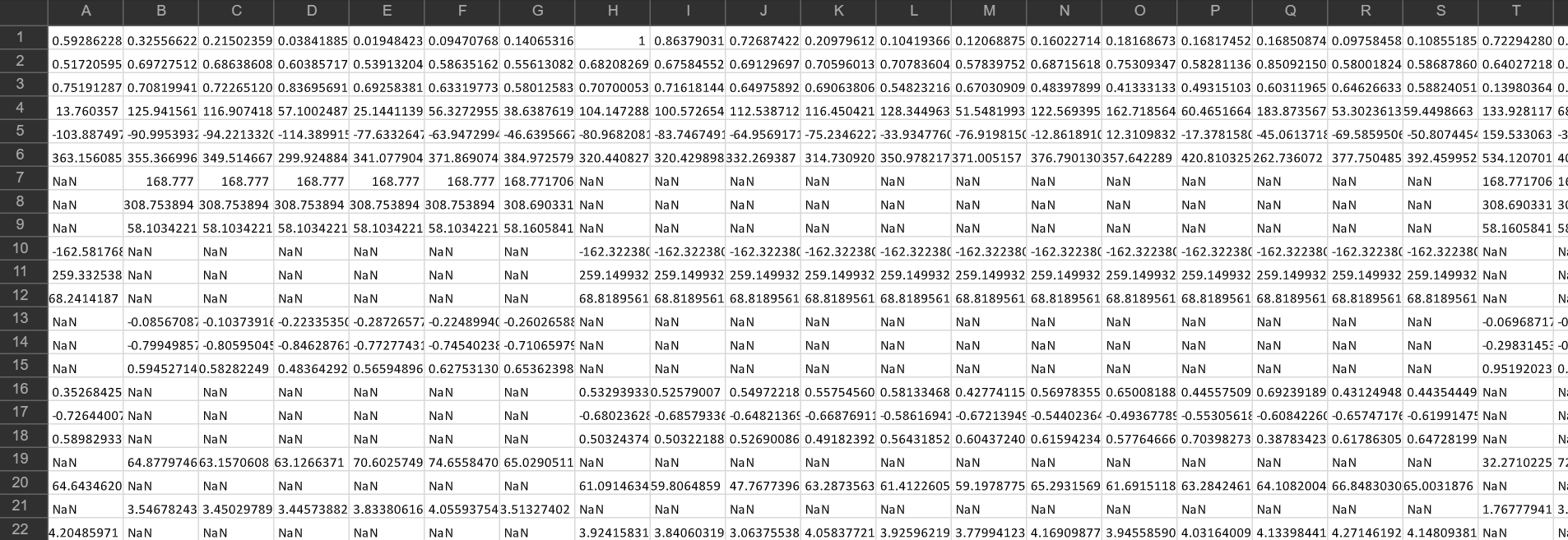
Yeah, that doesn't have any field names. What app did you use to convert / open that?
Hi folks - longtime user. We have a unique issue - a recording has negative timestamps! All of them are negative.
Hey, @user-8779ef - pupil time has an arbitrary beginning, so I think negative timestamps are not unexpected and that this isn't a bug. The network api provides a very simple method for changing the pupil time to whatever you want during runtime: https://docs.pupil-labs.com/developer/core/network-api/#pupil-remote
For data you've already collected, I don't think you want to multiply by -1, as that would make timestamps decreasing instead of increasing. Instead, you'll want to add a fixed value to every timestamp
This is screwing with a pipeline we have. Of course we could just modify the timestamps - the delta-times seem to make sense, so it's reasonable to suggest multipylying by -1.
that breaks down our ability to match timestamps for the gaze_directions.csv to cached data, like the data in pupil.pldata
Is there simple fix for this issue / bug that would prevent us from having to scrap this file, or from having to write a good deal of one-time-use code to correct for it?
Hey, what does the fixation circle size represents in pupil player? As far as I can tell, the size cannot be changed, so does it represents some kind of uncertainty about the fixation location?
Hi, @user-5ef6c0 - the diameter doesn't carry any information and it can actually be modified by adding a Vis Fixation element in the plugin manager. You'll then see a new button with the same icon as the fixation detector, and within those settings you can adjust the diameter. If you use that, you will then probably want to disable the Show fixations setting in the Fixation Detector plugin.
Hello! I would like to directly access real-time pupil-related data, such as the pixel coordinates of the pupils, while using Pupil Capture. Currently, I can only export data as CSV files using Pupil Player after recording. How can I achieve this?
Hi, @user-a2c3c8 - have you looked into the network api? https://docs.pupil-labs.com/developer/core/network-api
Hello Pupil community, Does anyone know how to open the calibiration files (.plcal) after using Pupil Core glasses? If not, does anyone know where the calibiration values are stored in the export files of the recordings?
Greetings, @user-47b063 - the calibration file is basically just a msgpack serialized version of a Calibration instance dict (see: https://github.com/pupil-labs/pupil/blob/master/pupil_src/shared_modules/gaze_producer/model/calibration.py).
The process for loading a calibration is pretty straightforward, and you can see how we do it by starting here: https://github.com/pupil-labs/pupil/blob/c309547099099bdff9fac829dc97b546e270d1b6/pupil_src/shared_modules/gaze_producer/model/calibration_storage.py#L172
I'm curious about what you want to do with though - mind sharing?
Hello community, I want to try detecting pupil, but because I just have a C922 webcam so I replace the IR-blocking Filter and used it for the eye camera. After I run Pupil Capture, the camera keeps disconnecting and reconnecting. Does anyone know how to fix it or maybe there is an additional step after replacing the filter? In addition, the eye window does not show any image like this.
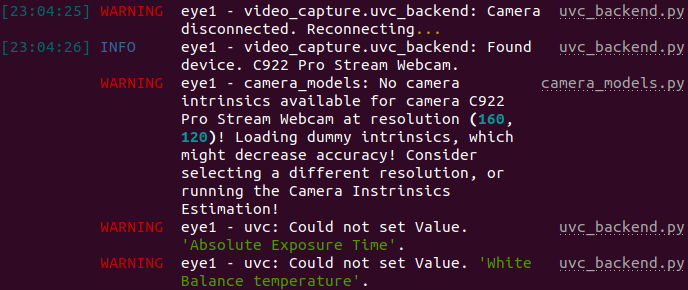
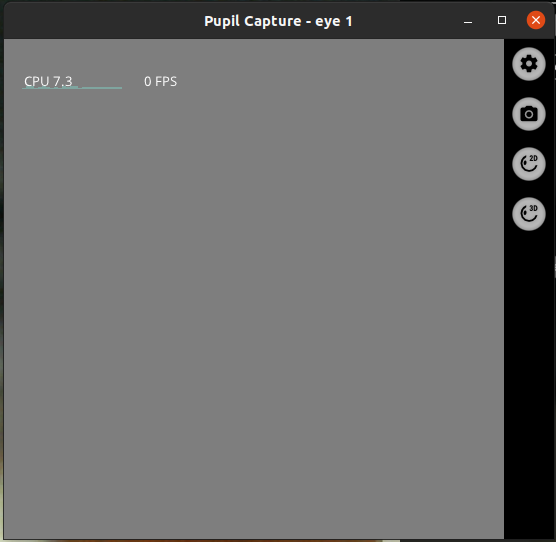
Hey, @user-6072e0 👋🏽 - can you confirm that the camera works on that machine with any other software?
Yup, the camera is working fine if I try with other software.
After I look into the code and searched the issue on pyuvc GitHub (https://github.com/pupil-labs/pyuvc/issues/4), they suggest changing bandwidth_factor variable. So I just change it until the camera is able to retrieve the image (in my case, I change it to 0).
Maybe I want to ask, what bandwidth_factor is for?
It's used to override the payload packet size. It seems it may be necessary when receiving multiple video streams over a single hub (see: https://github.com/pupil-labs/libuvc/blob/b7181e9625fb19eae80b54818537d2fd0a9090d3/src/stream.c#L1147)
Setting it to 0 as you have done appears to disable the overriding calculation and use the camera's default reported value
Ok, thanks for the answer 👍
Hello! We purchased Pupil Core in summer 2021. Some colleagues then attached each part of the headset onto a band for us, to suit our testing needs. We used it for the first time this month, and one of the eye cameras immediately stopped working. We tested all the connections, and it does seem to be the camera itself that is the problem, as the other eye cam works when plugged into the first eye cam's connector. Is this something anyone has any experience of, and would it be covered by warranty?
Hi @user-26a65d 👋. Sorry to hear the eye cam on your custom headband doesn't appear to be working. First thing to try would actually be a driver debug. Please follow the instructions here and let me know if it solves the issue: https://docs.pupil-labs.com/core/software/pupil-capture/#windows
Hi -- Sorry if this has been answered previously. If a pupil core recording has 3 stored calibrations, is there a clear, objective way to identify the best one? During recording, I know there are output metrics shared to the terminal (accuracy and precision), but I don't know how to access them later. We used a single point and would often repeat it to try to improve accuracy and precision. And, if a recording has all 3 calibration files stored (as *.plcal files), when loaded into Player does it use all 3, or only the first, or only the last, or the best (when selecting Data Source: Gaze Data From Recording). Thanks very much!
Hey @user-025d4c! Each calibration is used until a new calibration takes its place. In a recording where 3 calibrations happen at the beginning of a recording then, indeed, only the last calibration would be utilised for the majority of the recording. But if calibration occurs at 3 different points, e.g. start, middle and end, of a recording, then by default, each calibration is used for the preceding section of the recording. You can also re-run calibrations post-hoc in Pupil Player. It's then possible to choose the one that gets the best accuracy. Recommend replicating the videos here get a better understanding of the process: https://docs.pupil-labs.com/core/software/pupil-player/#pupil-data-and-post-hoc-detection
Hi, I want to ask about the Calibration Process. Does monocular calibration have to be done with the right eye or can we do it with just the left eye?
Then, after the calibration process, we get gaze visualization, right? What is needed to get better gaze results? maybe adding the camera's intrinsic or anything else?
One more, when I try to start recording, the Pupil Player crashes and the following error message appears ValueError: 'ForwardRef' object is not callable. Do you know anything about it? (I use Ubuntu 20.04 and pulled the master branch).
Thank you.
Hi there, I'm noticing a phenomenon where when the Pupil Core Vive Pro inserts are configured via Pupil Capture to operate at 400x400 pixels, the resulting images have noticably lower contrast than if they're set to 192x192 pixels or 96x96 pixels.
The difference in contrast (if one exists) between 96x96px and 192x192px is not visibly noticeable, but the difference in contrast between 400x400px and 192x192px is significant. We are seeing eye tracking (gaze estimation) performance lower at 400x400px than at 192x192px, and we think this might be the cause.
Is this a known thing, and do you know what the cause might be?
Good afternoon, I am running an experiment whereby participants view objects in front of them in various orientations. Currently the experiment runs through MATLAB and Pupil labs runs synchronously on the same PC machine for the duration of the study. Is there any available MATLAB code which can either trigger the pupil labs to stop/start between trials? Alternatively, any MATLAB code which can send a time stamp to the pupil capture/player data exports so I have precise timings for when a trial begins and ends? Many thanks.
Hi @user-3b4828 👋! Have you already seen https://github.com/pupil-labs/pupil-helpers/tree/master/matlab ?
Hi @user-3cff0d ! The edge detector kernel size is optimised for the lower resolutions, so it's normal that you see a better performance with 192x192 px resolution. Regarding the contrast, it's hard to tell as it could be hardware specific.
Hardware-specific meaning it might vary from camera-to-camera even when they're all the same model? Or do you mean the problem might vary depending on which model of camera is used?
This is the specific hardware that was used. We kept lighting consistent between trials, and it's present even when the vive itself is powered off
Thank you for the response!
Thank you @dominic I am a novice at reading code/python so I'll work through the github code and see if it is what I need. Essentially, I am looking to see where pupil core records the calibiration accuracy and precision degree numbers. I am running an interaction study and wanted to record the starting and stopping accuracy and precision numbers after each calibiration and validation. I assumed that those numbers would be in the .plcal file. If this is the wrong place to find those numbers, please let me know.
After looking into the code a little more, I'm not sure that the accuracy and precision values are stored. You can see how they are calculated here: https://github.com/pupil-labs/pupil/blob/c309547099099bdff9fac829dc97b546e270d1b6/pupil_src/shared_modules/accuracy_visualizer.py#L424. Lines 401 and 410 in that same file show where those values are printed to the screen. As far as I can tell, they aren't referenced anywhere else and don't appear to be part of the calibration class definition.
The best way for you to record what you need may be to simply capture the console output to a file and then parse the file for those values later.
If you have a monocular setup you can use either eye. The most important component of good gaze estimation starts with good pupil detection, so you'll need a clear, well-framed image of the eye across its entire range of motion. There's some good information for starting out here: https://docs.pupil-labs.com/core/software/pupil-capture/#pupil-detection and also here: https://www.youtube.com/watch?v=7wuVCwWcGnE.
Couple of remarks regarding that crash
I am starting a recording with Pupil Capture
Ok. Have you tried using the release version of the software?
Ok I will try that, thanks
Hi, Im new to this community. But may I know what I need to integrate this eye-tracking service into my own wearable glasses? Im very interested in learning how to build such a ML model for eye tracking purposes...
I guess that would depend on exactly how much of the Pupil Labs core pipeline you want to utilize. From a very high level, images are acquired (using pyuvc), those go to a pupil detection algorithm, and that data goes to a gaze mapping algorithm. Depending on what you plan to do, you'll probably be replacing one or more of those steps. The entire Core pipeline is open source (https://github.com/pupil-labs/pupil/), so feel free to dig in! Also, just in case you haven't seen it yet, check out this page: https://docs.pupil-labs.com/core/diy/
Hi, during recording was problems with world camera as a result have few files with world video. I try to export it into iMotions and the soft use the one, the shortest. If I delete this file would it play the next one?
Hi @user-35fbd7 👋 ! You are using Pupil Invisible, right? I will reply to you in the 🕶 invisible channel for the sake of clarity.
And one more question - is it possible to download video recording - world+eye-tracking?
Hello everyone, I have one quick question: where can I find the serial number of an Pupil Core headset? Thanks!
Hi @user-820a68! Pupil Core systems don't have a serial number. Check out this message for reference: https://discord.com/channels/285728493612957698/285728493612957698/955426808399011861
Hello ,
I would like to automate the process of loading a Capture recording into Pupil Player and exporting it through a script. Is there already a solution that does this or could you please point me towards the right direction on how to do this?
Hey! What data would you like to batch export from your recordings? There are some community contributed tools for this. Have a look at https://github.com/tombullock/batchExportPupilLabs
Yeah, so this .xdf file was open using MATLab and collected using lab recorder lsl. Sorry for the late reply
To my knowledge, MatLab doesn't directly support XDF files. Are you using the xdf-Matlab importer ( https://github.com/xdf-modules/xdf-Matlab )? Something else?
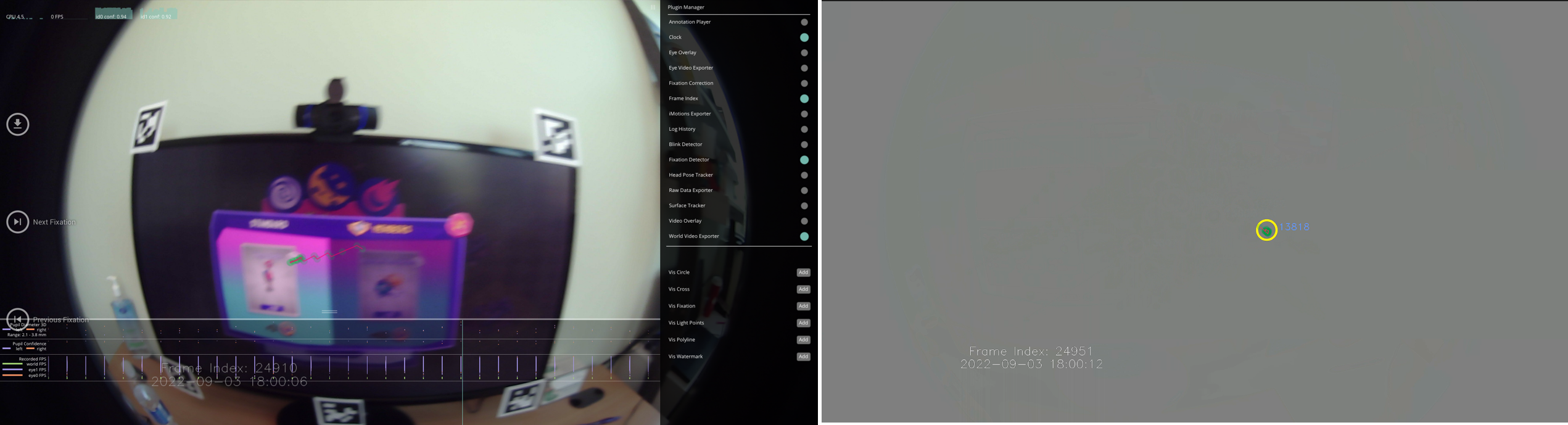
Hello! I am using the Pupil Player to export the world video. In the Player, it appears correctly (left), but when exported as video, there are some issues. The later portions of the video were entirely in gray (right) but the fixation remains though. Even when I tried it on a different computer, the problem persisted. Is there any suggestion on how to fix this issue? Thank you very much.
The link you found doesn't work because the branch it pointed to was deleted after it was merged into the main branch. In other words, that fix was applied a couple of years ago and probably isn't related to your problem. Are you actually seeing that same error message when you're recording? It seemed to me (from your screenshot) that your data is probably recorded fine, and the issue is opening it properly in MatLab
I am also having the same issue, I just recorded ignoring it to check what would happen. However, I thought that the error on the sheet might be due to the error appearing?
🤔 looks like quite a long recording! What is its duration if you don't mind me asking?
About 60 mins
Hi, we are using a single marker calibration with the physical marker attached to an object in 1,5 m distance. After the calibration (spiral pattern), we ask the participants to do another round of this movement to validate the calibration. It occured multiple times, that the validation shows lower accuracy than the calibration. We then start all over again. How important is the validation process? To shorten the duration of the experiment and to lower the load of the participant, it would be practical to eliminate the validation step, if it's not that important, as the participants report that the calibration/validation process can be exhausting.
Hi @user-e91538 👋. Pupil Capture calculates gaze accuracy after calibration (C) and validation (T). The difference is that the validation uses (or rather should use) different locations in the subject's field of view than the calibration to test how accurately the calibration generalises. In general, it's fairly common then to see lower accuracy after a validation. Whether or not you need to re-calibrate depends on your experimental task. What sort of accuracy values are you seeing? And what is your experimental task?
HI there, we are having a really hard time getting the pylsl plugin to work, is gives an error saying no lib found. Can you help us?
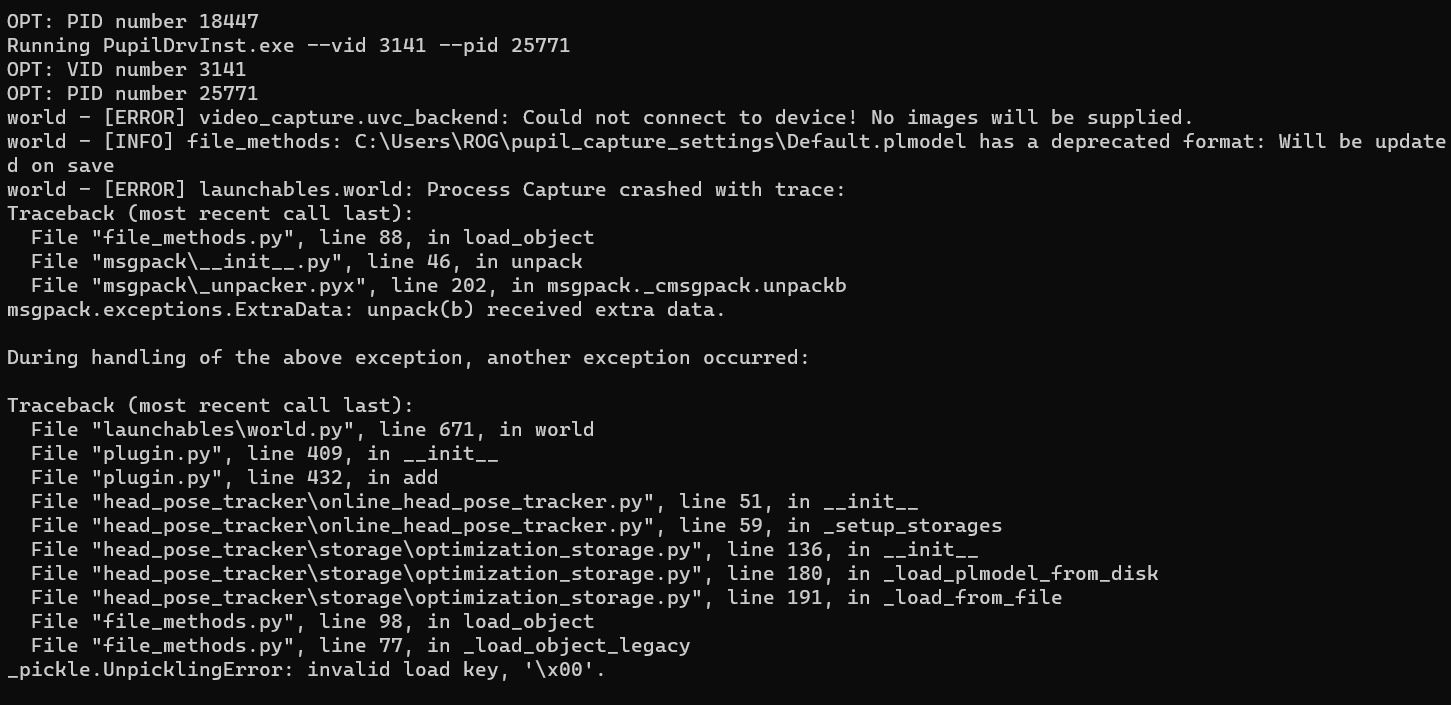
world - [WARNING] plugin: Failed to load 'pupil_capture_lsl_recorder'. Reason: 'LSL binary library file was not found. Please make sure that the binary file can be found in the package lib folder (C:\Users\Mentalab\pupil_capture_settings\plugins\pylsl\lib) or specify the PYLSL_LIB environment variable.
[email removed] 👋🏽 - looks like you're missing the liblsl.dll file. You can grab it from a release file here: https://github.com/sccn/liblsl/releases (if you're not sure which one you need, it's probably
liblsl-1.16.2-Win_amd64.zip). Inside that zip you should see a bin folder, and inside that you'll find liblsl.dll.
Copy that file to C:\Users\Mentalab\pupil_capture_settings\plugins\pylsl\lib\liblsl.dll, and you should be good to go 🙂
What version of the software are you using and on what operating system? Can you share the full output log?
Hi there Dom, here it is the info requested by you (1) The lab recorder version is as follows: LabRecorder-1.16.0.
(2) The operating system is Windows 10 Home.
(3) I am attaching the output file from the LSL
Hello, I've been using gaze.norm_pos in my calculations but as it turns out, the z dimension is also something of interest to me. I had a few questions I wanted a clarification on:
gaze.gaze_point_3d the right place to look at? If so, in what coordinate space is this point (I'm assuming it's with respect to the camera on top of the head).gaze.gaze_point_3d is the 3D point, how does this conversion from gaze.norm_pos to gaze.gaze_point_3d takes place?Hey! gaze_point_3d is indeed the correct place to look. However, it is known to be pretty inaccurate, especially at viewing distances over 1 m.
I have previously written about this, with some explanations of how the variable is calculated. Recommend checking out these messages:
Is there documentation on best practices for doing monocular eye tracking?
Hi @user-fa2527 ! Unfortunately, there are no best practices for monocular eye tracking. Anything specific that you would like to address? Do you have a single camera set-up, or are you trying to record monocular data, from both eyes? In case of the latest, you would need https://gist.github.com/papr/5e1f0fc9ef464691588b3f3e0e95f350
Hi there, is there any way to capture and track the position of a moving calibration target in Unity? The user guide says the Calibration marker is automatically detected by Pupil software in the world video and I want to capture that data.
Hi @user-b62a38 👋 ! Just to be sure, are you using Pupil Core or are you using the VR Add-on with the HMD eyes package? In the HMD eyes the position of the calibration target is known, so there is no need for Pupil Capture to detect it on the world camera, instead, it is passed along. https://github.com/pupil-labs/hmd-eyes/blob/master/plugin/Scripts/Calibration.cs https://github.com/pupil-labs/hmd-eyes/blob/master/plugin/Scripts/CalibrationController.cs
Note that the standard calibration, would take 40 samples per target, present the target for 1s and ignore the first 0.1s. https://github.com/pupil-labs/hmd-eyes/blob/master/plugin/Scripts/CalibrationSettings.cs
If you would like to present a dynamic stimuli for calibration, you would need to modify the appointed scripts.
hi,may I ask how to install it on an arm device, such as Jetson
Hi @user-84cfa7 ! Unfortunately, we do not have native support for ARM processors, you could try to run it from source and compile wheels, but to my knowledge, there some additional dependencies which do not support ARM processors either, so, you would need to compile them too. Please have a look at https://discord.com/channels/285728493612957698/1039477832440631366
May I ask why would you like to run it on an ARM processor? If all of this sounds to complicate and you simply want some single board computer (SBC) to run it, some users have reported that the Lattepanda 3 delta works great, and without headaches as it's architecture is x86. https://discord.com/channels/285728493612957698/285728493612957698/1123484310649966602
I only have Jetson nx, do I have any other methods for pupil tracking?
Want to use an arm architecture computer for eye tracking control of the Arduino robotic arm
Perhaps the simplest way, without taking too much effort to make Capture run on the Jetson, would be to stream the cameras from there to another PC where Pupil Capture is running, if you have that possibility https://discord.com/channels/285728493612957698/285728493612957698/1108325281464332338
Do you have any relevant information
Has anyone implemented this method?
Capture also requires an amd64 architecture computer and cannot be installed on Jetson
Yes! People have used this in the past to stream video from devices like Raspberry Pi to another computer. You can read about it here (https://github.com/Lifestohack/pupil-video-backend). There are some minor things that one would need to take into consideration, such as it does not stream the camera intrinsics, so if you are not using Pupil Core cameras, you may need to modify them or that by default, it runs at 30fps, although there is a flag/option -vp to change that.
Sorry, I thought we were talking about Pupil Capture all the time. Were you referring to a different software solution? Yes, Pupil Capture does not run on ARM devices by default. That's why I mentioned that you would need to either compile it from the source, use a different arch or use the Jetson as a proxy to stream the video to a supported device using that video backend.
Both suggestions are very valuable. Thank you for your suggestion
Just put a patch over one eye and proceed normally?
You don't even need to do that, you can just disable the camera the eye in question.
The error that I get in the program is this one (attached) which I believe it is related to the plugin
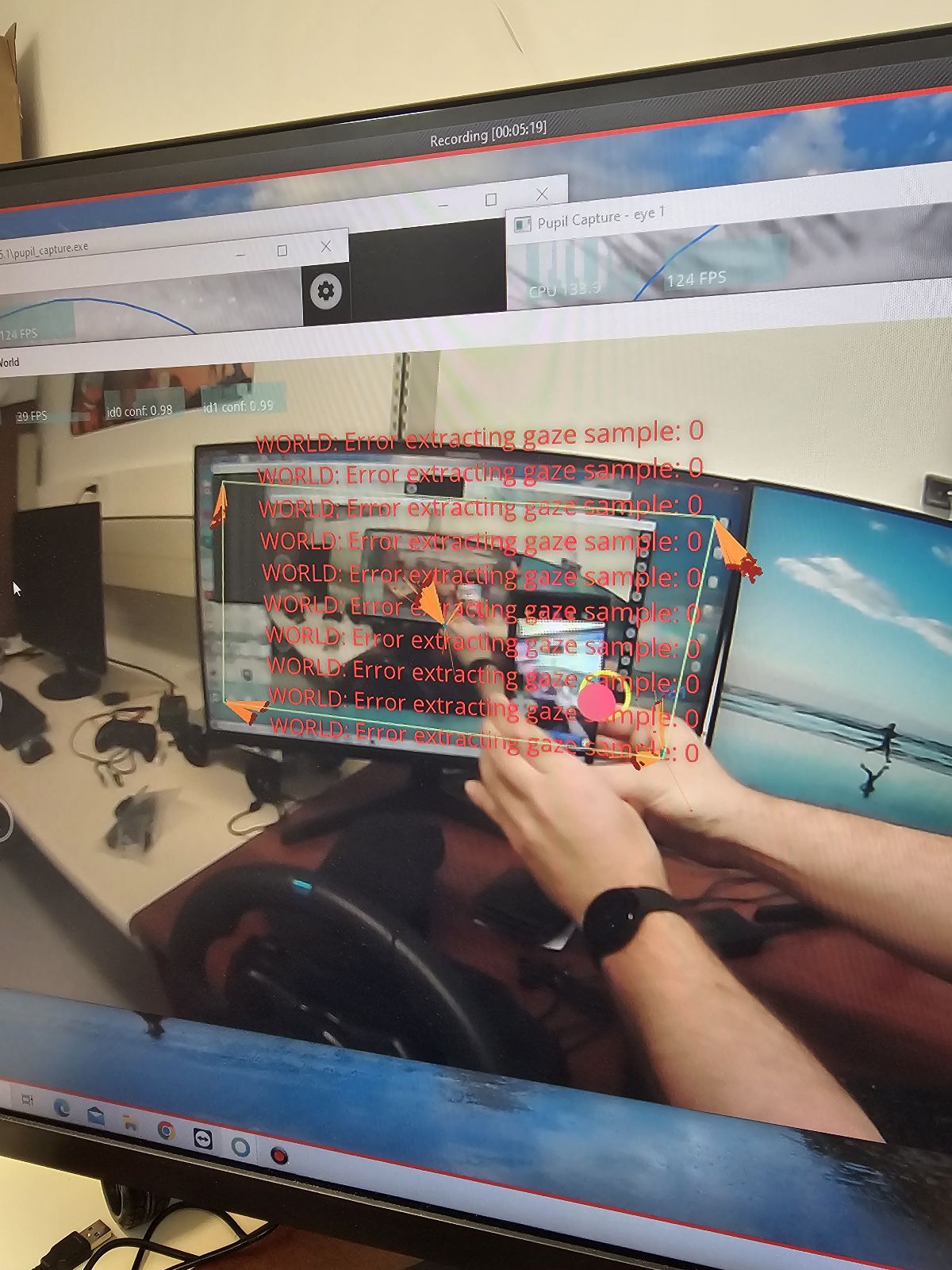
Thanks for the info! In your pupil_capture_settings folder, you should see a file called capture.log. Can you share that file with me?
Hi there! Im using the HMD package, looking at 3d eye movements, so if I can track the callibration target at the same time as the gaze that wouold be great - at this point in time I'm marrying arduino data with gaze so its a bit....fraught! My issue is that I dont know how to modify the script well to capture a dynamic target - if you can offer me any help that would be awesome
Hi @user-b62a38 ! I would recommend you start with a demo scene and start adding more calibration points on the scripts I pointed you to on my previous message, such that you can grasp how the code works. From there, you can write a a script that dynamically changes the target on Update() and pass the new location as the Calibration script does.
Hello I would like to know if there is an option to make it more portable, I've tried with the old mobile app and with a raspberry but none of them work and I can't afford a new device
This comes up with some regularity - in fact, just yesterday https://discord.com/channels/285728493612957698/285728493612957698/1140896658574557204
You can find a lot more discussion using the search feature in this Discord server - including some comments from people who have tried running on a Raspberry Pi and other methods for getting gaze data to such a device
May I ask why I want to add a Plugin to the core
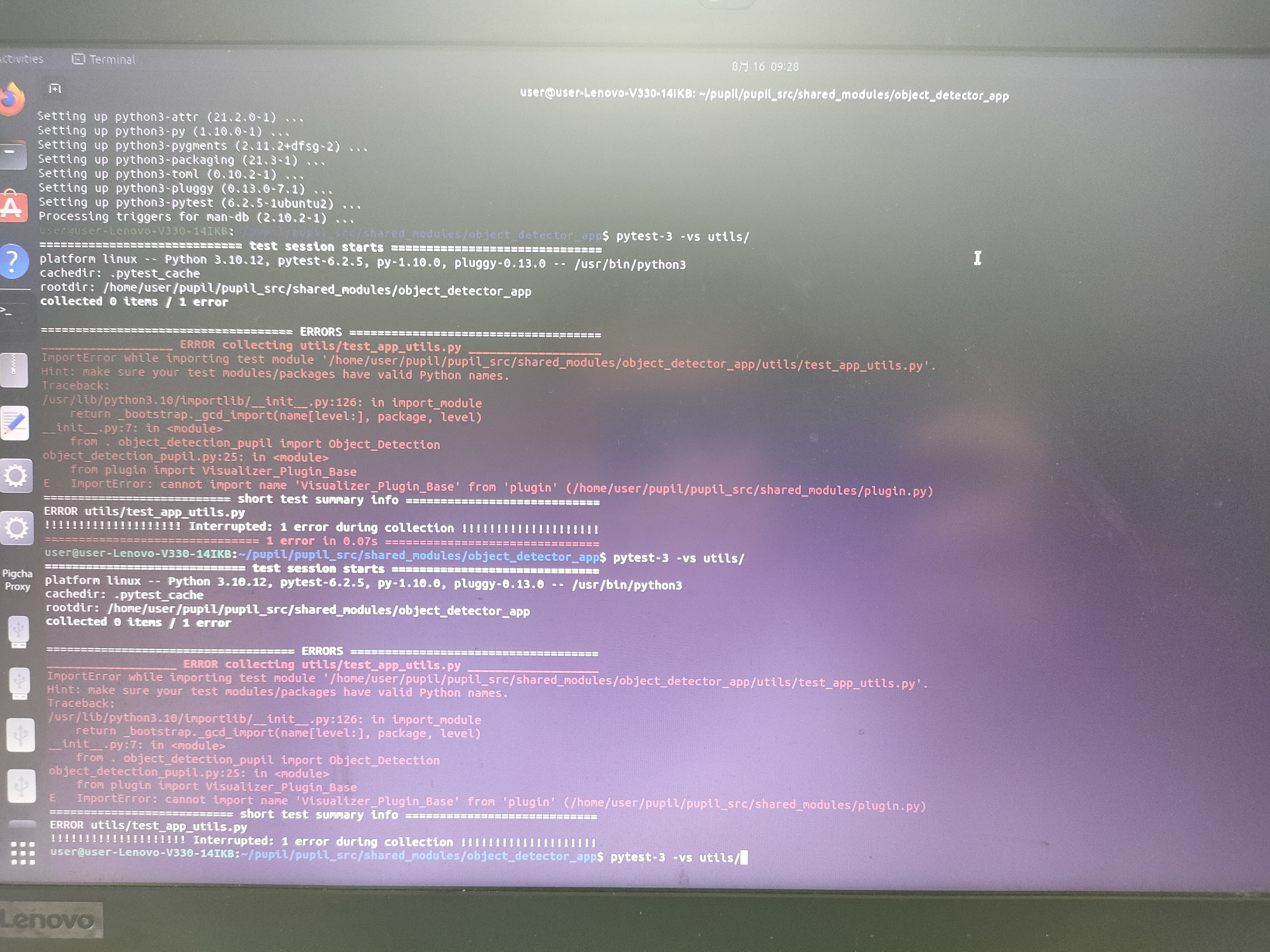
I want to add the plugin to the core
Hi @user-84cfa7 ! To add a plugin to Pupil Capture or Pupil Player, you can simply drag and drop it in the corresponding folder https://docs.pupil-labs.com/developer/core/plugin-api/#adding-a-plugin
how do taht on the Linux system?
and windows
How can I improve it
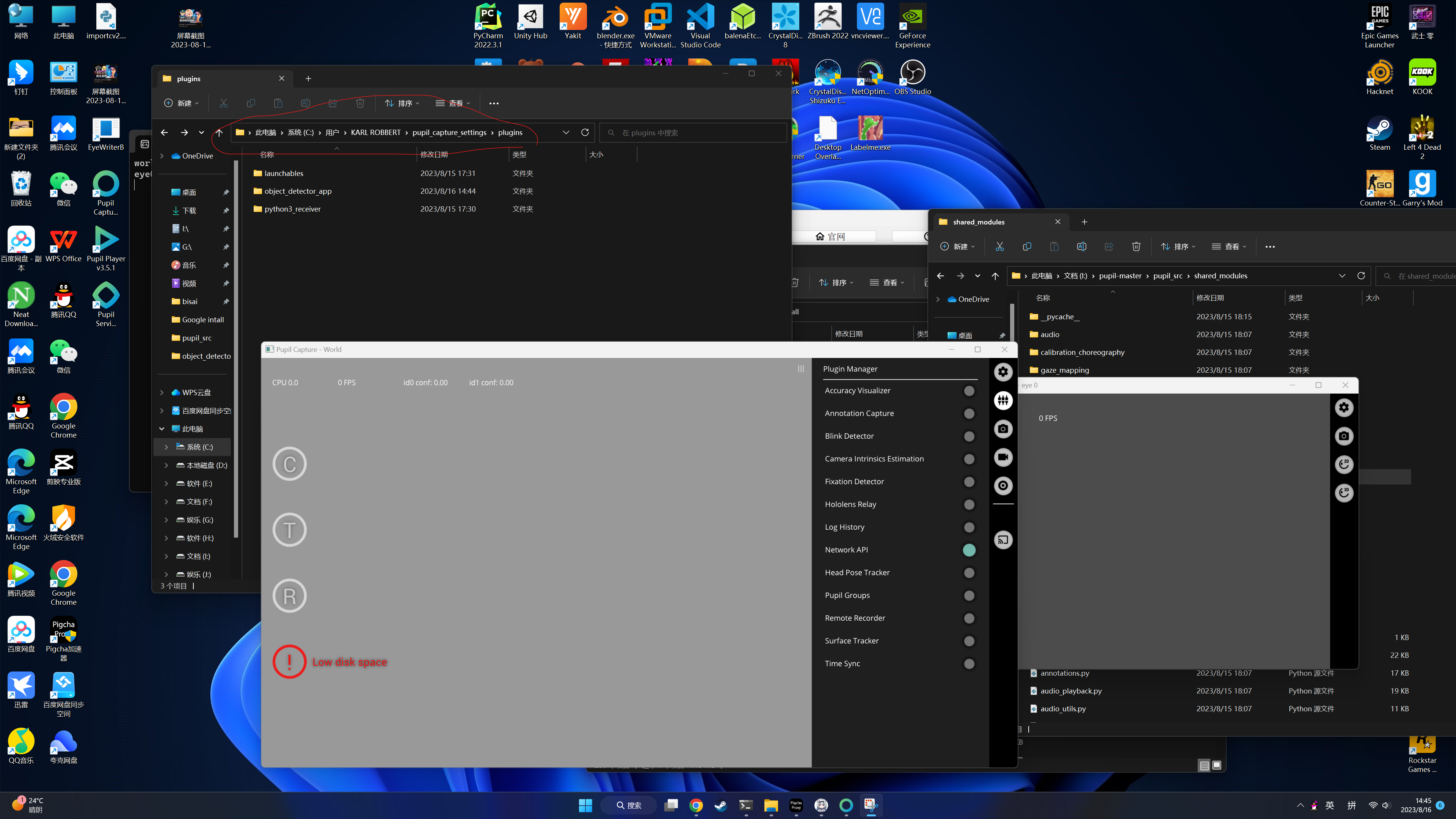
Hi! @user-84cfa7! On Linux it should be a folder equally named under the home directory. Could you post the content of the plugin you are trying to load? Retro compatibility with custom plugins is not guaranteed unfortunately
how can i control robothand by core
Rather than using a plugin for something like that, I'd suggest writing a standalone Python program using the Network API (https://docs.pupil-labs.com/developer/core/network-api/) to get gaze data from Core and pyserial (https://pyserial.readthedocs.io/en/latest/pyserial.html) to transmit data or commands to the Arduino.
Arduino uno bard is the controlcore
@user-d407c1Hi, excuse me.When I am using blink.csv file, I want to know what is the specific time of start_timestamp and end_timestamp.How should I do the conversion?
Hi @user-873c0a ! To what would you like to convert? Timestamps in Core are defined as described here https://docs.pupil-labs.com/core/terminology/#timestamps in Unix epoch.
May I ask if it is possible to display the world and eye images on one computer on another screen?
In fact, here's some sample code for that demonstrates how to receive a video stream from Core into your own application: https://github.com/pupil-labs/pupil-helpers/blob/master/python/recv_world_video_frames.py
thank you so much
Of course! It sounds like a fun and interesting project! If you feel so inclined, feel free to share your progress with this community. I'd personally love to see how it goes!
ok
TOPIC: Natural Features Calibration Issue
Hello all,
We are currently conducting psychophysics/EEG experiments using Pupil Core. We have a MATLAB computer (a Windows 7 one) with an external monitor inside the dark subject cabin. We have a separate Windows 10 computer for Pupil Labs, and the two computers communicate via LAN. There is no problem with data acquisition right now. However, since our stimulus computer is not the same as the Pupil labs computer and the subject cabin needs to be dark during the experiment, we can only use the Natural Features choreography for the calibration step. We perform this by presenting two separate arrays of calibration and test dots on the stimulus screen. But our average angular accuracy after calibration is around 3 visual degrees, which is not enough for us to detect fixations to a fixation spot accurately.
Do you have any specific advices for us to reach better angular accuracies?
Topic: gaze tracking on a screen with Pupil Core
Good evening! I am conducting an experiment with the Pupil Core and want to check if participants are looking away from the screen for extended periods of time. For that I used the calibration function of PupilCapture and performed the "Screen Marker" (default) choreography. I get the rectangle around my screen in the world view, so the configuration seems to work fine. I can't seem to make sense of the recorded data though. In the documentation it says:
Pupil Capture and Player automatically map gaze and fixation data to surface coordinates if a valid surface transformation is available. The surface-normalized coordinates of mapped gaze/fixations have the following properties:
- origin: bottom left (pay attention to red triangle indicating surface up/top side) unit: surface width/height
- bounds (if gaze/fixation is on AOI): x: [0, 1], y: [0, 1]
How can I use this, to check for someone who is NOT looking at the AOI? I tried looking away from the screen, but all measurements are still in the [0,1] range, so there's no indicator of whether I looked at the screen or not. I suppose I am using the wrong data here - could you tell me, what I am doing wrong, or rather what I should be checking to see if participants are looking at the screen?
Thanks in advance and have a nice week!
Hi, @user-19fd19 - are you using the Surface Tracking plugin (https://docs.pupil-labs.com/core/software/pupil-capture/#surface-tracking) ? You'll need to place AprilTag markers on or around then screen and then configure the surface corners using the plugin. You may also want to configure the surface dimensions - many users doing gaze on screens set the dimensions to match the screen resolution so that the reported surface gaze positions are in pixels. You could also use the physical dimensions of the display, or leave it as 1x1 for normalized coordinates.
With that configured, you'll have now have surface gaze data along with the regular gaze data. You'll know when the gaze is off screen if the surface gaze positions are outside the range of your configured surface dimensions.
Hi @user-d407c1, oh that I get, I'm talking about being able to recognise and track the printed target in the physical world, not a programmable gameobject in Unity.
Apologies @user-b62a38 ! I understood you were using the HMD Eyes package. The calibration target position is also stored when using other calibrations. If you are looking at how the tracker is detected, as a pointer, I would recommend that you look at the CircleTracker class (https://github.com/pupil-labs/pupil/blob/master/pupil_src/shared_modules/circle_detector.py)
Is that useful?
Thanks for the reply! I will look into that. But allow me a follow-up question: if I need AprilTags even when configuring a screen surface , then what is the purpose of the Screen Marker choreography? It paints a rectangle around my screen in the world view and seems to configure something… what is that then?
That's for calibration - it's used to correlate the position of the user's eyes with a coordinate in the scene camera - not between the user's eyes and anything in the environment. The location of the markers on the screen is meaningless - it's their location in the camera which is important, because gaze positions are calculated and presented in camera space.
This makes sense when you consider that a user can move and rotate their head freely in the environment. The AprilTag markers provide a means to localize a surface from the camera space frame-by-frame, and with that, gaze coordinates (also in camera space) can be converted to surface coordinates.
Hello, I would like to send a USB port signal at a certain location through the red dot during tracking. May I know how to achieve this
Hi, @user-84cfa7 - have you seen this sample script? https://github.com/pupil-labs/pupil-helpers/blob/master/python/serial_bridge.py
Hi guys, I am learning to build a plugin for for pupil capture which aim to detect colour at the gaze positions in the world process: Get the gaze position (coordinates) Return the colour (by printing out the colour in the world process) I am thinking about overwriting the def recent_events(self, events) function for the plugin but could not find much information about the data associated with the argument "events" when calling this.
Is there a better way to do this? Could anyone shed some light on this please?
PS. I am not running from source
Thanks in advance!
An alternative approach to writing a custom plugin would be to write a separate app and use the Network API to receive the gaze data and scene camera frames
@user-d407c1 Would you be able to point me in the right direction on this please? Thanks for your help!
hi, sorry for the late response. Thank you for the information. We have loudpeakers horizontally set up in a circle with 5° spacing, so we were aiming to achieve an accuracy of 2,5° after validation. Until now, the accuracy values mostly are between 2,4° and 3°. We ask the subjects to do the spiral pattern for both calibration and validation (and afterwards a left and right movement with the head to get more horitonzal gaze angles). We are doing a localization experiment. During the experiment the subjects must look at a loudpeaker to localize a sound source. Should we use another pattern for validation then? The resolution in the horizontal direction is the most important for us.
Thanks for elaborating. A reasonable approach here would be to ask your participants to stay seated and keep their head still, then manually move the calibration marker (slowly) around the speaker array. Make sure that you cover each of the speakers. You can also add in some vertical movements. The trick is to cover as much of the area as possible, but not make it too challenging for the participants, since whenever they look away from the marker during calibration, that will introduce a small error.
Hi, does the eye camera have a IR Filter ? If so, what is the range of this filter ?
Hi @user-e91538! Eye cameras do have a filter blocking visible light and allowing NIR from 850nm onwards. Kindly note that most filters do not effectively block 100% of the light.
That sounds like a good idea. Should we do this as calibration and validation then?
It's really a question of whether you want validation metrics or are content with a more subjective approach. The latter involves asking your participant to gaze at several speakers after you've calibrated. If the gaze is clearly on the speaker you directed them to look at, then that's often sufficient to proceed. You can conduct these sorts of quality controls at different stages of your experiment to ensure the calibration hasn't degraded. If you truly need the validation metric, then run the validation. It might not be necessary to cover the entire speaker array during the validation, as it can become time-consuming.
Hi, I'm just wondering, is the pupil core the most accurate camera set you have? Compared to the AR/VR which shows ~1.0 degree accuracy, the core shows ~0.6 degrees. Is that correct?
Hello,
We have been doing some experiments with Pupil Core since last month, but yesterday we started having some hardware issues. First, one of the eye cameras stopped responding. Then in some instances the world camera was not responding as well. We first thought it was a cable issue but it kept on going after we made sure that all cables are firmly attached. Then finally we got blue screen errors from Windows with the error code "ATTEMPTED_SWITCH_FROM_DPC". This computer has 16GB RAM and intel i3 CPU. Since the minimum requirements for the CPU is i5 according to your website, we installed the software and the drivers to another computer which has i7 and 32 GB RAM. However the result was similar: The world camera and eye 1 were appearing grey, with no recognized cameras. Only eye 0 was working. And whenever the world camera starts working, it freezes again once we try to move it a little bit. And a little while after we disconnected the USB in this new computer, we got another blue screen error from Windows, this time with the code 'MEMORY_MANAGEMENT'
We are making sure that we have all cameras enabled, we also tried decreasing the resolution to the lowest setting for each camera. None of these helped. Are we having a hardware issue? (I am sending this same message as e-mail to info@pupil-labs.com just in case).
Hi @user-5adff6 👋 ! I have followed up through email.
Thank you very much! I will run the troubleshoot steps and get back to you asap!
HI Dom! Here it is the .log file you asked for. https://drive.google.com/u/0/uc?id=1AWhuYpuIu7N-_1okWUW9IlQATqsAzQhB&export=download
File was too big, I had to upload it in the google drive
It looks like the LSL plugin and/or pylsl is not installed correctly. Can you share what your pupil_capture_settings/plugins folder structure looks like?
Hi pupil, I am using PupilLabs unity api, I want to ask is it possible to get confidence for individual eye?
Hi @user-13fa38 ! Yes! you should be able to use the https://github.com/pupil-labs/hmd-eyes/blob/master/docs/Developer.md#subscriptionscontroller to subscribe to any topic from Pupil Capture.
You can check all topics using https://github.com/pupil-labs/pupil-helpers/blob/master/python/filter_messages.py, the one you would be looking is pupil.X.Y where X is the eye (0 or 1) and Y is the 2d or 3d gazer and which contains the confidence.
See more at https://docs.pupil-labs.com/developer/core/network-api/#message-topics
Hi, I am trying to re-calculate fixations and wrote this function to get dispersion:
`def vector_dispersion(x_norm_values, y_norm_values): """ This calculates angular distance between x, y gaze coordinates in 2D space and returns dispersion in radians """ np.array([[x_norm_values[i], y_norm_values[i]] for i in range(len(x_norm_values))]) # Drop rows with any NaN values vectors_without_nan = pd.DataFrame({"x_norm": x_norm_values, "y_norm": y_norm_values}).dropna()
distances = pdist(vectors_without_nan, metric="cosine")
dispersion_cosine = 1.0 - distances.max()

if np.isnan(dispersion_cosine):  # Check for NaN resulting from division by zero
    return np.nan

angular_dispersion = np.arccos(dispersion_cosine)
dispersion_radians = np.deg2rad(angular_dispersion)
return dispersion_radians`
Does this ultimaltely give you the dispersion in radians? We are getting really small numbers on our end? Is it better to use gaze_point_3d values? Could that lend to this difference?
Hi @user-908b50 👋 ! it looks good but perhaps you would like to use visual angle degrees, and not use the normalised coordinates. If you want to use fixations as is done in Pupil's Core software have a look at https://github.com/pupil-labs/pupil/blob/master/pupil_src/shared_modules/fixation_detector.py#L130 As you could see, for the 2D detector, gaze is denormalised and undistorted to a 3D plane (lines 142 to 148).
Hello all, I try to synchronize Pupil Core with the software presentation and EEG. For this purpose, I would like to send some triggers from Presentation to Pupil Core. As I understand it so far, you can add the LSL Recorder plugin and send triggers to Pupil Core via LSL. So far the stream from the presentation is recognized (green button), but after starting the recording the capture software is frozen and a message like this is displayed.
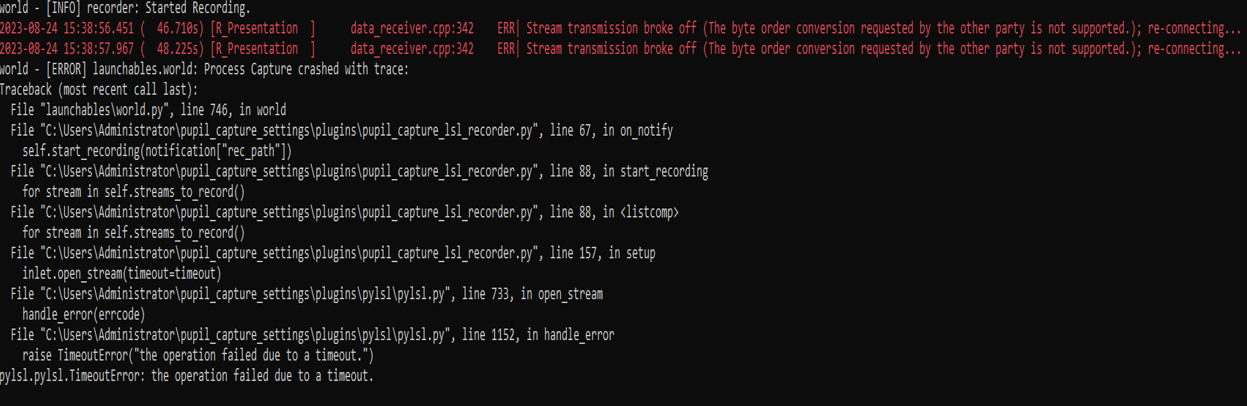
Hi @user-dfd547 👋. The error is from pylsl timing out when receiving data from your presentation software - very difficult to guess what the issue could be. Are you able to record your presentation's stream using LSL's native Lab Recorder App: https://github.com/labstreaminglayer/App-LabRecorder ?
Does this mean that the data stream is not accepted from Software Presentation or do I have to set something in Presentation? Thank you in advance!
Hi 👋 I am experimenting with pupil core. The experiment setup has four screens: three on the table, and 4th one is a big screen behind the table, A person wearing the pupil core sits on a chair in front of the screen to monitor some parameters on the screen. I am sticking the April tag markers in the environment to use the head pose tracking plug-in of the pupil core.
In the pupil player, the plug-in detects all the markers in the environment but takes only a few for 3D visualization and exporting the head pose data. The accuracy of the translation and rotation exported data(in head_pose_tracker_poses.csv) is not good.
What are your suggestions for getting an accurate head pose? What are the factors that affect accurate head pose tracking? Thank You
Hi @user-0aefc0 ! could you please let us know which April tags markers do you use, what their size is and how where are the markers located? If you run it in capture or post hoc in player and if you triedresetting the model once the markers are visualized?
Thank you for your reply I am using April tags 'tag36h11'. The size of each tag is 2.6 cm*2.6 cm (only black part). The location of the markers: six markers on the corners and the border of a 21-inch screen( three screens means 18 markers) and 12 markers on the corners and the borders of a 50-inch screen. I am running the post hoc in the player, starting to detect the markers and selecting the origin markers for which a maximum number of markers are used for the '3D Visualization Window' model then exporting the files.
If the markers are well-detected, but only a few are utilised by the head pose tracker, this indicates that the 3D model building was inadequate. For the head pose tracker to function effectively, it's necessary to record the environment from diverse angles/perspectives until all markers are incorporated into the model. This will yield a more accurate head pose. If you view the video in the documentation, the wearer is moving through the environment, which generates sufficient perspectives. However, if your participants are more stationary, it's usually necessary to create a separate scanning recording to build a model. You can transfer the model to your participant recordings, so you only need to make it once. Just ensure not to move or change the markers making it.
Hi 👋
I am having issue with Pupil Capture today when I tried launching it. Reinstalling the app did not resolve the issue. I have attached the log as below.
Thank you!
Hi @user-74a158! Can you please try deleting the 'pupil_capture_settings' folder from your home drive and then re-launching Capture? Note that if you have any custom plugins, you should back them up first.
Thanks, Neil I scanned the entire environment to include all markers. Built the head pose model using the pupil player, transferred all the exported files of the good model to normal recording files, and then opened normal recording in the pupil player but no change in results than earlier. I think I am not following the exact procedure to transfer the model to another. It would be very helpful for me if you could tell me the step-by-step procedure to transfer the model to another recording file.
The next question from me: are all the markers included in the model in your scanning recording? That should be confirmed before transferring the model.
Hi @neil ! . Thank you for your quick reply. I have also tried it with the LSL's native Lab Recorder App. After recording, I received a xdf-file which I tried to read out with the help of the Matlab Importer. Unfortunately, for the Pupil Capture data, I have got unstructured floating point numbers for time series and time stamps and for the presentation data, I got strings and floating point numbers in one cell regarding the time series.
Hi @user-dfd547, the lab recorder app does indeed generate an xdf file which contains the unified data streams. I'm not sure I fully understand your problem, however. Is the issue with reading the contents of the xdf file?
hello how are you
I need to install software which I don't have on your website, could you help me?
Hi @user-4a0164 👋 Could you kindly provide further details regarding the specific software you intend to install? If you're interested in Pupil Core software, you can find additional information at this link: https://github.com/pupil-labs/pupil/releases/tag/v3.5
@user-e91538 ???
Thank you for your reply 28/30 markers are included in the model of the scanning recording
That would indicate a decent model. In that case, please try copy/pasting the 'Default.plmodel' file from your scanning recording to the eye tracking recording of interest. You can find that file in the recording directory. Note that if you renamed the model, the 'Default' text would correspond to whatever you used.
Hi @neil , sorry for my poor description of my issue. Basically, as you already mentioned, the issue is with reading the contents of the xdf file. I have also tried to use the Python importer, but I don't know how to find the command for showing the pupil core data. For example, the read.py file prints the values for the markers from Presentation with the command print(f' marker " {marker [0]}" @ {timestamp:.2f}s'). How do I find out the identifiers for Pupil Core data ? Thank you in adavance !
My colleague, @dominic, can probably provide some pointers in this regard 🙂
I highly recommend the XDF Browser tool - you can open an XDF file with it, and it presents a nice GUI for exploring your data. Very useful for understanding how the data is actually organized
Thank you for your quick reply, do you have a recommendation regarding the tool I can choose?
"XDFBrowser" is one of the official LSL apps https://github.com/xdf-modules/XDFBrowser/
When you do a recursive checkout of the LSL repo (https://github.com/sccn/labstreaminglayer), it will be in the Apps/ folder, and you can build it from there
Do I need to install the full version of Qt for building the XDF Browser or is it sufficient to use the Open Source version ?
Thanks a lot for the help Now finally i am getting good results
Awesome!
Hey Miguel, yes, I did read the code and I see that you have defined vectors as such >> vectors = np.array([gp["gaze_point_3d"] for gp in gaze_subset]). Gaze point 3d is the visual angle in degree based on pupil coordinates right?
Also, lines 142 - 148 do talk about denormalizing based on frame size? I am trying to understand what that means and what undistorting onto the 3D plane means? Is undistorting onto the potential size of the object width and height in 3D? Or the size of the object in pixels?
Also, how is unprojectPoints defined? There are two functions here: https://github.com/pupil-labs/pupil/blob/c309547099099bdff9fac829dc97b546e270d1b6/pupil_src/shared_modules/camera_models.py#L594
OSS. What operating system are you using? I (Debian Linux) already had all the necessary Qt dependencies installed from official debian repos. On Mac you can probably use homebrew, but on Windows you'll probably have to use the Qt installer
Hmm ok, I am using Windows now
I am trying to gaze_point_3d values from gaze_positions.csv file with the surface_gaze_positions.csv file (after merging the surface file with blinks). My next goal is to The problem that I am seeing now is that for a given gaze_timestamp with a similar world index, the x_norm and y_norm coordinates are not like the norm_pos_x and norm_pos_y coordinates. I know that these are transformed. For a specific world_timestamp, you have multiple gaze_timestamps (presumably because the eye is moving of course), which is not seen in the gaze_positions.csv where you will only have a subset of the gaze_timestamps. I am not sure how to reconcile the difference. I would appreciate suggestions on tackling the different databases.
My next goal is to also merge diameter (from the pupil positions file) with the same surface file (with the fixation and blinks data merged). Running into a similar problem with reconciling databases as above.
For Windows it looks like there's a pre-built binary: https://github.com/xdf-modules/XDFBrowser/releases
Hi @user-908b50 ! Have you seen our pupil tutorials? There might require some update depending on your pandas version, but they will show you the basics of data handling, including how to merge databases https://github.com/pupil-labs/pupil-tutorials/blob/master/10_merge_fixation_and_blink_ids_into_gaze_dataframe.ipynb
or getting the pupil diameter by fixation on surface: https://github.com/pupil-labs/pupil-tutorials/blob/master/06_fixation_pupil_diameter.ipynb
Will take a look again, thanks! I might have seen them a long time ago. Would you please able to answer my earlier question related to the vector dispersion function?
Hello, I would like to use pupil core to track pupil diameter of research subjects! However, I am having difficulty getting it started... I downloaded softward onto my mac.. PLugged the pupilcore device into my computer (through a USB B to USC C converter) and the video feedback of the eyes and world is not showing up. PLus I am getting the following error message. Is anyone familiar? This is my first time using the device.
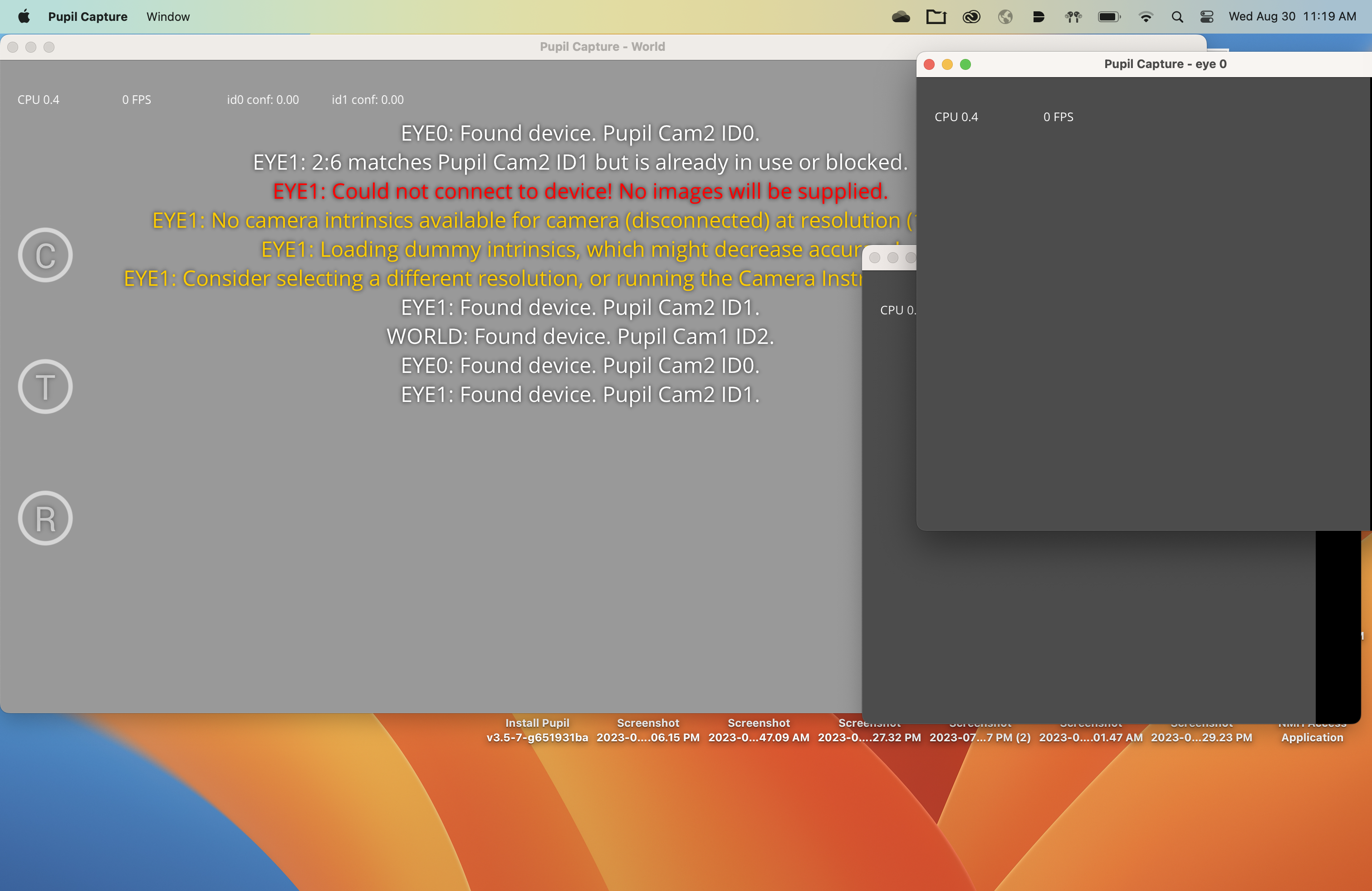
Hi, @user-63b5b0 👋🏽 - on newer versions of MacOS, you'll need to be sure that you run Pupil Capture with admin privileges. More info here: https://docs.pupil-labs.com/core/software/pupil-capture/#macos-12-monterey-and-newer
Great! I will try this! thank you
Hi Neil, I am trying to detect the pixel rgb values at the gaze position (single pixel value for now) but now it always return (255, 0, 102) because of the red gaze position marker. How can I get the original world image without the red gaze position marker in the image. Thanks for your help!