
Hi guys, I am trying to buy a new phone for using Neon Companion. Any suggestions? I think all latest phones are not supported due to lack of SNP supported.
Hi @user-7ce0cc! The Neon Companion app is tuned to work with a small number of carefully selected and tested models (Samsung Galaxy S25 or Motorola Edge 40 Pro are the ones we currently ship with Neon and are highly recommended). You can find the list of supported devices here.
hello, is anyone else getting errors when attempting to create image mapper and auto mapper enrichments?
Hi @user-21cddf! Could you please describe the issue you're experiencing on Pupil Cloud when creating these enrichments?
at some point the enrichment just shows "error" in the status.
hoverering over the icon it says it is a "server error", but it has been hapenning for almost every enrichment we have been making for the past month or so
Thanks for clarifying @user-21cddf! Can you please create a ticket in the 🛟 troubleshooting channel and we can assist you there in a private chat!
Hello, Ive been having issues with getting the 3d_eye_states.csv from the neon companion app. For my recording the pupil diameter is crucial. Any help would be appreciated
Hi @user-22c696 , where is the problem occurring exactly? Are you using Pupil Cloud or Neon Player?
Hi, I’m currently using Neon Player because our study is not permitted to use any cloud services. However, I’m running into an issue where the available plugins don’t seem to provide any pupillometry measures, specifically pupil diameter data.
What version of the Neon Companion app and what version of Neon Player?
Neon Companion App: 2.9.31, Neon Player: v6.0.2
Thanks. First, I would recommend updating to the latest version, 6.0..7, when you have the chance. Then, may I ask if the Compute eyestate option was enabled in the Neon Companion app when making the recordings?
Thanks, for the neon companion app, the Compute Eyestate was not enabled, and as for the Neon Player ive updated to the most recent version. Ill try to see if those changes worked
Thanks, for the neon companion app, the
Hi all, I am trying to use my neon via matlab. I have everything set up (MATLAB R2024b, pyenv configured, matlab_pl_neon library pulled from github and added to MATLAB path, python 3.10.1, pupil-labs-realtime-api 1.6.2) with glasses. I should note that i am able to communicate with the glasses directly via python, but when i try to search for the glasses using "device=Device()", i get a "Device Found" message followed by an error. When i printed out the obj variable in Device.m of the matlab api, it showed empty/blank entries for all device properties (ip addresses, storage space etc.). It looks like some issue between matlab and the python realtime api. Could you advise on how i can resolve it?
Hi @user-97c46e , can you try updating to v1.8.0 of the Python Real-time API package and try again? You may also want to consider updating to Python 3.11.X, as Python 3.10 will reach end of life this year.
@rob I get this error when trying to run my code after upgrading to v1.8.0 - "ModuleNotFoundError: No module named 'pupil_labs.neon_recording.timeseries'"
I'm trying to use my python code as a sanity check that the dependencies are all in shape before i try with matlab
Hi - I am developing a plugin for the Neon Player (using v 6.0.7 from git). If I set up a background job to run, I have two callback methods in the plugin class - one is called when the action button is clicked, and the other is connected to the job's finished() slot. When I click the button, the first method is called. It does it's work, and leaves some values set in the class. When the job's finished() slot is called, my second method is called..... but it comes from a different instantiation of the plugin class! Is this by design? If so, is there a way to save "state" after the plugin action runs? Does each "action" run with a separate instantiation of the plugin class?
Hi @user-f7e879 , I have discussed this with the team. Without seeing your code, it is not clear how this happened, but they suggest that you probably want to use a code structure like this: [email removed] def my_action(self): # runs in the main process bg_job = self.job_manager.run_background_action("My Job", "MyPlugin.bg_task") bg_job.finished.connect(self._on_bg_task_finished) return bg_job
def bg_task(self): # runs in the background process ...
def _on_bg_task_finished(self): # runs in the main process ...
If you have a long-running process, then note that background jobs are run in a separate sub-process. In such cases, you can make use of the cache path (`self.get_cache_path()`) to store the results of those long-running jobs for use by later routines. See the [audio plugin for an example](https://github.com/pupil-labs/neon-player/blob/81507a733ad76a8bcdc27dfe44d241bf312ad418/src/pupil_labs/neon_player/plugins/audio.py#L86-L89).Hi, I'm getting "Error Downloading Project Data" when trying to download "Timeseries CSV and Scene Video" from my project (10 recordings). Tried Chrome and Edge browsers, same result. Native Recording Data also gets the same error. Can you help?
Hi @user-9b1b0f , I see that you also opened a Support Ticket. The team will be starting the work day soon and we will communicate with you there.
Thank you @rob
Thank you! After I sent the msg, I also looked over 'face_detect' in more detail - it follows a similar pattern. It looks like background jobs are run with a separate instantiation of the plugin. It probably lives and dies in the background thread, and so cannot/should not save any state - because that state will not be available to the Plugin instance in the main thread. So, the background function should write the cache_file as it's way of saving state, and the "on_finished" callback loads the state file. Cool!
Happy to hear about someone working on a custom plugin! Out of sheer curiosity, what does/will your plugin do?
Good morning Pupil Labs team, I am currently having an issue with a few data recordings on the cloud and our mobile device. The recording is timestamped and named as of a year ago (11 months ago) however that was not physically possible as people in the video were not part of the data collection effort at the time. Is there any way to check or confirm if there is some sort of issue happening that is treating the recording as a different date? On the cloud it mentions it was recorded 11 months ago, meanwhile the recording name itself is YYYY-MM-DD_HH:MM:SS which also says it is 11 months ago. The phone is connected to WiFi so we don't suspect it is an error on the time
Hi @user-16e110 , are there any data missing from the recording or is it corrupted in any way? Are the date and time on the phone currently correctly?
Phone time is correct (date, year, time). Phone has always been connected to WiFi when powered on. I suspect there may be data missing but cannot confirm since I am still in the process of consolidating the specific data collection dates and checking whether the files exist (locally on the phone or on the cloud)
Ok. The date & time on the recording are taken directly from the phone and that is what is used on Pupil Cloud. When this has happened to other users, it was because the date & time on the phone were incorrect. If you inspect the recording and find that data are missing or corrupted, then please let us know by opening a Support Ticket in 🛟 troubleshooting . If only the date & time are wrong in this one instance, then that is in principle harmless. Otherwise, may it have been the case that this was an early recording, after the device was initially received and enabled? Perhaps the date & time had still not synced at that time?
Hi, I am having an issue with recordings from the Neon. In certain recordings, the eye cameras seem to stop recording for a few seconds (see screenshot). After resuming the data seems fine, however fixation detection stops at this point. Are the any ideas what the issue could be a) with the recording and b) with the fixation detection? Recording was done with the app v2.9.23-prod, analysis with the neon player 5.0.6 Thanks!
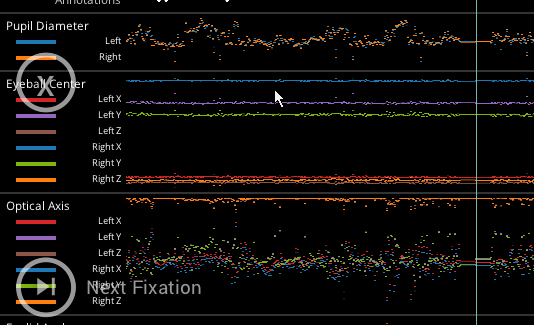
Hi @user-9dd213 , would you be able to share the recording with us so we can take a closer look? You can put it on any file sharing service you prefer and share it with data@pupil-labs.com
Sure. Since the recordings also contain recordings of persons can I assume that these will be handled confidentially for the error diagnosis only?
They certainly will. We take privacy very seriously and are GDPR compliant. But if you want, you can exclude the scene camera MP4 when sending it to us, since we only need to inspect the eye tracking data here.
Perfect, thank you! I am preparing the upload now and will send the link shortly.
Starting out with facial recognition. I think there are plans to extend it after I get the basic plugin working. I wish I could tell you in more detail - I'm a little out of the loop at this point!
Sounds cool!
Whenever I call logging.info/debug/error() from my Plugin, I end up with two messages on my console. The formatting is slightly different:
DEBUG:root:render: found 1 faces for time_in_recording=1777395896284161792, scene_ts=1777395896266954153
2026-05-06 14:22:39,435 - DEBUG - retinaface_face_mapper.py:481 - render: found 1 faces for time_in_recording=1777395896284161792, scene_ts=1777395896266954153
This isn't terrible, just annoying. Is there a way out of this?
We'll look into this - thanks for the report
Is it possible to upload exported Neon exported files to Pupil Cloud for post-anaylsis? I cannot find any 'add' button or something on the page. Or if I once delete the recording, is there any way to re-upload with exported files?
Hi @user-737ef5 , it is only possible to upload via the Neon Companion app, after the recording has been saved to the phone. It is not possible to upload from a separate computer nor is it possible to re-upload a recording to Pupil Cloud after it has been deleted (i.e., deleting from Pupil Cloud is permanent). This is for data integrity reasons.
What are you looking to achieve? Would Neon Player be suitable?
We need Pupil Cloud because we need to use AOI analyzing..
We need Pupil Cloud because we need to
Hello Pupil Labs Team, I am currently working on a object-based attention experiment using PsychoPy's plugin and the Neon eye tracking glasses. I have a relatively niche question. Would it be possible to estimate the viewer's distance to a surface (e.g., a screen) with the available gaze information? Or better yet, is that a feature that already exists within the Pupil Labs environment?
Hi @user-a5fe1d , if you use AprilTags and know their physical dimensions, then you could use OpenCV's solvePnP function to figure that out, but may I first ask what your use case is? Does your experiment explicitly require that people move around in front of the screen?
It's more of a validity measure. My experiment requires participants to maintain fixation in a single point and answer by using their peripheral vision. In theory, participants should keep the same distance throughout the entire presentation. However, we didn't specifically control for this aspect by using a chin-rest, for example, so we'd like to make sure that distance to the stimulus remained constant throughout. We'd like to avoid a situation where the relative size of the stimulus in the retina may affect the participants RTs
I see. To clarify, no gaze data is needed for this. Only scene camera images with fiducial markers in view. Even if you did not use AprilTags, you can still use solvePnP, but it would require that you have clear landmarks in view of the camera and you know their physical positions relative to a chosen fixed origin, such as the top left corner of the monitor. It is easiest if these landmarks can be easily detected by a computer vision algorithm, to save manual effort.
Great, thank you for the info and quick response!
Hi everyone, I had a question regarding the temporal precision of fixation data from the Pupil Labs Neon glasses.
From what I understand, the Neon records gaze data at 200 Hz, which would correspond to roughly 5 ms between samples. Does this mean that fixation start/end timestamps can effectively be considered accurate to around 5 ms precision?
Hi @user-22c696 , this is correct. The fixation data inherits the timestamps of the underlying gaze data, since it is directly computed from that data.
hi all! sorry for asking a basic question, but what is the easiest way to create a scanpath / video for just part of a recording?
Hi @user-73f4fe, the easiest way to create a video with gaze and fixation scanpath overlays is by using the Video Renderer visualization in Pupil Cloud.
You can first mark the relevant sections of the recording by adding Events to the recording timeline. Then, within the Video Renderer, you can use those custom events for the temporal selection, allowing you to generate a trimmed scene video focused only on the part of interest.
Hi, I am encountering some errors while trying to integrate neon glasses on matlab. My hardware specifications are as follows: OS: Microsoft Windows 11 Pro; MATLAB Architecture: win64, version R2026a. I'm positive I have downloaded the correct python version (3.13.13) downloaded from python.org. And I have given MATLAB access to find devices on the network. The network I'm using is a local network created from a router not connected to the internet. The error occurs when I'm trying to run the basic_recording.m script: "Unable to resolve the name 'device.phone_ip' " when I try to run it on the local network without internet, but the script runs fine when I use a mobile hotspot to run it! Do I need to be connected to the internet in order to use the pupil-labs-realtime_api? Or is this related to something else altogether?
Hi @user-7cd972 , Neon's Real-time API does not need Internet access. To clarify, you do not need Internet to use Neon.
When you connect Neon to the router, do you eventually see a QR code and an IP address in the Streaming panel of the Neon Companion app? You found this panel by clicking the button that looks like a phone emitting radio waves, in the top right corner under the Settings button.
thanks eleonora! but i actually meant that I see the gaze video on top of a still image. I am actually not sure how you call that (i think the gaze path also has the dots as an image not a video, but could not find how to add events there)
In that case, this Alpha Lab guide is specifically designed to generate dynamic scanpaths overlaid onto a static reference image.
To use this workflow, you would first run a gaze mapping enrichment on the relevant section of the recording by selecting your custom Events in the temporal selection. You can then use the exported enrichment data in the Colab notebook provided in the guide to generate a dynamic scanpath containing only the data from the selected portion of the recording.
For the standard static scanpath, you can obtain it by using the scanpath visualization in Pupil Cloud.
so i would ideally both like; a gaze path image, but for a specific section of the recording (using events). and a gaze path video on a static image, not full video renderer
and is it possible to export audio only (for AI transcription) - either in cloud or neon player
We do not currently support downloading only the audio track directly from either Pupil Cloud or Neon Player. However, you can download the scene video and then extract the audio track using any third-party software or library designed for audio/video processing.
We also provide an Alpha Lab guide that demonstrates how to generate events from the audio track of a recording. As part of this workflow, the tool also produces a full transcript of the recorded audio.
and can you also undistort the video in the neon player?
The undistortion of the scene video is currently not available in Neon Player. However, we do provide this guide showing how to undistort the scene video.
If having this feature integrated directly into Neon Player would be useful for your workflow, I’d also encourage you to submit a request in the https://discord.com/channels/285728493612957698/1203965124759519252 channel so the team can take it into consideration for future development.
Hi Rob, it did have the QR and the right IP address. I forgot to mention, but MATLAB crashed a couple of times when I tried to run the script as well, so I ended up restarting my computer, and it now connects over the local network as well. Unsure where the issue was, but I'll let you know if I encounter it again! Thanks so much for taking the time to help with this.
You are welcome! And glad to hear that it worked out. Let us know if you have any other questions.
In that case, [this Alpha Lab guide](
In the Neon Player, we can drag the Export Window trims around, but is there a way to have it snap to events so I don't have to eyeball it?
Hi @user-eebf39 , not yet, but this is a nice idea. Feel free to add it as a 💡 feature-requests , so that we can share it with the team/community and keep track of it.
Fixation position frozen in Neon Companion App
Good morning, I was trying to use Mac version of Neon Player yesterday evening but it didn't work out. How I can fix it?
Hi @user-28b16a , when you say it did not work out, what exactly went wrong? Were you not able to start it?
The app isn't opening and the icon is crackling
I see. I am not sure what "crackling" means. If you could send a screenshot of that, it would be helpful.
With respect to it not opening, this is likely because MacOS's security feature is blocking it. When you try to open it again and it does not open, then open System Setings, go to Privacy, and scroll down to the bottom. Click the button to allow Neon Player and that should do it.
I installed many versions of the dmg, but it didn't workout anyway
You will also want to use the latest version of the DMG, available here.
The crackling is the movement when you open an usual app, I put my authoritation on settings but it didn't workout anyway
Can you fully uninstall all copies of Neon Player on your computer, delete all downloaded copies, and then download it anew and try again from scratch?
I installed the latest version of the DMG
May I also ask what version of MacOS you are using?
mac os monterey 12.5
I see. This version is likely now too old to support Neon Player. It was also declared End-Of-Life by Apple in mid-2024. I would recommend trying with a system running MacOS 14 or newer.
Hi everyone, I’ve just started using the Pupil Neon today. After finishing a recording, I get a message saying something like “Wait for the program to respond or close the application.”
Has anyone else experienced this? Is this normal behavior, or could it indicate a problem with the app/device?
Thanks!
Hi @user-4514c3 , is this happening with the phone provided with the device?
Hi, yes, thanks!
Ok, and did that message simply appear on its own or did it appear while pushing other buttons or using a different app on the phone?
It appears when I finish the recording.
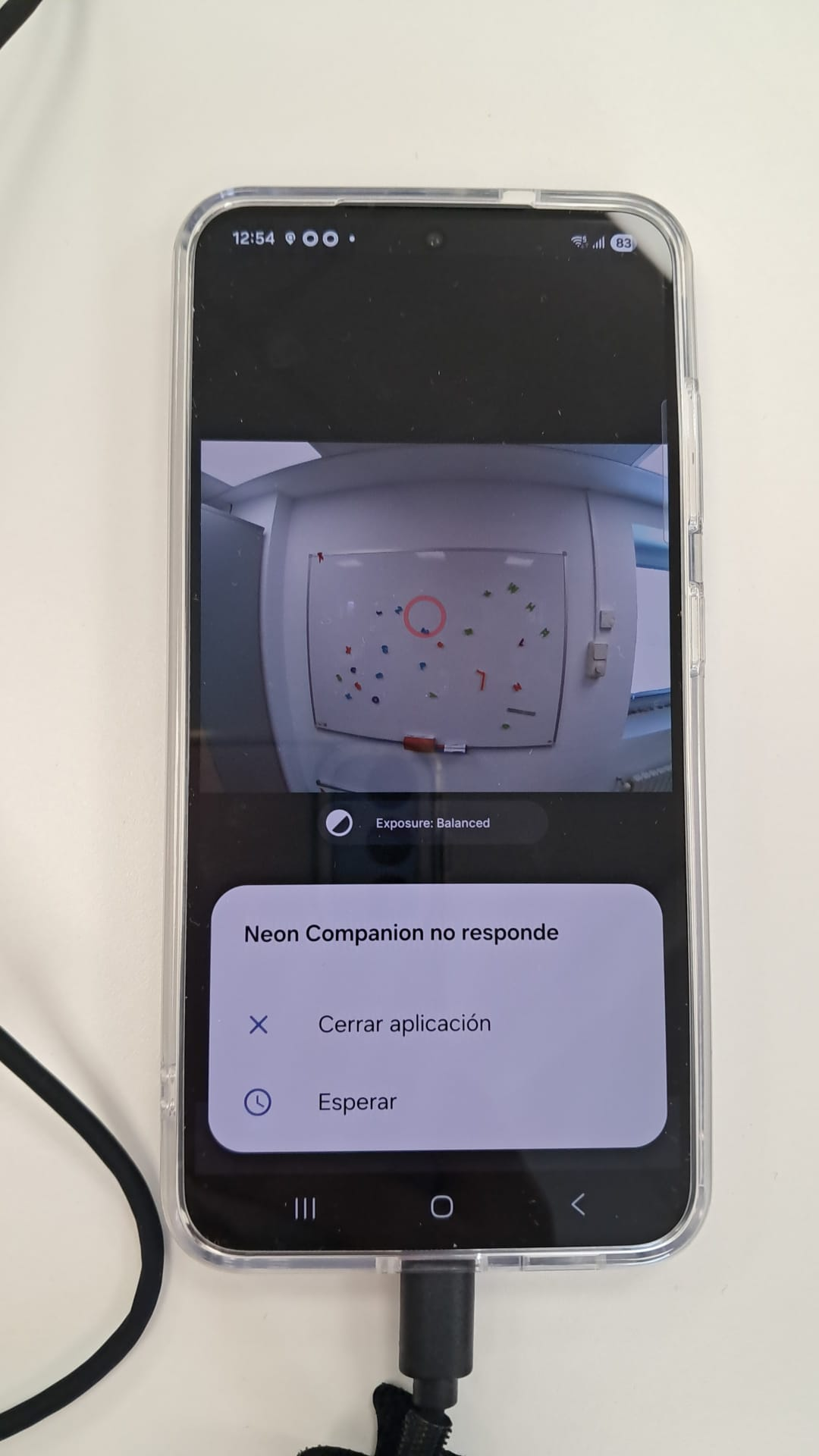
It appears when I finish the recording.
Anyone have experiences they'd like DM me about Soma Reality? We're considering using their software to try and measure cognitive differences between different robotic control interfaces and are wondering about results we may get, (e.g., how sensitive is their outcome to different lightings, do their results make sense, etc.).
hey! We are syncing Pupil-Neon data with some EEG & marker streams via LSL. We see the stream etc. but we only get LSL data at ~160Hz instead of the promised 200 Hz. Nothing else is running on the phone, it is a Moto Edge 40 Pro, it is not running hot, no other streams are active. While we use Wifi, the much larger and faster EEG system (1kHz, 128 channels) has no transmission problems (over wifi too).
What could be the problem? Have you seen this before?
We already figured out that the recorded data on the phone should be 200Hz anyway - but then synchronisation is an additional hurdle/step we want to fix away
Thanks for your help!
Hi @user-28265f! We'll look into this and see if we can replicate.
Hi everyone! 👋 I'm planning on using Pupil Neon with EEG . To get the best EEG signal quality, we are testing inside a signal-isolating booth. The issue is that keeping the companion phone inside the booth disrupts the LSL connection and introduces noise to the EEG.
I'd like to keep the phone outside the booth. Is there a way to use a longer cable attached directly to the glasses? Specifically:
Does using an extension cause any data delays or latency?
Can I use any standard USB-C extension / Thunderbolt cable?
Does Pupil Labs sell an official extension cable?
Thanks for any insights!
Hi @user-339ca3! As a quick note, we haven't previously seen the Companion phone cause noise in EEG signals, and it should have no impact on LSL whether the phone is in the booth or not. That being said, have you tried putting the phone in airplane mode just to rule out any interference?
Regarding the cable extension, we don't sell an official one. However, some users have reported that this UGREEN 1-meter USB cable extension worked for them, though we haven't tested it ourselves. Just keep in mind that with anything longer, you would likely see signal degradation and other issues.
hello, quick question abuot pupil cloud. If we purchase the ujnlimited analysis plan, does our storage increase immediately?
Hi @user-5ef6c0 , all recordings that were locked should then be unlocked. In either case, you can continue to upload. Are you seeing an orange warning about limited space?
yes, the storage is full. We haven't used the eye tracker in a while and will start a study tomorrow.
Can you open a Support Ticket in 🛟 troubleshooting ? Then, we can continue discussion there. Thanks
Hi, Anyone has experience the phone companion vibrating during the data collection and shows the "Sensor Error" sign?
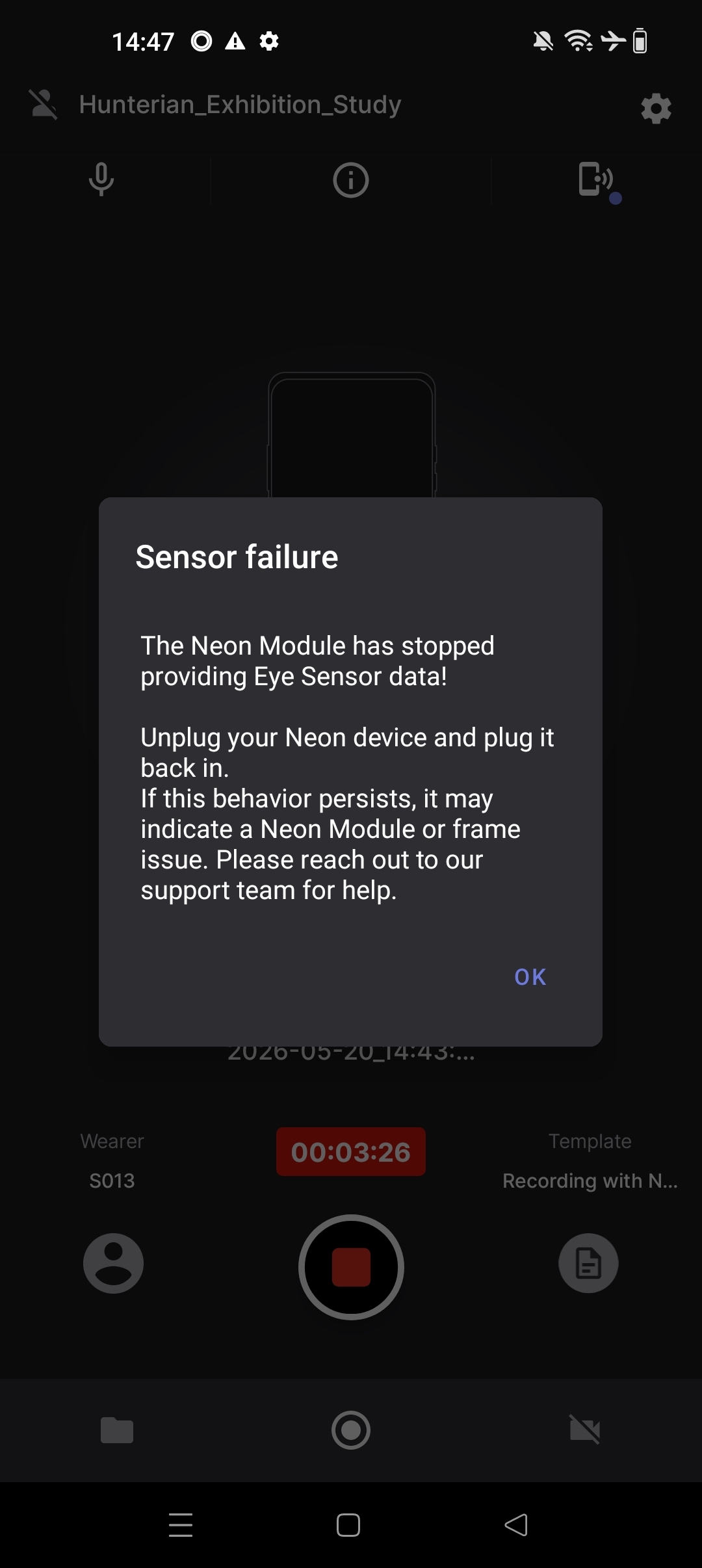
Hi @user-29f76a 👋 ! Would you mind opening a ticket at 🛟 troubleshooting including the SN and additional details so we can further investigate?
Seems you already reached by email, we will follow up there.
@neil thanks, I'm just confused because the manual explicitly says 200hz. We confirmed that it is not a wifi bandwidth issue, but rather on the sending site (an lsl recorder on the phone also receives with lower sampling rate). We are now thinking to send at lower sampling rate and take the local recording to resync, but it is not what we expected
Hi @user-28265f , I am hopping in for @neil .
To clarify, we are using the standard Android LSL implementation. It should ideally mitigate against missing samples. But due to your findings, our Android team is looking into it.
It's not possible to send data at a lower sampling rate in the Neon Companion app without also reducing the Native Recording rate. So, we recommend keeping the Gaze Rate at 200 Hz, and post-hoc sync the Native Recording data with the other LSL streams. This is done by sending some basic Events to Neon during the recording. If you also stream the Event Data Outlet in LabRecorder, then these will appear in the LSL and Neon timelines and you simply align them to put all of Neon's high fidelity data synced onto the LSL time axis.
I can provide a small script showcasing this later today or early next week.
We will of course let you know when the Android team reports back.
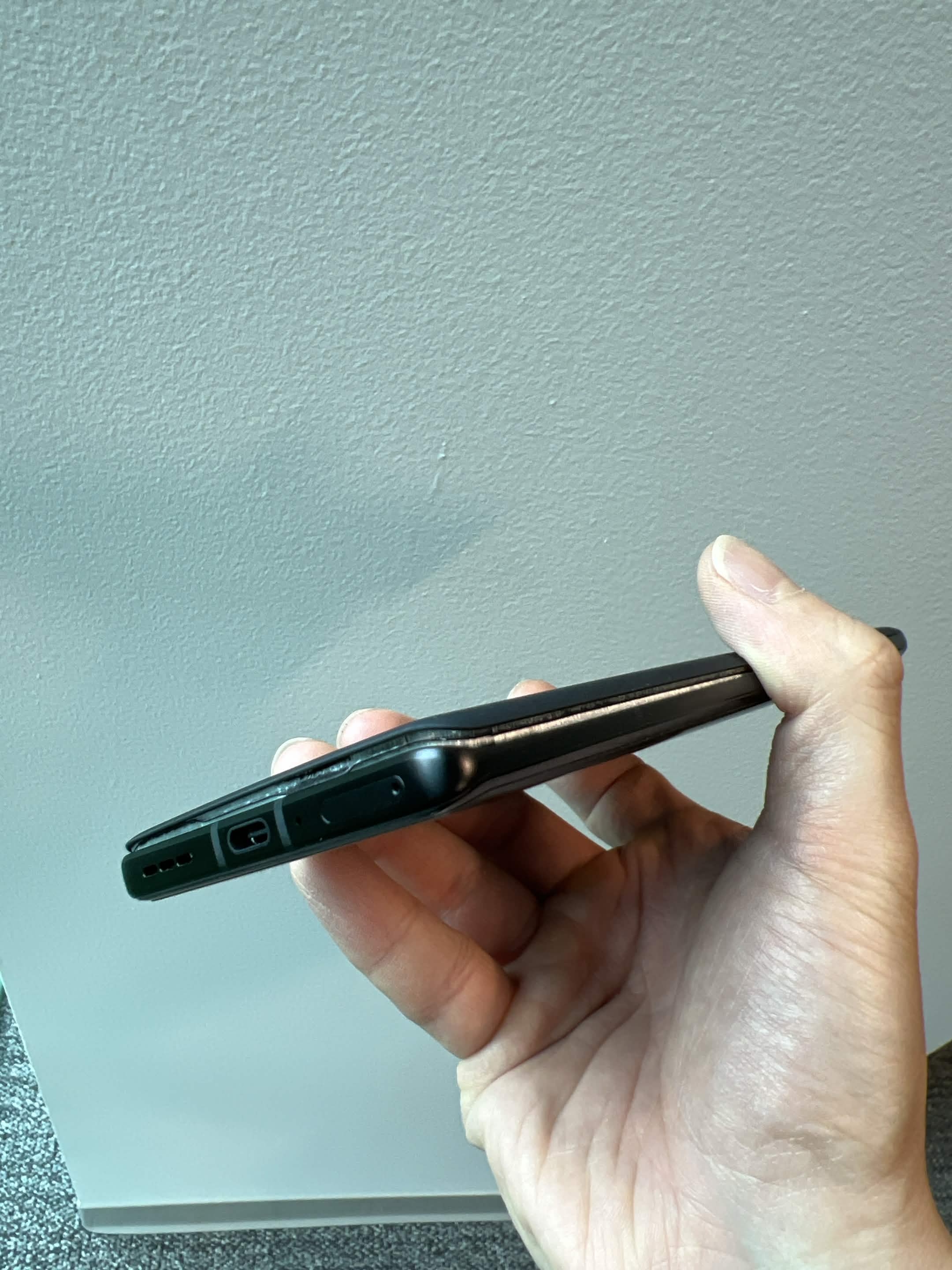
Hi developers! We had a spare Neon eyetracker and a Motorola companion phone. We haven’t used it since we bought it until today, and found out the phone is broken. Are we able to buy a new phone from you? Would it still be under warranty? We can provide any information you need
Hi @user-bda2e6 👋. It looks like the Moto battery has swollen. Please send an email to [email removed] quoting your original order ID and describing the issue. Someone from there will look after you!
Okay! Thank you very much! @neil
Dear Pupil Labs Team,
I am currently beginning my Master’s thesis research focused on adaptive digital presentations using the Neon eye-tracking glasses.
The goal of the study is to measure participants’ visual attention and gaze behavior during live presentations, and dynamically adapt presentation content in real time based on the collected gaze data. The research will investigate how adaptive presentations influence engagement, comprehension, cognitive load, and knowledge retention.
I would like to ask whether you could recommend any presentation software, frameworks, or integration approaches that would work particularly well with Neon for this type of real-time adaptive presentation study.
Additionally, I would greatly appreciate any suggestions regarding:
Real-time gaze streaming and synchronization methods Suitable presentation environments or APIs AOI (Area of Interest) tracking approaches Best practices for live experimental setups Latency considerations for real-time adaptation Any existing examples, workflows, or research projects using Neon in adaptive or educational contexts
At the moment, I am considering browser-based presentation systems and lightweight adaptive logic, but I would value your recommendations on practical and reliable approaches compatible with Neon.
Thank you very much for your time and support. I look forward to your advice.
Best regards, Donald
Hi @user-d0c322 👋 ! It looks like you posted the same message twice in the Invisible channel 🙂 Could you kindly clarify which system you are using? You mentioned Neon in your body, so I’m assuming you may actually be working with Neon and I have removed the duplicate from the 🕶 invisible channel.
If your goal is to provide realtime feedback on a screen, then you will need some form of fiducial markers to detect the surface and map gaze from the egocentric scene camera onto the display coordinates.
There are several ways to approach this. For example:
Once you obtain gaze coordinates on the screen, you can use them however you like for realtime feedback or interaction.
A few relevant resources:
One important note: these workflows rely heavily on having a stable Wi-Fi connection. I’d strongly recommend using a dedicated local router (even without internet access) rather than institutional/shared networks.
Thank you. Any suggestions for presentation software that will best fit for my work as describe?
Hi @user-d0c322 , I am briefly hopping in for @user-d407c1 . I would recommend first checking the links he sent, as those showcase a few different presentation methods. Neon is flexible and can work in principle with almost any stimulus presentation method.
Ultimately though, the presentation method that will work best for you depends on the comfort with programming and the types of stimuli you will be presenting, as well as the research paradigm. You may also want to check published literature in your field to see what others regularly use.
Can I ask where I can find the device’s serial number?
Hi @user-bda2e6 , you can find this by plugging Neon in and pressing the info button at the top middle of the Neon Companion app. Alternatively, you can scan the DataMatrix on the back of the module with a compatible app. Lastly, it is contained in the info.json file of each recording.
Thank you for the reply @rob . But I am asking about the companion phone instead of the eye tracker. Sorry for the confusion! The phone is broken and does not power on so I cannot get this information about the settings
The sales team is asking for either the serial number or the IMEI
Ah, then if it is alright, since you already have email communication with us, let us keep the communication there, instead of splitting it across channels. I will discuss it with the others in the morning and we will respond by email. Thanks.
Sure, thank you! I'm only asking in here because the sales team is asking for the serial number over email, and I cannot access it. But yes, I will keep the communication to the email. Thank you again!
Understood. It is already after-hours for them, but I have made a note for them and will look into it in the morning for you.
Hello team, are the lenses on the "Safety On" model removable? Also, does it support vision correction, like the "I Can See Clearly Now"?
Hi @user-52e548 👋 ! The lenses are removable, in the product info you can find more information about what lenses we include on the Safety On frame. Note that you need to remove the module before attempting to remove the lenses as noted on our documentation.
As for the refractive lenses, unfortunately they are not supported at this moment.
Sorry to bother you—I couldn’t find any mention of whether the lenses are removable before asking my question. I also understand that prescription lenses are not available. Thanks for your reply!
No worries, that's what we are for here.
Hi @user-bda2e6 , you should have received an email from us. No need to provide the IMEI or serial number of the phone anymore. If you have any questions, simply respond to the email we sent. Thanks!
Yes I did. Thank you very much!
hello, quick question about pupil neon. Once the recordings have been uploaded to pupil cloud, is it safe to delete the files from the companion device, aka the phone?
Hi @user-5ef6c0 , if the Neon Companion app shows a cloud symbol with a checkmark next to the recording, then yes. If you want, you can also export the recording from the phone to a PC as a secondary, local backup.
Hi everyone - I’m in Chicago and looking to see if anyone has experience with Pupil Labs Neon or Core, or possibly has a device we could try/borrow for a short experiment.
My mom suffered a devastating stroke after a doctor’s mistake and was unfortunately left bedridden. Before that she was very healthy and active. We now essentially have a mini home hospital setup for her care.
We’ve tried Tobii and other eye-tracking systems, but they’ve been extremely difficult for her to use consistently. Our goal is very simple: test whether a wearable eye tracker could help her communicate reliable yes/no responses.
I work in technology and can write/code custom software for experiments and communication interfaces. Over the last few years I’ve also learned a tremendous amount about the medical system and neurological recovery, and I’d genuinely love to use this experience to help both my mom and potentially others in similar situations.
Ideally, we’d love to find someone in Chicago who has a Neon or Core device that we could borrow or test, since that would obviously be the easiest logistically. But if anyone anywhere in the U.S. - or even internationally - has a program, lab, device, or opportunity that could help us try this for my mom, we’d absolutely be open to it.
We’re also open to collaborating with researchers, engineers, students, clinicians, or anyone passionate about this space anywhere in the world. My long-term goal is to openly share data and learnings to help improve communication tools for bedridden stroke patients and others with severe neurological impairments.
Thank you.
Hi @user-7d2cbb , I have moved your message to the 👓 neon channel for more visibility. The 📸 show-and-tell channel is mainly for finished or ongoing projects with an application ready to show.
I see that you have already been in contact with my colleague and they are offering assistance where possible. In the meantime, any member of the community should feel free to chime in.
You may also want to check our Publications List to see how others have used our eyetrackers in similar situations. You may be able to reach out to some of those groups, too. Wishing all the best!
thank you Rob!
Hello! Quick question about pupil cloud, I'm watching some videos, FPV alongside pupils, at 0.25 speed. I have the impression that the framerate of the pupil video is lower than the FPV, although it should have a much higher framerate. Is that expected, i.e. is it sampled down in the web viewer? Or am I just having a wrong impression?
I think I figured it out myself, the temporal granularity of the player is 30ms, not 5ms, so I guess it is sampled down. I guess I have to resort to playing the raw video.
Hi @user-4b18ca , correct. There are constraints to playing videos in web browsers, moreso when they have different FPS. However, the eye camera video should not play back at a lower FPS than the scene camera video. May I ask how you confirmed this?
Hi Rob, I had a wrong impression of videos playing at different frame rates. They are playing with the same time base, so everything is as expected. For detailed inspection I downloaded the raw eye camera videos. Thanks!
we are getting lots of recording errors. At first, I thought they were due to limited storage in the companion device (even though the app said "sensor error"... but well, I deleted hundreds of videos and we are still getting the errors
Can you open a Support Ticket in 🛟 troubleshooting about this? Thanks
we are half way through the study, with participant 18 of 50
hi all and @rob !
long time listener first time poster - almost
after uploading a recording to the cloud, and adding the typical gaze/fixation visualizations, i ran and completed the process. i then downloaded the file (twice) - and both ended with it saying "decompression failed."
any insights that might help?
Hi @user-f268f3 👋 ! Could you kindly create a ticket at 🛟 troubleshooting and share the visualization ID? Might be the zip file got corrupted and we will need to investigate.
Hi @user-f268f3 , apologies, I missed this earlier today.
Which OS are you on? Can you try opening it with 7zip?
Hello, I was reading your paper Pupil Labs fixation detector and I was wondering how did you choose the 70ms fixation criteria in your algorithm ?
Hi @user-664cca 👋 ! Have a look at https://discord.com/channels/285728493612957698/633564003846717444/973890097504211024 while the answer was for Pupil Invisible and some of the values changed, the core idea remains. We used a n annotated in-house dataset to look for the optimal parameters.
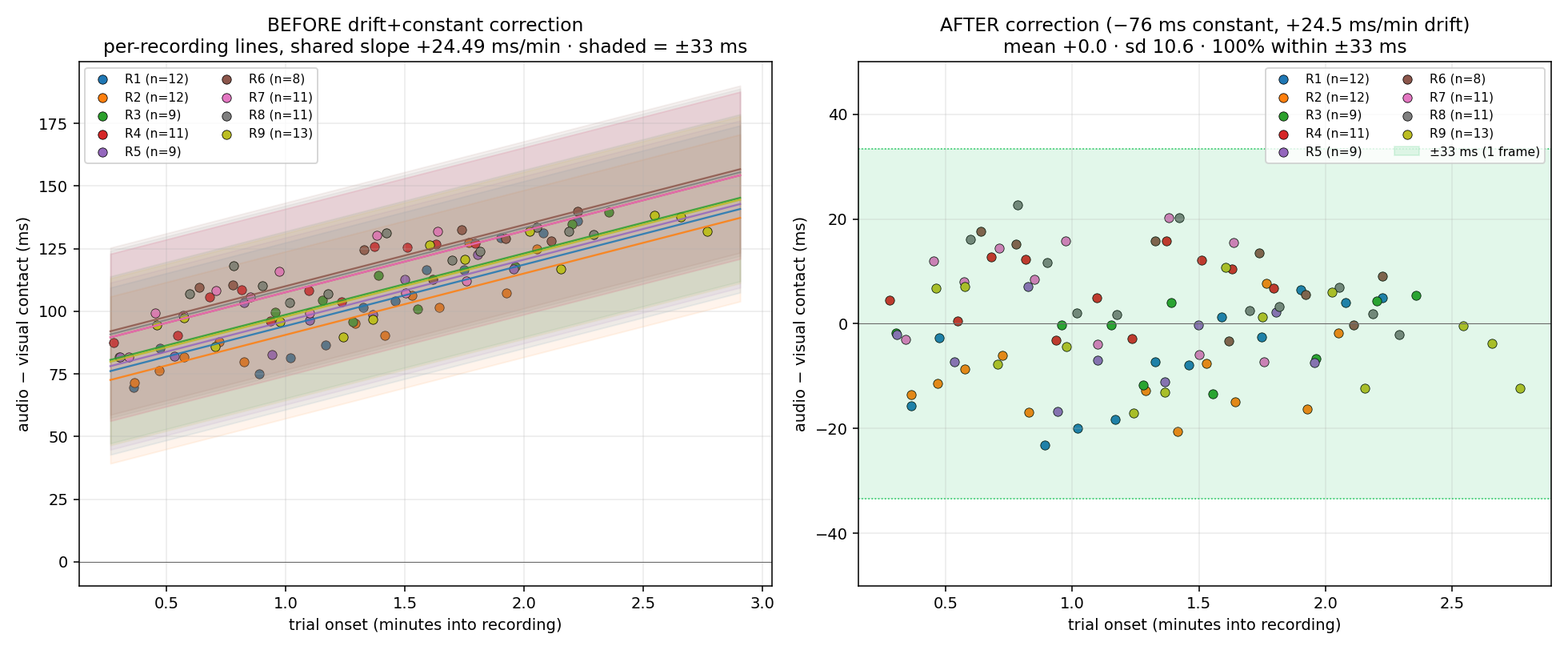
Hello, I am doing my MSc on saccadic reaction times to visual stimuli + audio stimuli. Going through the data I have found that each recording the audio drifts. After some digging I have found that this is true for both the native and the cloud recordings although the cloud recordings seem to have some type of correction. I have run several trials in which I send an audio signal paired with a timestamp. The audio has been falling behind between 19 ms/min up to 27 ms/min. This is presenting some difficulties for marking the audio onset relative to the visual onset. Is there a fix for this?
Hi @user-f0ea5b , the audio signal is not an optimal way to synchronize devices (https://discord.com/channels/285728493612957698/1047111711230009405/1481275533592367196). We would instead recommend the methods in our Time Sync guide for high precision sync and using Events. You could also stream the audio signal as an Lab Streaming Layer (LSL) outlet, since Neon also has LSL integration..
Does your audio generator (I assume a sound card in a PC?) provide timestamps in its own local clock (or the clock of the PC) for when each signal is generated?
This is an example for the visual stimulus onset vs the 1khz sound that I play concurrently at onset relative to recording onset. The 33.3 ms spread is partly due to the 30 Hz sampling rate of the POV camera but I find the same pattern when aligning audio peaks with the timestamps.
26.3.1 mac os tahoe
H @user-f268f3 , thanks. Did you try opening it with 7zip? You can install it for MacOS direct from its webpage or via Homebrew.
Hi, I have a quick question about Neon monocular gaze extraction. I know monocular recording can be selected during data collection in the Pupil Companion app, but I would prefer to record in binocular mode and later analyze each eye separately if needed. Is it possible to export monocular gaze estimates and fixation data separately for the left and right eye from an already collected binocular recording in Neon Player or Neon Cloud/Neon People? Or does monocular gaze estimation only work if the recording was originally configured as monocular in the Companion app?
Hi @user-698822 , if you are on the latest app version, v2.9.31-prod, it saves binocular and both monocular gaze estimates. If you download the Timeseries CSV from Pupil Cloud for that recording, you will see binocular and dual monocular gaze estimate columns.
As described here, the Gaze Mode Setting rather chooses the primary signal for saccades, fixations, visualization, and post-processing in Pupil Cloud (e.g., Enrichments)
Hello @rob, I’m using sounds generated by sports equipment to look at multi sensory facilitation on reaction time. I am not able to sync these as I am not the one generating them. I am using the sound recorded by the neon to tag onsets of events recorded by the scene camera (hitting the ball with the hand in volleyball) and am not synchronizing across devices using audio. My current solution is to use my calculated audio offsets as I am assuming the audio is being time stamped by a chip separate from the scene camera causing the desynchronization. Is that t he case and my manual calibration will be as good as I will get without rigging up an additional microphone attached and streaming timestamps to the neon? I’ve been playing around with different microcontroller setups and integrating the neon with several sport sensors for the varsity teams. TLDR; I am using the neon camera to record athletes during training sessions and tagging events using the neon audio with the offset calibration I calculated to correlate sport performance with multisensory event onset.
Hi @user-f0ea5b , let us discuss this with the others tomorrow. We will keep you updated.