
I'm unsure. I tried a couple, and everything but Gnome worked. At least it's working now 🙂
Hi, I have a problem with Pupil Core binocular headset and Pupil Capture on Macbook Pro M1 (macOS Ventura). It seems that only one eye camera can work at a time. When I start it, only one eye camera is active. If I try to enable the second eye camera, the first one gets disconnected. This started happening recently, and before that it worked fine. Any advice? Thanks!
Hi
We're planning to buy the neon machine from India. Just had a few queries about the availability of spares and whether the glasses truly work without the need for calibration. We've worked with Tobii glasses pro 2 before and we had problems with people who didn't have perfect vision where the gaze data would be off. Will the neon be able to work around this?
Hi @user-f6ec36 👋 . Thank you for your interest in Neon. I'm replying to your message in the 👓 neon channel.
Thanks Nadia
Did I connect with you on Linkedin 2 days ago
Yes! 🙂
Is this a public chat platform . Is it ok to ask queries
Yes! This is a public chat platform for questions related to our Pupil Core eye tracking system. If you would like to ask more questions about Neon, please write them on this channel: 👓 neon
Hey everyone. During a few of my latest recording sessions, one or more camera feeds from our Pupil Core crashed, resulting in a corrupted video file. For instance, the recording folder contains a "world.mp4.writing" file instead of the standard "world.mp4" file, and Pupil Player isn't able to open the video. Anyone has encountered a similar issue before and could tell me if recovering the file, even partially, is possible?
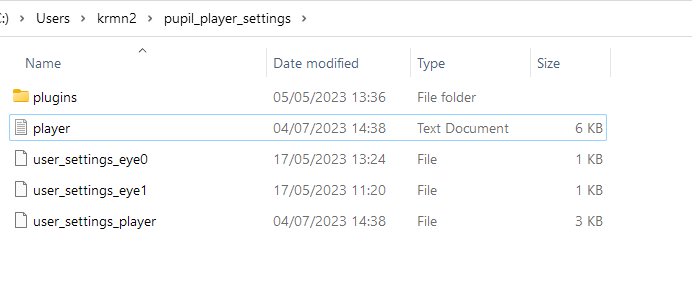
Hi @user-1aa180! Please share the player.log file immediately after trying to open the recording. Search on your machine, pupil_player_settings. Inside that folder is the log file.
these are the files within that folder.
Hello everybody!
I'm starting to get into your pupil core glasses, doing the tutorial, using the sample_recording_v2, where I encountered something that's puzzling me: gaze_positions.csv is calculated from pupil_positions.csv, correct? but pupil_positions starts with time_stamp 329353.721339 and gaze_positions starts with time_stamp 1216.218711,347 how do these correlate? Or don't they, and I just misunderstood something?
@nadia hello, I see that you have an add on for Epson BT300. But I have only BT35E, could you check if your add on also work for BT35E? thanks a lot
Hi @user-9f0514 👋. Our Add-on is only compatible with the BT-300
Both eye cameras cannot work at the same time on Mac M1
It's the file named, 'player'. You can share it here or with data@pupil-labs.com if it contains information you don't wish to make public!
here it is. logs of corrupted file import start at 18:04. In this case, the world video was corrupted
Hi, I have a problem with the calibration. I am working in Linux and when using the pupil core capture software the calibration does not work as the marker remains all the time in the same position without moving. I obtain the following information in the log file:
2023-07-05 13:50:21,005 - world - [INFO] calibration_choreography.base_plugin: Starting Calibration 2023-07-05 13:50:21,107 - world - [DEBUG] calibration_choreography.screen_marker_plugin: Moving screen marker to site at (0.5, 0.5) 2023-07-05 13:52:22,286 - world - [INFO] calibration_choreography.base_plugin: Stopping Calibration 2023-07-05 13:52:22,313 - world - [DEBUG] calibration_choreography.base_plugin: Calibration already stopped. 2023-07-05 13:52:22,315 - world - [DEBUG] gaze_mapping.utils: Dismissing 2.13% pupil data due to confidence < 0.80 2023-07-05 13:52:22,315 - world - [ERROR] gaze_mapping.gazer_base: Calibration Failed! 2023-07-05 13:52:22,315 - world - [ERROR] gaze_mapping.gazer_base: Not sufficient reference data available.
Hi, @user-e91538 👋🏽 - how far are you positioned from the monitor when calibrating, and what is the resolution of your scene camera set to? The scene camera needs to have a clear view of the calibration marker during this process.
Any ideas on how to solve it? Thanks
The resolution is set to 1280,720 and the camera views the whole monitor that I have in front of me. The distance is just some centimeters from the monitor.
The calibration marker appears but it is always in red and it does not move
To help narrow the problem, have you tried any of the other calibration methods?
No, I haven't. What I just realized is that it says in the main page that 2 markers detected, please remove all other markers. This appears as the marker does not move, I go back to the main page and that is the message that it appears in yellow
Ah! The calibration routine is looking for exactly one marker. If there is something else in the view of the scene camera which has a similar enough appearance to the marker, it will need to be moved
Maybe this provides more info; if not, I will try other calibration methods
But I do not have any other marker.... 😦
Do you think you could make a recording and share it with us? One option is to email it to data@pupil-labs.com
2023-07-05 16:15:17,332 - eye1 - [DEBUG] pye3d.eye_model.background_helper: Dropping task! args: ('add_observation', <pye3d.observation.Observation object at 0x7f7d30c70e80>), kwargs: {}
I get this in the log file
Ok, I send it there
Hi all-I'm new to this system. Apologies if this is a common error, but I looked through the forums here and could not find anything on this. We recorded the a couple of minutes from one mac computer (osx 13.something I believe). Everything looked fine and I started to do some analyses. I then saved the whole folder for that day to google drive. Now on my work computer (osx 12.6.7), the eye movements show up in pupil player, but video does not. I also notice that none of the mp4 files in the folder play (world, eye0) in quicktime (Version 10.5 (1126.4.1)) on this computer. Any thoughts on what I can do to get the video back? These same videos do play when I load them in VLC, so I suspect it might be QuickTime that is causing a problem.
That's interesting. Do you have any way to copy the files from the OSX 13 computer to the OSX 12 computer that doesn't involve uploading? E.g., external hard drive, flash drive, etc.
That would help us determine if it's some difference between the codecs on the different OSX versions or if it's something Google Drive is doing to your videos
I'm now across the country from that computer. I think the best I can do would be to have a colleague try to send it over via dropbox or something. Interestingly, when I pulled over the 'world.mp4' file using a thumbdrive, I had no problem viewing it on this computer using quicktime. But I didn't pull the whole folder so I cannot try to analyze that data in Pupil Player.
Hi @user-b08155. It sounds to me like something got lost during the upload to and download from Google Drive. What browser did you use?
Hey Neil-this issue seems to be resolved when you use Box.
chrome
actually chrome on the upload, firefox on the download.
Hi. We are completely new to pupil labs. We have successfully managed to collect data and have exported raw data files into excel. The next hurdle is data analysis. How does everyone typically analyse fixation data- we would like to compare fixation for two groups? We would also like to create two heatmaps comparing both groups fixation - does anyone know how best to do this? Thanks in advance!
Hi team, we would need a longer cable to connect to the eye tracker, around 3 meters.. what kind of cable settings would you recommend to avoid any further latency? thanks
Greetings, @user-6cf287! USB3-Hubs have been used in the past as repeaters to achieve longer cable lengths. Just be sure to appropriately manage the cable to avoid the participant gettign tangled!
I am having an issue where the eye camera and scene camera are throttling their sample rates to match the display refresh rate of the monitor the eye windows are open on. If I move either eye window to the 120 Hz display, the rate jumps to 120 Hz. It then then falls back down to 30 Hz when moved to the 30 Hz display, while still running. We have confirmed that the data sample rate is matching. Is this how the system is designed? Can we disable this coupling?
Hey folks. I've been having issues with the 3D eye model in pupil capture. I can't for the life of me get it to consistently work. The best luck I've had is spamming the 'reset 3d model' button until the 'long term model outline' looks appropriate, and then freezing the model.
Here is a video of what I am experiencing.
Can anybody from Pupil offer me some advice? I never used to have this issue.
Hi @user-1c31f4. In order to fit the model, you need to look around to sample sufficient gaze angles. It looks like your resetting the model manually before it's had time to fit. Please try again without resetting the model.
Morning...my Neon Companion app is crashing / won't open. I need to back-up yesterday's data and be start collecting new data imminently. Any ideas / options? Thanks. 👓 neon
I should add I've restarted the phone, had it plugged in to my PC, plugged in to the tracker, and not plugged in to anything - isn't working on any option...
Hi @user-c10c09 ! Sorry to hear you are experiencing this issues, do you see any error message? Are you using the latest version of the app? Could you hold your finger over the app icon, go to App Info > Storage > Clear Storage or Data depending on which Companion Device do you have?
After that you would have to log in into the app again, go to Settings > Data Usage > Import recordings (within the app) to restore your recordings.
HI Miguel. I've just managed to open the app it by disabling wifi. No error message - just begins to open then closes again. It was happening yesterday too. Concerned that clearing storage will mean losing my data... Plan for now is to get everything onto Pupil Cloud, back it up, then clear storage and check for updates. Sound fair?
That sounds fair! Let us know if you struggle at any point.
Side note, clearing the data on the app info's view should not end up in loosing your data but rather that you would have to reimport previous recordings. That said, yours is a perfect valid and safe approach, mine was more in case you could not open the app.
That's great - thanks so much
i am using pupil core in my research work.
i am trying to compare driving data between beginner and a pro driver. I have taken driving datas with pro diver and a beginner driver. Can you please suggest me how can I proceed forward . What can be the next step to do in my project. Please help .
Hi @user-6bde19 👋. That sounds like quite a rich dataset you have. Comparing novice vs pro drivers is definitely an area of interest. Why not check out this article for some inspiration: https://pupil-labs.com/blog/community/motorcycle-rider-eye-tracking/ ?
Hi - need to test you now... I'm running a study using Neons and I'm getting an intermittent sensor fault. With some participants it happens in around 30-60 seconds of use, every time I start recording, and for some participants I don't get a fault at all. It's the red light flashing in front of the left eye and the phone vibrating away that there's a fault, so easily noticed. Any ideas on how to resolve? It'll be frequent with one participant and not at all with the next... Thanks,
Heat maps
Hi our cable has broken- is it possible to get a new one. I mean the one, connecting the Eye-Tracker withe the USB Cable
Hi @user-e91538 👋 ! Please reach out to info@pupil-labs.com in this regard
Hi need to test you now I m running a
Hi, we were thinking of ordering a new eye tracker and were wondering if you could provide us with details regarding the shipping duration?
Hi @user-80c70d 👋 ! Nice to hear that you are considering our products, could you contact [email removed] indicating which product you are interested and to which country would you like it to be shipped? The sales team would be able then to respond to these queries.
thank you for your fast response and I will do so!
may I ask an additional question, are your new eye trackers able to record eye movement outside in the sunlight?
Yes! they can ! ☀️ 😎 You can see some examples of using Neon outdoors at https://pupil-labs.com/products/neon
thank you a lot for the information!
[email removed] (Pupil Labs), is there a document that explains how the pupil diameters were derived and how they can be converted to more realistic dimensions?
@user-355442, you can read about that here: https://pupil-labs.com/blog/research-digest/better-pupillometry-corneal-refraction/ (link to publication in the article). May I ask what you mean by converting to realistic dimensions? Is diameter reported in mm not sufficient?
Hi @neil thanks for the tip! I am also wondering if I could also use a wireless USB extender? would that work?
You'll probably run into latency issues with a wireless extender. We have found these to be inadequate. If the goal is to make Core more portable, some users have had success using a small form-factor tablet style PC in a backpack.
thank you. is there a maximum cable length limit if we intend to simply use a longer cable instead?
We don't recommend anything longer than the original USB cable.
I have diameters in the range of 15 to 90. That does not seem realistic to me, if it is in mm. I will review the publication in the link. Thanks.
Pupil diameter is reported both in pixels (as observed in the eye image) and mm (provided by pye3d, our geometrical eye model). Recommend reading our Best Practices for pupillometry: https://docs.pupil-labs.com/core/best-practices/#pupillometry
hi everyone! Could someone kindly tell me whether pupil core could connect to cell phones instead of to the computer like pupil invisible? Our experiment requires subjects to wear the eye tracker while walking around. Can core support this?
Hi @user-74c615👋 ! Pupil Core cannot connect to cell phones. Please have a look here for another alternativehttps://discord.com/channels/285728493612957698/285728493612957698/1042712204140630117
ok!got it!thank you!
Hi everyone, I am using the pupil core glasses with a double monitor display and the pupil cameras are consistently losing track of the pupils, I'm hoping someone here can help. The cause of this issue is unclear, so I'll be pretty thorough in my explanation of all of the things that are going on. Basically, whenever the pupil cameras lose sight of the pupils, the eye tracking stops and the cameras are unable to find the pupil again (even when it is fully in view) until there is movement of the eye, or it's chance when it reconnects. The issue seems to be fixed when changing from 'extending' to 'duplicating' the screen display designated as the monitor in the pupil computer app. The issue also does not appear with some people whereas it consistently happens with others. Thanks in advance! Update: We may have solved the issue, changing the maximum 2D pupil size setting to ~150 pixels in the post-hoc plugin settings prevents the loss of tracking. This also fixes the 3D measurements since the 3D measurement seems to be built off of the 2D measurement.
Hello, good morning/good afternoon/good evening, I'm having some problems with my equipment, it has a failure in the device descriptor request and then windows shuts down the usb, someone know what could I do?
Hello Meon Support Team...After setting up the device and successfully completing the first recording, the device is no longer being recognized on the Neon app. The screen prompt to plug-in remains even after I have plugged the device using the USB cables that were provided by you. I have tried rebooting the phone, reinstalling the app, but the problem persists. I would much appreciate it if you can reach out to me as soon as possible.
Hi @user-48526c 👋 ! Thanks for reaching out and welcome to the community 🙂 Let's move this conversation to the 👓 neon channel! I replied to your message here: https://discord.com/channels/285728493612957698/1047111711230009405/1130391388870152222
Hello! It's my first time using the Core and I can't get it to work. For now I'm still just trying to follow the tutorial on https://docs.pupil-labs.com/core/, but the PupilCapture software is not showing camera (or any kind of) input.
My steps:
After a while, the error messages disappear. Then I have a grey screen and a repeatedly appearing message that some devices have been found, but nothing else happens (I've also attached a video that shows this).
I work on MacOS Ventura 13.4.1 with an Intel MacBook. The USB port that I am using is working as expected with other devices (i.e. keyboard, mouse).
Any help would be greatly appreciated!
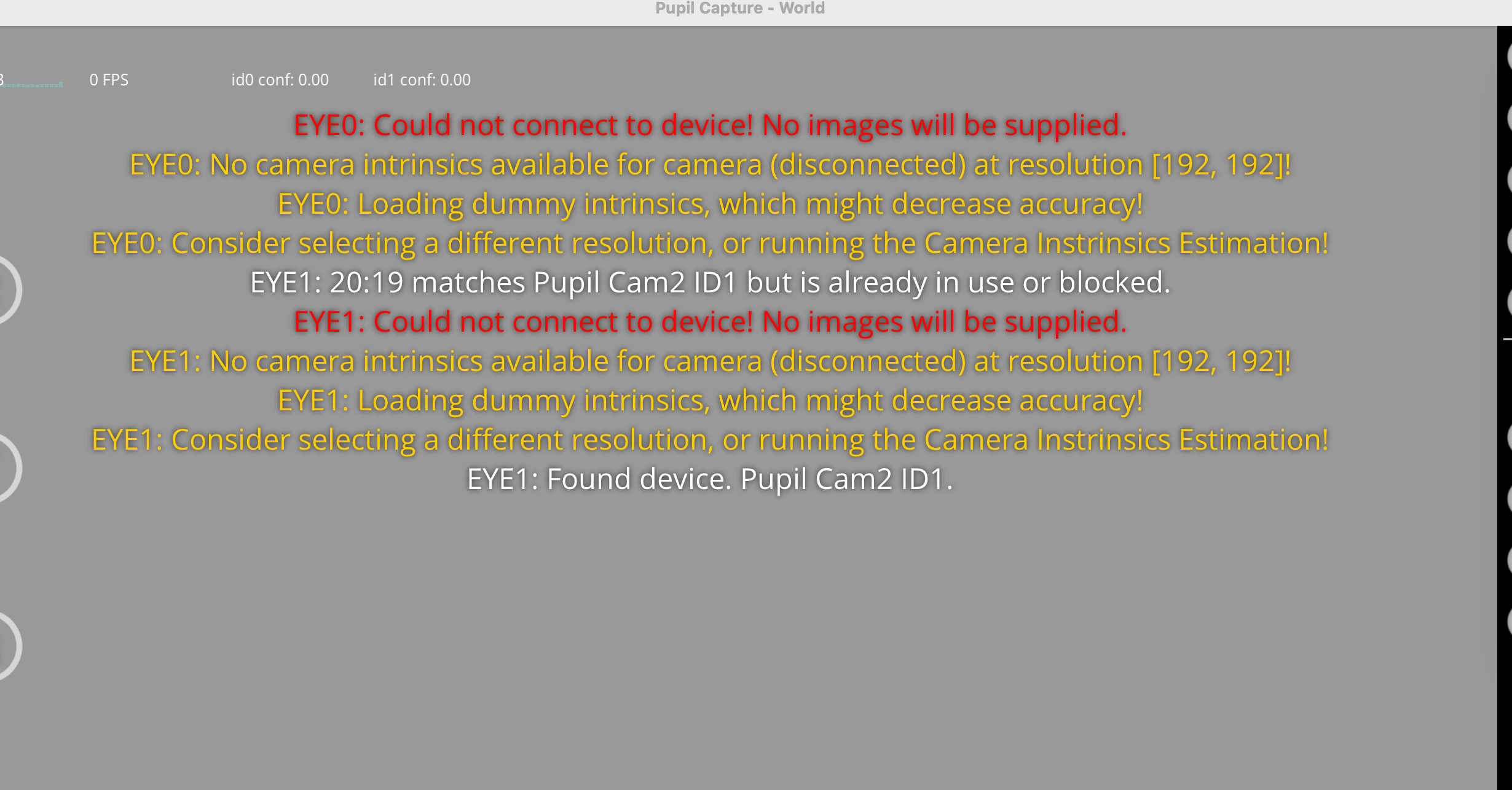
Hello, @user-19fd19! On Mac, you'll need to run Pupil Capture with admin rights. There's information and detailed instructions here: https://docs.pupil-labs.com/core/software/pupil-capture/#macos-12-monterey-and-newer
Sorry, I forgot the video that I promised. Here it is 🙂
Hi! I have a recording I made with the world camera at 1024x768 but when I try to open it in Pupil Player it says "no camera intrinsics for camera world at resolution (1280, 720)" so the world camera is all gray. The world.intrinsics file also correctly says it was 1024. Any idea where it's getting 1280 from or how I can change it? Thanks!
Hi! I am using pyuvc to read the eye cameras and the world camera of the Pupil Labs Core glasses. With the eye camera I don't have any problem to access the images but with the world camera I have problems. To access the images from the world camera I don't always get images and if I move the headset cable that is connected to the computer I get TimeoutErrors and I can't reconnect to the camera. why does this happen? it's strange because with the eye cameras I don't have any problems when I move the cable.
Idk what happened but now I cannot access to the world camera at any time😢. How can I fix the problem?
I tried with windows and linux
Hi @papr I had this question as well. Just wanted to clarify -- why does the HTC addon have LED rings if the pye3d algorithm is glint-free ?
Hi @user-720765 ! The LED rings on the HTC Vive eye tracker addon are used for illuminating the eye and capturing clear images of the pupil. While the pye3d algorithm used by Pupil Labs is glint-free, it still requires good illumination to accurately detect and track the pupil. The LED rings provide the necessary infrared illumination for the algorithm to work effectively.
Thanks for the clarification, Miguel
Hi @user-e91538 @user-e91538 👋 ! The issue you're experiencing with the world camera of the Pupil Core could be related to the cable connection or the camera itself. Here are a few possible reasons for the problem:
Cable Connection or Quality: The cable connecting to the computer may be loose or damaged. If using a 3rd party cable, it may be of lower quality or not designed to handle the data transfer required by the world camera. This could lead to intermittent connectivity issues. Try using a different cable or a higher-quality cable to see if it resolves the problem. The connector of the world camera to the cable tree might be damaged, is there any visible damage?
Camera Hardware: There could be an issue with the world camera hardware itself. It's possible that the camera is faulty or damaged, which is causing the intermittent image access and TimeoutErrors.
In any case, please contact us at info@pupil-labs.com for further debugging steps.
Thank you! I will write an email.
hi, can anyone help with this? :) thanks
Could you share the recording (a zip file of the entire recording folder)?
sure
actually it's quite big, hope you can download it
it's 17gb, about the same size zipped or unzipped, it's a 35 min recording
@user-75df7c - I was able to download it and start troubleshooting - thanks!
It seems to be related to data in world_lookup.npy. That file is automatically generated the first time you load a recording in Player, but it seems an error occurred when this one was created. When I remove the file and load the recording in Player once again, the file is regenerated without error. Can you try to do the same thing?
Hello! Regarding the Surface Tracker, is there any integration for LSL (Lab Streaming Layer)? In essence, does data from surface detection get streamed via LSL plugin or do I have to make a new plugin? If so, any help / insight to the matter would be really helpful.
Hi, @user-59ce16 - the LSL relay doesn't support that directly, so yes, a new or modified plugin would be required. You might be able to accomplish what you need by making a Capture recording while simultaneously streaming to LSL and then cross-referencing the surface gaze data posthoc.
Hi! I'm trying to open my recordings in the pupil player on my mac. For some reason pupil player closes after trying to load the file. I tried re-installing it but that did not fix the problem.
Hi, @user-20af7e - that's odd. What operating system are you using? There should be some output when you run it, and that usually has error messages and other clues about what may have caused any problems. Can you share that with us?
Hi! I am trying to integrate my own camera with Pupil Lab's code. I found the original camera parameters set in the 'camera_models.py' file and added my own camera name and parameters. Then, I made modifications to the 'default_capture_settings' and other parameters in 'eye.py'. However, I found that it cannot run, and it still connects to my Pupil Core for operation. What should I do next? Please help me!
Hi, @user-a2c3c8 - what kind of cameras are you using? Most off-the-shelf cameras can be used by simply enabling the "Manual Camera Selection" option. It's in the Video Source settings, which you can find by clicking the camera icon on the right side of the Pupil Capture windows. With that enabled, you can change cameras by using the drop down.
Pupil Capture no longer recognizes my cameras. It says they are disconnected when they're not. Smetimes after 5+ minutes they suddenly come on line. Using MacOS Big Sur on a macbook. what the heck?
FYI I'm conencting directly to a thunderbolt port. Pupil Capture used to recognize the cameras instantly.
I opened Pupil Capture from the Applications folder and pasted the suggested command into Terminal
Hi, @user-fa2527 - that does sound problematic. When you refer to the "suggested command", do you mean the sudo ... command that's used to run Pupil Capture with administrative rights? or something else?
@dominic yes the command to run with administrative rights - thank you for responding
When you say they sometimes come online after 5+ minutes, do you have the software running that entire time? Or you just have your headset plugged in and, after a few minutes, try launching the software and it works?
I have the software running. Pupil Capture says USB not connected - my macbook does not have a usb port so I use the thunderbolt port, which used to work (edited)
@dominic I have the software running. Pupil Capture says USB not connected - my macbook does not have a usb port so I use the thunderbolt port, which used to work
Hello,
I am doing a psychophysics experiment using MATLAB and I want to record eye tracking with Pupil Core. I want to send triggers from MATLAB to the Pupil Core with the timestamps of the moments where certain stimuli are presented. I read a couple of discussions on this topic online but as a newbie, I got really confused.
The MATLAB computer that I am using does not have Internet access right now, but the Pupil Core computer does. My first question is do I really have to have Internet access to both computers to send event triggers? Is there a way that I can manage this via a LAN cable between the two computers?
If yes, can you walk me through the steps I need to do for this? (I basically want to be able to successfully use “send_annotations.m” function in my setup)
I would much appreciate any help!! 🙂
When I download videos from pupil labs cloud workspace, the download folders do not contain the following files: gaze ps1.raw, gaze ps1.tim, PI world v1 ps1time, PI world v1 ps1.mp4, extimu ps1.raw, extimu ps1.time, and info.json. I am using pupil invisible glasses.
However, these files were in my downloads from pupil labs cloud in April. Can any help me figure out how to download these files? I need them to run analysis in iMotions.
From the software's perspective, USB and Thunderbolt are the same thing. Anyway, what you're experiencing is definitely abnormal, and I suspect it's the result of some hardware issue. Do you use any other devices on that port? If so, do you have any problems with them? If the port works fine otherwise, it may be a problem with your headset
Thank you - I discovered that the headset is only recognized by one of the four thunderbolt ports
Neither computer needs internet access for that to work, but you do need network access between them (e.g., on the same LAN or WiFi). If you look at pupil_remote_control.m in the matlab folder of the pupil-helpers repo, you'll see a line that defines an enpoint:
endpoint = 'tcp://127.0.0.1:50020';
That 127.0.0.1 is an IP address - in this case it refers to the same machine running the matlab code. To connect to a different machine, you'd replace 127.0.0.1 with the IP address of the computer running Pupil Capture. As long as the computers can talk to each other over the network (even without internet access), it will work.
Thank you for the reply! However I am now running into the following error: "Error using mex version.c C:\Program Files\ZeroMQ 4.0.4\lib\matlab-zmq-master\src\core\version.c(2): fatal error C1083: Cannot open include file: 'zmq.h': No such file or directory"
Has anybody experienced a similar issue?
Note: One thing I particularly don't understand is that when I run the make.m file for matlab-zmq, the code somehow automatically adds (2) at the end of the directory. But there is no such file as version.c(2) on my computer, there is only a single version.c and I double checked its name
Hi there, I noticed in the gaze_position.csv file that gaze_normal_0 has repeated data for two rows. The same is true for gaze_normal_1 but the repetitions are just offset by one from the other eye. Is this expected? If so, why? Thank you very much in advance for your help!
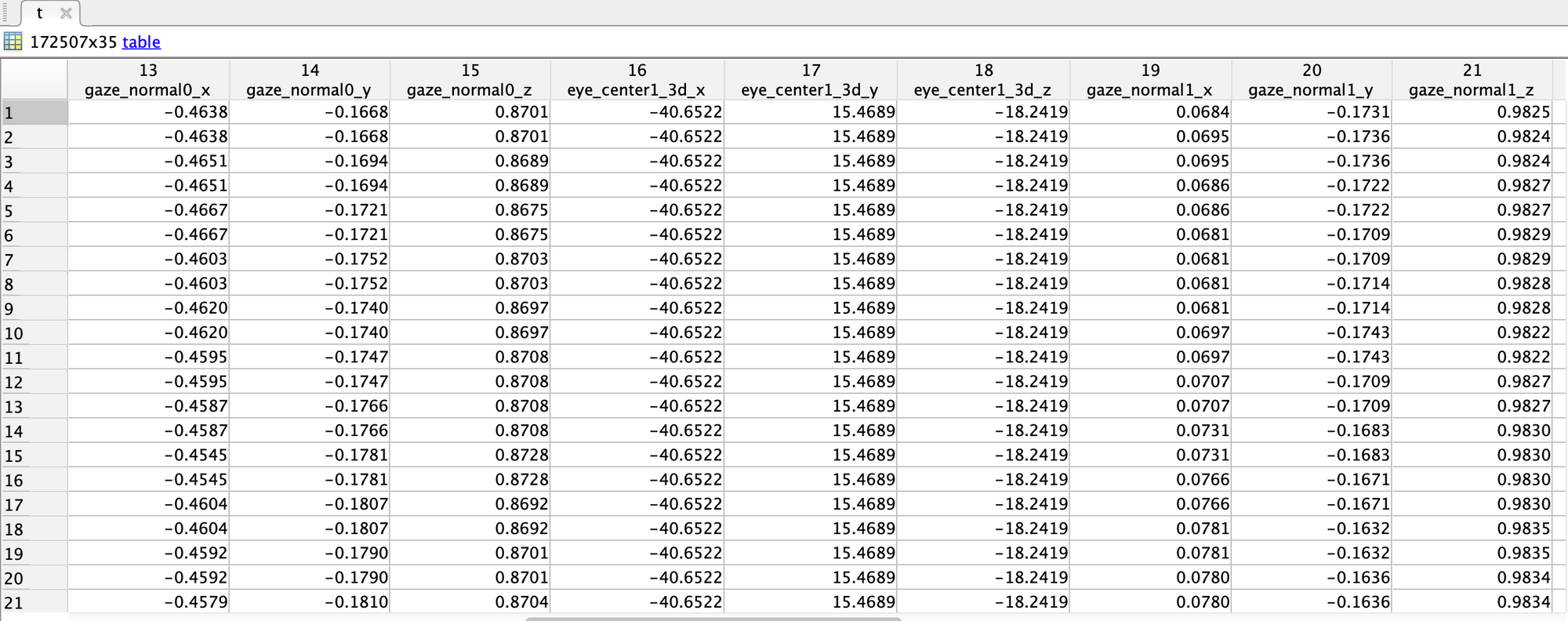
This is expected. If you look at the base_data column, you'll see two values for each row, one with a -0 and one with a -1 at the end. If you compare these values across rows, you'll see that they repeat in pairs too. In fact, you'll see that when the -0 values in base_data repeat, the values for eye 0 repeat, and the same for -1 with eye 1 values.
The computer can only capture one frame from one camera at a time, so they will never be exactly in sync. 3D gaze estimation, however, is performed on every frame from either camera, so the duplicates are expected.
Put another way,
You can see here that the frame from camera 0 is used twice - once when it was new and again when camera 1 captured its new frame.
Yes, other people have reported that the matlab-zmq package is not compatible with Matlab 2021b and newer. You'll find some discussion and potential alternatives here: https://discord.com/channels/285728493612957698/446977689690177536/1121708316876341259 and here: https://discord.com/channels/285728493612957698/446977689690177536/1123432094526361753
Sorry I should have clarified this: I am using Matlab 2017a, which is the version that the matlab-zmq was tested with. And the fork that @user-93ff01 has made is not of particular help to me because I am struggling with compiling the mex files and I am using Windows (the fork has pre-compiled mex files for Linux and OS X if I am not mistaken).
Could you suggest any other alternatives or workarounds? Or should I direct the question to the software-dev channel?
It worked, thank you!
Hooray! 😁
No problem. It sounds like your build environment may not be configured correctly. Do you have ZMQ 4.0.x installed? Did you modify config.m so that it points to your ZMQ installation?
I have the ZMQ 4.0.4 installed (found this as a stable release for Windows 7). I also downloaded the matlab-zmq and msgpack folders from GitHub and unzipped. I tried modifying config.m, but I am not sure if I should be pointing it to the ZMQ 4.0.4 or to the directories of matlab-zmq and msgpack.
But I actually tried both and they both did not work.
Should not having an Internet access be a problem in this building step?
Hello, I was struggling (for a while) to get my pupil camera (Microsoft HD-6000) to work with Capture. After following "https://github.com/pupil-labs/pyuvc/blob/master/WINDOWS_USER.md", I was able to see the camera in the manual drop down list in Capture, but I kept getting the error "the selected camera is already in use or blocked". I ended up figuring out that for some reason my mouse (Logitech MX Master) was interfering with the connection. With the mouse dongle plugged in, only certain ports would detect the camera. With the mouse dongle unplugged, the camera is detected every time and on any port. Once Capture has connected to the camera, I can re-insert my dongle and use as normal. Just wanted to share my findings to help anyone else having issue.
No, you shouldn't need internet access to compile if you have everything installed already.
config.m should point to your ZMQ 4.0.4 installation. There's a sample config_win.m that you should examine. Can you double-check that your config.m looks similar to config_win.m? Is the error that you're seeing from when you run make.m?
I am sorry for the confusion, I thought I was pointing out to the installation but as it turns out I wasn't and I am getting success now when I run make.m!
Thanks a lot! I might be updating with further questions down the line 😅
No problem! There's a lot of little details with this sort of thing, so it's always nice to have an extra set of eyes around. Let me know how it goes and if I can help further 🙂
Hello again, I have a question about remote annotations now 😅
I tried the following lines as remote annotations from Matlab to Pupil Core (after successfully starting the recording and getting the corresponding recv, so the send-recv usage should not be the issue I suppose):
`zmq.core.send(socket, uint8('t')); currentTime = zmq.core.recv(socket); keys_start = {'topic', 'label', timestamp', 'duration'}; values_start={'annotation.TrialStart', 1.0, currentTime, 0.0};
start_annotation = containers.Map(keys_start, values_start); send_annotation(socket, start_annotation);
result = zmq.core.recv(socket);`
The issue is that right after these lines in my code, the Pupil Capture freezes even though Matlab does not throw any errors (and of course the recording cannot be completed afterwards).
Could you help me debug this small piece of code?
Nothing jumps out at me looking at your code. What version of Pupil Capture are you running? Can you double check to ensure that the Annotation Capture plugin is enabled?
I am using Pupil Capture v3.5.1.
I did another test with double checking that the Annotation Capture is definitely enabled.
I ran the pupil_remote_control.m script as given in the Pupil Helper Github page. The Script works perfectly fine and I remote control the start and stop of the recording. There is no freezing.
However, then I added these lines I mentioned yesterday:
`zmq.core.send(socket, uint8('t'));
currentTime = zmq.core.recv(socket);
keys_start = {'topic', 'label', timestamp', 'duration'};
values_start={'annotation.TrialStart', 1.0, currentTime, 0.0};
start_annotation = containers.Map(keys_start, values_start); send_annotation(socket, start_annotation);
result = zmq.core.recv(socket);`
Then at the point in the recording where the annotation should be sent, Pupil Capture freezes and becomes unresponsive.
Another (maybe related) issue that I am experiencing is that sometimes when turning the Pupil Capture on, it is unresponsive from the beginning and does not start at all. In those instances it gives the following error:
ctypes.ArgumentError: argument 4: <class 'TypeError'>: expected LP_IP_ADAPTER_ADDRESSES instance instead of LP_IP_ADAPTER_ADDRESSES
I had first installed the Pupil Labs software with another network that was connected to Wi-fi. Then in order to connect another computer (Matlab computer for the experiments -has no internet access) to the pupil labs computer, I started using the Pupil Labs with a LAN cable from the Matlab computer. If I uninstall the Pupil Labs and then re-install with the LAN network, would the issue be resolved?
Thank you for your reply! I didn't notice this feature before, but I couldn't get it to work. I tried connecting three USB cameras and checked the 'Enable Manual Camera Selection' option. In the dropdown list of cameras, all camera names were displayed as 'unknown @ Local USB.' When I clicked on any camera, it showed the message 'the selected camera is already in use or blocked.' However, I can access these cameras using the built-in Windows camera application. What could be the issue? Is there something that needs to be set?
Hi @user-a2c3c8 - I conferred with a colleague and have two notes to share.
hi everyone! Is this means pupil core must always connect to a computer?
hi!I still have some problems about this question. Is there any way to solve this problem? I still do not understand why the pupils aren't visible for some angles. And why does core don not have this problem? thx
Hi @user-74c615
Yes! Pupil Core needs to be connected to a computer. Some users have used in the past some smaller single board computers (such as a RPI) and stream the data to a more powerful computer to make it more portable. But in general, yes, Pupil Core software runs on Computer (Windows, Mac or Linux), unlike Pupil Invisible or Neon which are tethered to a phone.
Reg. the question about Pupil Invisible eye cameras positioning. Pupil Invisible eye cameras are placed on the temporal side and they can't be moved, this means some angles the pupil is not visible.
In Neon, the eye cameras are placed nasally, due to better positioning, it is easier to capture the pupil.
With Pupil Core, the eye cameras are not fixed, they can be rotated and moved, so you can place them on an optimal position, which you may have to do for each subject.
I hope this make things clearer, please let me know if there anything else I can help you with
Although reinstalling software can sometimes fix issues, it generally makes does not matter what your network configuration is when you install it - only when you run it. This is true for our software as well.
Taking a second look at your snippet, I do notice that the value you have for label is numeric, but it should be text like the topic value. Unfortunately, I don't have Matlab, so I'm unable to test whether this is causing the freeze or not, but it should certainly be changed.
I'm not sure what to say about the LP_IP_ADAPTER_ADDRESSES error. It seems to be an error caused by an external library we're using and not in the Pupil code directly. I haven't been able to find much info that would help troubleshoot it.
Thanks for the suggestion, but changing the label to text unfortunately does not make a change. Another related question about annotations though: I realized that when I return the current Pupil time via the 't' command, I am getting a uint8 vector. How do I convert this into a floating point timestamp?
EDIT: I actually found out that putting a random floating point instead of that uint8 time vector solves the freezing problem. But I want to give the current Pupil time as a timestamp there.
Ah, ok makes sense. You currently have:
currentTime = zmq.core.recv(socket);
But I think you need to specify the buffer length. IIRC, floats in the standard python implementation are always 64-bit, so you need to read 8 bytes:
currentTime_bytes = zmq.core.recv(socket, 8);
I suspect that will give you an array of bytes, which you may be able to use as-is if you don't need to actually interpret the value in Matlab other than just sending it back.
But you might need to convert it first (if you need to use the value within Matlab, you definitely will). It looks like Matlab's equivalent data type would be double, and I think the conversion would look like this
currentTime = typecast(currentTime_bytes, 'double')
EDIT: Nevermind, solved. Apparently the solution is:
currentTime_bytes = zmq.core.recv(socket, 8); currentTimeChar = char(currentTime_bytes); currentTimeNum = str2num(currentTimeChar);
and use currentTimeNum for the annotation timestamp value. Wanted to share for future Matlab users 🙂
ENTRY BEFORE EDIT: Hi, I would need to look into the annotations in order to understand if the currentTime variable is working properly right now. But my issue is that the annotations.csv file is empty when I export the recordings from Pupil PLayer (it only has the header row with 'index', 'timestamp',... but with no entries)
I am always checking that the Annotation Capture is turned on during recording. The annotation player plug-in is also turned on in Pupil Player.
When I upload the recording folder to the Pupil Player, I always get these notifications on the screen:
Loaded n (however many annotations i sent via the Matlab script) annotations from annotations_player.pldata Loaded 0 annotations from annotations.pldata
So the number of annotations loaded from annotations_player.pldata always match the number of annotations I sent via Matlab, which means that the annotations are somehow saved somewhere. But I don't understand how to retrieve them. The classical annotations.csv export method seems to not work for me.
Sorry for a lot of questions, I am just trying to get an experiment up and running as soon as possible and it is my first experience on setting up a rather complicated setup 😅
thanks for your reply! Is there any case of using pupil core with a single board computers? Sadly I do not have any experience with this technique.🥹
Sure!, please have a look at this previous message from my colleague about streaming from a Raspberry Pi: https://discord.com/channels/285728493612957698/285728493612957698/1108325281464332338
Nice work! It's interesting though... that type conversion feels completely wrong to me, but it wouldn't be the first time Matlab surprised me in a way like that. If you inspect or print currentTimeNum in Matlab, does the value match what you expect?
It also felt wrong to me, I thought converting bytes to char shouldn't make any sense at least. But yeah, it gives totally reasonable timepoints after setting Pupil time to zero with 'T 0.0' command (if I print the currentTimeNum 10 secs after the 'T 0.0' command, it prints out smth very close to 10 etcetc.). Also the annotations that appear on the Pupil Player video are synchronized to the actual timepoints that the corresponding events are occurring.
I am still confused . If you use the single board computer to collect data. Does core need another device to supply power ? Or one single board computer is enough?
Hi! The reason why to use the SBC to stream only is that it might not be powerful enough to run the detection algorithms, thus you capture the video and stream it to a more powerful device capable of handling the detecting and gazing algorithms. Additionally, Pupil Core software is not built for ARM processors like Raspberry PI is.
And could core use pupil cloud to save data?
No, Pupil Cloud is exclusive to Pupil Invisible and Neon. Perhaps you would like to request a demo and Q&A session with one of our product specialists so that they can solve all your questions? if so you can write to info@pupil-labs.com to request it
Hey @user-74c615! If I may ask, what's your intended goal with eye tracking? Or another way, what's your research question? That might help us in making a concrete product recommendation
Thank you for your help. I have two cameras now working properly. However, one of the cameras displays an upside-down image. Ideally, I could rotate the camera to correct this, but rotating the camera would make it difficult to fix securely. Is there a way to set the camera to vertically flip the image?
In the General Settings for each camera, there should be an option to flip the camera
Hi Pupil Labs team, I have a question about the eye videos recording.
For the participants' anonymity, we are required to not record the eye videos during our experiment. I found that the Pupil Capture software offers this possibility. However, I would like to enquire about the quality of the data in this case. Does the disabled eye video recording impact the tracking signal or the subsequent analysis in the Pupil Player ? Thank you for your help ! 🙂
Hello I would like to ask whether setting ROI in pupil labs eye cameras has any impact on eye tracking quality instead of leaving the borders in the corner of the window.
@user-888ccf yes, it does especially with mascara, I would recommend setting an ROI that covers the range of motion of the pupil..
Hi @user-6586ca! Hmm. That's an interesting question 🤔. It is technically possible to record gaze data in its raw form, i.e. the raw coordinates, without the need to also record the eye videos. Conceptually, not recording the eye videos should have no impact on the quality of your data. However, you won't be able to do any post-hoc processing. But before we get into the details, it might be best if you describe your experimental setup and exactly what kind of data and outcome metrics you need!
Hi @neil , thank you for your answer. Maybe, this is a good news !
We study the attention processes, where participants should perform a detection task seating in front of several screens. We assess their fixations, and i usually use the Fixation Detector plag-in in Pupil Player to set fixations dispersion and their duration before the data export. But as far as I know, theses settings could be done in Pupil Capture before the recording ?
As for the data, we work with the gaze_positions.csv and fixations.csv exported files to calculate several ocular behaviors, as for example, the number and the duration of fixations on AOI. Specifically, the columns as world_timestamp, start_timestamp, world_index, duration, on_surf, confidence ....
Hope, these details will help you to better understand our enquiry 🙂
Where I can find to download pupil_capture.exe ?
Hi @user-39737f ! In this page, click at Download Pupil Core Software https://docs.pupil-labs.com/core/
Thanks for the answer! I'm aiming for real-time usage. It should't be that hard to modify the existing plugin to send data to LSL, should it? I'm quite experienced in programming, so I'm asking beforehand to avoid any surprises.
For an experienced Python programmer, I think it'd be relatively straightforward.
IntersectionX and IntersectionY for the gaze point on the surface as well as an ObjectId for the surface identifier. You will need to setup a channel for each of these in the outlet (see https://github.com/labstreaminglayer/App-PupilLabs/blob/711afa9d430d1da824f8f1a97cb38c77cd7eefb3/pupil_capture/pupil_capture_lsl_relay.py#L108). If you need multiple surfaces, you may need to configure separate outlets or break the gaze-meta-data convention and add an surface identifier to the x/y coordinate field names.surface events in the main loop (https://github.com/labstreaminglayer/App-PupilLabs/blob/711afa9d430d1da824f8f1a97cb38c77cd7eefb3/pupil_capture/pupil_capture_lsl_relay.py#L47) and push them through the outletIf you follow-through with this, I do hope you'll consider making a PR so that it might be officially integrated 🙂