
Hi @rob ,
No, it doesn't need to be dynamic. I'll switch those options back on.
In terms of metrics, at the moment, I'm just trying to get my head around everything and make sure I'm getting the tools working properly. So I'm opening things up, trying things and messing around a lot. Once I know I understand and have the system working properly, then I will look at the different metrics.
Thanks for all your help, I really appreciate it.
No problem. Feel free to reach out when you have more questions!
After calibration and recording the video, I noticed that the estimated gaze points are not singular but rather consist of two green circles. There is also a fluctuating red line between these circles. Could you please clarify what the green circles and the red line represent?
Additionally, since I am using a Raspberry Pi as a relay for transmitting the video stream, I have observed some delays with the dual-eye camera and lower image quality (resolution: 640×480, FPS: 5-15). When the quality is not high, the two green circles in the recorded image do not overlap as they normally would in direct use, but instead appear noticeably separated, and the red line becomes more pronounced.
I would appreciate any insights you may have on this issue!
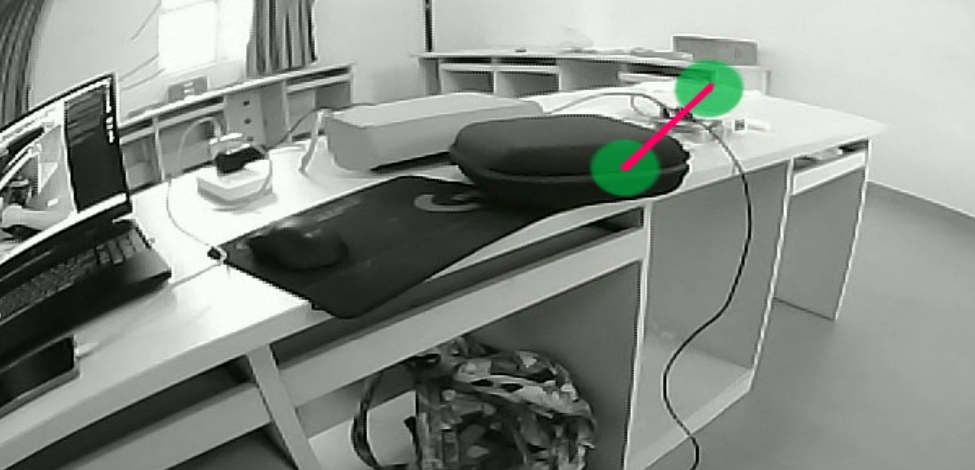
Hi @user-7c9706 , Pupil Player actually always shows multiple green circles by default. It is visualizing all gaze points for the current world camera frame. Since gaze is sampled at a higher rate than the world camera, there will usually be multiple green circles per world camera frame under typical recording conditions. The red line is also a default visualization and connects the green circles, being a kind of rudimentary scanpath. You can find more details in the Pupil Player documentation, under the Visualization Plugins section.
Also, the green circles actually almost never perfectly overlap, due to the natural constant fluctuation of gaze and any noise/jitter in the signal. They will overlap significantly less during a saccade, for example.
Hi, we had a problem with the Pupil Core extensions (the orange ones) in which the eye cameras could be placed as one of them broke. Is it possible to obtain a replacement? Thanks!
Hi @user-6a6d64 , yes. Please send an email to info@pupil-labs.com with the request.
Great, thx!
Hello everyone, I have encountered something during use that I do not fully understand.
According to the official documentation and its referenced papers, there is a 3D coordinate space centered at the camera origin used to represent gaze direction. Based on this 3D coordinate system and the calibration data from the world camera, a normalized 2D coordinate can then be obtained to represent the gaze position within the projected image.
However, during my recordings, I found that a considerable portion of the normalized coordinates fall outside the [0,1] range. I am not quite sure why this happens. Additionally, the data shown in the figure comes from the fixations.csv file.
I would greatly appreciate any explanation or insight into this issue.
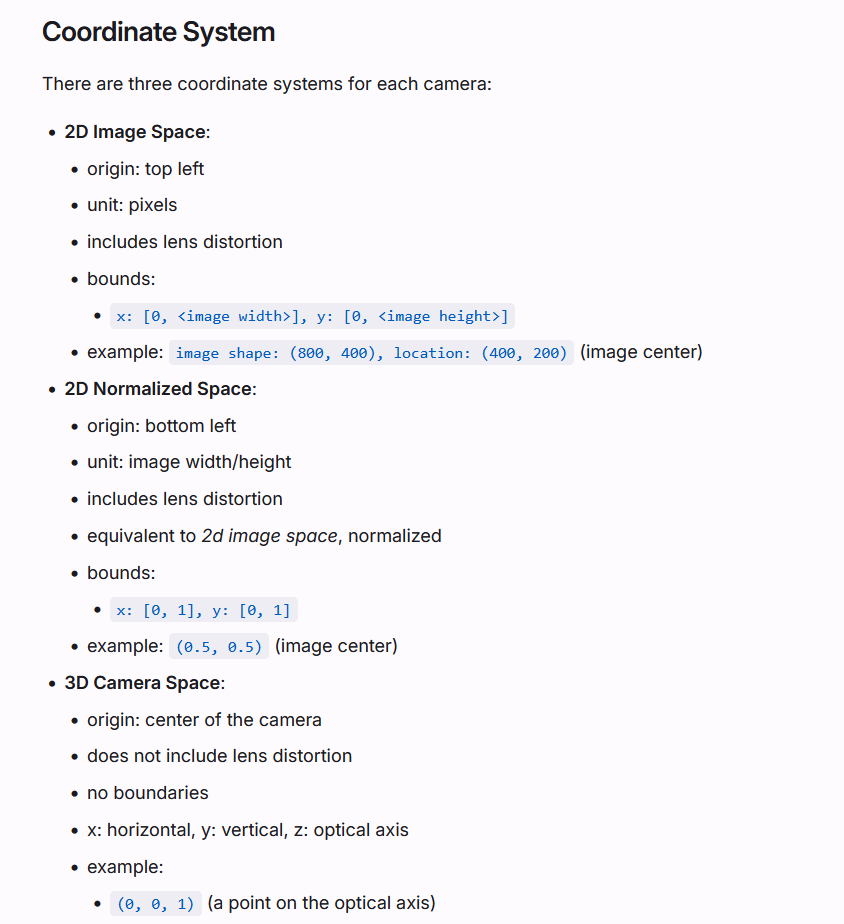
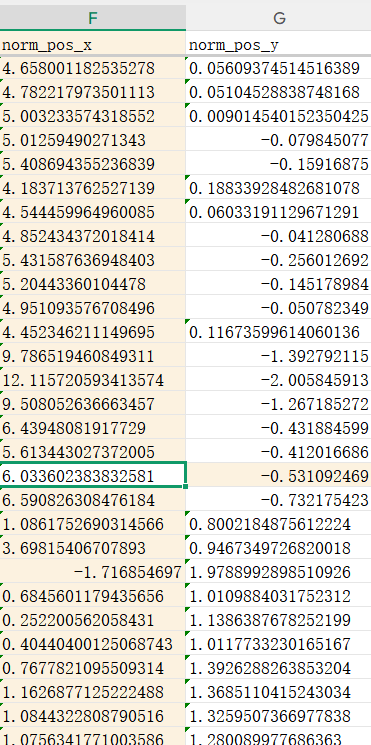
Hi @user-7c9706 , it’s a bit hard to make a judgement without seeing the recording. Would you be able to share it with [email removed] Then, we can provide more direct feedback.
Thank you for your reply.
This recording may not be very representative, since it was recorded using a Raspberry Pi as a relay. Due to the relatively low image transmission quality, many of the estimated gaze points are probably not very accurate.
I mainly want to understand whether this behavior is actually abnormal, or if I may have misunderstood how the normalized coordinate space works.
Thank you again!
Sorry for the interruption. I rechecked the data recorded under normal conditions, and everything appears to be working correctly. It seems this issue was indeed caused by the image transmission quality.
If I remember correctly, you downsample the world camera feed on the Raspberry Pi end, right? The Pupil Core code will probably need to be adapted for the changed world image size.
Yes, but my world camera resolution is 640×480, which I remember should already meet the recommended requirements.
I guess this issue is most likely caused by the poor quality of my Wi-Fi connection, I'm going to try this system on a better network.
Do you have also the world camera settings in Pupil Capture configured for that resolution?
Oh, I hadn’t noticed that before. I will make the adjustments and try recalibrating. Thanks.
Pupil Capture crashed at the end of one of our experiments, leaving the mp4 files to be suffixed with .mp4.writing. Is this advice still the most promising potential fix? https://discord.com/channels/285728493612957698/285728493612957698/1073541118404349962
Hi @user-f6a550 👋 ! Yes! that's still valid.
Hi Pupil Labs Support Team and everyone, I am currently in the experimental design stage of a research project using Pupil Core with task-based experiment, and I would really appreciate some guidance and recommendations from your technical team and researchers with practical experience.
My study will involve simultaneous eye-tracking and EEG recording, and I have a few concerns regarding participants with refractive correction:
As I am still designing the experiment, I would greatly appreciate any advice, shared experiences, technical documentation, or practical considerations from your team.
Thank you very much for your time and support~
Hi @user-d72f9a , thanks for sharing the details!
Pupil Core is not explicitly desinged for participants with glasses, but some people have successfully used it that way. The important thing is the positioning of the eye cameras and making sure that the glasses and Pupil Core remain stable on the head. If Pupil Core slips, you need to pause the experiment and re-calibrate.
Otherwise, so long as the pupils are consistently detected and the 3D eye model is well fit, then you can proceed to calibration.
For the participants that were wearing contact lenses, could you share an example recording with [email removed] Then, we can provide better feedback.
For question 2 and 3, many researchers have used Pupil Core with EEG. You can check our Publication List to see how others have used it with EEG.
thank you a lot. I already sent an email to data team.
Thanks, we received the email and responded.
Hello everyone,
I’ve noticed that using the conventional Screen Marker Calibration Choreography only allows calibration over a relatively small gaze range, which is insufficient for my needs. Therefore, I tried using Post-hoc Detection, but I observed two issues with this calibration mode:
When transferring the post-hoc calibrated mapping to other recordings, there is still a noticeable loss in accuracy. The existing calibration methods do not work very well when the gaze points are at different distances.
Does anyone have mature or effective methods to handle situations where gaze points vary in distance?
Thank you!
Hi @user-7c9706
hello! I'm I trying to set up an experiment using the pupil core, working with gaze data via the IPC backbone. When I'm using Capture, gaze messages start transmitting after I complete calibration as expected. I'd like to use Service instead of Capture, as it's more lightweight. But I can't figure out how to run the calibration in Service.
I can connect to Service via zmq, recieve pupil data and check for sufficient confidence levels. But if I try to start the calibration with a pupil_remote.send_string("C") , Service tries to run the hmd_plugin, can't find it, and crashes "[ERROR] launchables.service: Process Service crashed with trace: Traceback (most recent call last): File "launchables/service.py", line 287, in service File "calibration_choreography/hmd_plugin.py", line 81, in on_notify File "calibration_choreography/hmd_plugin.py", line 126, in _prepare_perform_start_from_notification KeyError: 'translation_eye0'"
I've been delving deep into the API docs, and while there's a snippet of code to set the calibration choreography to the run the plugin hmd_plugin, but I can't figure out how to tell it to use a Screen Markers or Single Marker Choreography. I'd love any help/advice
Hi @user-7dbafa , Pupil Service is designed for situations where you will not be using the World Camera, such as in VR headsets, as documented here. The World Camera feed is necessary for doing a standard calibration, such as is done in Pupil Capture.
May I ask what your experimental/research goal is? Since otherwise, you need to program your own custom calibration routine and present custom stimuli, similar to what hmd_eyes does, if you prefer to use Pupil Service.
Also I can't do anything with the ~/pupil_capture_settings/pre_recorded_calibration_setup file because of the data format, it's just nonsense in VS code or VI
Hi**@rob**
1.No, I did not turn off the Pupil Core or move it between the two recordings. These two recordings are basically continuous. 2.I haven’t tried placing the gaze targets at an average distance yet. My calibration method involves creating custom images for recording in order to perform Post-hoc Detection, and all of this was done on my computer screen.
Hi @user-7c9706 , thanks. Would you be open to sharing the 2 recordings from point 1 with [email removed] Then, we can provide better feedback.
With respect to point 2, since you create custom images, I assume you also have a custom routine for detecting them? Is it your own calibration plugin?
Otherwise, since you displayed them on a computer monitor, does this mean that the person moved to different distances for each target presentation?
Hi Pupil community, I'm posting this because I didn't find it in any of the DIY searches I did, but I saw lots of people with the problem. If you aren't seeing the cameras show up and your Pupil Capture screens are just gray: , after doing the troubleshooting the main support team has on the site, make sure you see if lisbUSBk steps were taken. https://github.com/pupil-labs/pyuvc/blob/master/WINDOWS_USER.md
I skipped this and saw lots of people showing their cameras working through Windows (as mine did) but not in the software. Best of luck!
Thanks for sharing this, @user-26a746 . Yes, this would be something to try. It is listed in a few Discord posts here, but always good to remind others. We can probably find space for this in the Pupil Core Documentation.
For sure, its definitely in there but in different pages and outside of the main guidance or troubleshooting. It was a mistake on my part, but a big duh once the libUSBk and Zadig softwares did their part. Thank you guys for letting the DIY community work in here. 🧡