
I have a very strange hardware issue with our pupil core. Every time I connect the eye tracker to a computer and launch Pupil Capture, only the left eye camera is detected. If I unplug and reconnect the right eye camera, nothing happens. However, if I swap the eye cameras (left eye camera on right side, and viceversa), and then plug them back where they belong, both eye cameras are detected. If I disconnect the eye tracker and connect it again, then again only the left eye camera is detected. Any ideas how to fix this? It seems to me both and both connectors work. I don't know if this could be fixed with a firmware update or something like that
Hi @user-5ef6c0 👋 Please reach out to info@pupil-labs.com in this regard
Hi Pupil Labs, I am currently creating an order for our University to purchase multiple pupil labs eye-trackers. Could you let me know if these integrate with any motion capture system such as Vicon and what additional equipment/ information is necessary?
Hi @user-4e60e1 👋 . It seems that some of the errors are not directly related to Pupil Core (e.g., ERROR Support for the sounddeviceaudio backend is not available this session. Please installpsychopy-sounddevice and restart the session to enable support).
What version of Pupil Capture are you running? Could you try connecting the core headset to your computer and opening Pupil Capture without running your psychopy pipeline? This will help us understand if there are errors related to the core pipeline per se or if the problem appears when running it with psychopy.
Hi @user-c5ca5f , latest version of Pupil Capture still works with Pupil Mobile, although kindly note that the app is no longer maintained and is not available on Google Play Store.
Existing Pupil Mobile bundles will still work, but we are no longer developing or maintaining the Pupil Mobile application or selling the Pupil Mobile bundle (we will not be able to assist if there are issues with that app).
We recommend a small form-factor tablet-style PC to make Pupil Core more portable.
Regarding the steps, you only need to connect Pupil Core to your device, start the application while connected to the same local network as your laptop.
In your Pupil Capture instance, enable the network API plugin if is not, go to camera sources, enable manual selection and the camera feeds should show up there.
Thank you ! I tried the steps but the camera feed doesn’t show up. It says local usb : camera disconnected and when i select unknown @ local usb as input camera in video source, it says the selected camera is already in use or blocked
It is recognizing the device as a remote recorder but not able to show the camera feed
Also when I enabled the network api it says “Could not bind to socket tcp://*:50020. Reason:Addres……”
What is the maximum resolution of the camera included in the HTC Vive Add-On?
Hi @user-5251cb. The eye cameras for the Add-on run at 192x192 pixels. Tech-specs available here: https://pupil-labs.com/products/vr-ar/tech-specs/
@neil Hi! We added some markers in Unity, but when we click on Add surface in Pupil player, it shows that no marker has been added. What should we do?
Hi @user-6b1efe ! You can check the marker detection progress in Pupil Player's timeline to see if the markers are being detected.
If they are not being detected, you may need to adjust the size or contrast of the markers to make them more visible.
If the markers are being detected but not showing up when you click "Add surface" in Pupil Player, make sure that you have at least 2 visible markers in the scene(this is on the video frame). Pupil Player requires at least 2 visible markers to detect a surface successfully.
Thank you very much for your reply. Your solution has been a great help to me.
Thank you for your response. I have a few more questions. I'm looking to obtain a sharper eye image. With a resolution of 400x400 for the 120Hz camera, is the eye image sharper than that of the 200Hz camera? Also, is it possible to mount the 120Hz camera on VR and Pupil Core devices?
You can select 400x400 @ 120 Hz in the software. The VR Add-on cameras are not interchangeable with Core as they have specific enclosures and mounts.
Hi @user-6b1efe how can I find fixtion duration and fixation count of different dynamic AOIs using the pupil core software for a recording done from the pupil core eye tracker??
@user-c8a63d @user-d407c1 @neil kindly consider my question asked above and provide me with an solution!!.
The Surface Tracker plugin enables you to create AOIs and subsequently investigate fixations in them. Recommend checking out the Surface Tracker documentation to get started 🙂 https://docs.pupil-labs.com/core/software/pupil-capture/#surface-tracking
Will it work for dynamic AOIs also??
Hi there, my right eye camera has stopped working. I get an error saying it could not connect to device and the capture screen just shows gray. the other eye cam and the world cam both work. Hoping there is a software fix but afraid it may be a hardware issue.
Hello pupil labs, I am using pupil VR/AR with HTC Vive (steam VR) and unity, and I see that the eye tracker is supposed to support data collection at 200 Hz, however, I seem to only get it at 45 Hz. Is there any way to fix it?
What OS are you using and what version of Pupil Capture?
Windows 11 and pupil capture 3.5.1
200 Hz Pupil Capture
Hello, is there another TCP port that can be used to connect Pupil Mobile with Pupil Capture through the Network API (Pupil Core glasses)? We have been trying 50020 and it doesn't seem to work. We've gone back and forth with our University Networking IT folks and we're having great difficulty figuring out why the signal is being blocked.
Hi @user-2e5a7e. I've often run into problems with institutional networks blocking connections. In general, and to save headaches, I recommend using a dedicated router or local hotspot set up on the computer that's running Pupil Capture.
Thanks Miguel! Is there more information on how to run a monocular post-hoc detection? I am not seeing that as an option for the post-hoc detection.
Hello. I'm using pupil core headset and pupil capture v3.4.0. I use the single marker calibration for 3D mapping. In the process of calibration, there is not a feedback whether the participant is effectively looked at or not on the program interface when the participant looks at the calibration surface. There is only a completion process by the software when showing the stopping surfaces. Please help! Thank you very much!
Hi @user-040866! You are right, there is no realtime feedback on whether the subject is looking at the single marker, unless you previously ran a calibration and its loaded.
Basically, if no calibration has been recorded before, it can not estimate where the subject is looking at. Once you complete a calibration it will be stored and next time you open Capture it will load it, so you should see the gaze point as a pink circle.
Thus, you will need to run a calibration before, and use that to estimate whether the participant is gazing on the marker. BTW if you are interested on how the single marker plugin works you can check https://github.com/pupil-labs/pupil/blob/master/pupil_src/shared_modules/calibration_choreography/single_marker_plugin.py
If the pink marker is too big and occludes the single marker, note that you can modify it using this plugin. https://gist.github.com/mikelgg93/c8d6822cb20cc2a999ef1ab490121876
BTW is there any reason why you are not using the latest version of Pupil Capture 3.5?
Hi**@user-d407c1**! If I want to get the gaze point in a real scene, how can I do the calibration in a real scene? In other words, I dont want to use the screen marker.
Do you mean the Natural Features Calibration? https://docs.pupil-labs.com/core/software/pupil-capture/#natural-features-calibration-choreography
While the natural features calibration it is recommended on a 2D surface, it is not restricted to a plane, you can ask your participant to look at the edges of the table and mark those.
That said, you can also use the Single Marker calibration, moving the marker around the table.
Thank you @user-d407c1 / Miguel (Pupil Labs)! Does the latest version 3.5 have the ability to give feedback? I remember when I was using an older version of about 2.7, there was a feedback function. It does help with calibration. Thanks!
Not explicitly, as I mentioned it would display recent gaze positions using the previous calibration. I don't think there was ever one feedback utility that updates the calibration realtime as you look at points and gives you feedback. But for what you are looking to do, using the old calibration would be probably good enough.
Thank you**@user-d407c1**. I will give it a try.
Hi, I am exporting data from Player using the surface tracker plugin, but sometimes this error appears "player - [ERROR] surface_tracker.surface_tracker_offline: Marker detection not finished. No data will be exported." I don't know how to solve it, because in some videos it works perfectly without changing anything, and in others it doesn't even if I wait more time. Thanks in advance.
Hi! I try to record data with PupilInvisible, but eye cameras don’t connect to the companion. They are not recognized. What problem could it be?
Hi @user-1e429b! Please contact info@pupil-labs.com on this regard. Also, for clarity, in the future, I would kindly ask you to place questions about Pupil Invisible on its dedicated channel 🕶 invisible
Hi**@user-d407c1**! if I see something in the real scene,can i use the calibration by using the screen marker?
If you plan on measuring offscreen content, it is recommended to use a physical marker for calibration instead of relying solely on screen-based calibration. This is because screen-based calibration can be affected by various factors such as lighting conditions and screen resolution
@user-d407c1Thank you! As you mentioned yesterday,I prepare to use the single marker to calibrate, By the way,I want to ask where is the right place to set the marker, should I keep the marker position unchanged.(My purpose is to stare at objects in the scene,Objects in real scenes have 3D coordinates information)
Either you move it around the area you want to calibrate and ask the participant to look at the center of the target, or you keep it static at the center of your area of interest and ask the participant to rotate the head while fixating the target.
With Pupil Capture you won't be able to capture 3D information per se, if you want to record the 3D coordinates of objects in the scene, you will need to use additional equipment such as a motion capture system or a stereo camera setup, rgb-d sensors or use monocular depth estimators.
Thank you very much**@user-d407c1**! I would combine the 3D gaze point from the Pupil-core with the 3D information from the scene captured by other cameras.In order to verify the positional relationship between the gaze point and the objects in the scene, do you think it is feasible in terms of the three-dimensional accuracy of the gaze point?
This is possible and others have done so. However, you'll need to ensure you get a good calibration with accurate gaze estimates, or else the signal can end up quite noisy.
Also note, don't rely on gaze_point_3d_*. The depth component of this can be quite noisy. Recommend instead that you project a gaze ray into your motion capture space and then intersect that with known objects in the scene.
Hi all, is it possible to use jetson nano (or other devices like this) with Pupil core to acquire eye tracking results in real-time?
Check out this message for reference: https://discord.com/channels/285728493612957698/1039477832440631366/1067346082931150928
Hi! As far as I know, it is recommended to split an experiment into blocks and re-calibrate. How often/ after how much time should you re-calibrate the Pupil Core glasses? Let's say my task takes 15 minutes and the participants are instructed to localize a loudspeaker with their eyes (fixate it), how often should I re-calibrate? The accuracy should stay below 2.5°
@user-d407c1 I'm trying to use Pupil labs API. After I installing related plug-in, I tried "Find one or more devices" simple example. However, it failed to search my PupilCore. During the execution, PupilCore was connected to PC through USB-C cable. What should I do to find the device?
It sounds like you're using the real-time api that's designed for Neon and Invisible. This won't work with Pupil Core. Pupil Core's API documentation can be found here: https://docs.pupil-labs.com/developer/core/network-api/#network-api And here are some example scripts: https://github.com/pupil-labs/pupil-helpers/tree/master/python 🙂
Hi @user-e91538 👋. This depends on quite a few factors, such as headset slippage, required accuracy etc. In general, a 15 minute recording while keeping accuracy below 2.5 degrees sounds reasonable, so long as headset slippage is kept to a minimum. You can also validate the calibration part-way through if required, to check your accuracy is still okay.
thank you. You're right, that is a good point!
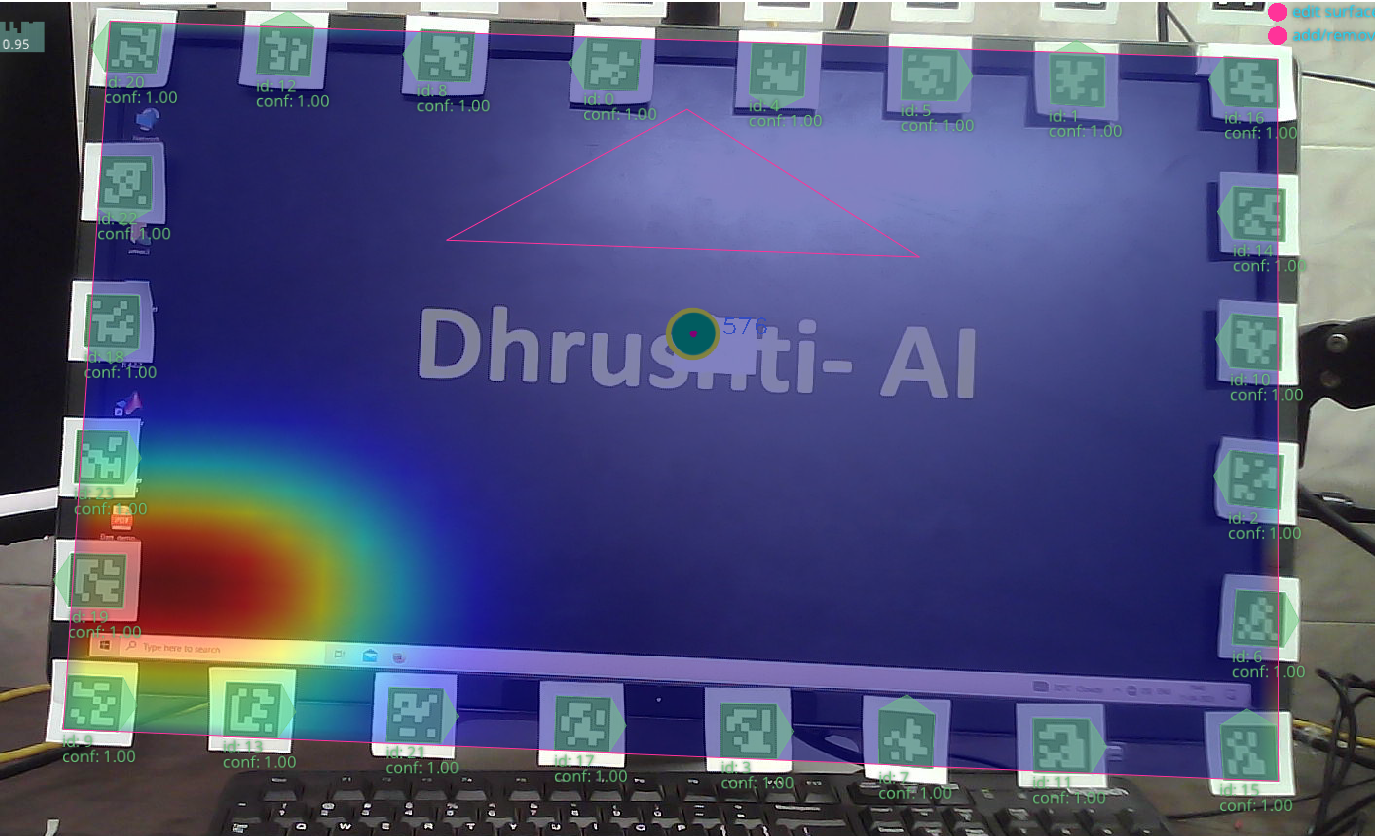
Query related to Surface Tracker: The subject is looking at the center of the screen all the time (See fixation) but still the heatmap is dense towards the bottom left corner. I also tried changing the surface X and Y 300 and 200 respectively but nothing happens (Screen size is roughly 54 cm * 32 cm). How can I rectify this error? Am I doing anything wrong here?
@neilThank you very much! I will try it
Hi guys. I have problem with Pupil Core. When i make recording with surfaces I can see the surface selected on the recording in pupil player, but when I export it i get no results for surface csv. What's wrong? Any ideas?
I use 4 qrcodes in the corners of the a4 paper
Hi @user-876467! That definitely doesn't look quite as expected. Can you try to re-define the surface and see if the new heatmap looks any better?
I tried removing the surface and re-defined the surface at a different frame. The result does not change much.
Hey @user-612622! Are you sure that the surface tracking had finished processing before you hit export? Sometimes that can lead to confusion as it won't populate the surface folder in the export directory.
thats the catch! Ive heard that youy need to wait for it. Okay, will try this. Thanks!
Hi there, I'm currently using the pupil core headset with the pupil lsl relay to synchronise data with an eeg device, i've done a capture today for eyes open and eyes closed , after calibrating in the pupil capture .exe i can see the individual eye id confidences are quite stable - going low when an eye is closed and high when an eye is open, however my lsl recorded averaged confidence in the first channel of the gaze meta data appears to give the opposite result, i get a high confidence for eyes closed and low confidence for eyes open and the data is quite unstable. I've attached an image here showing my eyes open and eyes closed epochs matched with FP1 and 2 to show eye blink artifacts with gaze data channels ["confidence", "diameter0_3d", "diameter1_3d"]
Any advice on how i may be interpreting this data wrong or steps i may be missing to validate/calibrate would be greatly appreciated.
Hi there I m currently using the pupil
Hi, I have some problems with Pupil Capture v3.5.1 that I use the Logitech C922 PRO as the eye cam, it shows "No camera intrinsics available for camera (disconnected) at resolution (192,192)", what should I
给 👁 core 发消息
Accuracy Visualizer plugin
Hello, we are working with data from Pupil Labs Core that we want to export via Pupil Player. After several short recordings with good quality and no problems, we now have (accidentally) very long recordings (~60 minutes) and Pupil Player hangs every time when exporting the World Video. The Task Manager also shows that there is no process load. Next time we will create several smaller blocks. However, this does not help us with the current situation. Do you have any tips on how to prevent the freeze? Any advice would be appreciated. Thanks! (Windows 10, Pupil Player v3.5.1)
Hey @user-e91538! 60 minutes is a long recording indeed. It might take considerable time to render the video. When you say Pupil Player hangs, it might just still be rendering. How long did you leave it?
Surface tracking
Hi there, working on exporting the calibration data (accuracy and precision) of post-hoc calibrations. I found this repo: https://github.com/pupil-labs/pupil-core-pipeline which exports the information I am looking for but I think it is only exporting calibrations taken during the recording (a couple of recordings have both), and not any post-hoc calibrations done. any help would be appreciated
Hi I have a question about potential hardware repairs. Our lab has several pupil cores that we bought a few years ago (in 2020 I think). Over the past few months to a year one of them has become increasingly temperamental from time to time. Often one of the eye cameras isn't detected and needs a fiddle before it works. However, this has gotten increasingly worse over time to the point it is no longer reliable to use. When running pupil capture the video feed for the eye camera in question is just grey (no signal) and will only sometimes turn on if I unplug the wire that connects the eye camera to the frame. I suspect it has a fault connection.
Do you have any advice for fixing the problem or do you offer repair services?
Many thanks!
Hi there, I've been using Pupil Cores for several years, but mostly for outdoor research. I'm working on a lab study now and couldn't seem to get the calibration right. I used screen marker method but the tracking was not accurate at all. I had to use natural marker. How does screen tracking actually work? The capture app seems to recognize a surface area corresponding to the monitor, but how does the app know where the monitor is, when the subject moves his/her head?
Additionally, there seems to be a huge difference in field of vision between 720p and 1080p. Which is recommended for on-screen tracking? Thanks!
One of the pinhole lens caps fell off of our Pupil Core, we have temporarily and successfully re-attached it with tape. Is there a recommended adhesive for re-attaching it more permanently or does the device have to be sent back? We are in a robotics research lab that deals with a lot of small electronics, so we would be willing to attempt to re-adhere it ourselves.
Thank you! ☺️
Hi @user-1b544f! I've spoken with the HW team, and they say something like this would be appropriate: https://www.amazon.de/-/en/Vibration-Practical-Multi-Purpose-Adhesive-Compatible/dp/B09Y5XT8F1/ref=sr_1_1?crid=19XMEZT85KJSB&keywords=imponic%2B7000&qid=1681721563&sprefix=imponic%2B7000%2Caps%2C83&sr=8-1&th=1 Take great care not to get any on the camera sensor, however!
Hi May I ask if there is an introduction to the technical parameters of the Pupil Core camera, such as the current and power of the eye camera? Thank you
Hi @user-a09f5d 👋 I’m sorry to hear you have issues with your Pupil Core. Please reach out to info@pupil-labs.com and a member of the team will help you to promptly assist you in diagnosing the problem and get you running with working hardware as soon as possible.
Great! Thanks a lot. I'll drop an email to you now.
Hi there @user-5346ee! 👋
When it comes to calibration principles for Pupil Core, whether you're working in or out of the lab, the same rules apply. Even if the calibration marker appears on-screen, the gaze coordinates are still given in scene camera coordinates. The portion of the visual field that corresponds to your monitor is just an area, so if the person wearing the Pupil Core turns away from the screen, the calibration will still be accurate.
If you need gaze in screen-based coordinates, you'll need to take an extra step and use our Surface Tracker Plugin. You can find more information about it here: https://docs.pupil-labs.com/core/software/pupil-player/#surface-tracker.
Whether you use the narrow or wide-angle lenses for on-screen work depends on your specific use-case. The narrow lens can make your screen appear larger in the video. It's important to note that if you switch lenses and are using the 3D pipeline, you'll need to re-estimate the narrow lens intrinsics to maintain calibration accuracy. You can learn how to do this here: https://docs.pupil-labs.com/core/software/pupil-capture/#camera-intrinsics-estimation. Estimating the intrinsics can be tricky, but give it a try and let us know how it goes!
Neil, thank you! You won't believe what happened. By using just one large 27" monitor, the participant was actually staring at an infinite loop of the Pupil Capture window. When I instructed them to focus on the top left corner of the window, they were actually looking at the window inside the Capture app. It's quite funny and we had a good laugh after we realized what went wrong.
Hi**@neil**,I want to get the intrinsic parameters of the camera by reading .intrinsics file,but i can't open it correctly,what should I do?
Hi @user-873c0a 👋 Please check out this message (https://discord.com/channels/285728493612957698/446977689690177536/913512054667747389) - it contains a code snippet that it may be helpful for you
General tech-specs for Pupil Core can be found here: https://pupil-labs.com/products/core/tech-specs/ Although we're unable to share specific plans for the camera sensors
Thanks
Hi Pupil Labs team. Due to our ethics committee, I need a statement on the risk of using the Pupil Core (e.g. using infrared light on the eye). Have you published a statement on this, for example regarding compliance of standards/norms?
Hi @user-e91538 👋 Pupil Core has undergone and passed independent testing for IR exposure. Pupil Core conforms with the EU IEC- 62471 standard for eye safety.
The above info is also included in the getting started booklet that accompanies Pupil Core. If you'd like additional information, just let us know 😸
Great, thank you! I will get back to you if necessary
Thank you very much**@eleonora**! it does work!
Hi, i{m having an issue you might help me with. I'm using the Network API and python, but the calibration process is not comming throgh. According to the documents it should be something like this: pupil_remote.send_string('C') #start print(pupil_remote.recv_string())
sleep(5) pupil_remote.send_string('c') #stop print(pupil_remote.recv_string())
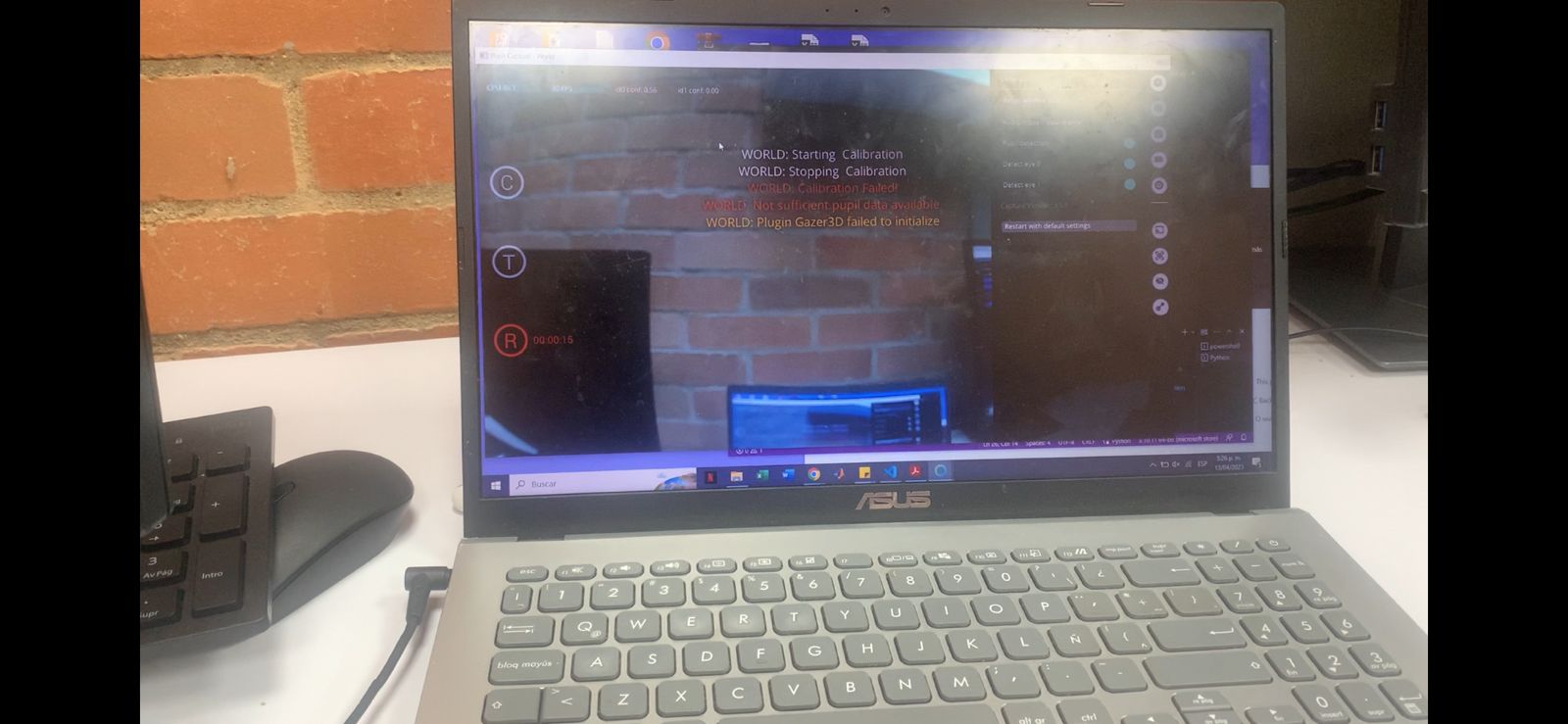
An the error I get in pupil capture is: WORLD: Calibration failed WORLD: Not sufficient data available
Hi, @user-9a0705 - the code you shared only allows 5 seconds for calibration to complete, which almost certainly isn't enough time. Try increasing that to, say, 30 or 60 seconds and try again.
There may also be a better way to accomplish what you want, depending on which calibration method you're using. If you're using the Screen Marker calibration method, here's a snippet that you may find useful.
# Pupil Labs network API snippet to initiate calibration and wait for it to complete

import zmq
import msgpack

addr = '127.0.0.1'
port = 50020

print('Connecting...')

context = zmq.Context()
pupil_remote = zmq.Socket(context, zmq.REQ)
pupil_remote.connect(f'tcp://{addr}:{port}')


print('Sending calibration command...')

pupil_remote.send_string('C')
print(pupil_remote.recv_string())


print('Listening for calibration events')

pupil_remote.send_string('SUB_PORT')
sub_port = pupil_remote.recv_string()

sub = context.socket(zmq.SUB)
sub.connect(f'tcp://{addr}:{sub_port}')
sub.setsockopt_string(zmq.SUBSCRIBE, 'notify.calibration')

while True:
    topic, payload = sub.recv_multipart()
    message = msgpack.loads(payload)

    if topic == b'notify.calibration.stopped':
        break

print('Calibration process is done.')
Can I ask how to contact the sales team? My friend is interested in getting the device but has some questions.
Hi @user-6de7a6 👋 That's great to hear that your friend is interested in our products! Please feel free to contact us at [email removed] We'd be more than happy to reply to any questions your friend may have.
Is there any customer service number that we can call
So the best way to contact you is by email, right?
Is there any phone number he call
And will you be able to take order from China maintain?
Thank you so much, this helps me a lot. from what i´m understanding, this code doesn´t present a time stamp but lets the calibration run its couse, however long it might take. Will it work for the Natural Feature coreography using the april tags?
That's correct. The Screen Marker calibration ends itself after all the points are complete, and the snippet I shared waits for that to occur (however long it takes). The workflow for other calibration methods is different, and the code would need to be adjusted accordingly.
what is the solution for 'Bad File Descriptor'?
Greetings @user-c3db01 👋🏽 - sorry to hear you're having some trouble with Pupil Core. Could you provide more details about your configuration? E.g.
The more information you can provide, the easier it will be to help 🙂
the window suddenly disappears after this display
i'm using pupil core
Hello everyone, I have a question for you, is there any configuration requirements for a laptop to run Pupil Capture on a Win computer. I want to buy a Win laptop to run Pupil Capture
Hey @user-143990! When it comes to Windows Laptops, the key specs are CPU and RAM. We would recommend a recent generation Intel i7 CPU with 16GB of ram to get the most performance. Note: we prefer Apple silicon (like the M1 Air) as they work great with Pupil Core!
Hello. I try to synchronize multiple devices using the LSL. I already recorded from both devices and connected them to the LSL. I try to understand how to synchronize their outputs. I have from the LSL xdf file, and from the eye-tracker (glasses) the excel (as it downloaded from the cloud).
How can I do it ? I saw this option but I already downloaded the relay, so I'm not sure what to do next (and where I need to write this command)

Hi, @user-535417 - it sounds like you have already collected your data without using the pupil-invisible-lsl-relay. Is that correct?
We prefer to communicate with our customers via email for the best possible support. And, we do offer worldwide shipping, including to China!
We also offer the option for a demo and Q&A video call, so please let us know if you're interested in setting one up sending an email to [email removed] We'd be happy to assist you further in any way we can 😸
Wonderful. I will send you an email. A Demo and Q&A video call will be very helpful.
We used the pupil-invisible-lsl-relay. but we didn't downloaded the extra dependencies (I think)
It sounds as though you downloaded the relay, but perhaps didn't activate it. Did you use LabRecorder to create the XDF file?
When you have the pupil-invisible-lsl-relay running, you will see extra streams available in LabRecorder for gaze and pupil data. If these streams are selected in LabRecorder, they will be included in the XDF directly.
Thank you
Hi**@eleonora**! Excuse me,How can I open the .pldata file?
Hello @user-873c0a ! I'd like to share a previous message from my colleague that may be helpful for you in understanding how to work with .pldata files. You can find the message here: https://discord.com/channels/285728493612957698/285728635267186688/1093701066874433547
Please let me know how it goes 😊
@eleonoraSorry, I failed to implement it this time, I would like to ask if the language of this method is python language?😭 What is "fm." and "data" in the code.Specifically, if I have an A.pldata file, how do I open it correctly?
Hey**@user-873c0a** 👋. Just to take a step back, why do you want to read directly from the .pldata file? These files are an intermediate format and we usually don't recommend working with them directly.
@neilYou are right.These files are indeed rarely used. I'm just curious about some of the data.
They actually just contain the same data as you get in the .csv exports, but in an intermediate format that enables fast loading etc. Details of their structure here: https://docs.pupil-labs.com/developer/core/recording-format/#pldata-files If you're still curious and want to dig around, you can use this function to extract and print out the contents: https://gist.github.com/papr/81163ada21e29469133bd5202de6893e#file-load_pldata_files-py
@neilThank you very much for your help, I really appreciate it!
Hello,
I have previously described the blurry-iris problem (https://discord.com/channels/285728493612957698/285728493612957698/1070771039509938327) that happens to my female participants who wear makeup on a semi-regular basis.
Surprisingly, today I have a male participant who had the same problem but I have his confirmation that he never wore eye-makeup or put any eye products into his eyes.
Any idea what could be causing this? I've already made peace with the prospect of not being able to use any eye-tracking data from the majority of my female participants, but now I'm getting worried about whether the same would happen to my male participants.
Hi @user-89d824 👋 ! I am sorry to hear you are experiencing these handicaps, it's possible that the issue with the male participant's eye camera is not related to eye cosmetics. There could be other factors that affect the quality of the eye camera image and the pupils image quality, such as lighting conditions, camera settings, or even the participant's tear-film. Without the full picture, is hard to know but here are some possible reasons.
The lighting conditions: Make sure that the room is well-lit and that there are no bright lights or reflections that could cause glare in the eye camera image. Are you using any other light source with NIR (near infrared light) that could be causing a bright pupil effect on the pupil's edge?
Adjust the camera position, move it and position it in a way that reflections are not visible and you see a sharp image on the eye camera.
Adjust the camera settings: Try manually changing the exposure settings to optimise the contrast between the pupil and the iris.
Clean the eye camera lens: Eye camera lenses can get dirty over time. Try cleaning the lens carefully with a microfiber cloth.
Pupil Core eye's cameras are arrested with glue to fix the focal length, but it could be that the cameras focal length moved and the whole image is out of focus? Can you place a grid paper at eye distance from the camera and check if the images appear blurred?
Also, would you mind sharing a recording made under normal light conditions and in your experiment conditions with data@pupil-labs.com
Hi, i'm trying to convert pupil time to system time but having a hard time locating the System Time in the files that download to my computer. I'm trying to use this code: https://docs.pupil-labs.com/developer/core/overview/#convert-pupil-time-to-system-time Also, as I'm working with the fixations, are the pupil times the ones in the csv file named fixations, the column that says: start_timestamp
Hi @user-9a0705 👋. For Pupil Core recordings, you can find the system time saved in the info.player.json under the heading start_time_system_s.
As regards the start_timestamp in the fixation export, you are correct – that is Pupil Time!
Hi Pupil Labs team, I am running a pupillometry study in which partiicipants listen to sentences, while looking at a dot at the center of the screen (light conditions are controlled etc etc). Following your suggestion in a previous communication I now freeze the 3D model, once I am sure I have a good tracking of the pupil and a good eyeball estimation. This all works fine. But: My study involves participants coming back for several sessions on 3 different days. Conditions and all are counterbalanced to control for that, but what I am worried about is the following: on each of these days I have to adjust pupil core (the pupil tracking and the 3D model) from scratch, before I freeze the 3D model. Thus, I practically pick a somewhat different eyeball model estimation each day. Will these models (3D model of day 1, 2 and 3) be comparable? This is important, because condition X might be tested on day one, while condition Y on day 3. I do calculate pupil dilation change relative to baseline in my pupil data analysis, but will the eyeball estimation not affect the scale (or at least the range) of the pupil dilation change reported? Because the baseline will be of different magnitude, depending on what size the eyeball was estimated to be each time. Thanks a lot for any suggestions on that!
Hi @user-2de265 👋 ! It is important to ensure that the 3D model estimation is consistent across all sessions to ensure comparability of the data. While it is true that the 3D model estimation may vary slightly from day to day, it is important to minimize this variation as much as possible. One way to do this is to ensure that the participant's head position and gaze direction are as consistent as possible across all sessions. Additionally, you can try to use the same calibration points and validation procedure across all sessions to ensure consistency in the calibration process.
Regarding the effect of the eyeball estimation on the scale of the pupil dilation change reported, it is possible that this could have an effect. However, this effect is likely to be small if the variation in the 3D model estimation is minimized as much as possible. Additionally, you can try to control for this effect by using a within-subjects design, in which each participant serves as their own control. This would involve comparing the pupil dilation change relative to baseline within each participant across all sessions, rather than comparing the absolute magnitude of the pupil dilation change across participants or sessions.
Overall, it is important to ensure consistency in the calibration process and to minimize variation in the 3D model estimation as much as possible to ensure comparability of the data across sessions. Additionally, using a within-subjects design can help to control for potential effects of variation in the 3D model estimation on the scale of the pupil dilation change reported.
Hi @user-d407c1 , Thanks for your very fast and informative reply. I do use a chin rest, which is in a fixed distance to the screen, and the gaze is always fixated on the dot on all days. Is the eyeball estimation size stored in some variable or can it at least be inferred by some of the other variables? Would it make sense to see how much this eyeball size estimation varies from day 1 to day 3? And what would be considered a "too large "variation btw days? My plan is indeed to compare pupil dilation change relative to baseline within each participant across all sessions, as different conditions will be tested on different days (counterbalanced). But will I not get still a different mm conversion estimation of the 3D model, depending on how big the eyeball size was estimated by the model on a given day? And as a result, could it not be the case that e.g. even though there is no real effect of a given condition, I might still "see" a difference, just because on day 1 the model estimated a different eyeball size than on day 3? And as a result the change in absolute mm is bigger in day 1 than in day 3? I was just thinking now: would it make sense to then look at both 2D and 3D data? To check if there are any major discrepancies btw the two when comparing across days? I hope this all makes sense to you!
Hey everyone. I know that Pupil Mobile is no longer officially supported, but where can I find the apk of the latest version? Thanks in advance!
Hey @user-586656! The Pupil Mobile app is no longer available - we made the decision to phase it out when we release Invisible at that provides a more robust to solution to mobile eye tracking. If you purchased the original mobile bundle and installed the app at then, it should still work as expected.
Hi, I'm affiliated with a university in Canada. We are looking at purchasing an eye tracker for our lab. Would it be possible to try one of your neon eye trackers to see if it would work for us?
Hey @user-fd43f5 👋. We can certainly offer a demo and Q&A session via video call - reach out to info@pupil-labs.com and a member of the team will assist you in scheduling a meeting!
Hi,
Thank you for replying my message. I've sent an email containing some recordings to the [email removed] email.
Two recordings were from the same male participant, and two of them were from myself taken under different lighting conditions.
2&3) I tried adjusting the cameras' positions and also the brightness contrast etc. for all my participants who have the same problem, but it never once worked.
I haven't tried options 4 and 5 but I've a short clip of myself using the eye tracker under the same conditions as any of my participants - the eye-tracker could detect my pupils just fine and the confidence level was very close to 1.00. They're in the email I sent you
Thanks @user-89d824 - we've got your email and will take a look at your recordings / provide feedback in the email thread 🙂
Hello @user-d407c1 ! I'm running Pupil Labs on a Windows 10 via MATLAB.
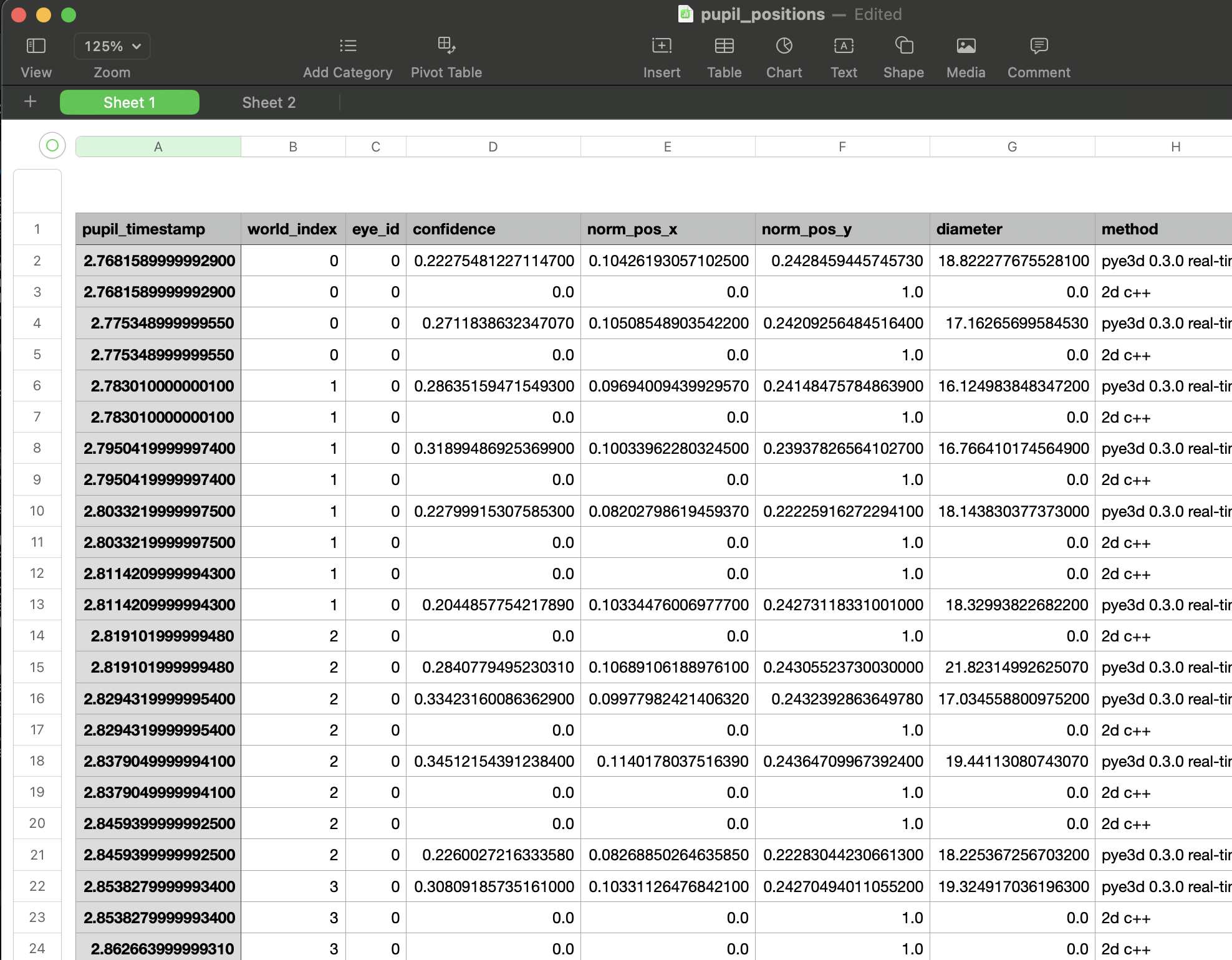
We would like to access pupil_timestamp's (see screenshot -- what time "Pupil Labs" thinks it is) in real time while our MATLAB script is running. In other words, we want MATLAB to know what "time" Pupil Labs thinks it is, and record timestamps in our MATLAB code that way.
Our script calls pupil labs commands to create annotations using matlab-zmq.
Is there a quick way to add our pupil labs annotations to this "pupil_positions.csv" file, such that annotations can be synced to the timing of different pupil positions?
We're currently leaving annotations using the send_annotations.m function in Pupil Labs' pupil-helpers module on GitHub.
I need some advice on how to approach participants with drops in sampling rate and confidence. Let me know how people approach this sort of cleanup. The sampling rate for each participant in my dataset differs.
Hi, I am using Pupil Core from Pupil Lab for an eye-tracking experiment and trying to obtain the precise position coordinates of the gaze point. However, I have encountered two issues:
Hey @user-a2c3c8 👋. Responses to your points below:
gaze_point_3d is known to be pretty noisy. gaze_point_3d is defined as the intersection (or nearest intersection) of the left and right eyes' visual axes. They don't always intersect, and especially not at far viewing distances. In my experience, it's not possible to reliably estimate viewing depth, for example, especially at distances over ~1 metre. What's your goal here, to investigate gaze in some 3d space?Hey @user-cdb45b! If you send annotations to Pupil Capture via the send_annotations.m function, they are stored automatically alongside the Core recording, with a Pupil timestamp. You will find these in the annotations export - as detailed here: https://docs.pupil-labs.com/core/software/pupil-capture/#annotations
Note that there may be some network latency associated with sending annotations. So depending on how little latency you require, it might be worth checking out this Python script - it uses a clock sync method to get lower latency: https://github.com/pupil-labs/pupil-helpers/blob/master/python/remote_annotations.py
Hi @neil ! Great, thank you. Since we are running our stimulus in MATLAB, I wanted to see if I could do this via the MATLAB functions that Pupil Labs provides in the pupil-helpers/matlab GitHub. I was creating annotations using the "send_annotations.m" function provided, but it seemed like I had to feed timestamps in on MATLAB - e.g.:
(The 'timestamp' in the keySet corresponds to the value 'startrt', which gets defined in my MATLAB script while the stimulus is running)
    keySet = {'topic','label','timestamp','duration'};
    valueSet = {'annotation.StimOnset',['StimOnset_' num2str(trial)],startrt,0.0};
    annotation = containers.Map(keySet,valueSet);
    send_annotation(socket,annotation);
    result = zmq.core.recv(socket);
Below is a screenshot of the timestamps left on the 'pupil_timestamp' spreadsheet that Pupil Labs outputs -- ideally, we'd love if the annotation left via 'send_annotation.m' could be a column of this pupil_timestamp spreadsheet that Pupil labs outputs (such that we exactly when annotations line up to gaze positions / pupil diameter).
If that's not possible, do you know if there is a quick way to get MATLAB to "know" what time "Pupil Labs" thinks it is, and have that time be what's left as the timestamp, instead of the time I'm defining in MATLAB?
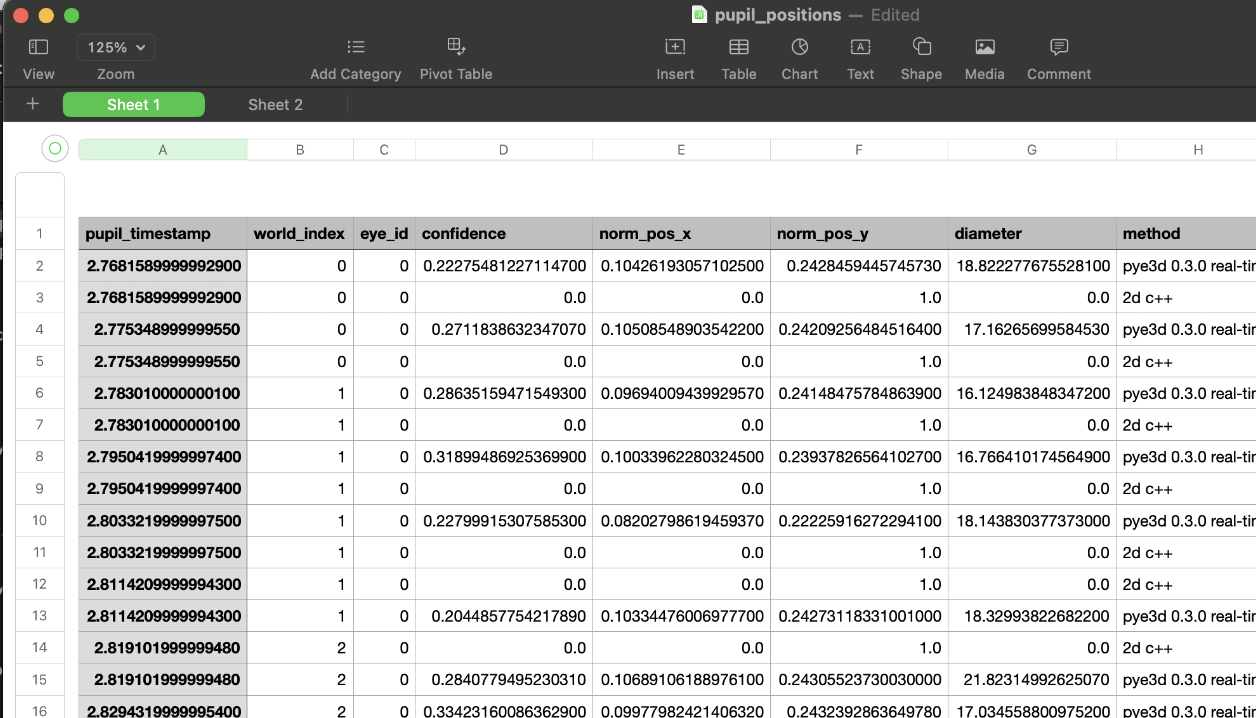
Hey @user-908b50! We usually recommend filtering out low-confidence data (<0.6). In terms of sampling frequency, it can depend a lot on what you're studying. Perhaps you can elaborate a bit on that? E.g. what's your research question, what are your outcome metrics? etc.
I am looking at whether eye movements can predict immersion during slot machine play across three different sensory feedback conditions. And, if these movements differ across the 3 sensory feedback conditions. The movements I am interested in are: fixations (count and duration) in each AOI and saccades in each AOI. I will also be looking pupil diameter in trial-by-trial analyses. I have been reading and it seems sampling frequency might affect saccadic velocity.
Hi All! Is there any data online that I could use to play with the Pupil Player before purchasing a tracker to use in the Capture program myself?
can someone form sales reach out? trying to find the delivery time for a Pupil Core
Hi @user-e91538 ! Please write at sales@pupil-labs.com to inquire about estimated delivery times. Kindly let them know to which country you will like to get it shipped 😉
Hi @user-477fe6 👋! You can find a recording sample along with a link to download the latest version of Capture and Player at the bottom of Pupil Core specs page https://pupil-labs.com/products/core/tech-specs/ Just drag the folder into the Pupil Player window (a grey window)
Hi there, since a few days we are having the problem the Invisible Companion app is not recording the world cam anymore. Gaze data was recorded and is working in live preview & calibration mode. I checked for the permissions, all seemed fine. It's on the OnePlus 8T. Still on Android 11. My next steps were:
After that the app kept crashing after logging in via Google Account. Crashing of the app happens 1-2 s after opening it. Doesn't matter if glasses are connected or not. Any idea what I could do next?
update:
Bests, Peter
Hi,
I'm trying to let an user read random webpages and play video games on their laptop, which can range from a few minutes to tens of minutes, and record what word was read at a given moment as well as their screen. Since some webpages have high word density, the spatial accuracy needs to be high to avoid detecting wrong word or not detecting when it should, though temporal precision doesn't need to be high. I don't need other features like saccades.
To make it work, I can smooth out the trajectory to make it more linear and less noisy. Also, I can use bounding box of each word and label each fixation to the word of the nearest close box.
Is there anything that I should look into or any feature of Pupil Lab that I can leverage for this purpose? Thank you for your help 🙂
Hi everyone, I am facing a problem. I am conducting an experiment which requires me to run my psychopy experiment in 1 computer, and the eye-tracker needs to be connected in seperate computer. I am communicating between these computers by using Network-API. The problem I am facing with this setup is that the calibration part is happening in the computer to which the eyetracker is connected and the experiment is presented in the other computer, whereas I need to do all the visual part in the second computer. So, is there a way to also do calibration in the second computer, to which the eye-tracker is not connected?
Hi @user-7c4009 👋. Are you using the Pupil Core PsychoPy integration? (https://psychopy.org/api/iohub/device/eyetracker_interface/PupilLabs_Core_Implementation_Notes.html)
Hey @user-34d5d1! Thanks for your question - just to confirm, do you already have a Core system and need support with your workflow, or just making some enquiries? This will help me to tailor my response 🙂
Hi Neil! I haven't got a Core system yet. But based on what I've found in this Discord and various papers, I believe this issue is what I need to keep an eye on. The case I'm testing is more like natural reading and browsing, so it doesn't necessarily follow the usual zigzag reading manner, which may make this harder.
Yes
Even though the calibration happens on a different screen in your case, it's actually the surface tracking markers that convert gaze to screen-based coordinates. So you should be okay with your current setup
Hi**@neil**,what's the relationship between pupil_timestamp and real time in video ?pupil_timestamp is from the pupil_positions.csv.
Hey @user-873c0a! Recommend reading this section of the docs - it has a pretty useful overview of the topic: https://docs.pupil-labs.com/core/terminology/#timing
Hi,have you solved your problems? I encountered the same problems as you 🙂
Core for reading studies
Hi all, I'm using the Pupil Core hardware and I have a rather simple question: I want to measure how far someone looks. I assume 'gaze_point_3d' contains the data I need here. My question is how this coordinate system actually works, where is the origin? And what direction is x, y and z? I assume the origin of the coordinate system [0, 0, 0] is the face position and if I want to find the gaze distance, I have to take the Euclidean norm of 'gaze_point_3d'? Is this correct? Thanks for the help in advance and best regards, brainlag
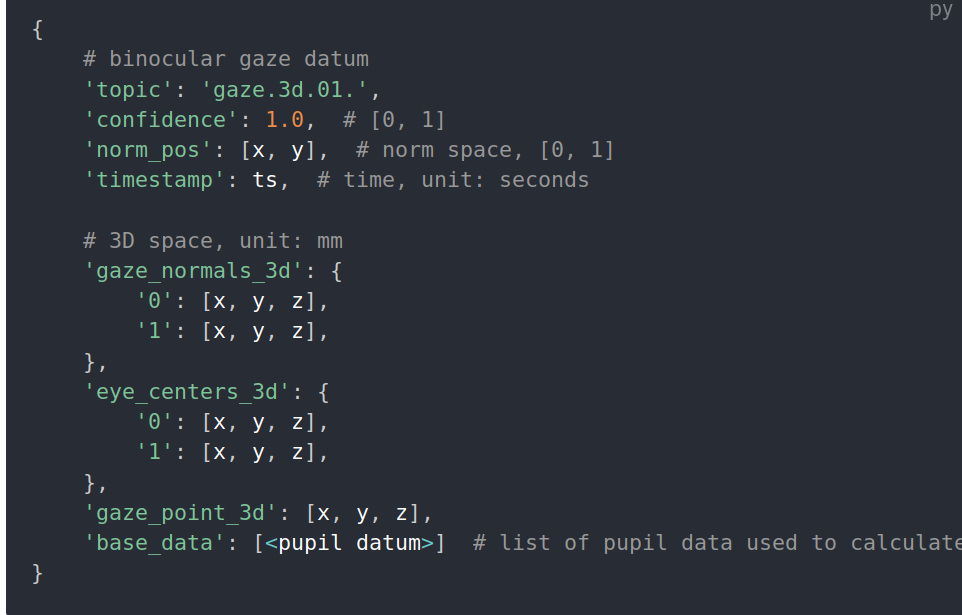
Hi @user-e91538 👋.
gaze_point_3d does have a depth component, yes. You can read about the coordinate system here (under the heading 3d camera space): https://docs.pupil-labs.com/core/terminology/#coordinate-system
However, the depth component (z-axis) is quote noisy. This is because determining viewing depth from eye data is pretty tricky. See point 1 of this message for an overview: https://discord.com/channels/285728493612957698/285728493612957698/1098535377029038090
If you're interested in tracking viewing depth, I can recommend looking at our Head Pose Tracker Plugin: https://docs.pupil-labs.com/core/software/pupil-player/#head-pose-tracking
Is there a paper or some sort of guidelines for dealing with difference in within participant and across participants sampling rate.
Also, I have been looking at the tech specs on the website. The sampling frequency of the eye camera is 200 Hz. That of the world camera can be one of three. On the box that we have in the lab, we were able to see this text: pupil w120 e200. Does that mean our world camera has a sampling frequency of 120 Hz?
The scene cam can sample up to 120 Hz, yes
Hi, I have a question regardin the export fixation files. From what i'm seeing in the documentation, it has to look like the first picture, but the information i'm getting is the seccond. Do any of you know why does it look different? Or if i have to do some sort of conversion in the cvs file?
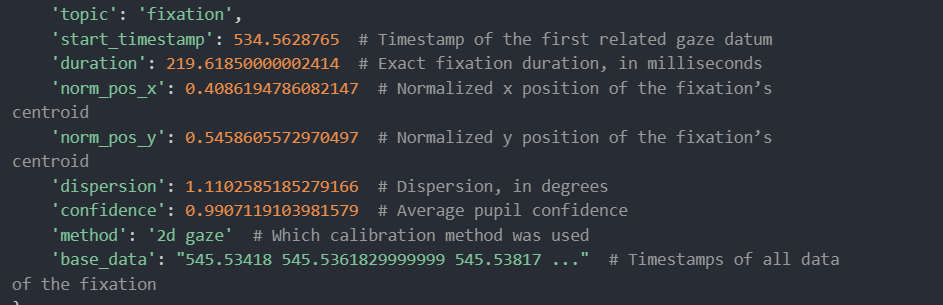
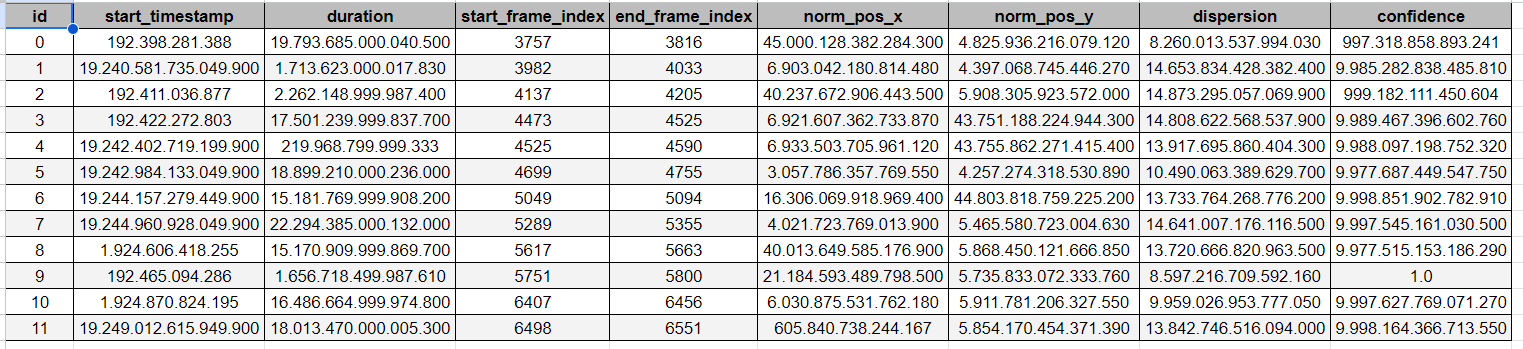
Hey @user-9a0705 👋. The first image is showing the raw data structure, more specifically, how one would see it if printed out in a terminal. The image on the right is the csv export, where we put the raw data in a more accessible and human readable format.
Slot machines
Hi Neil, thank you so much for your response. I'm a bit confused with the cvs data, as the numbers are so big in all of the columns. For example, for the duration I read that it is given in milisecconds, but the way it is written, sometimes it is a really big number 219 other times is 2. Why does this happen? Also, are the decimal points a sort of division or is everything in quatrillions?
Apologies for the confusion, I had misinterpreted your question. It looks like your spreadsheet software has incorrectly parsed the data - we've seen this a few times. What locale do you have set in your spreadsheet software?
So, does the sampling rate of the eye or the world camera affect gaze or pupil positions. I am thinking gaze positions would be more dependent on world camera and pupil on eye camera's sampling rate.
Gaze data is actually independent of the scene camera's sampling rate. Gaze is generated using pupil data. Let's jump into https://discord.com/channels/285728493612957698/1100139718022283326 to continue this discussion as these topics are related 🙂
I have it set like this, is in spanish, i don't know how to change the microsoft language, but I believe this is the locale you asked me for.
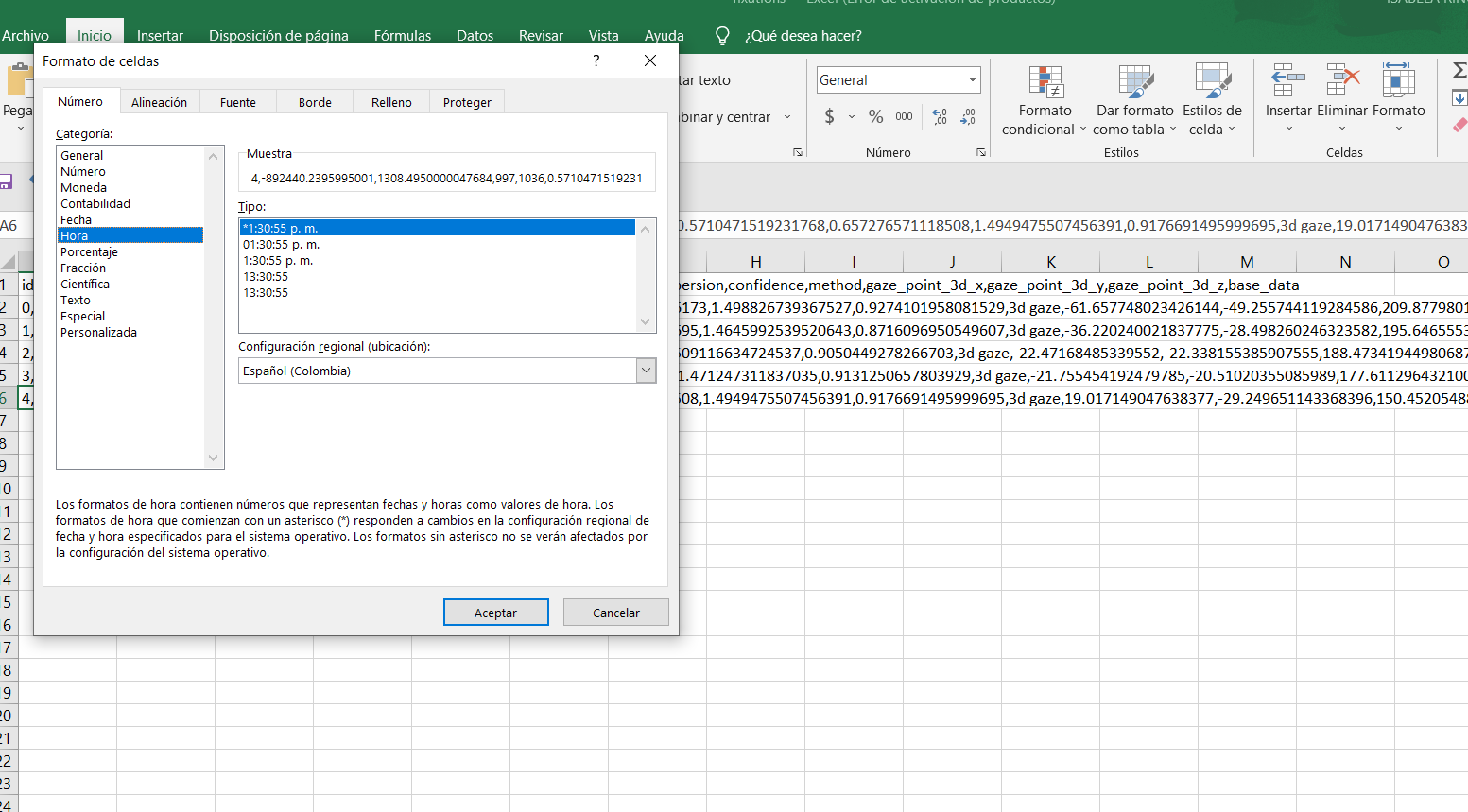
Those numbers look okay in your spreadsheet software now. You might need to set the delimiter as ',' when you first open the file such that the software knows how to structure the columns appropriately.
Hello! I am new to Pupil Labs/ Core and just received my device. I am able to successfully have Pupil Capture launch the World View but when I go to calibrate the device I get the error message that plugin Gazer3D failed to initialize. I am also not getting a pop up window with the pupil view.... Any help would be greatly appreciated
Getting started
Hi I have a question in regards to the Pupil Core hardware. I'm trying to connect the device to LabView in order to stream the data collected on the front panel of LabView. Has there been anything written on how to do this or is there already something developed in LabView that I could use for this?
Hi, Jared! We don't have any official samples for LabVIEW, but Core's Network Plugin provides a network interface with ZMQ, and there are ZMQ bindings for LabVIEW. So you should be able to connect LabVIEW and Pupil Capture with that - see https://labview-zmq.sourceforge.io/
Hi, I'm new to pupil labs core, and I am trying to figure out how to stream and record the data wirelessly. Besides, I also collect the EEG signals from another software in the meantime. This gives me another question about how to sync two data streams. Any suggestion would be really appreciated!
Hi, @user-fae66d 👋🏽 ! When considering a wireless solution, it should be noted that Pupil Core must be tethered to a PC or laptop. Our Pupil Invisible and NEON products provide more portable alternatives, so you might consider those depending on your environment/configuration.
As far as collecting EEG data along with the gaze/pupil data, you might consider something LabStreamingLayer (https://labstreaminglayer.org/). It is made for exactly this purpose, and we provide solutions for streaming data from Pupil Core (https://github.com/labstreaminglayer/App-PupilLabs) and from the companion app that Pupil Invisible and NEON use (https://pupil-invisible-lsl-relay.readthedocs.io/en/stable/).
Hi All, we just got some uncased Pupil core systems that we want to try to adapt to use in non-human primates. We need to custom build our own helmet, and some 3D models of the eye and world cameras would be helpful for prototyping. Is that possible?
Secondly, the pye3d model must have some constants that are based on human eye anatomy, would it matter on the substantially smaller eye diameters of non-human primates like macaques? Could we tune these parameters somehow?
The interpupil distance is also much smaller in monkeys, and I suspect this may affect some of the 3D estimations that may use binocular data?
And finally, as a user of Eyelink and Tobii Spectrum Pro hardware, I really appreciate the beautiful hardware and great software design coming from Pupil Labs, congratulations!!!
Hello there! Considering my research purpose, I am wondering can I only have a minimum duration threshold and leave the "maximum duration" in Pupil Player blank so as to present natural duration data?
Hi Dom, Thank you for your reply! Is that possible to use some medium to make the core wirelessly connect with a PC? The point is to let the subject can walk free inside a room (small room).
To add on to what @dominic suggested already - I would say a small tablet form factor computer/laptop in a backpack or shoulder bag would be the best option for Pupil Core. (Neon for fully mobile/dynamic movement)
Thank you for your tips, I have another question about core. Does it record the gaze location (coordinate)? Because I would like to find a way to combine and show the gaze map real-time in MX environment.
Yes! You can see a full list of what you can record with Core here: https://docs.pupil-labs.com/core/software/recording-format/
Thanks, Dom, can you please help me to understand the coordinate system of the core records, what is the origin point of the coordinate? Or are there any docs I can refer to? Thank you!
The Raw Data Exporter plugin for Pupil Player (which is used to generate the gaze_positions.csv file) includes an option to "Export Pupil Gaze Positions Info". This will create a file named pupil_gaze_positions_info.txt that contains the documentation you're looking for. You can also find it here: https://github.com/pupil-labs/pupil/blob/master/pupil_src/shared_modules/raw_data_exporter.py#L30
It may also help you to understand the coordinate systems in use: https://docs.pupil-labs.com/core/terminology/#coordinate-system
Many thanks, Dom. Have a great night!
You're very welcome 🙂
Hi! I have exported the raw data from Pupil player. I need the position of the each eye and speed of the pursuit eye movement for each eye, but I don't know where in the data I can find them. could you please help me with that?
Hi, @user-4a6394 👋
If you want pupil positions, it'll be in pupil_positions.csv if you have "Export Pupil Positions" checked in the raw export options. Gaze positions will be in gaze_positions.csv if you have that enabled.
I think if you want speed you'll need to calculate it by finding the distance between positions divided by the difference between the timestamps of those positions.
thank you. in the gaze_positions.csv, you mean the gaze_normal1_x, y and z and gaze_normal0_x,y and z are the gaze positions?
Well that would sort of depend on what you're after precisely. I suggest running the export again after making sure you have "Export Pupil Gaze Positions Info" enabled in the raw exporter settings. This will generate a file named pupil_gaze_positions_info.txt that gives a description of the columns in pupil_positions.csv and gaze_positions.csv.
thank you!
Hello there! Before exporting data from Pupil Player, I am wondering can you only have a minimum duration threshold set up and leave the "maximum duration" in Pupil Player blank so as to present a more "natural" duration data? I noticed the maximum fixation duration you can set up is only 40000ms. Thanks in advance!
Hi pupil, I was trying to connect to pupil on a computer remotely with unity on another computer. I tried simply changing the ip address but it did not work, this used to work when I was just using unity and pupil locally on one computer. Is there anything I can read on this?
Hi @user-13fa38 - you'll want to make sure that the Network API plugin is enabled in Pupil Capture and that the port number in your Unity settings matches up. If that's all good, you'll need to do some network troubleshooting (are the computers on the same network? Is the port being used by a different application? Is traffic being blocked by a firewall? Etc.)
hello, how heavy is the pupil lab core?