
Hi team, I want to use this: pl-neon-recording Python library, to export my native recording data to surface-gaze fixationn data. I cannot follow the guide from your website: https://docs.pupil-labs.com/neon/neon-player/surface-tracker/#workflow. Can I use the Surface Tracker with the Python library to export all my recordings in bulk? My recordings are exported locally via USB-C Cable from the phone. It looks like I have to export each recording separately from Neon Player?
Hi @user-827269 , we currently do not support transferring recordings across Workspaces. However, you can still use the Enrichment functionalities on those recordings, even though they are in a different Workspace.
Hi! I have a question regarding the companion smartphones for the Neon and the Invisible. We have one Invisible and one Neon which came with their companions smartphones. Can we use the Invisible phone also for the Neon and the Neon phone for the Invisible?
Hi @user-0cc8fa , it depends on the phone. You can find the list of supported phones here:
So, Android 11 on the OnePlus 8 and OnePlus 8T are supported for Pupil Invisible and Neon.
Hi @user-9a1aed , we do not have a batch exporting tool for Neon Player's Surface Tracker plugin. If you are using pl-neon-recording, then it would be necessary to do some programming to create such a tool. If using Neon Player, then correct, you export each recording separately.
Got it. Thanks! Your team previously recommended this library. I wonder if you could help with extracting the event's labels. When extracting the timestamp from the TIME file "event.time" and "event.txt", the numbers do not match. I have 117 records of timestamps, but I have 234 event labels. I am not sure what is going on. It looks like the timestamp in the event.time should be 8 bytes each? Please let me know if this is accurate. Thanks~~ https://pupil-labs.github.io/pl-neon-recording/dev/
Hi @rob thanks for your answer! If I understand well, you mean I can use the enrichment functionalities on those recordings separately, not combining with the other recordings in the other workspace, right?
Hi @user-827269 , correct! Although, if you need the aggregate statistics, then just note that those 2 recordings will of course be analyzed separately.
Hi, @user-9a1aed - you don't need to extract values form the .time file yourself, the recording library you mentioned can do that for you quite simply
from pupil_labs import neon_recording as nr

rec = nr.open("path/to/my/recording")
for e in rec.events:
    print(e.ts, e.event)
Thanks, Dom! For my recording, I found out that only half of the fixation data from the world coordinates is converted to surface coordinates. Is there a way to improve the detection of AprilTags? Just from eyeballing, the frames where AprilTags were successfully detected and NOT successfully detected look pretty much the same. I am not sure if your team could help. Thanks! This is the recording: https://hkustconnect-my.sharepoint.com/:f:/g/personal/yyangib_connect_ust_hk/EksNdsHxlNZNhnmdWYMLUywBNUTqqc8u76K6w80MUtmaMA?e=lwCMJc
Thanks for sharing the recording - that makes it much easier to troubleshoot. What you need here are larger tags. I'd probably double their size. You can also use more tags to improve tracking.
I thought larger tags were distracting to my participants. If I use more tags, would it help a lot? Not sure if the detection using 6 tags as compared with 4 tags would improve significantly. Currently, 90% of the tags could be properly detected.
Hi! I am inserting some PLEvent components into routines in PsychoPy Builder and am receiving the following error messages. " return computer_time + self._time_offset_estimate.time_offset_ms.mean / 1e3 AttributeError: 'NoneType' object has no attribute 'time_offset_ms' " I have defined the onset/offset of the components so I am not sure where the offset might be getting lost. Any thoughts on troubleshooting whould be helpful. Thanks! -Eric
Hi there! We are in the process of ordering the Pupil Labs Neon eye-tracking glasses, and it is my understanding that they ship with a Samsung Galaxy S25 as the companion device. Our goal is to integrate the glasses with a Qualisys motion capture system.
We are considering using a Linksys MR7350 router for this setup. Could you confirm whether this router would be suitable, or if you would recommend alternative models? We’d appreciate your recommendations regarding router compatibility (like the one posted in a previous message: TP-Link TL-WR841N N300 WLAN router) and performance when paired with the Samsung Galaxy S25 companion device.
Hello, I downloaded the Pupil Labs plugin for Psychopy Builder on a PC. I am using psychopy 2025.1.1 and pupil labs neon recording 1.0.3. However, there are no drop-down boxes available to change the IP address and port (see photo). Any idea what is happening here or how to fix it?
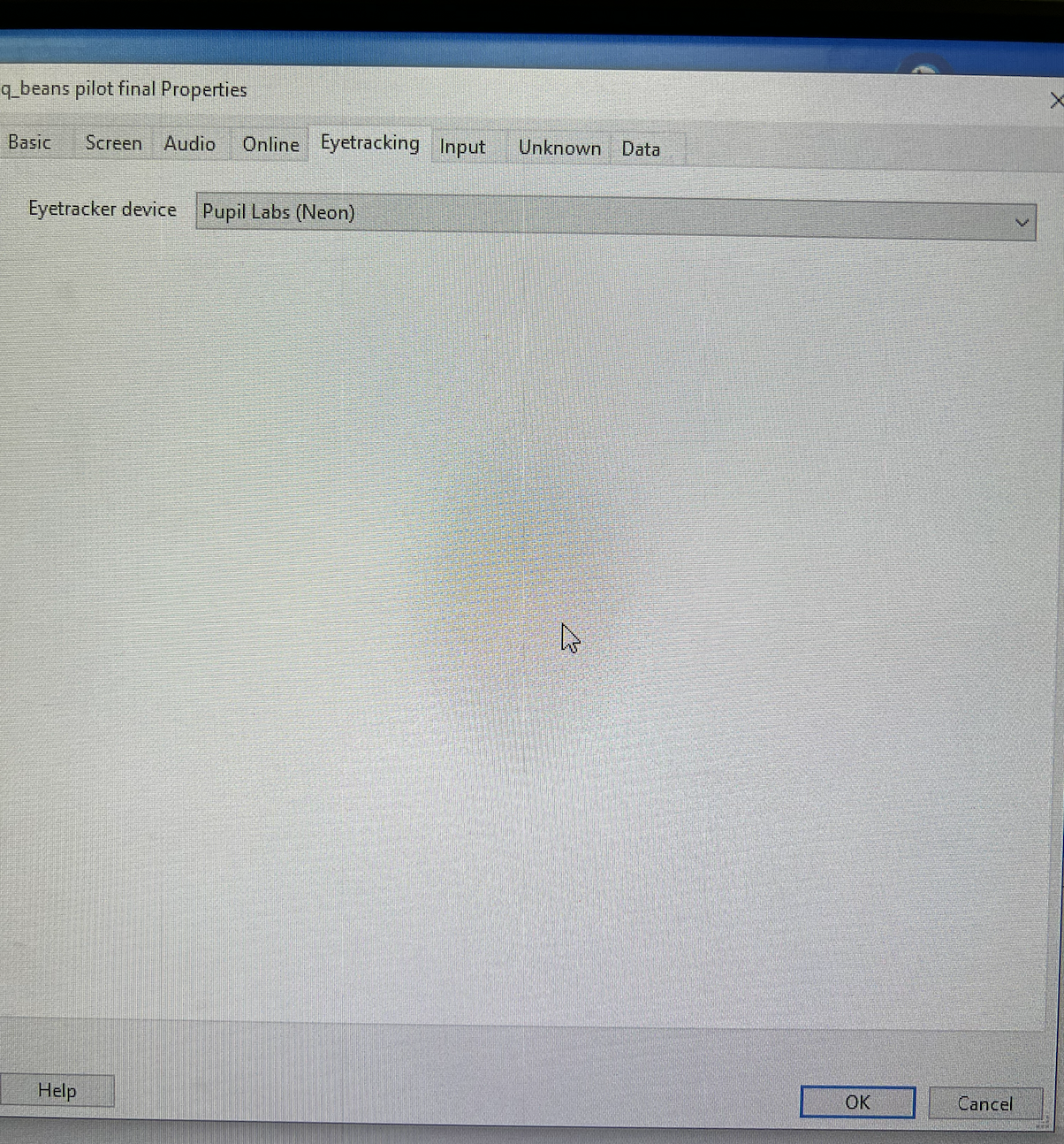
Hi, @user-6de021 - sorry for the trouble. 2025.1.1 had been in beta for quite a while, but it seems that have taken it out of beta now, which is great! I have been waiting for this to happen, as it does require a small change to our plugin to be compatible. I will make the change, test that it works, and push the update as soon as I can
Larger tags would be the biggest help, but more tags can be helpful too.
With tags this small, the detector will have a hard time finding them on any given frame. Any given marker may be detected on one frame but undetectable on the very next one. On some frames, some markers will be detected and others will not. If there's only, say, a 10% chance of a small marker being detected, and you only have 4 markers, then you will probably only detect 0 or 1 marker. If you have 100 markers though, you will likely detect ~10 of them.
So yes, more markers will help, but in your case larger ones will help more.
Got it. Thanks!
hello, can the gaze offsett correction on the neoplayer have 3 digits precision?
Hi, @user-f4b730 - sure, that's a pretty simple change. Are you able/willing to run from source? I've already pushed the change, but it's maybe too minor to justify a release by itself
ok, I see, how can I run it from source?
There are some instructions in the github readme - let me know if you have questions
Hi, @user-ff60f7 👋. Yes, that's correct. They'll be shipping with an S25. In terms of router, in principle, the one you mention should work just fine. Although we have had a lot of success with the afformentioned TP Link model. So that's what I recommend.
Thanks!
Hi @user-e3fdf5 , the time_offset_ms mentioned in that error message is distinct from the onset/offset that you are specifying in the components. The error that you are receiving indicates that a network connection was not established with Neon. What kind of network are you using? Is it a university network?
This is a university network. I hae reached out to our tech people to try to figure out a solution.
Hi Rob, thanks for getting back to me. I was testing without Neon turned on. I will try it again with Neon active. Should I have the connection to the phone on or should I connect the device directly to the computer?
Hi @user-e3fdf5 , Neon connects to the phone (i.e., the Companion Device) and is used via the Neon Companion app. To stream data to the PC, you connect Neon and that computer to the same network, whether that be WiFi, hotspot, or Ethernet.
Hello @dominic , for sure my bad, but running from source is not intuitive at all to me from the online readme...I get I may need just to change the steps in the gazemapper but I not able to start neon player from source
No worries - I'll just package a release
Here you go: https://github.com/pupil-labs/neon-player/releases/tag/v5.0.5
Hi, @user-6de021 - I have pushed the update. You should uninstall the plugin, reinstall it, and restart PsychoPy
Hi @dominic Thank you for pushing the update and for the instructions! I’ll go ahead and uninstall, reinstall the plugin, and restart PsychoPy with the new update. Thanks again for your help!
Hi team, may I receive any feedback on my recordings? It seems that the recorded gaze has a systematic shift toward the bottom. May I know how I can improve the tracking accuracy? here is my recording: https://hkustconnect-my.sharepoint.com/:v:/g/personal/yyangib_connect_ust_hk/EQ56jrm2_o5Alc4ZrS_bIfMBLlciUd3T55GjQW81WRfKZw?e=c7IDcS
Hi @user-9a1aed! Thanks for sharing the video. That's helpful! Small systematic offsets can be corrected using the offset correction feature, either in the Companion app or post-hoc in Pupil Cloud. You can also read more about the sources of offsets in this message https://discord.com/channels/285728493612957698/1047111711230009405/1283848621648908424
Hi all! Have two questions i was hoping someone could help with
Hi @user-73f4fe 👋. Unfortunately, it's not possible to shorten the eye tracking recording to use as a scanning recording. Although this feature request is on our radar: https://discord.com/channels/285728493612957698/1212053314527830026 With regards to a case, we don't have a smaller alternative. Although perhaps someone from the community will chime in with after market cases they've used 😄
Good morning! I would like to inquire If in the Neon Eye-tracker whether head rotation is taken into consideration when generating the gaze maps.
Hi @user-9382ce 👋. Just so I'm sure I understand, could you clarify what you mean by gaze maps? Are you referring to the enrichments like Reference Image Mapper in Pupil Cloud?
Yes, I'm referring to the Heat Maps created from the Enrichments.
Ah okay! Yes head movements are accounted for. Participants can move freely in their environment and we can achieve a robust mapping. You can read how we do this in my previous message here: https://discord.com/channels/285728493612957698/446977689690177536/1196459926395044021 and you might also want to watch this video if you haven't already.
Thank you so much!
Hi there, we ran into a problem with the android app gui disappearing into the background after launching it. It takes a couple of seconds after opening the application until this happens. We tried restarting the device, connecting / disconnecting wifi, manually closing the app etc., but nothing worked. We also recorded the process in a video which I can dm you, if necessary. The app is running on a OnePlus 10T and we did not encounter this behavior in the last couple of months. Do you have any suggestions?
Hi @user-e0a71c 👋. Please try the following:
Hey Neil, thanks for the quick reply. We are still waiting for a recording to be synced to the cloud and I'm afraid that by deleting the storage (clear data in the app info) I will delete the pending file. Can I proceed without any data loss? The pop-up window states that the app's files, settings, accounts, databases, and more will be deleted irrevocably
Clearing storage and cache in this way does not delete recordings. However, upon restarting the app you'll need to log in again and re-enable access permissions - which are prompted automatically and it's very easy to follow.
Yes it seems to work! The upload started and the app is not switching to the background, thanks! Is there a certain reason why this might have happened?
Just to confirm. Do the connections need to be the same? Will this only work if Companion Device and Computer are connected to Network A both with wifi? Or will it work if Computer is connected to network A with ethernet and Companion Device connected to Network A with wifi?
They just need to be connected to the same network. They do not need to be connected in the same way. So, Neon can be connected via WiFi, while the PC is connected via Ethernet, for example.
Hi @user-e3fdf5 , you can simply use a dedicated, local router. It does not need to be connected to the Internet, nor to the University network. You can even use a phone hotspot.
Thank you so much @rob this is very helpful
Hello**@rob**, Neon's companion software needs to be downloaded through Google Store, but because Google cannot access it in my area, I would like to ask if it is possible to provide the corresponding APK file? Thank you.
Companion app on Google Play Store
Thread
Dear Pupil Labs team,
I am using Pupil Cloud for eye movement analysis and would like to confirm the exact settings of the fixation and saccade detection algorithm. Specifically, I would like to know:
Which velocity and duration thresholds are used to classify a saccade?
Which criteria (e.g., velocity, dispersion, minimum duration) are applied to define a fixation?
Are these parameters fixed in Pupil Cloud, or can they be adjusted by the user?
In some eye-tracking systems, thresholds around 30°/s for fixations and 40°/s for saccades, with minimum fixation durations of 80 ms, are commonly reported. Could you please confirm whether these values are applied in Pupil Cloud, or clarify which exact thresholds your software uses?
Thank you very much for your attention and support.
Best regards, Alejandro
Hi @user-9382ce 👋 ! The fixation and saccade thresholds, as well as the algorithm details, are reported in our fixation white-paper, which you can find here.
These parameters are not tunable in Cloud; we use the values that we found work best on our dataset.
For convenience, I am attaching the white-paper directly to this message.
Kindly note that you can also get real-time fixations on the device, and the algorithm may have been slightly adjusted to accommodate its usage on the device.
Thank you so much!
Hi @dominic, I asked this question a while ago and it wasn't a feature back then. Is real-time blink detection when using neon and Psychopy a feature now? Sorry if this was in one of the updates, I haven't been following lately and I just got back to work
Hi @user-bda2e6! This hasn't been implemented as yet. But we do have your feature request logged!
Trying to use neon with psychopy builder. I am receiving RPC_DEVICE_RUNTIME_ERROR on psychopy. I am also receiving "ioHub Server Process Completed With Code: 0". I have neon connected via wifi and neon monitor can view the camera on the browser. Psychopy does not seem to recognize or find neon. I tried lots of things, reinstalling the package, setting the companion address to the ip address (neon monitor can be accessed with neon.local:8080). Looking for help with this last piece of the connection.
Hi team, may i check if I use pupil_labs.neon_recording.open to read the local recordings, what are .gaze.ts and .scene.ts and .event.ts? Particularly, scene.ts and event.ts, are they the onset time? It seems that the onset of gaze is earlier than the onset of the scene
Hi @user-9a1aed , the .ts fields always correspond to timestamps. In fact, the same timestamps as you get in the Pupil Cloud Timeseries CSV exports, so you can refer to the Data Format Documentation for details.
The very first timestamp of scene.ts, gaze.ts, and event.ts are the onsets of those respective streams.
For any Neon recording, gaze can start before the scene camera or the scene camera can start before gaze. This is because the sensors run independently (in parallel) and each has a warm up time. Typically, within a second or two, all sensors have started running.
Is your aim to know the timestamps relative to the start of the recording or relative to the start of the scene camera stream?
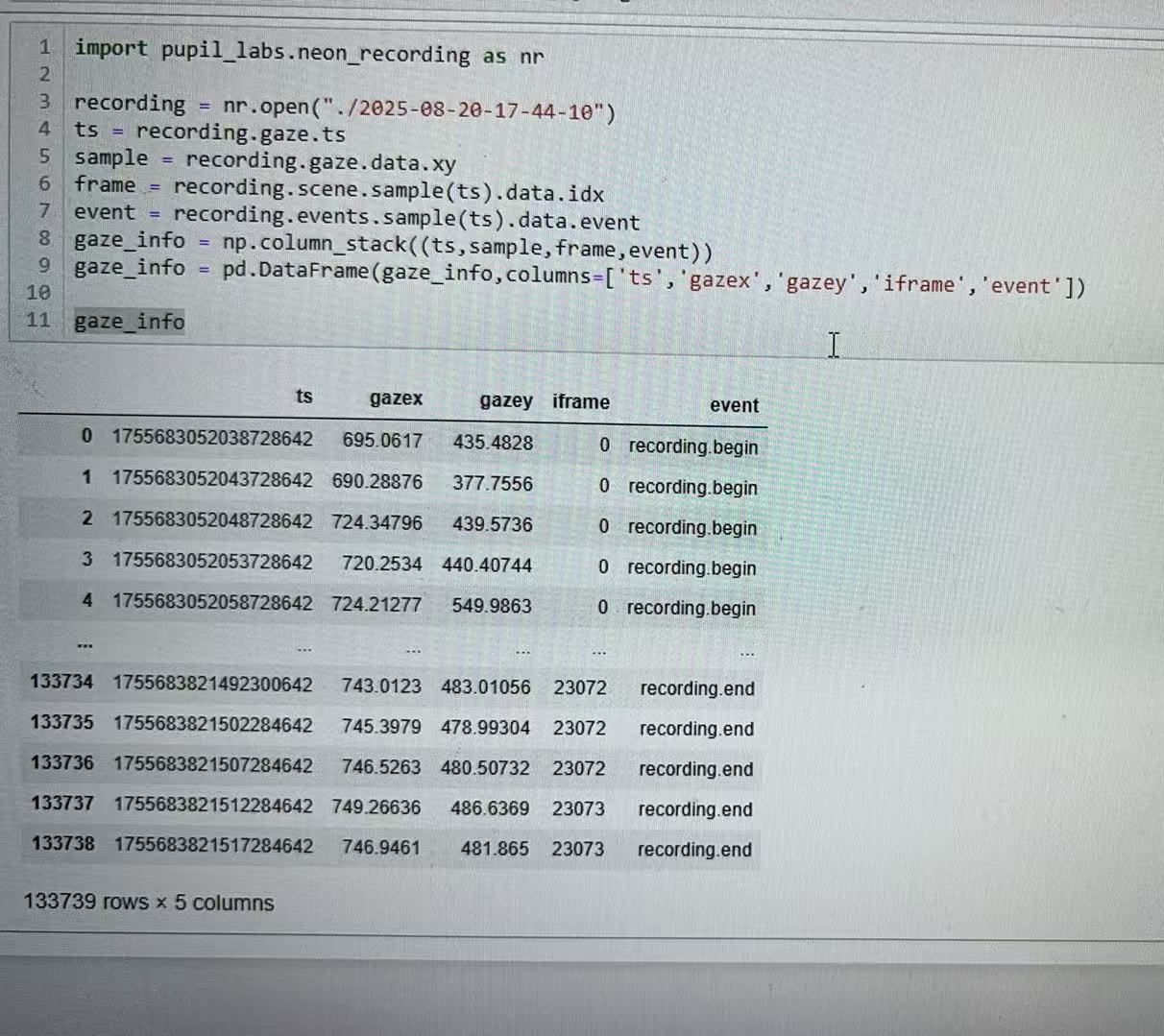
Is this the correct way to map the gaze, video frame index, event using the same timestamp>
Hi, two questions regarding Neon. Firstly has the streaming on the World View camera views to an IOS system been resolved and with our nonprescription lens the magnets on one of the lens have for some strange reason come away so we can’t attach it back on so Im wondering if it’s possible to get a spare lens?
Hi @user-057596! Thanks again for flagging these issues.
Unfortunately, the monitor app streaming on iOS hasn't been resolved yet. We're still waiting on some iOS features to be implemented so that our web monitor can run more reliably. If we get any updates, I'll make sure to let you know.
For the lens issue, could you please drop us an email at [email removed] with a photo showing the magnet? Our Ops team will then get in touch right away to sort it out for you.
Hi @user-e3fdf5 , are you using PsychoPy Builder or PsychoPy Coder?
I am using Builder.
Thank you! I want to have a table to store the fixation xy data, the frame indices, and also the corresponding events
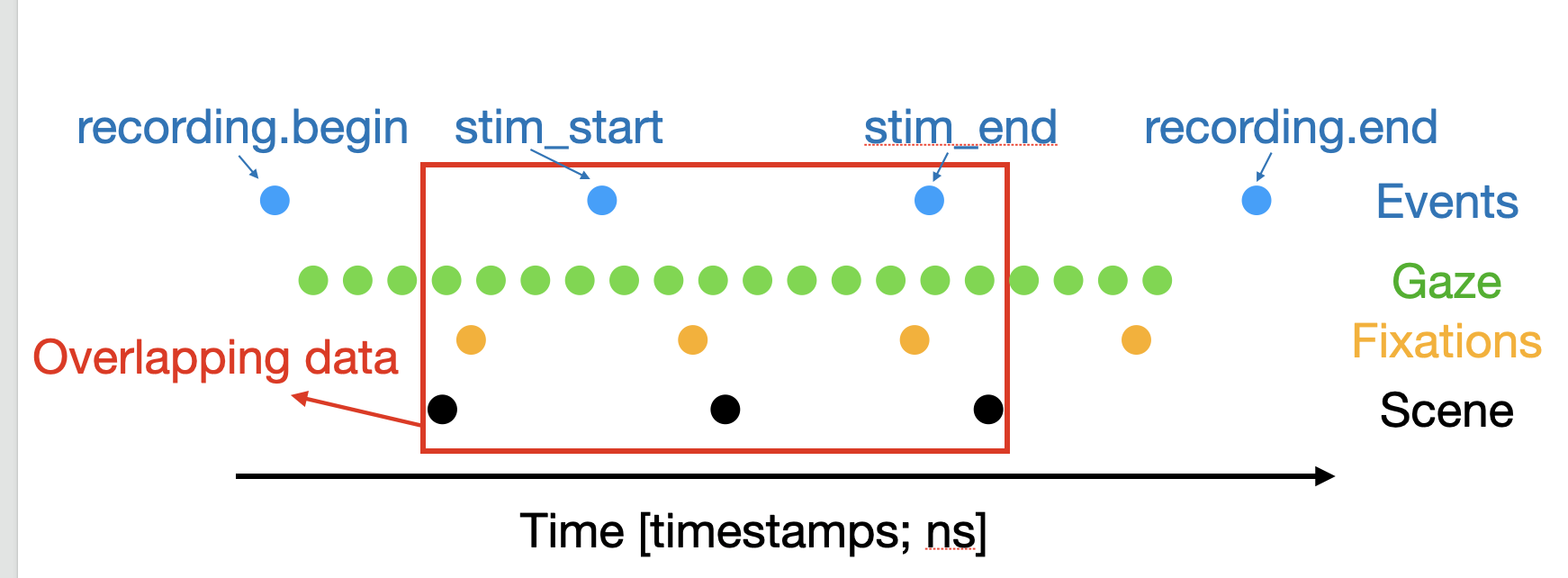
By overlapping, I mean what is diagrammed in the attached image below. Essentially the time where all datastreams are simultaneously active.
If you want only the data from that region, then you can have some code that uses the .ts fields. For example, in your case:
first_ts_to_sample.last_ts_to_sample.first_overlapping_fixation_idx = np.searchsorted(recording.fixations.ts, first_ts_to_sample)
last_overlapping_fixation_idx = np.searchsorted(recording.fixations.ts, last_ts_to_sample)
ts_of_interest = recording.fixations.ts([first_overlapping_fixation_idx:last_overlapping_fixation_idx])
.sample method to extract those overlapping data:overlapping_fixations = recording.fixations.sample(ts_of_interest)
overlapping_events = recording.events.sample(ts_of_interest)
overlapping_scene_frames = recording.scene.sample(ts_of_interest)
Hi @user-9a1aed , this is correct.
Just note that the default sampling method is nearest neighbor, so any gaze data that occur before the first scene camera frame occurs will be sampled as if they happened during that frame. This is also why recording.begin is shown as aligned with the first gaze datum and the first scene camera frame in your DataFrame, which is generally not the case.
For all overlapping data, you don't need to think about this.
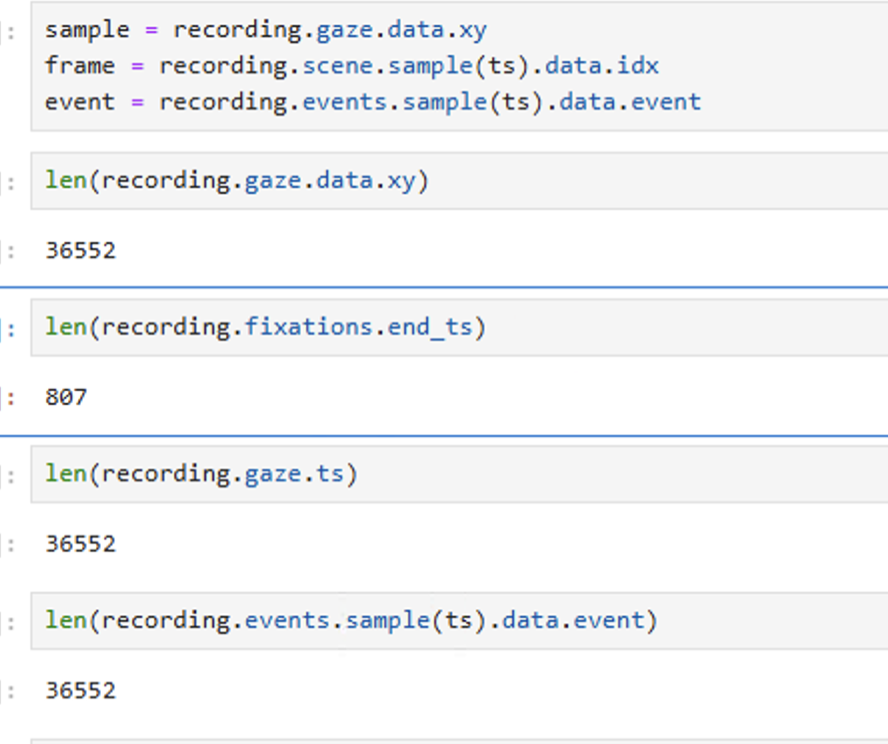
Thanks! I am not so sure about what you mean by overlapping data; no need to think about this. Could u help clarify, pls? Also, if I want to extract the duration for each fixation, how can I do so using python? Thx!
To get the duration of each fixation with pl-neon-recording, just use the start_ts and end_ts fields of each fixation datum:
first_fixation_duration_ns = recording.fixations[0].end_ts - recording.fixations[0].start_ts
Thx a lot Rob! The illustration is super clear. For the fixation duration, it seems that I have a lot fewer data points? May I confirm if this should be the case?
Thanks @nadia for getting back to me and I will photo the magnet and send it over.
Hi guys 👋 has anyone worked on obtaining the visual axis using Neon or knows of any references on how to calculate it? Also, has anyone tried projecting vectors using the optical axis through eye centers to estimate gaze position data — is this method legit?
Hi @user-ebd1fe , when you say "estimate gaze position data", do you mean estimate the 3D position in the world that the person is looking at?
Hi guys, I have the automatic upload to cloud on the companion device of the neon lab glasses, but I deleted the video from the cloud workspace by mistake, but it’s still on the phone, how can I reupload it to the cloud?
Hi @user-e9f71a 👋🏻 Once a recording is permanently deleted from Pupil Cloud, it cannot be re-uploaded from the Neon Companion app. However, when a recording is first removed from a workspace, it isn’t immediately lost but moved to the trash.
Could you please check if it’s still there? You can do this by clicking on the three-dot icon next to "Add filter", then selecting "Show trashed". If you find the recording, just right-click on it and select "Restore Recording" to bring it back to your workspace.
Hi Rob, Yes, exactly — by gaze position data I mean estimating the 3D point in the world that the person is looking at, rather than just the gaze direction vector.
Thanks for the clarification. So, using the optical axis vectors is not a reliable method past ~1 meter. This is because the two eyes rarely aim at exactly the same point and so applying trigonometry, as is often done, quickly incurs noticeable inaccuracies.
As you also point out, there is a discrepancy between the optical axis and visual axis vectors (c.f., angle kappa).
Rather, you might be interested in our Tag Aligner tool, which can accurately project the gaze vector into a 3D model of the environment. If the model is to scale, then you also have the 3D gaze point in units of meters, feet, or whatever is best for your use case.
Alternatively, you can give monocular depth estimation DNNs a try, as demonstrated in our Map Gaze Onto Anything Alpha Lab guide.
Hi all! I just downloaded Neon Player and am having trouble finding a way to add or edit AOIs. Is the Neon Player capable of setting AOIs, or is that a function only available in the Pupil Cloud?
This means that I cannot have duration for each gaze data point I have, right?
Hi @user-9a1aed , what is your end goal?
Gaze is not typically thought of as having a duration. Gaze is rather a continuous process; i.e., the ever changing position of where you are looking, which is sampled moment-by-moment. In other words, each gaze datum can be thought of as an instantaneous measurement in time.
When your gaze pauses, that is classified as a fixation and the duration of that pause is the fixation duration. As a result, there are always less fixations than gaze points.
If this is unfamiliar, just let us know.
Hi Rob, thanks a lot. From my previous experience, I could extract the fixation duration for each fixation data point. So now, I also want to achieve the same. I want to know how many fixations the subject has for viewing each image, and the duration for each fixation. In this case, perhaps I can join the data using gaze.ts and fixation.ts, for those gaze data points without pauses, I can mark them as 0 in the data?
Hi @user-9a1aed , I am not sure I fully follow, but to get the number of fixations and fixation duration, you do not need to join gaze.ts and fixations.ts.
Our fixation detector has already done all the hard work for you.
You only need the following Python code:
# number of fixations in recording
n_fixations = len(recording.fixations)

# duration of each fixation (in nanoseconds)
fixation_durations_ns = [(fix.end_ts - fix.start_ts) for fix in recording.fixations]
Thanks!!
Hi @user-ac970e , with Neon Player, you use the Surface Tracker plugin and draw multiple Surfaces to represent multiple AOIs.
If you need shapes other than quadrilaterals, then in a post-hoc analysis step, you can apply a mask to the surface-mapped gaze coordinates.
Thank you! I thought you would need more April tags for each surface to be drawn but it looks like I can draw it within an April-tagged screen and it works!
More AprilTags can always be helpful for robustness, but if you have a configuration that works for you, then great!
Hmm so I am not sure it is working so great after all, but maybe I did something wrong. I set each AOI as a new surface within the April-tagged screen (this is a study with infants so we can't have April tags by the in-screen elements as they would be too distracting) and it seems to have worked well and when I exported the file, it said "surface detection completed" or something. But it looks like surface 3 is not being located, and there are plenty of fixations within the surface that are not being picked up on, for example this fixation. (this also seems to be happening for surface 2) Is there anything I can do to remedy when things like this happen?
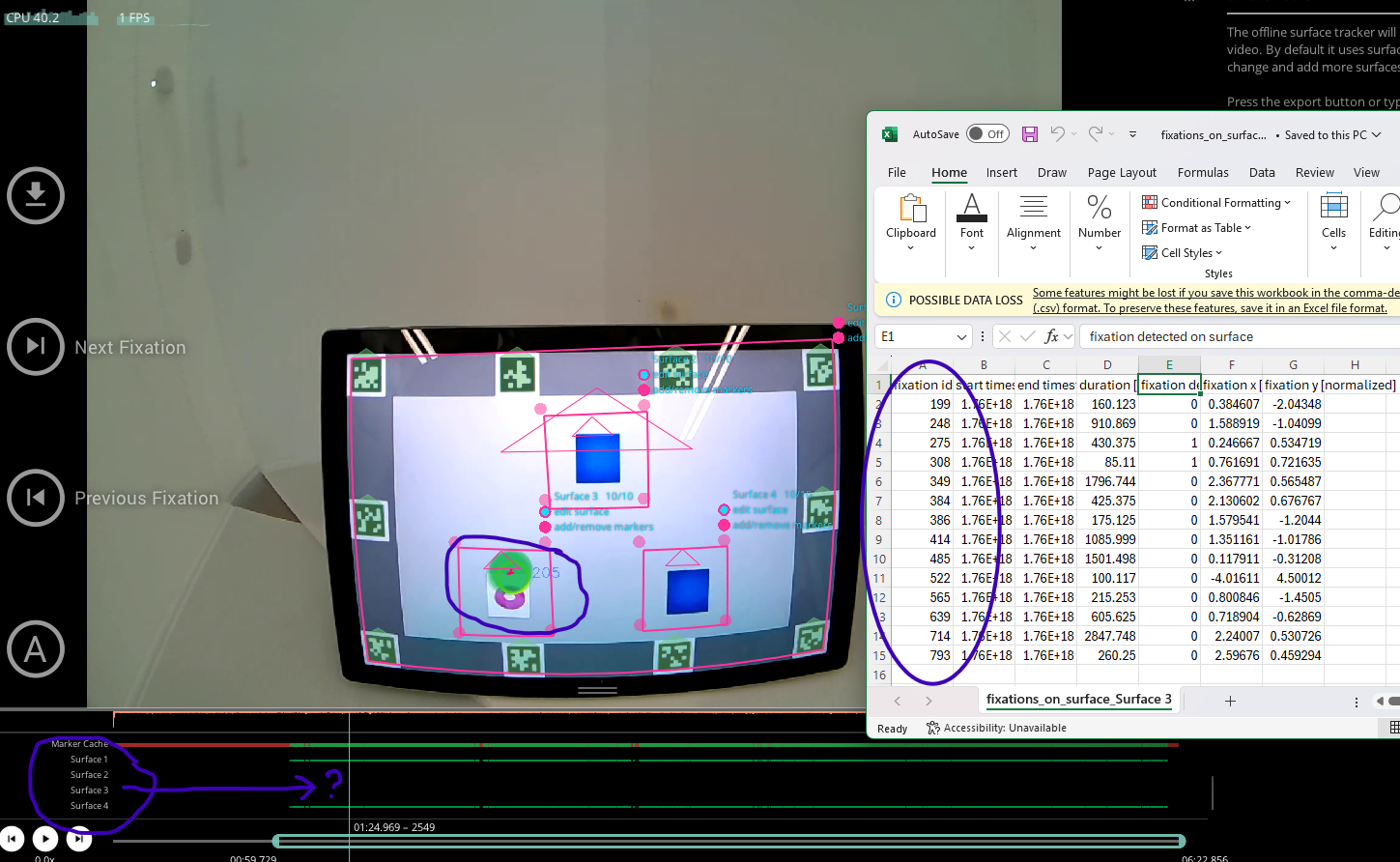
Hi! I have a similar question about setting AOIs in the Neon Player - is there any way to set surfaces across multiple recordings? Or do we have to set surfaces for each individual recording (and setting AOIs across multiple recordings is only a feature available in the Pupil Cloud)?
If all available data (full player-compatible package) are downloaded, saved offline, and then deleted from Pupil Cloud, can these data be re-uploaded to Pupil Cloud at a later time (restoring the original capture)? If so, how?
Separate Question: Is there any common wisdom on how to filter fixations based on the confidence value (0,1) indicated in 'fixation detected on surface' column in the 'fixations_on_surface' output file from Neon Player? And, is there any such confidence that is computed for fixations on AOIs built in Pupil Cloud? In output files for Pupil Cloud, I only find a total list of fixations/AOI, whereas in the output files for Neon Player, I find fixations and associated confidences/surface. Maybe my underlying question is more about the difference between the surface and AOI. Thanks!
Hi @user-763912 👋. Yes, you can reuse surface definitions across multiple recordings. After loading the Surface Tracker plugin and defining your surfaces in an initial recording, hit export. This action saves a surface_definitions file to the neon_player subdirectory of that recording. You can then copy this file and place it into the corresponding subdirectory of any new recording. The surfaces will be applied automatically as long as the same markers are present in the scene video.
Thanks for the clarification! You just saved me a lot of time.
Hi @user-999fbb!
It is not possible to re-upload recordings to Pupil Cloud after they have been downloaded and deleted. Recordings deleted from Cloud can be restored from the trash for 30 days, but once permanently removed, they cannot be uploaded again from any source.
Regarding your second question:
Thank you very much!
Hi Team, when I tried to run the PsychoPy program, it says calibration with the host IP failed. Later on, when I tried it several times, it worked. May I know what is going on? Sometimes, it takes a while to connect the host device to the laptop's program.
I haven't seen this particular error before, but it's likely a networking issue. Can you describe your network configuration?
Hi Neil, I had the same question about the fixation-detected-on-surface column that comes from a Neon Player export. There are some non-binary values in my column (e.g., 0.21739130434782608, 0.9166666666666666) and, just to be clear - the csvs that output about fixations and gaze on each specific surface are essentially timeseries of all fixations, just with a column for whether it was on the particular surface or not? (And the x and y coordinates in each csv must be relative to the Surface, correct?)
Hi, @user-ac970e - yeah, the non-binary values for surface fixation confidence is a little confusing. This happens when the dispersion of a fixation exceeds the edge of a surface. A "confidence" of 0.217 essentially means that 21% of the duration of the fixation occurred on the surface.
The X and Y coordinates are normalized surface space.
Hello, when I am running the Psychopy program, the host phone does not connect to the program, and the bug says cannot calibrate. After a while, the program can run smoothly, although I did not fix anything. I wonder why this happens sometimes? Thx!
If you could provide your PsychoPy log, that would be very helpful
I will take a screenshot if it ever happens again. thx!
The psychopy log is saved to a file in your .psychopy3 folder. It's overwritten every time you launch PsychoPy, so you need to make sure you grab it right after it happens
As for one of the recordings, I calibrated to ensure accuracy using the offset function. Also checked the eyeview to be captured during the recording, but it seems that the red circle is a bit off. I want to check if this is normal. Thx
Do you mean the red annulus displayed on the phone's screen (the one you apply the offset to), or do you mean the red circle displayed in your PsychoPy program?
the red circle from the phone's view. bascially the indication of participants' gaze? it looks like they are very off from the stimuli on the computer screen.
Thank you very much for your proposal. The workflow you suggested worked perfectly. Even when we sealed the GL-4000’s metallic cockpit and operated the motion platform, we were impressed that live monitoring from the remote control room via Wi-Fi remained completely stable.
However, we have now encountered a new issue. During daytime flights everything works fine, but during nighttime or low-light flights, the scene camera does not function and the screen remains completely dark. We tried manually setting the sensitivity to the maximum in the app, but at best only a faint image occasionally appears.
In order to obtain scene footage under these conditions, I believe it may be necessary to replace the scene camera itself with a more light-sensitive unit. From a technical standpoint, would such a replacement be possible? If we were to request this modification, could you give us an idea of the expected costs involved?
The only correction for this is the offset correction which, it sounds like you've already done. When you do the offset correction though, it's important that you adjust it for the target viewing distance. If you adjust it using a target distance that's different from your task, it will be inaccurate
yes! we use a chinrest during our procedure. so once we completed offset, the participant does not move their head.
for offset, we create small rectangle shapes on the computer screen. so the target viewing distance should be the same too
Hi all! My name is Nitya and I am a Master's student working on trying to identify blinks versus saccades in our collected data as automatic blink detection data is not available. Upon plotting the pupil size relative to time, I noticed that there seemed to be frequent dips in pupil size. I predict that this could correlate to blinking but wanted to check if anyone had any insights as to what could be causing these dips or if there was any other way to detect blinks. Thank you, Nitya
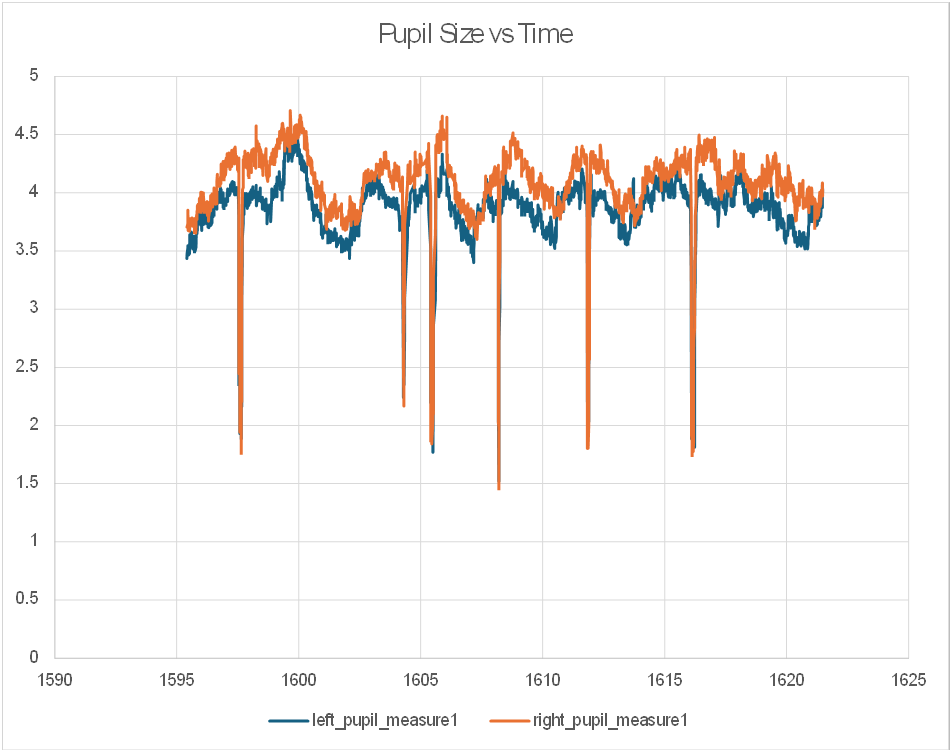
Hi @user-c4afaa , those dips are usually produced by blinks, but are not as robust or reliable as eyelid openness, which Neon's blink detector uses. May I ask, though, since you have pupil diameter, but not blink data, when was this data collected and are you using Pupil Cloud?
Hi @rob! Thank you for the reply. Nitya is working with me and I have been talking with @dominic regarding blink detection. Our data is streamed from Psychopy and due to IRB regulations we cannot use Pupil Cloud or the raw eye recordings. The time series data produced by Psychopy is the only thing we can work with in this particular study. Blink detection from Paychopy has not been implemented yet so we have to make our own algorithm to do that with what we already have.
Although we aren't streaming blinks to PsychoPy yet, the blink events are recorded in the Neon Recording. The best thing you could is synchronize the data sets (PsychoPy data and recording data)
And this pupil diameter drops are the only meaningful blink indicator we have seen in the data so far. So we are wondering if you could share any insight as to what could we do to better detect blinks from the data we have
Hi @dominic, We are doing a classroom study and we set up the AprilTags on the corners of the screen. However, they are not being detected. My suspicion is that it will be hard to include these when individuals are further back. Can you provide some guidance on this? (We need to define AOIs for later data analysis)
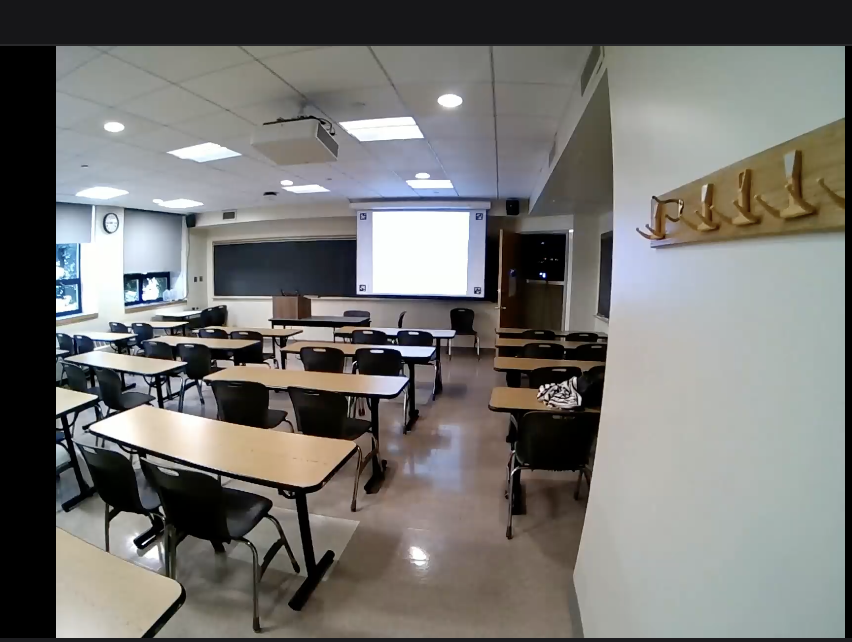
Margins and contrast are good, but the markers are too small at that distance.
A subjective judgement here is a reliable measure. If it's hard for you to distinguish the individual squares within a marker, then it's hard for the detector as well.
Thanks, Dom!
We have done offset correctly and with the same viewing distance. Is there other reasons/ways that we can improve the eye tracking accuracy? Thx!
Hi @user-9a1aed👋. To clarify, using the offset correction feature is not strictly a requirement. But it can help with optimising a setup, e.g. for screen-based tasks, in some wearers. You can read more about the sources of error from Neon's gaze measurements in this message: https://discord.com/channels/285728493612957698/1047111711230009405/1347040516633792533.
That said, if the gaze point is slightly off each stimulus, like in the video you shared, that suggests your offset correction could be improved. It can sometimes be tricky to set the ideal offset in app at the time of testing. So we also made it possible to set an offset correction post-hoc in Pupil Cloud.
Thanks a lot Neil. Does it make sense to perform the post-hoc analysis given that we do not know the groud truth of the participants' gaze?
That is a decision only you can make. You can have greater confidence in the offset if you know that the participant was gazing at a specific location at a particular point in time. Even if this is not the case, if your experiment is well-controlled and features clearly defined stimuli, and you only need to determine whether someone was looking at or away from the stimuli, it is usually possible to state with some degree of confidence where they were looking at any given moment. On the other hand, matters become more ambiguous in free-viewing situations, such as when someone is walking around in the street.
Hello. We have exchanged our pupillabs neon eyetracking module for a new one due to a defect. Now when using pupil cloud the old module is still registered for unlimited space, while the new module cannot be activated for unlimited space. How can we register the new eye-tracker module in pupil cloud with our old license?
Hi @user-11dbde , please send an email to info@pupil-labs.com about this and the team will resolve it.
old: 263231 -> new: 595697
the new one also indicates that there is 7h of data recorded, but we have no access to this recorded data in another account (I guess the data was recorded by pupil labs, not us)
Hi @rob thank you so much for your quick reply. I will send an email now.
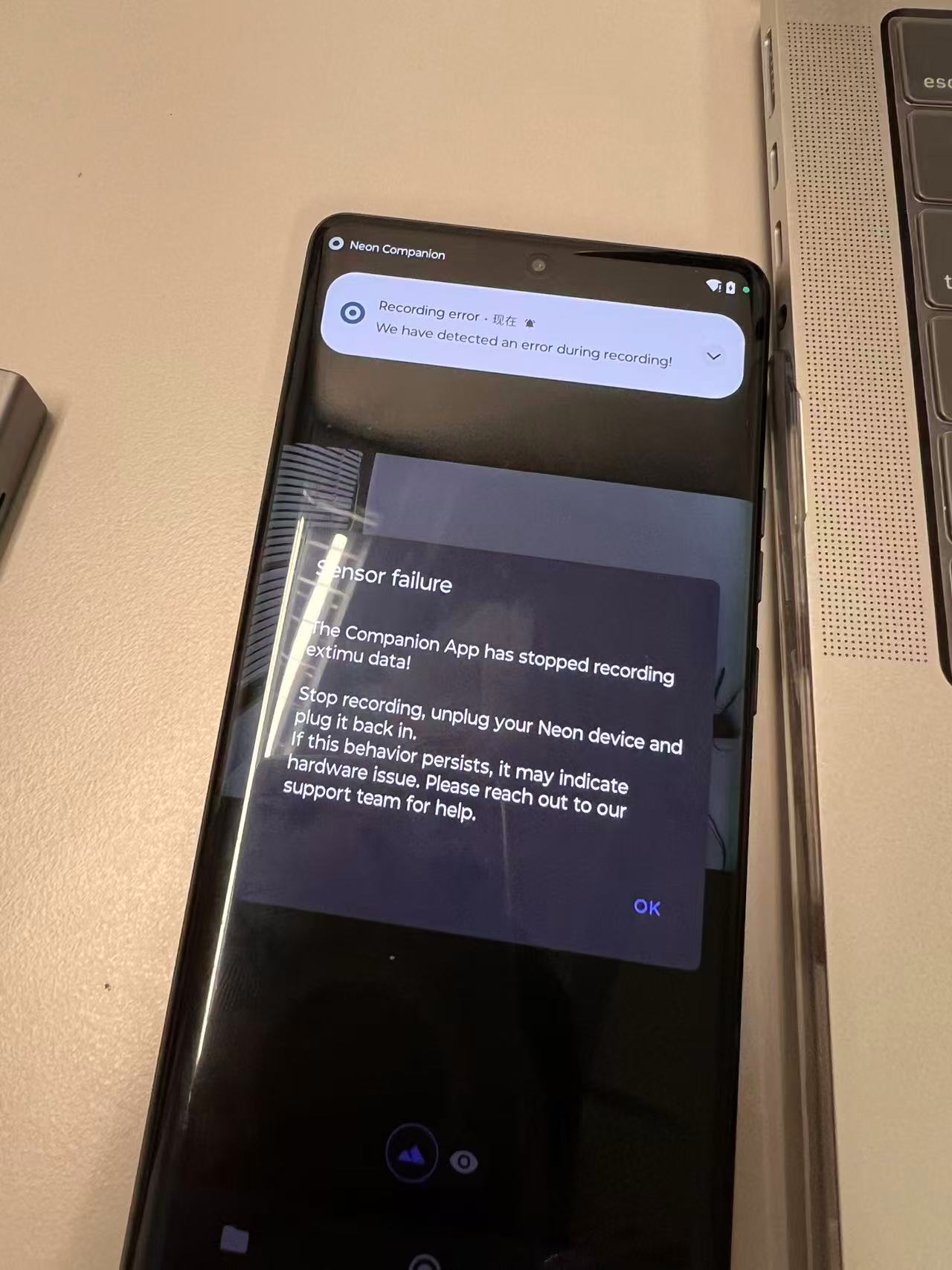
Hi team, when we use an extension hub to connect the eye tracker, charger, and mobile phone after some experiment blocks, the following prompt pops up on the Neon app“Sensor failure The Companion App has stopped recording extimu data! Stop recording, unplug your Neon device and plug it back in. If this behavior persists, it may indicate hardware issue. Please reach out to our support team for help."
So we removed the hub, directly connected the eye tracker to the mobile phone, and closed the small window. The recording display continued recording, and we asked the participants to look at the four corners and the center of the screen to ensure that the eye tracking was functioning. When the recording automatically ends after the experiment finishes, we found out that the recording was only 4 minutes and 58 seconds. But if we do not click into the video, it shows as an 8-minute video.
Hi @user-9a1aed , could you open a Support Ticket in 🛟 troubleshooting ? Thanks.
thanks!
Thank you for the reply @dominic Could you please tell us where this data is store in the raw recording? And how I can access it given that we cannot use pupil cloud? Thank you!
Our Neon Recording Library is the easiest way to access any of the data streams from native recording data. I think from our example demonstrating how to export recording data to csv, you'll find that it can be quite easy to work with the data using this library.
We also provide an example showing how to create a visualization using blink data if you're interested in that
Hello. Could you explain the distortion correction for Marker Mapper or Surface Tracker? If 2D barcodes are placed in the environment with tilt relative to the Neon module's IMU, how does this affect the definition of the ROI? Please discuss the tilt along each axis: X (pitch), Y (roll), and Z (yaw).
Hi @user-52e548 , Marker Mapper and Surface Tracker do not use the IMU. Rather, they compute the homography that projects the flat plane containing the AprilTags onto the image plane of the scene camera. This is done by estimating the pose of each of the AprilTags from the scene camera image. These are concepts from projective geometry and more details in the general context of cameras and OpenCV can be found here.
A key part of this process is undistorting the scene camera image.
When you say "please discuss the tilt along each axis", do you mean how does this tilt then relate to the orientation values provided by the IMU? Do you want to compare the surface orientation to IMU orientation?
Hello. I am a new PhD student in the field of rehabilitation robotics and am using Neon to detect objects of interest and calculate viewing distance. In your Pupil Labs fixation detector whitepaper, there is a following explanation of using IMU to calculate optic flow.
Where can a find the corresponding code?

Hi @user-69f927 ! You can find it here, but note that depth component is not computed, if that's what you are looking for.
Hi again! I am using the Neon Player to define surfaces and AOIs, and I just notice that when I load a recording, it seems to automatically begin finding the surface, and progress is shown in this cache. Great! But, do I need to open up every recording in the Neon Player before the surfaces can be found, and then export each recording? In other words, as I make new recordings with the same experiment (on-screen video with April Tags) do I still need to individually open each recording in Neon Player in order for the surfaces to be defined?

Hi @user-ac970e , you don't need to manually redo Surface definitions every time, if you re-use the same Surface and AprilTags across recordings, but it is necessary for them to be found in each recording (i.e., the caching progress that you refer to).
Since Neon is head-mounted, there is no a priori fixed relationship between the tags and the wearer, so the code needs to detect them, since there can be head motion, difference in observer height, sitting distance/position, etc.
Hi Rob! I think I see what you mean: I see from a previous question that I can copy the surface_definitions folder into all recordings to transfer the same surface positions across the recordings, but since it still needs to detect them, after I copy the surface_definitions folder into all recordings then I should load them each in Neon Player so that it can do the detection?
Hi @user-ac970e , it does not transfer the surface positions. Rather, it transfers the Surface Definitions, which are the grouping of tags that specify the form of said surface. Their positions then need to be detected anew for each recording. The copy process in my colleague's message is basically a timesaver with respect to clicking on Tags and clicking "Define Surface" and naming the Surface whenever you open Neon Player.
In other words, yes, after copying the definitions, you need to load each respective recording into Neon Player so it can detect their positions.
Hi guys! I’m having an issue with creating enrichments for a study I’m doing. The reference image mapping enrichments keep erroring out on each of the 10 samples I have. I’ve tried several different scan recordings and reference images but keep having the same issue. Is any one able to assist?
Hi @user-08dfba 👋. If you're able, please invite [email removed] to your workspace. That way we can take a look and provide some concrete feedback 🙂
Hi @neil , I sent an invite for two different workspaces. I sent the first one over because it’s a much cleaner past project that I didn’t have trouble with before but it’s giving me trouble when trying to create the same enrichment as “P1” so not sure if it’s a problem with my account. The second one I’m having trouble with now and I’ve tried several different things out on. Thank you!
I can see this has been asked before but I couldn't see a reply, so apologies for the double question!
When adding a gaze offset in Pupil Cloud, is there a way to do it more precisely? We're getting participants to look at a target, and it can be difficult to tell if the gaze is consistently offset in a particular direction and needs correcting or if the variation of the gaze from the target is just expected variation. It can also be difficult to tell exactly how much the gaze needs correcting, because at some points in time the variation will be less than others - is there a way to calculate the average gaze variation from a particular point in the scene camera over a period of time and then correct the gaze by that amount?
Also, is there a way to correct it other than dragging and dropping with the mouse? It's more accurate than doing it in the app, but it would be nice to have finer control by being able to enter coordinates or even being able to nudge it left/right/up/down using arrow keys once it's placed to make it more precise.
I saw another user mention that it would be great if we could use a target (like a QR code) that the glasses can automatically recognise and calculate the gaze offset from that point over a specified period of time (when the participant is looking at it), but I assume that isn't possible?
Hi @user-fa126e 👋! What you describe is possible. You can use fiducial markers, or even better, the circular calibration marker from Pupil Core.
Since our detector is open-source, you can use it to detect the marker, compute the average offset over a period of time, and then send that correction via the Cloud API. That said, from my experience the actual gain is usually minimal, if any.
I can put together a small gist to show how this would work if you’d like, though it may need to wait until next week.
One thing to check first though, if what you’re seeing looks more like jitter rather than a consistent offset, it might be related to the participant’s setup (e.g. wearing their own prescription glasses, or in some cases strabismus). That can introduce variability that won’t really be fixed by offset correction.
Does anyone have any suggestions for lining up the timestamps in gaze_positions_on_surface.csvs with the frames from the world video?
gaze_positions_on_surface.csv does not start at exactly the same timestamp as the world_timestamps.csv (the first value in one is 1755530803833957766 and in the other, 1755530802581479680, which is about one second difference or less, but still problematic to not have things lined up exactly especially since exports from Neon Player only give gaze positions and not fixations, so fixations have to be manually calculated), so I'm also unsure why there would be a discrepancy there. Also when I converted those values to Universal Time in R, the time it gave me did not match anything in the export_info.csv either.
Knowing the timing of events and fixations in my experiment is really important, but I am struggling to figure out how to know when in the gaze_positions_on_surface.csv an event occurs in the world video. I can imagine this is something someone else probably figured out how to do though?
Hi @user-ac970e 👋 The timestamps are already in UTC Unix Epoch (nanoseconds), and they’re already aligned. The gaze_positions_on_surface.csv inherits the timestamp of the underlying gaze sample, it checks for the closest scene camera frame and looks if the surface was detected. Since the gaze data itself carries the same timestamps, and you have the fixation IDs in gaze.csv, matching them should be straightforward.
Regarding your conversion to Universal Time, are you using a timezone-aware library? Could you share how you do it?
Also, could you clarify your note on Neon Player not computing fixations on surface? That shouldn’t be the case, you should see a fixations_on_surface_<surface_name>.csv (docs) as long as the fixation plugin was enabled. . Which versions of the Companion App and Neon Player are you using?
Hello,
I have two recordings that are each around 30 minutes long, with events already marked. I just realized that for enrichments, the videos cannot be longer than 3 minutes. Is there a way to crop or trim the videos so I can run enrichments only on the specific event segments?
Thank you for your help!
Hey Allison, I'm not from Pupil Labs but just curious - which enrichment are you using? I've been using the face mapper enrichment on videos that are 5-10 minutes long and haven't had any issues.
However, when I made my enrichments I was able to choose the "Begin event" and "End event" in the menu on the left (Under "Temporal Selection"). I assume all the recordings would have to have the same events in them if you want to process them all at once, otherwise you could probably do them individually and choose the start and end events for each of them separately.
Hi @user-6de021 , only the Scanning Recording for the Reference Image Mapper Enrichment has the 3 minute limitation. All of the other recordings that are then analyzed (i.e., the ones where participants actually wear Neon and do the task) can be as long as needed.
Hi Pupil Lab team! Would someone be able to clarify the units for the gaze in the x, y, z directions as well as the units for and difference between device_time, logged_time, and time? Thank you!
Hi @user-c4afaa , just to clarify, is this for data collected with PsychoPy?
I brought up the topic of IMUs to define coordinate axes with the intent of clarifying how AprilTag appears in the scene camera, but I couldn't explain it well. Is the attached figure understandable? I want to know the effects of three types of tilt, including Pitch (shown in the upper left of the attached figure), Roll, and Yaw.
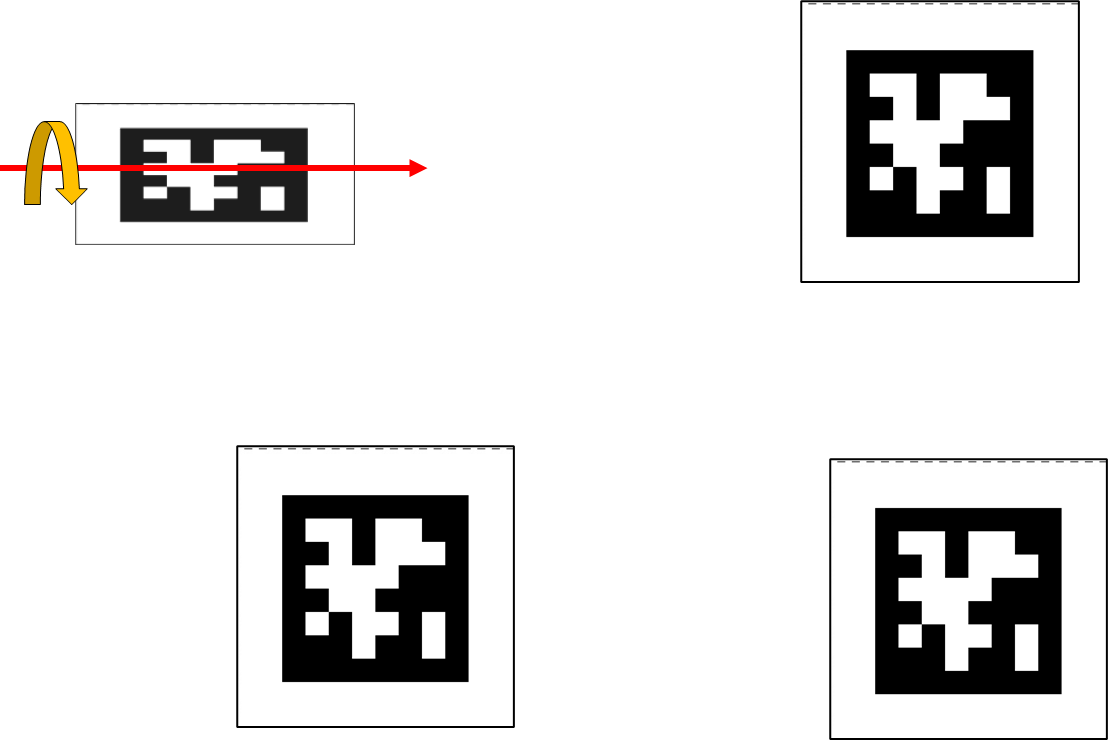
Hi @user-52e548 , thanks for the image. So that I can help better, may I ask what the ultimate goal is?
Does the system detect that the AprilTag is tilted and perform processing such as trapezoidal correction? If all tags are tilted in the same way, the correction seems likely to work well. However, if only one tag is tilted, as shown in the previous figure, I want to clarify what kind of processing would be performed if correction were performed.
Thanks, @user-52e548 , I see. So, using an IMU is not necessary to determine the tilt of the tags. This can be fully determined from the projection into the camera's image plane and is one of the primary reasons why AprilTags were developed, amongst others.
As mentioned in the previous message (https://discord.com/channels/285728493612957698/1047111711230009405/1418489747227017247), this is done by computing the homography that projects the flat plane containing the AprilTags onto the image plane of the scene camera. This is done by estimating the relative pose of each of the AprilTags from the scene camera image and is more comprehensive than trapezoidal correction.
Since AprilTags have a known square shape, it is possible to determine their relative tilt with respect to the camera's optical axis from this information alone.
Note that the Surface & Marker mapping algorithms assume that all of the AprilTags are fixed to the same flat plane, so in that configuration, it is not possible to position a camera such that one AprilTag is tilted, whereas the others are not. Do you have a situation where the AprilTags are not on a flat surface?
Hi @user-08dfba - stepping in for Neil here. I just reviewed your P1 enrichment on Cloud in one of the two workspaces. A few points:
The enrichment was completed successfully, but the mapping quality is not optimal. This is partly because the menu is mostly white with only a few black words, which does not provide enough visual features for the Reference Image Mapper to work robustly. For best results, the tool needs a feature-rich environment.
That said, you can significantly improve the mapping quality by adjusting the Neon scene camera exposure. In many of your videos, the menu looks overexposed. Changing either the room's illumination or the scene camera exposure settings (see here) will help the camera capture the environment more accurately.
If you'd like to continue working with the current enrichment, you can also use the Mapping Correction functionality to adjust fixations that were not mapped optimally.
I hope this helps! 🙂
Thank you @nadia ! For the new enrichment I made, I used the same videos and and scan recording as I did in the past (from the enrichment 9 months ago) and while the one 9 months ago worked, using the same parameters for the new one didn’t work for some reason. Do you know why that happened? And I’ll try to have better exposure in the future , thank you for the tips!
Let me ask another question while another thread is being processed. The following page states that Yaw convergence takes time, but is there any reference data available? I understand it is significantly influenced by the surrounding environment, but it would be helpful to have data showing the relationship between elapsed time and error rate. https://docs.pupil-labs.com/neon/data-collection/calibrating-the-imu/
Hi @user-52e548 , we specify the IMU's model number and link to the manufacturer in our Documentation. They have a page with technical details and specifications.
May I ask why it would be significantly influenced by the surrounding environment? Are you referring to when highly magnetic equipment is nearby?
Thanks for sharing the link. I'll check the manufacturer's information.
The reason I'm concerned about environmental effects is precisely as you described. During measurements inside a car, when turning a corner, this wasn't reflected in the yaw data.
Thank you for the explanation. I had completely forgotten that AprilTag is known to be square. Indeed, based on this, AprilTag's orientation can be estimated. Additionally, I also overlooked the instruction that all AprilTags should be affixed to the same plane. With these two facts, I realized my question was nonsense from the start. I apologize for bothering you.
In practice, situations requiring AprilTags to be placed on non-planar surfaces can be avoided. We're conducting various verifications on the system's behavior, and during that process, we were merely testing placing AprilTags on different planes.
You are welcome. Not a bother! Always feel free to post such questions here.
Hi Miguel,
I didn't see the fixations plugin in Neon Player - thank you so much for letting me know that exists! that is great to have fixations already calculated.
And for the timestamp thing, this is what I am doing: In Neon Player, I am setting the Frame index range to export to begin exactly at the frame that my experiment begins (experiment is just a video that plays while a toddler watches). In order to mark experiment events (event 1, say, always begins 30 seconds into the video) I need to know the timestamp that the video begins - would this be the first timestamp in world_timestamps.csv? If that's true, then I can set trial event 1 to be exactly 30 seconds after the first timestamp in world_timestamps.csv, and then eventually align the timestamps in world_timestamps.csv with the timestamps in the fixations_on_surface.csvs.
The reason why I am confused is that when I convert the timestamps, it gives me a universal time, but in Neon Player I can see that my export begins at frame 1905 or relative time 01:03.496, which is not at the same scale as the timestamps, so I just want to vet that fixations_on_surface.csv really begins from the start of the export I set (at frame 1905) and not at the very beginning of the actual recording (frames 1-1905 is noise). This is such a new software for me and there are so many csvs haha so I want to find a way to *know *what timestamp the experiment begins. (Also, I see that surface_events.csv does indeed say the first frame is 1905, but the first value in the world_timestamp column is 64.56998008000001, which is different from all the other timestamp numbers 😭 😂 it must be on yet a different scale?)
This is how I am converting the UTC timestamps into a universal time (in R), I'm first dividing by 1e9 to scale it back to seconds: fixations_surface2$start.timestamp..ns. <- as.POSIXct(fixations_surface2$start.timestamp..ns. / 1e9, origin = "1970-01-01", tz = "UTC")
Hi @user-ac970e ! Let’s try to break it down, since it can get a bit convoluted.
First, could you confirm which version of Neon Player you’re using? In the latest release, both fixations and gaze_on_surface use Unix nanosecond timestamps.
There is still some legacy code carried over from Pupil Capture where marker detections, surface events, and surface positions inherit still the index, world index, and relative world timestamps instead of absolute ones. You can see that here.
For trimmed sections, the relative timestamp in surface_positions refers to world_timestamps relative (example).
I know it can get confusing and we are due to a clean-up. Meanwhile, the easiest path (or less friction), would be to not use the trimming function on export, rather to export the whole recording and simply create an event when your experiment starts, as the events.csv file and the gaze_on_surface_* or fixations_on_surface* would carry the timestamps in the same unix epoch.
I hope this clarifies it a bit.
Hi @rob! That is correct!
Thanks. So, those columns are specific to PsychoPy's data format. The meanings are:
If you want to compare eyetracking data to stimulus onset/offset times from PsychoPy, then you will usually be working with the time column.
The x/y/z directions of "gaze", as saved in PsychoPy's format, represent Neon's optical axis vectors, which are documented here. Note that you need Compute eyestate enabled in the Neon Companion app to receive this data and see it in the resulting file.
@user-08dfba just to make sure we're talking about the same enrichments: Are you referring to the enrichment named "Test" as the errored one compared to "P1" that worked 9 months ago?
@nadia Sorry! Yes the "Test" is the one that errored out and "P1" is the one that I'm trying to copy
@user-08dfba upon confirming with the Cloud team, this was due to a transient issue affecting yesterday's enrichment - this is expected to be fixed tomorrow. Thanks for your understanding 🙂
Out of curiosity, may I ask why did you run the same enrichment (with the same image/scanning rec) twice?
@nadiaWould it be possible to resolve before tomorrow? We have a deadline coming EOD today. My team and I have been having trouble since last Thursday with enrichments. After trying to troubleshoot I decided to go back to see if a past project would show the same error to see if was user error and encountered the same issue. I've also tried running simpler test projects to see if the error continued and it did.
@user-08dfba thanks for sharing more context. Just to clarify, since the enrichments Test and P1 are identical, and P1 has already been completed successfully, is there anything specific preventing you from using the output of P1?
are there any other enrichments that haven't been completed?
@nadia so that YardHouse workspace was a past project that I was trying to test things on. The current project is that second workspace I shared access to is where we first experienced the issues. So that new test enrichment was just a troubleshooting test
@user-08dfba just to follow up here as well - the fix has been deployed and enrichments are now being re-processed. Since you also have opened a ticket in the 🛟 troubleshooting channel, we can continue the conversation there once re-processing has finished!
Hi! Is there a way to change gaze data capture rate post collection in pupil cloud / on neon player app? say I recorded gaze data at 200hz and wanted to downsample to 100hz, or vice versa
[email removed] ! Let’s try to break it down
Hello, I am still having some trouble downloading the data from the project in the cloud. I manage to download it eventually, but only after several failed attempts. The speed also continues to fluctuate a lot. I was looking at other options, such as the Pupil Cloud API (https://api.cloud.pupil-labs.com/v2). However, when I downloaded the files, they did not correspond to the ones available in the Timeseries (different files and different columns). Is there any web endpoint (API) that provides access to all the files available through the cloud download? And where is this documented? Thank you
Hi @user-cc6fe4 ! Are you looking to download the Timeseries of a set of recordings? If so here is how you can do so.
Hi Miguel, that sounds great. Would love if you could put together something to show how it would work, no problem if it's next week.
Would this add the gaze offset correction in real time, so that we wouldn't need to adjust it in the app or in Pupil Cloud?
I will follow up, but you can through the Cloud API set the offset correction.
Hi, I want to do a sanity check. We are developing some cognitive aids for paramedics to use in the field. They will be accessed via a tablet. We want to do some user testing in a simulated real world environment. Looking through the Alpha Labs I have come across the "Map to Dynamic Screen Content", "Gaze on Phones" and "Website AOIs". After reading these my plan is to record the screen on the tablet at the same time as the eye tracking. Create a Reference Image Mapper enrichment. Export data for offline analysis, to generate scanpath etc..? Just wanted to double check there isn't an updated way to track dynamic content on a phone or tablet?
Hi, I'm running a video renderer for a project, but I keep getting an error message even after trying multiple times. I've also emailed the cloud support team. Is it possible to get help resolving this?
Hi @user-67b98a! We've received your email and working on a fix. We will follow up as soon as possible! Thank you for your understanding 🙏🏼
Hi @user-1423fd ! That’s not possible to change after the fact, the sampling rate is fixed during recording.
Worth noting though: if Cloud detects that the data is below ~185 Hz, it will automatically reprocess the recording to achieve 200 Hz.
Makes sense. Thanks Miguel!
Hi! I'm having difficultly deleting wearer profiles. I am not synced to pupil cloud at all, and the wearer has no recordings associated with it, but when I try and delete the wearer I get "Cannot delete wearer. Wearer is either synced with pupil cloud web interface or has recordings"
Hi @user-a84f25 , have you tried deleting the Wearer from the respective Workspace on Pupil Cloud and then letting the phone sync?
@rob The wearer isn't on the workspace on pupil cloud. I've basically never uploaded anything to pupil cloud
Hi @user-a84f25 , I will check with the team. However, if storage space is of concern, the Wearer Profiles take only a handful of kilobytes and you can have as many as you like.
Thank you for the very helpful reply! I was able to see the blinks with Unix timestamps in the file names blink ps1.time exported from the companion phone. But it looks like this blink ps1.time file only existed for recording made roughly after this April. Is this normal?

Yes - the on-device realtime blink detector was a new feature added in April
Hi, do you have any guide on how to use Neon Player? I’m trying to figure out the zone of interest of a golf player on the golf course.
Hi @user-58c1ce , Neon Player requires the use of AprilTags to effectively define Areas of Interest, known as "Surfaces" using the Surface Tracker plugin. But, if you just want to do a qualitative assessment, then you can simply review the playback.
The full documentation of Neon Player is here.
Hi, I have a question about timestamps again. This time about surf_positions_[Name].csv exported from Neon Player. The only documentation I found is from here: https://github.com/pupil-labs/pupil-tutorials/blob/master/04_visualize_surface_positions_in_world_camera_pixel_space.ipynb According to this world_index - The frame number of the world camera to which this sample is correlated. world_timestamp - The world camera timestamp at which the sample was recorded. However, in my exported file, for world_index 0 the world_timestamp is > 2.9. So this would mean that the first frame has a timestamp of 2.9 seconds, which doesn't seem right to me. So how do those times correlate to the other times exported from Neon Player and to the video? It seems a bit strange that this is the only file that doesn't use a system timestamp, instead the timestamps and the world_index (which doesn't exist in any other file) look like straight out of the old Pupil Player.
Hi @user-d1f142 , what is the time difference between the first world timestamp and recording.begin for the original data? To clarify, the first scene camera frame can usually be ~1 to 2 seconds after recording.begin. This is because all of the sensors run in parallel and have non-deterministic warmup times.
With respect to your second question, the times correlate exactly to the others, as all data from Neon is timestamped with the same high-precision clock. Just in this case, you are looking at timestamps relative to recording.begin, rather than absolute UTC timestamps.
Hi we have been asked to be involved in a research project involving individuals that are deaf or significant loss of hearing. It is looking at different methods of communication in television programmes involving sign language and subtitles.
We want to eyetracking them with Neon under controlled conditions and I know you that it’s possible to map gaze onto dynamic screen content however what I woukd also like to know is if it is possible to select AOI on the dynamic screen such as the location of the subtitles. Furthermore is also possible from the video to select different body features such as face, arms and hands to identify them and to map the gaze onto them.
Thanks Gary
Hi @user-057596 👋 As you mentioned, you can follow this tutorial to map gaze onto dynamic video content. You can also achieve a similar setup using Apriltags if you prefer not to use the Reference Image Mapper (although is not coded there).
That said, AOIs aren’t built-in for this workflow, you’d need to define them yourself on top of the mapped gaze data.
For identifying faces and body parts (hands, arms, etc.), you can combine this with existing tools like:
All of these can be applied to screen content as well, so you should be able to annotate faces, or gestures depending on your research needs.
For subtitles, text and even OCR models could be leveraged.
hi @user-d407c1 Thanks for getting back. Do you think it would be possible to identify body parts on a video rather than from world view camera if we wanted to identify which part of the body the gaze was on someone who was using sign language on a television program.
Definitely!
Hi!
We are working in synchronizing the Neon with external devices (an external camera with the Neon camera and an external motion sensor with the IMU) and a delay appeared within NEON itself, between the NEON IR CAM, and the NEON IMU.
The question is: should I expect the timestamps from the IMU and IR eye cam to reflect the same clock and alignment with insignificant delays between sensors?
Basically we tested it this way:
I did 3 tests and got :
Could this be possible? Thanks
Thanks @user-d407c1 most appreciated
Hi! I am using the Neon and integrating it with Psychtoolbox. To map my computer screen gaze coordinates, I render markers which are correctly identified (see pic below). I have run the surface mapping, but it is not allowing me to download the remapped coordinates, even though the process has run successfully. I have successfully done this a few times before, so I am unsure what could be going wrong. Thank you very much

Hi @user-4369a0 👋 Could you share which picture you uploaded?
Alternatively, try clicking the three dots in the top-right and select Use current frame as image.
If the issue still persists, feel free to invite us [email removed] to your workspace and we’ll take a look.
@rob The difference between the first value in world_timestamps.csv and info.json/start_time (could not find recording.begin) matches the 2.9 seconds. So I think this is perhaps a miscommunication - world_timestamp is not the "world camera timestamp", but the global timestamp of the recording at which this world camera frame was recorded. Regarding your second answer "you are looking at timestamps relative to recording.begin" makes it sound like I have the choice of looking at system timestamps instead. If this is the case it would be the best solution for me. Is there an option to switch this to system timestamps?
Hi @user-d1f142 , can you clarify how it is not a world camera timestamp, rather than just relative to a different start point? In other words, it is a timestamp that is derived from the default world camera timestamps by subtracting off start_time (equivalent to recording.begin). It sounds rather that "world timestamp" was interpreted with the expectation that the first world timestamp would be 0 ns, thereby being relative to the start of the scene camera feed?
In essence, it is just shifting around the zero point (i.e., the origin):
recording.beginThis is what I refer to when saying you can look at relative or absolute (UTC) timestamps.
In all cases, the clock, the precision, the units, and the way in which the timestamp was measured remain the same.
When you say System Time, do you mean you want to know the timestamp in terms of a specific timezone?
When I say system time, I mean absolute (Unix epoch) as opposed to relative timestamp. The distinction you made between unix epoch, recording relative and world relative is very helpful, so let's stick with this. My one question is: Is it possible to get unix epoch timestamps into surf_positions...csv instead of relative timestamps? The other question is: If not, is the world_timestamp in surf_positions...csv recording relative or world relative? It seems to me now that it is recording relative (I have to subtract start_time), even though the name and the documentation suggest that it is world relative.
Hi @user-d1f142 , the default timestamps provided for the raw data from Neon are already in UTC relative to the Unix epoch, so you don't need to do anything for them.
The world_timestamp column in the Surface Positions CSV from Neon Player are relative to the start of the recording (i.e., recording.begin) and are in seconds, so to easily convert them to be relative to the Unix epoch, you can do the following:
world_ts_rel_to_unix_epoch = world_ts*1e9 + start_time
They are called "world timestamps" because sometimes the scene camera is also referred to as the world camera.
Note that the tutorial you linked was for Pupil Core, which had a different timing convention than Neon, although all the principles in that tutorial remain effectively the same.
Thank you for the feedback, Miguel! I tried that approach, and it doesn't work. When I defined my markers, it was okay, and I could run the mapping.

Hi @user-4369a0 ! Could you kindly create a ticket at 🛟 troubleshooting and indicate us the workspace, enrichment IDs?
Hello, We recently purchased a Neon device and have been testing it. The cloud was not syncing (I could only view the recordings on the app, but not on the laptop). I checked the website, which suggested logging out and back in again. However, after doing this, all of my data disappeared. Could you please advise on how I can recover the data? Thank you.
Hi @user-b92f77 👋 Could you double-check that the account you used on the web is the same one logged into on the Companion Device? Also, have a look at the recordings list on the device, do you see a little Cloud icon next to them?
If everything matches and the issue persists, please open a ticket in 🛟 troubleshooting so we can look into it privately. Sharing that info there will help us sort it out faster. \
Thanks. I still think that it is a misnomer, as it is clearly a recording relative timestamp an not a world relative timestamp. I was initially very happy that pupil player exports everything as unix epoch times, which makes it easier for me, so I don't understand why surf_positions...csv is the exception to this rule. To be honest, I think It would be very helpful if there were a document where all the different kinds of times were clearly defined, and how to convert between them. I would claim to be very familiar with these kinds of conversions and synchronizations (we support many devices and synchronizations between them) but in this regard I find Pupil Labs to be quite confusing. So far I have been given the following information:
I cannot imagine that I'm the only one who finds this confusing, but using the search function I have the impression that I'm the only one inquiring about this, so perhaps I am.
Hi @user-d1f142 , they are timestamps for frames from the world camera (i.e., the scene camera that looks at the world), hence world timestamps. The "world" in there was not intended to mean relative to a world clock, although all the timestamps for Neon are in UTC format, just sometimes relative to different starting points, so in a sense, all of them are in "world time", regardless of the origin (i.e., what they are relative to).
To clarify:
Subtracting start_time does not convert to world relative time. It converts to relative to recording start.
Subtracting the first timestamp in world_timestamps.csv also does not convert to world relative time. It converts to relative to start of the scene/world camera feed.
The differences between Pupil Player and Neon Player happened naturally in the course of development, as we took everything we learned from Pupil Core and found ways to make it simpler and more streamlined for Neon.
However, we are always open to feedback and ways to make things easier for our users to understand. We have updates planned for Neon Player, so I will pass this feedback onto the respective team. Thanks!
I'm sorry, but this makes it even more confusing.
start_time does not convert to world relative time. It converts to relative to recording start. Yes, this is what I wrote. Except if it is an export from Pupil Cloud (at least this is what I have been told twice in this Discord).
Subtracting the first timestamp in world_timestamps.csv also does not convert to world relative time. It converts to relative to start of the scene/world camera feed. What is the difference between a world relative time and "relative to start of scene/world camera feed"? In your reply above you said "World relative timestamps -> Origin is shifted to first scene camera frame". To me this sounds exactly the same.
The differences between Pupil Player and Neon Player happened naturally in the course of development, as we took everything we learned from Pupil Core and found ways to make it simpler and more streamlined for Neon. So you learned from Pupil Player to make everything Unix epoch relative except for surf_positions, which switched from world relative to recording relative without changing the name and without documenting it? It looks more like an oversight to me, which is totally fine, happens to me all the time. 😅 I just think it's a bit silly to pretend that this is an improvement.
Understood. And yes, I had forgotten that yesterday I had used "world relative" to mean relative to start of world camera feed. I thought in this message (https://discord.com/channels/285728493612957698/1047111711230009405/1421116313023025173) that it was now being used to refer to some kind of global world clock.
Can you link to where in Discord it was said that start_time acts differently for an export from Pupil Cloud?
Yes, that was an oversight. The goal is naturally to make things improved and simpler as time goes on. That one got past us. However, on the whole, I would say things have improved
To clarify though, we would still probably call them something that indicates world timestamps, as they are timestamps for world camera frames.
The first time I inquired about start_time for Pupil Cloud was here: https://discord.com/channels/285728493612957698/1047111711230009405/1184517071321694378 I then re-enquired here and it was confirmed that it is indeed different between Cloud and Neon Player: https://discord.com/channels/285728493612957698/1047111711230009405/1364243824620343326
The goal is naturally to make things improved and simpler as time goes on. That one got past us. However, on the whole, yes, I would say things have improved I agree, and as I said, I appreciate that for the other files everything is unix epoch relative now.
To clarify though, we would still probably call them something that indicates world timestamps, as they are timestamps for world camera frames. This does not make sense to me. All timestamps in Pupil Player export (with the exception of surf_positions) are simply called "timestamp [ns]", regardless of whether they are for world camera or eye video frame time. In fact that is another thing I think should be in that document, because it is no longer possible to distinguish between world and gaze time from the column name (as used to be the case), it is only possible to find out by comparing to the timestamps in world_timestamps.csv and gaze_positions.csv.
The first time I inquired about start_
Hello again! I noticed that the video and the gaze data do not always have the same length. In fact, even when comparing the difference between world_timestamps and gaze_timestamps, it’s always non-zero—although usually very small. However, I have a session where, even from the Neon player, you can see that the video starts (with some gray frames at the beginning, but I saw here on Discord that others already mentioned this as well) and only afterwards the gaze data appears. When replotting the frames with the gaze overlaid in MATLAB, there’s a clear delay, and indeed when checking world_timestamps and gaze_timestamps there is a difference of about 3 seconds. I tried to realign the data streams based on this offset, but there still seems to be an additional mismatch, and I have no idea how to determine its exact value.
Have you ever come across this issue? Is there a way to reliably realign the video and gaze data streams? Thanks a lot!!
Hi @user-a4aa71 , this is not an issue and is actually expected. Everything is also already aligned.
The different sensors in Neon run in parallel and have non-deterministic start times. Sometimes gaze can start first, sometimes the scene camera starts first. They also end at different times when the recording is stopped & saved.
If you have used Pupil Cloud, this explains the gray frames that you see at the start & end of recordings. They help to visualize the moment between pressing the white record button and the sensors starting to record data.
Since all of Neon's data are timestamped from the same high-precision clock, you can simply work with the timestamps as-is. For example, if you want the gaze data for the first scene camera frame, then just take the gaze data with timestamps between scene camera frame 1 and scene camera frame 2, without applying any offset.
Hello again! Ok, it’s true what you wrote: there’s no offset , but if the data are exported from the phone. If they’re exported from the cloud there is a delay. Let me explain better: I ran this test — I exported the data from the phone, imported them into Neon Player to get the video with the gaze overlaid on it, and then in MATLAB I checked whether re-plotting the gaze_x and gaze_y data matched what the Pupil Player had drawn on the frame. In this case the two visualizations match perfectly.
I did the exact same thing with the data downloaded from Pupil Cloud (so using the gaze.csv and world_timestamps.csv from the downloaded folder, and the video, even though I don’t have the gaze drawn on the frames), but here in MATLAB I can clearly see by eye that there’s an offset. Considering the issue with the gray frames, I thought of removing that part and using something like: offset = abs(worldTimestamps(1) - gazeTimestamps(1)); but this still doesn’t realign them. Maybe I’m trying to do something that just isn’t possible, because exporting through Pupil Cloud necessarily introduces a misalignment?
I’m asking this specific thing because, since my device for some strange reason didn’t record the 3D data, I had to retrieve them by going through the cloud and downloading the time series and scene video... so I’m afraid that if I use the data exported directly from the phone and then Neon Player, but having the 3D data retrieved from the cloud, there might be a time mismatch
Thank you so much for the support!
Hi! I had a question about audiostreams. I currently have an applicaiton that captures gaze using the real time API. I would like to look at audio through this application as well. I have a couple of way I am thinking about doing this, which come down to two questions:
Thanks!
Hi @user-f89b02 👋 The API already streams audio over RTSP, it’s AAC, 32 ftlp, mono, with an 8 kHz sampling rate. You can access it via any RTSP client with audio support (e.g. ffmpeg, VLC, Live555).
If you’re working with our Python client: full support isn’t merged yet, but there’s a WIP branch audio_support you can already try. It includes docs and a few examples.
Regarding saved recordings, accessing them directly through the API isn’t possible. If you’d find it useful, feel free to suggest it in the 💡 feature-requests channel.
Meanwhile, a workaround would be to set up an FTP server on the Companion Device to pull the recordings.
Hi everyone, I need help with re-uploading recordings to Pupil Cloud. I had recordings uploaded to Cloud but accidentally deleted them. The recordings are still present on my phone inside the Neon Companion app, but the app marks them as already uploaded, so I cannot re-upload them again. I tried using Export, but the exported files are only raw data (.raw, .time, .bin, .mp4), and they don’t include the processed CSV files (like gaze.csv).
My question: Is there a way to force the app to re-upload a recording that was deleted from Cloud?
Thanks a lot for any advice 🙏
Hi @user-a09a75 - have you already checked in the trash folder? If they are still in there, you can easily recover them.
thank you for your response and for the example. i will take a look at them!
Hello, I am working with the pupil neon for my masters thesis. For my MS thesis, I need to use the 3D left and right eye gaze direction vectors from NEON. Can you anyone help me with this? I am free to use any of the neon API version - python, unity, etc.
Hello team, I want to check if there are any products from the company that can tie the monitoring phone to the participant wearing the eye-tracking glasses? This is because our participant may walk and jump around in a room and interact with others. Ideally, we expect a vest for participants to wear so that it can hold the phone while we collect eye tracking data from the participants. thanks a lot!
Hi @user-9a1aed , we do not provide anything like that, but you can use anything you like really: sports armbands, sports vests, a pouch or backback, etc. Some also use a clip on the shirt to hold the cable stable by the back of the neck. Whatever you find works best for your situation is best.
Hi @user-b55ba6! 🙂 Just to make sure everything is up to date, could you please do 1-2 more tests after updating to the latest app version, 2.9.16-prod? https://discord.com/channels/285728493612957698/733230031228370956/1422080447264854089
Thanks Nadia for the response. I know there could be something wrong in my line of thought and in the tests I did, but the results were confusing (with both + and - delays of even 300 ms.). When I ran the test I checked there were no updates. I am in a short schedule so will probably not do more tests these weeks. Even if I update it, I would like to know if I can be sure - or mostly sure - that there are no delays between the IMU timestamps and the IR timestamps , i.e , that they reflect the same time vector. Or if there is a delay to know if it is fixed or unpredictable. If I do tests I will let you know. According to your response, I infer Neon solves this issue correctly and that events with the same IMU and IR timestamp happen with small delays (in the order of 10 ms, not 300 ms like we tested). Am i right?
Hi @user-ce065d , could you describe in more detail what you need to achieve?
To clarify, Pupil Cloud does not introduce a misalignment or time mismatch. It uses the same timestamps from the raw data on the phone.
Would be able to share both sets of data with [email removed] Then we can check it.
Of course! I’ll prepare the material and send it to you, thank you so much!
Hi, thank for your answer, unfortunately I can't recover them from the trash folder, Is It possibile to upload them again from the app?