
Hi @user-b442f7! Would you be able to show a screen recording showing the progression of the fixation and gaze? That would be helpful for us to understand what you're describing.
Hi Neil!
Thanks and for sure. First video linked is a (cropped) recording during validation where I took the above screenshots. I left gaze during blinking in for visualization. Fixations 668 and 670 are the ones affected by blinking.
There are more instances during the actual experiment over multiple sessions where gaze seems on-target but fixation "lagged behind". Often after blinking, occasionally after small corrective saccade (see second video @ 0.5x speed).
Thanks for sharing. That's really helpful! I think your observations are about correct. Can you use Marker Mapper in Pupil Cloud? You can easily correct these fixations manually using the Mapping Correction Tool. So that would be the most straightforward fix. Neon Player doesn't have this corrective function.
Unfortunately no…the data was deleted off cloud and re-upload is not allowed if I remember. Also, it kind of defeats the purpose if I need to manually adjust 100+ fixations for each recording.
Any suggestions on how to proceed, preferably algorothmically within the Neon ecosystem? Or do we need custom fixation estimation outside of Neon if we don’t want to do manual correction?
Hi @user-7413e1 ! Could you clarify what you mean by "different values"? Are you referring to a different number of fixations, or differences in the x, y coordinates?
To some extent, this is expected, one set refers to mapped fixations (i.e. those linked to a surface), while the other (TimeSeries Data) includes all fixations, regardless of whether they were mapped or not, and have the x-y coordinates in the scene camera coordinates.
Sorry I will try to explain this better: I have three files for fixations: one from the time series data and two from the enrichment. I understand that time series fixations.csv file cntains all fixations, while aoi_fixations.csv from enrichment only contains fixations within a given AOI. But why do I have a third file fixations.csv from enrichment that contains less fixations than the time series file, but more than the aoi_fixation file?
Hello so i have been using this GPS features launched recently but i dont see a way to download the map video. Can it only be played online ? Screen recording causes synchronisaiton issues
Hi @user-15edb3 , you mean you want to make a video like is shown in the GPS Alpha Lab guide?
yes.
Ok. We had simply used the built-in screen recording functionality of Ubuntu and MacOS to record the map playback for that video. If that does not work for you, then you could also try a tool like OBS Studio.
If that also results in synchronization issues on your computer, then you could:
Ok but pls consider adding a download option.
Hi @user-15edb3 , I have noted the request, but just to clarify, the Alpha Lab tools are essentially provided as-is, showcasing how to go further with Neon, to spark ideas.
They serve as a basis for users to see what is possible and to build their own tools. If an issue is found in an Alpha Lab tool, we do investigate that to fix it, but further development to add new features to published Alpha Labs is not usually planned.
If you would like a customized version, then that could potentially fall under a Support Package, such as a Custom Consultancy.
Let me explain it better.
In this drawing, the 3 of them would be on the timeseries, 1 and 2 on the marker mapper and only 1 on the aois. Is this clear?
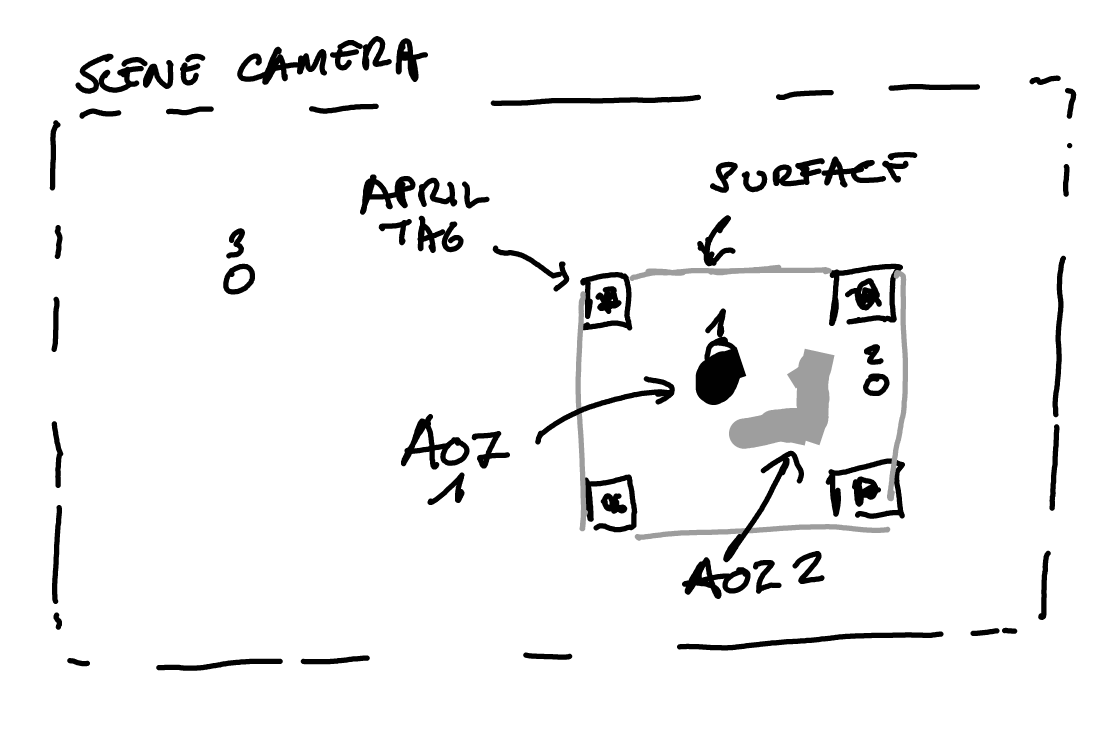
ok thank you. So if I understood correctly, I get two information from when a fixation is recorded inside an area of interested (i.e. area within markers): one piece of info is telling me whether the fixation is within the area (no matter where) - and this is stored in marker mapper fixations.csv -, and one piece of info is telling me whether fixation is on the object within an area - and this is stored in aoi_fixations.csv? So you are saying that the system is able to distinguish different things within the marked area? If my understanding is correct, would you agree that the best thing to do to check the real fixation duration on object of interest is to combine time series fixations.csv with aoi_fixations.csv? Thank you so much for your help!
That’s correct, once you're in the AOI editor and have drawn some AOIs, you can distinguish between them.
As for what’s “best,” that really depends on your use case. Let’s take a step back, what exactly are you trying to accomplish?
If you're simply trying to get the fixation duration within a drawn AOI, then aoi_fixations should already give you what you need.
When I mentioned cross-referencing with regular fixations, that’s mainly relevant only if the surface wasn’t detected (e.g. due to motion blur), which might cause a fixation to be broken or only partially mapped.
To clarify: if the participant’s head is still and the surface (e.g. a screen with markers) remains fixed in space, then the fixation duration from the egocentric POV and the surface-mapped data should typically match. Likewise, mapped fixations and AOI fixations should typically match in duration, just filtered by spatial inclusion in the AOI.
Thank you. My confusion arises because I never really drawn any AOIs. I simply have a marked area (screen with some QR codes at the four angles) and I vary the object presented inside that area (one per trial). Therefore I am not really sure about what different AOIs refer to.
My final aim is to have a time series datastream per participant where I know for each time point from start to end whether they looked at the marked area (object), at the face of their interlocutor (face_mapper) or somewhere else (binary array).
How can I get that free call? Actually we're getting some issues with the Pupil cloud enrichment and other situations
Please send an email to info@pupil-labs.com with the original Order ID.
It might be that the Scanning Recording or Reference Image needs some adjustments. Feel free to also share some details here, if you’d like some preliminary feedback.
Please let me know if you have any suggestions on how to go re this. I am at the point of creating my timeseries vector per participant and would like to know whether to use aoi_fixations.csv file or (enrichment)fixations.csv.
To clarify: during my experiment, participants move their head around to look at a partner (sit next to them) and to a screen (placed in front of them), so POV changes constantly. But within the marked area, I have not drawn any AOI and the item inside the mapped area changes every trial.
Hi @user-7413e1 ! Could you double check in the AOI Editor of that enrichment, whether you really don't have an AOI drawn?
If you do not have an AOI drawn, aoi_fixations.csv should be empty.
What you're trying to do sounds quite straightforward. Just to clarify, are you interested in gaze samples. or fixations?
In either case, you can use the on_surface and on_face boolean columns to check whether the subject was looking at faces, the screen or something else.
Where do I find the on_surface and on_face columns? My understand is that I need to run two separate enrichments and download two separate batches of data, one for fixation on the object (marked area) and one for fixation on the face (partner). From there, I will work on the fixations.csv file to combine these different pieces of info and create a complete timeseries vector per participant, which will have info in separate columns for looking_at_object and looking_at_face. Am I wrong? Am I missing something for which I could make this process more efficient?
Also, to clarify: I am still very confused about the difference between the marked area (surrounded by QR codes) and AOI (drawn?). I have run enrichments on the marked area, and I can see it is taking the mapped area correctly. But within that area, the item changes at every trial (while the enrichment is run across the full session) and therefore I do not understand how the algorithm knows to look for different things (AOIs?) inside the mapped area. Thank you for your help.
To follow up on this, earlier you explained and I quote: "Marker mapper fixations.csv = fixations mapped to the surface (i.e. between the markers) or if from reference image mapper the ones mapped to the image." Therefore, what would a fixation that is classified as FALSE in the 'fixation detected on surface' column mean in this file (marker-mapper fixations.csv)?
Hi @user-7413e1 ! That's correct, you'll need to ran both enrichments and to merge the CSV files later, lemme know if you need help with that.
To combine them you can use the shared fixation id and recording id fields. The fixations.csv from enrichments contain the column fixation detected on surface and the fixations_on_face.csv contains the fixation on face column.
For full granularity, you could also work at the gaze sample level using gaze.csv and gaze_on_face.csv.
Also, to clarify: I am still very confused about the difference between the marked area (surrounded by QR codes) and AOI (drawn?). I have run enrichments on the marked area, and I can see it is taking the mapped area correctly. But within that area, the item changes at every trial (while the enrichment is run across the full session) and therefore I do not understand how the algorithm knows to look for different things (AOIs?) inside the mapped area. Thank you for your help.
You can ignore the aoi_fixations.csv, if you haven't define any. This is meant for static AOIs that you would need to draw. Since your content does change every frame, you can't, unless you want to know for example if they look at an specific area within the screen (regardless of its content).
To follow up on this, earlier you explained and I quote: "Marker mapper fixations.csv = fixations mapped to the surface (i.e. between the markers) or if from reference image mapper the ones mapped to the image." Therefore, what would a fixation that is classified as FALSE in the 'fixation detected on surface' column mean in this file (marker-mapper fixations.csv)?
Apologies for the confusion, that's an oversimplification The enrichments fixations contains a subset of fixations from start to end of the enrichment, only those marked as on fixation detected on surface==True are landed on the surface.
Hello! Our team was wondering if locking the phone while recording with the Neon glasses can cause any errors with recording over time
While testing stuff out, we had the phone locked while recording for several minutes.
After roughly ten minutes, the glasses began flashing a red light and the phone vibrated. We unlocked the phone and it displayed a sensor error. Our data stream seemed to still be receiving data from Neon.
Is locking the phone the potential cause of this? Or might there be something else?
This was on the Motorola Edge 40 Pro
Hi @user-04e026 ! Locking the phone screen shouldn't cause any issues, in fact, it’s the recommended workflow to help reduce battery drain and avoid phone's temperature increase.
The sensor error you encountered likely stems from something else. Do you recall the exact error message that appeared on the phone? And is the recording saved? That info could help us pinpoint the issue.
In the meantime, I’d recommend double-checking that the app and phone have all the necessary permissions enabled. If the issue happens again and you catch the exact error, or you have the recording stored, feel free to open a ticket in 🛟 troubleshooting so we can dig deeper.
Sadly we didn’t save any of the recordings nor did we write down the exact error message. However, there is likely to be more testing like that this week so I’ll reach back out if we are able to record any of that.
Thanks!
Hi @user-f389a1 ! Apologies, your message got buried in the Discord ether, and I missed it.
In general, I wouldn’t recommend interpolating over blinks, it's usually better to just remove those segments. But of course, that depends on your specific use case and hypotheses.
If you do choose to interpolate, both numpy and scipy offer solid interpolation functions that can handle this well.
hello, is it possible to download audio data from pupil cloud? I now see that in the cloud is displayed the audio trace.
Hi @user-3e88a5 , yes. The audio track is in the scene camera MP4 video that you can download either via the Timeseries + Scene Video option or the Native Recording Data option.
You can also use the scene camera MP4 video exported from the phone.
If using the Native Recording Data or the raw data exported from the phone, then you may be interested in our pl-neon-recording Python library that makes it easier to extract the audio stream and work with it. See this script for an example.
@user-3e88a5 You can also see how we worked with the audio from the MP4 in the Timeseries Data download in our Audio-Based Event Detection With Pupil Cloud and OpenAI's Whisper Alpha Lab guide.
Surface-mapped fixation validation
Good morning, if I used the monocular option while recording with pupil neon is there any possibility to change it from left to right or viceversa in the cloud or in the pupil player?
Hi @user-3e88a5 , it needs to be set at the time of recording. Changing it afterwards in Pupil Cloud or Neon Player is not a supported workflow.
Thank you very much. Sorry, another question, with the neon player is there any way to analyze and export more recordings contemporaneously, something like a batch export? or do I need to download the source code from github and make some modification myself?
Hi @user-3e88a5 , no problem, feel free to ask.
Neon Player does not support batch export, but you can achieve this, in the same Data Format, at the command line with this script from the pl-neon-recording Python package.
Perfect thank you very much!
Hi I'm looking at Neon product. I would like to know it there is any intrinsic and extrinsic information of two eye tracker near the nose pads.
Hi @user-802786 , do you mean that you would like the intrinsic & extrinsic camera parameters of each eye camera? In other words, values related to the camera calibration and the camera's position relative to the eyes?
Hi Rob, my neon device is also having similar problem with this. May I know what can I do to get some help with this issue?
Hi @user-a93c37 , please open a Support Ticket in 🛟 troubleshooting and provide the info it requests. It is currently after hours for the team, but one of us will reach out in the morning.
Hi @rob . Kind of. Not all of them. I'm more instested in two eye camear optical axis(vector) or where it looking at. We would like to play it with different poisition but we would like to make sure, both eye pupils are clearly shown in both camera(not clipping).
Hi @user-802786 , I can interpret this in a few ways, so I provide each potential answer:
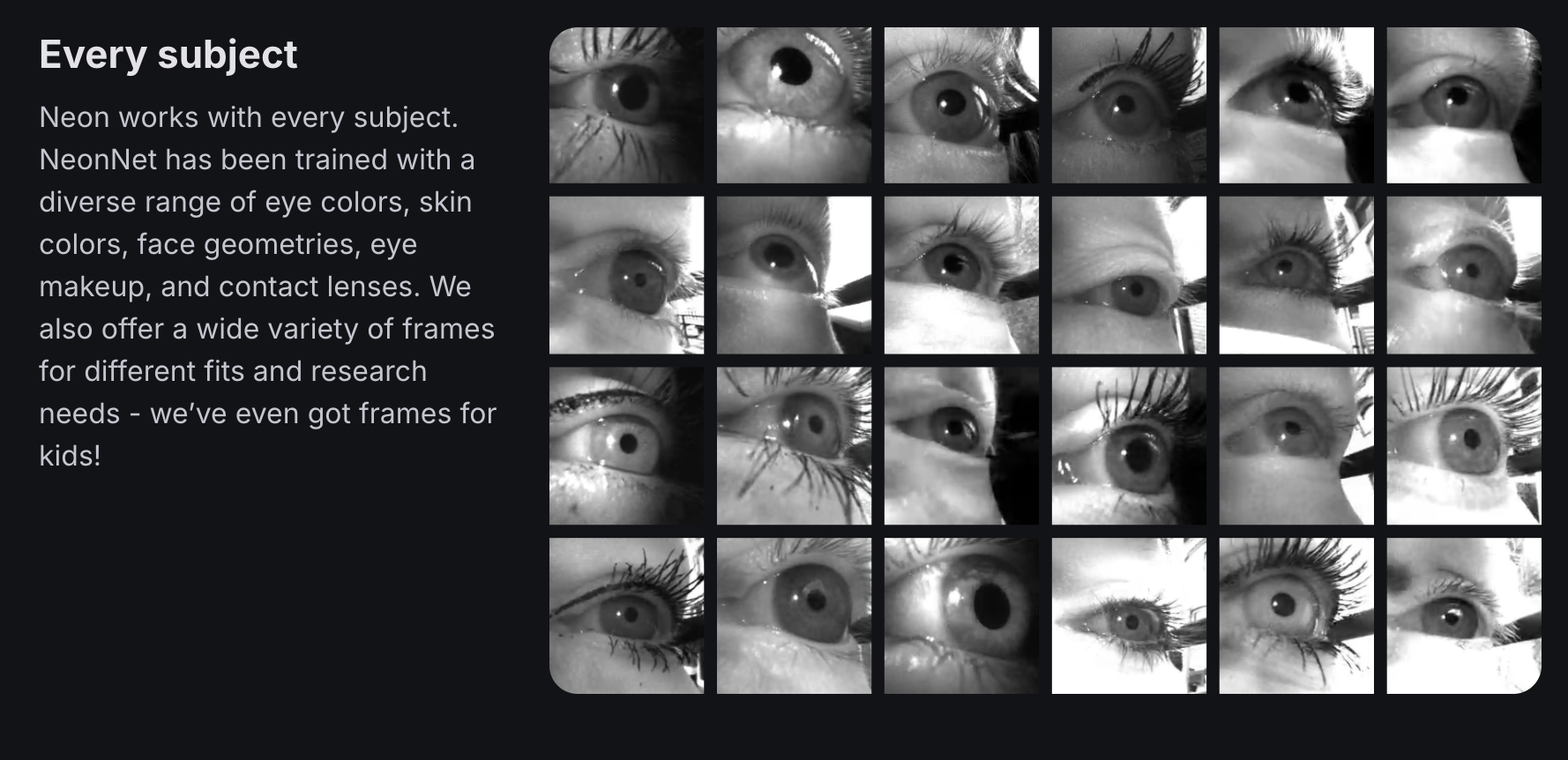
It sounds like you want the 3D geometry of the Neon module, so that you can simulate how it sits on different faces? Are you planning to build your own custom frame? While such a simulation is possible, I have also attached an image from our webpage, showing a wide sample of eyes that were imaged with Neon in our standard frames. This should hopefully provide an answer, as simulating this will only be so accurate.
Since you mention "optical axis of where it is looking", there is also the possibility that you mean the optical axis vector of each eye with respect to each eye camera? If so, then yes, you can also measure this with Neon. It's deep-learning powered pipeline, NeonNet, provides the 3D Eye Poses, so the extrinsics of each eye in scene camera coordinates, and again knowing the 3D geometry of the Neon module and the intrinsics of an eye camera, you can transform that to the coordinate system of each eye camera.
Since you mention "clipping", then you could also be referring to the intensity of pixels in each image? Neon works equally well in pure darkness to bright sunny beaches. I refer again to this page showing examples (make sure to watch the videos at the bottom to the end). The eye cameras have auto-exposure and handle such wide variations in dynamic range fine, so you don't need to be concerned about "clipping" of pixel intensity values, if that was being asked.
Hello, I didn't make any modifications. When I was 3D printing frames, I opened the step file from GitHub and found that the temples and frames were separated, as shown in the figure, so I couldn't print the whole thing
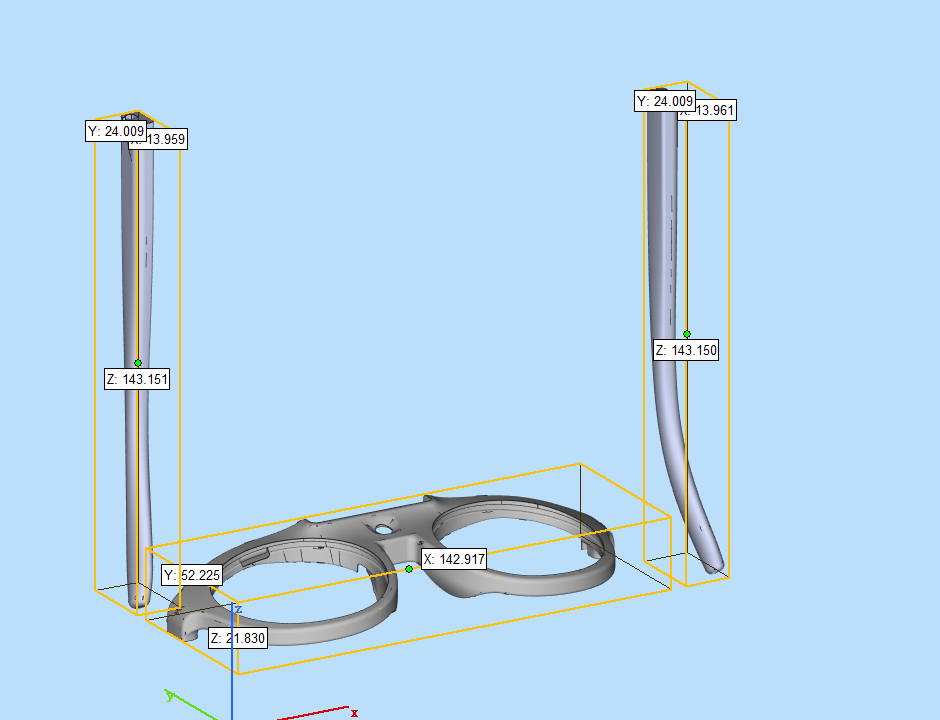
Hi @user-5a90f3! Yes, you'll need to link the temples to the frame and print it as one. Post-hoc, the hinges cannot be bought at low quantities
Hi @neil When they are combined, there are still gaps between the temples and the frame, and if you 3D print them with nylon material, they will still fall apart. I would like to ask if the original file of the glasses itself is made up of three parts (one frame and two temples), and these three parts are not connected and not integrated.
Correct. You'll need to fuse them in your cad software.
We can also provide dummy frames for prototyping - reach out to info@pupil-labs.com if that's of interest 🙂
Okay, thank you very much!
I set some event buttons in my Neon Monitor but if I open the monitor on another device connected to the same network they do not appear. How can I reuse these?
Hi @user-ffef53 , please feel free to post this as a 💡 feature-requests so we can pass it onto the team and keep track of it.
Hi @user-ffef53 👋 Just to add to what @rob mentioned, events created in the Monitor App are saved locally in your browser’s localStorage.
That’s why they don’t sync across devices (PCs). It’s definitely worth posting a feature request in 💡 feature-requests if you'd like to see that change!
That said, there is a quick (and a bit hacky 😅) workaround if you want to copy events over manually:
F12 (or Cmd+Option+I on Mac / Ctrl+Shift+I on Windows) to open Developer Tools . Note: This might change depending on your web browser.const myEvents = [
"Event1",
"Event2",
"Event3"
];
localStorage.setItem('plConstMonitor_presetEvents', JSON.stringify(myEvents));
Thanks guys!
Hi, I am a PhD student looking for an eye tracker for our user study. The project requires an eye tracker to return the 3d eye pose and pupil diameter of users in real time. I'm having trouble deciding between the neon and core trackers. Could I have some help understanding the differences between neon and core?
Hi @user-ff00f7 , briefly, Pupil Core is our original eyetracker, first introduced over 10 years ago. While Pupil Core is powerful, Neon takes everything we have learned from Pupil Core and improves on it in every way, while being easier to use, modular, and truly mobile.
Neon's deep-learning powered & calibration-free pipeline help to enable this. With Pupil Core, you must calibrate every time you put on the eyetracker, as well as when it has slipped. With Neon, you don't need to think about this. You simply put it on and you are accurately eyetracking.
For more details, please see these two messages for a comparison of both eyetrackers:
Thank you very much!
If you have any more questions, feel free to post!
Hi I'm a PhD student working with the Neon device, I was wondering if there's a way to capture the data from a laptop rather than the companion device? Like the pupil capture. Thank you!
Hi @user-14fea1! To make use of Neon's native recording format, it must be tethered to the Companion phone for operation. But you can easily stream all the data to your computer in real-time using Neon's real-time API and/or Monitor app, if that's of interest!
Hi team! If my phone storaeg is low and each recording has a cloud sign with a tick in the middle, is it safe to say it's been uploaded to the cloud and I can delete the local phone recordings? This won't also sync and delete the recordings in the cloud?
Hi @user-0001be 👋 Yes, that means they’re backed up in Cloud.
And no, deleting them from the phone won’t remove them from Cloud. If you’d like, you can also transfer them locally first as an extra backup before removing them from the device.
Will do! Thank you @user-d407c1 !! 🙂
Hey guys. Apologies if there ends up being multiple messages from me in a row, my last ones weren't showing up after pressing send.
We are having an intermittent problem with the neon companion app on the Motorola edge 40 pro where the app freezes when you press stop recording. When this occurs, the android OS will pop up with a notification that the app has stopped responding, and you can choose wait/stop. We've tried waiting several minutes for it to respond, but it seems the only way to recover is to hit stop or switch out of the app. When we reopen it, the recording is lost...
I've tried searching the Documents/Neon directory on the phone to see if any of the data was saved, but I couldn't find anything matching the timestamps of the recording. Any idea if there's a way to recover this data? If not, is there any way to prevent this?
Hi @user-d086cf 👋. Thanks for your message. Sorry to hear you're encountering app crashes.
Please try the following:
Press and hold the Companion App icon in the app launcher (home screen), then select:
App Info → Storage & cache → Clear cache
You can also clear storage.
Does that solve the issue?
Here's the log for the crash...
(Note that this won't delete any recordings)
Hello, I am an instructor and researcher at a pilot training & research facility.
Due to strict information security policies, our environment cannot connect to the external internet.
I am looking for an eye tracker that can be operated completely offline (standalone).
My questions:
Background:
If anyone knows whether this is possible with Pupil Neon (or other Pupil Labs devices),
or can recommend a suitable configuration for offline use, I would greatly appreciate it.
Hi @rob You probably do not recall, but I did not manage to use the surface tracker incorporated in pupil labs in my set-up, so I will need to do it my self. To do so, I want to use the undistorted data. I just want to be certain I am using the correct data. While doing this, it would be great to be certain that I keep everything syncchronized, that is why I was also asking about the world_timestamps.csv, since there is not much information about it. Thank you
Hi @user-cc6fe4 , I see and now I remember.
If it helps, you can also present the AprilTags as digital images on the monitor/display, making them more brighter and more detectable, provided that does not disturb the required lighting/adaptation conditions for your experiments.
new user: i recorded a pitcher throwing but the target only shows prior to the throw
how do i get the ttacking
tracking for the actual throw
Hi @user-2d1b95! Thanks for your message. I'm not sure I understand what you mean. Could you elaborate?
Hi @user-f578a4 👋. Great to hear you're considering Neon for this work! Since you're familiar already with Neon, you'll know about the Companion phone. You'll need to create and log into a Pupil Cloud account once when you set up the Companion app. But after that, you can use Neon for recording, live viewing, and data analysis without ever connecting to the internet. The workflow is straightforward:
Hi again! Ran into an issue with my blink files. We ran an experiment in the morning and in the afternoon. The morning recordings look fine and nothing is missing. The afternoon files i exported contain empty blink files. I tried to re-export from the companion device, but still getting a zero bytes file. Any idea what the problem could be with this?
Hi @user-ffef53 ! Could you kindly create a ticket at 🛟 troubleshooting so we can have a look?
Hi, i am using the pupillabs neon for a research project. I just noticed there is a limitation of 2hours. I´ve deleted some old coverage but the used minutes doesn´t reduce. Are there any tips to expand these without the upgrade ?
Hi @user-e0026b ! Yes, you can manually delete older recordings from Pupil Cloud to free up space. Just make sure to also empty the trash folder to permanently remove them. Once space is available, any newer recordings that were previously blocked will automatically become accessible. Please note, however, that recordings cannot be re-uploaded to Pupil Cloud once deleted
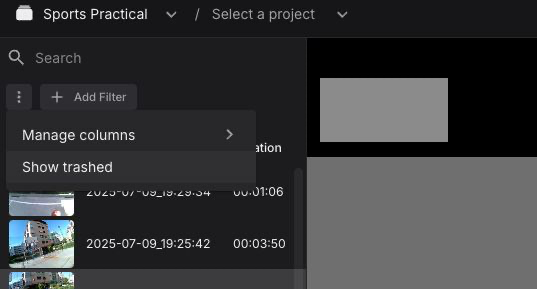
Alternatively, you can work completely offline, transferring your recordings from the Companion Device and using Neon Player or pl-neon-recording to analyse it.
Hi, In pupil cloud, I can see the graph for pupil diameter and blink graph. How can I get certain part of the graph with proper scales with X and y axis? Is downloading CSV file is the only way? I'm not a programmer btw but I need to analyse the graph in certain parts of events that I marked.
Hey @user-c704c9 👋 On Cloud, the graphs show two things:
They’re plotted with mean (right/left) values on the y-axis and time on the x-axis.
If you want more granular control over the plot, it’s often easier to build it yourself, you don’t need to be a programmer for that.
Are you familiar with Excel? If so, you can:
3d_eye_states.csv file in ExcelThat way, you can zoom in, filter, or format the graph exactly how you like.
So there is no other way than using csv to plot. I thought I could get easier way to plot faster because I had to convert the data to plottable parts and sometime it become slow as I add sheets with different recordings. Thanks for reply.
Right, Pupil Cloud doesn’t have turnkey tools for fine-tuning plots. It’s not designed to replace dedicated charting or full suite analysis tools.
That said, if having more flexible plotting options directly in Cloud would be useful for your workflow, it’s worth adding it as a suggestion in 💡 feature-requests so the team can consider it for future updates.
Thank you. I'll ask in suggestion. It will be a lot helpful to plot things faster and also for presentations. Also, how can I record the video with fixations and also those graphs under. I tried recording in OBS while opening the pupil cloud site in browser. But the fps drop and the fixations points and video doesn't match.
Hi @user-c704c9 , apologies, I did not see that you also want the graphs in the video export. That is currently not supported. It would be recommended to make a custom visualization for that purpose.
To export the videos as they appear on Pupil Cloud, make sure to use the Video Renderer Visualization.
Also, if you have not yet had your free 30-minute Onboarding call, be sure to send an email to info@pupil-labs.com with the original Order ID to organize that.
Yes, I want to show the video as the play head is moving to exactly show what is happening in certain parts. I'll just have to use Video renderer just like you said and record the graph from the cloud and stitch them together I guess.
I don't know about onboarding call because the owner is my boss and I'm just assigned to do the work. Thanks for reply @rob @user-d407c1 .
You are welcome. Your boss is free to organize the Onboarding and they can invite the whole team to the call, if they like.
I’ve downloaded the Pupil Core Bundle onto a Microsoft Surface Pro but neither the Workd View camera or eye cameras feeds are coming through.
Hi @user-057596 , the Pupil Core Bundle is not built for ARM processors, which are found in many models of the Microsoft Surface. You could try running it from source (see this message: https://discord.com/channels/285728493612957698/285728493612957698/1354350692688592947), but may I ask, are you trying to use that software with Neon?
Hello, I have a pupil neon. I am trying to get gaze fixation in real-time on a marked surface. However, I don't see any way to define the surface on tue companion app. I know how to do it in post-hoc but that it not what I want.
Also, I tried to connect Neon to the pupil capture software on windows, it fails to detect the hardware.
Is there anyway I can get real-time fixation data on a surface from Neon?
Hi @user-4ba9c4 , you want to look into our real-time-screen-gaze package for Neon.
Hii, thanks a lot!! I will try this out and update!
Hi Rob, is it possible to use physical markers instead of on screen markers? It looks like I need to define the coordinates of individual markers.
It is technically possible, but then you need to specify their location in the virtual pixel space that your monitor would cover if you could expand it to be larger, while still respecting the default coordinate system of the monitor.
I can confer with my colleagues in the morning about the simplest way to go about doing that.
Otherwise, that package is designed with the intention that you typically display the tags digitally, as images on the screen.
Hi, I would like to get some recommendations:
Our teams is using the eye tracker for a user study for prolonged duration, roughly 2 hours or more. I am wondering if anyone can recommend any way for us to make sure that we are not running out of battery. We have been thinking to use a wireless powerbank that sticks at the back of the phone, but when tried that, the phone gets really hot. So I am wondering if anyone has any recommendation on the method/powerbank brand/cable splitter for powerbank + tracker that works that would be helpful. Thanks!
Although you can record for longer than that with Neon, if you want extended battery life, then here are some suggestions:
@rob Hi Rob, no we are using it with Capture this time in a 2 days Mastery Learning course for regional anaesthesia as our analytical software is only designed as yet to connect to the Core pipeline and we are holding a worlds first clinical skills completion based on qualitative data so we just wanted to have the new Surface Pro as a back up but if it’s not compatible then that’s fine. Thanks for getting back so promptly.💪🏻
I see. Thanks for the recommendation. Also, since I have previously had error with the sensor, could it be due the overheated phone with the wireless charging?
Hi @user-a93c37 , that is not related. And, if Android has not shown any heating warnings and especially if it did not close the Neon Companion app in conjunction with a heating warning, then it has not overheated, so no need to worry about that.
Got it. Thanks!
No problem. If you are concerned about the temperature of the phone, you can leave it on a table or in a sports arm band, well ventilated.
Has anyone else faced the issue of not being able to install the Neon Companion App?
Hi @user-613332 , what phone are you using?
Samsung S25
Did you initialize Android with a basic Gmail account?
I did, I set up the phone with a gmail and samsung account. Interestingly, as soon you messaged me, it started downloading. Which is great! Will keep you posted.
It worked! How do I schedule the 30 minute demo?
Great! Please send an email to info@pupil-labs.com with the original Order ID to schedule your 30-minute Onboarding call.
Hi, I'm working with Mr. Ax's parabolic flight group - we conducted some research using the Neon device. We're aware that it is possible to elucidate blink completion metrics from the data and wondered how to compute these?
Hi @user-b98aae 👋 ! Neon does capture eyelid aperture since April on the latest app version.
If you had "Compute Eye state" enabled that metric should already be there, if the recording are made with an older version they won't have it.
Hi Miguel! I see, the recordings were made in 2023/2024, during the parabolic flight campaign, so eyelid aperture was not automatically selected. Is there a way to re-run the analysis to retroactively see eyelid aperture in our data?
Please write an email to info@pupil-labs.com and we will see what can we do.
Is there a way to estimate how much time a recorded video will take to process in the background? Especially for videos that have the anonymization add on.
Hi @user-613332 , there is no set time. It depends on not only on the length of the recording, but also on where it sits in the processing queue, which is variable.
Hi, I would like to get some suggestion about preparing AprilTag for Maker Mapper.
I'm using AprilTags which is distributed on the Pupil Labs website for surface detection following, but tags are not detected properly when I process of Maker Mapper for some reasons. There are multi monitors at the data collecting environment, and these monitors are right next each other and very dense. I would try to detect each monitor surface with 4 tags per monitor. The user stands in 2/2.5m apart from monitor, and tags become small on the scene camera. For tag calibration, I have some questions and would ask you some tag recommendations:
What I did so far:
Thanks for your support!
Hi, @user-c529ed - tag size is a very important factor in tag detection and localization, and from the sounds of it, this is definitely what you should focus on first.
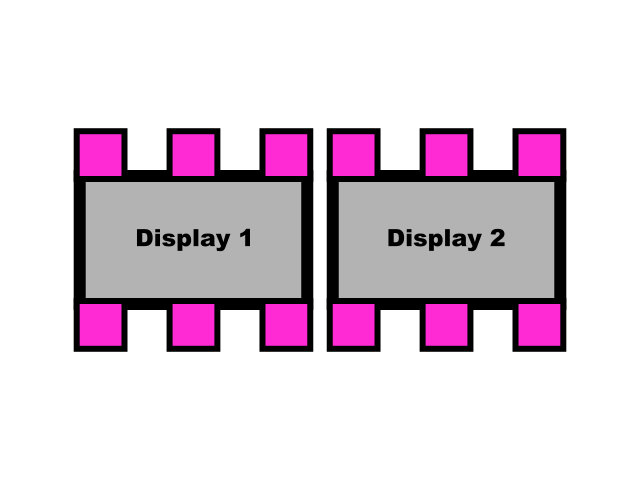
You mention that the tags can't be made much bigger because of the monitor restriction, but would the configuration in this image work for you (where the pink squares are AprilTag markers)
@dominic Thank you for suggestion!
Do you mean that tag size is still same small one and putting more tag instead of size change? And if the monitor configuration is like the picture below, how do you put the tag for detecting each monitor?
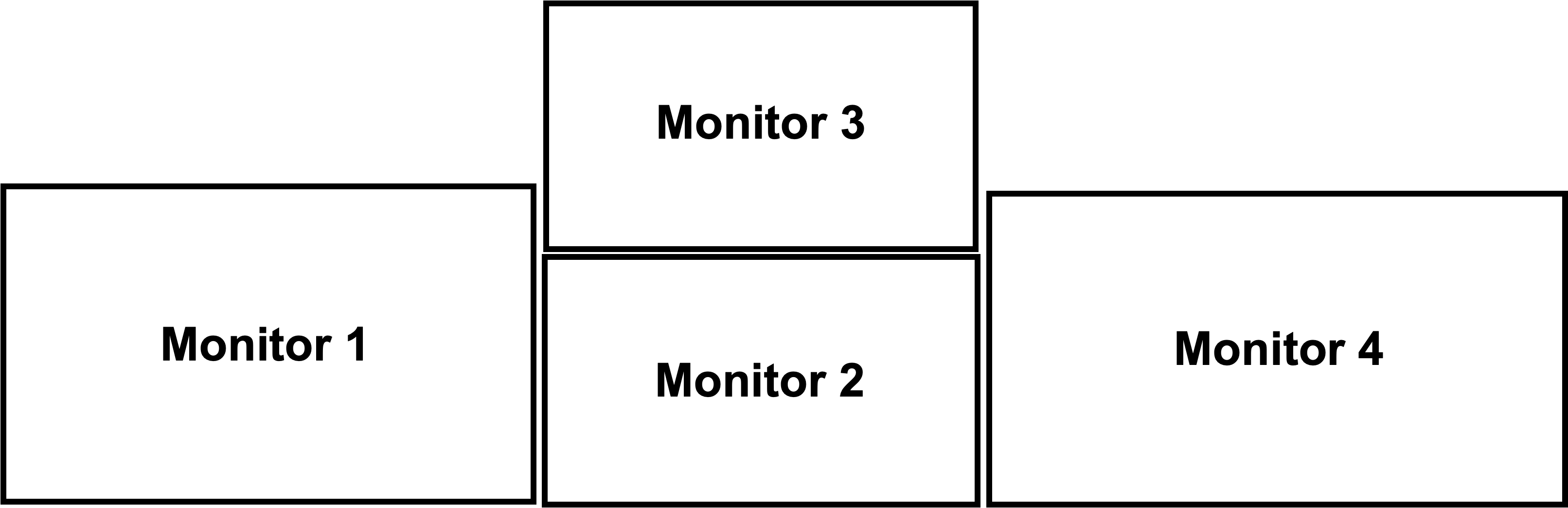
I can't say with confidence about your tag size since I haven't seen them, but from your description they probably need to be larger.
Are all of your displays positioned so that they share a single, common plane? I.e., none of them are rotated relative to one another - they are all "squared-up" with each other.
I ask because you don't need 4 markers per screen. You can define one surface that describes all of the displays, and within that create an area-of-interest for each individual display. In this way, you only need a minimum of 4 markers total, although I really would suggest something more like the layout shown here.
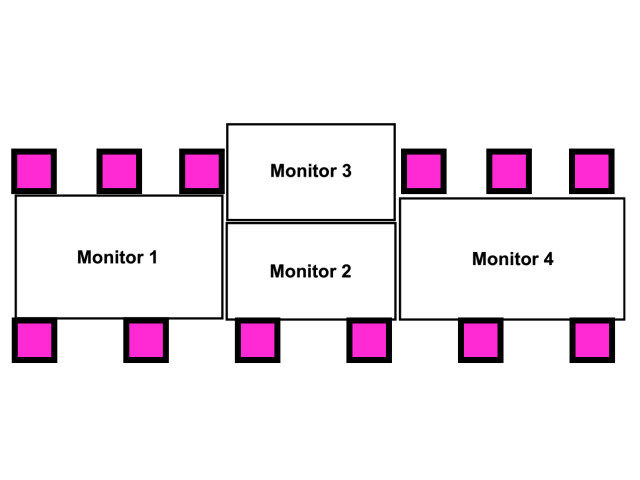
I see, no need to use marker for each monitor is a good point. Monitor 1,2,4 is positioned at common plane, and monitor 3 is tilting for pitch angle. I'll try to put makers around the monitor as much as possible to capture multi monitor together.
Thank you so much!
monitor 3 is tilting for pitch angle
In this case, Monitor 3 needs its own set of (at least 4) markers. These markers need to be on the same plane as monitor 3
Hi! I was attempting to get blink data but after viewing the data in the cloud, there is no blink data for my last two trials. A trial I ran a couple days earlier has blink data. The only difference is that the trial with blink data starts recording after the glasses are put on, while the ones without that data start recording a few minutes before the glasses are put on. I'm wondering if this is the cause of the issue, and if there's any way to rerun the blink analysis but starting from later in the recording i.e. when the glasses were worn.
Hi @user-ad7ce5! Please open a ticket in 🛟 troubleshooting and share the recording ID. We can look into it there!
Hi Pupil Labs, we were working with the IMU data and found that the number of samples recorded for each second are not consistent. Shouldn't there be 110 rows (or nearby) for each second in the dataframes?
Hi @user-ccf2f6 👋 ! Could you also kindly open a ticket at 🛟 troubleshooting so we can further investigate it?
Is the automate_custom_events package still working? I am getting a "ValueError: invalid literal for int() with base 10" error no matter what prompts I use. Thanks!
I also observed this. According to neon (as im keeping 120hz) i should receive 120 data frames per second, but for whole 10 seconds im receiving only around 500-600. I assumed it is ommiting the non-tracked data (like eyes closed, pupils not found etc).
Hi @user-6c6c81 👋 I think we might be mixing apples and pears here, what you may have noted as 120 Hz is the gaze inference, since the sampling rate of the cameras and IMU cannot be changed.
May I ask first, is that sampling rate through NeonXR? Real-time API or recorded one?
@user-d407c1 i did not get your last question. I am using Motorola 5g for neon which came with neon. And im using neon xr for unity and tracking and recording realtime time series data such as (pupil diamenter, pupil centers, gaze point, gaze origin, gaze vectors, eyelid angles, etc and saving into CSV file
@user-6c6c81 Just to clarify, the sampling rate you’re seeing is based on the received data from NeonXR, not the recorded data, correct?
If so, this is expected because the current library uses WebSockets and batches packets before sending (buffering). There’s a new beta version that uses UDP directly, which lets you send and receive the full sampling rate. You can try it here: UDP branch.
Since this is specific to 🤿 neon-xr and to avoid mixing with other topics, let’s continue the discussion there if you have more questions.
Ok thank you
Hi team, if the phone cannot connect to the wifi, is it possible that the setting of the phone's settings have some problems? I have three phones, two of which cannot connect to the wifi
Also, if I want to record the session, do I have to store the recording to the cloud to analyze the data? which means I have to purchase the addon service, right?
Hi @user-9a1aed , while you can still use the 2 hour free space on Pupil Cloud, it is not necessary to use Pupil Cloud to collect or analyze data. You don’t even need an Internet connection. All the raw data collected during a recording are saved on the phone. You can then export them via USB cable and load them into Neon Player or our pl-neon-recording Python library.
However, our most powerful analysis tools, such as Reference Image Mapper are only available on Pupil Cloud. If using Pupil Cloud, you also benefit from the data logistics it provides, such as Workspaces and sharing. It is designed to streamline the process from data collection, to qualitative review, to quantitative analysis & visualization.
Hi @user-9a1aed , were these two phones provided by us?
yes. thanks!
Is there any capacity to adjust the settings of the scene camera? For example, is it possible to increase on-sensor binning (thus reducing spatial resolution) in exchange for a higher frame rate?
Hi @user-dc9cc7 👋. This isn't possible with Neon's scene camera. But if you don't mind a bit of post-processing, what you can do is map gaze onto a third-party scene camera, e.g. a specialised camera with higher frame rate, using this Alpha Lab guide: https://docs.pupil-labs.com/alpha-lab/egocentric-video-mapper/
yes. thanks!
hey community! I'm using neon glasses and I read its data stream using OpenVibe aquisition server. I strem triggers in paraller and OpenVibe is suppsed to merge the triggers with the data. Both streams are visible in the aquisition server. But once visualized in OpenVibe designer the triggers don't appear and they are not recorded either. What is strange, is when I replace data stream from Neon by data stream from Muse, keeping the same trigger stream, everything works perfectly fine. So it is not the problem of the trigger stream format. Have you ever experienced such a problem?
Hi @user-8e9bb0 ! Just a quick note, there’s no official support for OpenVibe, so it’s a bit outside what we normally test. Could you explain a bit more about how your setup works or how you connect it to OpenVibe?
It might also be worth trying to stream the data directly via LSL (LabStreamingLayer) instead of routing through OpenVibe first, just to confirm whether the issue is specific to OpenVibe’s handling of the stream.
Hi Miguel! Thank you for your quick answer. The setting is the following: i activate Stream over LSL in the Neon Companion to stream gaze and pupil data to OpenVibe (it can bee another LSL reader). In parallel I run a python code that manages our protocol, that shows images in the screen and sends event in the LSL to synchronise the stimuli with the EEG and Eye tracking. So OpenVibe allows to merge both data stream (coming from Neon) and trigger stream coming from Python. Generally this works very well for EEG (when devices stream EEG into LSL) and it mergers triggers with EEG in real time. But for some reasons it does not happen with the data stream coming from Neon
Is the blink detection in neon player calculated the same way as it is in the real time API? Watching the video in the player and checking the blink detection bar, I’m noticing some discrepancies (ie missing blinks). Luckily this is not throughout the entire recording and most blinks are registered, just noticing some gaps
That depends on what version of the Companion App and Neon Player you're using. With older versions (before the app supported real-time blink detection), Neon Player used an older algorithm that's computed post-hoc. Now that the Companion App supports real-time blink detection, Neon Player simply loads the blinks that are detected while recording (and makes no attempt to detect blinks post-hoc)
We got the eye trackers about a month ago so I’d venture to guess it’s about as new as it can get but I will double check tomorrow updates. Any suggestions on how we might address these discrepancies in blink detection or even just some info on what is defined as a “blink” according to the detection algorithm? Thanks so much
Just to be clear, you're saying that some blinks you see on the real-time API do not appear in the recording?
The blink detector is based on the eye-openness signal, which itself is computed from eyelid angle estimation
Im just watching the video and noticing that there are gaps in blink detection bar in the neon player. When I examine the video closer, it seems blinks that I witness are not being counted by the detector while others are being counted as expected. Given your explanation, it could simply be due to the eyelid angle estimation. Still, it would be good to know if there’s a means of cleaning up / controlling for this noise through the API if possible
The definition of blinks is itself a bit fuzzy (e.g., "half-blinks"), so classification is probably always going to be imperfect. At this time, we don't have any configurable parameters for the blink detector, but if there's something you'd like to see, please let us know by suggesting it in 💡 feature-requests!
Thanks! Anywhere else I can find more info on blink classification?
We don't have much info out just yet for our newest blink detection algorithm. Hopefully we'll have something publicly available soon, but no timeline as of right now
Thanks anyways!
For the offline blink detection (using the blink_detector from github), are there adjustable parameters? e.g. if in one of my recordings, far fewer blinks are being detected and I want to increase the "sensitivity" per se
Could you link the gh repo you mention?
I was wondering if I could get any support on using adb to sync time? Whenever I do adb shell dumpsys time_detector I get mLastAutoTineClockSet=null
Additionally doing the command in the documentation adb shell cmd network_time_update_service force_refresh hangs and returns false
Hi @user-a84f25 t! 👋 A couple of quick notes that might help:
Seeing mLastAutoTimeClockSet=null isn’t necessarily an error, it usually indicates that Android’s automatic time detection hasn’t updated the clock yet. You can dump the full time_detector state with adb shell cmd time_detector dump to confirm if auto time is enabled and which sources (e.g. network ) are active. Android Open Source Project
The adb shell cmd network_time_update_service force_refresh command may hang or return false depending on your device or Android version, it isn't guaranteed to succeed in all cases. More info here If time sync is the aim, the easiest option would be to rely on the Companion Device’s NTP auto-sync, which generally works when the device is online.
Regarding the Python API note:
If the issue persists, could you share a bit more about your setup (device model, OS, and whether you’re on WiFi or USB tethering)? That would also help
I'm also sometimes not able to get any data from gaze/eye/world sensors through the python API. The API claims that no RTP is received for 10 seconds: closing
The time echo estimate always works fine however
Hi! I have used the Neon glasses for data collection, and I will submit a paper in which I would like to cite Pupil Labs. Is there a relevant publication I can cite?
Hi @user-42cb18 👋! You can find it here: https://docs.pupil-labs.com/neon/data-collection/publications-and-citation/.
And once your work is published, feel free to share it in 🔬 research-publications , we’d love to see it! 😉
Ah, so the code for that blink detector is open source, which of course means everything can be modified/adapted, but it wasn't really built with the idea of configurable parameters in mind, so it may be a bit challenging to make changes
Hi Miguel! I can actually formulate the question differently, independently of OpenVibe, how can I integrate LSL triggers generated by python app, that manages the protocol timing, into PupilLabs data? So that I can then synchronize both EEG, which receives already these triggers, and pupil/gaze data
Thanks for following up. May I ask have you tried https://docs.pupil-labs.com/neon/data-collection/lab-streaming-layer/ ? Are you able to receive the data from the outlets?
yes, i receive perfectly well the data from the glasses in the LSL and I can see them perfectly well in OpenVibe. The problem is the triggers, how to merge them with the data stream coming from the glasses. The triggers are generated by an external python app, so they are not generated in the Companion
Hi @user-8e9bb0 , I am hopping in for my colleague @user-d407c1 . What triggers are you sending? Do you mean Neon Events from our Real-time API?
Hi @rob non, i send triggers in string format (like numbers 10001 or 56 whatever of this type) from an external python app. Those triggers mark the beginning and the end of different stimuli. Those triggers are sent in LSL marker stream and it is merged with EEG (ANTNeuro). But for some reason we don't manage to merge them with PupilLabs data
I see. That is partly because those triggers are not compatible with Neon. They are only compatible with that EEG device.
To clarify, LSL does not force events or triggers from other devices to appear in the Neon recording timeline. Rather, those triggers will appear in the final LSL XDF file.
To best help, which data from Neon do you want to synchronize with the EEG device?
Pupil size especially
Ok, this is already contained in the LSL stream from Neon, called [Device Name]_Neon Gaze. If you are collecting such streams via LSL, then you typically don't need any other triggers. One of the big benefits of LSL is that it automatically synchronizes all compatible data streams for you.
The use of triggers is helpful for synchronizing other data sources that are not streamed over LSL. May I ask what the intention of your triggers are and why you need them in the Neon recording timeline?
Ah, apologies, I see. You use the triggers to mark the start and end of stimuli.
Then, if you have the following in the final LSL XDF file, you are already done:
Since LSL synchronizes all of those automatically, they will all be on the same LSL time axis. You can then directly compare the LSL triggers stream to the LSL Neon stream.
Is the intention of having the triggers in the original Neon recording timeline because you want higher data fidelity (e.g., the full 200Hz eyetracking rate of Neon)?
yes, I need those triggers to synchronize my pupil data with parallel EEG recording
Hey Miguel, I've done some more troubleshooting on the RTP errors and discovered the following:
Thanks so much
Hi @user-a84f25 ! You can't do NTP sync if there is no internet access.
How are you connecting through ethernet, do you have a dedicated router? I would recommend checking your firewalls too.
In the Neon Player, the marker mapper cannot be used, either, right? If we want to use the marker mapper, do I have to use Pupil iCloud? Thanks!
Neon Player offers a Surface Tracker plugin, which is similar to Marker Mapper, but not exactly the same.
Miguel: For some reason, sometimes it works with internet and sometimes it doesn't. I'm not sure what changes between when the RTP streams are captured when the phone has internet vs when it doesn't. I'll need to do more testing In terms of another question: is there any audio retrieval methods in the realtime api?
@user-d407c1 Have you ever ran into the problem that the eye state, gaze, and video RTSP streams work fine, but the time estimator dies or freezes after a couple of minutes? Do you know what might cause that?
Hi @user-a84f25 ! Thanks for your patience, I’m currently at a conference so my responses may be a bit delayed.
Could you let me know how many times you’re calling the time offset estimator? We haven’t encountered such issues in our tests, but this detail might help us narrow things down.
Regarding your question, audio signal is included in the RTSP signal, although currently our python realtime api client does no have support for it.
@user-d407c1 Thanks! I'm running it on 20 samples, as often as I can (I'm using the async API)
Hi, all! Are there any other files besides wearer.json that the identity of the wearer could be revealed?
Hi, @user-42cb18 - in the info.json file, you'll find a field named wearer_id. This value will match the one you'd see in wearer.json
"Hello, I've confirmed that the neon-player repository is on your GitHub. I was wondering, which repository is for real-time capture with the Neon device, similar to the 'Pupil Capture' software for the Core product?"
Hi, @user-fce73e - the development version of Pupil Capture on GitHub has experimental support for Neon Linux and Mac, but this isn't officially supported. The only recommended way to use Neon is with the Neon Companion app, available for free in the Google Play store
Hello! Is there a way to improve and/or stabilize the detection of surface markers for the surface tracker (I'm processing it via Neon Player)? Because I have some frames where the markers are probably too small and are not detected, so instead of being a rectangle, the surface becomes a weird polygon. The marker size was fine for the Core, but the Neon struggles more to detect it reliably. Thanks!!
Hi, @user-a4aa71 - I'm afraid there really isn't anything you can do post-hoc to correct for small markers
How does the timing between the gaze and the eye videos compare? Should the gaze timestamp refer to a specific frame in the video, or is gaze calculated from multiple frames? Also for using the TimeOffsetEstimator, how do you go back and recalculate the time of the events? Which estimates go with which time points? Do you do some sort of moving average assuming the timeoffsetestimator is reporting at a consistent rate over the recording?
Hey, @user-a84f25 -
Additionally, I have tried recording gaze through the pupil labs realtime api and through just recording on the phone. I was comparing timestamp_unix_ms from the realtime stream and ts from the recorded stream and I cannot find time correspondences?
The Realtime API streams data over an established data protocol that which defines a lower precision for timestamps than what we save in recordings, so your observation is correct and these timestamps will never exactly match up, and the difference will likely appear sporadic/inconsistent. Timestamps from the Realtime API are still correct - just not as correct as the ones in the recording
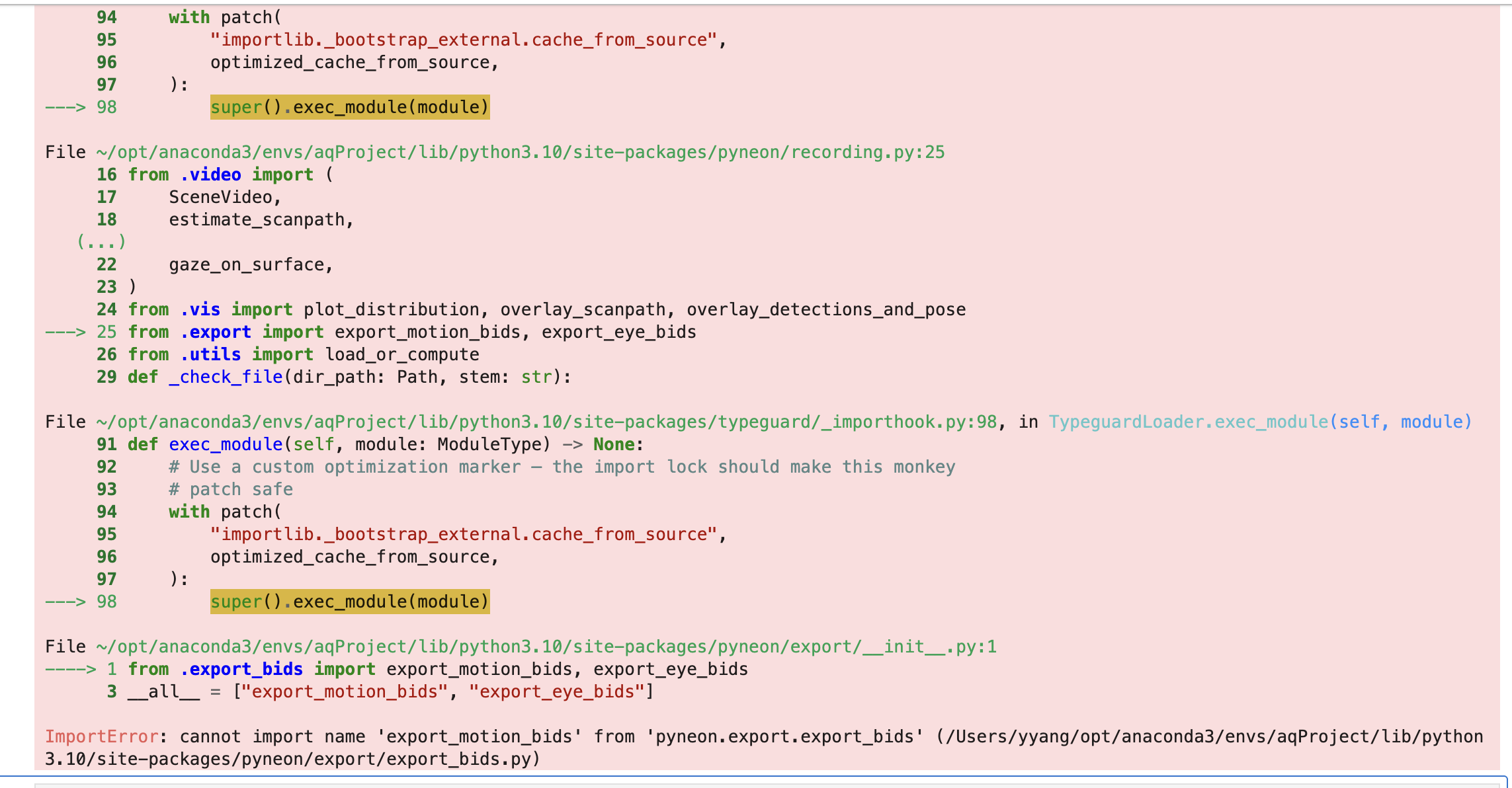
Hello, I wonder if anyone could help with pyNeon? I am following this tutorial, but it shows this error. https://ncc-brain.github.io/PyNeon/tutorials/surface_mapping.html
Hello, @dominic , I am running the same script on two laptops, the script is in Psychoy 2024.2.4, on one laptop the events are correctly stored. in the other laptop they are all stored at the end of the recording (i.e., recording.end). Any idea why the same script produces different behaviour? Thanks
I noticed that the same script with pupil plugin version 0.7.7 has that problem, but if I revert back to 0.7.6 the problem disappers and events are annotated at the right time. May I ask if 0.7.6/7 work with a specfici version of the NeonApp/NeonPlayer
Hi @user-9a1aed 👋. I think you'll have to reach out to the authors of that tool - it's a third-party tool that we haven't used before 😅
ahh.. ic. thx!
Hi, @user-f4b730 - could you share your script?
Yes, I can send it via email as it is very long (combines motion cpatrue, eye tracker and a robotic head). Can u remind me of the email?
Can I share it via email, as it very long and complex and combines motion capture, pupil and a robotic head?
You can send it to info@pupil-labs.com
Hello @dominic , I just sent an email with "Pupil plugin Versions and Annotations" as subject. Best
@dominic for the gaze and eye-video timestamps, on the copy recorded to the phone its one-to-one, but I cant find matches on the streamed copy? I i merge on the nearest time matches, I get as large a time difference as 1 sec
I'm a little unclear on what you're comparing. Are you looking at streamed gaze timestamps versus recorded world timestamps? Because any streamed timestamps aren't going to be comparable to any recorded timestamps. You can only really match streamed timestamps with other streamed timestamps or recorded timestamps against other recorded timestamps.
Also, FWIW, the real-time API has a convenient function for matching scene and gaze timestamps already
@dominic I didn't know about that function, that would be very helpful! I am grabbing gaze and eye-video through the async python realtime api, and then comparing the times of the eye-video and the times of the gaze. They don't match up exactly, but I can merge on the nearest timestamps
Should they match up exactly?
You know, I expected they would, but my own quick tests here seems to indicate they don't actually. I've posed the question to our Android engineering team and will let you know what I learn, but it does seem that you will need to match by finding the closest values
Hello everyone, I carried out an experiment starting the recordings with the Pupil Core and then I moved to Pupil Neon. Both have their own fixation detection algorithm, and the Neon also includes a saccade detection algorithm, both configurable in Pupil Player/Neon Player. Regarding fixations, are the results comparable? For example, it seems to me that in Pupil Player (with the Core) you can set the minimum and maximum duration as well as the dispersion for fixations, while the Neon Player uses a different type of algorithm and I don’t think it allows parameter adjustments. Should I, for instance, compare the number of fixations in an initial recording (done with the Core) and a final one (done with the Neon), or is there perhaps some repository/scripts that I could use with both datasets to detect saccades and fixations?
Thanks a lot!
Hello! My cloud storage was full, so I deleted some recordings, and also then deleted them from the Trash.
However, the other videos are still showing a yellow triangle with an exclamation mark, and when I try to add them to a project it says "Recording is processing, has errors, or blocked. This recording can not be added to the project."
How long does it take for the cloud to register that it has space available and allow me to access the other recordings?
Hi @user-fa126e 👋 It should be instantaneous. Can you try refreshing the website. You can also check https://cloud.pupil-labs.com/settings/devices to check storage quota.
Thanks! I had refreshed, and it wasn't instant for some reason. it seemed to take at least 15 minutes (possibly longer but I was working on other tasks and I'm not sure exactly when it started working).
But it's working now!
Hi @user-a4aa71 👋. That's a good question. The Core fixation detector does indeed have configurable thresholds. This means you can find different fixation detection results based on which thresholds you set. I found this to be useful in the past when tuning the filter to a given task. Differently, Neon's fixation detector is more advanced, as it compensates for head movements, and we have tuned the parameters to provide accurate results across different tasks. Now, can these be comparable. I would say, in principle, and in certain more controlled tasks, without head movements, it's possible. I think it would be more challenging with dynamic movements. That said, I wouldn't haphazardly take an old dataset recorded with Core and assume they're going to be comparable to Neon. Rather, I would recommend somehow comparing fixation results with Core and Neon to validate things. Unfortunately, we don't have a repo or scripts that you can run on different datasets to so.
Thanks for the answer! I figured it was like that, indeed in dynamic contexts identifying what is a “saccade” is more complex. I extracted the fixation detector code from the Core Pupil Player plug in and used it with both Core and Neon data and, for the first one, I get the same result as when using the plugin in Pupil Player, whereas for the Neon data I actually get something different, so I guess it’s for the reason you described.
Thanks @dominic it would be nice to know that answer! A different question: do you expect people using the TimeOffsetEstimator to be recording from streaming only and not recording? As you don't really get timestamps to retroactively fix offsets from the recording later
I think the primary use-case for calculating clock offsets is to save events within the Neon recording. E.g., "Trial 1 Start", "Trial 1 End", etc.
Hi, using Pupil Neon with the Companion App I accidentally uploaded two recordings to the wrong workspace. Is there any possibility to bring them to the right workspace or create a project in the cloud using videos from different workspaces as I want to use the enrichment functions in the cloud? thanks for help!