
Thanks Rob
Hi @user-b55ba6! Thanks for your question. Before I answer, I want to be sure I understand your goal. Can you elaborate more on what you mean by locating an object at a certain angle with respect to the eyeballs? Are you trying to compute, e.g. viewing depth based on the eye state measurements?
Hi Neil. I should have been more precise. I am trying to add a second camera. I would like to know the position of my camera with respect to the eyeball center (with respect to the scene camera). A follow-up question would be if there is a way to access the position of the eye infrarred camera with respect to the scene camera. That would enable some kind of external calibration between the infrarred and our camera (and use it to calculate the position in relation to the scene camera).
Hi Neil. Forget my previous question, which I think might have been confusing. A more direct question: is there a way to access the eyeball rotation centre, not in relation to the scene camera, but in relation to the Neon infrarred camera?
Hi, how did you do the normalization for x (gaze x [px]) and y (gaze y [px]) corrdinates of gaze in "gaze.csv"? I need to know the max and min value of these pixels to cut the plan into grids.
Hi @user-a97d77 , if you are referring to gaze.csv from Pupil Cloud, then those coordinates are not normalized, but are rather in pixel units. They refer to positions in the scene camera image. For Neon, the scene camera image is 1600 pixels wide by 1200 pixels high.
I am receiving the Lab Streaming Layer from the Neon companion application. As expected and per the gaze data fields, I am receiving 16 channels (fields) per sample. Can someone confirm for me the order of the fields being output over LSL? I checked the docs (https://docs.pupil-labs.com/neon/data-collection/lab-streaming-layer/) but they appear out of date. I took a stab at the order as follows:
"pixels_x","pixels_y","pupil_diameter_left","eyeball_center_left_x","eyeball_center_left_y","eyeballs_center_left_z","optical_axis_left_x","optical_axis_left_y","optical_axis_left_z","pupil_diameter_right","eyeball_center_right_x","eyeball_center_right_y","eyeball_center_right_z","optical_axis_right_x","optical_axis_right_y","optical_axis_right_z"
Thank you!
What are you using to receive the LSL data stream? The order and format of the data comes in the stream header, and the software you're using to receive the data should receive and parse that
Hi, I have four projects (=subjects) where the 3d_eye_states.csv file does not contain any values but the headers. This occurred for all the recordings from these 4 consecutive subjects, but not for other recordings collected before or after. Do you have any idea on how to fix that?
Hi @user-edb34b , could you open a ticket in 🛟 troubleshooting ?
Hello, I was wondering if there was any advice for helping the Neon better recognize the April tags? (Using Neon Player)
The lighting in our workspace is my main issue. Our setup requires lights to be off and the tags aren’t able to be placed on the screen.
Currently I’ve rigged up “light boxes” to backlight the tags, but I’m getting really inconsistent results with that.
Is it possible there is some distance/size ratio that the April tags are more likely not to be readable?
Edit: I should add, we’ve tried leaving the lights on or having lamps on in the room to partially light things. However, these results are inconsistent too as it seems the light is washing out the tags
If you can share your scene camera video (even just a single frame), I can better help you diagnose. Typically though, poor marker detection is due to markers being too small or not having enough margin around them. I also recommend adding more markers - many people just use 4, but if one fails to be detected, the mapping can be quite poor.
Also, in case you haven't seen it, the Surface Tracker plugin in Neon Player has image adjustments (brightness and contrast) that are applied under-the-hood before scanning each frame for tags. These are done "under-the-hood" to prevent these adjustments from affecting exported video - the only problem with that is that it can be hard to know what effect you're having when changing those values. So, there's also an "Image Adjustment" plugin where you can affect the scene video.
So start with the "Image Adjustment" plugin and tweak the values until YOU can see the tags clearly. Then apply those same values to the surface tracker plugin's brightness/contrast values.
Please keep in mind that these are kind of crude adjustments though, and really the best thing you can do is start with tags that are highly visible
Custom Python code. I do see that the field information is contained in the inlet's metadata. Thanks. I was able to inspect the XML from the inlet description and confirm the order as correct in my original message.
Rather than hard-coding that order, I'd recommend you parse and dynamically determine the order at runtime to better future-proof your code. We will be adding fields there in the future, and although they will probably be added to the end, it's not a guarantee
Is it possible yet to use to Neon glasses as if it was a Pupil Core headset with a MOS rather than with MacOS and Linux as there had been a mention a while back of developing this facility and our eyetracking analysis software is developed for MOS so it would save us the hassle and expense of requiring one device to capture the data and then connected to another device to analyse the data with our software?
Hi @user-057596! Thank you for your question! Currently, using Neon glasses like a Pupil Core headset with MOS isn’t supported or on our roadmap. Our development efforts have focused on other priorities to enhance the native Neon experience. Linux and MacOS should continue to work.
Can we set the scene camera exposure using pupil_labs.realtime_api?
Hi @user-56256e! No, this is not exposed via the real-time API
My understanding is that we have two kinds of gaze angle outputs from Neon: (1) cyclopian gaze angle in 2D coodinate [px] that is scene camera coordinate and (2) binocular 3D gaze unit vectors (optical axes for left and right eyes). I'm trying to convert the first cyclopian gaze data to 3D gaze unit vector. Do you have a conversion from pixel to angular coodinate for the first data? Alternatively, is it possible to generate a cyclopian gaze vector from the second data (is this how Neon calculates cyclopian gaze in pixel coodinate for (1)?)
Hi @user-b55ba6. I feel like I might be better understanding your goal. By the sounds of it, you're trying to transform Neon's eyeball centre measurements to the coordinate system of a third-party camera. Is that correct, and is the second camera you're adding a scene camera or an eye camera?
Hi Neil. There are many things in mind (that is why so many questions above). But you are correct. Lets start there. We want the eyeball centre in a second camera. So interested in:
Andrés
Your understanding is almost correct. I'll provide some clarifications below:
You can easily convert the latter (b) to a vector by transforming from spherical to Cartesian coordinates, as demonstrated in this example.
I hope that makes sense!
Thanks @neil!
Neon's eye state measurements provide optical axis vectors, which point from the eyeball centre to the pupil centre. These measurements are independent of gaze, meaning that it's not really practical to transform eye state measurements into gaze measurements. I'm still struggling to understand this. Why can't we use the optical axis vectors as binocular (left/right) gaze? Is it because optical axis != visual axis?
This gave rise to another question... my understanding is that the offset calibration done with the app is for calibrating out the angle kappa (angle formed by visual and optical axes). Is this offset calibration baked into the Neon's eye state measurements?
Hi team, we are getting this message on our cloud on the workspace login for the owner. I was under the impression that we would have unlimited storage for all of our devices? We have currently two cores and four frames. Two frames were the latest additions.
Hi @user-37a2bd! Thanks for bringing this to our attention. I'll liaise with the relevant team and follow up asap
@user-37a2bd we sent an email to the email associated with the order ID. Please let me know if you have any further questions 🙂
Thanks Nadia.
Third-party eye camera
Yes, that's correct. Eye state provides the optical axes, which represent the pose of the eyeballs. This does not necessarily reflect the visual axes.
Let me clarify the offset correction. Neon's gaze measurements are optimised for the population average, meaning that kappa angles are implicitly accounted for. However, some wearers will deviate from the population average in terms of both angle kappa and other physiological factors. For these wearers, the offset can be used to improve the accuracy of Neon's gaze measurements by reducing systematic errors that are consistent in both magnitude and direction across the field of view.
Offset correction can only be applied to Neon's gaze measurements, not to eye state. There is no offset baked into Neon's eye state measurements.
Importantly, you need to consider 'gaze' and 'eye state' as separate and independent data streams provided by NeonNet.
I hope this clears things up. Let me know if you have any further questions!
Thanks for the detailed explanation!
I’ve just updated Neon Companion App and now on the world view on the App the gaze circle is staying on the same position as I move my head and gaze around but is working as it should be in the recording. Furthermore with the Neon Monitor when the page is loaded you are presented with a warning that the Video Preview May Not Be Available in IOS, also the video frozen and the gaze circle is moving in the opposite direction to the movement of your eyes and head
Hi @user-057596 👋 ! Would you mind trying to clear the cache of the Companion App?
If that doesn’t resolve the issue, please follow up by opening a 🛟 troubleshooting ticket with relevant details, including your Companion Device model and Companion App version.
Hi @user-d407c1 how do you clear the cache again?
Press and hold the Companion App icon in the app launcher (home screen), then select:
App Info → Storage & cache → Clear cache
You can also clear storage.
Note that the naming may vary depending on your Companion Device model and Android version.
Hello, sorry I have an issue when I want to delete a recorded file from the trash area. I want to free some space in pupil cloud, therefore delete some recorded videos, then there were moved to Trash area. and then tried to delete them premanently form trash memory by right click on it and select the delete , it gives me an "Internal Server Error" . what should I do for this matter? thanks in advance.
Hi @user-d54741 ! Could you create a ticket at 🛟 troubleshooting with the recording ID?
Hi, ok, I already opened a thicket. thanks
Hello everyone, I need just a clarification (maybe its a silly question). By buying the "bundle - I can see clearly now " is it possible to detach the neon module and put it in the frame mount for the pico or quest 3? Because it is not clear to me if buying the frame mount for quest 3, for example, the NEST PCB is integrated ( I suppose yes) and so I can then just take the neon module mounted on another frame and mount on the other frame. Thank you very much in advance!
Hi @user-a4aa71! You're correct. You can swap the module between frames. This video shows you how: https://docs.pupil-labs.com/neon/hardware/swapping-frames/#swapping-frames. So it's possible to purchase one ICSCN bundle, and just the pico or quest 3 frame.
Hi, I used pupil NEON device, to record about 10 situations. I transfered these recording into gaze overlayed MP4 files using NEON player (using 'Fixation detector' and 'World video exporter').
But, a few files can not convert into gaze overlayed MP4, although I can see gaze overlayed movie at my local PC . I can confirm that 'Fixation detector' worked well, but NEON player app crashed in the process of 'World video exporter'.
Could you check my recording files if I send you these files?
Hi @user-b03a4c! Yes, we can take a look for you. Can you please open a ticket in 🛟 troubleshooting and we can coordinate there 🙂
Hi @dominic! A quick follow up on our previous discussion. What does “[left|right]eye_cam[x|y|z] will be eye positions” mean? And what are the units? Thank you!
left_eye_cam_x would be the horizontal distance of the left eye as measured from the Neon module's scene camera sensor. right_eye_cam_y would be the vertical distance of the right eye as measured from the scene camera sensor.
More info here: https://docs.pupil-labs.com/neon/data-collection/data-streams/#_3d-eye-states
I see. Thank you so much!
Good morning! I am working with the Pupil Neon glasses. I was wondering if you have instructions of how to include the Picture in Picture with the video of the eye and blinks for displaying in the pupil lab cloud .
Hi @user-3bcaa4! Thanks for your question. The eye videos are not playable in Cloud. Blinks are visualised when the red gaze circle turns grey, and also in the timeline of the Cloud player window. If you want to watch the eye videos alongside the main recording, you could use Neon Player, our free desktop software. You'd need to enable the eye overlay plugin: https://docs.pupil-labs.com/neon/neon-player/#neon-player
Hi team, I have another question about our recordings. We have one recording in which we noticed that sometimes, one video frame to the next stays completely the same while the fixation moves. We think this should not be the case (e.g., in the background, people are walking and suddenly freeze for two frames before their movements continue as if nothing has happened). We have a screen recording that we could share of the effect.
Hi @user-80c70d! Do you mind opening a ticket in our 🛟 troubleshooting channel and sharing the recording ID for this recording, along with a screen rec showing this issue you report? We can continue the conversation there in a private chat.
Hello - Recorded a session and received this message when I tried to add to a project: "1 recording is processing, has errors, or blocked. This recording can not be added to the project." I can view the enture recording on the cloud, it seems OK - anything I can do to be able to add it to a project for enhancements? Thanks in advance!
Hi @user-796c70 ! Can you please open a ticket in our 🛟 troubleshooting channel? We'll assist you there in a private chat.
Hi guys. I was chatting with some of my collaborators, and they were interested in the Neon eye trackers, but apparently have some on-site restrictions on wifi/bluetooth devices, so they'd not be able to use the companion android device with the Neon. Is there any work being done to have a version of the recording software on the PC compatible with the Neon? Or would they be better off using the Core version?
Hi @user-d086cf! Could you share more details about your colleagues' setup?
Note that WiFi is not required to collect data with Neon. An internet connection is only needed for the initial setup (e.g., downloading the app from the Google Play Store), see these instructions on setup. Once everything is set up, you can record data without being connected to WiFi.
Recordings are first saved locally on the phone. After data collection, you can connect the phone to WiFi to upload the recordings to Pupil Cloud.
Hi Nadia. My colleagues work in Defense, so there's apparently an issue with bringing in the android device onto their lab site, since it has bluetooth/wifi capabilities. The eye tracker itself is fine, but they would need to use one of their existing computers with it rather than the companion device. Is this possible?
Hi @user-d086cf! Neon does need to be tethered to a Companion device (Android smartphone) for operation (with WiFi/bluetooth disabled if you'd prefer that). NeonNet runs on the phone, and provides accurate and highly robust data streams, including gaze, pupillometry, optical axes vectors, and so on. These are all provided in an open format (see here.
That said, you can stream the data from the phone to a laptop using our real-time API and a local network. The API offers flexible approaches to access raw data, control experiments remotely, send/receive trigger events and annotations, and synchronise Neon with other devices.
In both the monocular and binocular hdf5 output, there are always three times, device time, logged_time, and time. I know that logged_time should be the Psychopy’s experiment clock. The problem is logged_time always have many duplicate timestamps
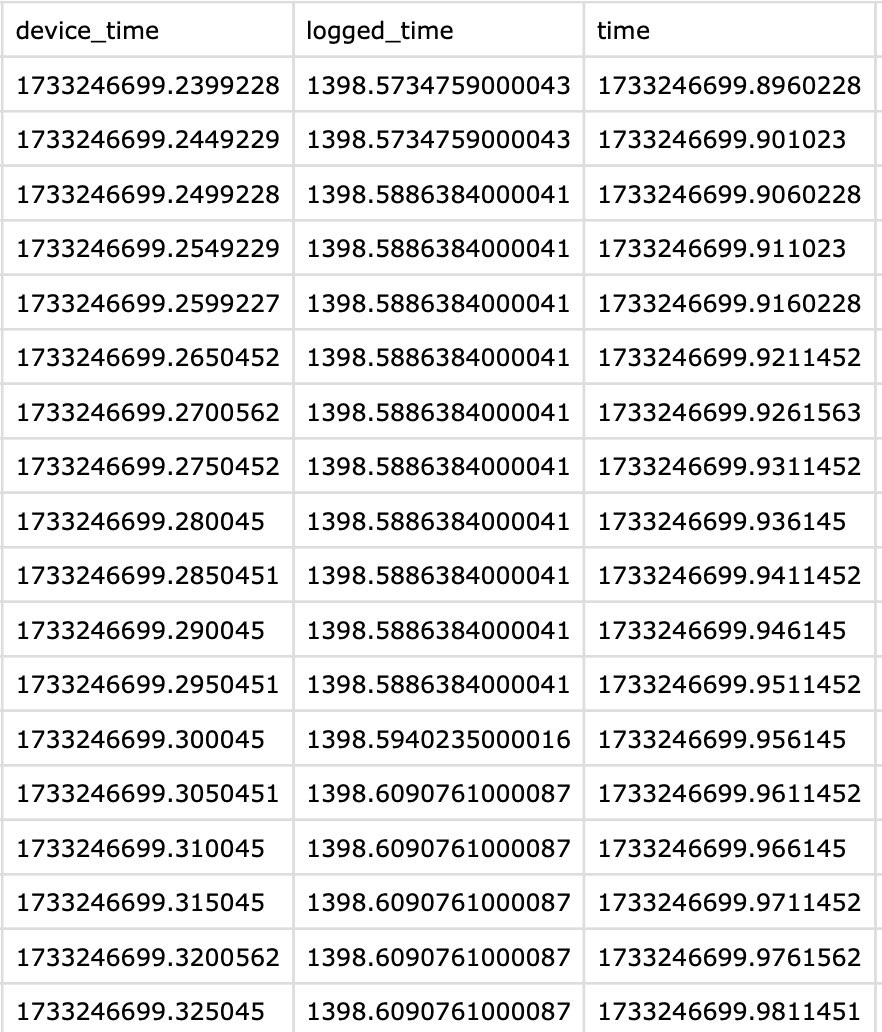
This is not a big problem since I can interpolate the timestamps myself. However, when there are duplicate timestamps in adjacent rows, which row corresponds to the actual moment that timestamp occurs, the first appearance or the last?
Hi, @user-bda2e6 - there have been some updates to the PsychoPy plugin recently that deal with clocks/synchronization. Could you try uninstalling and then re-installing the plugin so that you have the latest version? Let me know if there are still uncertainties after that
@dominic I will try that and keep you updated. Thank you! However we have already collected quite a lot of data so far and it already has the duplicate timestamps. So in either case I need to find a way to properly interpolate it. Do you have any insight regarding my original question?
This question: “when there are duplicate timestamps in adjacent rows, which row corresponds to the actual moment that timestamp occurs, the first appearance or the last?”
Again thank you so much for the help
Hi, I'm facing an issue with empty csv files after using the Reference Image Mapper and haven't found a solution through search here. Here's what I have: a recording (with special events) that lasts 1.27 min, "enrichments" successfully identified fixation points on reference image (visually), but 1) I can't visualize the heatmap (it seems there are no points, so I see only the reference image) 2) all csv files are empty. Where could the problem be?
Hi @user-12efb7! Could you please open a ticket in our 🛟 troubleshooting channel and we'll assist you there in a private chat?
This question: “when there are duplicate
Hi, I am planning a new experiment using neon pupil labs and I am considering using it outside in the dark. Do the glasses work in the dark? Thank you
Hello, I am using Neon during an experiment where participants interact with a collaborative robot in the construction of components. I need to log an event every time a participant looks at the robot (e.g., "look.robot.start" and "look.robot.stop"). Ideally, I would like to generate this event programmatically via the API. However, I am currently unable to reliably track this event, even on the Cloud.
I have tried creating a Reference Image Mapper of the scene and drawing an AOI on the robot, but I have encountered two main issues: 1) I am unsure whether this approach will work, as my AOI is dynamic rather than static. 2) I cannot verify this approach, since I can only see the AOI on the reference image and not on the video. I have also attempted to attach several AprilTags to the robot and create a Marker Mapper. However, in this case, I would need to create different surfaces for different parts of the robot (since as the robot moves, some AprilTags may disappear while others appear), anyway I do not see a way to create multiple surfaces within a single enrichment.
Would you be able to suggest a reliable solution for my problem? Specifically, I need to: 1) Accurately track when participants look at the cobot and log an event each time this occurs 2) (Ideally) Generate these events in real-time via API Thank you very much in advance for your help!
Hi general question: after we finish recording on the Neon for a study, what would be the best recommended method in terms of sharing the data - including the video, and all metrics collected - to other collaborators who might not have an account for pupil cloud? Any simple and accessible way people have used?
Hi @user-3ee243 , all of your colleagues are allowed to make free accounts on Pupil Cloud. Has this not worked for them? Then, you can invite them as Collaborators to that Workspace. That would be the easiest way and you would all have access to the same interface, analysis tools, and metrics.
Hi @user-cc6fe4 , NeonNet works in complete darkness, thanks to the IR illuminators in the module. The scene camera's exposure can be adjusted to optimize it for dark conditions. It might be easiest to do a test or two and then check in with us again with how it works out.
Thank you, Rob! I am planning to do some tests.
Hi @user-a09a75 , do you know the position of the robot and the articulation/pose of it's joints over time?
Hi @rob, thanks for your answer! Yes, it would be possible to obtain real-time information about the robot's movements (e.g., joint angles, TCP (Tool Center Point) position in Cartesian coordinates, and its orientation in terms of roll, pitch, and yaw). If this is the only possible solution to address my issue, could you guide me on how to proceed? Or are there alternative solutions that do not rely on this information? Thanks again!
Hello! Could somebody tell me whether it is possible to export the recorded scene camera video with the gaze overlay (the red circle) from the cloud? Whenever I choose any version of 'Download' the only video I get is the scene camera video without gaze overlay. Thank you! 🙏
Hi @user-b57ada , sure, you want to give the Video Renderer Visualization a try. Let us know if you need more info.
Thank you, Rob - I did find this info about the video renderer, but could you give me a little bit more info on where to find the video renderer in my Pupil Cloud workspace and how to export from it? It's probably straightforward but I can't find it!
Hi @user-b57ada , sure.
Video Renderer Visualization.Run. By default, it will automatically process all recordings in the Project.Download the result.I'd recommend checking out this video for an overview of the Pupil Cloud workflow and if you have not yet had your free 30-minute Onboarding, then just send an email with the original Order ID to [email removed] We can get you up-and-running and answer any other questions you might have.
Brilliant, thank you! I'll check out the sources mentioned and see if I can get on the onboarding as well.
Hi @user-a09a75 , ok, that information is helpful. If I understood the original message correctly, you are not necessarily using (i.e., consuming) the gaze data in real-time, but rather, saving it for later analysis? If so, then a potential solution with Tag Aligner comes to mind:
Whether it is better to use a Scanning Recording made with or without the robot in the scene would only require a test or two.
You could also use something like Head Pose Tracker, and knowing the scale of your scene, you could project gaze onto a playback of the robot's motion that way. However, this requires hanging AprilTags about the scene.
In either case, I'm not sure if Events would be necessary here, although they can be used, of course. Your analysis pipeline could output a CSV with columns like timestamp, gaze on/off robot, position on robot body, for example.
Hey @rob thank you for your response! I’m actually trying to do something slightly different, which involves integrating gaze information with an object detection model. The general idea is that every time the gaze falls inside the bounding box of a recognized object (the robot), an event called "gaze on cobot" is recorded. However, the issue I’m encountering is that I’m working on reconstructing gaze in the video using gaze coordinates from gaze.csv downloaded from Pupil Cloud. To verify the accuracy of this reconstruction, I’m using the video downloaded from Pupil Cloud’s video renderer, which already contains a gaze overlay. My assumption is that an accurate reconstruction of gaze from gaze.csv (represented as a red dot) should be perfectly aligned with the gaze movement in the rendered video. Despite this, I’m noticing a misalignment between the gaze reconstructed from gaze.csv coordinates, and the gaze integrated into the rendered video. Can you help me understand why this happens? And what would be the best strategy to overcome this problem? Could it be a timestamp synchronization issue? Currently, I’m extracting video timestamps using cv2.CAP_PROP_POS_MSEC and converting them to nanoseconds to match them with the timestamps in gaze.csv.
Furthermore, regarding the timestamps, since the whole purpose of detecting the "participant looks at the robot" event is to analyze what happens in the EEG signal at those moments, I need the eye-tracking data to be synchronized with the EEG data. Right now, I’m using Lab Streaming Layer (LSL) to record EEG, which is why I initially wanted to mark these events programmatically via API (since I’m also recording Neon with both LSL and Companion). However, since this is not possible, what is the best approach you suggest for synchronizing post hoc the information extracted from Companion with Lab Streaming Layer?
Apologies for the long issue, and thank you in advance for your help! 🙏
Hi Pupil Labs, I am purchasing the frame "Every move you make" (ID: 20250311035037)
Is the CAD design available? Or other design specs? Do you have an estimation of the accuracy of the physical tool? Or even (if it possible to export/import it) the rigid body definition from the OptiTrack software?
Thank you,
Agostino
Hello.
I'm parsing data from neon companion + pupil cloud.
I want to obtain the average position of each fixation for each eye separately. To do this, I am analyzing the eye data for each fixation, obtained from 3d_eye_states.csv. This file provides the position of each eye separately (eye) and its unit gaze vector (v).
With this, I can make a projection, for example, at a distance of 1000mm and obtain a distant point in the gaze direction of each eye. It would be something like:
objectPoints = eye + 1000 * v
I then project this point back to screen coordinates using:
cv::projectPoints(objectPoints, rvec, tvec, cameraMatrix, distCoeffs, imagePoints);
For rvec and tvec, I am using null matrices since I understand that the eye positions are already given in camera coordinates, so no translation or rotation is needed.
I do this for all data lines corresponding to the fixation. In the end, I compute the average of the obtained pixel points.
This gives me the average fixation point for each eye, in pixels.
However, these points are not symmetric with respect to the fixation coordinates stored in fixations.csv. I expected them to be symmetric. They are near but not symmetric.
Am I missing something in the projection, or have I misunderstood something?
Additionally, if I do something similar using the azimuth and elevation of the fixation from fixations.csv, calculating a distant point from the camera using polar coordinates and projecting it with cv::projectPoints, I do obtain the coordinates indicated as the fixation center in fixations.csv.
What is happening here? Am I doing something incorrectly?
Thank you
Hi @user-cbf227! Thanks for your question. A clarification is needed which should help clear things up.
The eye state measurements you're referring to characterise the optical axis of each eye, represented as a vector originating at the centre of the eyeball and pointing towards the centre of the pupil, essentially characterising eyeball orientation. This is not the same as gaze.
Neon's gaze measurements are a separate data stream, represented as a 2D gaze point in scene camera coordinates, along with the elevation and azimuth of a gaze ray. It's important to note that the origin of the gaze ray is the scene camera, not the centre of each eyeball.
While both measurements (gaze and eye state) are provided by NeonNet, they are not directly comparable as they characterise slightly different properties of the visual system, and therefore, not symmetric with respect to the fixation coordinates.
If you want dual monocular fixations, you essentially have some options:
I hope this helps! Let me know if you have follow-up questions.
Hello! Is gaze data recorded by Neon saved onto a micro SD card on the companion device?
Hi @user-6952ca! Recordings are saved onto the Companion device's internal filesystem. Not an SD card.
Hi @user-97997c! We don't really have this information – the marker cluster geometries and their pose with respect to Neon's scene camera will need to be established by the user in motion capture coordinates. That said, could you share more details about your proposed use case with the Every Move You Make frame and OptiTrack?
Hi @user-d407c1 - replying to this old message because it is the best match to my question. I've checked a few recordings and have also found a mismatch between the fixations from the cloud and neon player. One recording had ~30 more fixations from the cloud and another had ~100 more from the cloud. It does not appear to be the case that neon player is just giving a longer fixation that the cloud splits into two or because the cloud video starts sooner than the neon player video. (Note: unlike the og question, all of our fixations are over 70ms.) The timestamps of fixations don’t line up completely and even ones that are “close enough” have different durations and x,y coordinates. Watching the videos with fixations visualized shows that they are meaningful differences. Do you know why these differences exits – and, like the original question asked, which is more reliable? Thanks!
Hi @user-01e7b4 👋! Let me break down some key differences.
If there's excessive workload on the Companion Device, you’re using an older companion device, or you’ve selected a different frame rate in the settings, your sampling rate may vary or you may have experience some frame rate drops. In these cases, Pupil Cloud reprocesses recordings to ensure data is maintained at 200Hz. So, the first thing to check is your gaze data timestamps, as it may already differ from the local output on the device.
Additionally, note that Pupil Cloud keeps the gaze data from when all sensors start (including the early gray frames you might’ve seen), while Neon Player takes only once all sensors are fully running.
The fixation detector works on top of that gaze data stream, using both optic flow and the IMU to detect saccades and fixations. If your gaze data differs, the fixation data will too.
With that in mind, it’s hard to assess the exact cause without access to the recordings. That’s why I previously recommended opening a ticket on 🛟 troubleshooting and sharing the recording IDs — with this we can answer you more in detail about what may happen.
Hello - a question ... Is it possible to view a recording immediately after completion on a connected laptop device, before it is uploaded to the pupil cloud? We'd like to allow a pitcher to view a windup and delivery immediately after the pitch is completed without a wait - thanks
Hi @user-796c70! It's of course possible to playback the recordings on the Companion device immediately for review. Have you already tried that / is the screen big enough? If not, there are a couple of options. Firstly, to answer your last question, yes, you can use the Monitor App to real-time stream the eye tracking footage. You can read more about that in this section of the docs. Secondly, it's possible to transfer your recordings to a laptop running Neon Player, our free desktop software. You can load the recording into Neon Player. This isn't immediate as you need to transfer them, e.g. via USB. But it would be relatively quick and easy.
Also, if its not possible to view it immediately - is it possible to send the live stream to another app via the neon.local:8080 port?
good morning, does anybody happen to know if and where I can set the detection threshold for fixations in neon player? thx in advance
Hi, @user-688acf - sorry, but it's not configurable. Although, the current version of Neon Player uses pl-rec-export under the hood for fixation calculation. This tool doesn't directly expose any timing thresholds as configurable parameter, but it is open source, so one could tune it to their specific needs
Hi 🙂
I’m working with the Pupil Labs Neon glasses and the Pupil Labs Asynchronous API for streaming data. There’s an issue with the framerate that isn’t entirely clear from the API guide. While the gaze data is captured at 200Hz, the scene video (which we use to detect the screen in real time) is only recorded at 30Hz. The problem arises when combining these two streams: the recommended implementation syncs the gaze data to the scene video’s framerate, meaning you lose the high-frequency gaze data.
I’ve been experimenting with a workaround to decouple the two streams (still a work in progress), but I’m wondering if there’s a more elegant solution. Specifically, is it possible, by design, to overlay the gaze data onto the scene video while maintaining the full 200Hz framerate of the gaze data? Of course, I could have missed something in the documentation, please let me know if that is the case. Thank you!
Hi, @user-a7588f - I suppose you're using the receive_matched_scene_video_frame_and_gaze function?
Instead, you can use device.receive_scene_video_frame() and device.receive_gaze_datum() to pull the data separately.
If called with no arguments, these functions will block until the requested data is ready, but you can specify a timeout_seconds argument here to control how long the call will block waiting for data before giving up. Using a value of 0 will cause the function call to return immediately - either with the data (if it was available) or None if it was not.
So something like this would get you 200Hz gaze with 30Hz scene video (depending on factors like the speed of your network, workload of the pc, etc):
... snip ...
gaze = None
scene_frame = None

while True:
    gaze = device.receive_gaze_datum(0) or gaze
    scene_frame = device.receive_scene_video_frame(0) or scene_frame

    if None in (gaze, scene_frame):
        time.sleep(0.5)
        continue

    frame = scene_frame.bgr_pixels
    cv2.circle(
        frame,
        (int(gaze.x), int(gaze.y)),
        radius=80,
        color=(0, 0, 255),
        thickness=15,
    )

    cv2.imshow("Scene camera with gaze overlay", frame)
    if cv2.pollKey() & 0xFF == 27:
        break
thank you vary much, i'll give it at go 🙂
Thanks Neil - I'm looking to replay the captured video pretty immediately in slow motion on a screen that is larger than the devices running the companion app. Dealing with athletes that are warmed up and can't wait for a USB transfer, they can wait 20-30 seconds, but not longer before getting back to activity. If like to review there last play with them immediately after completion and before the next one?
hi, I am replying to this because we are also using the "Every move you make" frames
We are doing some recordings with our mocap system (vicon) and we can properly track the markers over time. And I was also wondering if there were a 3d model of this frame that you are able to share. Alternatively, is there a correct way to compute the frontal camera 3d position from to the markers' one (I am basically using a centroid computation for now).
Sorry if the question is redundant, I was not able to find any documentation online on that, I am also happy to share the details of our pipeline if someone would need it.
Thank you in advance for the help! Alberto
hi again, I am following up my question on the "Every move you make" glasses in the mocap environment. My current solution is developing a sort of calibration (similar to the one of the accuracy) , and try to trace back in the 3d world the front camera position from a known 3d target and the tracked glasses lateral markers. I wanted to ask if you think this would be the best approach to extract the front camera position in the 3d environment? thank you again, Alberto
Hi @user-a09a75 , I see. Thanks for the clarification.
When you use the Video Renderer, have you clicked the Undistort video option? If so, please note that the values in gaze.csv are provided in the original distorted scene image coordinates. If you used the Undistort video option and prefer to work with undistorted video & gaze, then I would recommend checking the Undistort Video and Gaze Data Alpha Lab guide.
With respect to the timestamps, the most accurate method would be to seek to a given frame index and then lookup the corresponding timestamp value in the world_timestamps.csv file. Please note that OpenCV can have some inaccuracy when seeking videos and it would be recommended to use pyav instead.
If you are open to working with the Native Recording Data from the phone, or at least adapting code, then my colleague, @user-d407c1 , has used the pl-neon-recording library to apply YOLO object detection to the scene camera video feed. Please see the attached code.
With respect to LSL, you can send Neon Events to it in real-time. It would efficient, and probably easier for analysis purposes, to send an Event whenever the wearer starts looking at the object and then another Event when they stop.
You could also just send a handful of Events to the Neon recording timeline & the LSL timeline, and then do the object detection offline. You would only need to find the corresponding Events in the two timelines to post-hoc align them.
Please let us know if that clears things up!
Hello! I didn’t use the undistorted video option because I thought it might cause some misalignment. In any case, using world_timestamps.csv worked perfectly, and now the gaze reconstructed from the coordinates and the gaze integrated into the rendered video are perfectly synchronized! 😊
That being said, your suggestion sounds very interesting. If I understood correctly, the script you attached performs the same task I am currently working on (applying the YOLO model to the scene camera) but without requiring post-hoc synchronization and interpolation between world_timestamps.csv and gaze.csv, right? Is this approach applicable only to data downloaded directly from the phone and not to those obtained from the cloud?
Regarding synchronization with LSL, your suggestion would be exactly perfect (to send an Event whenever the wearer starts looking at the object and then another Event when they stop). However, how would this be implemented? How can I apply the object detection model in real-time on Neon and send these events programmatically to LSL?
Right now, I’m doing something similar to your second suggestion: sending some Events to both the Neon recording timeline and the LSL timeline, and then post-hoc aligning them by converting the timestamps from both timelines to the CET time domain. This process is a bit time-consuming, and the real-time approach would definitively be better. However, in case I’m unable to implement it, do you think my current method is an accurate alternative?
Thanks again! 😊
Hello, I am wondering if anyone ran into a problem when trying to permanently delete videos from the drive, they dont delete?
Hi @user-21cddf! If the recordings you're trying to delete are currently part of an enrichment, that might be why you cannot delete them. This is a failsafe.
I am also wondering if the scanning recording for the reference image mapper has to be from the same device as the videos or from the same day? Ive been having issues where an identical scanning recording does not create a good match for the model, even if the context, lighting etc. are identical I would also appreciate any tips on using the reference image mapper in general:)
Hi there!
We're hesitating between upgrading our older Pupil Core (with the original eye camera on a single eye) to the newer binocular Pupil Core, or switching to a Neon. Could you please help me clarify a few things ?
1/ Is it fair to say that compared to the Core, the Neon is actually a downgrade in terms of accuracy (reported as 1.3° with offset correction for the Neon, and 0.60° after calibration for the Core)? Is it the case that better resistance to slippage for the Neon somehow offsets the loss in accuracy in actual everyday use?
2/ Is it the case that the "Just act natural" frame would be the most suitable for in-lab studies in terms of generally fitting well to all head shapes? I think I understand the "better safe than sorry" frame fits more tightly and could be less suitable for some participants. What about the "Is this thing on" and "Nothing to see here" options - is there a meaningful difference in fit or in accuracy?
3/ Is it correct that I can buy the Neon with a "Just act natural" frame, add an empty additional "All fun and games" frame for cheap, and easily swap between the two?
4/ Is it correct that you have to use the Neon Companion app on a smartphone and cannot connect the Neon directly to a computer? I'm a bit confused about this. Our current setup with the Core is that we use PsychoPy to display auditory stimuli, and at key moments in the task we have PsychoPy send a notification to Pupil Remote which we then use to synchronize timestamps. How exactly could we make this work if we can't actually connect the Neon to the computer? (Note that participants in this study don't actually look at the computer so we can't even use the world camera to synchronize the two.)
5/ After ordering, what is the approximate delay to receive a Core vs. a Neon ?
Thanks for all your help ! :)
It should not matter. But so that we can provide more concrete feedback, would you be able to invite [email removed] to your workspace so we can take a look?
Of course! I have new enrichments running right now, if the same thing happens i will add you and let you know. As for the recordings - they apperantly are all recordings that have been deleted in the device in the app, after theyve been uploaded to the drive. Could that be the reason for the error?
i've added you to the drive, could you take a look? I could write the specifics here, but could also talk with you privately about the issue
Hi @user-a4e164! Certainly, I'll respond to your points below:
Thanks a lot! I'm a bit confused about a frame being "more snug fitting". Is this a good thing (in the sense that there is less slippage/movement on the head), or a bad thing (in the sense that the camera could miss the eye for some participants with a nose that is too flat, as I seem to gather from some comments here)?
Hi @user-a09a75 , glad to hear it worked out with the gaze overlay!
All of the datastreams from Neon are timestamped from the same high-precision clock, so all of Neon's data are synchronized by default. The Native Recording Data and Pupil Cloud's Timeseries Data are in principle the same, so the approach is equally valid for both formats. Pupil Cloud re-processes gaze at 200Hz and computes some additional streams
The pl-neon-recording library used in @user-d407c1 s YOLO example is a Python interface to work with the open data saved on the phone. Internally, it uses pyav and interpolates when sampling streams
Regarding the LSL synchronization, when Stream to LSL is enabled and you send an Event, then it is automatically saved in the Neon recording timeline, as well as LSL's. It sounds like you are already doing this
Note that converting to different timezones does not change approaches to synchronization. It can even obscure that process. Timezone conversion changes how the timestamps are visually represented for display purposes. For accuracy, it should be easier to stick with the default formats and save the timezone conversion for a final step
Since your analysis is already done post-hoc, I'd personally stick with doing it like that. I'd assume it is easier than migrating to a real-time implementation
If you want to apply YOLO or similar real-time models to your situation, I'd recommend checking out one of our Support Packages. Then, we can dedicate resources to assist with code & implementation. Briefly, whenever gaze is on an object that YOLO has detected, you can send an Event
Ok everything clear! I just want to stress a little bit the issue of post-hoc events alignment. So, Right now, the procedure I’m following consists of:
So, why I converted Neon timestamps from UTC to CET: Since LSL XDF files include metadata that provides the recording start time in CET, I can use this as a reference and align all timestamps in the recording relative to that start timestamp. This is why, for convenience, I also converted Neon timestamps from UTC to CET, allowing me to compare and align LSL and Neon timestamps more easily.
I hope this explanation clarifies my approach! If you have any suggestions for a better or more direct method, I’d love to hear them! 😊
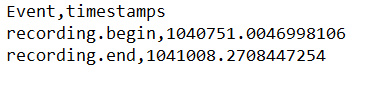
Hi @user-a09a75 , the recording.begin and recording.end Events will be found in both the Neon and LSL timelines. If you take the difference between the timestamp of recording.begin in the Neon timeline and the corresponding timestamp for that Event in the LSL timeline, then you have the offset between the clocks of both systems. This offset will let you transform Neon timestamps, such as those in world_timestamps.csv, to LSL timestamps and vice versa.
Converting to CET or taking into account start times is not necessary for this step.
Hey @rob thanks again for your help... I’m not very experienced in the topic of synchronization, and I still don’t quite understand how this solution can work without conversions, considering that the LSL and Neon timestamps have different formats. As you can see in the attachments, the first image represents the events recorded by LSL and the second image represents the corresponding ones recorded by Neon. How can I take the difference between the timestamp of recording.begin in the Neon timeline and the corresponding timestamp for that event in the LSL timeline and calculate the offset between the clocks of both systems if the timestamps are represented in different formats?

Motion Capture w. Neon
Reference Image Mapper
Hi @user-a4e164! I wouldn't necessarily consider that as good or bad. It's true that a closer fit will inherently keep the headset secure, especially during dynamic movements. However, we offer a head strap for the Just Act Natural model that eliminates slippage regardless. Plus, Neon's gaze measurements are slippage-invariant, meaning you can take the glasses off and on, move them around, etc., without needing to re-calibrate. For wearers with less pronounced nose bridges, a head strap should prevent any risk of the glasses moving outside of the eye capture area.
Many thanks ! Neon ITTO it is then 😎
Hello! I'm using Pupil Neon for the first time, and I'm encountering an issue where there's an offset between where I'm actually looking and where my gaze is being detected. I've performed manual offset correction and inter-eye distance measurement in the app, but there's still some offset remaining in certain areas.
https://www.youtube.com/watch?v=08z9t3BZ7OI The video is a screen capture of the recording from the app. I'm actually looking at the position of the white circle. As you can see in the last part, there's still a significant offset remaining in the left edge area of the screen.
Is there any way to address this issue? Thank you!
Hi @user-2d96f8 👋 ! May I ask, are you wearing your own spectacles under Neon? Can you share a screenshot of your eye images so we can better understand what's happening.
Feel free to open a ticket in 🛟 troubleshootingto share that image.
Hi! I was wondering if any of you could point me towards where I can find the script to convert raw Pupil Lab data into csv files
Hi @user-e13d09 👋 ! To convert from Native Recording Format to CSV files locally you can use pl-rec-export.
Lemme know if you need help with
Regarding I'm testing the same vdo clip with 5 people, is it possible to aggregate gaze point of each subjects in the SAME frame of analysis?
Because I love to see distribution of attention at the certain frame
Plz kindly suggesting us
Hi @user-afb0c1 , are you using Pupil Cloud?
Hi, It would be really helpful if we could develop with the realtime API without needing physical devices. Are there any mocks or simulations available to support this kind of development?
Hi @user-2d96f8 , we currently do not offer something like that, but perhaps members of the community have created it.
You could approach this by taking the data from a Neon recording and streaming it over the network from a local server. You would need to simulate at least some of the functions described in the Under the Hood section of the Real-time API docs. You would probably also want to simulate the sampling rates of the different datastreams.
I'm not sure though if it would be the most robust way to develop, since there is always a chance for discrepancy from the official version running in the Neon Companion app and anytime the app is updated, the mock may similarly need to be updated.
May I ask what your use case is?
@rob Thank you!
I'm interested in doing something similar to what's shown at https://docs.pupil-labs.com/alpha-lab/gaze-contingency-assistive/. Since our team shares the device, I was wondering if there's a way to continue development even when I don't have access to the device.
Also, this is a separate question, but would it be possible to create such an application using LSL? I checked the LSL documentation (https://docs.pupil-labs.com/neon/data-collection/lab-streaming-layer/#gaze-data-outlet) and it seems the output only includes coordinate data. Without access to the scene camera frames, it wouldn't be possible to use surfaces, right?
Hi @user-2d96f8 , correct, the LSL outlet sends gaze data in Neon's scene camera coordinates, not in screen-mapped coordinates.
An LSL mock outlet can be developed, so if necessary, you could certainly give it a try, but the time spent in developing and debugging such mocks, and ensuring that they match the standard real-time API outputs closely enough, could be substantial.
it seems the output only includes coordinate data
FWIW, if you start a recording on your Neon and add events in realtime, those events will also be streamed to LSL (on a different outlet than the gaze data). You can use such an event recorded in both streams to convert video frame timestamps to LSL time post-hoc.
Despite its name, the real-time-screen-gaze package can then be used easily on pre-recorded data.
So if you want surface gaze data synchronized with other data in LSL, all the pieces to that puzzle exist already - just requires some assembly.
Thank you, but we want to move the cursor in real-time, so we're thinking of using the real-time API.
Ah, apologies. I had seen the comments about LSL, but had forgotten the previous comments giving it context. LSL isn't going to be much help here, but that AlphaLab article you linked should be
Hello! I have been attempting to run Face Mapper data overnight, but Pupil Cloud has been stuck in the "Processing" stage for over 10 hours. I wanted to check if the website is currently experiencing issues. Is there anything I can do to resolve this and get it working again?
Thank you for your assistance.
Hello, same for me with both the Face Mapper and the Marker Mapper, the enrichments are still "Processing" for 24h now. Thanks for your assistance.
I can confirm that I am also experiencing the same issue with pupil cloud as @user-fea107 and @user-edb34b. I have been trying to run a RIM enrichment and it has also been stuck on the processing stage for almost 24h.
Hi @user-a09f5d , @user-fea107 , @user-edb34b 👋!
Cloud is currently under an exceptionally high load, which might result in longer enrichment processing times.
First of all apologies, as you may experience some delays until results are available. The team is actively working to speed things up and prevent this from happening in the future.
We appreciate your patience !
Hi, I am working with AOI gaze data, to detect what percentage of gaze data is not detected by the Pupil Cloud enrichment and neon glasses. Is there a way to calculate that? I have tried looking at the data where gaze position on surface x and y are empty, but it was not the case in any raw data. Is there any better way to detect the gaze coverage percentage by the eye-tracking system?
Hi @user-665dc2 , since you mention on surface, you are looking at the gaze.csv file from the Marker Mapper Enrichment, correct?
To be sure I can provide the best answer, may I ask for more clarification about what is meant by gaze coverage percentage and gaze not detected?
Hi Rob, thank you for your quick support. I mean for quality control of the research study, I need to calculate the percentage of the time in which the eye-tracking system successfully tracked the eyes. I am more interested in detecting how often the gaze was not recognized at all by the Neon or Pupil Cloud. I could not find this metric in raw data individually, but if I know how I can calculate it through gaze.csv from marker mapper or the general gaze.csv data from Timeseries Data folder, it will be great 🙂
Hi @user-665dc2 , Neon's eye camera images are recorded at 200Hz. Since you are using Pupil Cloud, then upon upload of a Neon recording, gaze is re-computed for those eye feeds, using the same gaze estimation pipeline as found in the Neon Companion app. So, the data in gaze.csv are also provided at a 200Hz sample rate. That is, a gaze estimate will be provided for each eye image. This is also the default behaviour of the Companion app.
Do you have signs in your data that indicate otherwise?
Hi @user-665dc2 , to clarify, are you also looking to determine gaze estimation accuracy (i.e., a data quality metric)? Or, do you want to know when Neon was worn in front of the eyes versus lying on a table?
Hi Rob, thank you for your response, the requirement is more towards gaze estimation accuracy, the percentage of detected gaze data by the system while user was wearing them looking at the monitor for 1h for example.
Is there a way to realize when the system failed to detect gaze due to low light, not detecting the april markers, or other external/internal disturbances? for example.
Hi!
I'm looking into timestamps for the eyetracker's world video. It seems like world_timestamps.csv has different length compared to the timestamps obtained from neon_recording.scene.ts (world_timestamps is longer for most of my recordings), upon closer inspection it also seems like their values can differ substantially when refering to the same frame in the video. I was wondering if this is expected or if I'm missing something? Any help is appreciated, thanks in advance!
Hi @user-41d16e 👋 ! Some sensors can have a slight startup delay. Rather than discarding that early data, in Cloud we fill the scene camera feed with gray/empty frames — this ensures no data is lost. pl-neon-recording will not generate those empty frames by default and timestamps start at the beginning of the scene camera feed.
Is this what you are observing? Or are the timestamps completely different? If you share some example data (through 🛟 troubleshooting ) we can have a look.
Yes, I’m using it
Testing the same video clip for 4 people and love to see aggregation on the same timeline, if possible on a PupilCloud.
Ok! If you'd like to generate such scanpaths visualizations, then you might be interested in our Generate Scanpath Visualisations Alpha Lab guide. Let me know if that clears things up!
I don’t think that’s what I want to do.
Imagine that we have 4 people who seeing the same vdo clip 1mi. 30 sec (separately 1 by 1).
Then I love to see the distribution of fixate of all 4 people at a certain time.
Could we do it on a PupilLab?
Hi @user-afb0c1 , I see. So, something like a beeswarm visualization? While that is currently not possible on Pupil Cloud, you could build on the code in the Scanpath Alpha Lab guide to do this.
Otherwise, feel free to make a 💡 feature-requests !
I meant, on a PupilCloud
@rob
Hi, we are having an issue with our recording. We are recording two 30-minute sessions. While everything works perfectly fine for some recordings, others (and we could not find an error on our end) do not have any events in the recordings. This is most often but not always the first out of the two 30-minute recordings. Specifically, we only get the events 'recording.start' or 'recording.end' but not any of the synchronization triggers via LSL and also do not get any of these.
Hi @user-98b2a9 , could you open a Support Ticket in 🛟 troubleshooting ? We will follow-up there.
Sure, Thanks!
Hi all, for the IMU in the neon, are the X, Y and Z directions what you would typically expect? X is subject's left-right / medial-distal, Y is up and down towards the ceiling or floor / superior-inferior, Z is forward-back / anterior-posterior?
Hi @user-24f54b , the IMU's axes are documented & diagrammed here. You might also be interested in our IMU Transformations Alpha Lab guide.
Hey there, was wondering if anyone had undertaken a project that involved gaze-contingent displays/stimuli that respond to the eyetracking data in real time. I know the latency of such a system would depend on one's own network, since the coordinates are transmitted wirelessly, but I was hoping somebody could share what latency they were able to achieve with this type of setup?
also if this is not the best channel to send this question, would much appreciate being redirected, thanks!