Thank you very much!!!♥️
Hello,
We're having a few issue with our Pupil Core glasses. When we initially received the glasses, all of the cameras were working correctly. After a few uses, the world camera stopped working. On Windows 11, we consistently get the following message in the command prompt: "world - [ERROR] video_capture.uvc_backend: Could not connect to device! No images will be supplied.". On Windows 11 and Ubuntu 22.04, the eye cameras seem to work, although it can be finnicky and sometimes requires unplugging/plugging in the glasses a few times. However, we cannot seem to get the world camera to work. There was a recent occurrence where the world camera worked, but then one of the eye cameras stopped working. Shortly after that, the world camera stopped working again, but both eye cameras were still functional.
Here are some of the fixes that we've tried:
pupil_capture_settings, pupil_player_settings and pupil_service_settings directories from the home directories.All of our machines' drivers are up-to-date. Please let us know if there are any other ideas or suggestions that we should try.
Thanks,
Brayden
Hi, dear pupil lab teams. I'm wonder if you sell the camera world replacement. I think that our camera CMOS was crashed... 😔
Hi @user-cb8fad! Sounds like you've already done some thorough testing. We might need to receive the system back for inspection/repair. Can you please send your original order ID to info@pupil-labs.com and someone will assist you from there!
Yes we can replace world cameras on the core headset. Please reach out to sales@pupil-labs.com mentioning that you require a new world camera!
I see. Thanks!!
Hello, how can I generate heatmaps from the eye tracking recorded video?
Hi @user-757948! You'll want to check out the Surface Tracker Plugin. More in this section of the docs
Is there a guide or manual on how to install the plugin and use it?
Hi there, the confidence level of the right eye is really low. In the attached video, you can see that even if the camera is pointing exactly at the eye, the model keeps failing to track the pupil and the eyeball. Do you have any idea how to solve this issue?
Recommend setting the eye camera to autoexposure in the settings - the image looks somewhat over-exposed.
I played with those parameters, but the problem persists. Also, I don't understand why only one of the two eye models is failing if it is an exposure problem.
Hello team, is there a way to mark areas of interest without using the apriltag marker? I have a puzzle, and I want to analyze every piece. Thank you!
With Pupil Core, specifically, you would need to use AprilTag markers to generate AOIs, if using our software. Is that not feasible for you?
Hello, We are running 2 experiments using Pupil Core: Experiment 1 is performed on a screen with gray background, whereas experiment 2 has to be performed on black background, both in almost a pitch dark experiment cabin (except the light from the screen). 3d pupil detection works significantly better in Experiment 1 where the pupils are smaller due to the light coming from the screen. In experiment 2 with black background, pupil detection confidences drop below ~0.7-0.8 quite often, which leads to time windows during which gaze detection does not work (which we also use for our experiments). In this case, which parameters and settings would help me the most to improve pupil detection in a dark environment?
Are you able to share an example recording with us such that we can take a closer look? If so, please send the recording to [email removed] referencing our conversation here
In the screen capture you shared, it looks like the eye cameras have different exposure times. The one on the bottom appears over-exposed. Are you sure both were set to autoexposure?
You are right in the video I shared one eye looks overexposed, now I change to auto exposure (both eyes) but the problem remains. I am attaching another video where you can also see the 3 d model keep failing. Also I dont understand why in the debug mode the left eye is flipped.
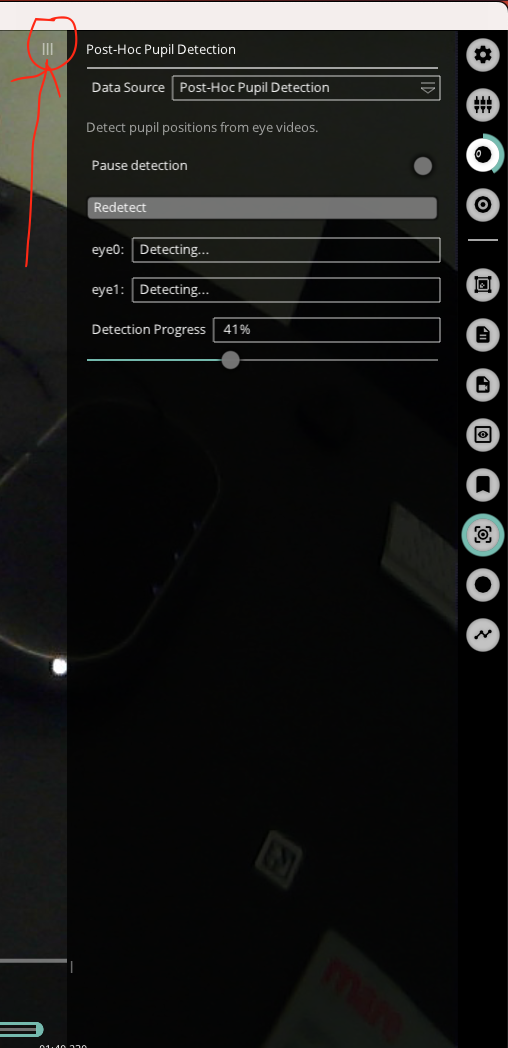
Hi! I have a simple question about the right-hand Player (v 3.5.7) menu. It seems to be only partially visible, so I can't access everything I need to (e.g., the manual edit mode toggle). I've adjusted the window size, restarted Player, restarted my machine (MacBook Pro 2021, v 12.6), and toggled different menu options. Is there an easy way to fix this?
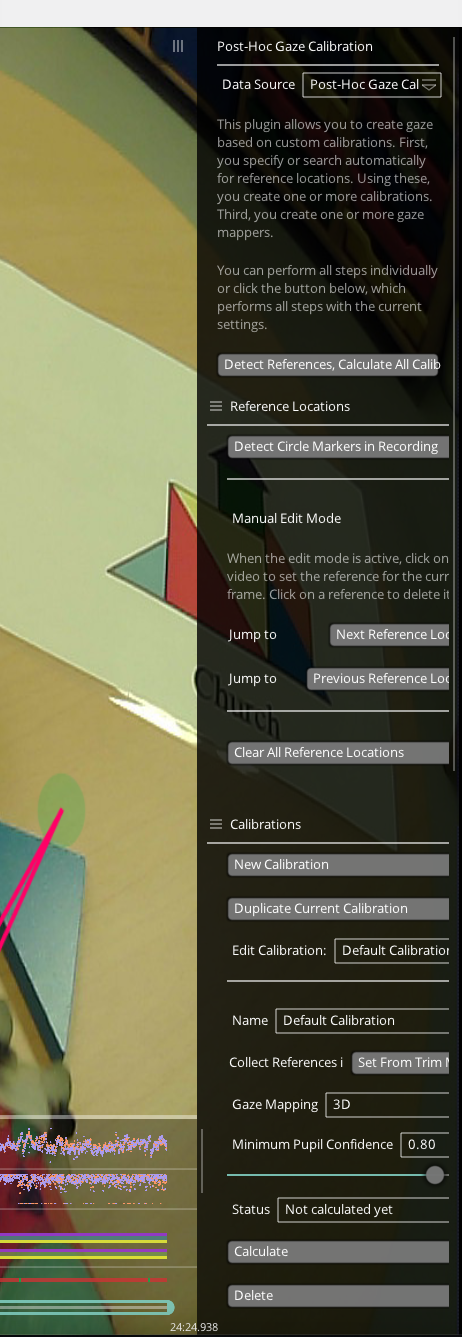
You can resize that panel by dragging the three bars to the desired location (see red arrow in screenshot)
Thank you. If I have already passed some participants and have not used those marks, is there a way to delimit the areas of interest?
Unfortunately, not with our software. You may need to explore computer vision algorithms to automatically identify the outline of the puzzle, or potentially do manual frame-by-frame (or fixation-by-fixation) coding using the annotation player plugin
The camera positioning looks really good, and the exposure also seems to be appropriate. The next steps would be to try the following:
Thank you! I think ROI selection solved the problem
Hi Does it affect the use of an eye tracker if one eye camera is broken and only one eye camera can function properly? Thanks
Hi @user-4bc389 👋. Pupil Core can operate with only one eye camera. But it will default to a monocular gaze estimation pipeline, so that means slightly less accuracy in practice. We also sell replacement cameras and can repair damaged frames/internals. So if you need inspection/repair, please reach out to info@pupil-labs.com
Hi! I have a question about mapping dynamic areas of interest with data from Pupil Core. I've collected data from children and mothers wearing Cores with apriltags attached at the top of the headsets. We want to see if we can measure looks to each other's faces - the apriltag marker provides a rough estimate of 'face in worldview', but this is a bit less precise than we'd ideally want. Do you have any suggestions about methods for defining areas of interest in the worldview that we can then map fixation data onto? If I'm not mistaken, Cloud is only compatible with Neon. I'm looking for something like this but usable with Core. Thanks so much!
Hi @user-5a4bba 👋 ! Using only 1 AprilTag to capture a dynamic area of interest will be tricky, as you would still need a way to segment the AOI to know when gaze/fixation is on it. If your goal is to detect faces, then one approach would be post-hoc processing with an open-source face detection software, such as RetinaFace. And, you are correct that Cloud is not compatible with Pupil Core.
Hi, I am interested in how the gaze estimation is calculated from the pupil position data. More specifically, how is the frequency of both related. Lets say the pupil position data is recorded at approximately 120hz, what will be the frequency of the calculated gaze position data?
A following up question, if I would like to down sample the data to 120hz, which is the frame rate of my current recording, what would be a recommended way to achieve this?
Hi team, i would like to know how many seconds/miliseconds of the beginning of the recorded pupil data can be used as a baseline value. Also is it best to use a mean value. The goal is so that i can then calculate the percentage of pupil diameter change compared to the baseline. I did not record a particular baseline value but there was at least a 10 second pause before the next scenario was played to them. Thanks
Hi @user-6cf287!
Regarding baseline correction for pupillometry, I highly recommend having a look at this paper by Mathôt et al: https://doi.org/10.3758/s13428-017-1007-2. The recommended approach is to use subtractive baseline correction (corrected pupil size = pupil size − baseline). Please also see this relevant message for more on this topic: https://discord.com/channels/285728493612957698/285728493612957698/1084755193918406696
Now, as of how long of the pre-stimulus/trial period you should include as baseline, this depends. There's research that includes long baseline periods up to 1s and others using shorter periods of ~500 ms (you can find examples in the paper I shared). Ultimately, the best approach would be to find previous published research with paradigms similar to yours and see what they've done.
Thank you. I'm uncertain if I've grasped it correctly, but it seems I need to place markers, such as one in each corner of the board, and delineate each of the pieces individually. Can I complete this task later, or does it need to be done before the participant proceeds with our experiment? Additionally, should I perform this task with each participant or for each recording, or is there a way to generalize it? Apologies for any inconvenience. Thank you.
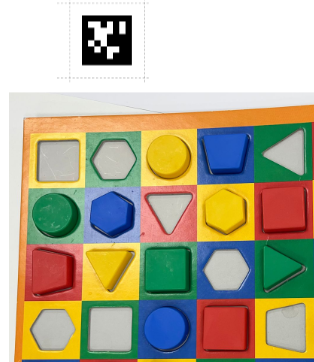
Hi @user-4514c3 👋 ! Yes, if you want the puzzle surface to be robustly detected, then you need to put 4 AprilTag markers, one in each corner of the puzzle. You need to do it before the participant runs (e.g., you could tape the markers to the corners of the puzzle) and the markers will need to be visible to the scene camera while the task is being performed. You can use the same AprilTags for all participants, but the markers will need to be present in every recording. As @neil mentioned, if the AprilTag markers were not used during the recordings and you want to detect the surfaces post-hoc, then other computer vision algorithms will be needed.
Thanks btw!
I encountered a strange problem while stream data using the LSL plugin. When I look at the xdf file, the timestamps are not monotonously increasing. Did anyone encounter such a problem?
Hi, @user-6d3681 - if I recall correctly, LabRecorder doesn't make any attempt to sort data as it arrives. This task must be done later.
If you think about it, this is preferable. Because the data is sent over the network, the order of their arrival is not guaranteed to match the order in which they are sent. LSL and LabRecorder are designed to work with multiple high- and low-frequency streams. Sorting data as it arrives can be computationally expensive, and could always be done later instead. Because of this, LabRecorder instead uses its resources to just ensure that all the data is recorded
Hi @dominic -- Thank you for the quick reply. I understand that LabRecorder dosn't sort the times. However, I use load_xdf.m (a MATLAB function) that does that for me. It works fine with the other streams I have but the timestamps for the eye tracker are as I described.
Can you share or link this load_xdf.m? If that function is meant to sort and is returning data which isn't sorted, the error must be there, right?
load_xdf.m is here: https://github.com/xdf-modules/xdf-Matlab. It has been used by many others and not just me. As I mentioned, it works well for my other streams. I think, also, that LSL does ensure samples are recorded in order and handles retransmits as needed. Does the Pupil Labs LSL plugin not transmit data in order?
Network traffic is never guaranteed to arrive in the order in which it's sent
I understand that, but, again, all the other streams seem to be fine. They also have more channels and higher data rate.
That may be a bit unexpected, but not impossible. Regardless, if load_xdf.m is supposed to perform a sort, then it wouldn't matter how the data is sent or recorded.
exactly. That's why it's strange. I asked here in case someone noticed that problem in the past. In our end we are experimenting with some other computers (perhaps it's a computer problem). I'll let you know if we resolve it.
manual
hey pupil labs, i just wanted to know what excatly happens when the Core eye tracker dosent recognise the eye in the middle of a recording?
i meant will it record it as a false data or it just skips the perticular point? like will it give a false fixation or blink anything like that or it just skips?
There are several instances where this could occur, such as during blinks. In the case of blinks, we have a blink detector. There may also be instances where the eye isn't detected properly due to, for example, less-than-optimal camera positioning or when the wearer looks outside of the eye camera's field of view. In these situations, you will encounter 'low-confidence' data. The raw gaze will still be recorded by our system, but it won't be used by plugins like the fixation detector. Generally, when confidence drops below 0.6, we would recommend discarding the data. However, there can be exceptions. If you haven't already, definitely have a read through our online documentation, and let us know if anything requires further clarification!
Hi Pupil Labs,
I am not able to find documentation on the Core's working distances. I would like to set a visual task closer than 40cm, ideally 20cm away from the observer's eyes, has this been tested before?
Hi @user-57290c 👋. Pupil Core can indeed operate at the viewing distances you mention. I'd recommend calibrating at about the desired distance to get the best results
Can anyone please help me out? 🙂
Hi @user-757948! The Surface Tracker plugin is already available on Pupil Player, that is, there is no need to install it. You need to select it from the Plugin Manager view on Player. Please read our docs for more details on the Surface Tracker plugin: https://docs.pupil-labs.com/core/software/pupil-player/#surface-tracker
Thank you!! On more question please, when I download the eye tracking recording from the cloud, it gets downloaded without the gaze and fixation points, is there a way I can download it as it is from cloud?
Can you clarify which eye tracker you're using? Pupil Core, Pupil Invisible, or Neon ? Pupil Cloud is only compatible with Pupil Invisible and Neon recordings.
Neon
Thanks for clarifying @user-757948! Let's move this discussion to the 👓 neon channel then. I replied there: https://discord.com/channels/285728493612957698/1047111711230009405/1215222805583499264.
Hi, I would like sync pupil eye tracker with other device, how to do it the right way?
Hi @user-756d06 ! Can you kindly confirm whether you are using Pupil Core or else, such that I can link you to the correct documentation? There are multiple ways to sync with other devices, being the most popular Lab Streaming Layer or iMotions. What other device are you looking to sync with?
i would like sync pupil core eye tracker with IMU sensor from Movella DOT
I use Pupil core
Here you can find the LSL plugin for Pupil Capture.
I do not know if IMU has LSL support, you will need to ask the at Movella.
Hey guys. Could anyone give me a little information?
Hi @user-d09ae0 How can we help you?
Hi I was interested in the mechanism of the pupil core device. I wanted to know how does the system decide the confidence value? Is there a computational algorithm which it uses to assess the confidence based on height width and depth of the world view and the pupil position or does it use some form of computer vision based model to provide a reding for the confidence?
2D confidence, specifically, is an indicator of pupil detection confidence, measured using the number of pixels on the circumference of a fitted ellipse. Pupil detection forms the foundation of Pupil Core's gaze estimation pipeline. Highly recommend reading the whitepaper for a detailed overview!
Hi! I am interested in achieving the data of pupil and gaze through pupil core by using my own cameras. Is there any demonstrations or examples for testing? And where can I find them? Thanks sincerely!
Hi @user-b02f36 - I'm not sure I fully understand your question. Pupil Core comes with its own eye and world cameras. Could you maybe elaborate on your use case?
Thank you very much. I tried using the AprilTags initially, but encountered continuous issues, including poor detection. Is it necessary to define the area beforehand, or can they be analyzed post hoc as long as they appear during the recordings? Thanks!
Hi @user-4514c3 ! Surfaces can be defined post-hoc in Pupil Player, provided the AprilTags are recognizable. In fact, if your data capture is done on a lower-end PC, defining surfaces and detecting markers post-hoc can be beneficial to reduce computer load.
Hi, Nadia! I am now using Pupil Capture for gaze tracking to show the image in the fovea region through my own AR-NED, and it is critical for me to get the gaze data. From the user guide, I know that I can view and record my real-time gaze and pupil data from Pupil Capture through record function, but I don't know which document has the data I need and how can read it. Could you give me some tips or demonstrations? Here I give you my record outputs and the appearance of my AR-NED.
Hi @user-b02f36 - Recording data in real time is possible using our Network API. Have you already checked our docs. I recommend having a look at our pupil helpers repository for more resources on how to remote control and receive data from Capture.
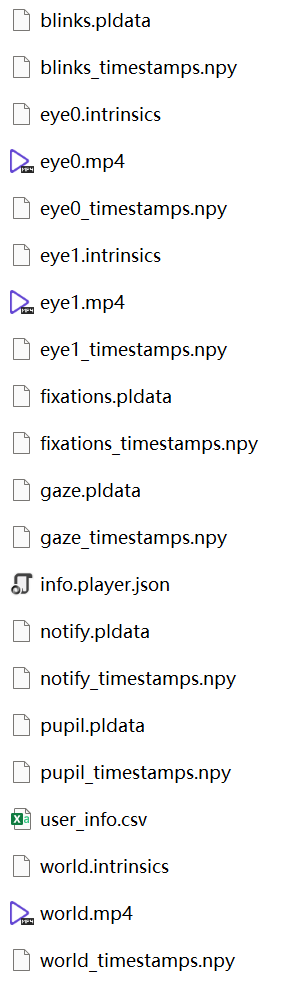
Hi Peter @user-e91538 have you solved your problem? I think I have a similar issue: the world camera is not working, but the eye camera is. It would be helpful if you could share how you fix your issue. Thank you. Best, Jack
Hi @user-36b9d8 ! If you are experiencing issues with your Pupil Invisible scene camera please open a ticket in 🛟 troubleshooting such that we can better assist you. For general questions about Pupil Invisible, please move the conversation to 🕶 invisible .
Hi I have updated my Macbook and installed the new version of Pupil capture, now I faced on problem in local USB (it is seem inactive). How can I solve this problem?
Hi @user-9d6c03 ! Could you develop a bit? What version of Mac OS were you running/are you running now? Have you already seen/tried these troubleshooting steps ?
Question: How can I normalize the left/right pupil size? In my figure, each green line is a stimuli onset, (this recording has multiple trials) , blue scatter plots are left eye recording, red plots are right eye recording. You can see left and right pupil size are very different, but I'm guessing it's from the camera angle and other instrumentation errors. So my question is what's the best way to match (normalize) the two eye sizes? I'm thinking shifting the red plot baseline up, then rescale the plots so it has the same peak sizes as blue plots, and do it for every single trials. Is there a better way to do this?
Hi @user-03c5da 👋 ! The "diameter_3d" column of the pupil_positions.csv file gives you the pupil diameter in millimetres that is provided by the 3d eye model. Note that you need a well-fit eye model and no slippage for these values to be accurate.
Can I ask what your stimulus/setup was and the general environmental lighting conditions? For future reference, you can consult our tutorial on visualizing the pupil diameter, if you have not done so already.
Lastly, may I ask why do you need to normalize values across eyes?
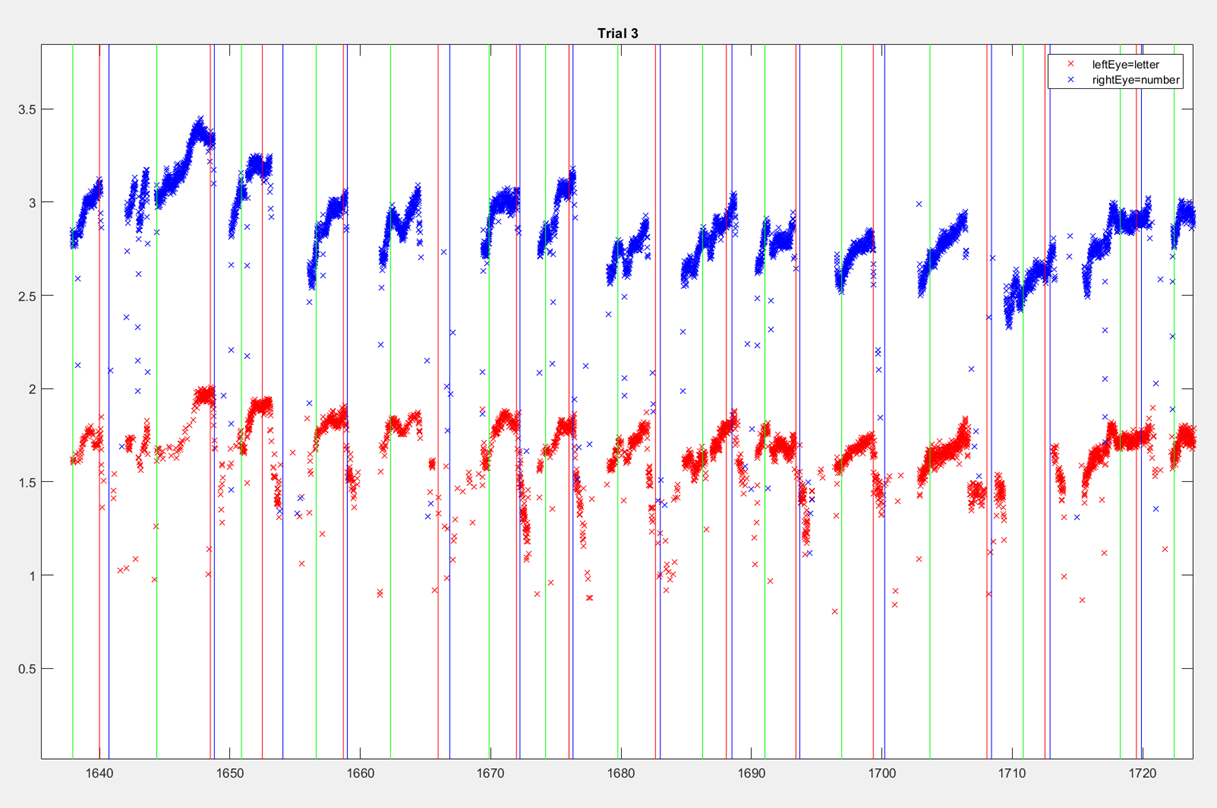
Hi Rob, we have a dichoptic stimulus setup, presenting two different images to each eye. The experiment is in a relatively dark room. Each of our trial last 6 seconds, and each experiment has 50 trials, so that's about 5 minutes per recording. The reason for normalizing the two eyes is that we want to be able to compare the eyes' time series directly. The 1mm baseline shift is obviously not real, so we need to fix that in order to do any comparison.
Thanks for the clarification. Then, do I understand correctly then that there are no significant luminance/intensity or other differences between the images presented to the two eyes? And just so that I understand, may I ask how you determined that the 1mm baseline shift is not real?
Hello, i'm currently doing my master thesis and im implementing the Pupil Core headset within an entire system of biosensors for monitoring in real time data from First Responder (nurses, firefighters etc...) My objective is to obtain data in real time with the Network Api to MongoDB - Docker. The thing is that im trying to run the Pupil Core in Visual Studio Code and when installing the requirements.txt appears an error. This error is related with the installation of uvc and the wheels. Im lost. Im on windows 11, Ive tried with virtual environment, installing wheel, installing cmake, -m build, the steps you provide in github in the uvc windows section but nothing. i can send you the error image. Could you help me im a bit desperate. Also, could you recommend me how do you think I should implement the system to upload it to Mongo and Docker, should I do it in visual studio, should I do it using the Capture app, I'm a bit lost with that too because I really don't know what to do after running it in python. How could I approach it? Very thank you in advance
Hi @user-4ab98e , I have continued the conversation here.
Thanks for your quick response. My Macbook is 12.7.2 . I tried troubleshooting but did not work.
Hi @user-9d6c03 could you kindly open a ticket on 🛟 troubleshooting such that we can follow up with more debugging steps? Alternatively, feel free to send an email to info@pupil-labs.com sharing the capture.log and some additional information on how you installed/ run the bundle and how you connect Pupil Core to your Mac.
Please in which way can we record voice using Pupil Lab Core?
Hello, I’m developing an application that interfaces the pupil capture. The application can start, stop recording, and perform other functionalities. Now I want to develop a new functionality: can close and open each eye camera. Is it possible to do that with the Network API? Thanks in advance, Nobby
Indeed you can! Here's a snippet
import time
import zmq, msgpack

# create a zmq REQ socket to talk to Pupil Service
ctx = zmq.Context()
pupil_remote = ctx.socket(zmq.REQ)
pupil_remote.connect('tcp://localhost:50020')

# convenience function
def send_recv_notification(n):
    pupil_remote.send_string(f"notify.{n['subject']}", flags=zmq.SNDMORE)
    pupil_remote.send(msgpack.dumps(n))
    return pupil_remote.recv_string()

n = {
    "subject": f"eye_process.should_start",
    "eye_id": 0,
}

print(send_recv_notification(n))
time.sleep(5)

n = {
    "subject": f"eye_process.should_stop",
    "eye_id": 0,
}

print(send_recv_notification(n))
Hi @dominic , i have a short question regarding the "Pupil Core" model. Is it able to measure the average blinking rates of participants?
Hi @user-7daa32 ! Pupil Core has no microphones, if you would like to capture audio. It is possible to collect audio externally using the Lab Streaming Layer (LSL) framework. This would provide accurate synchronisation between audio and gaze data, but takes more steps to set up:
Hi @user-afe8dd ! Pupil Core does not output directly the blink rate, but computing this parameter is trivial.
Firstly, I 'd recommend learning about the blink detector employed and how it differs from Capture to Player and the best practices when employing the blink detector.
Once you understand how blinks are detected, and know whether you would like to compute blinks in realtime or post-hoc, you simply need to iterate over the blinks and their timestamps.
Simply define the period you want to compute your blink rate from, and look up for the blinks whose start and end ts are within
@user-d407c1 thank you for your answer. for my research this parameter is quite important. So i guess, i would have to look at the number of blinks a particpant has made, then divide it with their time they spent during the experiment. And do this for all of my 200 participants. So this is quite doable, do i understand correctly?
That sounds like a good approach to get a blink rate per session. Perhaps you would like to compute the blinks per minute across each session, as it might be more useful. That would give you a metric to compare not only across participants but also to compare along the experiment.
Depending on how long the sessions were, how exhausting it was, or whether screen tasks were involved, you may see a decay within the participant alone.
Good tip! thanks!
I'm getting the following error when running 1 (out of 21) recordings. Is this a corrupted file issue, and is there a way to fix the file in question?
player - [INFO] launchables.player: System Info: User: ander, Platform: Windows, Machine: Muttnik-3, Release: 10, Version: 10.0.19041 Fixation detection - [INFO] background_helper: Traceback (most recent call last): File "background_helper.py", line 73, in _wrapper File "fixation_detector.py", line 170, in detect_fixations File "fixation_detector.py", line 170, in File "file_methods.py", line 293, in getitem File "file_methods.py", line 253, in _deser File "msgpack_unpacker.pyx", line 195, in msgpack._cmsgpack.unpackb UnicodeDecodeError: 'utf-8' codec can't decode byte 0xbf in position 2: invalid start byte
player - [ERROR] launchables.player: Process Player crashed with trace: Traceback (most recent call last): File "launchables\player.py", line 722, in player File "fixation_detector.py", line 534, in recent_events File "background_helper.py", line 121, in fetch UnicodeDecodeError: 'utf-8' codec can't decode byte 0xbf in position 2: invalid start byte
player - [INFO] launchables.player: Process shutting down.
Hello all, I plan to use Pupil Core when the participants are in motion. I realize that the Pupil Mobile application is no longer available on the Play Store. Is there any way to use this Pupil Core on mobile? Thank you.
Hi @user-75ea17! Do you already have a Pupil Core system or are you scoping out a new purchase?
Thanks for the quick response! My uni has a Pupil Core device, but we're still stuck in using it for movement activity.
Hi… I’m going though the GitHub scripts to find out the pccr (pupil center corneal reflections ) implementation… can any one please help me… I’m trying to implement it for a two camera system and hoping to find some help here… would be grateful for any useful leads …. (Note: I am referring to Guestrin and Eizenmann’s paper , but I’m not getting expected results)
Thanks for clarifying. Using Core with participants in motion is not an ideal situation, but is possible. Some of our customers have had success using a small form factor tablet-style PC in a backpack, for example.
Thank you for the info! Looking forward to use your product in such a "not ideal" situation.
No problem. I'd also recommend using the 3D calibration pipeline as it offers better slippage compensation, and breaking your experiment up into smaller parts if possible. You can find more details in the Best Practices section of the docs. Let us know if you need any more help!
Thank you for the recommendation. We'll see if another problem pops up in the way.
Hi, where do I find the serial number of my pupil core device?
Hi @user-ea64b5! You can't find Pupil Core SN by visually inspecting it. May I ask why you need the serial number?
The university has to register each item by its serial number
You will need to use the original order ID, which acts as serial number for Pupil Core.
this?
that one yes
Hello! Our lab has the eye tracking glasses from Pupil Labs company. We would like to conduct an experiment using these glasses and other equipment in combination, namely: GRS (galvanic response) and PPG (photoplatysmogram). Which brands of GCR and PPG are the glasses compatible with?
Hi @user-ee74ae - I just replied to your email 😉
Thank you very much!
hi all, is it possible to use pupil player in a headless fashion to automate data exports. Have a large batch of recordings that I need to get pupil_positions.csv files for, similarly need to do post-hoc gaze calibration (marker dection, calibrations, mappings)
Hi @user-948402 👋 ! There is a community contributed batch exporter that you can try using to get pupil_positions.csv for each recording, but note that it requires a step where you edit file paths in the code. Regarding batch post-hoc gaze calibration, that is not possible in Pupil Player.
Hello ! I am working with surface tracker and I was wondering if there was any recommendations regarding the tag size in relation to the eyetracker-screen distance Thanks
Hi @user-c68c98 ! There are no specific Apriltag size guidelines, only that it needs to be big enough in the scene camera to be recognised, I would suggest that you try different sizes on the screen at the distance you want. The only requirement is about the white margin, it has to be at least the width of one of the smallest squares within the marker to be decoded. That said there are other factors to account for:
Hello! I'm not sure if this Discord will be able to help me with this issue, but I thought I would give it a try. My Computer Science Capstone class is working with our Psychology Department to use the Pupil Core glasses. My team split up some work and asked me to find information on the following:
*Documentation on the origin point of all cameras (eye0, eye1, world) and what the correlation between them is. (I think they are asking, if your pupil is at the center of the sensor, are you staring at the center of the screen?)
*The device we use creates a grid in the device itself for tracking the eye movements, we need to figure out how these X and Y values relate to the pixels on the screen the person is looking at. First, I would like to see if you could find any documentation on this, or if there is a script already available to use.
Basically, I am wondering if there is any more indepth documentation then what is on the website?
Any help is appreciated!
Hi @user-c921bf 👋 ! Always feel free to ask questions here.
The three cameras can be rotated independently of each other, so their coordinate systems are indepedent. The headset can also be positioned up and down the nose. Because of these factors, pupil at center of the image does not mean you are staring at the center of the screen. Rather, a 3D eye model is first fit and then you want to perform the calibration process to know how pupil position relates to gaze. For mapping gaze to normalized surface coordinates, check out the Surface Tracker plugin. The coordinate systems for the cameras are documented here.
What is the name of the device? I am not sure I understand what the grid is.
Hello! I have a difficult problem when using the GUI of Pupil Capture. Here is the description: I'm now using Pupil Capture for the debug of my world camera and two eye cameras. It is correct to get the image for three cameras in world GUI, but I cannot change the eye camera when it comes to the eye GUI. Actually, neither eye 0 GUI nor eye 1 GUI is working correctly even I change the different USB for each cameras. The appearance is that I can only debug one camera. Has anyone ever encountered this problem? Please give me some suggestions! Thank you sincerely!
P.S. : The drivers of the used cameras have been changed into libsdk. My computer device is ASUS TUF Laptop using AMD 7940H and Nividia RTX4060, the version of Pupil Capture is 3.1.16
Hello,
I’m currently using the camera from Pupil Labs along with the UVC Python library to capture video. It’s working well, and I can successfully capture video streams from both the left and right cameras. However, I’m encountering an issue where the video from the right-side camera is upside down.
For context, I’ve created a Camera class that takes idcam as a parameter, which can be either 0 or 1. The expectation is that the video streams from both the left and right cameras should be identical when I instantiate this class.
I appreciate any assistance you can provide on this matter.
Regards, Nobby
Hi @user-b02f36 👋 ! Could you open a ticket in the 🛟 troubleshooting channel? Then, we can assist you with debugging steps in a private chat.
OK, I will! Thank you sincerely!
Hi @user-80123a 👋 ! That is because that camera is actually mounted upside down. You can simply flip the image in software (try cv2.flip(img, 0) or np.flipud() ). However, just to be clear, the video streams from the two cameras will never be identical. May I ask what you are planning to do and why do you prefer PyUVC over Pupil Capture?
Thank you for your response,
I find it a bit strange that when I’m using Pupil Capture, neither of the two images is flipped. Could this be because the image is automatically flipped when it’s upside down with Pupil Labs?
I’m developing an application for binocular vision analysis. This requires me to present objects on a screen and track the direction of the gaze. It’s quite inconvenient to constantly switch between Pupil Labs and my application. Therefore, I’ve decided to integrate the camera stream into my application, and also allows to remotely control the recording (start and stop).
Yes, the Pupil Capture software performs the flip already for you. You can change the "flip" setting in the settings of each eye camera window. Is the gaze data provided by the Network API insufficient? Or, is there any reason why the Frame Publisher plugin for the Network API is not appropriate for your purposes? What are you doing with the eye images?
Thank you, the flip method works.
We want to build an eye tracker and we want to use pupil labs as a base line. And we need the eye images for computing the gaze direction.
Hi there. I'm just starting to experiment with AOIs and Pupil Core. My experiment setup is quite "natural" (people sitting on a chair gazing at a white wall, whilst thinking about personal memories). I had two questions : 1) I see there are a variety of AprilTags - how does one pick a specific one ? Do you need to use a different type of tag everytime ? 2) how many should I place on my white wall ? Thank you so much for your help !
(Another quick question : does anybody know of this Plugin : https://scholarworks.calstate.edu/downloads/2j62s7153 'Gaze Features Exporter" and know where/how I could install it to directly export average fixation durations, saccades, etc. ? Thank you so much)
Hi @user-ee70bf 👋. Recommend using the ones provide in our docs. We know they work well. As for size and number, that really depends on your set up. Check out the example here. It's in the Neon docs, but shows how we used markers to outline a whiteboard.
Hi @user-b02f36! Just to be clear, you're using third-party cameras with the capture software, not those from Pupil Core?
Yes, Neil! However these three cameras have turned to be normal recently. I think that it may be the problem of my selecting sequence of cameras for each windows. There is no problem when I first choose the world camera.
I'm not familiar with the work you've linked to. What exports exactly does it provide that the stock Pupil Player doesn't?
The virtual environment may also be the source of my problem. When I changed my system environment from Python 3.9 into 3.11, all of my Python Demo and the Pupil Capture could run normally.
Thank you very much for your answer @neil ! I believe this work provides data on saccades, which Pupil Player does not ? It also should automatically provide statistics on average fixation duration, average saccade amplitude, average pupil dilation... To avoid doing all the calculus manually. Do you know of any way to do that ?
Hi @user-ee70bf 👋 ! Just during a brief glance at the article, I notice some errors in the pseudo-code, as well as some errors in the main text. You might want to check out the Pupil Community repo on Github. In there, you will find links to post-hoc analysis tools, including one that claims to output saccades and another that is a batch exporter of data. Please note that we do not provide official support for these tools.
Hi everyone, I have some data from my last study (on painting and eye tracking), I put my data on pupil player and now I have some questions about extract data. I had 60 images and in extracted data I have fixation_on_surface 1 and fixation_on_surface 2.i can't find what is this. can you please help me?
Hi @user-2cc535 ! I assume you are using the surface tracker, is that correct? If so, this surface 1 or surface 2 are defined surfaces by you, you get one file per surface/AOI that you defined. Kindly note that you can name them in Pupil Player before exporting them, and they will have more meaningful names.
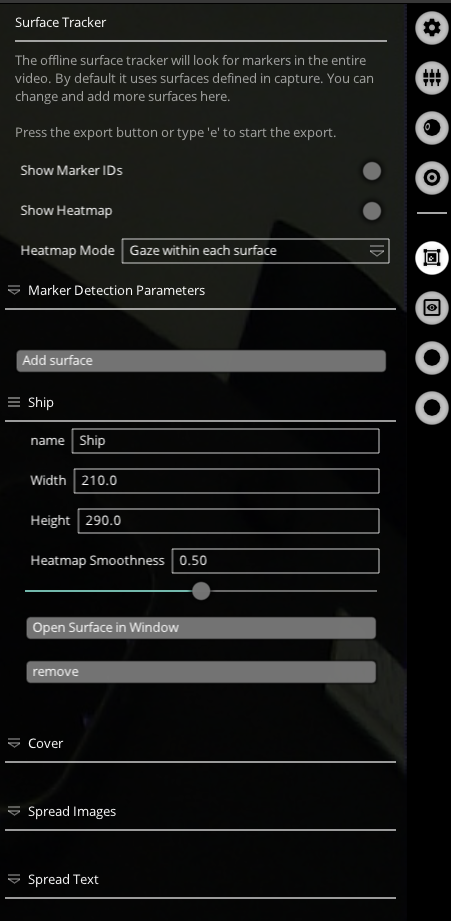
Thank you so much @user-d407c1 just one more question, I have all the 60 images in one task (aprox. 8 mins). so I must surface 1 and surface 2 just one time and it will be defined for whole task?
The surfaces you define are there for the whole recording duration. Do you have 60 surfaces on an 8-minute task? May I ask how you define these surfaces? Do you use unique markers for each one? Or do you use one set of markers and crop the area?
dear Miguel (Pupil Labs) I could resolve it. Thank you so much
Hi team. I would like to generate scan paths, however I noticed from this https://docs.pupil-labs.com/alpha-lab/scanpath-rim/ that it uses Reference Image Mapper in Pupil Cloud which is used with Neon and Invisible. I have Pupil Core. Is there a way to generate scan paths with Core?
Hi @user-3c6ee7 - have you checked this tutorial ? It shows how to generate scanpaths with Pupil Core data.
Hey guys, we are currently trying to run pupil_capture on Ubuntu 22.04 but somehow it's not working. First we tried to install the latest release (https://github.com/pupil-labs/pupil/releases/tag/v3.5) which doesn't start due to "Segmentation Fault" in CPython. Then we tried to run the master branch from source: The program starts but we can't open the options of the three different windows (world, eye0, eye1). If you already answered this, sorry for asking. We tried to search this commuity for answers but unsuccessfully. Help is appreciated. Best regards, Rob
Hi @user-1386c3 ! This is probably a different issue, but have you already tried these troubleshooting issues.
hm. It's kinda strange. It doesn't seem to have to do with the cameras. It worked initially when setting up Ubuntu 22.04 (with the release package) but after dist-upgrade it stopped working. Do you run the source on 22.04?
Hi everyone. I have one more question. I extract my data. I have one problem; for pupil _positions, in the clumn of CSV file with the name of method, I have two sources of data: 2d c++ and pye3d 0.3.3 post-hoc, so in the part of dimetr_3d I have empty rows. is it the problem of recording process? can I resolve it in the pupil player or capture?thanks in advanced
Hi @user-2cc535 👋 ! If you look at the timestamp column, you will see that there are two entries for every timestamp, one for the 3D detection method and another for the 2D detection method, as both pipelines run in parallel. So, you can just filter based on the "method" column for "pye3d 0.3.0 real-time" and use the resulting data.
Hi! I have a question in Pupil Capture. From developer document, there are two data related to gaze tracking. Due to my use of Pupil Capture for achieving foveated rendering, which gaze data should I use? 'gaze_point_3d' in Gaze Datum Format or 'gaze_on_surfaces' in Surface Datum Format?
Assuming the surface you're tracking is the screen on which you're doing foveated rendering, you'll want to use the surface gaze data
I see, dom. So, if I'm using tracking for giving my AR-NED to show an virtual image in the real world and changing the rendering based on the gaze data, will it be possible to use 3d gaze data?
hm. It's kinda strange. It doesn't seem
Ah, so in your case the surface you're tracking is not the display surface then, right? I'm not very familiar with AR-NEDs, but I imagine that you're virtual image has a virtualized real-world position and size then. If so, what you'd probably need to do is calculate the intersection of the 3D gaze ray with this virtual display surface
AH. I see, dom. So according to your suggestion, the first I need is the real-world location of my virtual image plane? Then it is possible to achieve surface gaze data from Pupil Capture to render my foveated image.
Yes, although to be abundantly specific, you'll want the real-world location of the virtual image plane relative to your subject's eyes
I see, dom. By the way, if I get the distance between my pupil plane and the virtual image plane, is it necessary to demonstrate gaze tracking through Pupil Capture by using a large display screen at the same distance in the real world?
I'm not sure I fully understand the question. Are you asking if you need to setup a physical screen that matches up with your virtual one? If so, then no, that wouldn't be necessary unless you wanted to validate your math or something.
OK, I got it. There are another two questions, dom. I'm not sure my understanding is right. Is the gaze point position in 'gaze_point_3d' means the gaze position in the world camera coordinate system? If so, are the x, y, and z positions the same as those in Fixation Messages mentioned in Network API Doc, which topics are 'gaze_point_3d_x', 'gaze_point_3d_y' and 'gaze_point_3d_z'?
Hello, we're looking for recommendations for small microphones to attach to the eye-tracker. Does anyone use anything like this?
Hey all, I am working with the pupil core for a class project. I am wondering if there is a way to determine what pixel the user is looking at. I have access to pupil_postions.csv and gaze_positions.csv post recording, and I want to take that data and translate it to determine what pixel (on a screen/monitor) the user was looking at during the recording, or I am wondering if there are any plugins that would help with this? Thanks!
Hi @user-ab0a30 👋 ! If you want to map gaze to screen coordinates, then we recommend using AprilTags + our Surface Tracker plugin during the recording with Pupil Capture. You can also do post-hoc detection of the AprilTags with the Surface Tracker visualizer in Pupil Player. If you did not use AprilTags during the recording, then our software for Pupil Core does not handle that case and if you cannot re-do the project, then you might give computer vision algorithms for feature/object tracking a try.
Yes, all of those are indeed in the world camera coordinate system. You got this! 🙂
YES! I got it, dom. Thank you sincerely! By the way, I'm now trying to get the full data from Pupil Capture based on the docs, but there's something wrong with my code. Could you give me some suggestions?
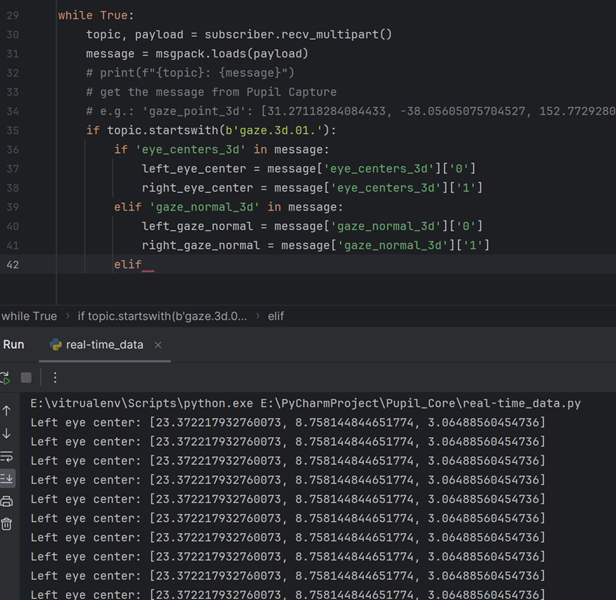
It turns out that this code cannot print the center data because of KeyError. However, this key can be seen when the code runs into line 32. Is there any bugs in my code? My interpreter is Python 3.11 in Windows 11. Here I give you the code, problems and a part of the data I get from Pupil Capture.
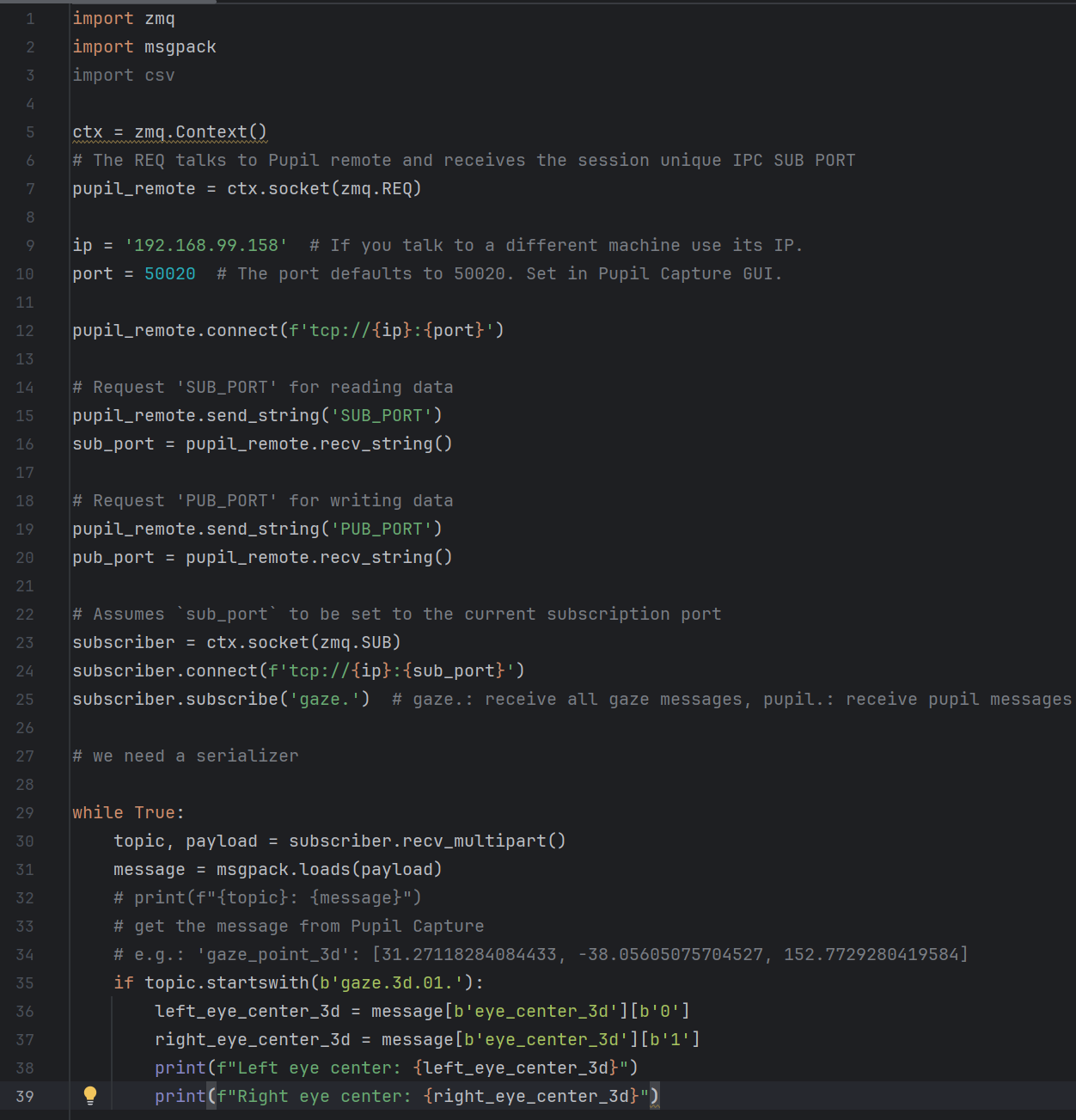

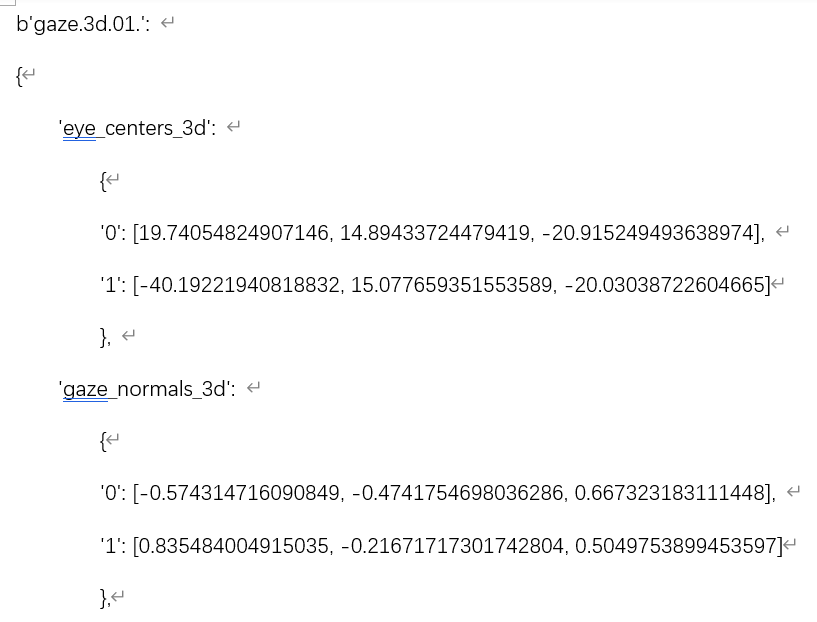
Hi @user-b02f36 👋 ! It looks like you instead want “eye_centers_3d”, with an “s”, as the key.
Good eye!
AH, I see. It's my mistake, I will try again later. Thank you, Rob!
I'm terribly sorry, Rob. There is a pretty weird problem when achieving the data. It seems that I can run the correct data on one laptop, but can not work on another laptop with the same code, the same hardware, the same virtual environment, the same Python interpreter, the same site packages and the same system in Win 11. How could this be possible? I'm very confused with it. Could you give me some suggestions? Because it is very critical for me to run this code in different devices.
I would guess that in the first video, both Pupil Capture and your Python script are running on the same PC, while in the second video you're running Pupil Capture on the first laptop but your Python script on a different laptop?
If so, you will need to change the IP address in the script running on the second laptop so that it uses the IP address of the laptop which is running Pupil Capture.
"localhost" means "connect to this computer", which isn't what you want if Pupil Capture and your Python script are running on separate computers.
Nope, dom. The second one is running on the second laptop with the same Python version and Scripts of the first one. So maybe I should change the IP address in my code when using different devices?
In the first video, I ran the code and Pupil Capture 3.5.1 on one laptop with Python Interpreter 3.11. In the second video, I ran the same code with the same Pupil Capture version and the same Python version on a different laptop.
I may have been a bit unclear. The fact that you're running that same code on both computers is likely the problem. You can only use "localhost" in that script IF Pupil Capture and the Python script are running on the same computer at the same time.
If Pupil Capture is running on a different computer than the Python script, then you will need to modify the Python script so that instead of "localhost", it uses the IP address of the computer which is running Pupil Capture.
After changing "localhost" to the IP address of the computer running Pupil Capture, you should be able to run that script on any computer on the same network - whether it's the computer running Pupil Capture or not.
I see, dom. Thanks for your suggestion sincerely! I will try it later.
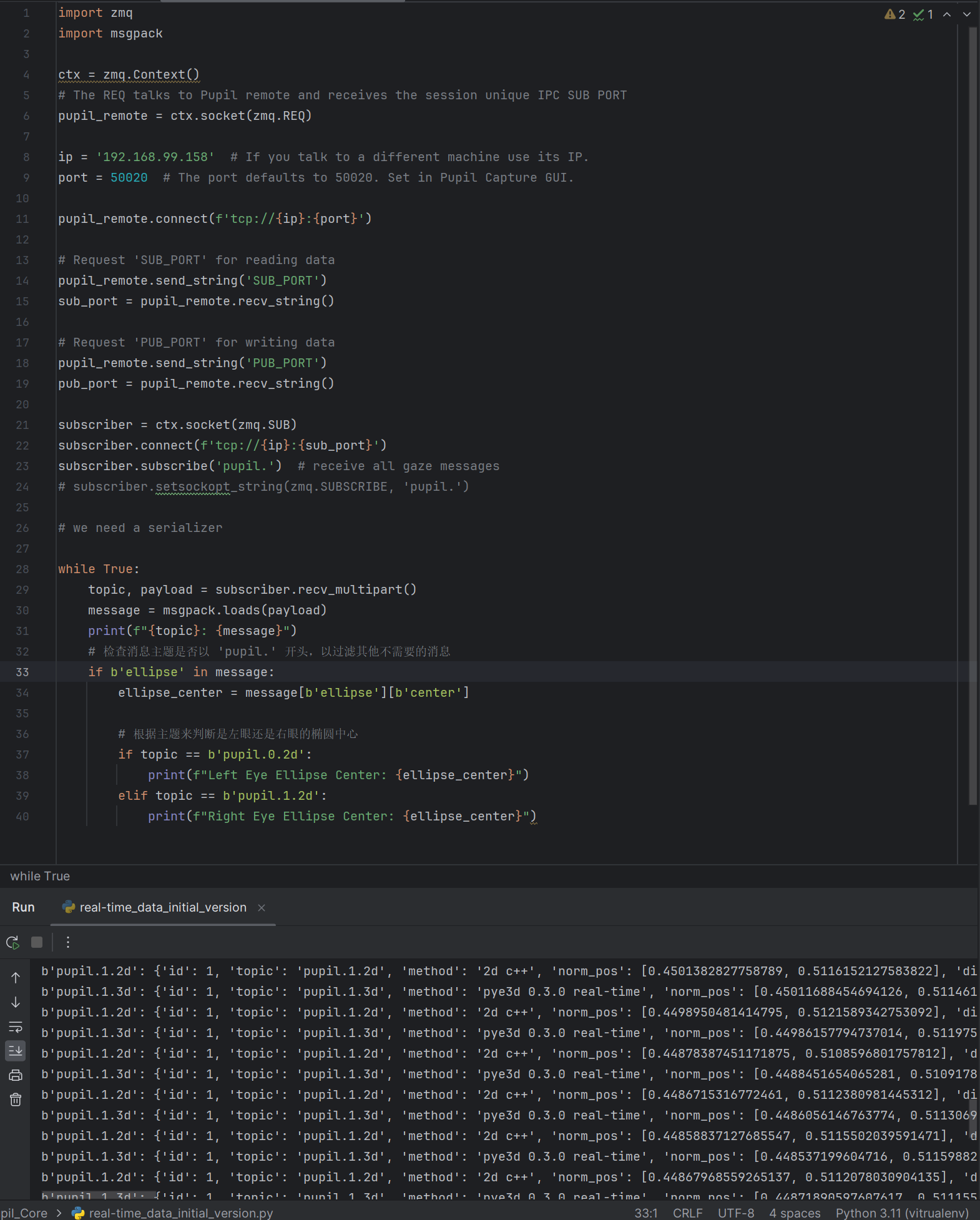
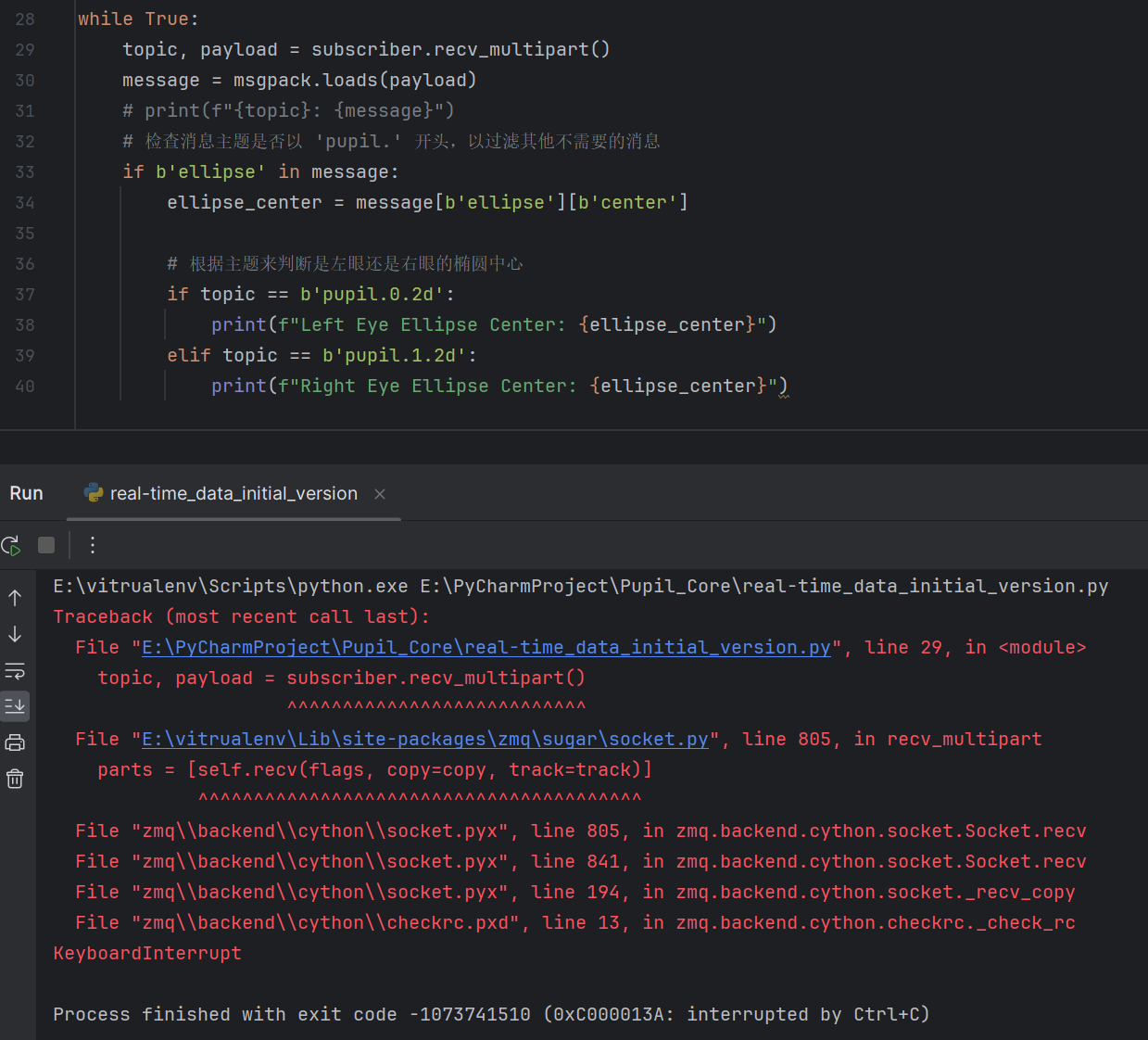
I'm terribly sorry to disturb you, dom. I have changed the IP address of my second laptop into the code. Here I gave a breakpoint before the if function I used for separating the data, and obviously I could achieve all message. However, when I removed the breakpoint and made line 31 into comments, I could not achieve the message like the first video shown before.
Let's start by making sure I correctly understand your configuration
192.168.99.158Is that correct so far?
I notice that in your earlier video, the pupil cameras appear to be still images rather than a video feed. They are also out of focus and the camera for eye0 is not well-positioned. It's almost as if you have the cameras pointed at an image of eyes instead of actual eyes.
I believe I see the problem with your code. You are using bytes as your dictionary keys for the message dict, but I can see in your output window that the keys to that dict are actually strings. In other words,
b'ellipse' is not the same as 'ellipse'
So on lines 33-34, you have
if b'ellipse' in message:
    ellipse_center = message[b'ellipse'][b'center']
You should change these to:
if 'ellipse' in message:
    ellipse_center = message['ellipse']['center']
Ah, I see, dom. My mistake on using dict keys. Thank you very much for your suggestion and assistance sincerely! I will correct my code based on yours. Wish you a good day, dom!
Hi, dom. It works fine now. Thank you sincerely for your assistance again!