
Hi @neil
the problem is data protection. We are still working on our concept. Another question: is it possible to increase the heart rate in the desktop version or is 160 the maximum?
Thanks for clarifying! There's no way to increase sampling rate beyond that without Cloud. For reference, gaze recorded on the phone and then accessed with Pupil Player is only at about 120 Hz. Pupil Invisible's eye cameras operate and save video at 200 Hz, but we can only perform real-time gaze estimation on the phone at 120 Hz due to limited computational resources. Once recordings are uploaded to Pupil Cloud we re-process gaze estimation at 200 Hz. Pupil Player does not have functionality to re-process gaze like in Cloud.
ok thank you
I have used some eye tracking products in the past but would be new to pupil. I am considering a project that would use neon to record technical skill performance by health professions in a relatively dynamic, sometimes high-arousal environment. Does the Pupil Cloud/Player facilitate the analysis of such complex data? If not, is there another software package someone could recommend or is this idea beyond what the technology can support? Also, is the cloud HIPAA compliant?
@eleonora followed up here: https://discord.com/channels/285728493612957698/1047111711230009405/1136612569260498975
Hi PL team! First of all, I wanted to let you know our measurement campaign last week went quite well using the PL Invisible device. We were able to remotely control the start and stop of measurements and send events in the meantime. The connection between companion phone and laptop was established using an ethernet cable and a USB hub (the one suggested on the website). However, for some unknown reason, sometimes the connection of the pc with the phone was lost. We could not end events nor stop the measurements, also not directly in the companion app on the phone. I also noticed that the glasses got a bit hot after a while - could this be related? The phone did not get too hot, as we mounted it in front of an airco grill of the car that was blowing cold air over it. Is this something that has been reported by customers before as well? Any info or possible actions to compensate for this behaviour would be welcome. Regards, Harald
Hi @user-e91538 ! Thank you for your detailed update on the measurement campaign using the PL Invisible device. It's nice to hear that the campaign went well overall and that you were able to remotely control measurements.
Regarding the intermittent connection loss between the companion phone and laptop, there could be several factors contributing to this issue, and it's hard to know without further information. It's possible that the USB hub or the Ethernet cable might have intermittent connectivity problems, leading to the loss of connection, so you may want to rule out the USB port and ethernet cable, trying a different one.
But it might be due to software, please check the laptop's network and battery management preferences, ensure that there is no power saving mode that might be switching off the connection, and that the wifi is not enabled (in the laptop or the phone, as it could be that it tries to connect to a different network, as you won't have internet access, leading to network preferences changes on the go...).
Regarding the heat, it's normal that after prolonged use, one of the arms become warmer, but that should not be an issue, and it won't affect the network connection.
EDIT: It slipped my radar, but I saw that you also had issues stopping the recording from the app, has this ever happened when starting the recording manually? Additionally, how are you starting the recordings and sending events, through the realtime API or directly sending POST requests to the HTTP REST API?
Hi Miguel, thanks for answering so fast and elaborately! I don't have the setup with me right now so I cannot yet do the by you suggested hardware checks. However, I can give some more detail on your questions:
The wifi is switched off on the laptop. Still, there is of course a possibility that the wired connection temporarily fails. Is there a possibility to reconnect using the realtime_api.simple API once you lost connection, and then stop an ongoing measurement using the API?
Currently, I am starting and stopping the recording using the realtime_api.simple. I did some tests in the past where I started the recording with the API and stopped it manually, but never the other way around.
Another idea: would my remote control be more stable and robust if I used the web browser control? https://docs.pupil-labs.com/invisible/how-tos/data-collection-with-the-companion-app/monitor-your-data-collection-in-real-time.html
I'll update you once I have more details.
Hi, colleagues! I have a problem with downloading recordings to iMotions. It writes: no nesessary files. You have changed interface of Pupil Lab since my last visit. As I see some parametres of dowloading has been changed and the nesessary files that are listed at iMotions requirements are absent. Could you advice how I can solve this issue?
Hi @user-35fbd7 ! If you are looking for the Raw Data, you can still access it. You would just need to enable it on your workspace settings, please have a look at our previous messages https://discord.com/channels/285728493612957698/1047111711230009405/1108647823173484615
and where I can find the Raw Data? I dowloaded the file and it doesn`t include it
and what option to download raw data I should choose: Timeseries or Pupil Player Format?
Once enabled, right-click on a recording and select Pupil Player Format; that's the raw data. Unfortunately, I don't recall which format iMotions software consumes, is any specific file required? Could you point me to the requirements?
they specify these files as nesessary ones: gaze ps1.raw,
gaze ps1.time,
PI world v1 ps1.time,
PI world v1 ps1.mp4,
extimu ps1.raw,
extimu ps1.time,
andinfo.json.)
Those should be included in the Pupil Player format, let us know if there is anything else we can do for you.
now it works, thank you for asistance
Hi @user-35fbd7! I am answering you here:
Thank you! If it is possible to download merging videos and merging nesessary files? Because I see iMotions has the problem with it, their soft use the first part and that's all. Or for me to understand how I can to repack it for some files? Because I get accustomed to their ayalyses
Multi-part recordings
Hello! Not sure if this is the right channel but I have some questions regarding analysis in pupil cloud. I read that we will soon be able to blur faces in scene video. Is this feature automatic or manual? If it is automatic is there any guarantee that all faces will be blurred or do we have to look through the video to doublecheck?
Hi @user-36b552! Automatic face blurring is a beta feature that has only been enabled for a small number of users for testing purposes and is not generally available, if you would like to enter this beta testing please drop a message to info@pupil-labs.com
Hi I can not log into the cloud is there maybe an issue on your end?
Hi, I am having some issues logging into Pupil Cloud with a Google account. When I click log in with google the popup window appears and allows me to select a google account to log in with. Once the popup closes, the log in screen does not refresh. Are there any access issues to Pupil Cloud currently?
Same problem only with e-mail log in, seems to be an issue.
Hi @user-e91538 and @user-bdf59c! We can replicate the issue and are currently looking into it for a fix! We'll post updates as soon as they are available. Sorry for the inconvenience!
Thank you. If it's at all possible to advise when this might be, that would be great, as I have had a request from a client. 🙂
Hi @user-bdf59c , @user-e91538 ! I am glad to inform you that the Pupil Cloud login issues have been resolved, apologies again for the inconvenience, and let us know if there is anything else we can do for you.
I seem to be in fine, thanks very much!
I can not log in again. It worked but stopped working again @user-d407c1
Hi @user-e91538 ! I can't replicate it, could you please try to do a hard refresh in your browser? if that does not work, could you please send an email to info@pupil-labs.com with your account, which browser are you using and whether you use Google OAuth or not?
Will do thx!
@user-d407c1 the problem persits from our side, could you help! We would need a fast solution since we start field work at 11 am!
Hi @user-e91538 ! It has been solved now, we are taking measurements to prevent this to happen again, however, we did not have time to implement them yet 🙃
Hello, Out team had just purchased Pupil Invisible a few months ago and had ran into some issues of the App crashing/not responding. I did seven sessions, 20 mins each and the app were having issues in two of the sessions, Wondering if I can get some advices.
The first time was that after the participant took a 20 mins walk with the eye-tracker the app seemed crashed when he returned, the app showed the recording length was only 13mins so it must had crashed halfway and the video was corrupted. I was able to recover the video but the sampling rate looked a bit odd......
The second was when the participant returned for a 20 mins walk I could not stop the recording, tap the stop button and it suddenly shows that the recording was stopped, I can see the file name on the main screen but when looking at the recording folder it was not there and I was not prompted with an option to save the recording. As I cannot find the save option I tried to tap around and after tapped Recording with Notes the app crashed. And when reopening it says there was unsaved recovered recording and I save it, but when playing it although it shows the recording is 20 mins long the video playback was only 9 mins.
It seems that the recording was being broken down into two parts, PS1 is 9 mins long and for PS2 there are eye videos and gaze data, but the world video is 0kb. I am wondering if there is a way to recover it......
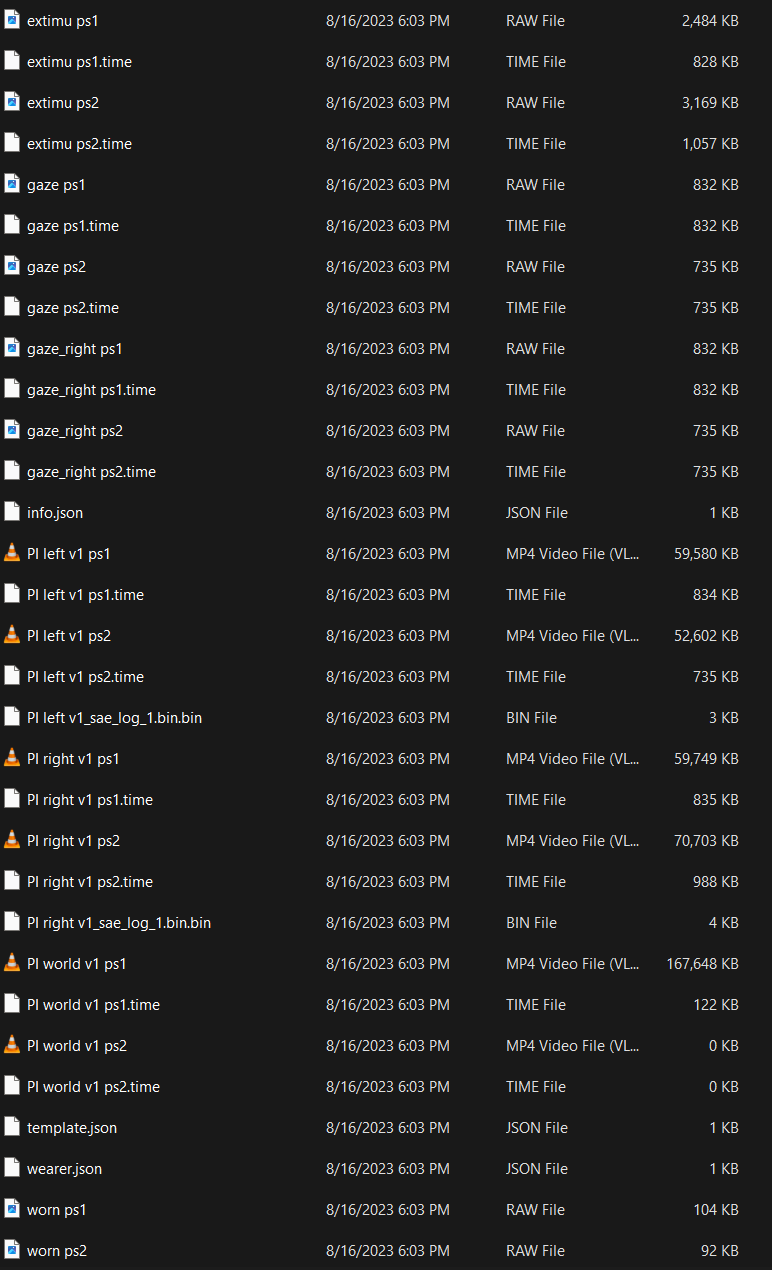
Hi @user-88386c ! Was there any error message on the phone when that happened? And could you share the Android.log.zip file of that recording with us at [email removed]
While it can happen that a recording get split due to an error or big file size, both Pupil Cloud and Pupil Player are prepared to handle multiple files recordings. However if the world video is 0kb, I am afraid there's nothing that can be done to recover it. Most probably the wearer knocked off the scene camera and no world video was recorded.
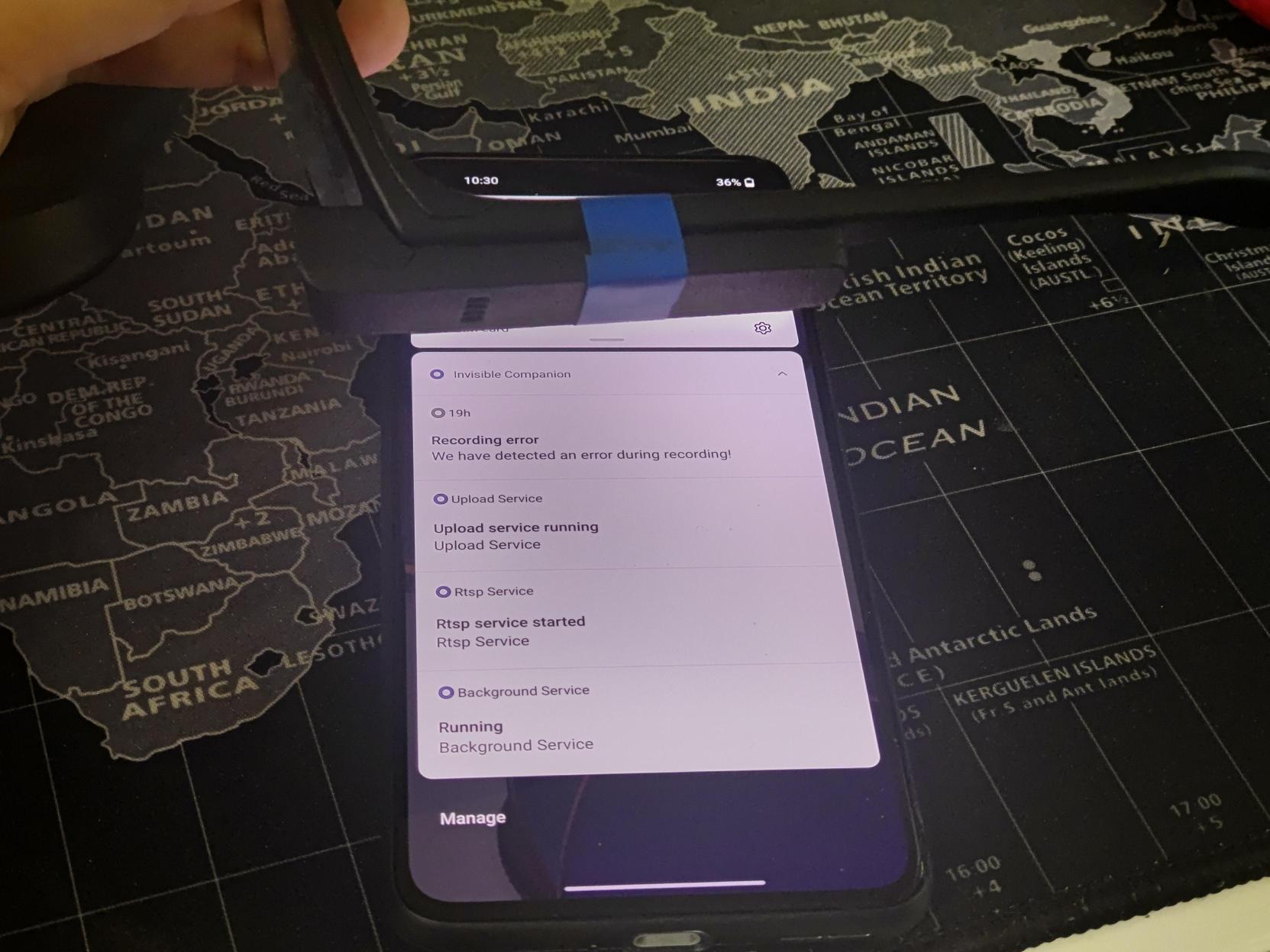
Thanks, we bound the camera to the frame so it shouldn't come off during the recording. When running the last participant I did ran into an issue saying there was a error (like show in the screen) that I had to restart the recording. Not sure what happened, I sent the two Android.log.zip files to your
Another question, I tried to open the (good) recording downloaded from the Pupil Cloud and play them in Pupil Player but found that all I got is blank screen, Is there any settings I need to tweak to get it to work? (the file is playing fine in Pupil cloud)
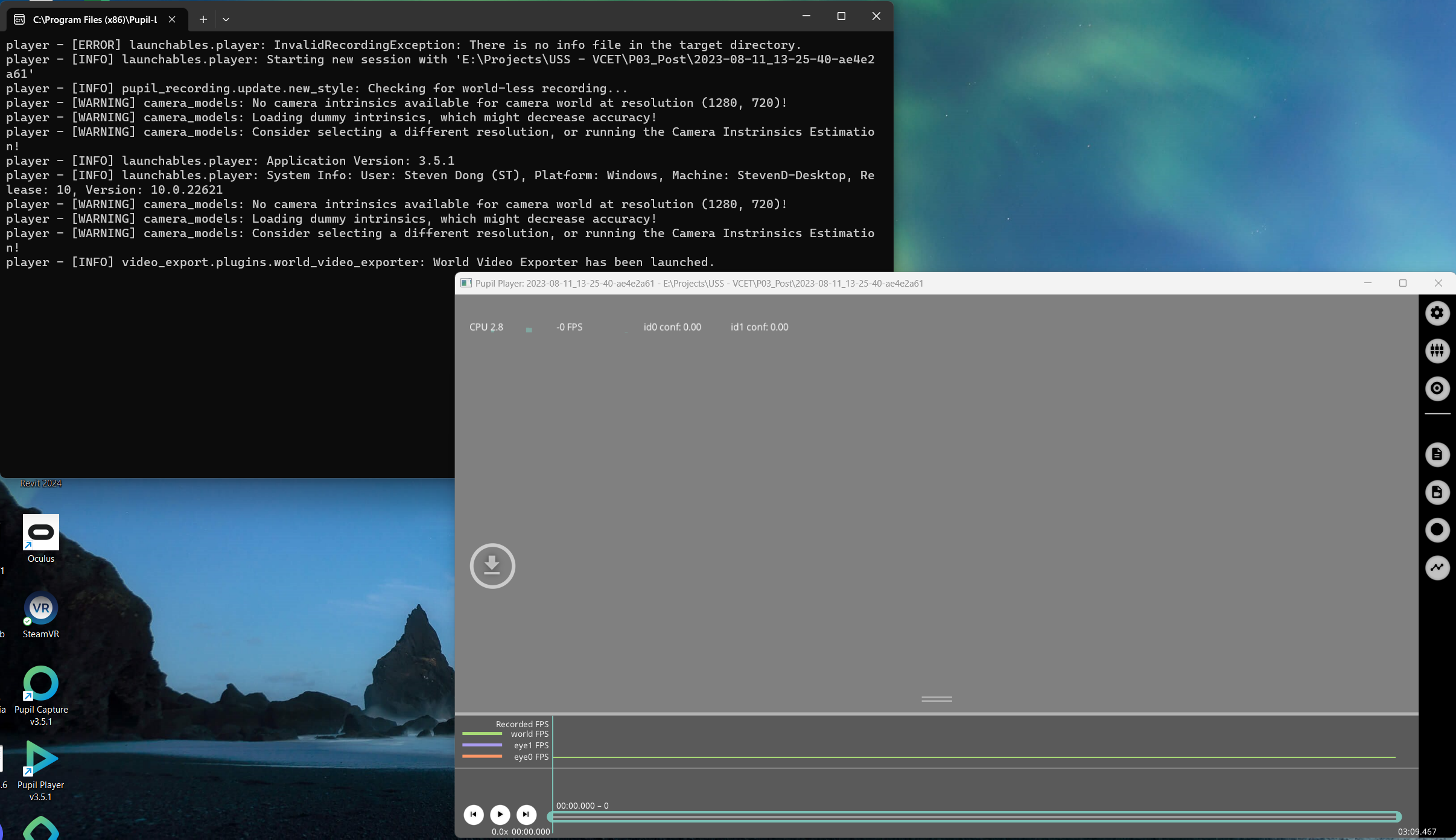
I did a test and it seems that I can only read the file exported from the phone not the files downloaded from the Pupil Cloud, is there a way to make it works?
Hi @user-88386c , Thanks for sending the logs, we will have a look at them. Regarding Pupil Player, might it be that you are downloading a different format? On Cloud, to download recordings in a compatible format with Pupil Player, you would need to enable "Raw Sensor Data" on your workspace.
See here: https://discord.com/channels/285728493612957698/1047111711230009405/1108647823173484615
Once enabled, right-click on a recording and select Pupil Player Format; that's the raw data Pupil Player consumes.
Thanks it works!!
Hi Pupil Labs, the question has probably come up multiple times before but is there a way to analyze my recordings with a custom software solution (e.g., Matlab)? And if that was possible, would there be restrictions compared to Pupil Cloud? My colleague wants to automate the analyses as far as possible. I'm not willing to do so but I need to convince my colleague that Pupil Cloud offers the best solution... 😉
Hi pupil labs team! When using the real-time-api module I experienced the issue, that the mobile phone starts buzzing and I get the notification "(....) sensor is not detected, recording stopped" (something along those lines). When I simply start recording without the API I do not get the error. What could be the issue here?
Hi @user-ace7a4 ! what version of the API are you using? and could you post the snippet of the code that you use?
Hi @user-d407c1. I am using the version pupil-labs-realtime-api==1.1.0.
''' `from pupil_labs.realtime_api.simple import Device
ip = "192.168.80.4"
device = Device(address=ip, port="8080") device.recording_start()
Wait for a couple seconds before starting to give all sensors enough time to initializetime.sleep(3)
t=0 c=0 b=0
while c < 30:#30 trials if b % 2==0: if t < 1: device.send_event(stimuli_names[t] + "_start") extro_intro_draw(Extro_condition) device.send_event(stimuli_names[t] + "_end") t=t+1 b=b+2 elif t == 1: device.send_event(stimuli_names[t] + "_start") extro_intro_draw(Intro_condition) device.send_event(stimuli_names[t] + "_end") t=t-1 c=c+1 b=b+1 else: device.send_event('Break' + '_start') break_draw(stimuli_break) device.send_event('Break' + '_end') b=b+1
device.recording_stop_and_save() win.close() core.quit()`
Sorry I do not get how to properly format code on discord! This code has been working just fine for ~15 participants. Thats why I am not sure if the code is really the problem here
There is a newer version of the API, but the changes are mostly to make it compatible with Neon. I would not bother to update it if it was working fine. Anyway seems like you can replicate the issue quite easily, would you be able to send a screenshot of the error you get to [email removed] We will follow up with some additional debugging steps
Hi Miguel - I just tried rerunning the script (the script runs for 12 minutes) and this the error did not occur. However, last friday was not the first time this happened. This is not ideally, because if the error shows up spontaneously this conflicts with recruitments and we cannot control for it. I changed nothing in the setup. Is there any other idea you might have? Unfortunately I do not clearly remember the error message, but it was something along the lines of "did not detect sensor in the left frame(?), cannot continue recording". Any help is highly appreciated. Best wishes
Hi @user-ace7a4 ! Could you start the streaming and gently wiggle the USB cable along its length and near the USB connectors. If there are disconnects or error messages, try to identify if they were caused by the USB cable itself or by the connectors. After that please reach out to info@pupil-labs.com with the results, we would be more than happy to delve into and figure out what is breaking there
As weird as it sounds, I cannot replicate the error. I guess I have no other option than to wait for the error to show up again?
@user-e91538 hi good morning. i have sent a mail regarding an update on the pick-up. kindly have a look.
When using the Pupil invisible, the worldcam is shown. Only the gaze is not shown. Is there some way in checking what is wrong?
Hi all! I have yet another question. Is it possible to batch process measurements in pupil cloud? I would like to apply the same processing on a large number of recordings - being exporting their raw data. Or will I have to do all of this by hand?
Hi @user-e91538 ! yes, you can export programmatically recordings from Cloud, using the Cloud API. Feel free to drop us an email at info@pupil-labs.com if you would like to get more details.
Hey @user-e91538! You can batch export timeseries data like blinks and fixation directly from Pupil Cloud.
Add the relevant recordings to a project. In the project, navigate to the 'Downloads' tab in the bottom left, then you'll see an option for 'Raw data export'.
Click on 'Download' there and it'll batch export all of the recordings in the project.
You can also batch export recordings programmatically with the Cloud api. Although its documentation is a bit sparse and the enpoints are subject to change. You can read more about that here: https://api.cloud.pupil-labs.com/v2
Hi there,
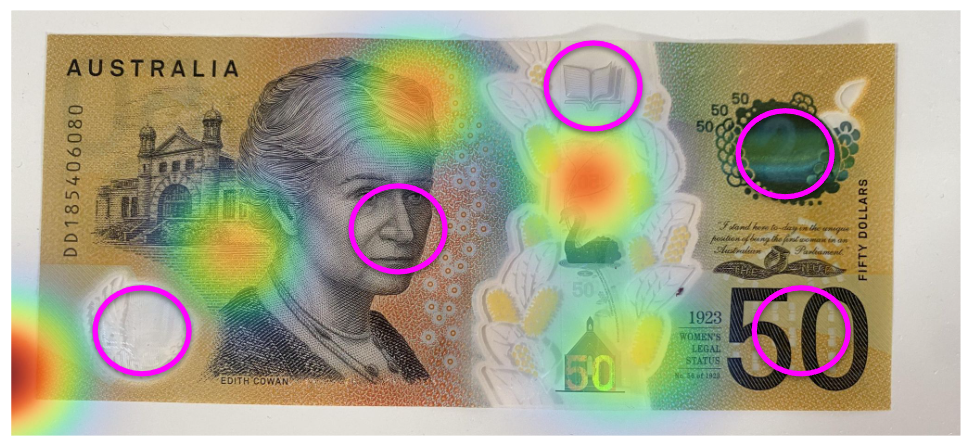
Recently our lab conducted a study looking at people's fixations when viewing Australian banknotes. We came across an interesting finding whereby no one was looking at the right side of the note. We thought this was strange and did some of our own piloting. We have looked at the banknote and picked 5 points to concentrate on, however when this is translated by the glasses fixations - it seems to have a leftward bias (see attached photo of generated reference mapper heatmap and pink dots indicating the actual places where we fixated). This is extremely problematic for our data as it is not accurately capturing where participants are looking at the banknote. Does your team have any potential post-hoc adjustments that can be made to our data to fix this error?
Thanks in advance,
Monique
Note: We checked calibration was accurate for each participant prior to the experiment, yet still find the same problem for all...
Hi @user-8ac05e! I have a couple of follow-up questions:
Depending on your experiment setup, a potential explanation could be parallax error. The estimates of Pupil Invisible get an offset to the left when looking at objects at a distance of <1 meter. The closer they are the larger the offset. In this case this might be 20-30 cm distance which would correspond to subjects holding the banknote in front of them in their hands.
Have you heard of the offset correction feature already? It allows you to explicitly correct for a present offset and could help mitigate the problem. You can access this feature by navigating to a wearer profile and clicking "Adjust".
Hi @marc,
Thanks for your reply.
I assume this parallax error is what is happening as the banknote is less than a meter away from participants.
I have heard of the offset correction feature - however it still glitches at times and returns back to being offset.
Are there any posthoc things that can be done as we have over 100 participants data with their gaze offset already?
Hi @user-8ac05e! When you say "calibration", do you mean applying the offset correction? It's a good approach to ask the subjects to fixate on some stimuli while you apply the offset correction. But if your primary problem is due to parallax error, you should make sure that this stimuli is located at a similar viewing distance to the banknotes. The parallax error is highly dependent on the viewing distance, so if you e.g. apply the offset correction using a stimuli at 100 cm distance and the subjects later inspect the bank notes at 30 cm distance, there is going to be an offset. The offset should never glitch in the sense that the correction is gone, but there is a chance that the distances don't match and therefore the applied offset is incorrect.
There are currently no pre-made tools to fix the offset post hoc. The offset is simply adding a constant to the predictions though. So in theory you could try to create your own tooling to determine the required pixel value for the offset and then simply add it to the results offline.
I would like to add to this, I also found in a few of our recordings the gaze position were off a bit and would really like a way to post correct and then reupload it to the Pupil Cloud. I guess one challenge I found is the phone screen is really small and I have a fat finger so it is really hard to do an accurate calibration. What I ended up doing was to download the raw file from Pupil Cloud and post-correct the gaze with the plugin https://gist.github.com/papr/d3ec18dd40899353bb52b506e3cfb433 in Pupil Player and wrote my custom script for plotting, but of course I won't be able to utilize the Reference Image mapping technique.
A Pupil Cloud feature that allows post-correction or reupload the post corrected data will be great.
I am unable to enrichment in gaze overlay form. Erlier last mont I am able to extract gaze overlay enrichment but last for few days I am not getting gaze overlay in enrichment section of pupil cloud. Please can anyone help me from pupil invisible side. Thanks
Hi @user-787054! This feature has moved to a new place. Click on the 'Analysis' tab in the bottom left, and then you'll see some text that says + New Visualization Click on that to generate a Gaze Overlay Enrichment!
Hello! I am trying to write a python script that gets the fixation data from the Invisible Companion App. As far as I understand you need to import the Export from the App to the Pupil Player and export it again to get the necessary data to get the fixations correct? I am doing that but I am struggling however to get the same fixations as the Pupil Cloud gives us. Does a tool exist to extract Fixations directly from the android app export? And is there any way to check what parameters the Pupil Cloud use for min_duration, max_duration, max_dispersion?
<@&288503824266690561> sorry for the ping but we would like to get this done asap. Is there really no way to extract fixations just from the Data we get from the companion app?
Hi <@&288503824266690561>! Not sure if this is the right place to ask, but I've just been having trouble getting the Monitor web-based app to load on my computer and was wondering if I could get some help on that?
Can you tell me more about the trouble?
When going to the web-based app (http://pi.local:8080/) it simply says that the site cannot be reached. I tried using a hot spot wifi as I read about how sometimes public wifis do not allow for the connection, but it also did not solve my problem. Is that the right site I should be using?
There could be a couple of different issues depending on your network configuration. First, please switch back to your wifi and then try the IP address instead of pi.local. You can find the IP address by opening the hamburger menu in the bottom left corner of the app and selecting the "Streaming" option