
Hi, I have had multiple times the occurrence with pupil companion app crashing, usually in between recordings and not wanting to open for cause of zmq_msg_recv: errno 4
What does that mean exactly? Is there a way to avoid this, and how do I get the app back and running as quickly as possible again?
It has usually taken me about 5 minutes of force-stopping the app, restarting the phone, etc to get it back running
Hi, I am trying to test our pair of glasses and it keeps throwing up an error message saying we need to enable 'PI world V1' when we try to use the Invisible Companion app - any idea what we do here?
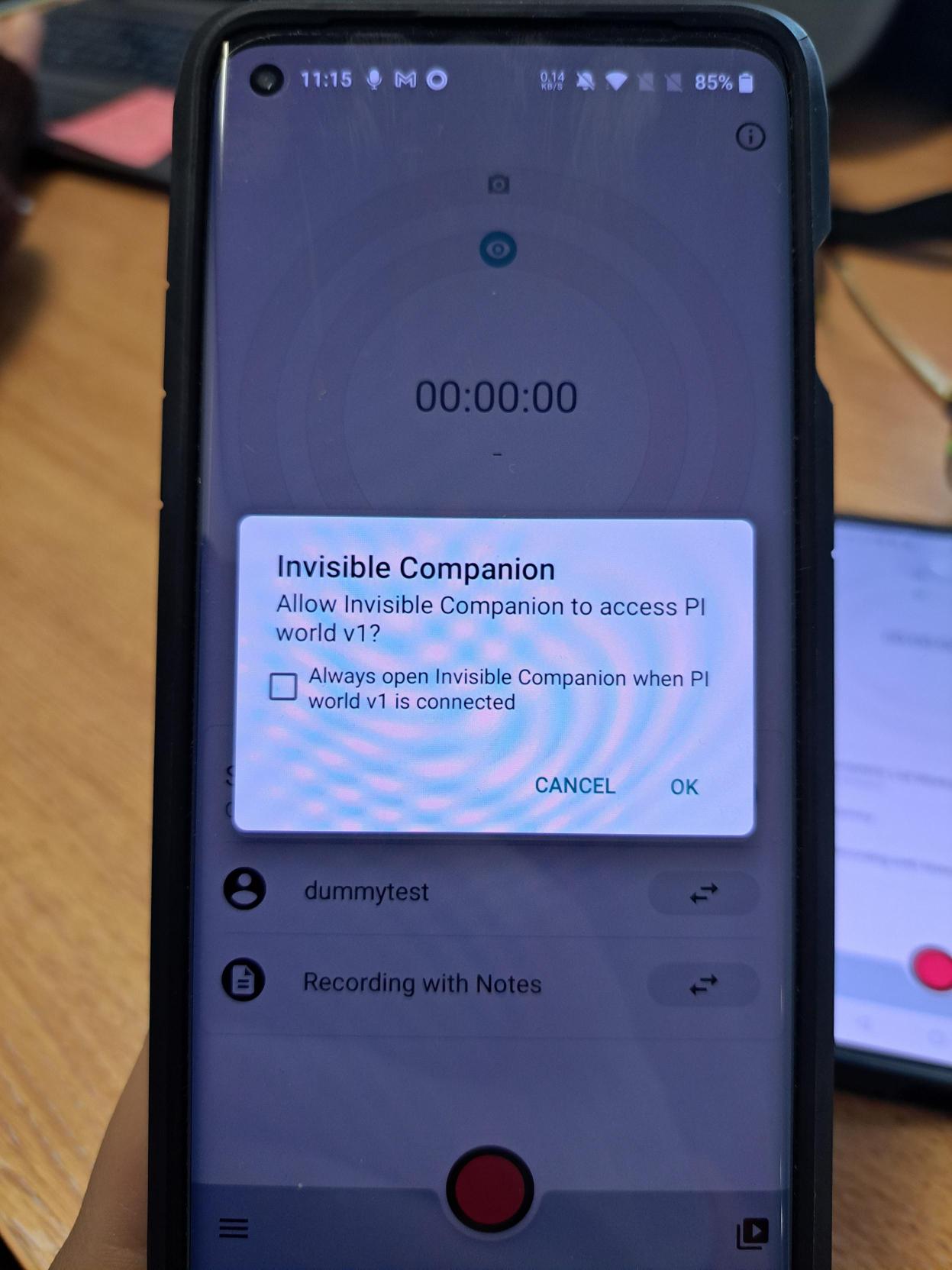
Also, in this type of permission prompt make sure to click the checkbox before hitting ok!
Hi, @user-6b1aa9 👋 - that appears to be a permission request, not an error message. It's a security feature of Android devices that apps must request permission from the user before accessing cameras. You'll want to click "Ok" on that message and the ones that follow. Once you've granted permissions for the Companion App to access the cameras it needs, you should never see those permission request screens again.
Hi Dom, thanks for your response - I have granted the permission on both this message and then the subsequent one too, but it still seems to pop up sporadically... Assuming we just continue to grant the permission, or is there a way for these settings to be saved?
Ah, it may have accidentally been set to "Ask every time" the first time it popped up - but that's easy to fix.
Swipe down from the top of the screen to show your notifications drawer. At the top right, you should see a gear icon - clicking that will open your device settings.
From here, navigation varies depending on the device/Android version, but you should be able to find an option to manage applications. In there, you'll see a list of installed apps and if you open settings for the Invisible Companion app, you'll see a spot where you can modify permissions. Open the camera permissions and make sure it's set to "Allow while using the app"
Perfect, thanks guys 🙂
Hi**@user-cd03b7**! Low vision per se should not be detrimental to Invisible's gaze estimation. But there are other eye conditions that might be. What did you have in mind?
zmq_msg_recv: errno 4
Hi @user-e91538 👋. Responding to your message (https://discord.com/channels/285728493612957698/285728493612957698/1102924666395435008) here. Our real-time api already offers the possibility to stream gaze and scene video over the network. It should be pretty trivial to receive this in ROS. Have you already looked into this? If not, you can find the documentation here: https://pupil-labs-realtime-api.readthedocs.io/en/stable/examples/index.html
(I was asked to post this here instead of 👁 core)
Hi, I'm using Pupil Invisible for an eye-tracking project. The goal is to have a stream of the Video, as well as the x and y coordinates of the gaze in ROS as two individual messages. The best way to do this, would be to have an android application on the phone that is connected to the glasses, that already sends this data in the right format. Are there any resources from your side, that could assist me to develop such an app? Thanks in advance!
I already managed to recceive the data in a python script over the network. I could also figure out how to send it from there (python on a raspberry pi) to ROS. But my goal is to see the messages in ROS directly, without any further code on a Windows or Linux machine, so without any script except for whats running on the Smartphone.
I'm not overly familiar with ROS, but I would have assumed it possible to run a Python client capable of receiving data from Invisible over the network. Or perhaps I'm misinterpreting your requirements?
Nothing in particular, we're just trying to determine how valuable/feasible a study would be with low-vis test participants. Logic dictates that you need full vision to run an eye tracking study, but it sounds like that isn't the case. We're just trying to cover every possible tester demographic, some being low-vision.
Low vision should be okay with Invisible. We have seen reduced gaze accuracy with conditions like misalignment of the eyes, but to be honest this is from a very small sample so we couldn't make generalisations.
Also - do you guys know if there's a way I can export the pupil cloud video preview? I need the video export to contain the fixations and saccades, but all the raw data export files are devoid of anything along those lines.
So this is planned and on the roadmap.🤞 we won't be waiting too long for it 🙂 https://feedback.pupil-labs.com/pupil-cloud/p/export-of-fixation-scanpath
Question 1: Is there an algorithm that does time-level alignment for IMU & Blink data with Raw egocentric video? -- No need for gaze-to-video time-level alignment in my case.
Question 2: Also, how to understand the coordinate system given in "gaze ps1.raw"? For example, given its squarish world view map of 1080x1088, if I got [[ 100, 800 ],...], should the first value be interpreted as...
Question 3: Given that the camera is situated in the opposite side for the right eye, does the same rule above hold true for reading the data for the right eyes, or the different rule applies (e.g., 1 but origin is upper right)
Question 4: I see (very few) values exceeding 1088 in the gaze raw file -- what do they signify? I just want to make sure I correctly normalize the value into "2D Normalized Space" format from https://docs.pupil-labs.com/core/terminology/#coordinate-system -- or if it's already given, where can I find it?
I would like to ask your opinion about the apparatus and which enrichment method is best for my recording. The experiment is as follows:
We are in an apparatus gymnastics training stadium, specifically in the vault area. We want to record the eye movement of athletes with invisible glasses during the time period from the athlete's approach initiation to the moment of contact of the hands on the table before the aerial phase of the jump. So we have 4 periods: Starting Standing Phase, run-up, a touch of springboard, and aerial phase until the moment of hand contact for the push on the table. I am sending you a related video. First, we placed a series of Apriltag in the different areas of the athlete's path, as shown in the photo. We would like your opinion on the number of Apriltag, their position, and their size, as well as which enrichment method is best for grading - calibration of the area where the athlete moves. We are definitely interested in the run-up area, the springboard area under the table, and the area of the table where his hands will rest. We have done a pilot recording, also. The glasses seems stable at first and the raw data ok. We chose the Reference Image Mapper as the enrichment method. We don't know how is better to record the view of the scene for enrichment because the starting point is far away from the vault that athlete approach while running.
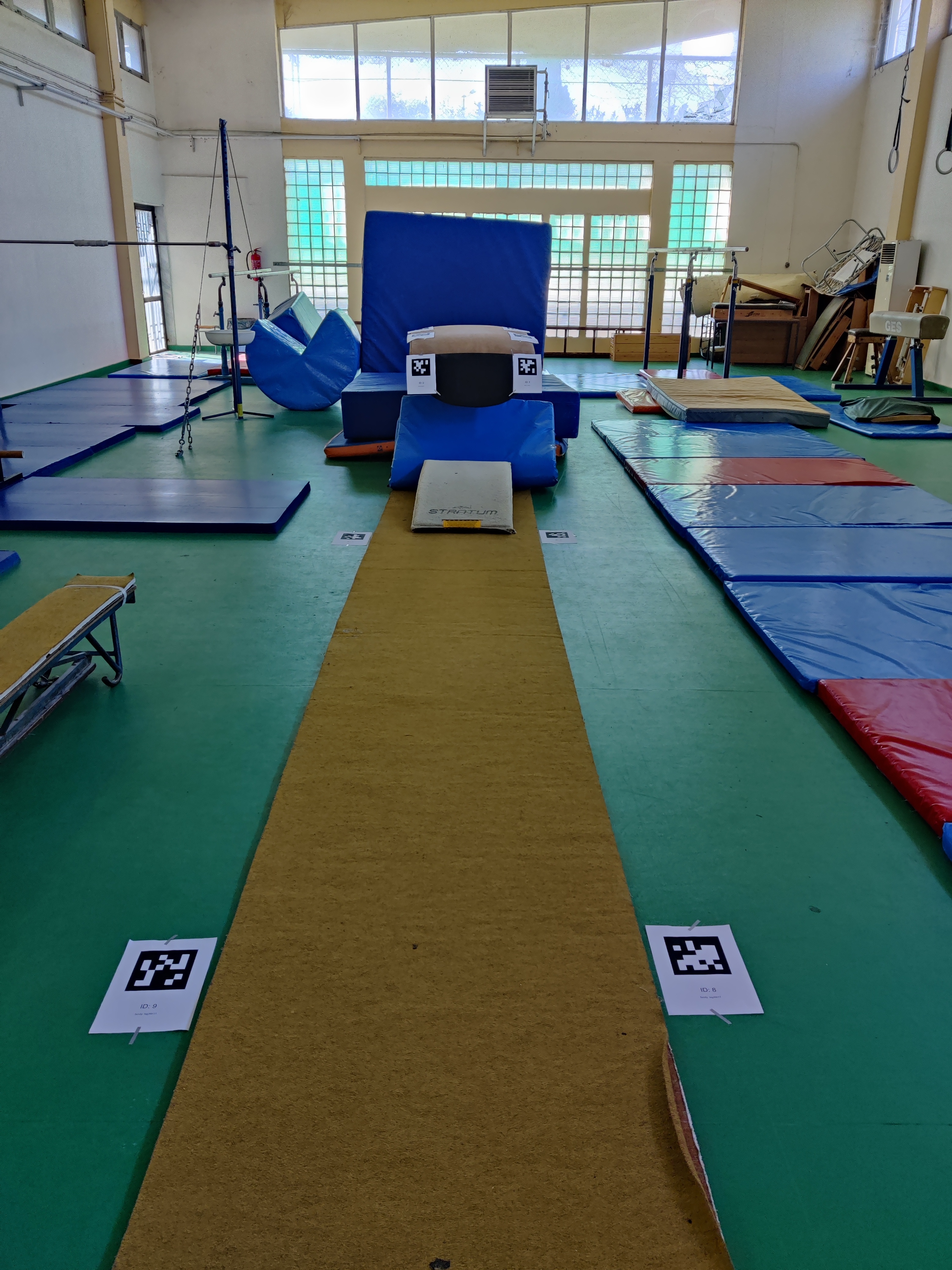
Hey @user-b37306👋 . Thanks for sharing the info about your setup! Regarding the enrichments, given your setup, you could try running multiple Reference Image Mapper enrichments depending on your area of interest (e.g., springboard, table etc). This would give you a clearer idea of where the athlete is looking depending on your area of interest at the different periods of your "trial" (e.g., starting standing phase, run up, etc). For this enrichment, you do not need the Apriltag markers. You can follow this tutorial on our Alpha lab page - you might it find useful https://docs.pupil-labs.com/alpha-lab/multiple-rim/. Hope this helps, but please let me know if you have any further questions!
Thanks Nadia for yours suggestions. It is very helpful! You suggest to use different scanning videos of the area. These videos scanning the area in a random trajectory (freely), like one that scanning the whole area from the starting position, and another like the athletes moving trajectory? Is it ok? And after that i run a number of Reference Image Mapper enrichments based on event annotations that i previously i had create?
Happy to hear that you found this tutorial helpful @user-b37306! As an example, you could first have a RIM with a whole-area scanning for the "Starting position" phase. For the run-up phase, you could have a more close-up reference image of the run-up area (along with its scanning recording). Later on, for the "touch of springboard" you could have a scanning recording of the springboard so that you can capture the eye movements specifically onto this area. Similarly, for the last phase ("hand contact for the push on the table"), you could have a RIM with the table as a reference image (and a scanning recording of it). For the scanning recording, I'd recommend to follow the best practices for optimal scanning. https://docs.pupil-labs.com/invisible/enrichments/reference-image-mapper/#scanning-best-practices
Perfect! Thanks! I will follow your suggestions!
Hi @user-13f46a! Is there a reason you want to use the gaze ps1.raw files rather than the gaze.csv files? The CSV files are much easier to work with and all our documentation is based on those, so I'd recommend you try using those.
For guidance on temporally aligning data streams please check out this how-to guide: https://docs.pupil-labs.com/invisible/how-tos/advanced-analysis/syncing-sensors/
The top left corner of the image is considered (0,0) and the order of the components is (x,y). You can find a visualizaton of this here:
https://docs.pupil-labs.com/invisible/basic-concepts/data-streams/#gaze
When you say "data for the right eyes", what do you mean exactly? Note that the gaze right ps1.raw file contains debugging information only and does not constitute independent gaze estimate from the right eye. The gaze estimates are generated using images of both eyes simultaneously.
Those are correct estimates. If subjects try hard enough they can look outside the FOV of the scene camera. The gaze estimation pipeline is capable of making gaze estimates outside of the FOV to a small extend.
When you say "data for the right eyes", what do you mean exactly?
Oh I see. Didn't look carefully into what values were stored in gaze right ps1.value. So, is it normal to see all zeros (e.g., np.zeros_like((gaze_timeseries_length, 2))) there?
And could you confirm that, in response to my question #2, within gaze.csv, gaze x (px) = 100 and gaze y (px) = 800 refers to the user looking at 7 o-clock ish in Quadrant 3?
Hi @marc , I'm doing some research with Pupil Invisible. In my experience, Pupil-invisible does not have a file describing calibration accuracy like Pupil-Core. However the reviewer asked me this question:* It is recommended to add a description of the eye tracker’s accuracy criteria and the confidence level of each subject.* Is there a relevant document or paper reporting the accuracy of INVISIBLE for each user?
Hi @user-a98526! There is no confidence concept for Pupil Invisible (or Neon). One could argue the algorithm always claims 100% confidence. Since there is no calibration, there is also no classic calibration accuracy. You could in in theory calculate the average gaze estimation error per subject though by comparing estimates with a range of ground truth targets. Given that you're paper is already submitted you may no longer have access to the subjects though, so this is no longer an option I guess?
You could refer to our white paper which discussed average performance on a large population: https://arxiv.org/pdf/2009.00508.pdf
Yes, my paper has been submitted and the reviewer suggested me to complete this content In fact, I found that the accuracy of the Invisible varies in different areas during the experiment, for example, the accuracy is high in the center of the visual field and decreases at the edges.
That observation is correct! Accuracy is not perfectly uniform but a bit worse towards the edges. The paper is going into more detail on this.
Thank you very much, it is very helpful.
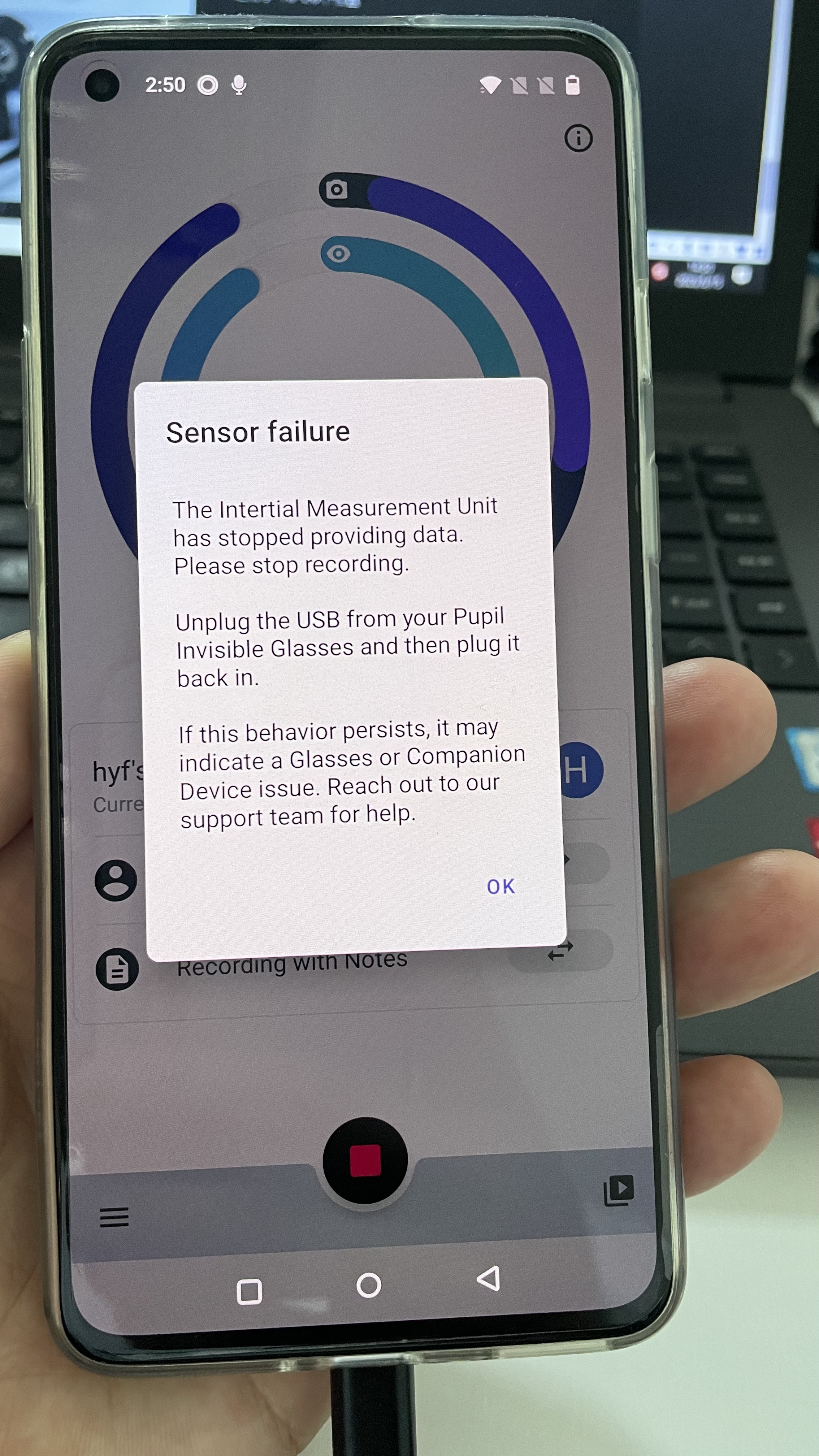
Hello, I am encountering this error during data collection with Pupil Invisible Glasses - please see the attached picture below have been experiencing this for the past three days, and it stops abruptly between without as stopping the recording. What could be the cause/solution for this? Please advise. Thank you
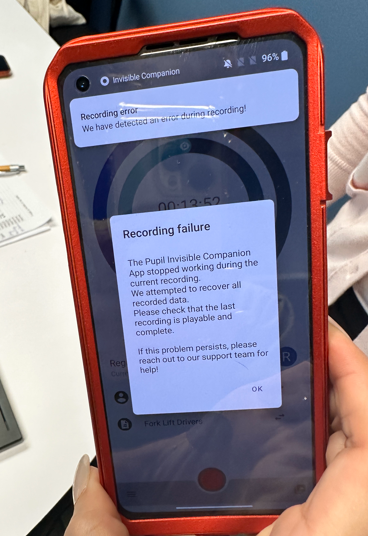
Hi @user-1f9e4f 👋 I'm sorry to hear you're experiencing issues with your Pupil Invisible. May I ask you to send an email referring to this message at [email removed] A member of the team will help you to swiftly diagnose the issue and get you running with working hardware ASAP.
Is there a reason you want to use the gaze ps1.raw files rather than the gaze.csv files
Could you please explain how they are the same?
For example, the csv file gives the following:
timestamp [ns] gaze x [px] gaze y [px] 0 1679673284566946861 145.666 788.836 1 1679673284566961861 145.231 788.253 2 1679673284570922861 71.136 742.944 ... ... ... ...
However, the raw file gives the following data: {'time': array([1679673285619089861, 1679673285624343861, 1679673285626909861, ...], dtype=uint64), 'value': array([[295.6631 , 702.1068 ], [295.68954, 699.0629 ], [295.98767, 698.5893 ], ...], dtype=float32)}
Now, for one, the time & gaze values mismatch, and second, the length of the csv and raw mismatch (e.g., csv=(186578,) vs. raw=(186323,))
Again I'd recommend to not use the raw sensor files but go straight for the CSV! The reason those are not identical is because the raw sensor files contain the real-time gaze data calculated at recording time, while the CSV data contains the 200 Hz data which is calculated from scratch in Pupil Cloud. Thus indices and timestamps do not match one to one.
Yes (100, 800) would be a point in the bottom left quadrant if you split the image up in the middle.
This might be a trivial question, but is it possible so solely download a specific recording from a project on pupil cloud? I have four recordings stored in a project and already downloaded one. Now I want to get the remaining three recordings. When navigating to enrichment I can only select all 4 recordings at once for the raw data export (or any other enrichment as well). What am I missing here? Thanks a lot! :))
Hi @user-ace7a4! Going through the Raw Data Exporter enrichment there is no way to filter down the included recordings. If you download recordings from drive view (via right click on the selection -> Download -> Timeseries and Video) you get the same data but with more control over what is included.
We are aware that this is a bit confusing and inconvenient. We have a big UI update coming for Pupil Cloud in a couple days that will make things like this much easier!
For my minor Neuromarketing I use the invisible companion to make use of the blurring feature. Through my school I have been put in a workspace where this is possible. Now I have sadly failed in every attempt to use the blurring. Can anyone help?
Hi @user-f6894e! Do you mean the automatic face blurring feature? This is a beta feature that has only been enabled for a small number of users for testing purposes and is not generally available.
I am aware. My school has this possibility and @user-e91538 has created the possibility for me to use this feature for school.
I see! The blurring needs to be turned on during workspace creation. So if they created a new workspace for you this should already be enabled in theory. If the configuration was not done correctly during creation, a new workspace will need to be created.
It works! I thought I had to enrich it myself. But the faces are blurred in the last video I have made. Thank you for your responses.
Hi @marc I encountered a problem when using Invisible, which is that when data collection stopped, the mobile phone got stuck and couldn't stop normally. Additionally, the collection duration was inconsistent with the actual recording duration, such as the actual recording duration being 10 minutes but only playing back for 6 minutes. Is there any solution to this problem. The phone is one plus 8T. Android 11 system
Hi @user-4bc389! This may indicate an issue with your Pupil Invisible hardware. Please reach out to [email removed] for support in diagnosing and a potential repair!
HI @user-d407c1 I recently was in touch about some questions re: detectron (mapping gaze onto body parts). I have been able to run this over some files, but noticed one thing: The input video (world.mp4) and the output (densepose.mp4) have a different duration. also, if I run then next to each other, the frames are off - just a bit. I suppose this has to do with variable frame rates/compression issue, which I understand in principle, but am not technical expert. I will try to e.g. split the video into frames, assuming that then there should be the same number of frames and I can match and reassemble those. But the broader question question is whether this is a known issue (or not seen as an issue at all)?
Hi, I'm trying to watch the video stream of my invisible glasses with opencv. How can I do that with an rtsp url?
Hi @user-e91538 👋 ! Please have a look at https://pupil-labs-realtime-api.readthedocs.io/en/stable/examples/simple.html#scene-camera-video-with-overlayed-gaze
Thank you, that worked!
Thank you for your reply. This issue only occurs during the continuous collection process. If you take a break in the middle, this issue will not occur. Is this also related to hardware?
In theory a hardware issue should not be provoked by longer recordings times, but the longer the recording the higher the chances are that the failure conditions occur. Taking a short break in the middle should in theory not change anything though.
Greetings! We currently purchased a the PupilLabs Invisible for our lab. We are wondering, whether the recording software also exists for windows or only the smartphone it was delivered with? Regards Eric
Hi @user-dfefdf! Recording data only works via the Companion smartphone and the Companion app. Connecting the glasses directly to a computer does not work.
Thanks for the information 🙂
Another question: is there a way to calibrate the camera? We are experiencing a slight offset towards the left
Hi @user-dfefdf 👋 The Invisible Companion app offers the possibility to manually set an offset correction. To do this, click on the name of the currently selected wearer on the home screen and then click "Adjust". The app provides instructions on how to set the offset. Once you set the offset, it will be saved in the wearer profile and automatically applied to future recordings of that wearer.
For the gaze.cvs downloaded from pupil cloud, why are the timestamp intervals not at even?
Hey @user-8664dc 👋. What is the variability you're seeing in your data?
Hello! Do you have best practice advice for this case? If one is running a study in a car with Invisible and interested in its dashboards, but these dashboards show up very dark in the scene video because of strong sunlight coming through the windows. Do you have advice on how the camera can better cope with this environment? I know that Neon has settings for this, do you have experience with how much the configuration can be tweaked to work in a case like this?
Hi @user-e91538 👋 Based on my experience in driving contexts, I recommend adjusting the exposure to manual in the Companion App settings. This will result in a brighter dashboard view, but the windshield will appear very bright as well, making it difficult to see what's happening outside the car. However, if your objective is just to examine gaze behavior within the car interior, this approach may work. It is a matter of trials and errors, so I suggest experimenting with various exposure settings to achieve the desired results.
Hi! Does the policy of pupil cloud follow the DSVGO guidelines?
Hey @user-ace7a4 👋 . Pupil Cloud is GDPR compliant. You can find all the details in our privacy policy https://pupil-labs.com/legal/privacy and in this document as well: https://docs.google.com/document/d/18yaGOFfIbCeIj-3_GSin3GoXhYwwgORu9_7Z-grZ-2U/export?format=pdf
Hi! I have a further inquiry regarding pupil cloud. The data protection manager from the institute I am working at asked, if some sort of processing contract exists between the buyer and pupil labs. Apparently this is relevant due to meta data of the participants that are uploaded to the cloud. We are trying to sort this out, but my advisor asked me to direct this issue to you anyways. Does some sort of contractual basis exist for using the eye-tracker (and the cloud?). Best wishes and thanks a lot for the help!
Hi Kerstin iMotions 2270 👋 Based on my
Thanks a lot @nadia :)))
Hi all! A practical question: is it possible to use the Invisible eye tracker glasses on test persons that already wear glasses?
Hello! I have the pupil glasses' video streaming information locally hosted at http://pi.local:8080/, and now want to stream the video into a Unity3D application. After looking through the docs at https://pupil-labs-realtime-api.readthedocs.io/en/stable/guides/under-the-hood.html, it seems that a RTP solution is the way to go, but I am unsure where to begin. Any suggestions or examples for this topic? Thanks!
Hi @user-8e415a! There is the Python client, which you could use as a template for the C# implementation. This would allow you to receive the gaze data in your Unity application. The next step would be to figure out the transformation from scene camera gaze coordinates into the VR world, i.e. the screens of your VR headset.
For Neon we will soon start developing Unity client ourselves to make Neon integrations into various VR/AR headsets possible. This could also serve as a template, although I can not give you an ETA yet on when we'd be able to first release something.
Hey @user-e91538! This sometimes works, but it really depends on the glasses size and shape, and the wearer. The goal would be to ensure that the eye cameras are unobstructed. You may notice a reduction in gaze accuracy, or it might just work. It's a case of trial and error in my experience.
Thanks for sharing your experience Neil!
If I plot gaze pose x for the first 20 sec of data from gaze.cvs, I noticed that sampling rate isn’t consistent and there are chunks of time where gaze wasn’t calculated. I was wondering what that is due. Example plot attached:
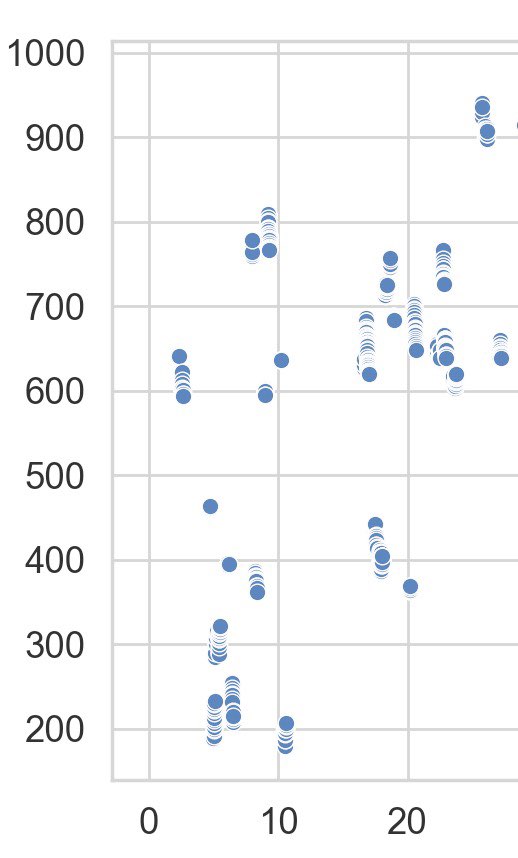
Hi I just wanted to follow up on the variable gaze sampling rate as output from gaze.cvs. Why are there inconsistent intervals in time in which gaze was not sampled? I thought it was supposed to outputted at 200Hz. Thanks
Hi there! I am using the Reference Image Mapper enrichment with the invisible software. Even though I am using the same scanning video and reference image, I've only been able to successfully get the enrichment to work once. How long should it take for the enrichment to process? I keep on getting the message "not matched" or "not computed" next to the scanning video and/or the video I am trying to analyze. Thanks!
Hi, @user-c414da - in my experience, creating a workable scan video is a bit of an art. If you're able to share your video, we might be able to provide better guidance on what you might do differently to improve your results
What you said is very reasonable. If you record for a long time, the eye tracker will heat up, and then the right eye lens will stop working. Is there a good solution to this?
While it is normal for the eye tracker to get warm, the eye tracker should not stop working because of that. As this sounds like a hardware defect the solution would be a repair/replacement. Please contact [email removed] referencing our conversation to facilitate that!
Hi, could you help me to calculate the task time (in min:sec.millisec) from the file export_info.csv using python? key value 0 Player Software Version 3.5.1 1 Data Format Version 2.0 2 Export Date 25.04.2023 3 Export Time 09:56:29 4 Frame Index Range: 856 - 5894 5 Relative Time Range 00:28.822 - 03:16.418 6 Absolute Time Range 162453.032179 - 162620.627951
Looking at those values, the absolute time range is probably the easiest to work with.
162453.032179 - 162620.627951 = 167.595772
167.595772 seconds = 2:47.596
oh, thank you a lot, I tried it with relative time range
Also, regarding those specific states note their meaning:
Not computed: This means that the enrichment definition would apply to the recording, but the computation process has not been started yet. So it might be a matter of hitting the "Run" button to start computing.Not matched: If you use start and stop events as part of the enrichment definition, the enrichment will only be computed on recordings that contain the according enrichment pair. Recordings that do not have those enrichment will show up as Not matched, so for those you'd need to add the events in order to move them to Not computed.That being said, there is a chance some bugs are left in the new UI. So if things still don't seem to make sense please let us know! Ideally, you'd share a screenshot of the problematic enrichment view (if its sensitive you could share it via DM).
Great, thank you. I have a follow up question: we are using the invisible glasses to track musicians' gaze when looking at a piece of music. I've found that though the red gaze tracker moves, the fixation do not consistently move along with it; most of the time they are relatively in sync with the red circle but occasionally the red circle will move far ahead (for several seconds) while the fixation stays in one place. Is this an issue with fixation duration? Are the glasses not picking up on very short fixations?
I am not getting to downloads the pupil invisible raw data in pupil player format from the pupil cloud. But Few days ago I have download the data in this format. Can anyone from pupil invisible confirm me why i am not getting this option currently from pupil cloud?
Hey Pavan! 👋 To get the data in Pupil Player format, please go to the Workspace Settings section and then click on the toggle next to "Show Raw Sensor Data". There you can enable this option in the download menu. Please keep in mind that you need to enable this feature for each workspace you'd like to download the raw data in the pupil player format
Thanks for the help Nadia
Hi Using invisible to continuously record eye movements multiple times, sometimes the following graphical issues occur, resulting in interruption of eye movement recording (the app will continue to run), and the recorded duration is inconsistent with the actual situation. What is the problem,
Hi @user-4bc389 👋 I’m sorry to hear you have issues with your Pupil Invisible. Please reach out to info@pupil-labs.com and a member of the team will help you to quickly diagnose the issue and get you running with working hardware ASAP.
Hey pupil! I saw that in the live streaming and when i'm recording the red circle has a "stable" offset at were im exactly looking. Is there a way to download the video with the gaze overlay enrichment but move the red circle a bit ? Make it go some inches down for example? Is maybe the fact that im wearing contact lenses ? Thank you!
It's okey i took the video and overlayed a circle and recreated the gazes with the small offset, everything is fine!
Hey @user-f1fcca 👋. There is an offset correction feature in-app, but you'd need to set it prior to recordings. Check out this message for reference: https://discord.com/channels/285728493612957698/633564003846717444/1105846907982581900
Any one can help from pupil labs, I have recorded gaze related data using pupil invisibles glasses . I have upload data on pupil cloud and download this data in timeseries + scene video format and pupil player format in my laptop. After that I upload pupil player format recording on pupil player app and export the data from their. The file contains word video of scene camera, world timestamps of corresponding frame. but the world_time stamps .csv file have two colums #timestamps and pts Eg. 0.914737 , 0 : 0.918952, 276 etc. So my doubt is how do i know this time in to IST or UTC time format for each frame.
Hi @user-787054 If you have both formats available, I'd recommend simply using Pupil Cloud's "Timeseries Data + Scene Video" format. The CSV files their contain UTC timestamps for every sample.
The export of Pupil Player is a little more complicated and initially only relative timestamps since the recording start are given.
Hey Dom,
We've been having this issue on several different devices sporadically over the span of 2-years with no resolution. We've followed the instructions on your website and this forum. Nothing has seemed to help.
The lab I work with has 4 pairs of invisible glasses, each experiencing this issue on sporadically. Additionally, we have collaborators from another lab that are also experiencing the permission bug.
Greetings, @user-2ecd13 👋
As @dominic previously stated, that is not an issue or bug but rather an Android security feature. Whenever something like a USB camera is tethered, Android will require permission at the user level to access it. We don't have control over how Android handles that, unfortunately.
That said, if you tick the box, it shouldn't reappear when using the same Invisible, but it sometimes comes back again, and typically when you tether a different Invisible. Recommend just ticking the box/accepting the request each time it pops up!
I reached out to @neil months ago and never received an update on this matter.
@neil I actually apologize, it seems Marc also replied to the message but it wasn't in the thread. He recommended deleting the apps data as well.
We've been ticking the box every time it pops up, but what's tricky about the dialog box is that it doesn't always appear right away. We've had instances where I've accidently clicked out of the prompt because of how long it took to pop up, restarted the device and permissions, and it seemed to work for 5-minutes before it popped up again during our testing session with a family. We ended up losing that data
Do you have any idea what causes it to pop up again besides a newer cable? Any other recommended work arounds?
🤔 did you click out of the prompt without ticking the box? If a disconnect happened it might ask for permission again in that case
That does sound a bit odd 🤔 Could you share an example recording with us so we can investigate that? Letting me know the recording ID and giving explicit permission to access the recording for this purpose would suffice.
I'll send it to you via DM!
Hello! I just wanted to ask how safe it is to update the oneplus 8. Since you put a rollback tutorial on the pupil labs website, I am not sure if it was more a preventive measure or a necessary one if you accidentally updated it. Did anyone have a problem with that at some point?
Generally speaking, yes, there have been problems with updating Android versions and the official recommendation is to not update unless the higher version is supported. Between different Android versions there are often changes regarding e.g. how USB devices are accessed. In some cases new bugs are introduced which make using an Android version entirely impossible (e.g. Android 10 did contain such a bug). Thoroughly testing an OS version for compatibility is a big effort and thus we typically only officially support a few versions.
Hello! I was looking into grabbing snapshots of the video feed using HTTP web requests, this reddit thread I found suggests that many cameras post the latest frame to a separate endpoint: https://www.reddit.com/r/Unity3D/comments/ohdp0t/comment/h4oucmp/ Is this true for the pupillabs implementation or should I continue trying to use RTSP in c# using something like https://github.com/ngraziano/SharpRTSP/tree/master
Hi, @user-8e415a - no, I don't believe there's an endpoint for that, so you'll want to use the RTSP stream. If you're trying to process video in realtime you probably wouldn't want to encode/decode individual frames in jpg anyway.
Since you're looking at Unity resources and posting in the Invisible channel, does that mean you're looking to integrate Pupil Invisible with a Unity desktop or mobile application?
yep, I will continue trying to get SharpRTSP working with unity
Hi there, I sent you guys an email with more specific information this morning (let me know if you received it!). But my lab is fairly certain that the frame of one of our glasses is damaged. From the troubleshooting we've done, the issue does not seem to be related to the Android device/software version, the invisible companion app permissions, the scene camera, or the cable that connects the android device to the glasses. Do you have any suggestions on how to proceed? Can we send the glasses back for repair?
Hey @user-ff83d1! We've got you're email. A member of the team will respond there to see about debugging/repair of your damaged frames!
Hi, while downloading my recording from pupil cloud, the connections are unstable and I am failing now. Something happens to the server?
Hey @user-84f758! Can you please check your connection speed to our servers using this tool: https://speedtest.cloud.pupil-labs.com/ ?
Thanks for letting me know how to check the speed. I just downloaded my files from pupil cloud successfully this time.
Hello Pupil, I understand that Pupil Cloud automatically generates and visualizes gaze circle, fixation lines and scanpath overlays on the uploaded recordings. I would like to export these as playable mp4s. I understand that gaze circles can be exported using the 'gaze overlay' enrichment. I wonder if can I do the same for the fixation lines & scanpaths? So far, the only method I can think of is to screen a recording that's playing - which takes a lot of time.
Hey, @user-e65190 - when you're setting up the Gaze Overlay enrichment, there's a checkbox for "Show Fixations", which overlays the fixations and the scanpath along with the gaze circles in the rendered video. This is new with the recently revamped Cloud user interface!
Can I just say as an early adopter and shameless fan, This new CloudUI?. [email removed] epic!... Sorry but that best expresses how I feel about the overhaul... Well fxcxn done! folks . 💐 - That is all So far so good - Need to dig into the Docs obviously but for now. 👏
Thank you so much for the kind words!! ❤️ It was forwarded to the team 🙂 The new UI was a lot of work and I am super happy to hear it has fans!
Hey @user-ace7a4 !👋 Regarding your question, we have a data processing agreement in our legal section on the website! https://pupil-labs.com/legal/ - I hope this will help!
Hi Nadia! Thanks a lot, I forwarded the information. I really appreciate the support you guys are providing here, so thanks a lot for that :))
Hi There was an issue with the video during playback. May I know the possible reason,Thanks
Hi @user-4bc389! Do you have the same playback issue in Pupil Cloud and/or Pupil Player? If you do, this might be a hardware issue and you should reach out to [email removed] to facilitate a repair.
Hey PL. Trying out the Ref_Img_Map Enrichment - Not sure what I am missing here - See images above in sequence - image load is great >> settings used >> "Run" output - Broken preview - Anybody seen this issue?... It's probably me being slow,🤦♂️ but 🤷♂️ . SOS
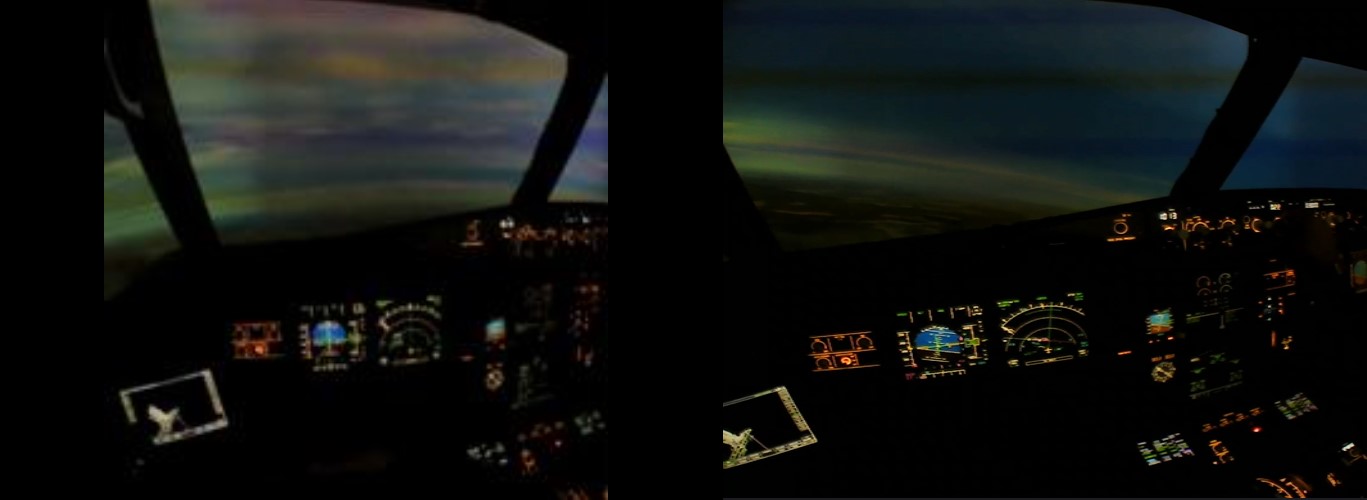
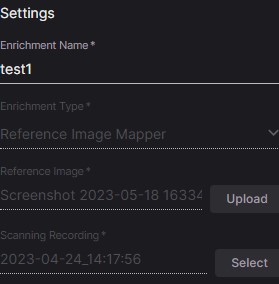
Hi @user-df1f44! The image not loading looks like a bug! Could you share the enrichment ID please so we can investigate?
Note that in the meantime you can always fall back to the old ui at old.cloud.pupil-labs.com
Hi Is it possible to create enrichment in the multiple recordings at the same time. I want to create gaze overlay of about 15 seconds in 200 recordings using post ad-hoc events (a1 and a2). I have defined a1 and a2 events manually in each recording. Thanks. This will save a lot of time.
@marc @nadia
Hey, I also have a problem with this system. I managed to get everything set up and running but after a few hours of waiting nothing happened. Can't generate results and an error pops up. What could be the cause?
Hi @user-1afabc! Could you also share the enrichment ID of the problematic enrichment please?
When creating the gaze overlay enrichment you can select the events to mark the start and end of your section of interest in the advanced settings of the enrichment. The enrichment will then be calculated automatically on all recordings in the project that contain those two events. So assuming you have all your recordings in a project and the events already defined, its just a matter of defining the enrichment using the events and computing it!
Thanks @marc , That was helpful.
5535753d-e745-45a2-828f-2422f46952b1
This is it
6da164be-da26-40c1-9fd2-93b49520d431 @marc .
Thanks @user-df1f44 and @user-1afabc! We are looking into it!
@user-df1f44 @user-1afabc The issue should be fixed, please try again!
Looks like it is now running just fine. Thanks again for the lightning fast fix.
Hello. For a Pupil Invisible recording uploaded to the Pupil Cloud site, what could prevent the "Pupil Player" download format from appearing?
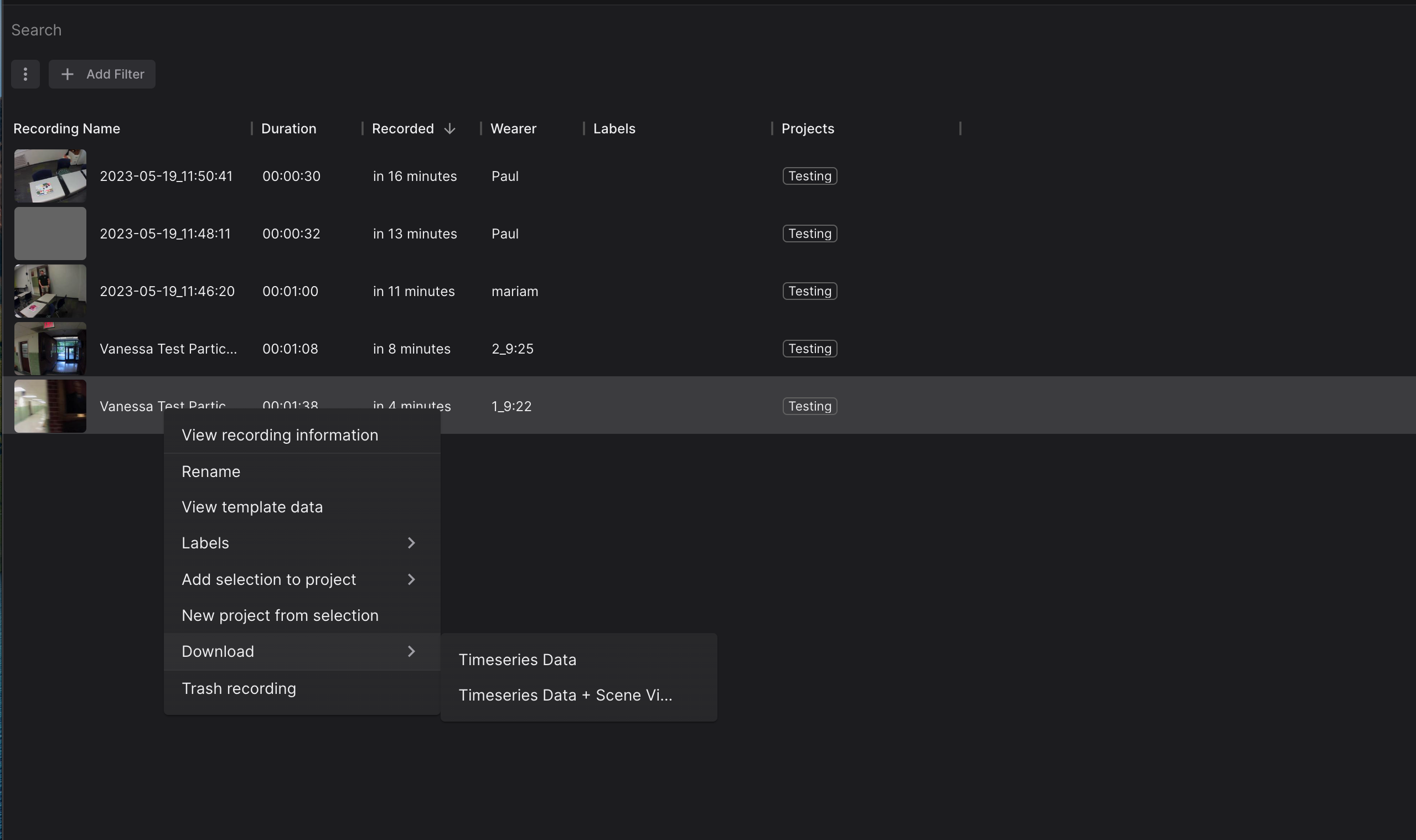
Hi @user-1f9e4f 👋 ! Please go to the Workspace settings and enable the raw download. See my previous message https://discord.com/channels/285728493612957698/1047111711230009405/1108647823173484615
Thanks for help. But unfortunately an error appeared and I could do nothing about it. What could be the problem? Because I have 9 other recordings and the same problem with each one. I can't generate the results.
What is the error you get @user-1afabc ? The Reference Image Mapper does not work in all environments and when using it for the first time it can be difficult to get the inputs right.
If you give us explicit permission to access the enrichment data and the connected recordings we can take a look and check the inputs.
Of course, I agree to access.
How can I give you the access?
Thanks @user-1afabc! Actually, the easiest thing would be if you could simply add me as a member to your workspace. If that is an option for you I'll DM you my email address!
@user-1afabc Thanks for the access! The issue with the enrichments is with the scanning recordings that were selected. Those recordings are regular "subject's recordings" that do not fulfill the requirements for "scaning" very well. Ideally you make custom recordings where you hold the glasses in your hand and carefully scan the environment from different angles.
Please refer to the instructions in the docs here for more details and also check out the examples of scanning videos: https://docs.pupil-labs.com/enrichments/reference-image-mapper/#scanning-best-practices
Thank you very much for your help. I'll check this information.
Thank you @dominic . this works perfectly! Might be too much to ask, but is this feature also available for the facemapper enrichment? (rendering videos with face coordinates baked onto the vids)
Hi @user-e65190! This is something we have on the roadmap but currently it's not possible.
I would like to ask one more question. Is there any possibility of making something out of these recordings that I already have.
If you have the ability to access the space where this was recorded again and could create similar conditions you could still record a scanning video post hoc and probably get the reference image mapper working successfully. Besides that it is at least not possible to run this enrichment and manual annotation would be required.
https://discord.com/channels/285728493612957698/285728493612957698/1110833501265207376 Hi! for now you can use https://old.cloud.pupil-labs.com/auth/change-password @user-6e2996
Thanks, it works!
Hey, what kind of success have you guys had making reference image environment scans in "open" areas? Like, a large park, or a beach, for example? We've experienced success in hallways and similarly confined spaces, but haven't tried something with a more open space
Hey @user-cd03b7! You would likely be able to capture a smaller area of a beach or park that was feature rich. The key would be to find features that are 'close enough' to the camera to generate sufficient motion parallax.
In this example I managed to capture a whole building facade by walking back and forth to record the width of the building in the scanning video (also rotating the camera up-and-down): https://docs.pupil-labs.com/enrichments/reference-image-mapper/#_4-an-entire-building.
You'll run into issues when trying to capture a panoramic, or where everything in the scene is super-far away. This is because no matter how much you walk around during the scanning recording, you'll generate very little motion parallax and thus insufficient perspectives for 'under-the-hood' processes to build a 3D model (shown by the point cloud if it's successful).
Thank you, Neil! Appreciate the explanation on this, the thorough technicalities are going to be useful when explaining limitations to the team. Great stuff!
Hello! I am trying to stream the data from pupil glasses using RTSP, and when the glasses are up and running, I can see a copy of the stream at http://pi.local:8080/
However, when I run VLC or alternatives and try to watch the RTSP stream using this link, I get this error (or a similar one)
http error: cannot resolve pi.local: No such host is known.
access error: HTTP connection failure
main error: cannot resolve pi.local port 8080 : No such host is known.
http error: cannot connect to pi.local:8080
Is this the right link to read the RTSP stream from, and how should I view the stream in an RTSP viewer instead of just the browser link? Thanks!
It may also be worth noting that I haven't been able to get VLC to run any sample streams from the internet either, with errors like
live555 error: Failed to connect with rtsp://wowzaec2demo.streamlock.net:554/vod/mp4:BigBuckBunny_115k.mp4
The first error you see is a name resolution error - VLC can't figure out where pi.local is supposed to point to for whatever reason. Easiest way to solve that is to use your companion device's IP instead of pi.local. You can find it easily by clicking on the hamburger menu in the app and clicking on Streaming
Second, you'll want to try this instead (where <DEVICE_IP> is your device's IP address): rtsp://<DEVICE_IP>:8086/?camera=world
Awesome, Thanks! The second one worked for me.
Hi Pupil Labs, after the release of the latest update to the Pupil Cloud's UI we have discovered that some of the events we have set as markers in our recordings have been lost. About half of them are now missing, most of them had been set at about the same time as another marker. Has this issue already occured frequently and is there any chance of restoring the data?
Hi! Do you know if loading the data from Pupil Cloud into Pupil Player is possible? And if is, do you know if there exists step-by-step documentation to do that? Thank you in advance for your help.