
Hi, I wonder if I can access to a pupil invisible through realtime api, within a docker project using ubuntu, currently I successfully install the package within the docker project, but still cannot detect the device (device = discover_one_device(max_search_duration_seconds=10)). Btw I used mac under the same network, and could detect the device. I checked the api documentation, I suppose I kind of need to configure the project so that MDNS and UDP is allowed??
It might be a good idea to try manually connecting the device using its IP address first (e.g., device = Device('192.168.0.123', 8080)). If that doesn't work, nothing else will.
Hi there, I see that in the description and evaluation of pupil invisible paper, the pupil invisible glasses "deliver unbiased gaze estimates with less than about 4◦ of random spread over most of the field of view".
Is it possible to derive a radius/buffer that accounts for this 4 degrees of spread given the gaze data, and if so how should we go about doing this? Also, would it be accurate to say that it's possible that the true gaze may lie somewhere within this buffer?
Hello, I am having trouble running the Reference Image Mapper (and Face Mapper as well) on Pupil Cloud. I believe other users also faced similar issues in the recent weeks?
I tried to start running them both from the new (cloud.pupil-labs.com) and old (old.cloud.pupil-labs.com) pages without any luck. The progress bar visible on the old page is always stuck at "0% Done". I tried to wait 30–60 minutes, and hard refresh the page several times, without any changes. I also tried to run brief samples in a new project (like 2 X 2-minutes recordings), again without any luck...
Hello I am having trouble running the
Greetings, @user-3437df! One can generally think of the true gaze point being somewhere within the gaze circle rendered by Invisible. Note that the accuracy figure reported is averaged over the whole field of vision and without any offset correction. In more central vision, you can expect better accuracy. It will vary from person-to-person. This third-party tool is pretty useful if you want to measure that: https://link.springer.com/article/10.3758/s13428-023-02105-5
Oh interesting - Thanks for your response! When you say the gaze circle, are you referring to the one that appears the companion app? And how is that circle calculated? I’ll definitely have a look at that tool
In the app or cloud, yes. That covers about 5 degrees.
Got it. Is it possible to get the radius of this circle and radii of circles of other degrees?
Hello, I would like to ask 2 questions:
is there any roadmap for offset correct in the cloud? Sometimes we can only catch offsets post-hoc, when we are back in ght lab. If/As more people are using the cloud for preprocessing including AOI detection, it would make sense to enable such a feature. For example in our project we have to take our analysis of line using the pupil player + plugins, for this reason, although the cloud analytics are otherwise sufficient for our purpose.
in the offset correct in the pupil player, is the offset constant across the scene camera space or is it spherical/angular, so smaller in the centre and wider on the periphery? I wonder if i can take the processed data and apply the offset correction when i do the analysis downstream (e.g. in R)
Thanks!
Hi @user-94f03a!
Post hoc offset correction in cloud is currently not concretley on the roadmap. I do understand where you are coming from though and see the use case. There is already a ticket for this in on our feedback board though and upvoting it there would certainly help to give this more priority! https://feedback.pupil-labs.com/pupil-cloud/p/post-hoc-offset-correction
The offset corrections in both Pupil Player and the Companion app are constant across the scene camera space and do not happen in angular space. So technically the correction is slightly off in the outter regions of the image where the distortion is strong. But this also means that you can indeed trivially add a similar correction yourself by simply adding an according constant to the gaze/fixation data samples.
Hi I'd just like to quickly follow up on this, thank you!
The gaze circle has a constant size proportional to the image size. For Pupil Invisible, which has a 1088x1080 px resolution, the circle diameter is 80 pixels. Due to camera distortion this is not perfectly proportional to an angular value. I.e. at the border of the image where the distortion is higher, the angular range covered by 80 pixels is a bit higher than in the center where distortion is low.
As an approximation you can consider that the horizontal FOV of Pupil Invisible is 82 degrees, so that makes roughly 1088 / 82 = 13.4 pixels per degree and thus 80 pixels correspond to roughly 6 degrees.
(When comparing this to Neon, note that 1) all the numbers are different, but also 2) the relative size of the circle in the scene image is smaller)
Hi there, I have a question regarding the Pupil Player Software. I used it in a recent video to analyse my Pupil Invisible recordings. I was interested in two things: The scene video and the pupils of my participant. When I downloaded the respective file from the Pupil Cloud and tried to open it in the Pupil Player yesterday, all I got was a grey screen. I already recognized that you modified the layout of the Pupil Cloud and the downloaded folder contained less files. Can I still use the Pupil Player and if not, what is my alternative? Thanks!
Hi @user-e91538! The UI in Pupil Cloud did indeed change, but your downloads should not contain less files. Combined with a gray scene video, this sounds like an error during recording where some of the sensor streams were not recorded and are therefore missing from the downloads. Did you get any error messages from the Companion app while recording? Does Pupil Cloud indicate any errors for the recording? Could you share a screenshot that shows what files are included in your download?
Hi Marc, thank you for your quick repsonse! This is a screenshot of the folder. I had a student of mine do the experiment but he says that he did not notice any unusual messages etc. The cloud itself does also not give me any error indications.
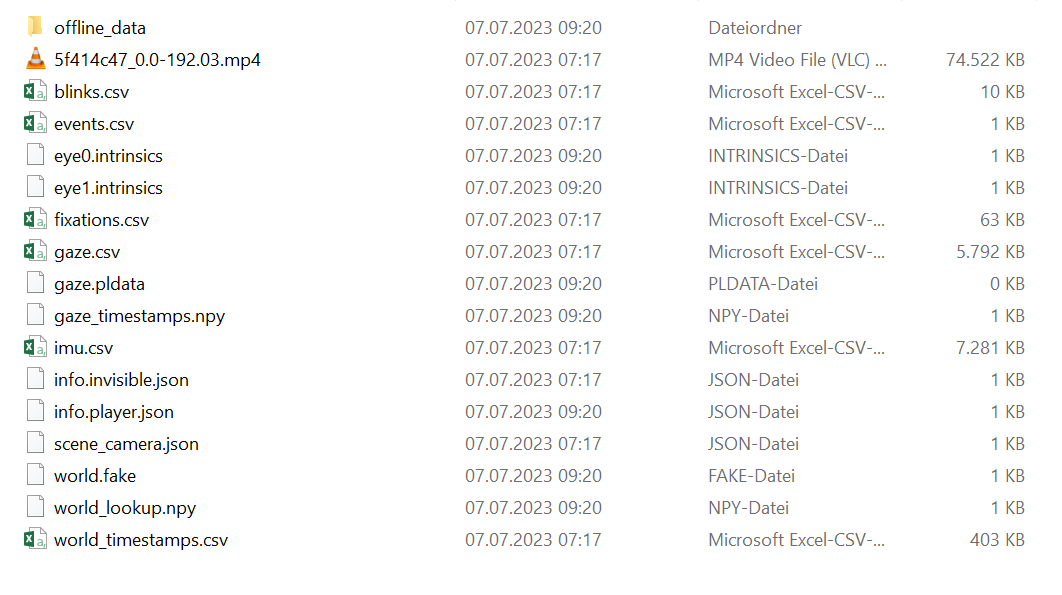
Just to add: I just opened a recording from spring in Pupil Player that I downloaded from the Cloud in spring - worked perfectly well. When I downloaded the same recording now, it also did not work. Plus: Less files in the current folder compared to the spring's folder.
Thanks for the additional info. That's interesting! The export format has not changed in theory, so I wonder what is going on.
When you say "did not work" you mean the scene video is gray, or do you also see other symptoms? Which files are missing?
And could we maybe inspect one of the recordings? It would suffice if you let us know the recording ID (available e.g. in the info.invisible.json file) and state your explicit permission for us to access the data.
With the "old file", I see the scene video plus the eye videos. With the "new file", I only see the scene video in grey, no eye videos and no sound. If I open the scene video with VLC Media Player etc., I do have visuals and sound though. Regarding the inspection, I need to double check because the recordings contain sensitive information, give me a minute please.
Okay, so I have an older ID that does not work (205e3483-11d7-4eca-ada5-6d4ce2b5d3e5) and a new ID that does not work either (c853518d-e71a-4e88-8bb0-2b462e51b0a2)
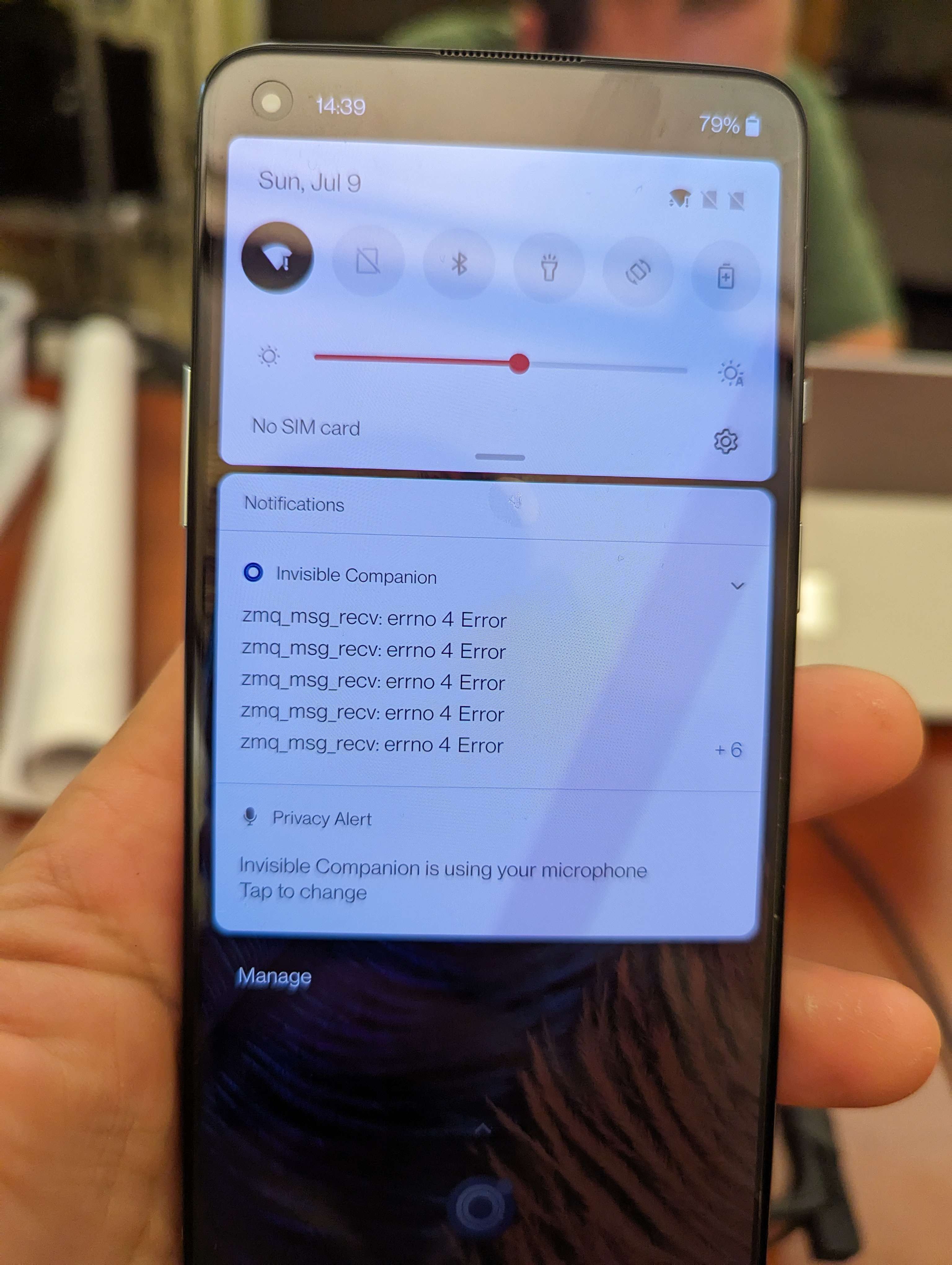
Dear Pupil Labs: when i am trying to upload the video to the cloud, it is not working with error code:zmq_msg_recov errno4 in the phone. i tried to link with different wifi, it is not working. how should i slove the problem of uploading the video? thanks
I think I know what the issue is! Pupil Cloud allows to download recordings in two formats, 1) convenient CSV + MP4 data that can easily be used in Python/R/Excel etc and 2) the raw sensor format which can be opened in Pupil Player. I believe your recent downloads are of format 1) and therefore do not work in Pupil Player.
In the UI of Pupil Cloud you need to enable the download of the Pupil Player compatible format in your workspace settings first by toggling the "Show Raw Sensor Data" option. Once it's enabled you should get an additional "Pupil Player format" download option.
Nice work! Indeed, the problem has been solved! Thank you so much! 😄
Hi @marc. I have to questions which are really important for my recent study.
Hi @user-3c26e4!
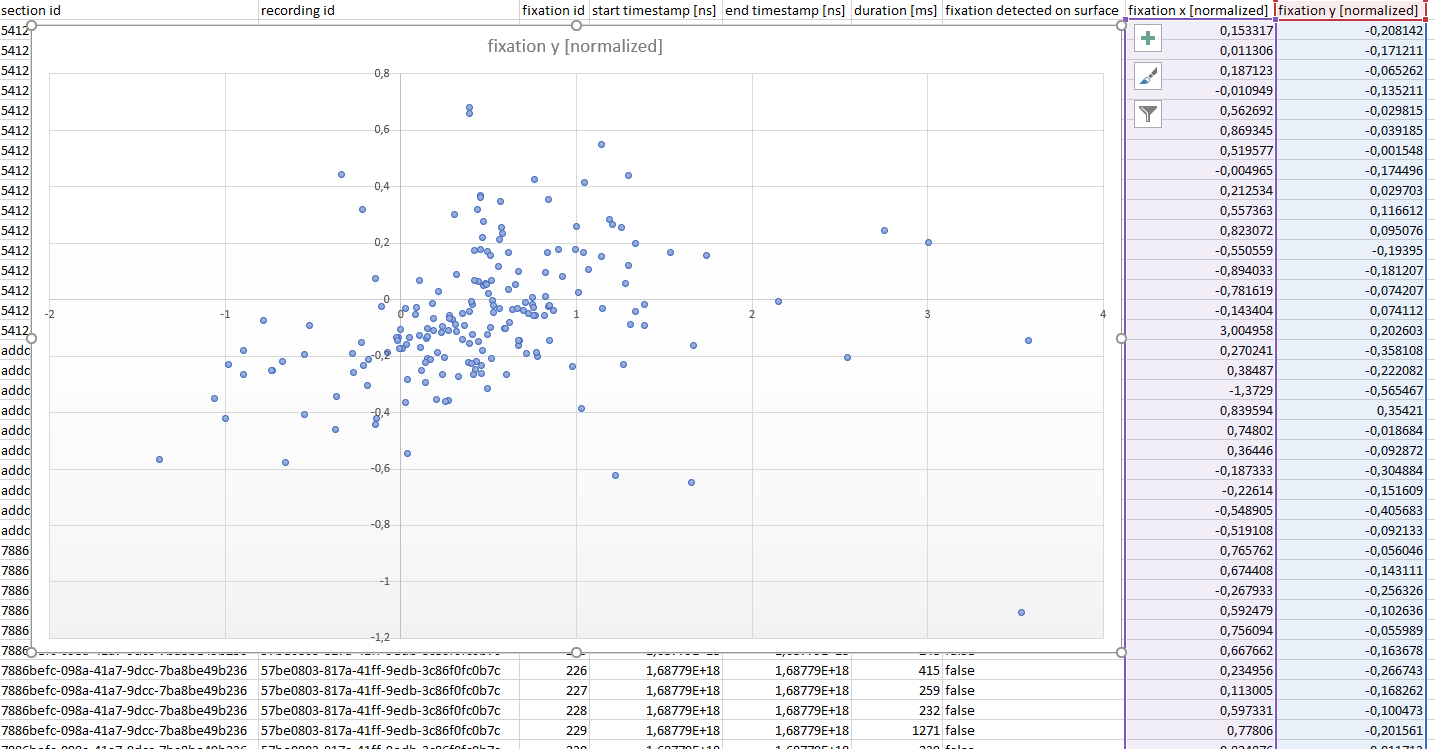
fixation x/y [normalized] values are coming from an export of the Marker Mapper. You are correct that (0, 0) corresponds to the top-left corner of the surface. (1,1) would be the bottom-right corner. Thus all samples with a x and y in [0, 1] would correspond to fixation samples inside of the surface. All other samples with values >1 or <0 correspond to samples outside of the surface.So if you see a lot of negative values that just means that a lot of the time the fixation is not inside of the surface.
Keyboard Shortcuts. There you can see that you can jump in steps of 0.03 seconds using Shift + Left/Right Arrow Key. This allows you to jump roughly frame by frame through the video as the scene camera's framerate is 30 Hz.Hi @marc, Thanks a lot formthe explanation! How about the data from Pupil Player? Is (0, 0) correspondi to the top-left corner of the surface and (1,1) to the bottom-right corner as well? Are all other samples with values >1 or <0 corresponding to samples outside of the surface? Please take a look at the graph.
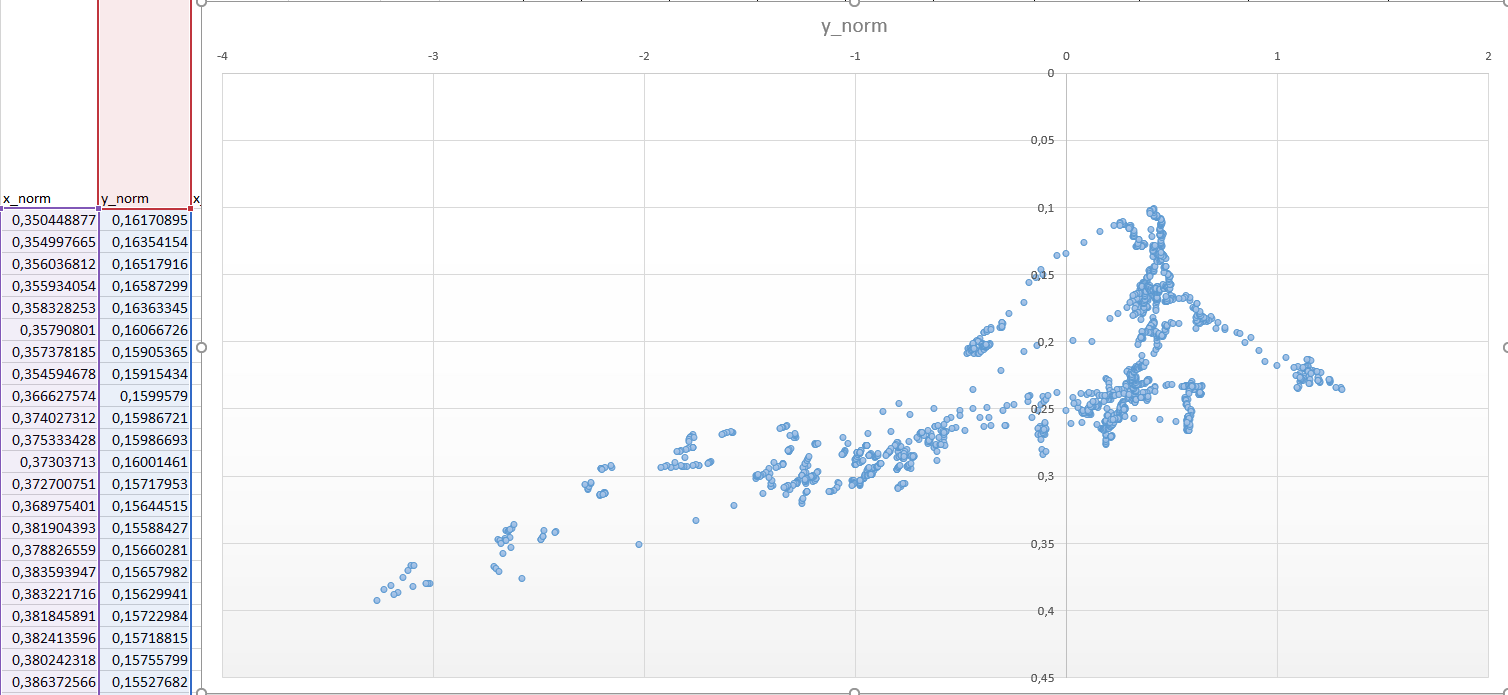
For Pupil Player the definition is not the same. Quoting from the documentation of Pupil Player:
x_norm and y_norm are coordinates between 0 and 1, where (0,0) is the bottom left corner of the surface and (1,1) is the top right corner. But yes, also here points >1 and <0 should belong to samples outside the surface.
Hello,
I’m using a Pupil Invisible in a driving study and seeking help integrating GPS data into the output stream. I know the companion device has GPS capability, but after some initial looking, I don’t see an option in the app to engage this metric. I could collect the GPS data externally, but that brings sync issues with the Invisible’s frame rate. Has anyone tried this and could offer any suggestions for integration? Wondering what the best approach would be going forward.
I’d appreciate all answers!
Hi @user-a95892! The Pupil Invisible Companion app does currently not record GPS data. As you say, you could use a 3rd party app to collect the GPS data. In theory, all data get timestamped on the phone, so syncing should be straight forward. You can consider this guide on how to match data based on timestamps: https://docs.pupil-labs.com/invisible/how-tos/advanced-analysis/syncing-sensors/
Hey Pupil, we received a few error messages while recording, but our RAs were only able to take the attached picture. The other error messages mentioned something about a "sensor malfunction".
Could you provide some details on what might cause these issues and how to quickly resolve them in the future?
Hi @user-2ecd13 👋 ! Sorry to hear that you were experiencing issues with your recordings. Would you be able to provide more details of the setup and when exactly the errors appear?
Hi @marc,
[email removed] (Pupil Labs), what do negative gaze positions mean please?
Hi @user-355442 For the raw gaze signal that would mean that the gaze point lies outside of the visible field of view of the camera. Given how large the field of view is that does not occur often, but its possible.
In the context of the marker mapper, it could also mean that the gaze data is outside of the defined surface.
Hi everyone, I'm currently trying out the project from the alpha lab using densepose (https://docs.pupil-labs.com/alpha-lab/dense-pose/). When using it we get in output a video and different csvs. One of them: densepose.csv is the same as gaze.csv but we a supplementary column indicating gazed body parts. However in this column, there are sometimes multiple different body parts + 'background' indicated for a single nanosecond. I can't find anywhere if it's the body parts ordered by certainty for this specific nanoseconds or something else. Could someone enlighten me on that point?
Hi! Happy to hear you are trying out the densepose tutorial. Basically, we set a circle radii here https://github.com/pupil-labs/densepose-module/blob/e92aef1ed880571a30c90deb5af5ef8b09007373/src/pupil_labs/dense_pose/pose.py#L173 and we check all the pixels inside the circle, to see whether they touch the prediction bounding box of any body part detected in the scene, if so, that body part is added.
PS. I could make the gaze circle (detection circle) as an argument if you prefer, such that you can easily modify it, or you can directly modify at the line I post above
[email removed] (Pupil Labs), is there a document that explains how the pupil diameters were derived and how it can be converted to more realistic dimensions?
Responded here: https://discord.com/channels/285728493612957698/285728493612957698/1129316839973982228
[email removed] (Pupil Labs), how can I overlay the heatmap with a section of the video recording from PupilCloud. Do I have to distort the heatmap so that the corners of the png match the corners of the trapezoid, or do I have to put the heatmap on the whole image section?
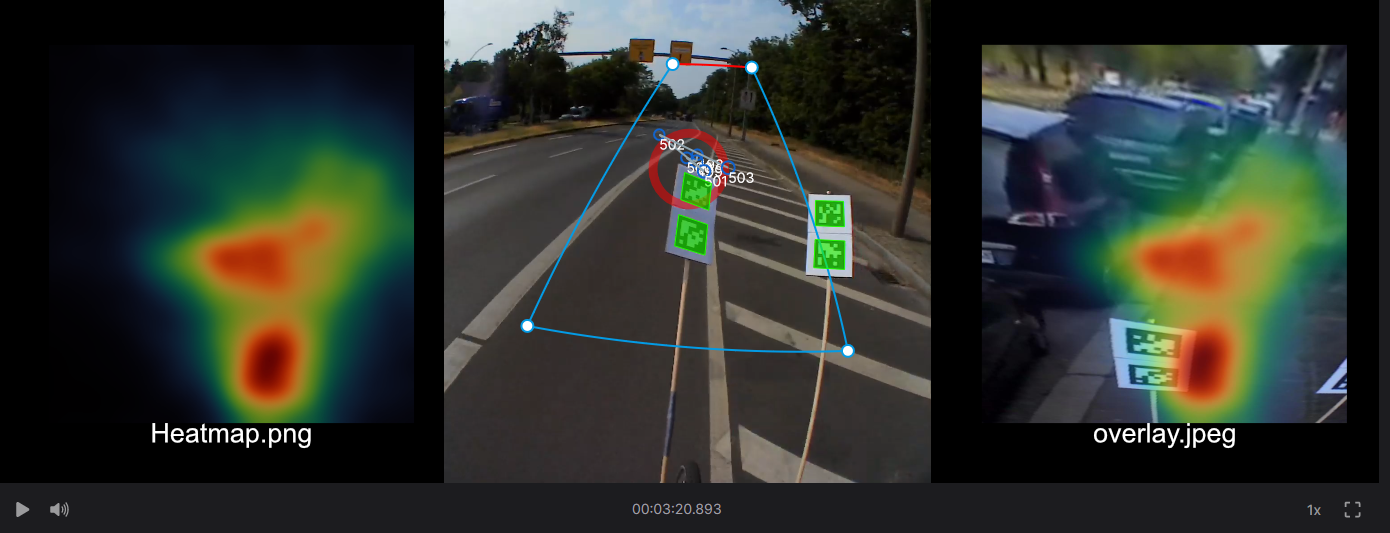
Hi @user-a15383! The heatmap you can download from Pupil Cloud is always rectangular and corresponds to the rectangle you get when undistorting the trapezoid of the surface into a rectangle.
the image background in the heatmap is such an undistorted crop from the scene video. This is essentially a homography transformation. Let me know if you need further input on how to get this done!
Dear Pupil Labs Team, we are currently running a study in Berlin, in which we want to measure the perception of participants while walking through the city. We use the Pupil Invisible to record eye tracking data. Unfortunately, some of recordings, after being uploaded in the cloud are just grey. This is very confusing as the camera seems to be recording and we didn’t receive error messages. I attached an screenshot so you can see what I’m referring to. Do you what might be reasons for this? Moreover, some times the recording just stopped without notifying us. Instead of a recording that was supposed to last almost 2 hours, we now have only 20 minutes… We are also using the LSL relay, as we want to synchronize eye tracking with other physiological data. Can this be a problem as well, so that the recording is less stable? Can you give me any information about what the reliability while walking through the city should be like?
Best regards Anton Voss TU Berlin
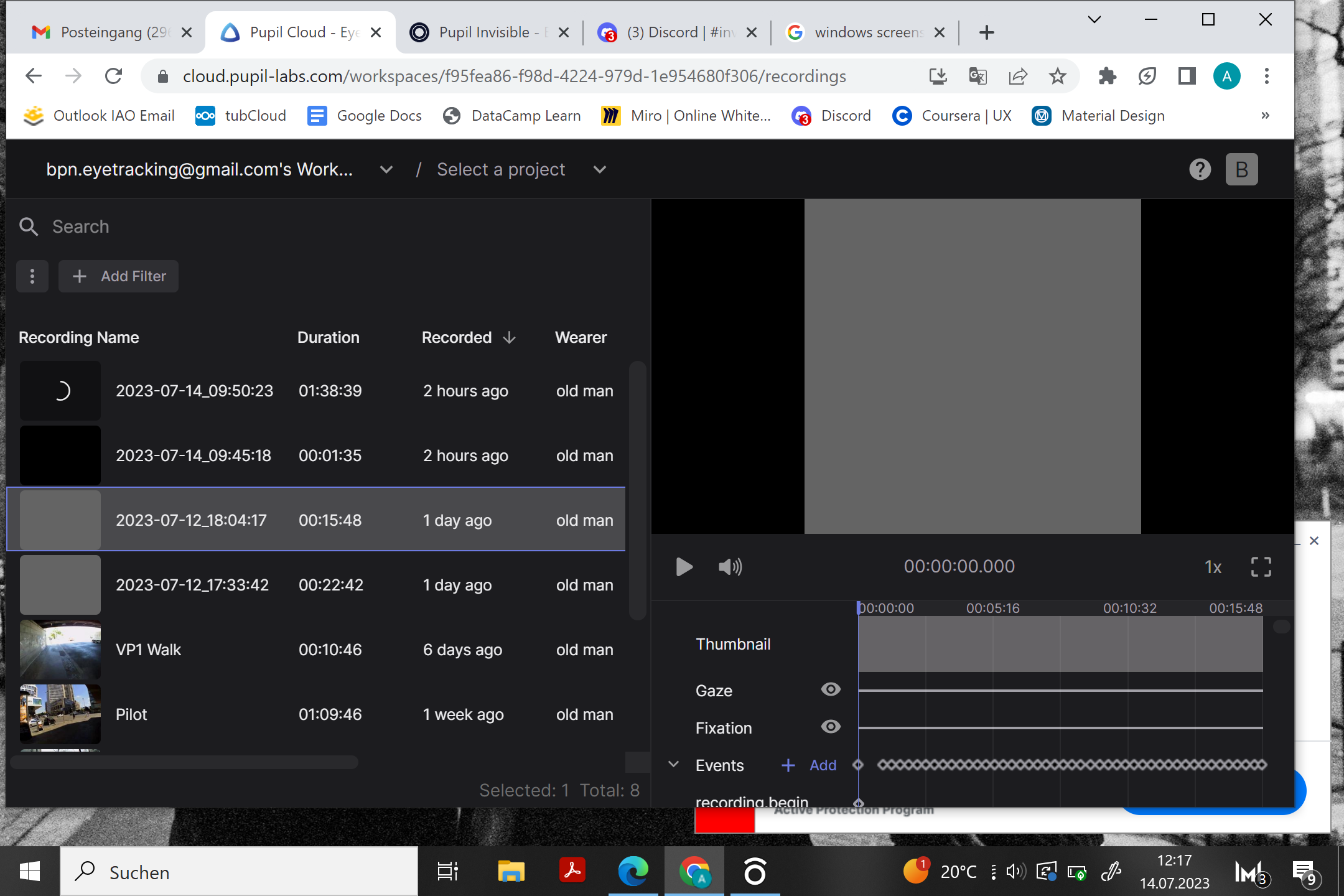
Hi @user-e91538! Sorry to hear about your issues! I have a couple of questions to clarify things:
Hey @marc any insights yet?
Yess sure its not just the first seconds of the recording, which are grey. I also can not play the recordings on the companion. An ID of one of the affected videos is: cb918757-a2bf-41ea-87f4-fcb6c9f670b8
Same for recording: 0e3b68ee-3872-4c6c-9474-6602e1ef1563
And for this recording after 46mins: 5b556c54-d111-4c9c-8695-47c7f9ae9a67
Hi Miguel! Thank you for your answer, if you could make the gaze circle size an argument that would be amazing
Hi @user-20a5eb ! I haven't got the time to properly test it, but here you have the branch circle_csize, which you can install using `pip install [email removed]
There you should see a new parameter -cs which you can pass to define the size of the gaze circle, this would be radius in pixels. The visualised circle would match the one used to detect touched areas.
I have another different question: I have 12 different phones and for each of them when I want to change the wearer from the app, it's endlessly showing a screen 'syncing wearers'. I found a post about this from 2020 but solutions didn't work. My phones are connected to internet, restarting them didn't work. Do you have any idea?
Hi @user-20a5eb! Could you try clearing the Companion app's internal storage via the following steps? Note, this will not delete any recording data on the phone, but only internal data of the app. If you want existing recordings to show up in the Companion app again after doing this, you will have to import them again from the app's settings view.
Steps to clear the app's storage
App info -> Storage usageClear data and press OkForce stop on App info screen and then OpenIt worked thank you @marc !
Hi, i have been experiencing some trouble lately, on the phone i am unable to get any feed when i put the glasses on. i am unable to know if the recording is happing or not. when the device is not worn then the video feed is seen. can i get some help.
Hi @user-f01a4e 👋 ! Sorry to hear that you've been having issues with your glasses. Could you please elaborate a bit on the issue? Do you mean that you connecting the glasses to the phone and you cannot preview the feed of the scene camera with the gaze estimation (ie red circle)?
Hi @user-e91538! We have inspected the recordings and see signs of sudden crash of the app. It's still a bit unclear what happened exactly, but it currently looks more like a software issue than a hardware issue. Did you ever see any error messages coming from the app?
There is a high chance that we can (at least partially) recover those recordings. We are currently looking into this.
A possible reason for a crash could be overheating of the phone. Have you made your recordings on one of the especially hot days in Berlin? The LSL relay should in principle not pose a problem. However, if you do stream data in real-time via LSL (or in any other way, e.g. using the Monitor app), this puts an additional load on the phone which can further increase the chances of overheating.
If overheating is the issue, one potential improvement you could make to your recording setup is to lower the frequency at which real-time gaze is computed on the phone. You can lower it in the settings to e.g. 33 Hz. This would lower the computational load on the phone and corresponding heat generation. Note that eye video is still recorded at 200 Hz, it's just not processed. Thus, after uploading the data to Pupil Cloud you'd still get 200 Hz gaze data, because the gaze data is re-computed at the full frame rate there.
I think overheating may have been the problem indeed! It was around 27 degrees outside and I noticed that the Companion phone was a bit warm
Where exactly can I lower the sampling rate? Did not find this option on the app ...
Turns out this featuer is currently only available in the Neon Companion app. My bad! What you can do in the Pupil Invisible Companion app though is to disable eye video compression in the settings!
Okk no worries. This is the same as "eye video transcoding" I assume?
Correct
Thank you so much! Hope this will make things better 🙂
Hi, @nadia thank you for prompt reply. so my problem starts when I connect the device with the phone, the app starts to flicker a bit. and then normalizes. after that when I preview the feed (with out wearing the glasses), I have a clear view of what the device is seeing but when I wear the device and then preview the feed, I am getting a black screen on the feed. there is no feed and I am unable to understand if I should do the recording or not. I have been using the feed to calibrate each different user but without the feed I afraid to use the device. Hope this is elaborate. Please let me know.
Hi @user-f01a4e 👋 ! Thanks for clarifying. Sorry to hear that you're having issues with your recordings. Please send an email to info@pupil-labs.com and I will follow up with some debugging steps. 🙂
@nadia Sure will do. thank you so much 🙌
Hey Marc! Yesterday I was able to record data successfully! I think the problem was indeed related to issues regarding the temperature, as I still noticed that I received a warning message, stating that the phone has a high temperature. Just to avoid further software issues, do you have any further suggestions what I can try to avoid issues regarding the temperature? Is there something like an outside temperature limit that has been tested? I thought its best to carry the companion not in the pockets of your trousers but rather in a cross bag. Maybe you have some other ideas what I could try to prevent overheating... Best regards Anton
Hey @user-e91538! The temperature is influenced by a lot of things, which makes it hard to give definitive answers. A couple points I can say:
hi Marc, hello everyone 🙂
I took a look at the recording exports, under https://docs.pupil-labs.com/export-formats/recording-data/invisible/ When you're talking about recording exports, this isn't just hitting export on a recording in the companion app, or is it?
it's something you do via the cloud?
Hi @user-1391e7 👋 ! The page that you link refers to the recording exports from the Cloud.
Hi @user-1391e7! To add onto the response, exporting your data through Pupil Cloud is the recommended path. After uploading a recording to Pupil Cloud additional data streams are added to the recording such as blinks and fixations. These are not available when accessing the data directly from the phone.
It is however possible to read the raw sensor data from the phone. This requires opening the binary files using e.g. Python though and is not super straight forward.
thanks! Yes, I've played around with that a little. currently using the realtime-api to run an online version of an I-DT fixation algorithm. now just looking to compare a little, see how far off the mark I am 😉
is there information on what thresholds you set for the calculations on the cloud?
like say.. 1° of visual angle, minimum duration of 100ms? both higher?
Hi @user-1391e7 ! You might not be able to fully compare them, the fixation algorithm employed in the Cloud does use the scene camera optic flow to compensate for VOR and head movements, you can read more about it here https://docs.google.com/document/d/1dTL1VS83F-W1AZfbG-EogYwq2PFk463HqwGgshK3yJE/export?format=pdf
This fixation algorithm, is currently being peer reviewed and once the process is over, we plan to make it publicly available, so that you can directly implement it with the realtime API. So please stay tuned! 😉
gotcha! thanks for the link!
how are blinks handled in this case? right now, I noticed that gaze data comes in anyways, even if my eyes are closed. would that be a separate detection that runs concurrently to fixation detection, get filtered or would the input for the fixation algorithm change in dependence of a blink detection?
Blinks are calculated independently of fixations and gaze in Pupil Cloud. The white paper of the algorithm can be found here: https://docs.google.com/document/d/1JLBhC7fmBr6BR59IT3cWgYyqiaM8HLpFxv5KImrN-qE/export?format=pdf
As you saw yourself, the gaze signal does not respect blinks and always gives a result. The fixation detector does not consider blinks either. In practice blinks lead to a short "jump" in the gaze signal, which in turn would cause the fixation detection to consider an ongoing fixation to be finished.
Considering blinks during fixation detection would make sense, however the robustness of the blink detector is still limited. In some settings it can have a high rate of false positives, which would have a negative effect on the fixation detection, which in turn makes considering blinks in the first place undesireable.
I noticed the jump as well. had some cracked ideas on how to detect that jump, but it's not identical for every user. and like you said, the jump itself finishes a fixation in any case. but when we're looking at the saccades more closely, rather than the fixations, then I eventually have to (with some degree of accuracy or certainty) discern between what was caused by a blink and what was a real saccade
Yes, that is true! If there is a blink that happens during a proper fixation, there will be a false (implicit) saccade detection and two shorter fixations instead.
one more minor thing, just for clarification: with respect to the logged gaze values, as well as the ones sent via realtime api:
both have the offset I've set via the companion app applied, right? or would the log be the absolute raw data so to speak and I'd have to reapply the offset recorded in info.json? I could see either way make sense, in a way, but I'm guessing they're logged with the offset applied.
Yes, the offset is already applied to the gaze values from all sources and also to the fixations!
also thank you for the many answers, you've been most helpful!
You're very welcome!
Hi**@marc**, Pupil Cloud has a wonderful update! In previous versions, I could download raw data in Pupil cloud for processing in Pupil player. I was wondering in knowing if I can still get this type of data from the pupil cloud now or if I can only get it via USB.
Hi @user-a98526! I am glad to hear you like it! Yes, this download is still available, it was just hidden away a little bit. You need to enable this additional download option per workspace in the workspace settings. Look for "Show Raw Sensor Data" in the settings. Once enabled you can find the additional download option in the right-click menu as before.
That's so cool and very helpful! Thanks!
while in the cloud, with my workspace open, whenever a new recording is currently uploading or is being processed (just the upload), I seem to be unable use playback of other recordings that are uploaded and have finished processing. Is this intended behaviour?
I do see the recording get loaded for a second or so in the player, with the thumbnails in place and the first frame loaded and then it disappears, the play button becomes greyed out
might it be a browser or operating system issue? Windows 10 with Firefox & Chrome
Hi @user-1391e7 ! Would you mind doing a hard refresh on the page? Did that solved it? Also could you send us a screenshot or screen recording of such behaviour at info@pupil-labs.com
Once recordings are processed, you should be available to play and work with them, independently of whether there are other recordings being upload.
refreshing doesn't change the behavior, it always happens if I'm trying to look at a video that is old, is finished, was processed, while I also see another video is being uploaded
it's like the little upload progress visualisation kills the loaded video (different recording than the one being uploaded)
I have no recordings left at the moment to upload, but I'll just make another real quick. just need it to be long enough so the upload progress stays for a little while
done, hope that helps
if it's not just my system somehow, I'm guessing it's just caused by this little upload progress circle. where the update of that visualisation somehow unloads the video or doesn't allow me to play the already processed video at the same time as another one is being uploaded and visible
thanks @user-1391e7 , we would look into it
found a temporary workaround as well, so it doesn't hinder me in the end. I just need to add the videos I want to watch to a project, switch to project view (then the video being uploaded isn't in the list) and it works
Hi, I'm struggling with pupil player (using Invisible). There doesn't seem to be a world cam movie. There seemed to be a new update. Any idea what might be happening?
Hi @user-e40297 👋 ! Did you got your data from Cloud or directly from the phone? If you got it from the Cloud, did you download the Pupil Player Format? You may have to enable it on your workspace, see my prev message on how to enable it. https://discord.com/channels/285728493612957698/1047111711230009405/1108647823173484615
Hello everyone!) our team experiencing some trouble with data analysis via PupilCloud. I’ve got a few questions. Firstly, we put several recordings in one project, let’s say it’s 12 videos. But after making the enrichment and downloading files - there’s lack of recording IDs. It seems like the fixation file contains data for only 6 recordings? We don’t understand why is this happening? And second question is about timestamps. It’s a UTC timestamp, but in what units do the time and the fixation duration measure, seconds or milliseconds? I hope my explanation is clear) Can I get some help, please?
inside the files of the download (e.g. fixations.csv), you should be able to find the recording ID as one of the columns. in the same files, you can see the measurement units in the header-line. so for fixation duration, we have "duration [ms]", meaning milliseconds. for the timestamps, we have - for example - "end timestamp [ns]", meaning epoch timestamp in nanoseconds
Oh, thank you so much for your reply 🙏🏻 the link is very helpful. But, still we have problem with the number of recordings. There’s less recording IDs in the export enrichment file than in the project.
Hi @user-1e429b 👋 ! Could you please contact info@pupil-labs.com with the project ID? You can simply copy the URL once you are in the project if you do not know where to find it.
Thanks for your help!
I'm using the phone that is delivered with the pupil Invisible
Sure! I meant, how did you export the data, as in what is your workflow to get the data from recording to Pupil Player. If you could develop, it would be really helpful to further assist you.
Do you see the scene video when playing back on the phone?
Hi Pupil Labs team! I have a quick question. We are going to perform a measurement campaign next week where we will use the Pupil Labs Invisible device. We will record quite some data each day, and we don't have the possibility to upload all of it over the internet. However, we only get one shot for doing the measurements, and therefore, I'd like to back-up the data over USB. When connecting the phone to a laptop, I cannot see the folder where the recordings are stored, however. Where can I find this? nB I know it is possible to make exports of each recording and transfer these over USB, but can I do without loss of data? We would like to compute gaze and fixation data afterwards, which I know can only be done (for now) upon uploading in the cloud.
Hi @user-e91538! Detailed instructions on how to export and transfer recordings via USB can be found here: https://docs.pupil-labs.com/invisible/how-tos/data-collection-with-the-companion-app/transfer-recordings-via-usb.html#export-from-invisible-companion-app You can copy these recordings over without losing access to them in the Companion App. Recordings can be uploaded from the Companion App later on when you have internet.
Hi Neil, thx for the quick response! However, my concern is the following: if I export the files to a computer through USB, and then something happens with the original data on the phone, is it still possible to use the exported data to upload in the cloud in order to compute processed parameters through enrichments?
I tried to export a test recording, delete it from the pupil labs invisible companion app, and then manually importing them again by adding the exported files to a separate folder which I select in the 'import recordings' button in the 'options' tab. However, these recordings are not added... the only workaround I see is to manually copy the original data folders from the phone to the laptop, and in case of data loss, copy them again in a later phase to the same folder on the phone. Seems a bit of a weird way of working, no?
@user-e91538 hi, anuj here. we have a scheduled pick up of the "invisible" your team through Fed-ex. there has been an update on that. kindly check your mail and let me know
Hi @user-e91538! Recordings can only be uploaded to Pupil Cloud from the Companion App. The recommended workflow is to upload them to Cloud as soon as you have internet access.
Recordings transferred off the phone cannot be uploaded to Cloud.
Similarly, transferring them back to the phone is not a supported workflow.
Hi Neil, okay thanks for the response. I already thought so, but just wanted to check this 🙂
Local transfers are mainly used for those who want access to the raw data via Pupil Player, our desktop app. But you don't get access to the enrichments in Cloud that way.
When I download videos from pupil labs cloud workspace, the download folders do not contain the following files: gaze ps1.raw, gaze ps1.tim, PI world v1 ps1time, PI world v1 ps1.mp4, extimu ps1.raw, extimu ps1.time, and info.json. I am using pupil invisible glasses.
However, these files were in my downloads from pupil labs cloud in April. Can any help me figure out how to download these files? I need them to run analysis in iMotions.
I found the solution from help posted in a previous post. Thanks.
Hey Pupil Labs team! I'm reaching out for assistance with some issues I'm encountering in the Pupil Cloud workspace. I keep receiving an error message that says "Precondition failed: If-Unmodified-Header Too Old." This error appears when I attempt to delete files or enrichments, move certain video files into a project, or create a reference image mapper enrichment. I'm using Microsoft Edge as my browser. I've tried using alternative browsers like Chrome, which allows me to perform some tasks, but I still encounter "internal server errors" when attempting to move certain videos into a project or create an enrichment. All our videos were recorded using the Pupil Invisible glasses and uploaded using the companion device and they play back with no issues. They are all max 10 mins long and have been recorded over the last couple of months. Any help or guidance you can provide would be greatly appreciated.
I trust you are well. We encountered an issue during a recent experiment and I'm hoping to tap into your collective knowledge for possible solutions.
During the experiment, we had 12 invisible devices and their respective companion devices activated simultaneously using the asynchronous API. We've been sending periodic messages to these devices. These companion devices, enclosed in a silicon case (designed for air flow) and worn around the neck, have ample storage space and were fully charged prior to the performance.
However, approximately 30 minutes into recording, one of the invisible glasses began to flash red and the companion devices vibrated. Of note is that both devices were notably hot to the touch at this point.
Any thoughts or suggestions on this would be highly appreciated.
Best Regards,
Hi @user-d23b52 👋 I am sorry to hear you're experiencing issues with your Pupil Invisible. May I ask you to reach out to info@pupil-labs.com in this regard? A member of the team will help you in quickly diagnose the issue and get you running with working hardware asap.
Hi @user-99b85c 👋 ! Sorry to hear you've been experiencing these issues. Could you please share with us the account and workspace ID to [email removed] You can find the workspace ID in the URL: https://cloud.pupil-labs.com/workspaces/<workspace ID>/
Thanks @nadia I will email those details now!
@user-e91538 hi anuj here, we had a query regarding the dispatch of the invisble. we have mailed the details. kIndly have a look and let us know.
Hello, I am trying to associate gaze with each frame of the video. I am using pupil invisible and I directly got the data from the phone without using Pupil Cloud. I extract frame of the world.mp4 using ffmpeg, and got the gaze data by dragging the folder into the Pupil Player and clicking the export button. However I found that for some videos, there is a slight difference in the frame number (about 20 frames). For example, the 20-th frame by ffmpeg corresponds to the 0-th frame by Pupil Player. Is there any idea of how and why this happens?
Hi @user-c16926! Is there a particular reason why you're using ffmpeg to extract the video frames rather than just using Pupil Player and making an export? ffmpeg is known to extract more frames than expected if the original video has some variable durations between frames. Depending on the lighting conditions and/or autoexposure settings, this might be the case with your recording. One thing to try is to set the vsync 0 option in ffmpeg to account for variable frame rate.
For example, the left image is the 1221-th frame by Pupil Player (you can see it from the bottom) and the right image 1221-th frame by ffmpeg. Due to the slight time difference, if I put the gaze of the 1221-th frame to the ffmpeg extracted frame, it is not at the correct position.
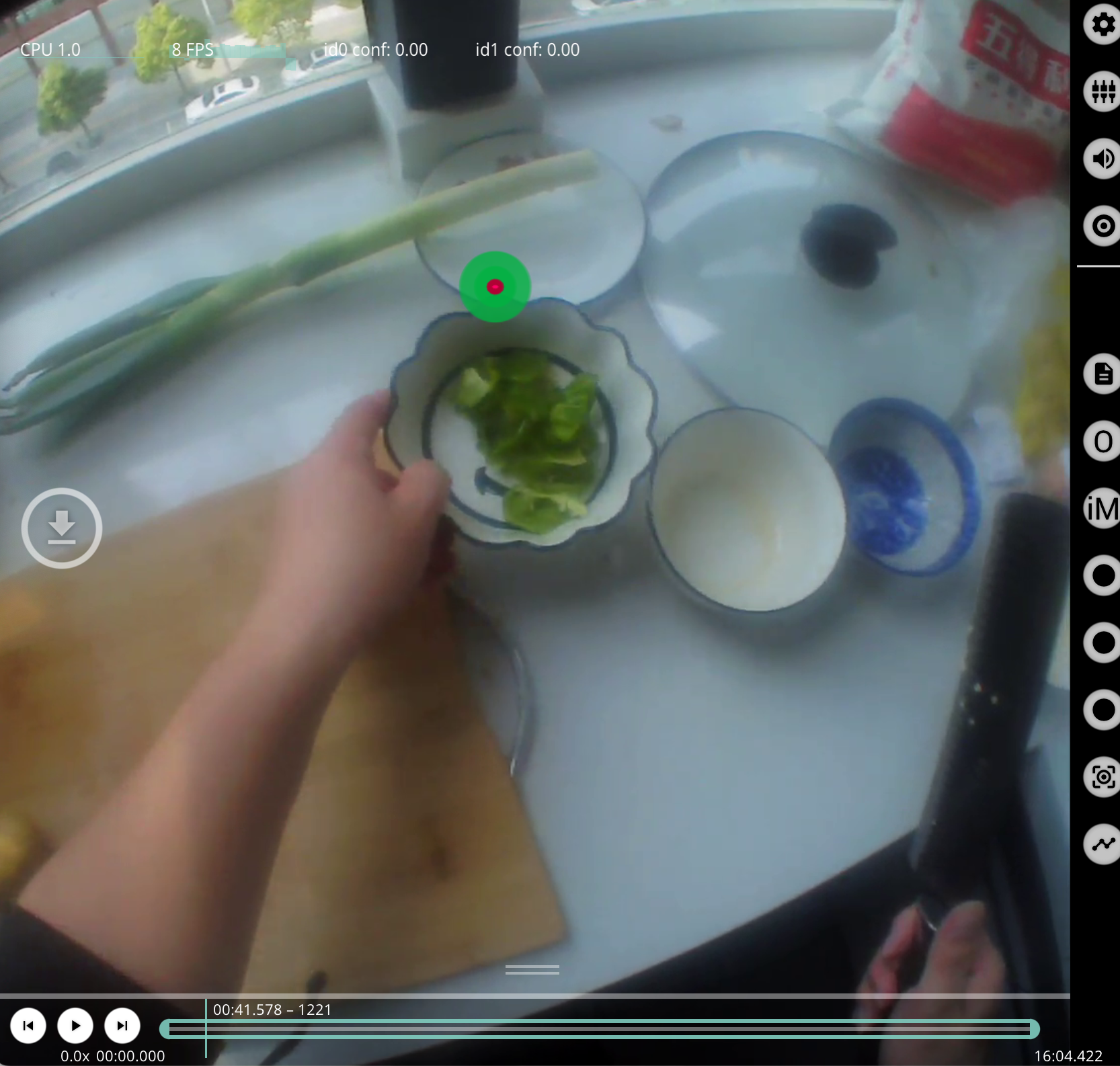
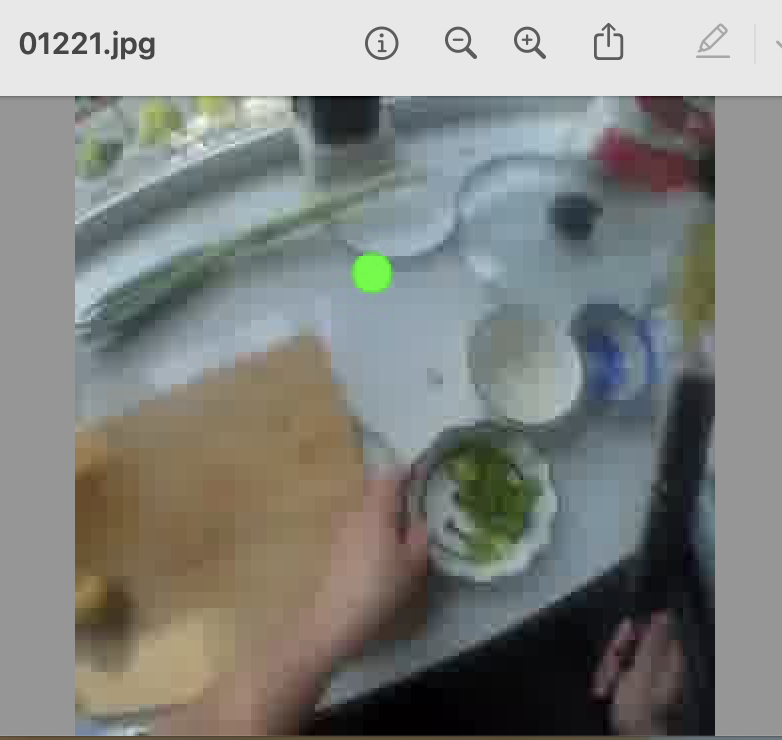
Thanks @neil ! I was trying to use only some clips in the whole video, so I tried to generate those clips by first extracting frames and then creating the clips using the corresponding frames. I will first try vsync 0 to see whether this can resolve my issue!
Did you know you can select certain portions of the video to export from Pupil Player? Just drag and drop the trim marks in the scroll bar 🙂
Then you can run the 'World Video Exporter' plugin. Very easy to do.
Further instructions here: https://docs.pupil-labs.com/core/software/pupil-player/#world-video-exporter
Thanks, but I have too many clips to extract so it is very hard to do it by hand
I see. In that case, a custom video renderer using ffmpeg makes sense as Pupil Player doesn't have a batch exporter. Let us know how you get on!
Is this expected to be kept informing warnings like Application provided invalid, non monotonically increasing dts to muxer in stream 0: 6 >= 6? I checked the output files and they seem to be okay.
Is that error coming from ffmpeg or Pupil Player?
it's from ffmpeg
Hmm. I'll loop @user-d407c1 into this as he's been working more with video rendering with gaze overlay!
Hello, my question is: Is it necessary to use the cloud or is it possible to bypass it?
Hi @user-e91538 👋 While Pupil Cloud is the recommended workflow for storing, playback, and enrich your recordings, we understand that it might not be feasible for everyone. If you are unable to use Pupil Cloud, you can still export recordings from the Pupil Invisible Companion App, transfer them to your laptop/desktop via USB, and then utilize Pupil Player for playback, visualization, and data export for individual recordings. To get a better understanding of this workflow, feel free to check out our documentation (https://docs.pupil-labs.com/invisible/how-tos/data-collection-with-the-companion-app/transfer-recordings-via-usb.html#transfer-recordings-via-usb) (https://docs.pupil-labs.com/core/software/pupil-player/#pupil-player).
Hi @user-e91538, is there a reason why you don't want to use Pupil Cloud? It has a lot of features and analysis tools that aren't available in Pupil Player, like, blinks, fixations, and advanced scene recognition algorithms. Plus we're always working behind the scenes to add additional functionality to make life easier for researchers 😅
Thank xou. I´ll try it.
And the player is just online. theres no desktop version?
Pupil Cloud is only available online, whereas Pupil Player is a desktop software that you can freely download from our website. You can access the download link here: https://github.com/pupil-labs/pupil/releases/tag/v3.5
FFMPEG plotting gaze