
similar question here: is there anyway to upload the exported files to cloud? I lost access to my old cloud account. But all videos are exported to my local computer. Thanks in advance.
@user-6e2996 unfortunately there is currently no way to externally upload recordings to Pupil Cloud, is there any chance you can recover the account, or maybe someone from your institution who still has access and can grant you access?
Hi! The fixation detector on upload to pupil cloud compensates for head movements leveraging optic flow of the scene camera, so won't work without the world video unfortunately @marc please correct me if I'm wrong on this.
Hi @user-e91538 while you could theoretically reimport files within the app, it is strongly discouraged as it could be easily end up wrong if additional files are placed in the folders or if it has been opened o with Pupil Player for example. Is there any specific reason you would like to place it back into the Companion device?
Regarding face blurring, please write to info@pupil-labs.com 😉
Hi, is there any problems with pupil cloud? Marker mapper enrichment (1 section, duration is 10 sec) is being analysed for 20 minutes so far...
Hi @user-1dc058 Sometimes, web browsers don't update their elements but rely on the cached versions. This means although the enrichments are finished, the web does not reflect these changes. Could you please refresh the page (Control + Shift + R or Control + F5 in Chrome Windows or Cmand + Shift + R in MacOS) and see the status?
I've tried this several times and nothing has changed.
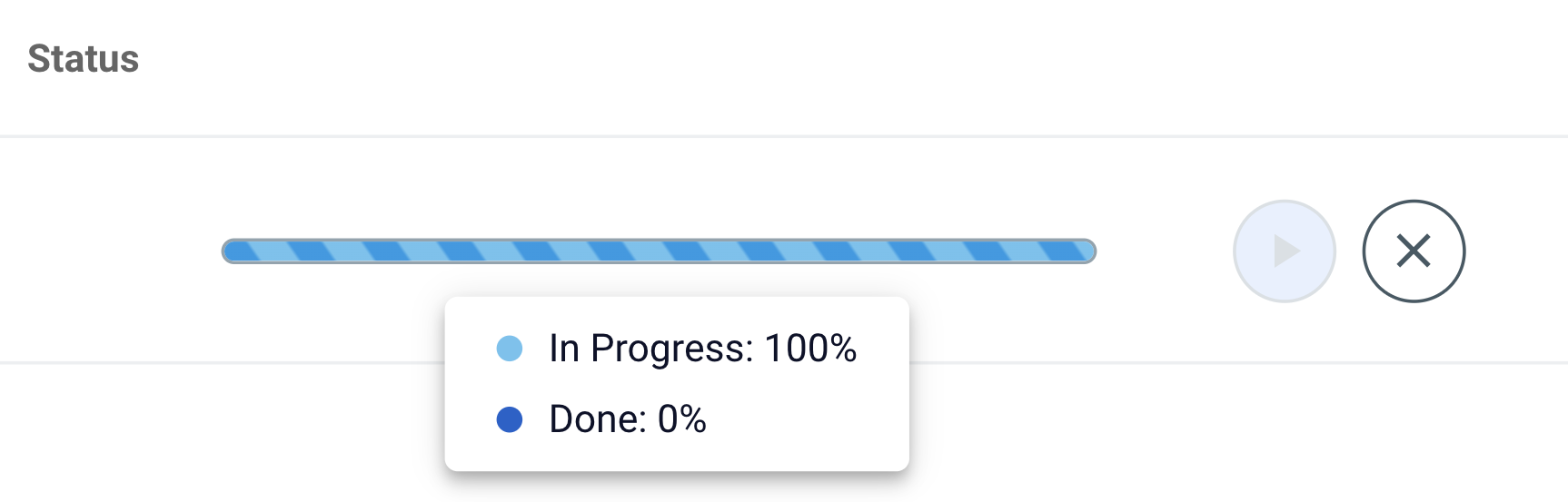
@user-1dc058 it has been fixed now, apologies for the inconvenience.
thank you!
No. We forgot about the username, which should be the email address. I can only found the workspace name. Is it possible to recover the username from the workspace name only?
The only option here is to get access to the email account you signed up with and do a password reset or log in and invite others as admins of the workspace.
Hello @will OR anyone from the team 🙂 - Here's a cheeky sense check - trying to concatenate fixations and blink data into one df - is there any sense in using the world_timestamp as a reference timestamp for both fixations and blinks? Given their different temporal dispositions (gaze vs world)...
Hi @user-df1f44! The timestamps of both blink and fixation data originate from the eye video timestamps, as this is the data that is used to generate them. Depending on your application, it might make sense to correlate this data with the scene video timestamps, e.g. to find out which scene video frames overlap with a specific fixation or blink. To really answer if it would make sense for you, we'd need to know a bit more about what you are trying to achieve!
Maybe the following guide is helpful to you, which discusses the syncing of data streams using timestamps: https://docs.pupil-labs.com/invisible/how-tos/advanced-analysis/syncing-sensors/
Thanks for the information - I'll go down this rabbit hole and revert back when I understand more - I am just trying to look at before/after effects (if any) of a simulated scenario. Cheers. 🙂
Hi, I am currently using the Pupil Invisible in a study. For my analysis, I need a file with the time series and the currently fixated surface (4 areas of interests) at that point of time. The surface_events file seems to be the best choice, but the data in it seems to be very very odd. Files for the individual surfaces are very consistent with what can be observed in the videos (i.e. true, when people look into that surface), but the surface_events file is just randomly printing "enter" and "exit", without any logical order (i.e. two exits from the same surface after another or five different enter events before any exits...)
Hey, the surface events are just about them being detected or not. They are not related to gaze. Check out the gaze on surface files.
It would be great if I could understand that file, to merge the enter and exits events to the surface currently looked at (i.e. 1 = Surface 1, 2 = Surface = 1, 3 = Surface 3).
Ok, so I will need to merge them. And one more problem I faced was that despite connecting the pupil invisible to one network, no consistent world time stamp is displayed in the data
Is using pupil Cloud and it's marker mapper an option for you? Pupil Player transforms the timestamps into the Pupil Core time format which is relative to recording start.
Despite being started just seconds apart, the world time stamps are not comparable at all.
Due to data privacy concerns we are not allowed to use pupil cloud :/
For a single recording, the timestamps should be comparable between the different surface files btw
But thank you so far!
Thats true, but i need to synchronize the data between interacting participants
Hi, My name is Zhi Guo. Recently our lab bought pupil invisible glasses. I can not set up and log in to the Pupil Invisible Companion App. When I log in it always shows that Login failedjava.security.cert.Cert PathValidatorException: Trust anchor for cerification path not found. But I can log in the pupil could with the same account. I have no idea. Could you help me figure out what happened?
@papr
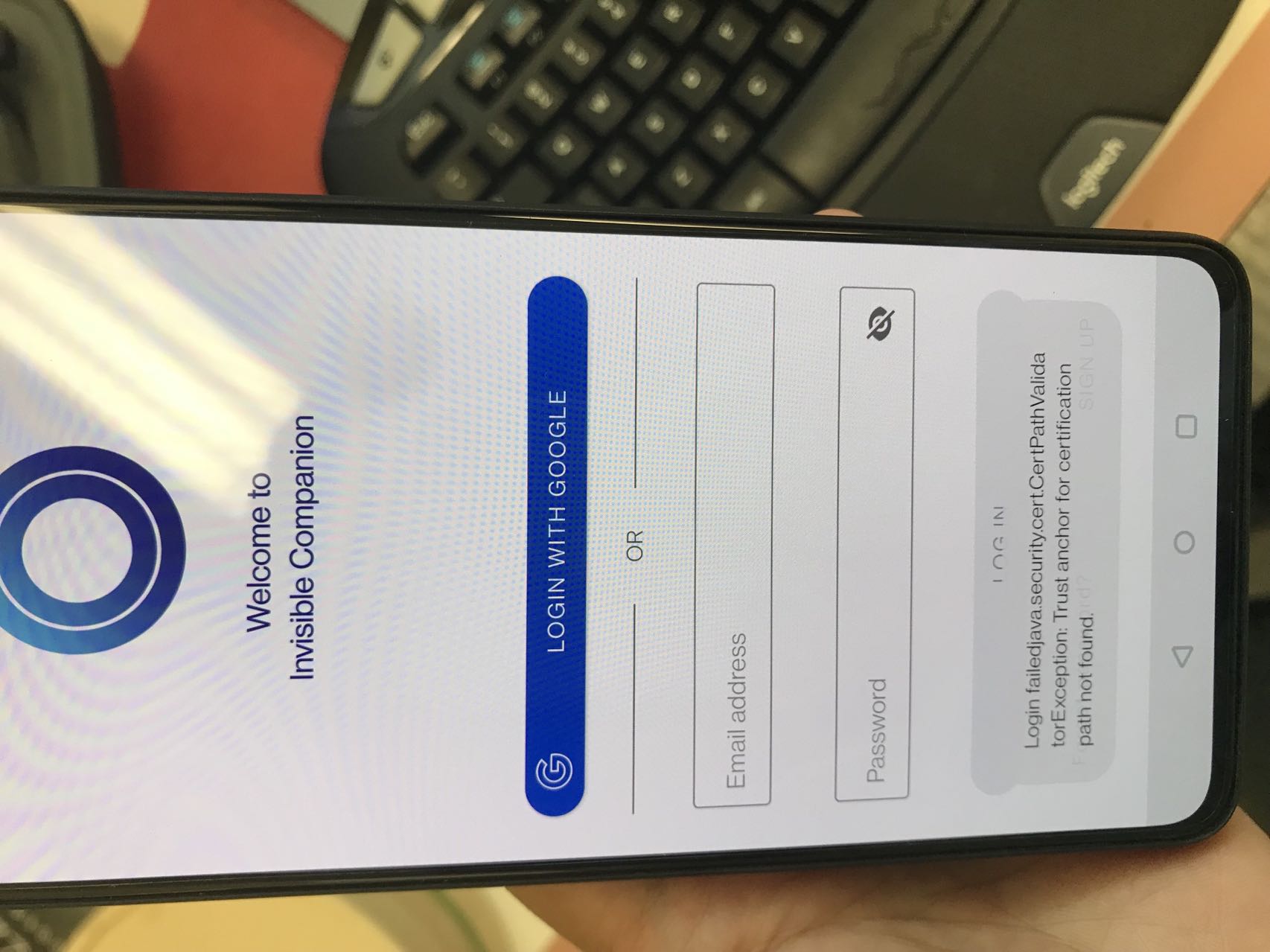
Hi @user-6b4c9f! We have not seen this particular error before. Are you maybe trying to login from Mainland China? This would explain why some things are not available 🤔
Have you tried reinstalling the app? And what version of Android do you have installed?
No, I am in USA now. I used the one plus phone accompanied by the Pupil invisible glasses.
Android 11
OnePlus 8T
I have reinstalled the app, but it has the same problem.
Can you tell us a bit more about your network situation? Are you in a corporate wifi?
@user-6b4c9f are you using Eduroam? If so, you might need to install additional certificates to properly connect to internet. I’d recommend you to check your university IT guidelines for Eduroam
Regarding the streaming and control of Invisible using the QR code to a pad/tablet is there any preferred devices or should it work equally well on all tablets/pads
I think there are known issues when using iOS and/or Firefox. Otherwise, it should work equally well.
Thanks papr, Just out curiosity what were the issues using IOS? I’ve used it on my IPad in a research location and it worked really well on Safari but we are looking for a cheaper alternative for a new research project coming up
Let me clarify, iOS on iPhone. iPads run iPad OS as far as I know and that makes a difference in practice.
Thanks papr that’s really helpful. 👍🏻
I am trying to plot detected faces into the videoframe using Matlab, I just cant understand the timestamps does not match.
The number of timestamps in world_timestamps.csv equals the number of frames in the .mp4 video and I assumed that the timestamps of face_detection.csv would match these timestamps as the faces must be detected in each frame of the video. I realize that the face_detection.csv can contain the same timestamp multiple times, or not at all depending on whether one/multiple/no faces are detected, but I can get a single time stamp to match between face_detection.csv and world_timestamps.csv.
What am I not doing wrong?
So did the face detection finish after all?
No, when I download the data it's only completed the first 5 minutes of the dataset
Sorry, just checked again, now it's done.
As you mentioned, there can be multiple faces per frame. Each face has its own row. So it is not a 1-to-1 mapping.
No, but I should be able to map some frames/stamps of world_timestamp.csv to some timestamps of face_detection.csv, correct?
That is correct. I just did a quick sanity check and ran into the same problem I think you have: not all the timestamps in face_detection.csv are contained in world_timestamp.csv, which would be expected. We will look into the cause of this and get back to you!
Interesting, but ok, I can work with that. Thanks a lot for the fast reply, I'm super impressed by the response times in here, good job 👍 👏
@user-648ceb Quick Update: it seems like there is somewhat of a rounding issue with the timestamps of the raw data export. Concretely, the last 4 digits of the timestamp are wrong. From a temporal accuracy perspective this is not really an issue as the error is in the range of micro seconds, but the numerical difference of course breaks the ability to match them to other timestamps.
We will certainly look into fixing this ASAP, but to get you moving again, you could in theory simply round away the last 4 digits of all timestamps.
I just use the campus wifi network. What do you mean about Eduroam? every wifi network at university?
Eduroam it’s a shared auth system that allows students, researchers, etc to connect to wifi networks across institutions in different countries in Europe and US
Some institutions require specific certificates to be installed on android phones to fully connect, if you are unsure about it, I’d recommend you to contact the IT Department of your university
Do you have an internet connection otherwise? If it is an open network you might also need to confirm a dialogue first before you can connect...
I just use campus network, it includes several networks, one of them named eduroam. I will try again by using my cellular hotspot network.
Hi team, we are having an issue exporting a recording session with the eye overlay. I am attaching the error message in the terminal window. I am guessing this is because we had an error towards the end of the recording, and the length of the exported eye videos do not exactly match the length of the scene video. Is the eye tracking still accurate? Or could this mess up the timing of eye tracking as well?
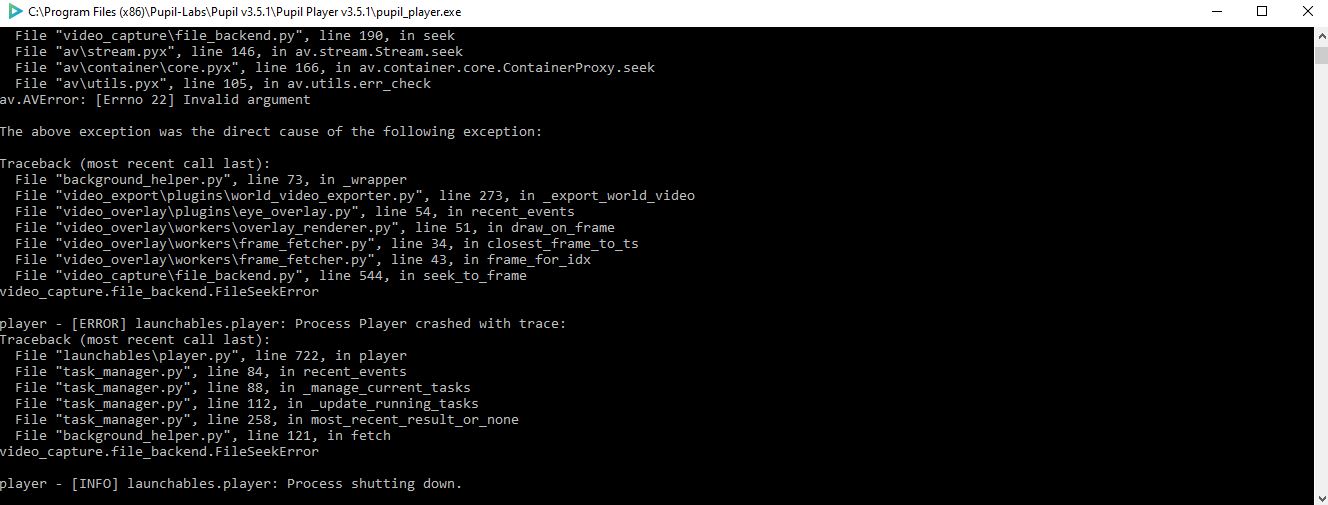
This is difficult to tell from the error message alone. Are you able to share the recording with [email removed] s.t. we can look into this in more detail?
Hi, this was extremely helpful and seems to have resolved the issue, thank you!
Hi! i have the Pupil Invisible device and i am trying to get it to run in Pupil Capture. The cameras for both eyes are detected, but the World Camera stays grey. Besides the two cameras for the eyes "PI left v1" and "PI right v1" I can select between 3 "unknown @ Local USB" resulting in "World: The selected camera is already in use or blocked". I am using Windows (have similar issues in Mac, here the world camera is showing but eyes are not both showing). I tried the Troubleshooting steps with deleting drivers shown here: https://docs.pupil-labs.com/core/software/pupil-capture/ Do you have any other ideas?
Hey, Pupil Capture is not designed to drive Pupil Invisible hardware. Please connect the glasses to the Companion device and use the dedicated Companion app.
Hey - I'm a part of Stanford's CIBSR and we are using Pupil Invisible + OnePlus integration for our trials. We need to sync timestamps and send from our primary device, but are having a hard time establishing TCP connections between the two devices. Do you have any resources where I can take a look at some of the example code used on the trigger device?
Hi @user-954737! Note that establishing connections like this is often problematic from within university networks (or other large public networks), because a lot of communication is restricted. See here for a little bit of detail: https://docs.pupil-labs.com/invisible/troubleshooting/#i-cannot-connect-to-devices-using-the-real-time-api
Regarding the implementation, I can reference you to this open-source protocol in our real-time API, which is using a TCP port in order to exchange timestamp values to calculate accurate clock offsets. https://pupil-labs-realtime-api.readthedocs.io/en/stable/api/async.html#module-pupil_labs.realtime_api.time_echo
Thanks so much - will try to implement and might be back if more questions arise!
We would like to test wayfinding and signage at the airport, the airport itself is also very interested in using the glasses. The only problem we run into is that the glasses' camera is always on and it records the faces of the people around it. The person wearing the gasses might have agreed to it but the people who also walk through the airport do not. The airport asks us if it is possible to make the faces of the people around unrecognizable before it is uploaded to the server. How have you solved this for other customers?
Hi @user-e91538! We are in a closed beta test on a feature that might help you with this. I'll DM you about it!
Oh that's great news! looking forward to it.
Hi Marc, funny story - I was coming on here today to ask this question - Ha! Can I get looped in on this as well? I have students who want to leverage pupil invisible but our ethics requirements and GDPR (at the university where I teach) will have none of it.
Hi,
I recorded a video with pupil invisible and using the latest pupil player exported the part of the video I am interested in. While I was going through the imu.csv file I saw that it has roll, pitch but not yaw. This is the information I am particularly looking for. To know the head orientation (yaw) of the person wearing the pupil. I went through the website below too and could not find it. Could you let me know how to get this information? https://docs.pupil-labs.com/invisible/reference/export-formats.html#imu-csv
Thank you in advance, Sai
HI @user-d119ac! The issue is that the IMU in Pupil Invisible does not have magnetometer, which is needed to calculate absolute yaw. The only thing you'd be able to calculate is the relative yaw based on the rotation speeds, but this will be affected by drift error over time. Absolute yaw is unfortunately not possible using the IMU.
An alternative to using the IMU for this would be to utilize the marker-based head-pose tracking plugin in Pupil Player: https://docs.pupil-labs.com/core/software/pupil-player/#head-pose-tracking
Hi @papr - having tried this out I think the NDSI approach is what we'll use for now since we need access to both cameras and the gaze position in real time. A couple of questions though:
The timestamps are generated by the App but are compensated for the USB-Camera-to-Device transmission delay. The camera generates hardware timestamps (with which we have estimated the transmission delay) but they are unreliable in longer recordings due to clock drift (which is why we use software timestamps). To accurately estimate the full latency, you will need to estimate the clock offset between the Companion device and the data-receiving device. Were you able to do this already?
Gaze is estimated using left-right-eye image pairs. The gaze datum inherits the left eye image's timestamp.
Thanks so much for your support. We're using a TP-Link, rather than our university's wifi to set up a TCP port, but are still having a tough time pinging the companion OnePlus device. It's not being recognized when connected/on on our trigger laptop when they are both connected to the same TP-Link/network. Any suggestions?
@user-954737 You could try the following.
Hi all, does someone know how to set up real-time API using ethernet connection rather than online streaming?
I'm setting up an experiment with the Pupil Invisible using gaze-contingency. I've been successful getting it running through the instructions Pupil Labs provides for real-time API: https://docs.pupil-labs.com/invisible/how-tos/integrate-with-the-real-time-api/introduction/. However, latency is too big using online streaming. I was suggested by Pupil Labs to use a USB-hub to have the eyetracker connect to my computer through ethernet. Now I'm stuck. The ethernet cable does connect to the computer, but the software doesn't detect the eyetracker over ethernet. I think I might need to use different code. I've been succesful to detect and connect to the Pupil Invisible through online streaming using the following code.
from pupil_labs.realtime_api.simple import discover_one_device device = discover_one_device()
Does someone know what I need to do differently to connect to the Pupil Invisible using ethernet connection?
Hi, I have some problems with the invisible glasses. I haven't used it for a while, and today, I wanted to use it again. For some reason, the camera feed on the phone is very laggy, and after a few seconds, the app crashes. I tried a different USB cable and updated the invisible app, which was the same behaviour. Does anyone know what's happening? I need the glasses for an experiment soon. Thanks so much for your help
Hi @user-e91538 ! To see if this is an issue with hardware rather than software, let's swap out the software. Please install the app "USB Camera" and see if the cameras provide stable streams using it or of the errors persist.
https://play.google.com/store/apps/details?id=com.shenyaocn.android.usbcamera
perfect, will do that now
tried a few things, camera stream is not lagging anymore using this app. World camera and PI left seem to work without any issues - they are streaming continuously. PI right seems to be the problem, it attaches and detaches itself randomly (when it's attached, I can see the stream and it works fine (no lag), but after a few seconds, I lose connection, and it detaches itself. This is the same behaviour I saw in the invisible app. In the device list of the USB camera app, it's also displayed as orange ( world and pi left are green). Maybe a hardware issue? anyway I can fix it?
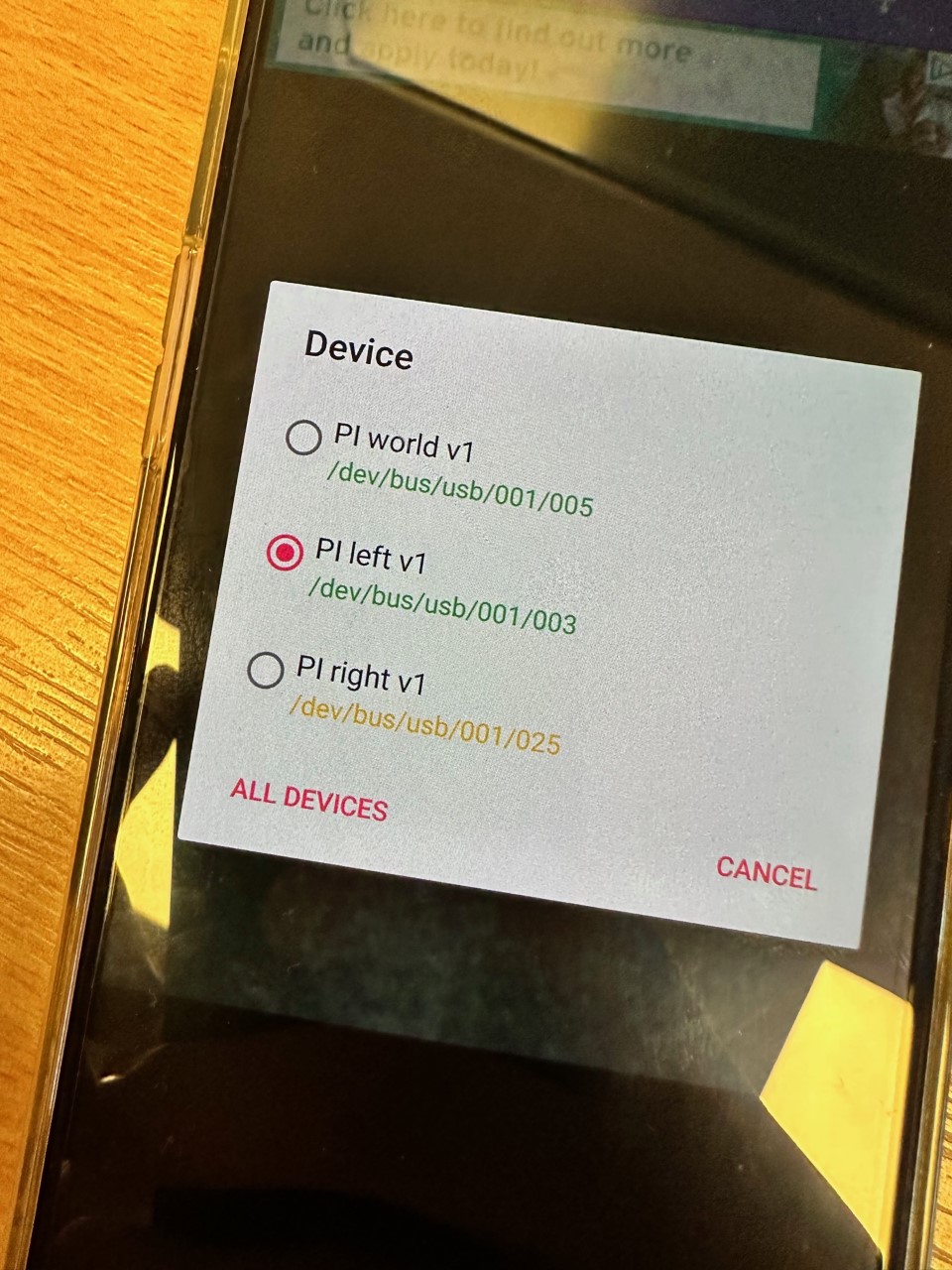
Please contact info@pupil-labs.com in this regard. Please mention this discord conversation as well as your order id or device serial number(s).
will do, thanks very much
@user-c8a63d Hi, I have pupil Invisible. Recently we are facing a calibration issue with the eye tracker. While calibrating, the red circle does not appear and many times the red circle is fluctuating too much while collecting data. Please suggest possible solutions for the same. I have tried changing the chord but it is still not working properly.
Hi @user-208db6! Could you elaborate a bit on the problems you are facing? When you say "calibrating" do you mean the offset correction feature? Would you be able to share a demo recording with [email removed] that demonstrates the fluctuating gaze circle?
Hi, I have a question : We forgot to switch to the good workspace for our experiment, and now I'm searching to change the recordings from a workspace to another on the cloud. I don't find how to do it on trhe doc. Thanks 😉
Hi @marc Yes I meant offset correction. you can find the link of the demonstration : https://drive.google.com/file/d/1oZbDeUu5UvRWoBbaMoOXLqejYhSsz-GY/view?usp=sharing
Thanks for the recording @user-208db6! There seems to be a hardware defect with the right eye camera in your device. Please contact [email removed] referencing this conversation to facilitate a repair.
Is there any indicator about pupil size?https://docs.pupil-labs.com/invisible/reference/export-formats.html
No, Pupil Invisible can not detect the pupil or measure its size.
Hi! I want to merge the gaze dataframe with both blinks and fixations. The fixation id within the gaze dataframe matches the timestamps from the fixation file. This means, that f.e. in the gaze dataframe fixation id 1.0 starts rougly at 1.2 seconds and ends at 2.0 seconds. This is similar to the start and end timestamp within the fixation file. However, for blinks it is not the same. Blink id 4 within the blink file starts at 4.0 seconds and ends at 4.48. Within the gaze dataframe, blink id 4 appears around 7 seconds. What am I missing here?
Can you elaborate as to what your time information is relative to?
So within the gaze dataframe I added the events column to it, meaning the time information is probably relative to them? We had two conditions and each condition in our paradigm was marked as "start_A/B and end_A/B" by using the real time api. I found the nearest timestamps for the events within gaze by using the bisect function. And then used some python code to add a new column in the gaze dataframe, so we know which gaze parameters match which event. I wanted to also add fixation and blink duration by matching the variables to the respective id (because both the gaze dataframe and the fixation/blink frame comes with an ID). Im not sure if this is what you ment by your question, but hopefully things are more clear
Hello, Is it possible to edit a video in to rwo recordings?
Hi, unfortunately, we don't have any ready-to-go tools to do that 😕
I recommend using Pupil Player's trim mark functionality to export sub-sections of the recording.
im performing an experiment on several participants and accidently didnt stop the video between two participants and i got one big video instead of two
on the app or at the cloud?
Apologies, I misunderstood. I was thinking about Pupil Core recordings, not Pupil Invisible recordings.
Pupil Player is a separate app that is usually used with Pupil Core. It has the functionality to export subsections of a recordings only, which Pupil Cloud currently does not. However, the export format of Pupil Player is different and combining exported data from Pupil Cloud and Pupil Player might be a bit cumbersome.
well so it is impossible to edit a video? i would like to use some enrichment and cut out the unrelevant parts of the videos. is it possible to somehow edit the videos ven with a video editing software and after re uploading them to the cloud?
It is currently not possible to export only a temporal section of a recording from cloud. You can only download the full recording. You can edit the scene video file with video editing software, but note that you'd manually have to cut the other data files, e.g. gaze data, as well. If you can tell us a bit about what analysis you are trying to do with the recordings, we might be able to give you additional advice on how to split up the data more easily.
well i conducted an experiment for the last 2 days at 2 branches of a restaurant in which we are trying to determine several parmeters on their beahvior at the restaruant and how they interact with the menu especially, what atracts their focus and other aspects of behavioral economic.
for that we gave the glasses for several clients who were mainly their first time on the restaurants and let them go through the entire process of reading the menu ordering and paying without telling them nothing about what the glasses do or how the should react in order to keep the experiment as natural as possible
so i have doazens of videos from which i want to get data but there is a great part of the video which is not relevant or i cant use for enrichment or analysis.
Hello, is there way to convert the co-ordinates of the webcam space to the image space?
@marc
I mean, if we are getting a certain co-ordinate, say(1768,878) as the location of the pixel(the part/point of the image at which it’s looking at), and placing the cursor at the same point on the same image gives (52,68), technically I mean how I can synchronize or maybe transform them? Can you please help?
or @papr , please help
Hi @user-e91538 👋. Would you be able to elaborate what you mean by 'webcam space'? Are you using the Pupil Invisible system or something else? Also note, we'd be grateful if you could avoid tagging multiple users in posts 🙂
It is possible to focus your enrichments on specific sections of a recording, e.g. the period when a client was looking at the menu. You can do this via 'events'. This is demonstrated in the Cloud Analysis Getting Started Guide: https://docs.pupil-labs.com/invisible/getting-started/analyse-recordings-in-pupil-cloud/#analyse-recordings-in-pupil-cloud If you haven't already, it's also worth checking out the Reference Image Mapper documentation, which has an example of mapping to a magazine page: https://docs.pupil-labs.com/invisible/explainers/enrichments/reference-image-mapper/#reference-image-mapper
Re: tagging. Noted, thanks for jumping in.. I mean the coordinate system of webcam and the image. I want to convert them, it’s used in pupil coordinate detection, not sure if that’s in Lab’s github…
Could you share a picture of your setup?
Papr, it’s not related to pupil labs code, but still, i think you all can help me. Csn I still send? 😊
Ok, got it. Feel free to send it anyway. 🙂
thanks a lot.. i will in a while:) in class..
hi, how is it possible to calculate in a video a how much percentage of the time is spent on each area in the video?
Hi! Once you have your Reference Image Mapper or Marker Mapper enrichment done, it is possible to export and access raw data that can be useful for this purpose. In this regard, take a look here to learn more about info offered by the various enrichments: https://docs.pupil-labs.com/invisible/reference/export-formats.html#export-formats
First of all, I'd suggest you to filter out cases where the AoI was not detected. Sometimes it might happen for several reasons - such as, motion blur. Depending on the enrichment you have performed, you can operate as follows:
Reference Image Mapper: if the reference image was not detected in the video at the given time, gaze position in reference image x (and y) will be empty. Filter out rows for empty values of such variable, and then compute the percentage of gaze detected in reference image = 1 across rows.
Marker Mapper: if the surface was not detected in the video at the given time, gaze position on surface x (and y) will be empty. Filter out rows for empty values of such variable, and then compute the percentage of gaze detected on surface = 1 across rows.
for example i divided the video in to a section the participant who is wearing the glasses is looking at a certain page and i want to calculate how much time is spent on each area in the page he is looking
is there a way to know that? or convert the heatmat generated by reference image mapper to percentage instead of colors?
To measure how long a subject has been looking at a specific object in its environment, like the page of a book, you need to track this object in the scene camera. If you know the objects coordinates in the scene camera, you can correlate it with the gaze data that also lives in scene camera coordinates. This process is generally called gaze mapping.
In Pupil Cloud we offer two enrichments to perform tracking like this:
Reference Image Mapper To use this, you'd have to take a reference image of the books page and a record scanning video (see the docs for details). The algorithm than automatically maps gaze data onto the reference image. So in this case you could just compare the number of samples that were successfully mapped to the page vs those that were not to get your estimate. We have successfully used the Reference Image Mapper to track pages of a magazine. I imagine a book could work as well, but you'd need to test this. https://docs.pupil-labs.com/invisible/explainers/enrichments/reference-image-mapper/
Marker Mapper For cases where the Reference Image Mapper does not suffice there is the Marker Mapper. For it to work you need to place Markers on the page, which can be tracked by the algorithm, so its a little bit more invasive. https://docs.pupil-labs.com/invisible/explainers/enrichments/marker-mapper/
Let me know if you have further questions!
Thank you for your reply!
does anyone know A way to combine several overlay files of heatmap generated from different sections into one file?
i have several results from different videos and would like to get 1 result combining all heatmaps. or alternatively using the reference image mapper enrichment with several sections instead of just 1
Just to confirm: It is always the same reference image, correct?
YES
You should be able to create a new reference image enrichment based on the "recording.begin/.end" events. It will include all sections.
But i am talking on sveral different recordings
An enrichment will always be computed on all recordings that belong to the corresponding project. You can add more than one recording to a project 🙂
Hi! I have a problem with loading a video in pupil player. On the app everything looks good, but if I drop it into the pupil player I get this error:
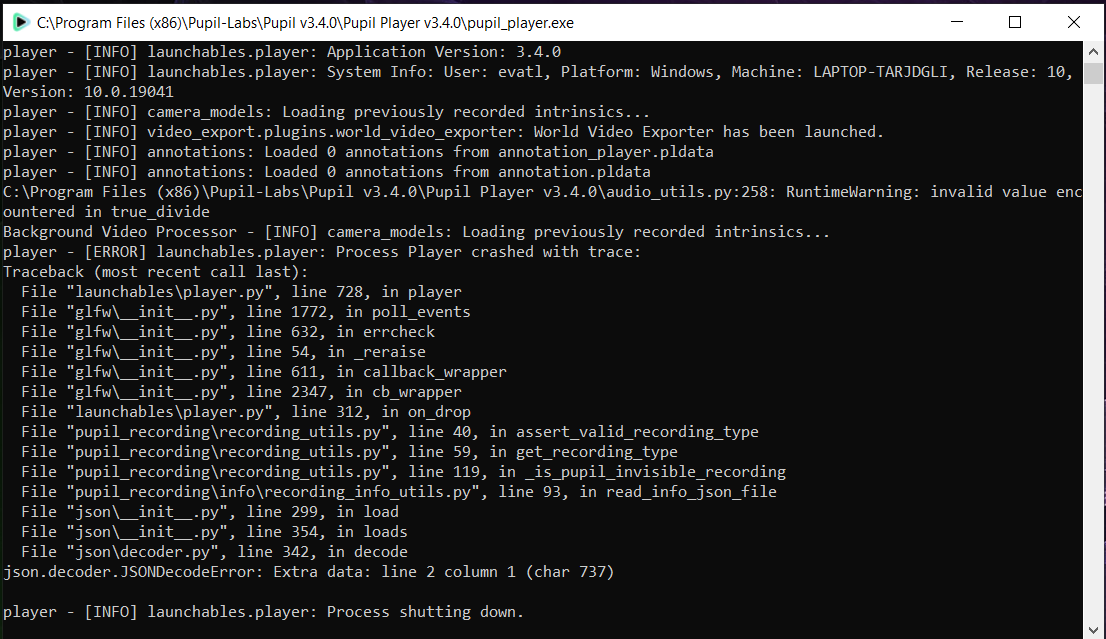
Hey, could you share the info.json file with us?
Yes, how should I share it?
In here is fine
Please open the file in notepad or a similar text editor and delete the second line and try again in Player
Yes it worked! Thank you
Hello
is there an api to download videos and interact with the pupil clouds?
Hi @user-87b92a! Yes, there is a basic API for Pupil Cloud, albeit it does lack better documentation. Downloading videos is a supported operation. See here: https://api.cloud.pupil-labs.com/
i saw for pupil core and i am looking for api for api to the pupil cloud
Hi team, we are going to do some data collection outdoors in the dark with the Invisibles. Are there any settings should adjust beforehand to optimize the recording?
Hi @user-ae76c9! The eye tracking should be unaffected. The device is actively illuminating the eyes using IR LEDs. The only issue could be the video recorded by the scene camera. In darkish environments the auto exposure will set long exposure times, which can lead to motion blur and a decrease in the framerate. But this is a general problem with cameras that can't really be solved with settings. So no, no configuration should be necessary!
Is there a reason the front facing camera on the invisible glasses would be removed?
it accidentally got shifted around during a test and the second half of the recording is just grey
I can't think of a reason why they'd be removable
Apologies as I'm sure this has been answered before (a quick search didn't find anything) - is there any way to download the dynamic scanpath video from pupil cloud (where the fixations shift to counteract head movement). This is such a good visualisation, am I missing something obvious?