
Hi @user-632640 👋. Do you mean in the context of remote eye tracking, i.e. having the cam mounted on or near a monitor, or head-mounted, i.e. close to the eye?
Hello everyone, I am interested to use the HTC Vive binocular add-on. Do we get eye-tracking data when using the binocular add-on? Can the binocular add-on also be used for Oculus Quest?
hello,? i am working with pupil diameter and i want to do baseline correction.. so someone has any idea how can I do it?
If it is methodological advise that you are looking for, I can recommend having a look at this https://www.researchgate.net/publication/335327223_Replicating_five_pupillometry_studies_of_Eckhard_Hess
Hi, is it possible to aggregate different heat maps from different recordings of the same surface?
Yes, but not within Pupil Player. You will need to export the gaze on surface data for each subject and aggregate it manually.
Hi, is there any problems with pupil cloud? Marker mapper enrichment (1 section, duration is 10 sec) is being analysed for 20 minutes so far...
Hi Pupil Labs, Just following up on this request. Is there any support for older Pupil Pro Binocular Rev 037 models? Thanks.
My Pupil Pro Binocular comes with two pupil cams. Should they both be streaming simultaneously? When I select the first eye, no problems. When I select the second camera for the second video feed, my first video feed jumps to the second window. I can't find a sequence or combination to get both pupil cams streaming simultaneously. Any help?
Hi, do they both have the same name in the selection menu?
If they indeed have the same name, please
~/pupil_capture_settings/plugins folder,The downloaded file will include an unique id that will help you identify the different cameras.
Hi Papr,
Thanks for your reply. I have completed your recommended procedure and all cameras are now showing with unique IDs however the behavior has not changed. My flow is as follows:
I am also experiencing intermittent crashes where the eye0 and eye1 windows crash/close (no error message on this event), my solution so far has been to fully close and reopen the entire program
additionally I am receiving the following error message (image attached) when starting the program, maybe it is related?
Thanks for your help!
Daniel

The attached error is to be expected. See https://docs.pupil-labs.com/core/software/pupil-capture/#camera-intrinsics-estimation for details.
Yeah. I was wondering if we can use the Pupil Capture with the LSL function to record its data when we launch a psychopy experiment.
For instance, some time ago I managed to integrate an EEG with psychopy using LabStreamLayer. I was wondering if the same can be done in a similar way, so that with LabRecorder I can save the information in an xdf file.
There are multiple possible solutions here. Could you tell me a bit about the kind of data that you are looking to record/analyse? This would allow me to give you a concrete recommendation.
if you have any information, it would be good
Hello, I am looking to utilize the pupil core software for eye tracking however I need to find a different small format IR camera. What requirements are needed for the video feed to process seamlessly with the software.
Hello! can someone please tell me what are the PC minimum requirements system for the installation of Pupil Labs software? Desktop, RAM, storage, minimum screen resolution.. Thanks in advance
Hi @user-e91538 Apple's silicon chips (like the M1 Air) work great with Pupil Core. If you prefer a PC, the key specs are CPU and RAM. Recommended specs are a recent generation Intel i7 CPU with 16GB of ram (but it will also work on a recent i5). The supported operative systems are: macOS (minimum v10.12.0), Linux (minimum Ubuntu 16.04 LTS), and Windows 10.
Does anyone else have problems with extremely long processing times for the cloud enrichment face mapping processing? I have a 15 min recording that has been at 75% since yesterday and still not done.
Hey, could you let me know the enrichment and workspace id?
I'm using Face Mapper. I have tried to use it on different projects (ef19b0f5-295b-4dce-92bd-22fecab05f5f and 3ad21ca5-7919-445a-b379-fa5bc7d3eb56), but none of them are done processing, however Raw Data Export is working just fine.
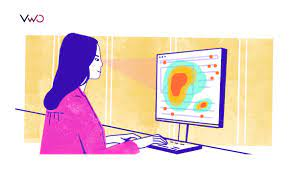
I would like to know how I can record the heatmap information for later analysis.
Ok, that means that you need surface-mapped gaze. The PsychoPy integration takes care of converting this type of gaze information into PsychoPy spatial coordinates https://psychopy.org/api/iohub/device/eyetracker_interface/PupilLabs_Core_Implementation_Notes.html#psychopy.iohub.devices.eyetracker.MonocularEyeSampleEvent.gaze_x
But Capture's LSL relay does not send this type of information. What you should be looking for is a LSL integration that runs part of your PsychoPy script and sends the PsychoPy-generated gaze data to LabRecorder. Unfortunately, I am not aware of a turn-key solution for this.
Hi, the issue should be resolved and your enrichment calculated. 🚀
Hmm, still indicates that it isn't done...

I am trying to visualize the position I am looking at in 3 dimensions using gaze_point_3d in gaze_positions.csv. Is the coordinate system of gaze_point_3d as shown in the figure? (Reference:https://docs.pupil-labs.com/core/terminology/#coordinate-system)
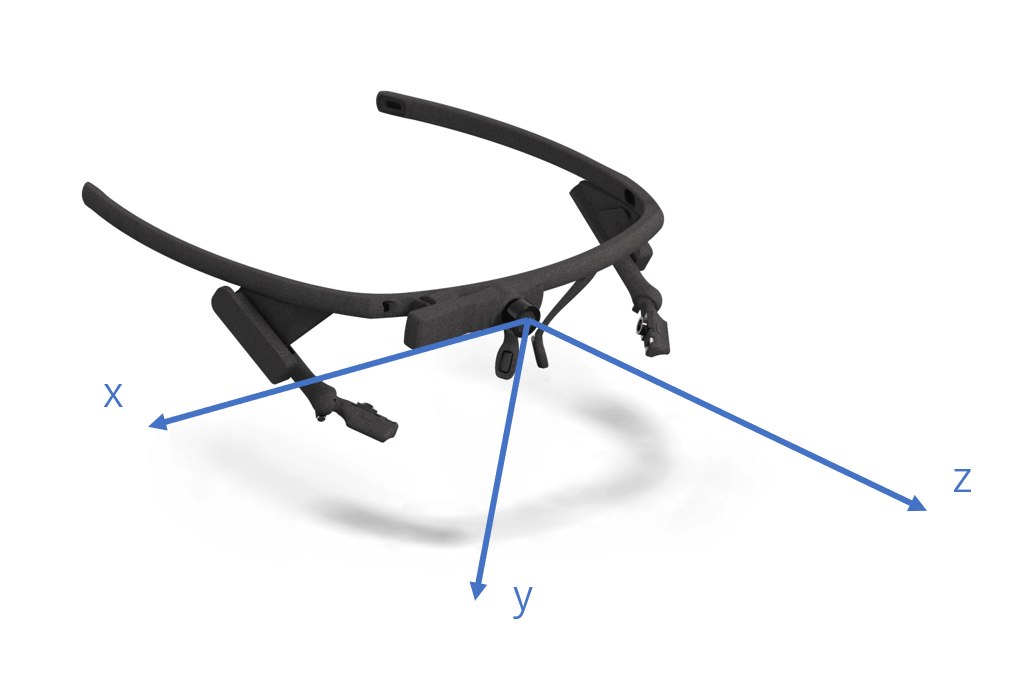
Hi @user-746d07 👋. That's correct
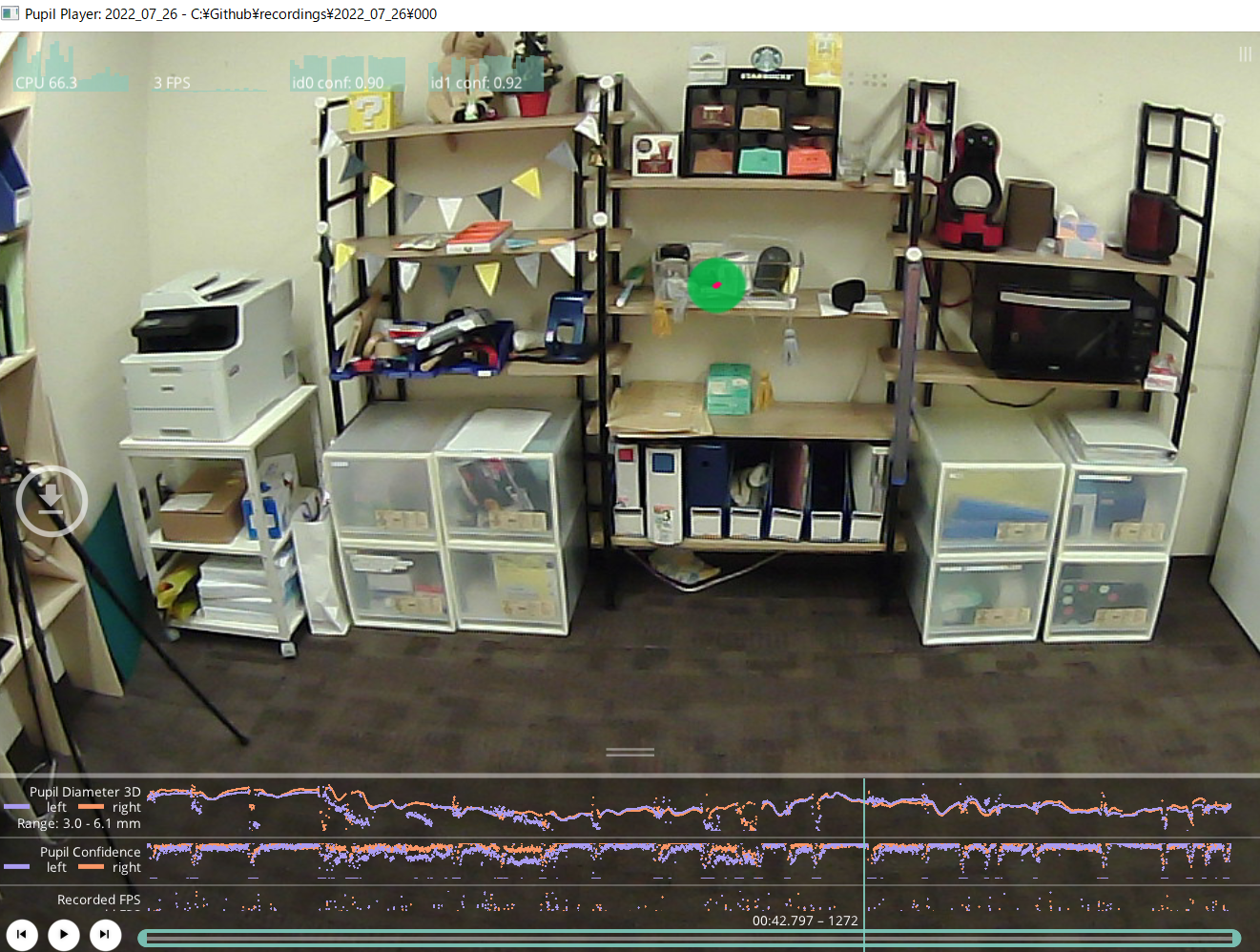
Thanks, I have done the gaze estimation as shown in this figure. The distance from the actual eye position to this shelf is approximately 2 meters. However, when I checked with gaze_point_3d_z in gaze_positions.csv, it is 500mm, which is a big difference. Why is this happening? I am currently calibrating using a computer at hand, is this bad?
The depth component of the gaze_point_3d is known to be less accurate at distances >0.5 meters. At these distances, small errors in the per-eye gaze ray estimations cause large errors in the depth calculation (ray intersection)
Good afternoon, I'm using Pupil Capture and running into an issue where the camera for one of the pupils keeps disconnecting and reconnecting, with a lot of dropped frames between loading. The window itself seems to be freezing quite often when I click on it as well. The other eye window works smoothly. I noticed a user posting about a similar issue - I assumed it's similar and was a hardware issue with the specific eye camera. However, the freezing seems to jump in between eye cameras, where one works for a period of time while the other suffers disconnections and freezing. One of the cameras is also heating up
This is the console log information
Estimated / selected altsetting bandwith : 151 / 256. !!!!Packets per transfer = 32 frameInterval = 82712 Estimated / selected altsetting bandwith : 151 / 256. !!!!Packets per transfer = 32 frameInterval = 82712 eye1 - [WARNING] video_capture.uvc_backend: Camera disconnected. Reconnecting... eye1 - [INFO] video_capture.uvc_backend: Found device. Pupil Cam2 ID1. eye0 - [WARNING] video_capture.uvc_backend: Camera disconnected. Reconnecting... eye0 - [INFO] video_capture.uvc_backend: Found device. Pupil Cam2 ID1. Estimated / selected altsetting bandwith : 151 / 256. !!!!Packets per transfer = 32 frameInterval = 82712
Hi, what kind of Pupil Core headset do you use? Can you please try restarting with default settings in the general settings menu?
Hi! Late update - finally had enough time to sit down and work with it - but the restart worked. Thank you so much for pointing that out
Good morning, I am planning to measure the pupil light reflex response. Is it possible to synchronise the world camera with the eye camera in order to get the exact timestamp, when the light reflex starts and an idea about the light intensity?
Hi check out https://pyplr.github.io/cvd_pupillometry/04_overview.html
Hello, I am doing a binocular rivalry experiment where each eye received a different image while I record their pupil diameter. I have only run two subjects however I keep seeing that their dominant eye has a larger pupil than their dominant eye (3mm vs 2mm). Is it possible to see this difference in pupil size across the two eyes? Moreover, am I seeing a real measure due to visual processing or do you think this is a technical/hardware problem with the pupil measurement? I have attached the data from one subject who is left eye dominant. Thank you in advance!
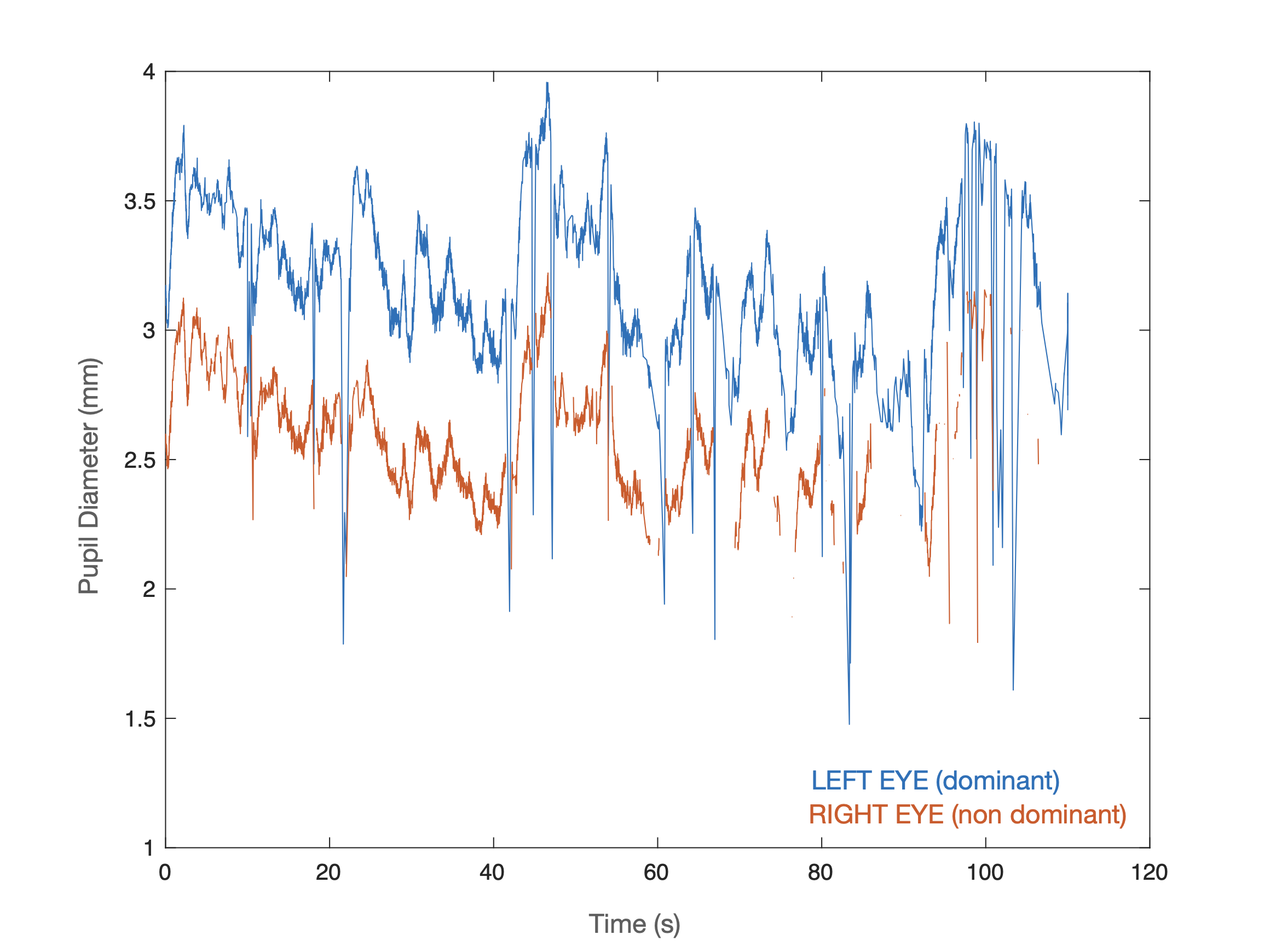
Yes, it is very much possible that the difference is a result of small eye model fitting inaccuracies. I recommend repeating the same trial multiple times and resetting+refitting the eye models between each trial. If you see the same difference across all trials, then it likely that you are measuring a physiological effect.
Yes, a white boarder is already included. I have experimented with the width of the white boarders in the meantime. Unfortunately, without success. I need to tag different software windows within the monitors because I want to measure different times and gaze changes etc. So, tagging the monitor corners is unfortunately only a stopgap solution, which would be quite disappointing
You can define multiple surfaces based on the same set of markers. Doesn't solve the time window issue though.
I am really at a loss here, went into the project ef19b0f5-295b-4dce-92bd-22fecab05f5f, which was done calculating on the 10th after you wrote, but now it's again still calculating. How is this possible? It is re-doing the face mapping every time you go into Enrichment?

Thanks for getting in touch. This should not be the case. I will forward your message to the Cloud team.
Hi everyone! Could you say please, if it is possible to turn the World camera recording off remotely? I haven't found this issue using search, so I hope it's not some sort of a cliché.
Hi, yes, that should be possible by sending this notification to Capture:
{
    "topic": "notify.start_plugin",
    "subject": "start_plugin",
    "name": "UVC_Source",
    "args": {
        "frame_size": (1270, 800),
        "frame_rate": 30,
        "name": "No scene camera",
    },
}
Many many thanks, it works! Have a lovely day!
Hi again! I'd like to follow up. This code fully turns the World camera off, but is it possible to make it work without recording? Our participants sit in the next room so it was very helpful to see what is going on on the screen during experiment. Thank you in advance
Hello everyone !
As part of our study, we assess the fixations within several AOI. The subjects, seating in front of the screen, should search some objects displayed on it.
Can you advise us about the best way to calculate the margin of visual error according to the distance between the subject and the screen.
One more thing, we need to expand the field of AOI to calculate the matches between AOI and subject's fixations (owed to some questions about peripheral vision). Can you give us any suggestions about how far we can go to expand this margin ?
Thanks for your help!
Hello, In one of my experiment I have connected Pupil Labs with Psychopy. Previously, I was getting proper data but today when I was trying to perform the experiment I was continuously getting errors like
" AttributeError: 'ioHubDevices" object has no attribute "tracker"
" AttributeError: 'NoneType" object has no attribute "getIOHubDeviceClass"
My eyetracker is properly connected with my PC. What would be the reason of this error? And how I can fix that?
Hey! Can you please check if you get the same issue with the latest version of PsychoPy, too?
Yes, I have reinstalled the version right now. It is throwing me same error.
Can you share the psychopy experiment file with me?
Will pupil core be well suited to an application where the subject wearing the device is turning their head to the side to monitor an automated process (say on a screen) and then turn back the other way to do some hands on tasks? This cycle would be repeated many times.
Yes, it would. Even though, Pupil Invisible might be the better fit.
Sure, on PVT chat Or Should I mail you?
Email is best. [email removed]
hello guys
i have one question
how can i get software catalogu of pupil core
You can download Pupil Core software via our documentation https://docs.pupil-labs.com/core/
is it pupilcore software catalogu?
The download will get you Pupil Capture, Pupil Service, and Pupil Player. Are you just looking for an overview of the available software?
hm... just i need pdf file
like technical sheet?
You can find general tech specs here: https://pupil-labs.com/products/core/tech-specs/
Unfortunately, we don't have a dedicate catalog for our software. This is a high-level overview over what is available for Pupil Core:
Pupil Capture - https://docs.pupil-labs.com/core/software/pupil-capture/Connect Pupil Core to a desktop or laptop computer. View, record and stream real-time gaze and pupil data. Interface with other devices with our network API.
Pupil Player - https://docs.pupil-labs.com/core/software/pupil-player/Drag and drop single recordings into Pupil Player. Build visualisations, enrich data with analysis plugins, and export raw data and results.
Thank you for sharing the file. Could you share the full trace back?
here is the full traceback:
2.1528 WARNING We strongly recommend you activate the PTB sound engine in PsychoPy prefs as the preferred audio engine. Its timing is vastly superior. Your prefs are currently set to use ['sounddevice', 'PTB', 'pyo', 'pygame'] (in that order). File "A:\RESEARCH\Relationship_eye_movememt\Code\Psychopy_main_exp\main_exp_updated_lastrun.py", line 1032, in calibration.run() File "C:\Program Files\PsychoPy\lib\site-packages\psychopy\hardware\eyetracker.py", line 178, in run tracker = self.eyetracker.getIOHubDeviceClass(full=True) AttributeError: 'NoneType' object has no attribute 'getIOHubDeviceClass' ################ Experiment ended with exit code 1 [pid:18800] ################# 307.0638 INFO Loaded monitor calibration from ['2022_04_12 17:02']
@papr# I don't know if this is a right direction or not, but by looking at the Eyetracker.py file inside the Psychopy folder. I can see conditional statements inside a Function definition for other eye trackers like Eyelink, Tobii, Gazepoint, Mouse, Sr research but no statement for Pupil Labs.
okay thanks papr ^^
have a nice day!!~
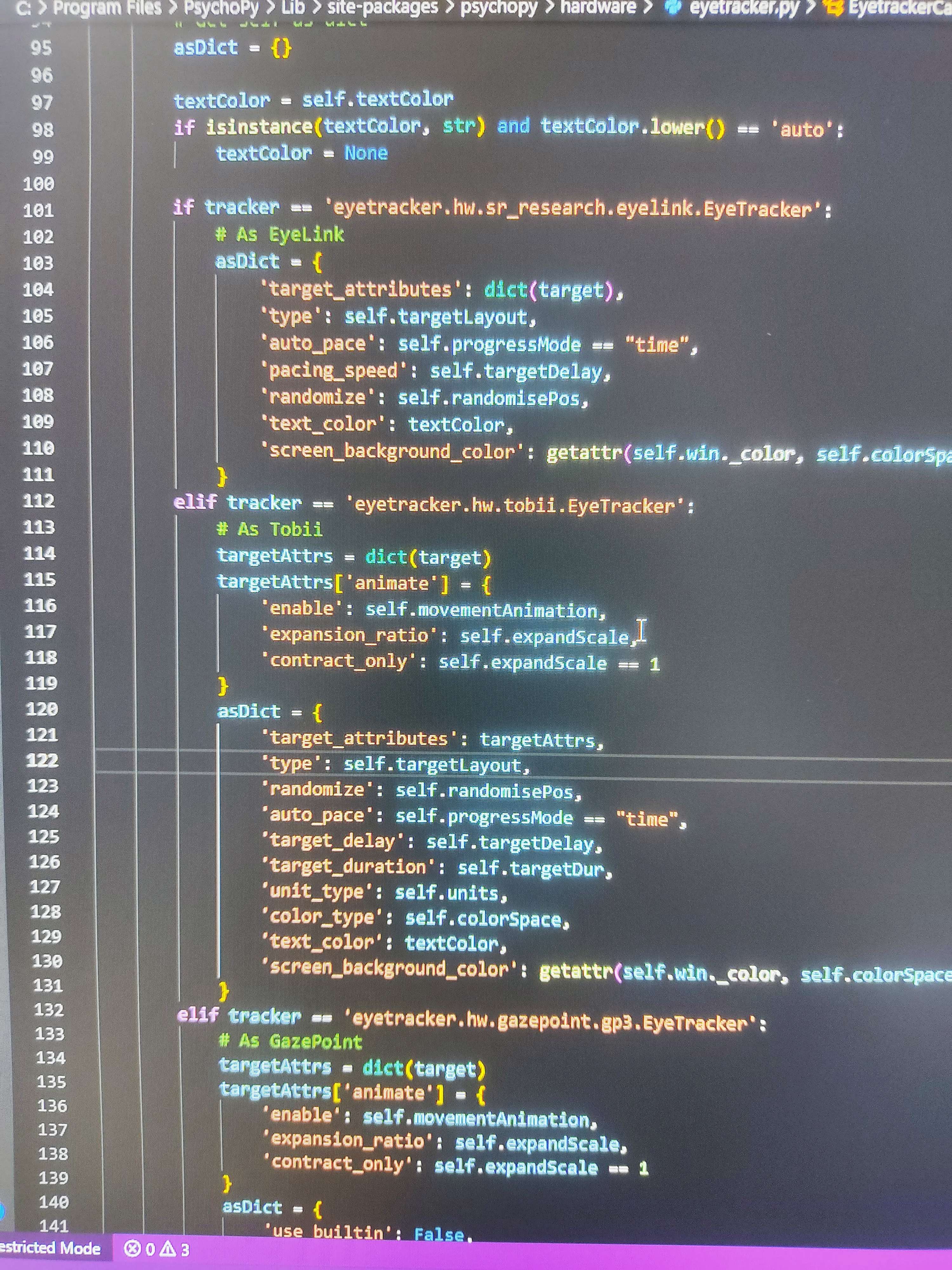
This file is just for the in-app calibration. It is not meant for Pupil Labs. Have you made sure that Pupil Capture is running and that PsychoPy is setup correctly to connect to it?
Yes, even I have tried with two different computers , results are same.
Then it might be an issue with the PsychoPy bundle. Please contact the maintainers.
To setup Pupil Labs with Psychopy what necessary steps I need to follow?
(1) Calibration (2) April tag surface declaration (3) Settings on the Psychopy (choose eye tracker and details) (4) Input as ioHub
Pupil capture was turned onn thoughout the experiment.
Do I miss anything?
P.s: I have recorded a pilot data with same settings couple of hours back to the error. It was working fine. But after couple of hours it was throwing the error.
When you run the experiment, the psychopy window should minimize and show the Pupil Capture calibration. i.e. (1) should not be necessary. Generally, these steps look correct. You can check out the Network API menu in Capture to verify that the address/port number did not change.
i had the same issue and i talked to psychopy about it and they had a fix that they will release in the next update but here is the solution they send me :
I have a fix for you! As expected, a very quick 'this thing isn't in this folder' bug was causing your issue! This will be fixed automatically in the next release of PsychoPy, but so that you can get up and running now you'll just need to follow a couple of steps:
Please save an unzipped copy of the folder I've attached here to your desktop
Navigate to: C:\Program Files\PsychoPy\Lib\site-packages\psychopy\iohub\devices\eyetracker\hw\pupil_labs (please note this is assuming that you've downloaded PsychoPy to your Program Files. If you've saved it somewhere else please navigate via that path instead)
Replace the entire pupil_labs folder that you have there currently, with the pupil_labs folder that you've now just saved to your desktop. Please make sure that the folder is named exactly the same as the previous one.
The module should now work as expected.
Nice! Thanks for sharing!
Thank you so much @user-f590a4
i hope this will work for you aswell 🙂
no problem 🙂
You mean, to have the scene camera running and streaming but not recording it?
Right!
You can turn off scene video recording in the Recorder menu
I can't believe it was that easy. Thank you very much!
I just have a very dumb question, but is there a pdf version of the user guide? I could certainly use a pdf copy of it
So is that a no?
Hi @user-660f48 👋. We don't have a complete pdf version of the userguide - everything is contained in the docs.pupil-labs.com pages
Understood, many thanks for your reply.
Good afternoon! Can you tell me if this can be fixed by hand or is there some method from pupil, where you can take into account the dynamically changing distance?
Let me correct my statement. If you see the gaze_point_3d as a vector, then its direction is accurate but its length is not. Correcting the z-component alone would change the direction. The software only takes into account the direction, e.g. when projecting the vector into the image (norm_pos values). The length of the vector is not used for any of the default plugins. There is no way to manually fix the values by hand other than after the export to csv.
Hello. Can I use Pupil core even if I wear glasses? If not, can I use pupil core if I wear contact lenses?
Hey! Using it with glasses is tricky. With contact lenses, it is no problem.
Thank you!
Hey, I run some of the plugins and had some detections done. After finishing this the data was exported automatically... but ehm. How can I open these files? What do they tell me? I am a but confused. I also tried to lay a heatmap over the video but it didnt work.
Hi @user-e91538. Data are exported as .csv files which you can open in, e.g. spreadsheet software. Checkout the online docs for an overview of analysis plugins and data exports: Analysis Plugins - https://docs.pupil-labs.com/core/software/pupil-player/#plugins Raw data exporter - https://docs.pupil-labs.com/core/software/pupil-player/#raw-data-exporter
bit*
To generate heatmaps, you'll need to use the Surface Tracker Plugin: https://docs.pupil-labs.com/core/software/pupil-player/#surface-tracker
I have that plugin and I tried to start it but it told me that it wasnt possible to add any new surfaces
I will try again with the guide you just sent me
I might come back to you. If not, I was successfull 😄
Okay I already fail with adding a new surface. It keeps telling me that there no markers in the image so I cannot add a new surface
Hi @user-e91538 , are you using the right family of markers https://docs.pupil-labs.com/core/software/pupil-capture/#markers ? If so, please keep in mind, that you will need to have at least 3 markers to properly detect a surface. Also, if you are printing them, please consider that you should include some white margins, so that they can be properly detected.
okay. I might get my problem. I didnt print any markers and put them around the screen. So of course I dont have any markers in my video/image. Ergo I cannot generate a heatpmap.
Markers are of course a pre-requisite: https://docs.pupil-labs.com/core/software/pupil-capture/#surface-tracking. We always recommend reading the docs and piloting prior to a testing session, but appreciate that ideas for data analysis often arise post-hoc 🙂. Feel free to ask questions on here in prep for any future testing!
Would have been helpful to know that before. Now it is too late as I cannot run that experiment again. Too sad,
I just thought I could select a frame in the video which I set as a "marker".
I remember that the Pupil Core came without a physical handbook. That might be something! I know you have everything on your homepage. But maybe you could send a little checklist or whatever with the glasses. So people initially know what to do before testing.
Now I know better. Which unfortunately doesnt help me very much 😦
@user-e91538 Not sure if this third-party plugin will work with the latest Player version, and how well it would work for your use case, but it might be worth a try https://github.com/cpicanco/pupil-plugin-and-example-data
Or maybe differently: I just saw that there is a Pupil Cloud. That sounded interesting to me but it is only for Pupil invisible? It sounded easier to handle and analyse data. Maybe you could preset a kind of a little questionnaire before actually buying/deciding which Pupil glasses is best for the purpose and based on that questionnaire you could recommend core or invisible.
thank you!
Hm it seems that this plugin doesnt work anymore. I followed the steps and copied the file to the plugin folder but the "screen tracker offline" plugin doesnt appear in pupil player
Looks like the plugin hasn't been updated for a while now so that's not totally unexpected
Yes, Pupil Cloud is only compatible with Pupil Invisible. Invisible certainly has benefits for a lot of applications, and it is very easy to use. If you're interested in learning more about Invisible, you can reach out to [email removed]
well, as I said I cannot run the experiment again so now I have to work with the data I have with Core.
are there any other third party plugins I could try? Any recommendations?
Hello, I am trying to analyze a HDF5 file recorded through Psychopy and Pupil core. But I am getting no values. What could be the possible reason for that ?
(1) I have clicked on the Check mark 'hdf5 'on the psychopy settings
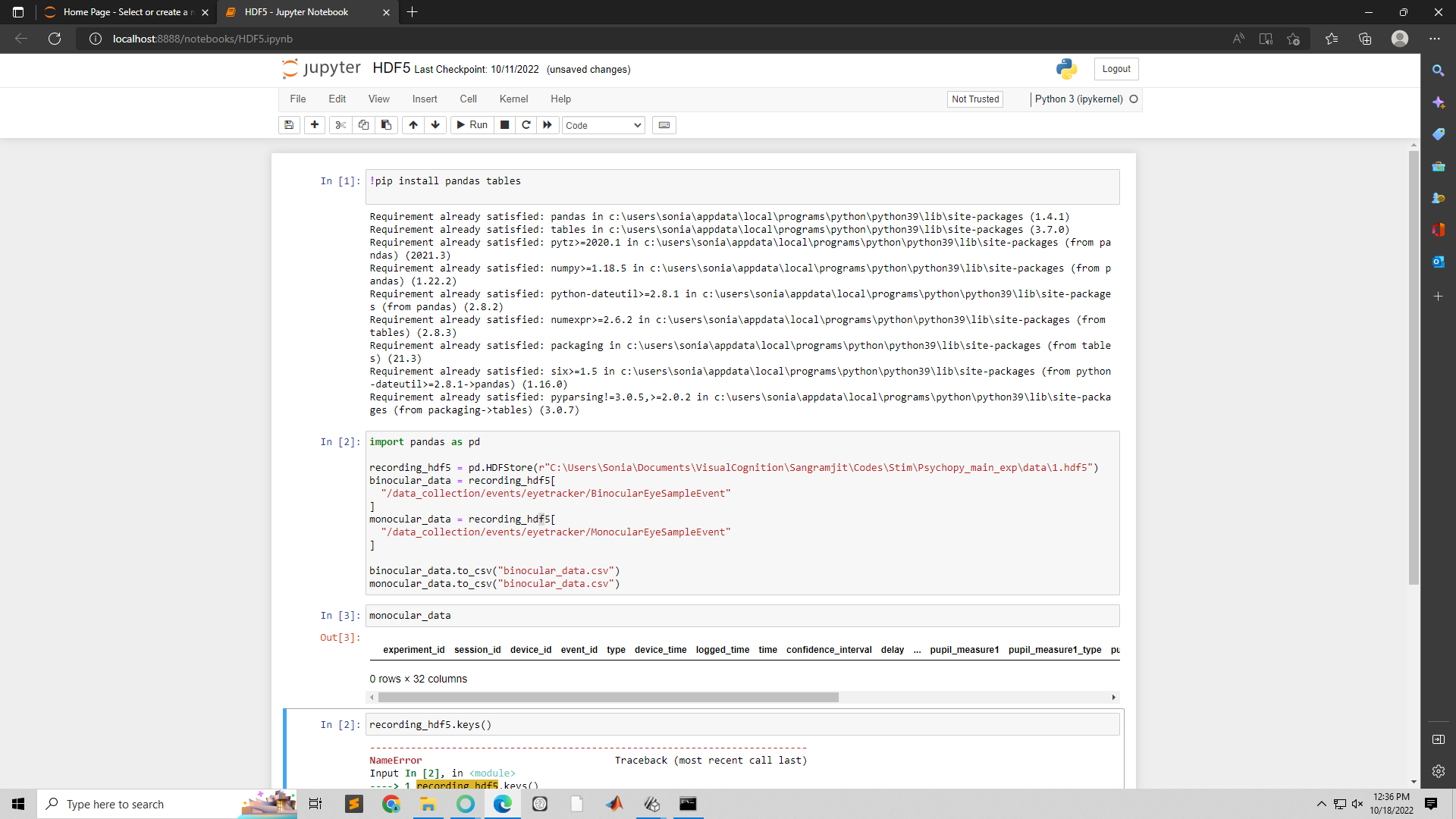
Let's continue discussing this here https://discord.com/channels/285728493612957698/973685431495426148
Hi! @papr I Hope you are doing great. While exporting data through the pupil player or API, I noticed that the timestamps for the pupil data and timestamps for the gaze data are different. Do you know any specific reasons behind this? Is it possible, or is there any way to get both pupil and gaze data with the same timestamp?
Binocular gaze samples inherit the mean timestamp of their two Base datums. Check out the base_data field for the corresponding Base timestamps
The differences are not in seconds but in milliseconds.
Hii, i wanted to ask how can i find saccades from the data exported (using pupil player). I am able to find the fixations, eye blinks, gaze positions csvs. I tried looking online but was unable to find any plugin and code for the same. A humble request to please guide how to find saccades.
Hi @user-b2d705 👋. We don't classify saccades in our software. Check out this message for further details: https://discord.com/channels/285728493612957698/285728493612957698/831795883007016981
Hello, everyone. In "gaze_positions.csv", I'm tyring to project the "gaze_point_3d_x", "gaze_point_3d_y", and "gaze_point_3d_z" to the 2d images accourding to camera intrinsics. However, I found the point(yellow point) did not matched with the result(green circle) of the "Pupil Player". But the point drew by "nom_pos_x" and "nom_pos_y" could match with the result of the "Pupil Player". Dose that mean the 3d gaze point is different from 2d gaze point? Or the 2d gaze point is not obtained by projecting 3d gaze point? Thanks.
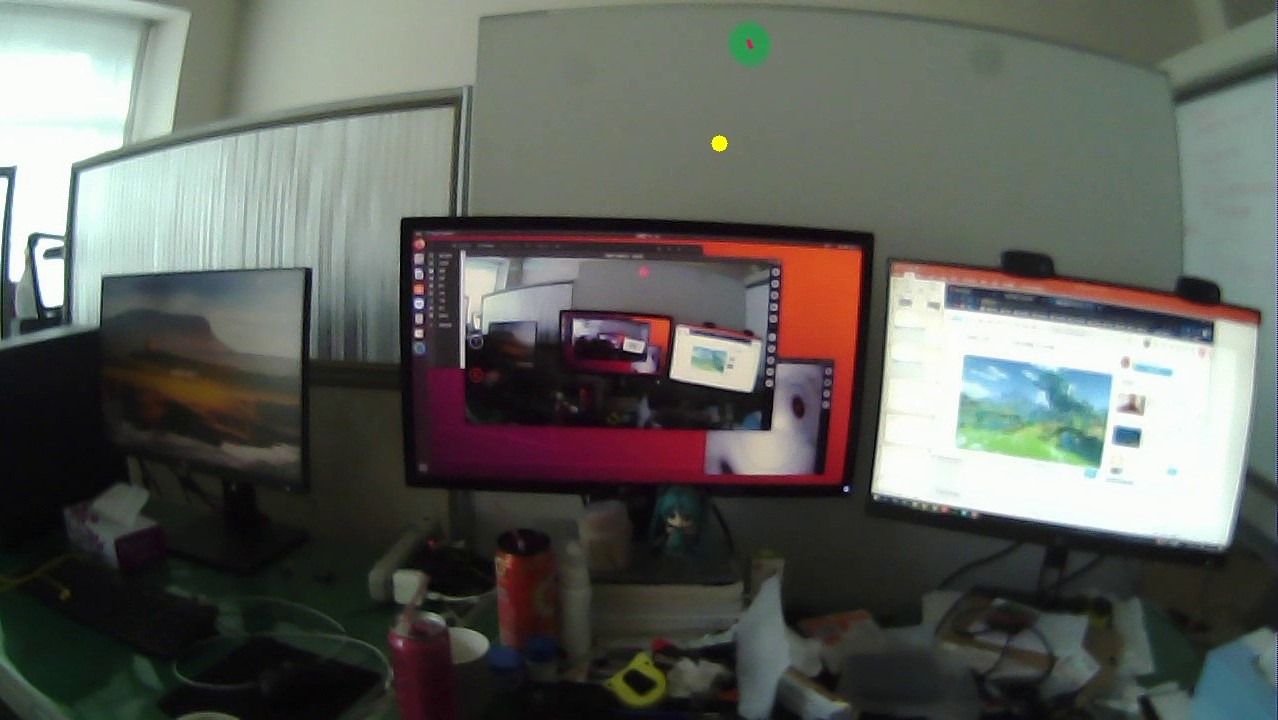
Hi @user-dfd400. gaze_point_3d is the intersection of both eyes' direction vectors (gaze_normal0/1).
The 3d point is projected onto the camera image plane using the camera intrinsics, thus yielding 2d gaze (norm_pos). View the code for binocular case here: https://github.com/pupil-labs/pupil/blob/eb8c2324f3fd558858ce33f3816972d93e02fcc6/pupil_src/shared_modules/gaze_mapping/gazer_3d/gazer_headset.py#L301
Thank you, I see.😆
Yeah, I am trying to use this community example, but this is giving dependencies issues 😦
It might be worth reaching out to the author
is there anything else that can be used
Pupil Core exposes a lot of raw data that you could use to implement your own classifier. Check out this message for reference: https://discord.com/channels/285728493612957698/285728493612957698/936235912696852490
Thanks
Hello all, I would like to know if it is possible with Pupil Capture + Surface Tracker + Pupil Player to do that. My first experiment was to ask participants to see projected objects using a video projector and then record the gaze direction of the participants. After the experiment, I collected the data and I compared the position of the projected objects and the gaze directions. In my second experiment, I will ask the participants to see 3D projected objects. The 3D projected objects will be at the same position (x, y), but with different depths (near / far). Could the Pupil Capture + Surface Tracker + Pupil Player do that? The problem is that Pupil Player only record the norm position (x, y), without z. If you have any suggestions ? Thanks in advance 🙂
How would you project those 3D objects? like anaglyphs/shutter glasses? is the physical distance changing or only the perceived one? What would be the distances?
I will use a 3D video Projector and the participants will wear 3D glasses
The distance will be the same, but not the perception
The distance will be around 2 meters
Core offers you gaze_point_3d in the gaze_positions.csv file as the intersection of both eyes' direction vectors (gaze_normal0/1). But at distances bigger than 0.5m this is known to be less accurate. That said, if you look at the wall and define the surface, you can use left and right eye disparities to estimate the Z component.
If the 3d projection is based on anaglyphic glasses you may want check if any of the filters block any part of the IR spectrum before using them with Core. If they are based on flickering (shutter glasses) you might loose the tracking of one of the eyes when occluded. I hope this helps!
In other word, is the distance limit of 2 metes valid for all scenarios?
Ok for the 3d glasses
Thank you! About the accuracy, for the case of normal usage (no 3D), just some projected 2D objects, the accuracy will be enough since I do not make an extra computation to find the z? even if the distance is still around 2 m?
Hi all, I've been meaning to calculate saccades now in my dataset. I have been at the messages in discord and found Teresa Canasbajo's open-source code and Salvucci & Goldberg's paper on the different types of algorithms to detect fixations and saccades. So, my question is do we absolutely need blinks for the code to work? We only collected data from the right eye. Is it possible to calculate blinks if you have right eye data? Also, we used version 1.11.4 to collect data and version 2.5.0 to process this data. Are we affected by some sort of data bug (just saw the release notes) that will affect our 3d circle radius values in pupil poisitions?
Hi, can you link me to the particular release that mentions the bug?
Hi @user-80123a! To further help you, it would be probably best, if you could share what is your hypothesis or end goal here. Like, do you plan to compare convergence between those conditions? How does gaze direction changes? Do you want to measure stereopsis?
Hi thank you! My work mainly consists in developing a software able to (1) extract the X, Y and Z coordinates of the gaze position on the surface for each eye (left / right), for the two situations (Z_near / Z_far) (2) compare the position (X, Y) of the eye_left / eye_right for Z_near / Z_far. (3) Present the disparities resulting from Z_near and Z_far.
@user-80123a I have this for you to get you going. This is how you can compute the Z component of a screen based on the image disparities from right (OD) and left eye(OS), you can use a similar principle by assuming gaze coordinates from left and right eye on the surfaces, represent the left and right image. I hope this helps.
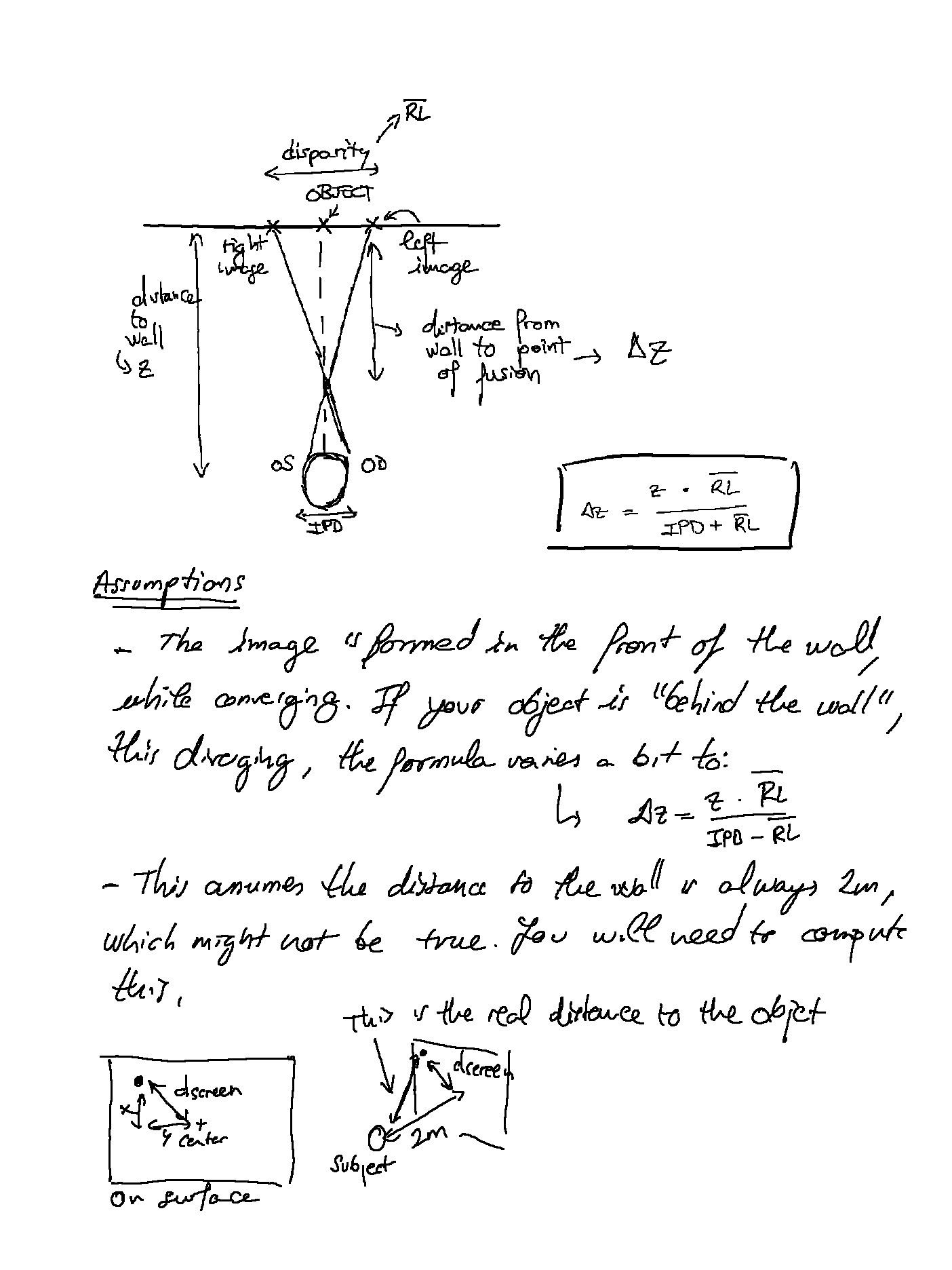
@user-d407c1 Thank you 🙂
With the second assumption I meant that you will need to change "z" in the formula to be more accurate, as the distance from the target to the subject may vary (especially if the screen or wall where is projected is big). Objects on the corners will be further away than if they were presented in the center (assuming the participant is centred)
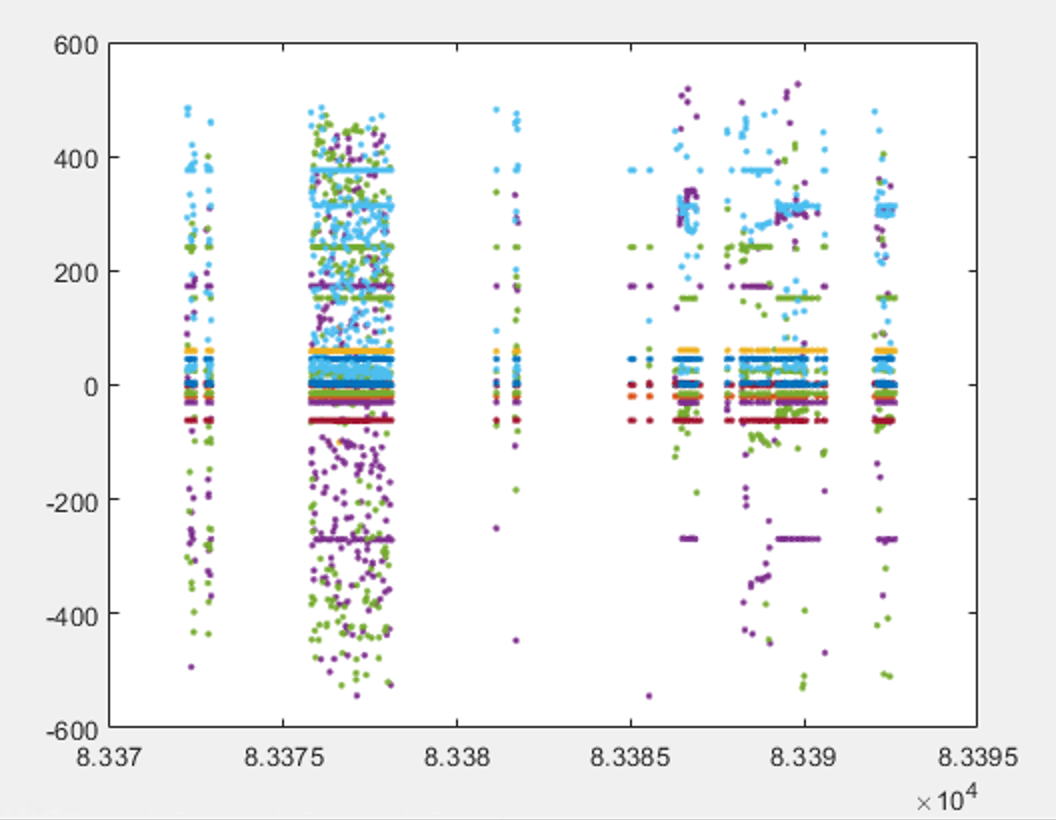
Hi all, I installed everything to have the pupil data going to LSL. apparently everything was going well. However, when pulling chunks from Matlab I have always a lot of NaN values and therefore missing data. Any suggestion what to change to fix this? The attached figure is just the plot of all raw values from the LSL pupil_capture stream agains its time stamps. I really appreciate your help!
Hello again, I would like to ask how to get the 3D data (X, Y, Z) with Pupil Player, when using the plugin dual-monocular. I already selected the Dual-monocular 3D on the Pupil Player, and selected the Post-Hoc Gaze Calibration in the Pupil Player. I did not see a difference when I activated or deactivated the plugin. Thanks in advance.
Did you redo the calibration and recomputed the gaze mapping after switching to Dual-monocular?
I did not redo the calibration. So I have to do the calibration from Pupil Player? Is that possible?
The post-hoc calibration in Player has three parts:
You need to set up each of them correctly to get post-hoc calibrated gaze. See https://docs.pupil-labs.com/core/software/pupil-player/#gaze-data-and-post-hoc-calibration
Make sure to press the Calculate buttons if you change something.
Could you share the xdf file with me s.t. I can have a look?
I made a new recording since I don't have an xdf of that same plot (attached). Also adding a brief 'pull_chunk()' from matlab with p=pupil data and t=timestamps.
Hii, I wanted to ask, in the gaze_positions.csv generated after export, the gaze_point_3d_x are the coordinates in which unit. I wanted to calculate the distance between them, so will the distance be in cm?
Also in the fixations.csv, what is the unit of duration column (milli-seconds)?
Hello I have a problem. I don't know how to set the software so that the red dot can be displayed again. Let the red dot show up on the screen, in the world cam video.@papr
In Capture, to get gaze, you need to run the calibration first. You can find the getting started guide in our online documentation
I used an eye cam and a world cam.
Would you please provide a guide for using the pupil-capture software for the first time?
@papr
@@user-c8a63d****@user-53a8c4****@user-a28f3d
Please refrain from tagging a lot of people. Please only tag someone e.g. if you are referring to somebody that you are in an active conversation with.
@user-b2d705Hi , Do you make the instrument by yourself or buy the instrument?
Go to the general settings and click the Restart with defaults button
I've done that, but there's still no red dot
Sorry, I seldom use this software, I don't know how to use this software better
Does the red dot appear after calibration? If I don't calibrate, do I not get a red dot?
The red dot represents the point that you are looking at (gaze). To get it, a successful calibration is required. And that in turn needs good pupil detection. Check out the getting started guide for details.
Usually yes. In some cases, an old calibration might be restored. But it is likely that it is inaccurate.
I only need to use one world-cam and one eye-cam. Is there any recommended Settings for capture software? I just need to get the position of the red dot.@papr
Default settings are sufficient for this
I would like to confirm that the default configuration of capture is OK when the software is installed.
Here are the steps I will take in the future:
I choose to open world-cam and eye 1 /or eye 0
Click "C" of the software for calibration
After the calibration is completed, a red dot will appear on the screen
That are the steps within the software. But you might also need to adjust the camera positions to ensure pupil detection (the input for the calibration) works as expected
@papr
@paprok , thank you!!!
The software doesn't recognize the pupil, doesn't show the red circle. @papr
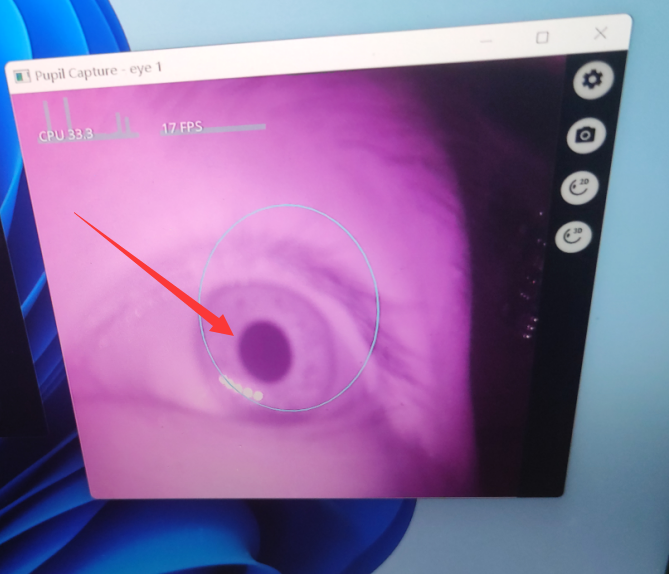
https://docs.pupil-labs.com/core/#_3-check-pupil-detection please see the videos here.
To improve the result, you might also want to change the eye windows region of interest. Go to the eye window settings, set mode to ROI and drag the rectangle such that it excludes any dark areas that are not your pupil.
Yes, I'm trying to identify the pupil
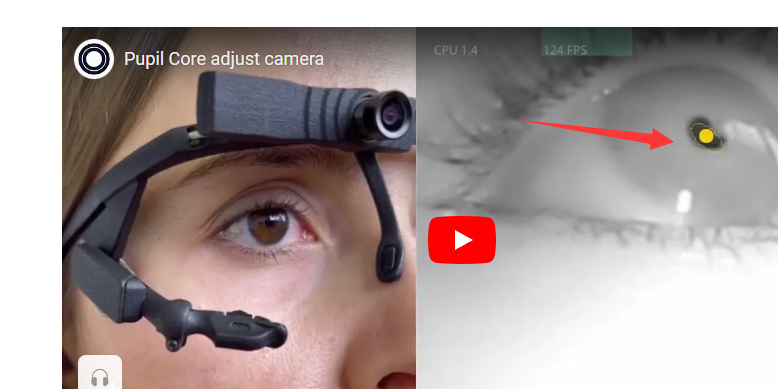
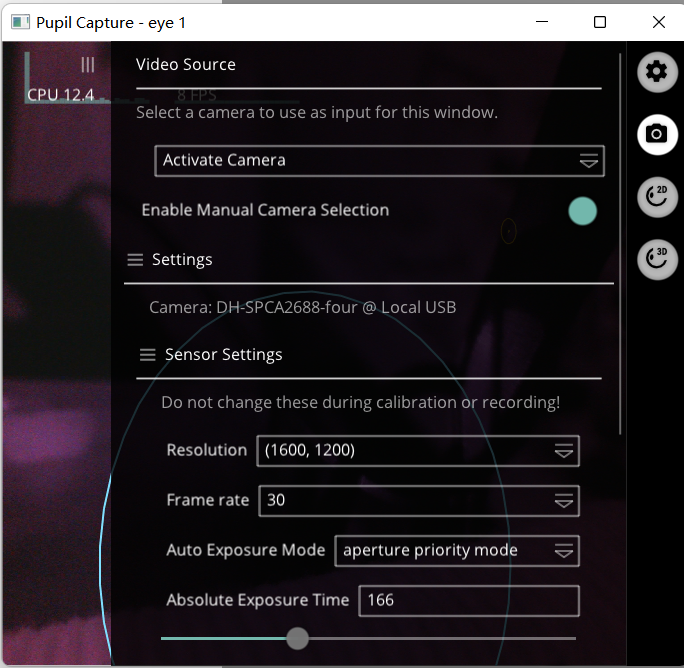
This is the setting of my eye-1, is it correct?@papr
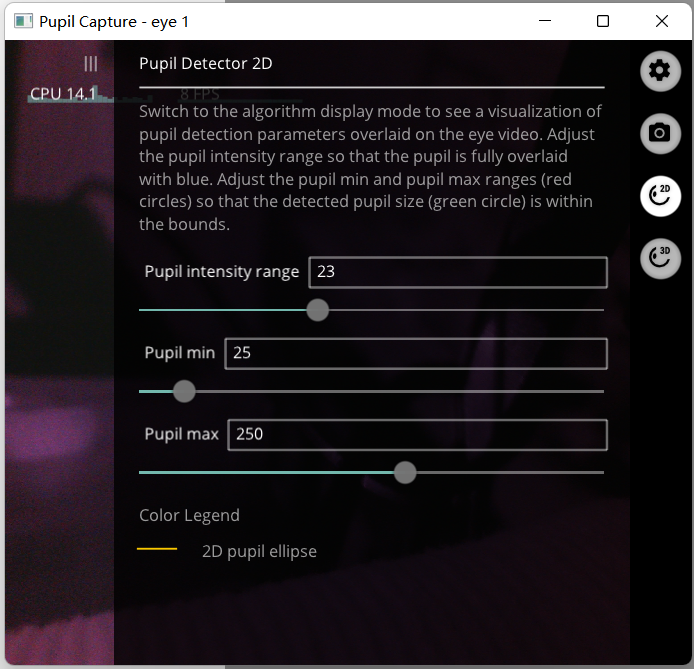
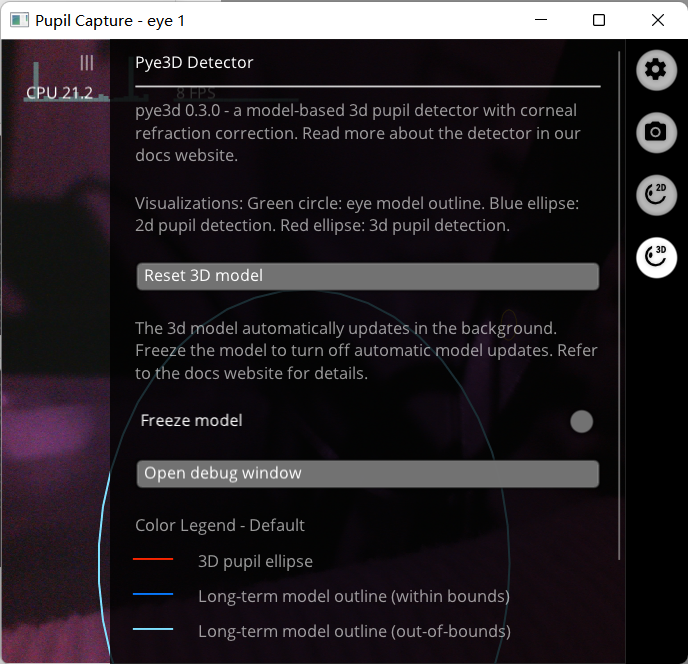
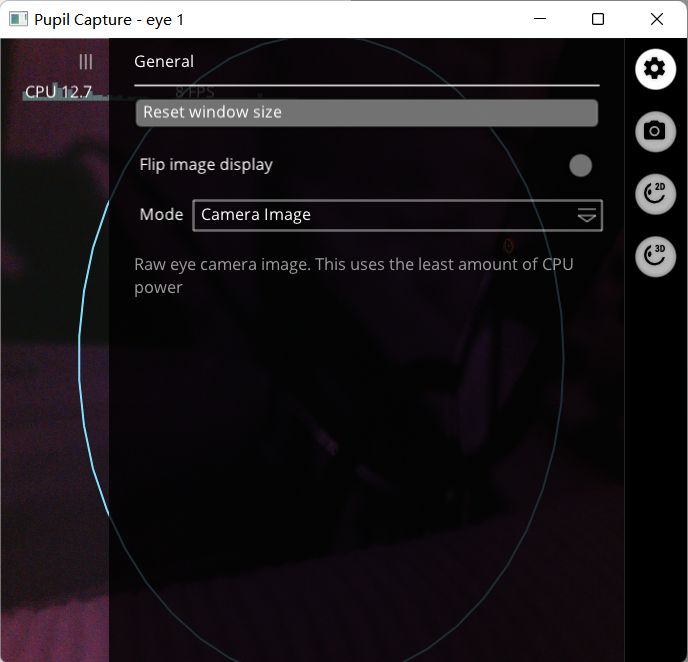
hello..how many seconds are in the top 100 rows of the pupil CSV file? is it seconds or milliseconds?

These values are in seconds 🙂
but if i want to know the rough value of it ? like what do you think how many seconds are there in the first 100 rows?
You can calculate it easily by subtracting the first from the last value. Note, that the file includes one row per eye (left/right) and per detector result (2d/3d).
@papr👍 👍👍 Thank you very much!!!
How can I set "Vis Polyline" (what is shown in green circle with a red dot in the middle) to show only one of the eyes movement (left or right eye)
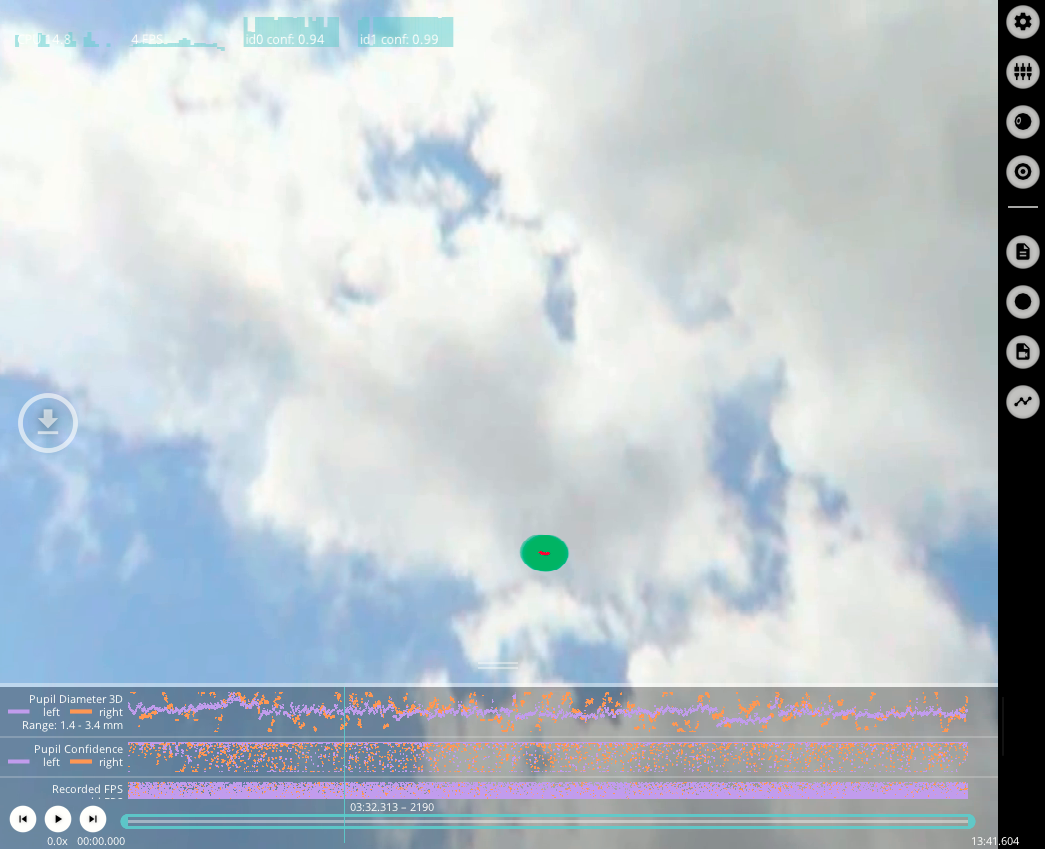
That is not currently not possible 😕
That's shame. When one of the eyes has a low confidence while the other has a high confidence, the "Vis Polyline" jumps unreasonably on the screen
Maybe you can work around that by increasing the minimum data confidence in the general settings
I'll try, thank you
@marc is there a way to view calibration accuracy and precision after having recording trials for a subject? I forgot to record a subject’s angular precision and I’m trying to see if I can still find that value
Hey, if you recorded the calibration, you can recalculate them with Player's post-hoc calibration plugin https://docs.pupil-labs.com/core/software/pupil-player/#gaze-data-and-post-hoc-calibration
Does the 3d eye model assume a certain radius constant? If so, is there a way for us to change that value prior to or after recording a session?
It does. https://github.com/pupil-labs/pye3d-detector/blob/master/pye3d/constants.py#L3 and https://github.com/pupil-labs/pye3d-detector/blob/master/pye3d/cpp/pupil_detection_3d.pyx#L15
The software is currently not designed to have that value changed on the fly. You would need to change those locations and reinstall the package.
Okay, so I was under the impression that the calibration would be recorded/saved with the recorded trials, is that not the case? Because I don’t think I pressed record during this person’s actual calibration process
Yes, the recording includes the calibration parameters of the latest calibration. But I don't think that is the case for the reference locations pupil data, too. These would be necessary to calculate the actual accuracy/precision. If you want, you can share the notifiy.pldata file with me and I can check whether the required information is present
Sounds good, I’ll find that file for you in a moment. Also to illustrate more context, I used a single marker calibration, as my study involves measuring fixations of people walking while carrying something. Not sure if this changes anything…
No, that does not change anything 🙂
Okay, here's the notify.pldata file
Everything necessary to recalculate the accuracy is in there. I can get you a script that performs the calculation tomorrow.
Actually I just realized that I sent you a file for the wrong participant! I'll send you the correct one sometime this morning, unless I can just use your script for the other participant. Either way I appreciate it, thanks!
The script will allow you to run the calculation for any recording that you have.
Just to be sure, Pupil Core software doesnt work with Win7 or 8, right?
Correct. Windows 10 is required.
In the pupil positions output csv, do the circle_3d_normal arguments relate to positions in the world camera image?
https://docs.pupil-labs.com/core/terminology/#coordinate-system
I noticed from your 3d Eye Model terminology that looking in certain directions relates to a change in x and y. Are these changes specific to the eye cameras or do they have any correlation to the world camera image? Like is looking in the center of the world camera image equivalent to a (0,0) coordinate in circle_3d_normal_x and y?
HI @user-b9005d 👋. circle_3d_normal is provided in 'eye camera' coordinates.
Essentially, all data contained in pupil_positions.csv is in eye camera coordinates, whilst those in gaze_positions.csv are in scene camera coordinates.
Check out this page for an overview: https://docs.pupil-labs.com/core/software/pupil-player/#raw-data-exporter
hey, unfortunately, I won't be able to finish this today. Will share the script early next week.
Sounds good, thanks for letting me know
Here you go
pip install git+https://github.com/papr/pupil-core-pipeline
pupil_core_accuracy <PATH TO RECORDING> -o results.json