
There's a second delay between my Azure Camera and Pupil Core (I noticed the pupil capture is 1 second ahead of the Azure camera), I am using the Network API to send commands.
It's inevitable. The process of starting any recording is going to take some amount of time, and exactly how long it will take is going to be inconsistent and impossible to predict precisely. This is just the nature of multitasking operating systems, and there really isn't any way around it. You can try to time the recording commands so they align, and you might get it close enough for your needs, but it will never be consistently, perfectly aligned.
Any help would be greatly appreciated!
I have a problem accessing the Core front camera using pyuvc. Sometimes I get a "TimeoutError" that stops the execution of the file. I tried to comment the line 705 (i attach image of the error) but as it's a .pyx file i cannot do it. I want to use the eyes and the front cameras without having this error since it stops the execution. how can i solve the problem? The most interesting thing is that I get this kind of error when I try to access the front camera, the eye cameras I don't get this error. Just in case I installed pyuvc following the steps of github.(https://github.com/pupil-labs/pyuvc)

Rather than commenting out the line that raises the exception, you may want to catch exception in 3d_gaze_mapping_blink.py:314 by wrapping that function call in a try-catch block
thank you!
Hello, I keep getting an error of an "unclosed client session" when attempting to connect with the glasses and starting a recording using the API code. Here is a screenshot. Can you help me with this? Thank you so much.

Hi, @user-86163a 👋🏽 - would you be able to share the code you're using? Also, can you tell us a little more about your network configuration (e.g., wifi at home, university network, work/corporate network, etc)? Lastly, which glasses are you using?
I tried using both a university network and personal hotspot, with both I get the error of an unclosed session and the recording never starts. I am using the Neon glasses.
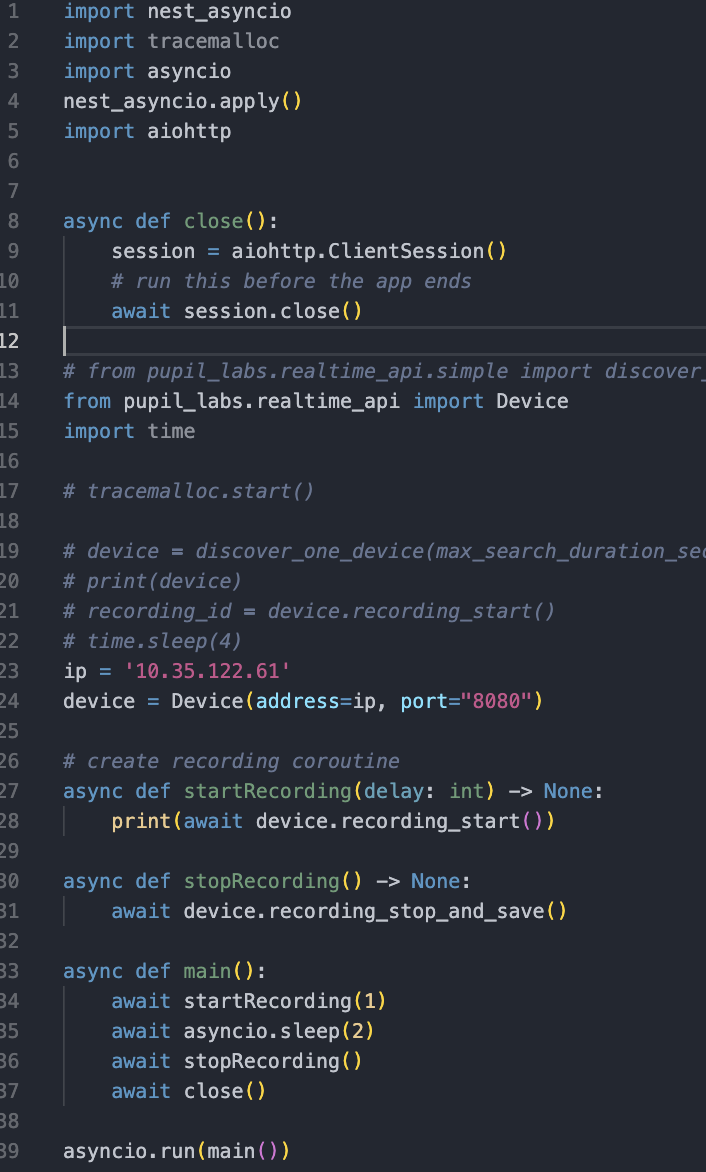
Fixed this!
Is there any annotated dataset for pupil captured from the invisible,core and neon devices? @user-53a8c4
Hi @user-25fb27! What do you mean by annotated?
i need 1. raw image of the eye from the eye camera of the device 2. segmentation mask around the pupil.
Good job! What was the solution?
Also, I'm sorry I missed your message with the screenshot of your code that I asked for. I had a holiday on Friday and then just dropped the ball coming back to it. Apologies!
I had to modify my async function a bit and there was a template field I was missing, no worries.
Hi, I just wanted to follow up in this question since I didn't get a response: https://discord.com/channels/285728493612957698/446977689690177536/1124066479294398536
Essentially, I am looking for a way to use the Cloud API to download the files corresponding to "Download Timeseries Data + Scene Video" in the web interface. How do I go about that using the Cloud API?
Hi @user-5fd308! Sorry for the delayed response! Yes, there is an endpoint for it!
https://api.cloud.pupil-labs.dev/v2/workspaces/<workspace_id>/recordings:raw-data-export?ids=<recording_id_1>&ids=<recording_id_2>
Hi 💻 software-dev , I'm looking for any information on using c++ to interact with the Neon real time API? Is there any documentation of such or anyone who has experience using C++ as opposed to python? Python may not be sufficient for our needs.
Hi @user-ac085e! We don't have any documentation on using C++ with Neon's realtime API. It would be worth reading this section of the docs which explains what goes on 'under the hood', or in other words, what we've built our Python client around: https://pupil-labs-realtime-api.readthedocs.io/en/stable/guides/under-the-hood.html#. That said, may I ask why Python may not be sufficient for your needs?
Thank you I will check it out. It is mostly due to Python not being a real time language, we are concerned using Python with the API to connect to our simulators will not offer accurate or high enough resolution timescales.
Bear in mind that our Python Client is just a client. It doesn't really handle the heavy lifting. For example, RTSP is used for real-time streaming of gaze data. What functionality of the API do you need for integration with your simulators?
My simulator team is going to reach out via email to discuss further as I do not have the depth of understanding their concerns.
You of course have to insert the corresponding workspace and recording IDs!
is there any dataset of annotated masks of pupil images from the eye camera of the neon , invisible and core? having such a dataset will help us to create a custom model for segmentation.
Hi @user-25fb27! Have you already seen this dataset: https://arxiv.org/abs/1511.05768 ?
Dear Pupil team, I just updated my pupilplayer to v3.5.1. Unfortunately, when exporting my videos, there is no fixations.csv as in the software version I used before. Can you please help me finding/creating/exporting the fixations.csv? Thanks in advance!
Please double-check that the fixation detector plugin is loaded otherwise the fixations export will be empty
Thaks @neil for your answer. The problem is, that with the new version, there is no fixation detector plugin listed. Maybe you can explain to me how I can include it intio the list? Please check the attached screenshot. Thanks in advance
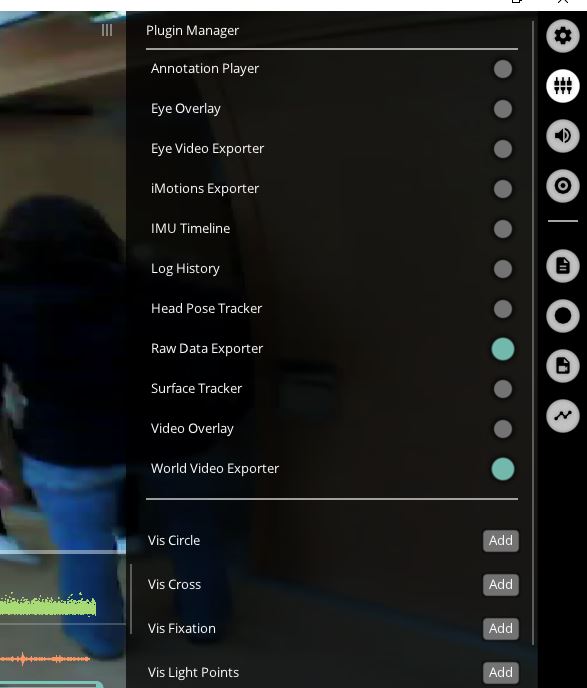
Ah, from that menu it appears you're using Pupil Invisible. Is that the case?
Yes, you are right. Sorry for not mention it until now.
I'm getting this error message when using the software. After Googling, my understanding is that it is caused by a VPN software modifying winsock. However, I'm currently visiting family in China and VPN is a must have. So resetting winsock is a no go. Is there anything I could do on the Pupil or Python end to make it work? (And reversible, too - as I will return to the U.S. in three weeks). Thanks!
Bad address (C:\projects\libzmq\src\epoll.cpp:100)
Hey @user-5346ee 👋. Would you be able to confirm what software you're using?
Thanks for confirming! The fixation detector for Invisible is disabled in more recent versions of Pupil Player. Checkout the docs for a list of product-specific plugins: https://docs.pupil-labs.com/core/software/pupil-player/#product-specific-plugins Have you been using the fixation detector in an older version of Player?
Yes Neil, I used the fixation detector in v3.1.0 before I went into parental leave. Now I wanted to extract some new data in a same way as before, but without fixations.csv it doesn't work for me in that way. Are there any similar or other options I can do to get the fixations? Thanks in advance.
Pupil Player and Capture 3.5.1, they worked fine a month ago. So VPN is most certainly the culprit. The error message appears before anything else and the software shuts itself down.
I'm not that familiar with VPN software and how it could influence Pupil Capture. That said, the error message indicates an issue stemming from zmq, which is leveraged by Core's Network Api: https://docs.pupil-labs.com/developer/core/network-api/#network-api. You could try disabling the Network API plugin to see if that helps. It's in the Plugin Manager in Pupil Capture.
Thanks. I'll try disabling the network API. Is there anyway to disable it in a configuration file, as the program interface will not launch.
The Capture configuration file is saved as a Python pickle called 'user_settings_world' in the 'pupil_capture_settings' directory. You could technically modify that if you know Python. Unfortunately, restarting with default settings won't help as the Network API Plugin is loaded by default. Another thought, is the VPN running on your computer or on some other network server? Why not just disconnect your computer from the network and/or disable the VPN on your computer. Pupil Capture doesn't need an internet connection.
Thanks. The issue is that many VPN software, especially those that are great at circumventing censorship, modifies a lot of system network settings. I know Steam gives me a warning every time it launches. I think I will uninstall the VPN software then disable Pupil's network API and see if it works. If you google the error message, many people are pointing to the VPN problem. Some tried resetting winsock but it made the VPN software useless.
I see that it could be annoying having to uninstall the VPN software every time you use Capture. Let me know if disabling the network api plugin works!
In this case I'd recommend reverting back to that version. We don't have another implementation of that specific fixation filter.
Ok thank you very much Neil. Is it possible to download the old version from your website? I would like to install that old version on another computer where my assistant can work with the data, too. Another question: I would like to ask why the fixation filter is not implemented in the newer versions anymore? I'm just wondering because I thought that the fixations are a worthful kind of data source - but how to deal with, then?
Hi @user-e91538!
If you want to be able to directly compare with the data that you extracted before, this is the latest version of Pupil Player that still supports the fixation plugin with Pupil Invisible: https://github.com/pupil-labs/pupil/releases/tag/v3.1
We chose to disable that fixation filter when we released a new fixation filter in Pupil Cloud. The new one is more optimised for dynamic conditions as it leverages optic flow to compensation for VOR eye movements. It was also developed and tested for use with Pupil Invisible's neural network-based gaze estimation, whereas the older Player version wasn't.
You can read more about it here: https://docs.google.com/document/d/1dTL1VS83F-W1AZfbG-EogYwq2PFk463HqwGgshK3yJE/export?format=pdf
May I ask, is there a specific reason you don't want to use Cloud?
Hi @neil, many thanks for providing the link and the explanation. We collected the data two years ago in a full week where we couldn't upload the data to the cloud due to internet connection and the time we had between the measurements. So we extracted just via USB. Since the player v3.1.0 we used at that time gave us the fixations, we were happy with that solution. Then, I was in parental leave and now we do want to extract some more information from the data. It would be too much time consuming to upload all measurements to the cloud now, and due to comparability we would have to run the analysis again if we would use the cloud-version.