Dual gaze on surface
Is the software compatible with HTC VIVE Focus 3 and their add-on Eye Tracker? If so, is there any documentation or other important information about this?
Hi @user-551c16 👋. Our VR Add-ons will only fit HTC Vive, Vive Pro and Vive Cosmos. Software wise, we have an integration with Unity3D: https://github.com/pupil-labs/hmd-eyes
Issue: running "api.download_recordings_zip" function
How:
api: Api = pupilcloud.Api(api_key=api_key, host="https://api.cloud.pupil-labs.com ")
ids: list[str] = [id_for_one_video]
data : User = api.get_profile().result # verified that get_profile() was correct using assertapi.download_recordings_zip(ids=ids) # Crash point
Output:
File "/home/blablabla/venv/lib/python3.9/site-packages/pupilcloud/rest.py", line 224, in request r.data = r.data.decode('utf8') UnicodeDecodeError: 'utf-8' codec can't decode byte 0x81 in position 11: invalid start byte
rest.py L224:
r.data = r.data.decode('utf8')
Post-Mortem: r.data[:15]
b'PK\x03\x04\x14\x00\x00\x00\x00\x00`\x81\x87V"'
Hi @user-13f46a 👋. Is there a particular reason you've removed the exception handling from your code? Please try again with the following added:
try:
    # Download multiple recordings in zip archive
    api.download_recordings_zip(ids=ids)
except ApiException as e:
    print("Exception when calling RecordingsApi->download_recordings_zip: %s\n" % e)
Hi, I have included it. I just omitted that portion for clarity.
File "/home/blabla/venv/lib/python3.9/site-packages/pupilcloud/api_client.py", line 170, in __call_api response_data = self.request( File "/home/blabla/venv/lib/python3.9/site-packages/pupilcloud/api_client.py", line 363, in request return self.rest_client.GET(url, File "/home/blabla/venv/lib/python3.9/site-packages/pupilcloud/rest.py", line 235, in GET return self.request("GET", url, File "/home/blabla/venv/lib/python3.9/site-packages/pupilcloud/rest.py", line 223, in request r.data = r.data.decode('utf8') UnicodeDecodeError: 'utf-8' codec can't decode byte 0x81 in position 11: invalid start byte
This issue persists.
Hi,
I have a eyetracker add-on for HTC vive wich actually works fine.
I have an application that running on Unity and I cast the VR view on pupil capture as recommended by using the screencast camera prefab.
That works fine also.
But I'm willing to know if there is a way to "stream the result from pupil capture through the network". My application is a multi-user one and so I want to compare the results for two participants on another computer than the ones used to play the experiments.
Thanks in advance
For the time being, I have been approaching with the following method that I think your team previously proposed, which worked in my case, but I think this limits my accessibility to full APIs
with file.open('wb') as f: f.write(self.api.download_recording_zip(id, _preload_content=False).data)
It looks like "Timeseries Data" download is independent of "Pupil Player Format" download. And when calling api.download_recording function, it retrieves "Pupil Player Format" data. Can I ask what function I should call to retrieve "Timeseries Data" data?
Hi @user-13f46a! Using /workspaces/{workspace_id}/recordings:raw-data-export?ids={recording_id} you can download the Timeseries + Video data. Do let me know if that is sufficient for you!
URGENT Help Needed: We recorded many sessions using pupil invisible. Now we want to download those session with metadata from Pupil cloud. As there are too many session, is there any API to download data from pupil cloud using script instead of manual approach?
Alternatively, is there a way to bulk-download multiple recordings at once from Pupil cloud?
Hi, @user-5b0955 and @user-980a66 - we do offer an api over https at https://api.cloud.pupil-labs.com/. A python implementation is available at https://github.com/pupil-labs/pupil-cloud-client-python
You will want to look at the download_recording_zip and download_recordings_zip calls.
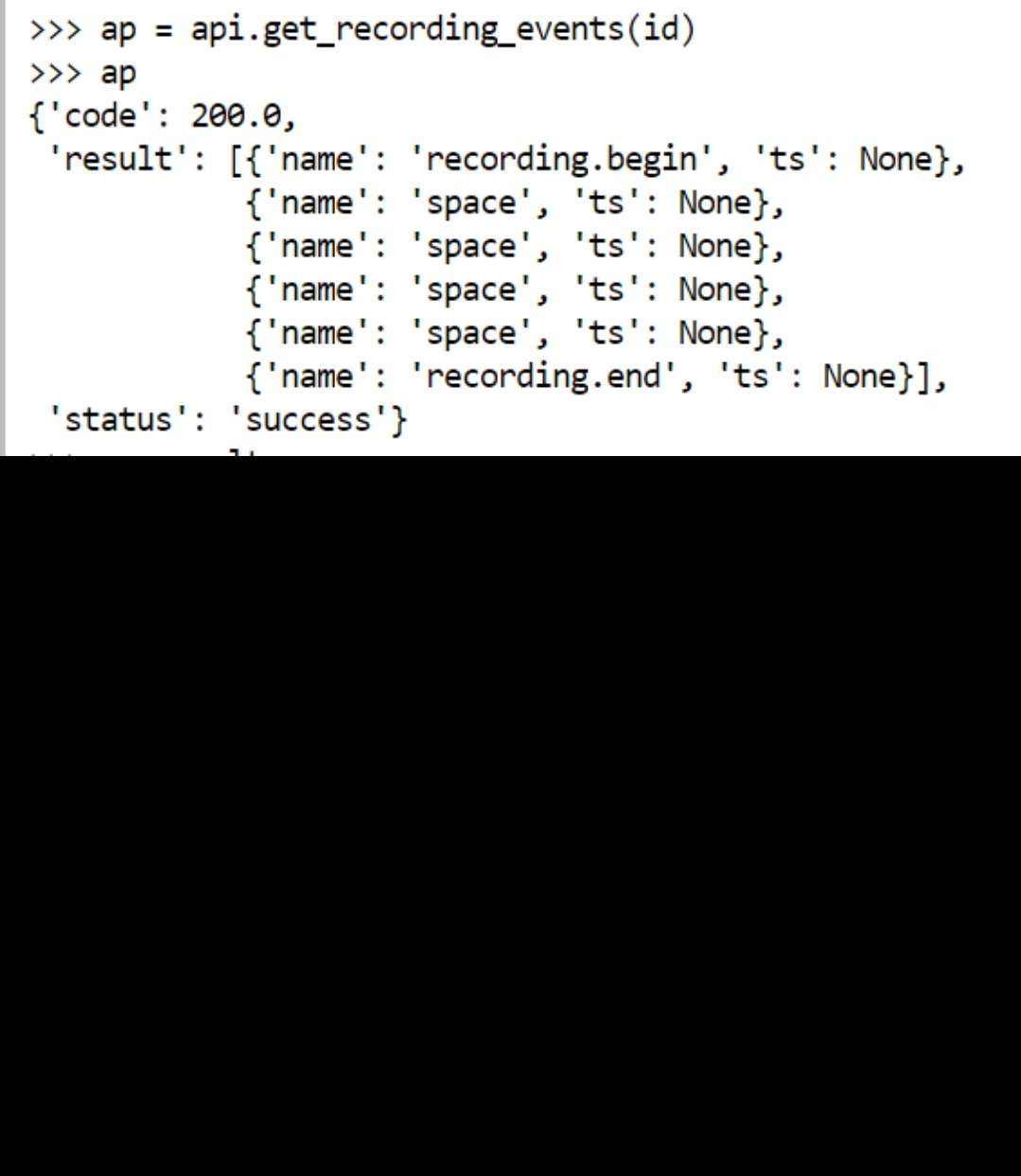
any way to download timeseries data using the API? I can view events in the provided "event.txt" file but it does not include timestamps
Hi! Can anybody quick hint me where I can find cli World Video export? the batch_exporter.py seems broken? I basically don't want use the GUI for exporting my videos. Which file can I use?
Hey @user-e91538 👋. The community projects that batch export data don't export the world video to the best of my knowledge – you'd have to do this manually.
Hi @neil Thank you for the answer, but now I'm confused. Basically I need a working batch_exporter.py script. https://github.com/pupil-labs/pupil/blob/master/pupil_src/shared_modules/batch_exporter.py So I was wondering if the functionality moved somewhere else?
Unfortunately, the batch exporter was disabled due to some technical details that were introduced with post-hoc detections. There's essentially no easy way to reenable the batch exporter functionality
There are some community examples, e.g. https://github.com/tombullock/batchExportPupilLabs, but they don't do video export
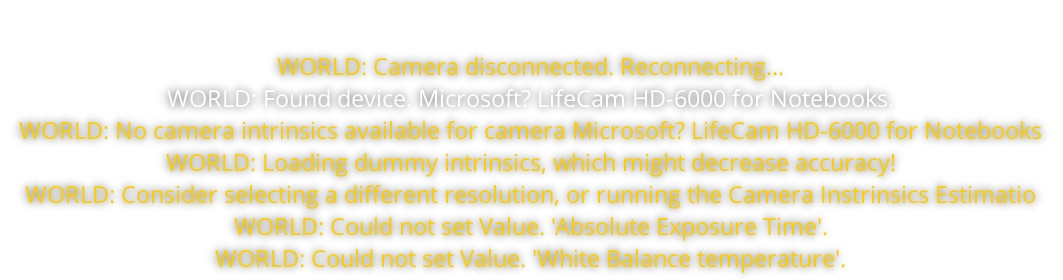
Hello. I installed the drivers for my laptop's built-in camera and it started working. but then I tried to use a usb camera and this error appeared. could you please tell me how I can solve this?
I believe what you're looking for can be found with the get_recording_events function in the Python implementation. The endpoint is https://api.cloud.pupil-labs.com/recordings/{RECORDING_ID}/events
this is what I see using get_recording_events, but when I download the full video and time series from cloud.pupil-labs.com, I can actually see the timestamps