
Hi, Would anyone know where I could start with understanding the human eye vs a canines? pupil_capture_windows_x64_v1.12-17 is trying to register the dogs pupil - I'm guessing its an algorithm incompatibility - I know this may be a big ask but any ideas? Cheers 😃
Hi, For a new international project we want to use the Pupil Eyer Tracker in our glasses. Does someone have CAD files of the electronics so we can make our glasses suitable for the Pupil Eye Tracker? I don't need schematics, only the 3D model.
Thanks!
Hi @user-e91538 we can supply you with dimensions but not the 3d model (I think you wrote to us via email as well, correct?) , would that be sufficient?
Yes! that would be great
ok, we will follow up via email then.
@user-346981 sorry, not able to provide any advice regarding canine pupil detection. Out of curiosity, how are you capturing the eye video of the canine? Are you using modified version of Pupil hardware?
@will thank you
I have got pupil mobile app in mobile and pupil capture in laptop and have connected the pupil eye tracker to the mobile and am able to view my eye videos and world videos but can someone help me how to use the features of Pupil Capture while my headset is connected to mobile? Features like calibration and plugins as i don't find them in pupil mobile app
Hi @user-e91538 your question was asked in two places, both here and in the 👁 core channel. Your question has been answered in the 👁 core channel. In the future, please post general questions in the 👁 core channel and do not post the same question in multiple channels 😸
@will
Yea sure...
From next time XD
@will Thanks for your reply, I researched quite a few papers regarding canine algorithms then the magic happened. I now have a Microsoft HD-5000 eye camera registering the dogs pupil at 90-100% confidence. (no mods) I can send you a link to my project that shows 'Ruby' using a Pupil Labs DIY human setup plus the initial eye capture. I'm currently trying to get the mouse_control.py to work so my service/assistance dog can do some drawing! HA!
@user-346981 this is great! I am so pleased to hear that you were able to track "Ruby's" eyes with such high confidence!
Please let us know what you need help with regarding mouse_control.py and what OS you're using
We would love to see Ruby drawings 😸
@will As I am a visual artist with limited knowledge of Python I'm 'learning by doing'. The fun bit is I dont think this has been done before using a stock standard Pupil Labs DIY setup. If I can't work the mouse_control.py out by myself I appreciate your offer 😃 Here is a pic of 'Ruby' all geared up and looking relaxed!
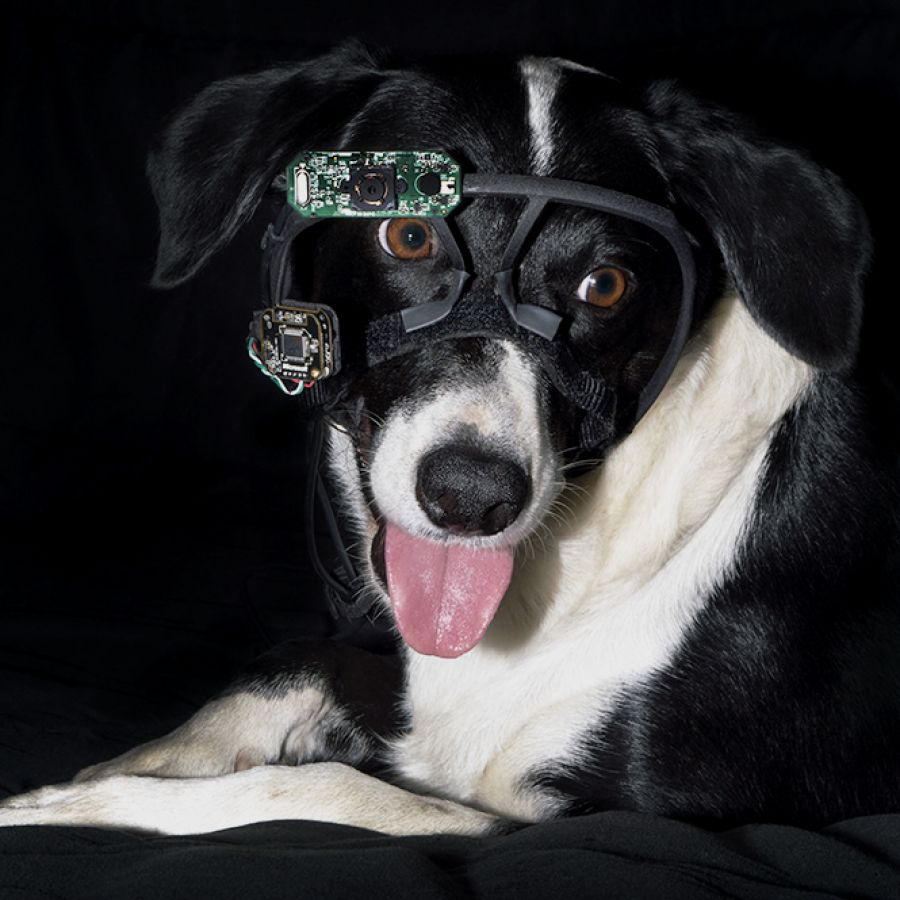
Hey @user-346981 Which operating system do you use?
@user-346981 I pushed an update to mouse_control.py in order to make it compatible with the newest version of Pupil Capture, v1.13. Make sure to name your surface screen to use the script.
Let us know if you run into any problems.
@papr Legend! Thanks for the 'screen' tip, that may just answer why I was hitting a brickwall 😃 Operating system? V1.13 on Win10-64
@user-346981 do not forget to update the script. It was out of date
@papr HA! another breadcrumb - a steep learning curve but well worth the chase! 😃
@user-346981 indeed!
@papr @will Is there anything 'wrong'??? with this workflow to get the control_mouse.py up and running? Thanks in advance :)
My Newbie Workflow List
Setup Steps:
- Install pip
- Install pyzmq
- Install PyUserInput
- clone pupil-helpers
Running Steps
- Start Pupil Capture
- Load Pupil Server plugin (now done by default in the world process)
- Calibrate -
- Load Marker Detector plugin (is this the surface tracker online plugin??????) - You should have some markers affixed to the screen edges that you will be using. Add the surface and name the surface ("screen" is the name of the surface in the helper script).
- Run the control_mouse.py helper script via terminal python control_mouse.py
@user-346981 correct, you should be using the 'surface tracker' plugin. The general workflow looks correct.
@will Cheers! 😃