
Hello, can anyone tell me if it is possible and if it is how to get data from the backbone without starting pupil service?
Hi @user-f21ba1 👋 ! May I ask for more detail about what you are trying to achieve? Whether using Pupil Capture or Pupil Service, they start the IPC backbone and keep it running, so you cannot really have one without the other.
I would like the IPC backbone started and kept running from my c++ app
Ok, two ways come to mind:
Thank you for your answer, the idea would be to have as little as possible, to have only the 3D eye tracking without the interface. The idea would be to have only the backbone running, to have a deamon answering messages sent with zmq, processing the camera images and sending the 2D/3D eyes information. If it can only be done through entry points throughout one of your dll, it might still interest me, even if it requires calling the processing functions without any IPC backbone. I just do not want to produce the image processing from scratch 😬
When you say "interface", do you mean the graphical user interface?
yes
Ah, okay, then we do not provide a ready-made solution for Pupil Core. Pupil Service is the minimal option. It is essentially the daemon you are seeking, but with a minimal GUI. Is it not possible to minimize the Pupil Service window after you start it?
If that is not an option and you are comfortable with calling Python code from C++, then you can also write your own code to get images from the eye cameras. They are UVC compatible. You could then run pye3d on the eye images, but just note that this does not include the 2D pupil detection pipeline. You would also need to write and run your own calibration routines if you are looking to get gaze estimates.
Alternatively, you could use our fork of libuvc in C++, but then you will be writing some components from scratch, essentially reproducing some of the work of pyuvc in C++.
The source code of the Pupil Core ecosystem is open-source and can be used as a reference to see how we obtain the eye images and apply the pupil detection pipelines.
You can also find 2D pupil detectors in the pupil-detectors repository.
Lastly, there is this third-party, user provided repository, showing a way to get the Pupil Core camera feeds in C++, but I cannot make any guarantees about it. The other community contributed software can be found in the Pupil Community repository.
Thank you, I will probably have a look at that too!
So if I understand correctly the image processing is done through pye3d and then the service app is written in python and serves as the IPC backbone. The service app gets images through pyuvc and feed them to calls to pye3d to process the eyes pos which is then send with zmq? If so I will look into it, thank you very much.
I am already running a custom gaze estimate, because the objects are displayed in a headset and I could not find a way to feed objects position to the pupillabs calibration procedure. Is there actually a way to do it?
Ah, are you using the Pupil Core VR add-ons? And are you using Unity?
There is a bit more to it than that. There is also a pupil matching algorithm involved, as well as some other subtleties. For example, the 2D and 3D pupil detection pipelines run in parallel. Details are in the Developer section of the docs. I would recommend trying to use Pupil Service, if you can, as it will simplify many things, rather than re-writing various components.
I am trying to use it for XR through a custom driver
You can also check out the hmd-eyes repository, which shows how we use Pupil Core with VR in Unity (C# code), including running the calibration procedure
Thank you a lot for your help, I will try to go through all this to see if it fits our needs.
No problem.
Feel free to return with any questions or if something needs to be clarified. I admit that I linked to a lot of information to process!
I just realized. You could potentially also fork the code for Pupil Service (part of the pupil repository) and configure it to skip the GUI and just receive command line arguments. Just note that we would not be able to provide support for such modifications, but in terms of overall development, it should in principle be less effort. Then, your C++ app could still use the Network API, i.e., communicate with the IPC backbone via the standard ZMQ commands.
Thanks, does it still require an old version of python?
As noted in the README of the pupil repository, we target and recommend Python 3.11. Where did you see that an old version is required?
I remember trying to run the master of pupil a few months ago and not being able to because it was required to use an old version of python and I could not patch everything. Maybe I am confused with something else
I’m not sure what may have happened in this case. I would recommend trying again with a fresh pull of the latest commit in a clean venv using Python 3.11. The README and Developer docs are also worth referencing during the install process.
Yes, definitely, thank you for your help!
Hello - I've been able to get most of the relevant data using the cloud API, but I'd like to access the timeseries files (before enrichments) like fixations.csv, saccades.csv, gaze.csv, imu.csv, but can't find the reference to thsese in https://api.cloud.pupil-labs.com/v2 Are these accessible via the API?
Hi @user-62b6a8 , it sounds like you want to download a specific timeseries file for each recording, such as only imu.csv for a set of recordings, correct? If I understood correctly, then you could give the following endpoint a try:
/workspaces/{workspace_id}/recordings/{recording_id}/files/{filename}
It is listed under “recordings” in the Cloud API documentation.
(I realize they can be downloaded in a .zip file but I am trying to access them directly on the cloud rather than download them)
Yes, I see a list of files that I can access in the recordings, including some related to imu and gaze but the file list doesn't include any of the .csv files that I mentioned (fixations.csv, saccades.csv, imu.csv, etc), but which are in the directory when I download the timeseries files. Can you help point me to the exact way to access those .csv files?
Here is an example of the list of files I get from the endpoint you suggest:
Vs. here is of the files I get in the .zip downloaded from the same recording:
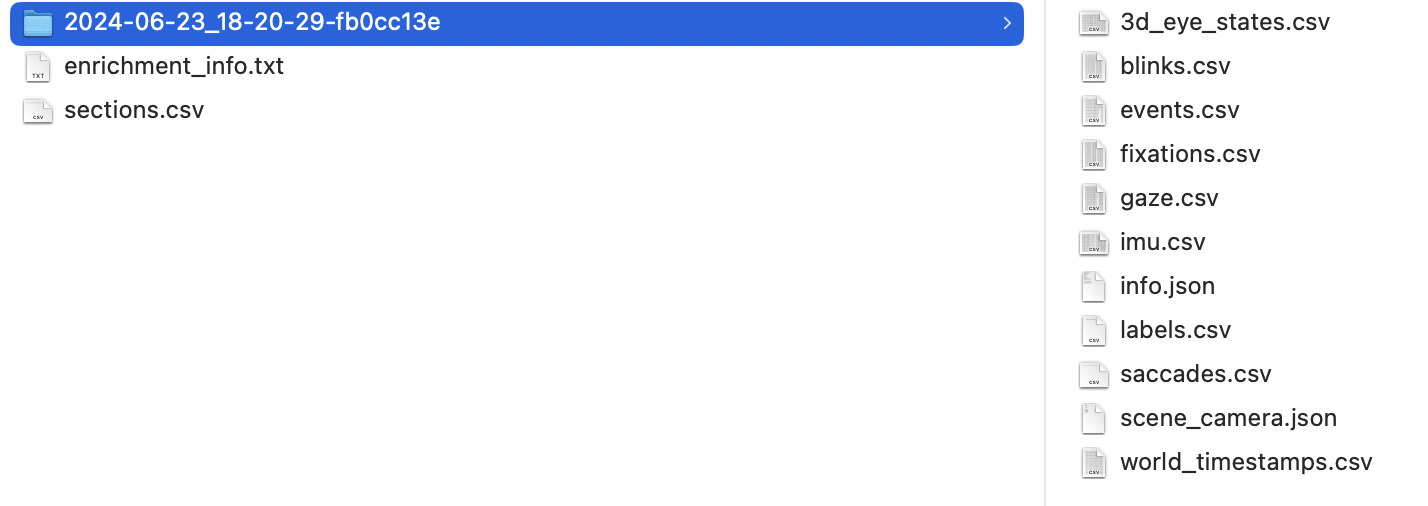
Hi Rob - I'm still having trouble understanding how to access those timeseries .csv files. Is there more information that might help you track this down? Many thanks!
Hi @user-62b6a8 👋 ! I just quickly put together an script demonstrating the use of the proper endpoint to download the CSV files using python. Note that, you can not really select which CSVs to download, but you will get all of them. The only file you can exclude these [ scene_camera.json, gaze.csv, scene.mp4, fixations.csv, blinks.csv, faces.csv, events.csv, imu.csv, eye_state.csv ]
Hi Miguel, thanks for the snippet. What I was hoping to do is to directly access the .csv files via the API, not to download them. That is, the same way I can access say the video files or the other raw data files. This would be a big advantage over having to store them again in another location. Is this not possible?
Oh, you mean access gaze, fixations streams?
Not all these values are available to access and stream, and the endpoints are not well documented. Plus, they might not follow the same format, but you can, for example, make a call to /workspaces/{workspace_id}/recordings/{recording_id}/files/scene.mp4?cbw= to access the video URL and then open the container with pyav for example.
You can also get the fixations and gaze as drawn in the Cloud using
/workspaces/{workspace_id}/recordings/{recording_id}/gaze.json?start={start}&end={end}&max_length={max_length} for gaze and
/workspaces/{workspace_id}/recordings/{recording_id}/scanpath.json?start={start}&end={end}&max_length={max_length} for fixations.
May I ask what you are trying to achieve?
Many thanks! the gaze endpoint is just what I was looking for. I am writing python code to integrate the gaze data with other experimental data collected separately.
hi I'm actually searcjing if is it possible to modify the max and min duration of fixations (I'm using neon)? maybe with the neon_player? or directly in the src code (of the player, for my use?)? (it is because I have way too long fixations that interfere with my data analysis)
Hi @user-bdc05d , an easy first solution could be to filter out the fixations that are too long. That is, just write code that excludes those fixations from your data analysis. Or do you mean that you are getting incorrectly detected fixations?
The parameters of the fixation detector have been chosen to cover a wide range of use cases. While the detector is open-source, it could be useful to know why filtering the data is not sufficient or why the fixation detector is not working for you, before modifying the code.
I think there was a response but I cannot see it
it is just that I had too long fixations that I think are in fact multiple fixation because it is widely over the litterature threshold (over 500-600ms) like some time 14000
and I think as they just should be separated and not deleted because they are present and revelant for my use
Yes, I see now. May I ask what the task is? Is it reading?
but just agregated in some way I thnik
think*
it is looking at an image and so what I am actually trying to do is determine time of fixation in some AOI I define (quite precise AOI)
Ok, if you want, you can modify the fixation detection code in pl-rec-export, in particular, the detect_fixations_neon function, using the associated whitepaper as a guide.
You will need to download the Native Recording Data to work with pl-rec-export. You can find this by right-clicking a recording and going to "Download".
and because of this I cannot have consistant result between subject and some are big 'outlier'
oh okay so it is not with the player?
Neon Player internally uses the pl-rec-export functions. You could go the route of modifying pl-rec-export and then making a custom build of Neon Player that uses it, but it will be easier to first focus on modifing pl-rec-export and testing that.
I was on this deposit
ok! to run it is just: pl-rec-export /path/to/rec (with the appropriate path)? because I have decodeerror (parsing message)
Yes. Make sure it is Native Recording Data (unzipped, so the same directory that you give to Neon Player). If you still encounter errors, then we can proceed in a thread.
okay this is what I use and it make an "export" folder with events.csv and gaze.csv but no fixations.csv or blink.csv
Am i still doing something wrong?
pl-rec-export fixation detector modifications
Hi, I recently got the Neon kit. I would like to know more about the pl-neon-recording tool? There is a similar looking tool pl-rec-export -- And they look similar 🙂 So what's the difference?
Secondly, there seem to be "raw" and "exported" data the can be copied form the Android device in directories "Neon" (with UUID-like directory names) and "Neon Export" (with readable, timestamped directory names) respectively. Which kind of directory is supposed to be used with these parsing tools?
Hi @user-c541c9 👋 ! The purposes of the two tools are as follows:
pl-rec-export: This is a command line tool to export the raw data (i.e., the Native Recording Data) to user-friendly CSV formats and to run the fixation & blink detectors on your own computer. It runs a pre-defined set of algorithms and transformations. You could use it as a Python library, but when used as a command-line tool, it is non-interactive and could be used in a shell script for batch processing data, for example.pl-neon-recording: This is a Python library for programmatically accessing the Native Recording Data. It handles the repetitive routine of loading the raw binary data, while leaving the rest up to your creativity. You can use it to create your own pipelines that build directly on the raw data. In this sense, it is more interactive. It comes with helper functions, such as routines that make it easier to sample the different data streams at the same timestamps, but does not run pre-defined algorithms, such as the fixation or blink detectors. I recommend taking a look at the examples to get an idea.Here are the differences between the two Android directories:
Neon: This is the raw binary data in a folder structure that is relevant for the Neon Companion App. It is not what you typically work with, as an end user.Neon Export: This is the raw binary data, converted to a more user friendly directory structure, with a more human friendly name. This is equivalent to the Native Recording Data download option on Pupil Cloud. These are the directories that you use with pl-neon-recording or pl-rec-export. See the "Transfer Recordings via USB" section of the Neon docs for the export instructions.Thank you for explaining in detail. The examples for pl-neon-recording are easy to understand. I tried it with some data with the basic example, and found I could read data in recording.gaze and recording.scene, but trying to access recordings.imu gave an immediate error... but I suppose you are developing this, and will have a stable version soon. Looking forward to it.
Could you please share the error message?
I have not encountered an error with loading the IMU data from my recordings, nor I have encountered the error that you previously posted with respect to line 27 in the basic_usage.py example.
I just tried with a new recording here to be sure that it was not anything specific about my previous test recording.
Kindly see the listing I have prepared and attached. I have the package git cloned and installed in its own virtual environment (pip install -e .). In my listing lines 29, 30 are like line 27 in the basic example in the repo. It prints nothing (at least not unless I access the streams, after which they can be enumerated), so potentially confusing and could lead one to conclude their recording does not have data streams (it does, and probably only being lazily loaded; that's probably okay).
IMU issue is shown following the invocation on line 54 in my console session. I'm pretty sure like gaze and scene, IMU data must also be present. On line 70, I show that indeed the exported directory does indeed have IMU data streams. I did not investigate further... hope this helps.
Ah, I see. Indeed, I missed that the stream names are absent in the output from the basic example. Yes, you are correct that the pl-neon-recording library was updated to lazily load the data, so the stream needs to be accessed first, then it is loaded on demand, and then you can print out its name, as you have demonstrated.
The IMU error that you encounter (Found zero norm quaternions in 'quat') is not exactly coming from the pl-neon-recording libary. Rather, it could indicate that something is off with the raw IMU data itself for that recording. I will start a separate thread, where we can dig into this a bit further, if you prefer.
Problematic raw IMU data
Hi all,
I've been using pl-rec-export to extract the gaze from phone recorded data. It creates an export folder the folder has event.csv and gaze.csv files. I'm confused by the time stamps as the event recordstop recordbegin difference is greater than the last row first row timestamp difference of the gaze data by a few seconds. also the start time of the gaze data does not match the start time of event recordbegin for example: timestamp [ns],name,type 1717586382816000000,recording.begin,recording 1717587392364000000,recording.end,recording
Hi @user-9f3e92 , the recording.begin event is essentially the moment when you push the white "Record" button in the Neon Companion App. It then takes a second or two for all the sensors and cameras to initialize. They run in parallel and do not have fixed starting points. Sometimes, the eye cameras and gaze start before the scene camera. Sometimes, the scene camera starts first instead. They also stop at different times, before the official recording.end.
The difference between recording.begin and the first gaze timestamp reflects that. It is the same idea as the gray frames at the start and end of a recording on Pupil Cloud.
file,timestamp [ns],gaze x [px],gaze y [px],worn,fixation id,blink id,azimuth [deg],elevation [deg] gaze ps1,1717586386994395346,820.7727,620.8837,True,,,0.69898784,-1.0643278 gaze ps1,1717586386999399346,822.5108,615.86975,True,,,0.8110849,-0.7404676
doing the basic calculations gives me: Event duration: 0:16:49.548000 Gaze duration: 0:16:45.358712
also the orignal recorded scene video is : 00:16:47 long
the original eye video is 00:16:46 long
i'm trying to match timestamp in order to get a gaze per frames of the video
so how can i determine the gaze matching with the scene video frame to overlay the data
further more: pl-rec-export always returns the following error and doesn't export blinks even if prompted:
It looks like you are using Python 3.12? Can you try again with Python 3.11.9? You will want to uninstall pl-rec-export, close the terminal and then re-install pl-rec-export with pip3.11 after installing Python 3.11.9.
hi rob, im on python 3.11.5
Ok, it is possible to try it with Python 3.11.9? Just as a first attempt at fixing it. This error has been seen before with Python 3.12 and installing Python 3.11.9 fixed it.
will do. I will keep you posted. Thank you
will it still likely to be the same problem regarding synchronisation of gaze data to video frames? or do you have a fix for that or even better a function
I will send a description in a moment. It is not an issue, but just requires knowing a thing or two about our data formats.
So, if you want to know which gaze samples correspond to a given scene camera video frame, then you want to compare the timestamps of both data streams. If you are using the CSV files exported from pl-rec-export or from Pupil Cloud, then you essentially do the following:
pandas in Python (or whatever method you prefer) to find the gaze timestamps that happen between these two world timestamps.Note that the pl-neon-recording library also works with the Native Recording Data and has routines that simplify this process. See here for an example that produces a gaze overlay video by searching for gaze samples and scene video frames that are nearest to a set of given timestamps. It also demonstrates the interpolation functionality in the library.
@rob i bought 6 sets plus my client 2 on ym reocmmendation. Would it please be possible to have a one to one quick support outside here due to sensitivity of the data and the work im doing?
Sure. Could you send an email to [email removed] (click the gray box)? Then, we can organize a 30-minute onboarding call.
Thank you i sent an email
We received it. We will continue communication there.
I have a question about sending events to Neon from Matlab. Not sure if it belong here or in 💻 software-dev .
On that page I found "The average response time for HTTP requests to Neon in MATLAB is 0.33s" In my case, sending an event with pupil_labs_realtime_api('Command', 'event', 'EventName', ['test']); takes around 1.8 seconds, which is far too long. The Matlab Code is blocked while the request is being processed.
Hi @user-4b18ca 👋! As indicated on the repository that library is obsolete.
We are yet to update our documentation with the new library that my colleague @rob referred on the previous message https://discord.com/channels/285728493612957698/1047111711230009405/1263072770619736114.
The first one used https://es.mathworks.com/help/matlab/ref/matlab.net.http-package.html to send the requests, while the latest, uses the new python integration in Matlab, and relies on the python library to make the requests and stream.
Why is so slow in your use case, well it could be that your code blocks the execution before, it's hard to say without seeing the code, but my recommendation would be to use the new package.
Ah, now I get the difference to the new package. I was following https://docs.pupil-labs.com/neon/real-time-api/tutorials/ where the "Track Your Experiment in MATLAB" section still follows the old library.
I timed the code execution around the api call, so the 1.8 seconds I'm seeing was really just from that request. I will report how things behave with the matlab python wrapper. Thanks so far.
When running https://github.com/pupil-labs/pl-neon-matlab/blob/main/matlab/examples/recording_with_events.m I get the following error
Searching for device... Device found! Phone IP address: 192.168.50.150 Phone name: Steven Hawking Battery level: 100% Free storage: 83.04 GB Serial number of connected module: 815614 Error: Python Error: ContentTypeError: 0, message='Attempt to decode JSON with unexpected mimetype: text/plain', url=URL('http://192.168.50.150:8080/api/event') Stopping run loop for rtsp://192.168.50.150:8086/?camera=gaze Stopping run loop for rtsp://192.168.50.150:8086/?camera=imu Stopping run loop for rtsp://192.168.50.150:8086/?camera=eyes Stopping run loop for rtsp://192.168.50.150:8086/?camera=world
Recording without sending events works as expected. I configured a python environment as suggested (python=3.10). System: x64, Ryzen 5 Desktop, Windows 10, Matlab R2023a
Could you share some additional information about what OS are you using, computer specs (is it ARM based?) and the version of Matlab?
x64, Ryzen 5 Desktop, Windows 10, Matlab R2023a App Version 2.7.10-prod pupil-labs-realtime-api 1.3.1
Thanks, it should work with these settings. Please allow me to consult tomorrow with my colleague @rob who wrote and tested that wrapper. In the meantime, I strongly recommend that you use the latest version of the Companion App.
Thanks. Installed the lastest version (message is the same)
I believe I found the problem. In https://github.com/pupil-labs/pl-neon-matlab/blob/main/matlab/Device.m#L103 (and L105) the timestamp is of type double, while send_event expects an integer value. Thus it should be evt = obj.py_device.send_event(event_text, int32(current_time_ns_in_companion_clock)); and evt = obj.py_device.send_event(event_text, int32(timestamp));
Hi @user-4b18ca , I have a moment, so just wanted to hop in.
First, if that solution works for you at the moment, then please note that you want to convert to int64 to match the type parameter of send_event in the real-time API. Otherwise, you will lose a significant amount of precision and potentially send erroneous and truncated timestamps.
I'm a bit unsure by the error and the solution at the moment, as I did not encounter this on different operating systems or Matlab versions. At first glance, the error message seems to be related to something else.
The double type parameter on the timestamp argument was chosen because MATLAB's default data type for numbers is double. Since timestamps could come from any source (Neon, EEG, Psychtoolbox, etc), it was decided to go with MATLAB's default, so that users need less type conversion sprinkled throughout their code.
The MATLAB-Python boundary should do the correct type conversion for you automatically. In retrospect, you are correct that depending on the system to automatically do "the right thing" is probably not optimal and I will find a better way.
I will have time to look at this tomorrow
Hi @user-4b18ca , apologies for the delay!
I had a chance to look into this and indeed, I had slightly changed how the default send_event function generates a timestamp in the Matlab wrapper. In particular, the get_ns function was changed to be consistent with our Python tutorial, but I made a logic error.
I thought I had tested that, so my apologies that it cost you some time and effort.
While the fix you propose "works", it is actually not the correct fix. I will push a fix today and update you.
Maintainers take note. I feel, in pl-neon-recordings, this line self.stream["eye"] = EyeVideoStream(self) needs to be self.streams.... Then one is able to run examples/eye_overlay.py.
Hi @user-c541c9 , a fix has been pushed. Please update to the latest version and let us know how it goes.
That was quick! Yes, it works, thank you.
Good morning, I can't do full screen calibration because the screen flickers, the display remains stable only by connecting a second monitor and using that for calibration or reducing the window. Why does this happen? are there any specific settings I need to set for my screen for this not to happen? thank you very much
Hi @user-a4aa71 , what graphics card and operating system do you have? Are you running it on a laptop display?
I have an asus tuf gaming with window 11 and NVIDIA 4070, yes is a laptop
Ok, similar to my laptop, except your GPU is better 😉 Are you on the latest version of the Nvidia drivers and is the laptop plugged into power when you are using Pupil Capture?
Hi! I wrote up some code to do real time data collection with the neon and saving it to a CSV file after running the script. We're finding that the frequency is a lot lower than the 200 Hz that the documentation mentioned pertaining to the gaze X and Y coordinates - I'm getting about 25 Hz of data. I think this may be one of the functions that I wrote that might be reducing the frequency. Any help would be amazing!
Hi @user-baddae! If you use this function: receive_matched_scene_video_frame_and_gaze(), note that this gives you the gaze data matched with the scene camera, so you will not get the gaze data at the full data rate. Instead we recommend using this function: receive_gaze_data and the async version of the API. Here's an example https://pupil-labs-realtime-api.readthedocs.io/en/stable/examples/async.html#gaze-data
Thank you so much! Can I ask what the main difference is between async and simple? I think I understand that async is non-blocking but how does it differ based the data rate?
Indeed, the async allows for non-blocking operations. You can find the main differences between the two here.
However, note that you can also get the gaze data at the full rate (independently of the scene camera) using the simple API. See this example.
I hope this helps!
For real time data collection, especially the implementation of calculation metrics like entropy, would it be more advised to use async or simple for better performance?
Hi @user-baddae - neither API by itself will impact performance good or bad
Async vs simple is more of a top-down decision. If you're building an async app, using the async api. If you're not building an async app, use the simple api.
Async provides a different paradigm for performing multiple tasks simultaneously, but only if you construct your app that way. You can do multiple tasks simultaneously with the simple API too, it's just a different method (async co-routines vs multiprocessing/threading)
If you have never used Python's async paradigm before, I'd recommend sticking to the simple API
Hi, i used the Invisible and we had to change to the Neon now for our experiment. I read that the parameters are basically the same such as 200hz for both eye camera, the scene camera. Just the world camera is much larger and captures more in terms of size. I wanted to create heatmaps via python and compare the patterns. However is this even possible ? I normally say what the original resolution (1088 x 1080px) was and scale it down. Wouldnt work complety if i switch between glasses right?
Hi @user-5ab4f5! You can find an overview of the differences between PI and Neon in this table.
Regarding your specific questions:
The Neon captures more than the Invisible can after all?
Thanks Rob! No worries.
@user-4b18ca I pushed a fix. Please pull the latest version and let me know how it goes.
Hi everyone! I am working on my thesis project with Pupil Labs using HTC VIVE on Unity. I was reading the documentation, particularly the section about the right gaze mapping pipeline. I read that it is recommended to divide the experiment into blocks. Does this mean that at the beginning of each scene in the project, it is advised to recalibrate? Did I understand correctly? When I record, should I record everything (even when switching scenes in Unity) and check if the error is high or not? How could one estimate the slippage error?
Hi @user-224f5a, thanks for reaching out 🙂 The goal of calibration (and validation) is to ensure good associations between eye images at various known positions (i.e., calibration targets). This is especially important for wearable eye-tracking because of headset slippage, as compared to remote eye-tracking where the head is often fixed onto a chinrest and immobile.
The 3D gaze estimation pipeline does compensate for some headset slippage (see here). However, it is always a good idea to calibrate frequently.
When you should calibrate depends a lot on your experiment. For instance, are your participants moving around a lot? If so, you might want to calibrate prior to the movements, and then again after some time. We recommend piloting the experiment to see how often calibration is needed, and whether using fewer calibration trials would grossly affect accuracy.
@nadia I tried to do it, doing a reference image and later heatmaps but i get errors for the reference image. Also i am kind of confused about 3 minutes maximum. In the end we also want to statistically analyze the patterns and do a PCA for example and thats not (as far as i understood) possible with the predefined heatmaps?
@user-5ab4f5 Let's try to address your questions one by one.
Point 1
I tried to do it, doing a reference image and later heatmaps but i get errors for the reference image. Can you explain what errors do you get?
Point 2
Also i am kind of confused about 3 minutes maximum. Regarding the 3 minutes maximum, this refers to the scanning recording. Note that to run a Reference Image Mapper enrichment, you need the following 3 things:
Details on the Reference Image Mapper enrichment can be also found in our docs: https://docs.pupil-labs.com/invisible/pupil-cloud/enrichments/reference-image-mapper/
Point 3
In the end we also want to statistically analyze the patterns and do a PCA for example and thats not (as far as i understood) possible with the predefined heatmaps?
I'm not sure I fully understand your planned analysis. Could you provide more details?
@nadia
2)Thank you. I tried to do this with a video that was less than 3 Minutes.
Hi @user-5ab4f5, thanks for following up. Let me try to provide some feedback:
Setup
Condition A should be applied using events in the temporal selection: condition_A_start, condition_A_end. Conversely, the RIM for Condition B should be applied with these events in the temporal selection: condition_B_start, condition_B_end.Errors Regarding the error you get: This error means that the reference image or scanning video were not optimal and the mapping failed. Please review the documentation, and this relevant message on how to run RIM https://discord.com/channels/285728493612957698/1047111711230009405/1268083029411364927. If you prefer, feel free to invite me to your workspace and I can have a look. Let me know if you prefer that and I can send you a DM with my email.