yall... why does the real-time-api use an older version of protobuf and the pl-rec-export use a newer version? Is there a way to use both on one version of protobuf....
@user-09f634 Pinning older versions of packages can improve interactions with other packages used within a library and can improve backwards compatibility with older versions of Python, as well as mitigating potential issues due to upstream breaking changes. Could you clarify the problem you have encountered?
I believe I will be able to resolve this issue using python environments, but when trying to use both the real-time API and pl-rec-export I run into version issues as pl-rec-export requires an updated version of protobuf where as real-time API requires the older 3.18.0 version. Was wondering if this was the intended way of resolving this problem or if there was a better option?
Hi @user-09f634 , apologies for the delay. Can you explain what you plan to do? Why do you want to use both libraries in the same project? With that information, I can better assist you.
Hi I'm getting started analysis data from a Neon device. I was trying to follow the tutorial provided here https://github.com/pupil-labs/pupil-tutorials but as far as I can tell it doesn't work with Neon output. I haven't managed to create a folder output from the cloud that open in the Neon player (v4.1.2) either. I just get an error saying there is no info file in the directory. Is there a similar tutorial for the Neon for basic plotting? Could you advice on some debugging steps for the player? Thanks.
Those tutorials are indeed for Pupil Core, so you're right in saying they don't work with Neon recording data.
If you're in search of something similar that's compatible with Neon, you should visit Alpha Lab. There, you'll find tutorials, guides (including plotting) and prototype analysis tools 🔩
In terms of working with Neon Player, ensure that you're downloading the correct format from Cloud. Be sure to select 'Native recording data'.
@rob @neil
I'm getting this error while trying to stream video using this pupil-labs-uvc.
"Can't open stream control - error: Operation not supported"
Platform: Windows
(It's working on Ubuntu though) Not sure what to do.
Really appreciate any help
Hi @user-5bac8b 👋 ! I assume you refer to https://github.com/pupil-labs/pyuvc, do you have the dependencies installed?
@user-d407c1 yup, dependencies are installed
Thanks for confirming! I only mentioned this because, on Windows, POSIX threads for Windows are required.
You also need the libUSBk driver installed for the cameras and running this code https://github.com/pupil-labs/pyuvc?tab=readme-ov-file#windows
Hi, I have a question regarding an old version of the pupil labs application of densepose. I have run the version 1.0.0b3 (according to the github repo) on some data and would like to use the same version of the code on the rest of the data. However, 'pip install pupil-labs-dense-pose' is not working, it seems that the library is not available on Pypi anymore. I have tried to execute the code by downloading the files from the version 1.0.0b3 from github but I meet this error 'File "/home/aarthuis/densepose/densepose-module-1.0.0b3/src/pupil_labs/dense_pose/main.py", line 12, in from pupil_labs.dynamic_content_on_rim.uitools.ui_tools import ( ModuleNotFoundError: No module named 'pupil_labs'', that I can't solve. Could you help me with this?
Hi @user-20a5eb 👋 ! the densepose module was never on the PyPi due to the detectron and torch dependencies.
Please ignore the releases section, there are no changes to the model used to detect poses, or how data is matched between versions, so you can use the latest. The only differences from previous version of the module are on how to install it and some refactor to make it a bit faster, including using a newer torch version.
To locally install it please follow the readme instructions, the RTD or if you want to avoid the installation hassle, simply use Colab.
All of these mentioned dependencies are installed.
Hi, @user-5bac8b - are you building/running pupil-labs-uvc from source, or did you use pip to install it?
Also, just to be doubly certain, did you follow the driver installation steps which are specific to Windows?
Using pip. And yes, I followed drivers installation steps
What version of Windows and Python are you using? Also, are you using a virtual environment for Python? There have been some reports in the past about problems using the UVC package in a virtual environment just on Windows, so it may be worth trying to pip-install it to your system python instead.
Lastly, it would be good to confirm that the camera you're using meets certain specific expectations of UVC compliance.
Windows 10, Python 3.10.
And I'm not using a virtual environment
we have two apps and want to be able to 1. receive the live stream from the phone and send events, then 2. export the raw files from the phone to the computer for offline processing.
Hi @user-09f634 , then yes, the plan you mentioned earlier, i.e., to use python virtual environments to develop the two apps in independent folders, is the course of action you want to take.
May I ask if you do not want to use the data provided by Pupil Cloud or you cannot use it in this case?
And, do you want to compare the live stream data to the exported data? Or you have a different plan in mind?
I am trying to build the pupil-labs-realtime-api from source on a Windows 10 machine, but I'm not sure how best to go about it.
Hi @user-1391e7 , what version of the realtime api were you using and what version of the Neon Companion app?
there's an exception that gets thrown every once in a while, where the raw data in gaze.py has an unexpected length. I
I'd rather like to try and skip receiving that one unexpectedly different package than close the stream at that point, but maybe that is folly anyways
both the newest as far as I know. I checked today, no newer release available for the realtime api
quickly starting up the phone to check the version of the companion app
2.8.2-prod
Actually, are you okay with opening a 🛟 troubleshooting ticket for this case?
pl-rec-export produces an events.csv file, which has the same recording start and stop timestamps that would be found in pupil cloud events.csv file. however, this doesn't make sense to me, because if you're using offline processing methods, the Neon scene camera.mp4 does not have the few seconds of grey shown in the videos downloaded from pupil cloud. So the start/end timestamps should be offset. How can this offset be determined? Is there a file generated that indicates what this offset is?
nevermind we put our brains together and figured it out
Hi team, I was wondering if there was a way to get access to audio from the glasses using the real-time API?
Hi @user-2255fa, the audio stream is currently not exposed in the realtime API, feel free to upvote this feature request here https://discord.com/channels/285728493612957698/1226973526947266622
Do you know if there are any other workaround to get access to the audio?
@user-2255fa there is no official workaround. But you might get what you want if you try AudioRelay to simultaneously stream the Companion Device Microphone (not Neon microphone) to your computer.
Note that this is untested, a third-party solution and we can not guarantee it will work
Hello everyone. I have one question, during the data analysis by pupil player, sometimes I get this message: “[Error] Marker detection not finished”. When I saw this msg, my data will be extracted without any file for heatmapt. I had never have this problem. Is it any way to resolve it? Thanks in advance
Hi @user-2cc535 👋 ! When you enable the surface tracker, it will try to detect all markers in the scene video. You can see on the bottom a graph with a line showing when a marker is detected. If you attempt to export it before it finishes you will get that error.
Thanks a lot Miguel, do you mean “Marker Cache”?
That one exactly
Hi everyone! I've just started using Pupil Labs and I'm having difficulty understanding how to use it. I've tried to integrate the gaze tracker into my VR project with HTC Vive, but when I hit play in Unity I get a 'not connected' message. Does anyone know how I could resolve this? I'm not sure if there's something I haven't done to make it work properly.
Hi everyone also from me, I am new here. We have been working with our 6 Neon headsets for some time, always using phone/cloud. Now I am trying to explore connecting directly to PC/raspberry. (1) From https://github.com/pupil-labs/pupil/pull/2299 I gather that Neon support was added to Pupil software, but since the latest release is from 2021, I understand there is only support when running from source. Is that correct? (2) I am trying to run from source on Raspberry Pi 4, working my way through many problems. Has anyone run it with success from RasPi?
Hi @user-4b18ca 👋! May I ask what's your goal when connecting Neon to a PC/Raspberry Pi? I ask, because we typically discourage it, as it does not use NeonNet and you will loose the calibration-free or the slippage resistance that the neural network offers.
That said, yes, to use it connected to a computer, you will have to run it from source as outlined here. Please be aware that not all dependencies of Pupil Capture are compatible with ARM architectures like the Raspberry Pi. For more details and alternatives, you can check this: https://discord.com/channels/285728493612957698/285728493612957698/1140896658574557204
Hi @user-224f5a 👋 ! Welcome to the Pupil Labs community! It sounds like you're encountering a connection issue with your setup. To better assist you, could you confirm if you are using the HTC Vive Addon (if so we can follow up here 🥽 core-xr ), or are you attempting a custom integration with 🤿 neon-xr ?
If the first one, are you running Pupil Capture on the same computer or a different one? Checking our documentation (hmd-eyes) might provide some insights or steps you might have missed.
Thanks @user-d407c1 , I will check out the link. We are working in a clinical setup, if the data never leaves the site it can save us some struggle with the ethics commission and data protection officer. Can you provide a link to understand the extend of "calibration-free" and "slippage resistance"? I have used the search function in https://docs.pupil-labs.com/neon/ but I was not able to find it.
Tbh, I think in the end we are going to use it with phone, nonetheless I would like to explore if and how it performs directly with a Windows Computer or Raspberry Pi.
Normally, there should not be any problem with the data protection or ethics committee, even when using Pupil Cloud, as it is GDPR Compliant and we follow all the enterprise standard procedures.
That said, if that's the issue, note that you can disable Cloud Uploads on the app and continue using the phone, then you can use our offline analysis tool Neon Player.
Can you provide a link to understand the extent of "calibration-free" and "slippage resistance"?
I don't think we have an example or link that shows this, but if you run it connected to a computer, you will immediately notice it. For instance, with Neon (using NeonNet), you can wear the glasses off and on again and there is no need to calibrate while running it connected to a computer, you will need to calibrate it every time you wear them.
I see, so it is not about better or continuous calibration, but rather the fact that user calibrations cannot be saved, like it can be done conveniently in the app.
More than calibrations being saved, it is the nature of how gaze is estimated. Have a look at this article, especially the How is eye gaze direction estimated and the differences between traditional algorithms and AI driven.
I will check out what Neon Player offers compared to the cloud's video player (or rather I delegated this to @user-861e5b 😂 )
Hi Pupil, is there a way to have the Companion App automatically have the recording files available through the Android Filesystem without the need to Export the recordings first? This would definitely improve usability and time for users.
Hi @user-b1e770, be default, all recordings are saved in Documents > Neon > Unique ID folder. From the Companion App, you can also tap the folder icon, select all recordings, and export them in one go.
Hi @user-07e923 , that is good insight. Thank you!
I was wondering if there's any issues with the pupil labs plugin for psychopy? I have tried on multiple computers, and different versions of psychopy and installing the plugin does not allow pupil labs device to be selected in setttings - eyetracking, and it also seems to break installations of psychopy that were working prior to the installation, any idea what the issue could be? Thanks!
Ah, this was solved by installing using pip rather than the package manager.
Hello @user-bc798f 👋 ! Psychopy's structure and its plugin handling are currently undergoing some changes. I believe the Psychopy team is actively addressing a few challenges that have emerged from these updates. For a more detailed update, my colleague @dominic , who has been involved in our plugin development, can provide further insights.
That said, happy to hear that you managed to get it working from pip
Thanks!
Hi Pupil Labs Team, does the Neon Companion App have an intent broadcast for recording start/stop that can be received by another application on the same device?
Hi Pupil Labs, I'm trying to access real time data from Pupil Core with Pupil Capture. I'm having a couple problems. First, I would expect that I should be able to access the most recent frame in the socket, or grab all the data on the socket. I think that possibly recv_multipart() grabs the oldest frame in the socket. Is there a way to only grab the most recent frame, or even better, the whole queue on the socket?
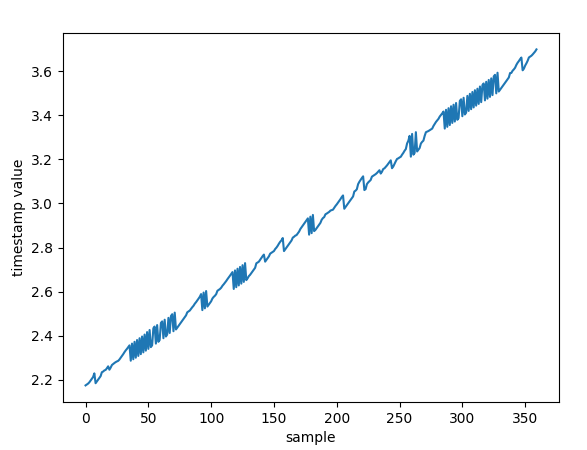
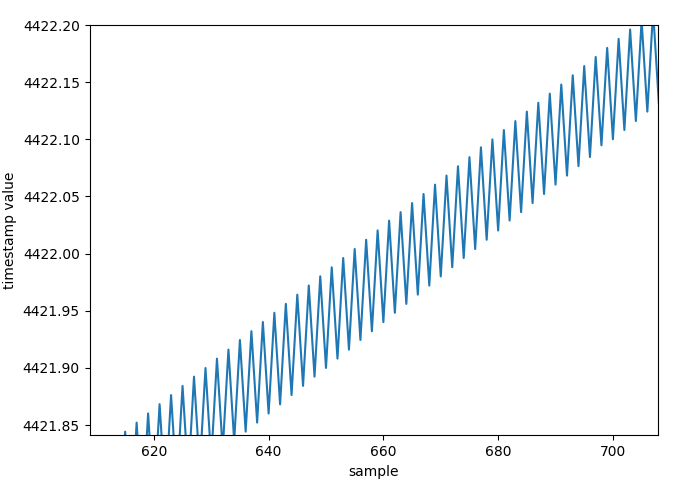
Second, when querying the frame times of the frames that I do get, it appears that frame timestamps do not monotonically increase, but instead fluctuate with some frames having timestamps that are earlier than the prior frame. I just want to make sure that this is expected behavior, and that I can reasonably sort frames by their timestamps without negatively affecting the corresponding gaze data. You can see this in an attached plot of the timestamps.
I've attached some sample code for reproduction. Thanks!
It might be worth reviewing the Delivery Guarantees section of our documentation, or even better, the ZMQ Guide. In short though, it's important to know that messages are queued and must be consumed as quickly as they are produced or else they will be dropped. Messages are queued in the order they are received, and, yes, the oldest ones will be pulled out first. If you're only interested in the latest messages, you will want to read all of the messages until the queue is empty and then just process the last one
Hi! I bought 2 new pupil core in 2021, and then was on maternity leave and havent had a chance to use them until now. While I was on leave I see that pupil mobile deprecated, so I can no longer use them as I had intended. For people who planned to use pupil core for non-tethered paradigms, what do you suggest we do? I dont have the funds to purchase a Neon and I really want to find a way to use the glasses.
Hi @user-f2c1b3, the community here had success with different ways to use Core wirelessly on tablets/PCs in a backpack. Please check out https://discord.com/channels/285728493612957698/285728493612957698/1129316201424748684 and https://discord.com/channels/285728493612957698/285728493612957698/1042712204140630117. Do note that tablets should meet the minimal requirements: https://discord.com/channels/285728493612957698/285728493612957698/968160918770958386
Alternatively, you can also stream data from Core wirelessly: https://discord.com/channels/285728493612957698/285728493612957698/1101035840374841435.
Hi, @user-fcb4e7 - I don't believe so, but you could probably gather this from the web socket stream for the real-time API - ws://localhost:8080
Thanks Dom, I'll look into using that method
Thanks Dom, that's helpful! We had the same thought - I've tried reading the queue as fast as possible (e.g., without pausing between loops), but it looks like the queue fills faster than recv_multipart() can read the data - its never able to empty the queue on the socket. Do you know of a faster way to read off the socket?
Can you share your code where you are trying this approach? Also, what are the specs on the machine running this?
Hi pupil labs, after the API and neon app update, my program isn't able to save events anymore. At first, I was getting an error related to gaze, but this was fixed by updating the API to 1.2.0. After updating the API, now im getting an error every time I try to send an event
This was working completly fine before the update. Do you guys know what was changed in regards to sending events using the async send_event() function?
Hi, @user-2255fa - can you share the error that you're seeing when you send an event?
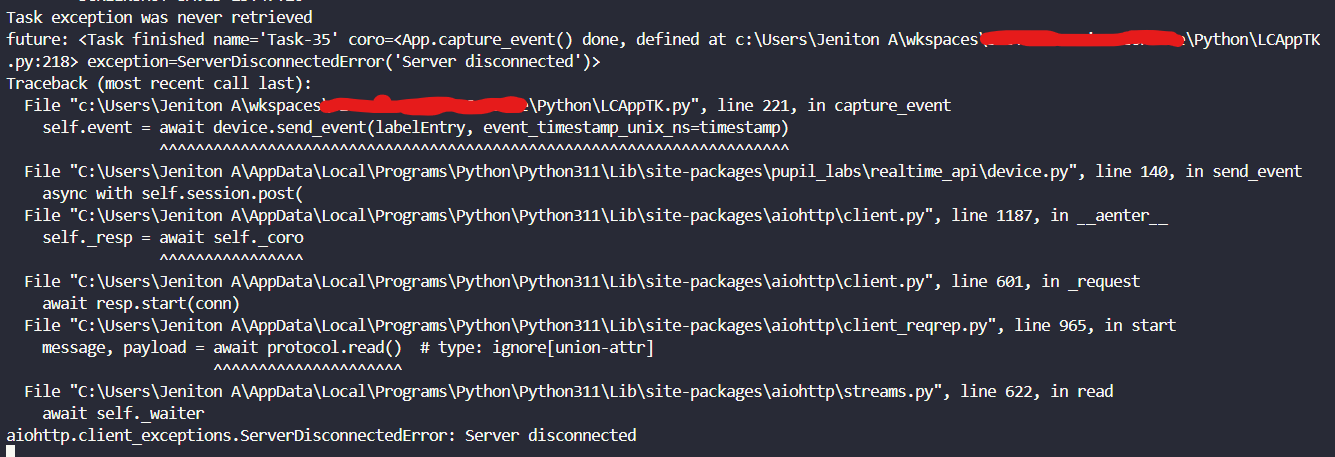
everything else works fine such as starting a recording, getting gaze position, but for some reason when sending an event the server abruptly disconnects
I'm not able to replicate this using the asynchronous or simple APIs. Can you try a simplified program to narrow down the issue? Here's the send-event example from the docs
import asyncio
import time

from pupil_labs.realtime_api import Device, Network


async def main():
    async with Network() as network:
        dev_info = await network.wait_for_new_device(timeout_seconds=5)
    if dev_info is None:
        print("No device could be found! Abort")
        return

    async with Device.from_discovered_device(dev_info) as device:
        # send event without timestamp
        print(await device.send_event("test event"))

        # send event with current timestamp
        print(
            await device.send_event(
                "test event", event_timestamp_unix_ns=time.time_ns()
            )
        )


if __name__ == "__main__":
    asyncio.run(main())
nvm it something to do with my wifi. When im connected to my phone hotspot, it works fine. But when its connected to my internet it doesnt wanna work. Prolly some networking issue. Thank you for helping out tho!
Hi Dom, I think I've resolved my issue - I realized that unpacking the bit string with msgpack.loads() was the bottleneck. I broke recv_multipart() and msgpack.loads() into separate threads and it seemed to mostly resolve the issue. I still see a sawtooth pattern in terms of the timestamps of the items frames pulled off the queue, but I think that can be easily remedied by sorting the data by timestamp after its been collected.
I've attached sample code in case you have any additional comments or thoughts.
That seems a reasonable solution to me!