
Okay. Did you make sure to record the scanning video from diverse angles and perspectives? It looks to be pretty static from the screenshot you shared. Here are some best practices for making an optimal scanning recording: https://docs.pupil-labs.com/neon/pupil-cloud/enrichments/reference-image-mapper/#scanning-best-practices
Hi @user-44c93c! Neon's pupil-size measurements are provided as a single value, reported in millimetres, quantifying the diameter of the 3D opening in the center of the iris. Currently, our approach assumes that the left and right pupil diameter is the same. According to physiological data, this is a good approximation for about 90% of wearers. Note, however, we do not assume that pupil images necessarily appear the same in the left and right eye image, as apparent 2D pupil size strongly depends on gaze angle. We are working on an approach that will robustly provide independent pupil sizes in the future. We cannot give a concrete ETA for that though.
@user-44c93c, regarding your second question, currently, we do not provide a quality metric, like confidence, for Neon's eye state or gaze outputs. While they are robust to things like headset slippage, accuracy will degrade at a certain point, e.g. when the glasses are too far from the eyes. This is certainly on our radar and we are exploring options.
Hi team. Can you guys tell me how to download the raw Android data from the cloud? I am trying to test the neon player.
Hi @user-37a2bd! To access the raw android data from the Cloud, please right-click on the recording > Download > Raw Android Data.
Please note that if the Raw Android Data option is not shown, you will have to enable it in your workspace. To get the data in this format, please go to the Workspace Settings section and then click on the toggle next to "Show Raw Sensor Data". There you can enable this option in the download menu. Please keep in mind that you need to enable this feature for each workspace you'd like to download the raw android data.
I hope this helps!
Thanks Nadia! It helped. I tried the neon player. Does it have a time limit for it to be opened? It seems to close by itself after a certain time. Any idea what the problem could be?
Hi @user-37a2bd! It might take a while to load depending on your recordings size. If you did not manage to load it successfully, could you please the Raw Android Data folder of your recording with [email removed] This might help us understand what went wrong.
It didn't have a problem opening the file. But after a few minutes the program would close by itself. I would be toggling some of the options and when I select say fixations and then them on before it could start processing the program would close by itself
Hi, could I ask what does 'timestep' columns represent in 'gaze.csv'file exported by neon by pupil? as the difference of each column seems vary! Thank you in advance for your help!
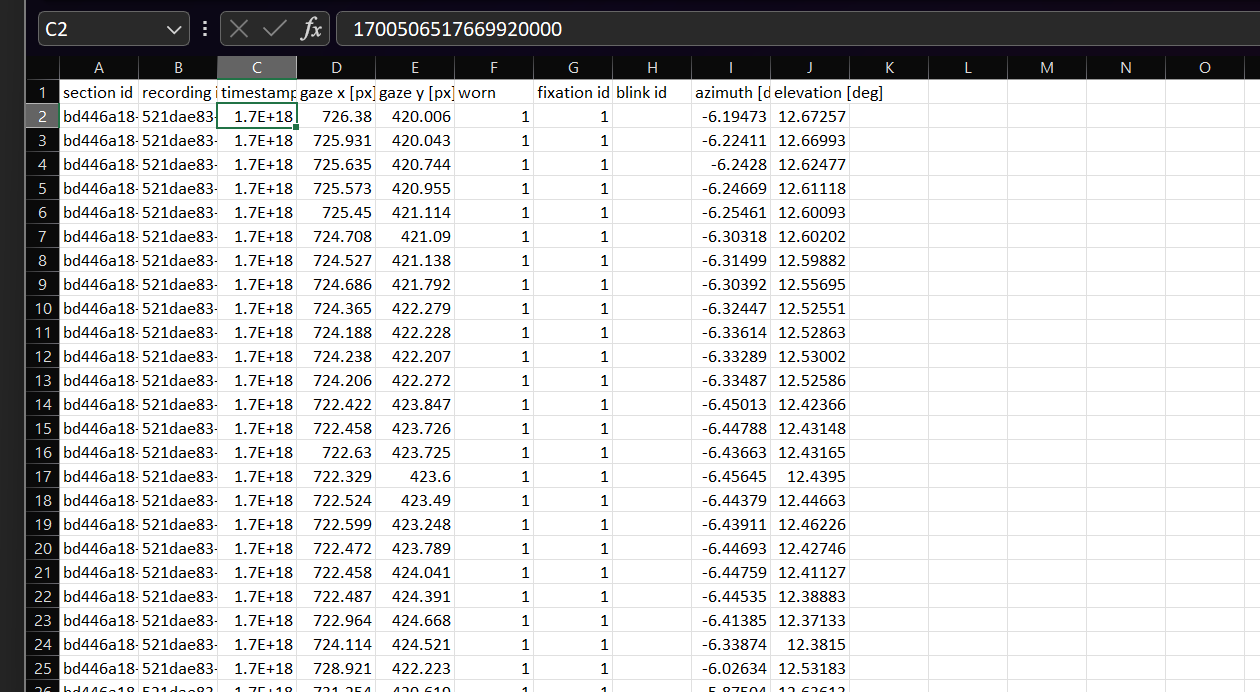
Hi @user-b5a8d2, these are timestamps. You can read about them in the docs: https://docs.pupil-labs.com/neon/data-collection/data-format/#gaze-csv
Sorry for disurbing you, I believe the cloud is temporarily not accessible at this moment Could you guys please check with this? Thank you so much!!
Hey @user-b5a8d2 👋. Pupil Cloud was undergoing scheduled maintenance: https://discord.com/channels/285728493612957698/733230031228370956/1180096742805491802. But it should be up and running again by now
Thank you so much !!!
Is it possible to know the frame index of world video in the gaze file? I mean how to know what all gaze fall in a particular frame. Currently, this information is not in the gaze.csv file. Also, the start timestamp of gaze.csv and world_timestamps.csv is different. Any suggestions?
Hi @user-d648ea 👋. The scene camera and eye cameras have different sampling rates - the scene is at 30 Hz, while the eye cameras are at 200 Hz. Although they aren't perfectly in sync, they do share a common clock. Therefore, one way to find which gaze data correspond to scene frames would be to find the closest matching timestamps. If you're familiar with Python, this can be done relatively easily using the Pandas pd.merge_asof method.
Hi, we had several recordings that couldn't be played either locally on the phone or on Pupil Cloud. All recordings were recorded today. The error message said "gaze pipeline was broken..." Can we have some help on this please? Thanks so much!
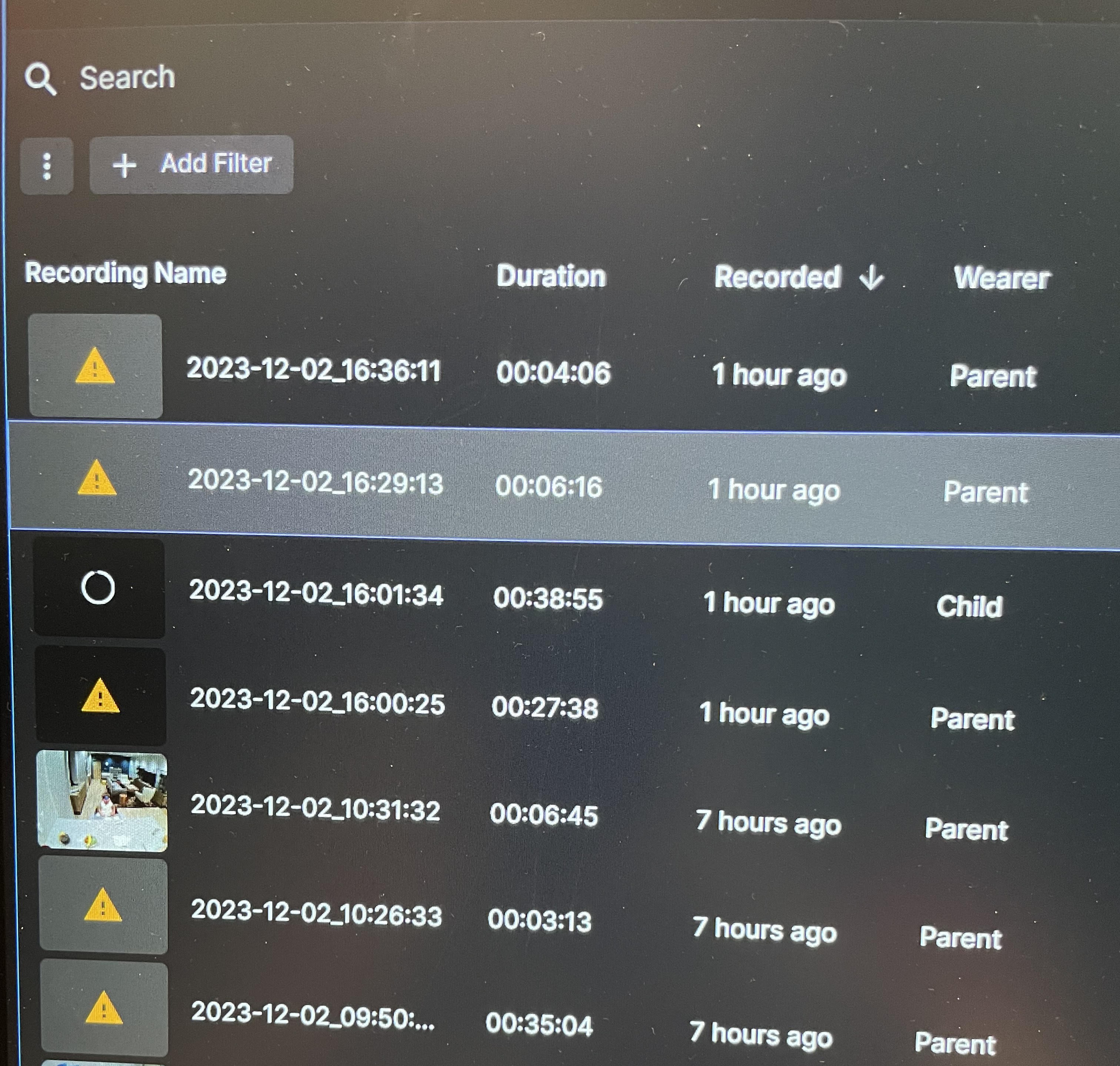
Hello good evening, are there any issues regarding Pupil Cloud at the moment after the scheduled maintenance? I wasn't able to generate an image mapper out of 3 videos (Error says "The enrichment could not be computed based on the selected scanning video") and when trying to download a simple video with the gaze overlay it says "Error: Please contact info+cloud-support@pupil-labs.com for support) Thanks in advance!
Hi @user-831bb5! The first message you shared indicates that the scanning recording video was not sufficient to complete the enrichment. This could be due to several reasons, such as insufficiently diverse camera perspectives, low light/contrast, etc. It's difficult to say without seeing it. The easiest way for me to check would be to invite me to the workspace. Are you able to do so? The second message will need further investigation. Can you share the enrichment ID with the email in the error message [email removed]
Neon Player debugging
HI @user-e141bd! Can you please send the recording IDs to [email removed] We will coordinate from there to try and get this Cloud error resolved ASAP!
Thanks, Neil! I sent the email just now
Hey, is it possible for the "Just act natural" frame to remove the lenses? I know that this was possible with the PupilInvisible
Thanks. @nadia . How does Neon ultimately determine the pupil size value it records? Does it always pick one of the two eyes? The larger diameter of the two eyes? Something else? Thanks!
Hi @user-44c93c. Our approach outputs a single value for both eyes. It does not assume the two pupil sizes to be different and does not favour one of the two eyes. We are planning to release a whitepaper to elaborate on our approach - that will be announced here so keep an eye out for it!
Hi @user-fb5b59 👋. The Just Act Natural lenses are not designed to be remove like with Invisible. Why you would like to do so?
If we are using other sensors, e.g. external monitoring camera with an active illumination, you will get reflections on the lenses. And if the lenses do not really have anything to contribute (so no correction lenses), it might be cool to do all recordings without such reflections
Hi PupilLabs, we're working with real-time streams from multiple Neon devices. It seems like the decoding of scene frames from the RTSP stream is limiting the number of devices we can stream at a time using the Python Realtime API. Is it possible to reduce the resolution of scene frames from 1600*1200 so the decoding is faster?
Thank you very much, I made a scanning video that lasted a bit longer and it fixed the issue! And the other issue fixed on itself haha maybe it was the cloud not being updated for me at the time. Anyways, thanks a lot!
Glad to hear you got your enrichment sorted with an improved scanning recording. Cloud was indeed being updated over the weekend, and I believe the team has resolved everything related to that now, so that's probably why your other issue is also sorted!
Hi - I am trying to set up PsychoPy. I am at the stage of details about 'remote address' and 'remote port'' (step 4 in this guide https://www.psychopy.org/api/iohub/device/eyetracker_interface/PupilLabs_Neon_Implementation_Notes.html#setting-up-the-eye-tracker). I am confused about how it works with more than one eye-trackers. I have two (therefore two IP addresses) and would like to set up an experiment where the same trigger is sent to both devices connected on the same network. Is that possible?
PsychoPy doesn't (directly) support multiple eyetrackers simultaneously.
This can be accomplished with our eyetrackers using the Python API (https://docs.pupil-labs.com/neon/real-time-api/tutorials/), but it will require manual coding and you will not be able to use PsychoPy's ioHub/eyetracker API/interface
thanks. when I try to install pupil-labs-real-time-api (from tutorial), I receive this error: note: This error originates from a subprocess, and is likely not a problem with pip. ERROR: Failed building wheel for multidict Failed to build frozenlist multidict ERROR: Could not build wheels for frozenlist, multidict, which is required to install pyproject.toml-based projects
Hi! Pupil lab support team. I used the marker reference enrichment to analyse data through pupil could via the application of apriltags. I would like to ask how the pixels data in surface positions tranfer into cm or mm ? Or in which way should I interpret them.
Hi, @user-042d90 - surface gaze positions are in normalized coordinate space. The top left corner of the surface is (0, 0) and the bottom right is (1, 1). See: https://docs.pupil-labs.com/neon/pupil-cloud/enrichments/marker-mapper/#surface-coordinates
If you're using PsychoPy's UI and installed PsychoPy using their installer, you'll need to install packages into the Python distribution that comes as part of PsychoPy.
If instead you're running PsychoPy from source or from a pip install, then you may need a newer version of Python
I'm using PyCharm - would that be a version issue?
Also as full reference this is the error I get. I have already installed the C++ build tools suggested in the error and restarted my laptop.
PyCharm is an IDE - a tool to edit and debug code. Python is installed separately.
Projects in PyCharm can be configured to use different Python installations or environments. It looks like you can follow the steps here to determine what version of Python is being used in your project: https://scripteverything.com/how-to-check-python-version-in-pycharm/
Maybe there is a list of packages that need to be pre-installed before installing with "pip install pupil-labs-realtime-api". I am using Python 3.12 (checked in PyCharm and also the interpreter is set to the 3.12). Still unable to install pupil-labs
Hi! I was wondering if the RTSP path rtsp://[phone_ip]:8086/?camera=world still work to get the glasses' webcam stream? Or do you know the actual path I can interface with?
Im trying to stream the glasses' camera directly into VLC, I was using rtsp://[phone_ip]:8086/axis-media/media.amp?camera=world×tamp=0&videocodec=h264, it was able to connect but I am not seeing any output. I took that path from the RTSP OPTIONS message sent in the PI Monitor websocket connection
If anyone from PupilLabs also has some insight on this that would be awesome! 🙂
Using ths axis-media url works in an OBS media source, im thinking VLC can't handle paramaters in the URL?
The end goal is to use FFMPEG to decode many streams on an NVIDIA GPU
rtsp://[phone_ip]:8086/?camera=world works for me
just so im sure im not doing something wrong, this is the URL i used to connect, it still shows no output, but does not error when connecting
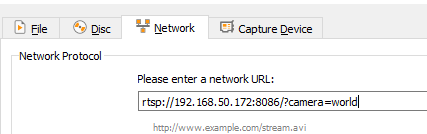
using ?camera=sdfas produces an immediate error, so using ?camera=world seems to connect fine, just again, no output
I am on VLC 3.0.11
How long did you wait? For me, it takes a couple of seconds for VLC's buffer to fill before the stream is displayed
30+ seconds, after around 5 seconds it switches to this
from this, where it is attempting to connect i assume
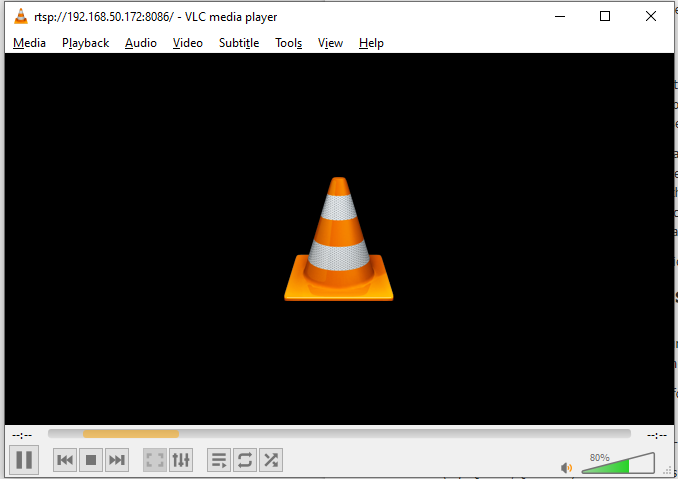
Do you have FFMPEG installed? If so, you could try this: ffplay -fflags nobuffer -flags low_delay -framedrop "rtsp://[IP]:8086?camera=world"
If not, you may get a little more info out of VLC by launching it on the command line
yup, works through ffmpeg, strange how VLC is the only issue
That is a bit of a headscratcher. Can you try launching VLC from the commandline?
vlc "rtsp://[IP]:8086?camera=world"
It looks like you're on Windows, so you may need to specify the full path to VLC
same result
But any additional messages on the command line output?
nope, command line output is empty
Hm. Well, did you specifically need support in VLC?
no, would have just been nice, the end goal was to run it through ffmpeg so thank you for helping with that!
Hey! We are having trouble with our companion app being connected to the servers. The recordings are not being uploaded. We have updated the app and the firmware. Tried reconnecting to the network but nothing seems to fix the issue. Please advise on how to fix!
Hi @user-e94e07! Can you please try logging out and back into Neon Companion app?
Hi, anyone tried to connect a bundled OnePlus 8T (Android 11) to Apple Silicon Mac? I am trying it using Android File Transfer / Open MTP, but none works.
Check out this link: https://docs.pupil-labs.com/neon/data-collection/transfer-recordings-via-usb/#export-from-neon-companion-app (instructions for mac at the bottom)
Hello, we are using the web interface to stream the video from the Neon glasses using the phone IP indicated on the Neon companion, but regularly either the video or the gaze is freezing. Is it normal? We have to close and open again the browser, sometimes two or three times to fix it. Did you observe this as well ? And if so, have you some ideas to avoid this problem ? Thanks !
Hi @user-51951e, may I ask which web browser you're using?
Hi, Is there any plan to be able to obtain real-time measurements of pupilometry data? My understanding is that this is only available after uploading to Pupil Cloud.
Hello everybody 🙂 Im from the university of Ulm and we just bought a couple of the pupil neon eye tracker, and they are working splendid! So we are really happy about them. 🙂 I have question about the parameters: Is there any way to find out how long the gaze has to rest in order for it to count as an fixations, saccade etc.? and is there any way to change these parameters? I looked through your homepage but coulnd´t find anything, so if sb could help me, that´d be great!
Glad to hear you're enjoying your Neons! Have you seen this whitepaper which describes our fixation detection algorithm? https://docs.google.com/document/d/1dTL1VS83F-W1AZfbG-EogYwq2PFk463HqwGgshK3yJE/export?format=pdf
thank you!
Hi @nadia Where is this how-to document now? The link is broken.
Hi @user-19bba3 👋🏽 ! Apologies - there have been updates of the documentation recently. You can find this how-to document here: https://docs.pupil-labs.com/alpha-lab/neon-with-capture/
We used Chrome and Microsoft Edge
Thanks for the information. Would you be able to share some further information about the kind of network you're on when using the monitor app?
Hi @user-2d7cba! Indeed, pupillometry is currently available only post-hoc after uploading the recordings to Pupil Cloud. Our next step will be to implement pupillometry on the Companion Device, allowing real-time measurement. We expect this feature to become available early next year.
Very excited about this future release!
Also to tell you that the audio recording was activated on the companion but we figured out after 6 videos that it didn't record the audio. We had to toggle off and on again the audio recording to make it work. Very unfortunate, please check this issue
Audio missing
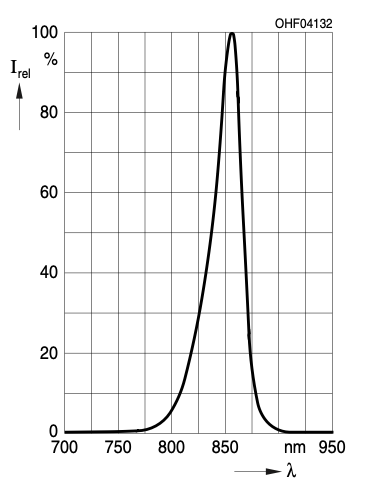
Hello, do you know what wavelengths are used in infrared by eye tracking glasses? Is interference possible with other devices in 780 and 850 nanometers?
Hey Pupil Labs team,
We need to know which gaze- and fixation- data points belong to which video frame. In Core, you provide the ‘start_frame_index’ for every fixation and the ‘frame_index’ for every gaze (https://docs.pupil-labs.com/core/software/pupil-player/#fixation-export). We would need something similar. Because of this missing information, we tried to synchronize gaze.csv and world_timestamps.csv with their closest minimum “timestamp [ns]”. We take the “timestamp [ns]” from the gaze and find the corresponding frame. However, the coordinates do not align with the red circle (image).
Therefore, the questions are:
(image)[The frame is from gaze overly enhancement of the video and blue dots are the gaze coordinates we exported from gaze.csv]
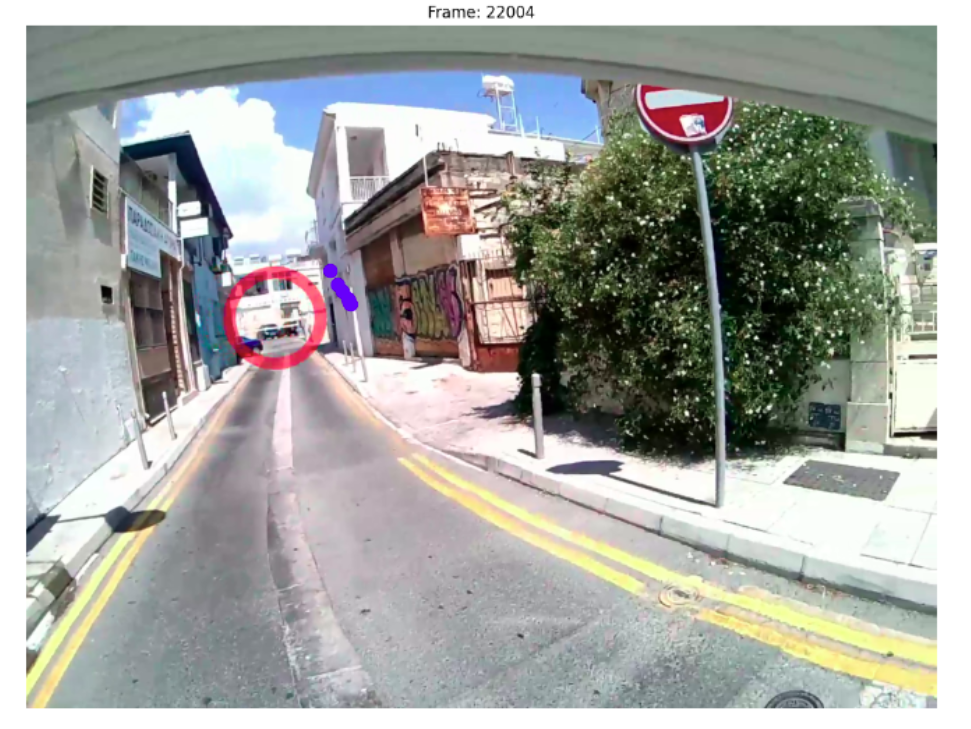
Hi @user-a64a96! You can use this repo https://github.com/pupil-labs/densepose-module/blob/main/src/pupil_labs/dense_pose/__main__.py as a reference for example, it reads the video, reads the csv gaze and world timestamps files and uses that information to get the match and render it. Simply ignore the densepose stuff, you can change the pose.get_densepose() function to whatever you you want, as you already have at that point the matching scene frame and coordinates.
Hi @user-ca96f7 ! The IR LEDs illuminating the eyes run at a peak wavelength (λ) of ~860nm (centroid 850nm ± 42nm Δλ). So while our IR will not interfere almost with the 780nm, they will with the 850nm. That said, note that we only use the IR for illumination purposes.
Okay, thank you for your answer!
@user-d407c1 Thank you for your answer. I think you forgot to add the link for the repo 🙂
Sy! 🤦 Added it
Hello Pupil Team! Could this problem be solved? I'm encountering the same issue at the moment. Even though three of my 4 markers are detected, the surface definition is all over the place...
Hi, @user-f8b80c - could you share the enrichment ID so that we can take a closer look? To copy the ID, open the enrichment in Pupil Cloud, then click on the three dots ⋮ at the top of the enrichment info and select "Copy Enrichment ID"
Hi Neil, I knew this instruction. I found I can access OnePlus using 2019 Intel MacBook Pro (Vetura) through Android Transfer without problem but still cannot access using 2021 M1 Max MacBook Pro (Ventura). Similar issue is reported here https://discussions.apple.com/thread/252616053?sortBy=best Open MTP (https://github.com/ganeshrvel/openmtp) is software seemingly developed to solve a common bug in data communication between Android OS and Mac OS, but it failed in this case; it may be that Apple Silicon & Open MTP & OnePlus 8T combination is not good fit. I hope readers of this post will give some information.
I'm not familiar with that repository, but we've not encountered issues with transferring files between 1+8 phones and Macbook M1. My question now is what USB cable are you using? Not all USB cables support data transfer.
Hi @dominic I tried deleting the old enrichment and adding a new marker mapper, this way it worked better for some videos, but not for all. The new enrichment ID is the following: 2b4fbe8f-7c6d-4eba-8639-e58cad32a2bb I applied the enrichment to all videos in my project (8 in total), for some it works perfectly fine, for others the above problem occurs.
Thanks! I've passed the recording ID along so we can investigate
Hi - I think this is not the issue, as my python version is the latest (3.12). Can you help me understand what's the issue?
That very well could be the issue! 3.12 is so new that some libraries are still catching up and don't support it yet. Can you try 3.11?
Also as full reference this is the error I get. I have already installed the C++ build tools suggested in the error and restarted my laptop.
Hi, @dominic I am having an issue with my pupil lab eye tracker it's not connecting to the phone
@user-42321a, could you please reach out to info@pupil-labs.com and someone from there will help to get you up and running again!
Hi @dominic, Could you please help! My neon companion stopped connecting to the phone (1plus 10 Pro) after making some continuous vibrations coupled with an error display. I have tried to update the firmware but the issue still persists.
@user-10b2f3 Could you please reach out to info@pupil-labs.com and someone from there will help to get you up and running again!
I used the same cable for validation so it was not the cause of the problem. I also found M1 Max x Monterey x Android Transfer worked. Finally, I updated minor version of Ventura (M1 Max Pro; the original problematic machine) and it worked. Thanks for your advice!
So mac update solved the recording transfer issue. Awesome!
Hello, I am interested in purchasing a Pupil Neon, can someone provide me with a sample data file output so I can review it? Does the Neon require paid software?
Hey @user-c87d2d 👋. Please reach out to info@pupil-labs.com and we will send you an example recording. If you haven't already, you can find an overview of the recording format on our online docs: https://docs.pupil-labs.com/neon/data-collection/data-format/#recording-format
Hi, I have a question about Pupil Cloud. I am trying to obtain ethical approval to use the Neon in a study. I want to use your Pupil Cloud services, but my Research Ethics Board wants to know whether the transfer of this data to your servers is secure. Is the data encrypted before transfer?
EDIT: It would also be great to know whether the data is stored on your servers in an encrypted state as well.
Hi @user-ddf0f7! Pupil Cloud is fully GDPR compliant. You can find all the details in our privacy policy https://pupil-labs.com/legal/privacy and in this document as well: https://docs.google.com/document/d/18yaGOFfIbCeIj-3_GSin3GoXhYwwgORu9_7Z-grZ-2U/export?format=pdf
Hello! I would like to use the data output from the neon device to predict 6d camera pose (relative 3d rotation + 3d translation) using visual-inertial odometry methods. However, it seems that these methods require magnetometer readings from the IMU device. After looking through the IMU manufaturers datasheet (https://invensense.tdk.com/download-pdf/icm-20948-datasheet/) it seems that it has two modes: 1) first mode uses the integrated digital motion processor (DMP), which outputs a quaternion but no magnetometer readings, and 2) second mode does not use DMP and so does not output a quaternion, but does return magnetometer readings. So basically, using the DMP throws away magnetometer readings, but returns quaternion. Does anyone here know how to set the IMU device to the second mode which returns the magnetometer readings? Thanks!
Hi, @user-275c4d - welcome to the community here! Neon uses an onboard algorithm to fuse data from the accelerometer, gyroscope, and magnetometer readings to produce an absolute orientation estimate. Direct-access to magnetometer sensor values is not available
Also, if anyone has experience with this kind of thing, I would greatly appreciate any tips/suggestions/experiences! Thanks
Hi! Is there any way to get the scene_camera.json file? Here https://docs.pupil-labs.com/neon/data-collection/data-format/, it says it's included in the recordings folder, but I can't seem to find it
Hi @user-e1140a 👋🏽 ! You can get the scene_camera.json file by downloading the Timeseries Data of the recording(s) of interest from Pupil Cloud.
Hi, I have a question regarding the relation between the timestamps and the video in data exported from a neon recording in the pupil cloud. The enrichment_info.txt points to https://docs.pupil-labs.com/cloud/enrichments/#raw-data-exporter, but unfortunately, this does not seem to exist. I am currently working under the assumption that the "start_time" in the info.json corresponds to the start time of the video, i.e. I can get the corresponding video time by subtracting that start time from the "timestamp [ns]" (in both gaze.csv and world_timestamps.csv). Is this assumption correct?
Hi, @user-d1f142 - yes, you have the right idea! Thanks for pointing out that bad link by the way - we recently overhauled our documentation website and it seems there are a couple of loose ends to tie up.
Hello! I saw on the website that pupillometry data and eye state are now supposedly available on pupil cloud now. Unless I'm looking in the wrong place, where do I go to access this data? There doesn't seem to be any new enrichments and there are no pupillometry related csv files in the data exports. Thanks!

Hi @user-328c63 ! Recordings made with the Companion App 2.7.4 or above should already have a new CSV file named 3d_eye_states.csv https://docs.pupil-labs.com/neon/data-collection/data-format/#_3d-eye-states-csv that contains pupillometry and eye state. If that's not the case or you need an older recording to be reprocessed, please let us know.
Hi Miguel, thanks for your reply! Gothca. Could you say more about reprocessing older recordings? I have multiple subjects I have already run, and was hoping to extract pupillometry from that data.
You can reach out to us by email [email removed] with a list of recording ids or workspace ids that you would like us to reprocess for pupil size.
it should be noted that the quaternion does include the magnetometer data. The pose if fully defined. So the magnetometer data is not thrown away. @user-275c4d
Hi, I am going through data I collected using pupil capture. However nearly every file has been misnamed. This can not be a result of me mislabeling the files before hand as I backed up the files by screen recording. For the screen recordings I can see that I entered the correct names next to where it says “recording session name” but when I view the files in pupil player most have the wrong name. Is there a way to fix this, and how can I prevent this from happening again in the future? Thanks!
Hello! We've received our neon glasses this week (yay)! I've been able to test them both glasses for a short time and with one of the two, neon companion has trouble displaying the gaze for some reason. When I uploaded the recording, after processing, the gaze data was present, I just couldn't display it in the stream or the preview of the app (or when trying to set an offset)
Hi @user-1391e7 👋 ! I am sorry to hear that you are experiencing issues with one of your Neons. Would you mind writing an email to info@pupil-labs.com referring to this message? We would follow up with more debugging steps to try to identify what happened but we might need to ask you for some IDs, purchase order, etc to better assist you and I feel it might be better to do so by email.
I think, since the gaze stream was there in the recording, maybe this is a software issue in the companion app? I need to test further, but any help in getting to the bottom of it would be greatly appreciated
the visualization shows up for the first few frames and then nothing
I'll try reinstalling the companion app, maybe something is up there
hm no, this is persisting :/
Hi @user-857e95 👋 ! Are you using Pupil Core or Neon ? Would you mind also developing what do you mean by the mislabeling? Perhaps stating what filenames do you find and which ones were you expecting.
Hi Miguel, I’m using pupil core, apologies for posting in the wrong room. By mislabeling I mean that the folders are numbered incorrectly. I’m doing driving research and labeled scenarios 1-8. The folders seem to be labeled correctly for the participant ID name but the scenario numbers are all incorrect. The names of each file are created in the follow format - participantID_Pre(or)Post_Sc01-08.
It seems as though the scenario number is what got screwed up for all participants. Also some files are duplicated and stored under a different scenario number.
thank you, I shall do that 🙂
I found a difference
the eye preview screen looks persistently fine on the pair that is working
but on the other pair, it looks like the whole frame is shifted up/down and maybe that isn't just a display error, maybe it impacts the live preview
when I upload a recording to the cloud and something didn't work out, can I reupload the recordings somehow?
the problem was, something didn't work during upload, so the recordings were stuck processing
I "trashed" the two broken recordings on the cloud web interface, but locally, the companion apps tell me the recordings are in the cloud, so I can't try and upload them again
Hi @user-1391e7 ! I have replied to you by email. The trash only removes the recordings from Cloud, not from the phone.
You can access the trash and restore them by clicking on the three dots of the search bar, and selecting "Show trashed"
A general question with regards to the companion app:
I saw that I can enable/disable audio recording in the companion app, which is great. For studies, in which the recording of video is an issue (meaning all we're allowed to record is general eye movement behaviours, but not the world around participants), can I disable video recording as well?
with the pupil invisible glasses, the workaround was to just disconnect the world-camera 🙂
You can not disable the scene camera yet, but you can occlude it. If you would like us to prioritise this feature, please suggest it here.
Additionally, note that you can disable scene video upload to the Cloud for any Workspace you choose, when creating it you will find a toggle to select it.
by occlude, you mean I could just cover up the lens? .. I didn't think of that, that's a very easy solution ^^
Yes, that's exactly what I meant! I recommend being cautious when placing a sticker over the camera to ensure that no adhesive residue remains on the lens. However, should any residue be left behind, you can normally clean it off.
the workspace options are awesome! very cool, ty
we always have to take great care with regards to rights to privacy, so any extra control there helps a lot
I was thinking I'd use a small piece of thick paper and tape over that, so then there's no contact between lens and anything sticky
also, the corrective lens swapping is great, really love the solution there.
the little screwdriver that came with the glasses fits into the center piece, does that mean I could in theory swap the frame for a different one?
Yes! Neon is modular, meaning you can swap the frame. All frames are 3D printed in high quality and contain a chip to interface.
You can see the different frames we have available here, and their specifications here.
Or you can prototype your own frame !
although, the frame must have something else neat inside, right? since you're connecting that to the usb cable
maybe the one thing I'm worried about with the glasses for now. accidentally bending the cable over the course of the next year or so
There is one version under Specifications, called "Ready, Set, Go", which I can't find in the shop? Is that a preview of a version yet to come or was that a prototype you decided against selling later?
We've temporarily removed this product from our store as we're redesigning it based on the feedback that we received from our customers. We will bring it back soon with some improvements! Thanks for your understanding
Hi Pupil Labs team 🙂 You mention a performance evaluation in a white paper coming this year (https://pupil-labs.com/products/neon/specs). Is there any news on this?
Just with the final touches on this, it will be available pretty soon ™️ (hopefully this week)
Hey everyone!! I'm trying to use the recently released blink detection algorithm Jupyter notebook, but even after installing the requirements I'm getting a ModuleNotFoundError regarding the pikit module. I tried installing the module separately, but it didn't solve the problem. I also changed my python version, but the problem persists. Has anyone been through this too and could help me?
Hello everyone! How can ı export the data in csv format ?
https://docs.pupil-labs.com/neon/data-collection/data-format/ Can I download it directly in csv format from neon companion or pupilcloud? In the download options, it downloads as a code in json format. Can I convert this code in Python and get csv format this way? Even though I examined this page, I would like to say that unfortunately I cannot fully understand it. How can I download my record in CSV format in the simplest way ?
Hi @user-228c95 👋🏽 ! To get the data in csv files, you have the following options:
You can upload the recording to Pupil Cloud, and then right-click on the recording of interest, select Download > Timeseries Data + Scene Video.
If you prefer to work with your data offline, you can use Neon Player. In this case you'd have to export the android data directly from the phone or from Pupil Cloud, right-click on the recording and select Download > Raw Android Data. Which data stream are you interested in? Note that data exported from Neon player does not currently include pupillometry.
Hi everyone! Could someone please tell me where I have to upload the reference image and the reference surroundin video? Also in my case http://neon.local:8080/ doesn´t work. Last thing: where can I find the steps for the calibration process for Neon - eve though it doesn´t necessarily need some, I got the information that it´s recommended.
Hi @user-e91538 👋🏽 . Regarding your first question: If you're planning to use the Reference Image Mapper enrichment on Cloud, you'd have to follow these steps:
Once you have made the eye-tracking recording and the scanning recording please upload them on Pupil Cloud. This should be done automatically if you have the Cloud upload enabled on the Settings of the Neon Companion App on the phone. See our scanning best practices. The reference image is just a picture of your area of interest. This can be taken with any phone.
Transfer the image you have taken from your phone to your computer.
When the eye-tracking and scanning recordings are uploaded to your workspace on Pupil Cloud, please right-click on them and place them in a new project or in an existing project (New project with 2 selections or Add 2 selections to project).
Then you can go to your project. You should see both the eye-tracking recording and the scanning recording.
Now you can create the enrichment. Go to the top right Enrichments > Add > Reference Image Mapper. Once you have clicked on the Reference Image Mapper, you should see a panel that requires you to introduce the information about the reference image and the scanning recording. You'd just need to upload the reference image that you should now have locally to your computer, and select the recording that is going to be used as scanning recording.
Have you checked our Pupil Cloud documentation? We have an onboarding video on how to use Pupil Cloud that might be helpful.
As for your last two questions:
Are the two devices connected to the same wifi/hotspot? To stream the data in real-time using the Neon Monitor App you need to connect your computer to the same WiFi network as the Companion device.
Regarding the offset correction feature, please have a look at this video for detailed instructions.
Thank you! Where can I download the Neon Monitor App for Mac?
To access the Monitor app make sure the Neon Companion app is running and visit the page neon.local:8080 on your computer.
And yes, all of the devices are connected with the same WiFi and the URL doesn´t lead anywhere...
Still nothing: Die Website ist nicht erreichbarDie DNS-Adresse von neon.local wurde nicht gefunden. Eine Problemdiagnose wird durchgeführt. DNS_PROBE_STARTED
page not found
are you by any chance be using Eduroam or some kind of institutional network?
Institutional networks like eduroam can be quite restrictive. Can you try typing the IP in the browser rather than neon.local:8080 and see if it works? Alternatively, I would recommend setting up a hotspot using a third-party device.
yes
but it also didn´t work with other wifi networks...
That worked, thank you so much!
Last question regarding the face mapper: I can´t figure out how to implement the face mapper into the Cloud. Do I need to program myself and download some training data?
Using the Face Mapper on Cloud is very simple - you don't need to program anything yourself. You'd have to select the recordings of interest and create a new project (see point 3 here: https://discord.com/channels/285728493612957698/1047111711230009405/1186283819364536390) and then select Enrichments > Face Mapper and click run. Once the enrichment is completed, you'll be able to download the data by going to the Downloads tab. The Downloads tab is in the project's page on the left side of the Cloud interface.
Hi @user-ff2367 ! Apologies for that, the code has been updated , could you kindly do a fetchand pull or re-download the code?
Hello @user-d407c1. The changes worked. Thank you very much!
thank you so much!
Hello guys, can you help me with the "waiting for DNS service?" RTSP iconnections s irregular across browsers and networks. Not sure what is missing.
Hi @user-2f2524 ! Just to clarify, are you trying to use the Neon Monitor App and having issues with streaming? If so, have you checked our relevant troubleshooting section ?
Hello again. Is that usual that it takes more than 10 minutes (still on going) for the reference and the face mapper to run? (each)
Hey @user-e91538 🙂 It can take more than 10 minutes, but this really depends on several factors (e.g., the duration of your recordings). See this relevant message for more information on that: https://discord.com/channels/285728493612957698/633564003846717444/1154018234299850813
In general, it is highly recommended to slice the recording into pieces and apply the enrichments only in the periods of interest. This can significantly reduce the processing and completion time for your enrichments. You can "slice" the recordings directly on Cloud by adding Events. Please have a look at this guide that also used event annotations to apply multiple RIM enrichments: https://docs.pupil-labs.com/alpha-lab/multiple-rim/
Hi, I am having an issue with the neon companion live monitor application. It seems that I have a pair of glasses that just doesnt produce a video when connecting to the live monitor. the gaze circle is correct but the video itself is just permanently loading on a gray screen. I have another pair of glasses that I tested with a different phone and it works just fine. Both phones are running the same versions of the neon companion app.
Hi @user-442653! By live monitor, do you mean the preview button on the app or the Neon Monitor App ?
sorry I meant the neon monitor app my bad for not clarifying
No worries 🙂 Thanks for clarifying! Can you please check whether the preview of the scene camera in the app works for the phone+glasses combination that shows the grey screen in the Neon Monitor App ? You can find the scene camera preview button on the bottom right part of the Neon Companion App
Yes I have tried the preview with the combination and it works just fine everytime
Hi, I have been having a problem with Pupil Cloud where I cannot download the Time Series data. The download starts, but fails around somewhere between 23 and 32 MB. It gives me a "Check internet connection" error message.
I have verified that my internet connection is not the problem. I have a consistent connection and am able to download similarly large files from other website (e.g., Google Drive). Most of the recordings are 1 to 1.5 hours long, so they are quite large, but I haven't had this problem in the past. It started last Friday or so. Is there anything I can do to resolve the issue?
Hi! Is there anyway to get the magnetometer data? Or is there any output data on the magnetic north?
Hey @user-e1140a! The raw magnetometer readings are not exposed. However, magnetic north is included with the quaternion and Euler angles, as the orientation of the IMU is computed. If you haven't already, be sure to read the IMU docs
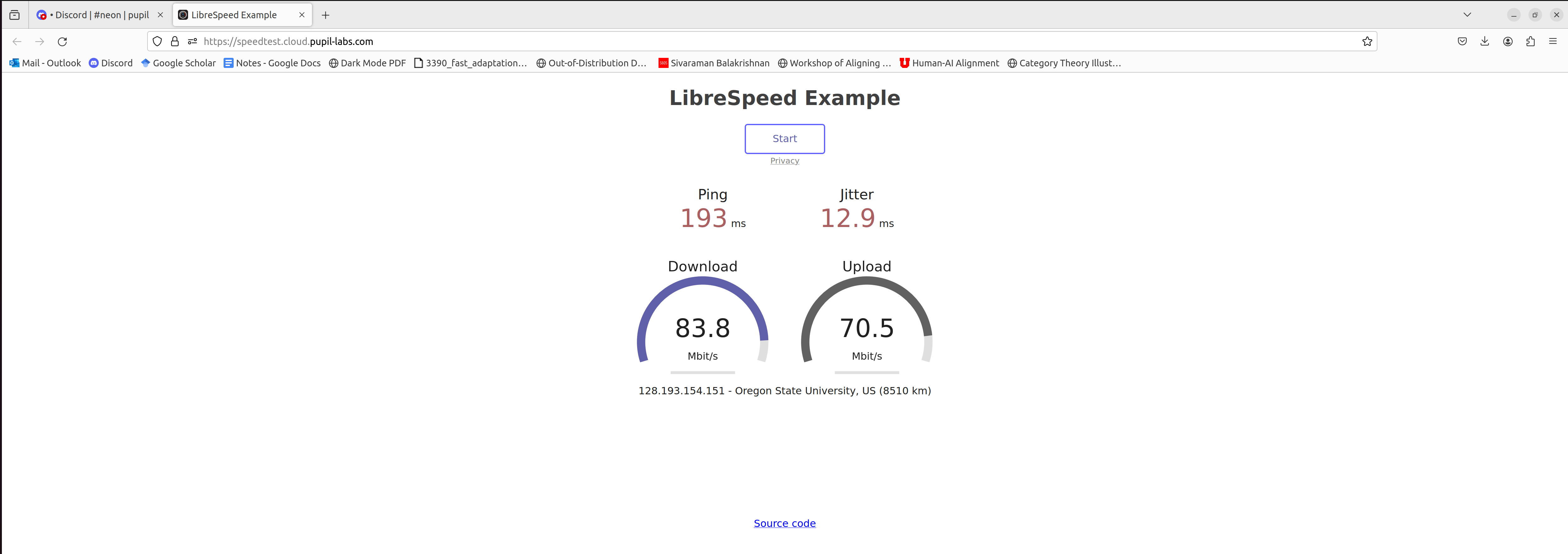
Hi @user-90c44a 👋. Please try running this speed test from your browser and let me know the outcome: https://speedtest.cloud.pupil-labs.com/
Hi Neil. Here are the results from the speed test
Hi! Is it possible to use the companion app for the neon without account and without internet?
Hi @user-e91538. To use the Neon Companion App, you would need to sign up using your Google account, or create an account with an email address and password. See our instructions on how to make your first recording
Regarding your second question, internet connection is not required to record data using the Neon Companion App. This data will be first saved on the phone and you can upload it to Pupil Cloud at a later point when you have internet access again. I hope this helps!
Yes, thank you very much!
Hi guys, I am running into an "Internal Server Error" when trying to delete recordings from the Pupil Cloud. Would you know how to address this?
Thanks for clarifying. Have you checked our troubleshooting section ? Can you also try using the IP address instead of neon.local:8080? You should be able to find the IP address by clicking on the Stream icon on the top left panel of the Companion App's main screen.
I also tried using the IP address and it was still causing the problems I could not seem to find any relevant trouble shooting information in the document you just provided when I was looking it over
Can you please try to re-connect Neon and let us know if the streaming starts? We'd also recommend opting for a low-traffic network (e.g., using a dedicated router or a hotspot by a phone)?
hmmm I just tested it out right now at home, and it seems to work, yesterday I was in office and tested both using my companies router as well as a dedicated router with 0 traffic and it wasnt working
Hey @user-2de7eb! I replied to your email. Please share with us the information I requested in the email and we'll try to resolve this issue as soon as possible.
Great, thank you!
Hey Pupil Labs,
In our data, we noticed a mismatch between the gaze data provided in your gaze overlay enrichment and plotting the gaze data from the csv using your code from the repository (https://github.com/pupil-labs/densepose-module/blob/main/src/pupil_labs/dense_pose/__main__.py). We do not understand why there is an offset, specifically a very visible delay, between the gaze data from the CSV file (gaze.csv and world_timestamps.csv) and the overlay circle. This leads us to the following questions:
Why is the data from the csv and the data in the video desynchronized (the gaze circle in the video lagging behind the csv data) even if we use the code from your repository?
How can we get the correct gaze coordinates(the exact position where the person is looking at) for each given frame, since there is obviously a time shift when using the version from your GitHub? Here is a visualization of the observed problem. The following video is downloaded from Cloud Pupil, features the normal gaze overlay enrichment (indicated by a large red circle). Our team reproduces the gaze coordinates using the code from your repository mentioned above (marked by a small red circle). As you can see, the large circle lags behind the gaze data from the CSV files. The script provided in the attachment, named sample.py, is a modified version derived from your repository. Its purpose is to synchronize the world_timestamp.csv and gaze.csv files.
Hi @user-a64a96 ! Could you share that raw recording with [email removed] so I could check this issue more in detail? If you simply want a gaze overlay, have you checked Neon Player
Sure! I'll send them right now! EDIT: Regarding Neon Player, I have checked it but we wanted to recreate the gaze overlay of the recording on our local machine using the csv files. Also, we wanted to know all the gaze samples regarding each specific frames
I will have a look at this tomorrow. Thanks for reporting it!
Hi Neil. Here are the results from the
Hi @user-a64a96 ! I noticed that the scene video is missing from the files you shared, which is necessary for me to understand what is going on. However, I have an idea about what might be happening. Did you try to plot the CSV data on the gaze overlay video instead of the original video?
Normally, eye cameras start slightly earlier than the scene camera after you press the record button. We don't throw away data, while waiting for the sensor and this means you have some gaze points over grey frames.
The video renderer / gaze overlay will not take this section of grey frames that appear at the beginning of the video in Cloud, and this will result on different video lengths, which could have caused this issue. What happens if you use the video downloaded from "Timeseries CSV + Video" ?
Hi @user-d407c1 Thank you for your email and this response. Perhaps, I am missing something but both videos (original video and video from gaze enrichment) are the same (amount of frames in both videos are identical). I didn't quite understand why plotting of merged csv file (world_timestamps.csv and gaze.csv based on nearest timestamps) on the original video or gaze enrichment video should be different. Since the frame numbers in the both videos and the merged csv file are the same.
I also tried to plot the merge csv file with the original video file but sadly the gaze point is not quite the same with gaze enrichment. I encounter another issue which I discussed in the email yesterday.
Hi**@user-a64a96**! I had a deeper look at the code that you shared, there are parts that are not necessary in your code, like multiplying by 10e9.
The override parameter on the densepose repo is to make it compatible with recordings from Pupil Player.
Here you have the barebones, for a simple gaze overlay, maintaining the audio. Note that you will need to change the input path.
Hey @user-d407c1 Thank you sharing your code.
@user-a64a96 And so you can also see that the temporal offset occurred because you used the gaze overlay video and not the original. Here you have the circle being plotted using the code above with the original video, stack next to the gaze overlay export(left), you can appreciate the temporal offset.