
Hello, all. I attached the Neon on my Apple Vision Pro and trying to get gaze data. What environment do you recommand to develop? Xcode(SwiftUI) or Unity? Actually I already try to use Neon XR Unity Package(https://docs.pupil-labs.com/neon/neon-xr/neon-xr-core-package/), but it doesn't work really well...
Hi @user-737ef5 , apologies for the delay in response.
Since you are working with the Apple Vision Pro (AVP), you will probably have the most success using Xcode. But note that although the Neon XR Unity Package may not work out-of-the-box in the context of the AVP, you can still use our package as guidance. You essentially need the following:
Hello. I'm writing to seek assistance with a connection issue I'm experiencing with my NEON XR device and Unity. I have installed the NEON XR Core package in my Unity project and followed all the steps in the official documentation up to Step 7 on this page: https://docs.pupil-labs.com/neon/neon-xr/neon-xr-core-package/
However, when I run the Unity project, I'm not seeing the expected [DnsDiscovery] received response from: ... message in the console. This indicates that the Unity program is not successfully establishing a connection with the NEON device.
Here is what I have already checked: Both the NEON device and my computer are connected to the same Wi-Fi network. My Unity project is running in Play mode. I have ensured that the NEON_XR_Core prefab is in my scene.
I have two main questions: After completing Step 7 in your documentation, are there any additional configurations I need to do in Unity or on the NEON device itself to establish the connection? If I manage to record eye-tracking data, where should I look for the saved data file? I'd appreciate any guidance/ tutorial video you can provide to help me troubleshoot this issue. Thank you for your time and assistance.
Hi @user-d43541 , I've moved your message to the 🤿 neon-xr channel.
May I ask what kind of network you are using?
Hi Rob, My Unity console shows a [DnsDiscovery] no device responded in time error. [DnsDiscovery] no device responded in time UnityEngine.Debug:Log (object) PupilLabs.DnsDiscovery/d__5:MoveNext () (at [email removed] UnityEngine.UnitySynchronizationContext:ExecuteTasks ()
The Neon Companion app on my phone only shows a red circle on a grey screen instead of displaying the VR headset's gameplay.
May I know how I should obtain the game view (showing in the VR headset) in my data recording?
Hi @user-d43541 , since you also reached out to us via email, we can continue discussion there. That looks like a network connection issue.
For the benefit of other users, I will briefly point out that the Neon Companion app does not record the VR headset's gameplay. Rather, it streams eyetracking data to the Unity app, as detailed here. Then, you can use our neon-vr-recorder tool for receiving the VR gameplay feed with a gaze overlay.
Hey Pupil Labs, so far I have been testing with the Anker USB Ethernet hub connected to a 2nd network card. Previously I figured out how to set this up ( https://discord.com/channels/285728493612957698/1238043619999617125/1288890519983755385 ) but it seems the behavior has changed (maybe due to a Windows update) and now I need to turn off and on network sharing each time after windows boot in order for the network connection between Companion Device and PC to establish. Questions:
-How does your usb ethernet setup look like? Have you tested with a 2nd network card? Currently our experiment pc uses ethernet connection for internet access and Windows Domain/user management.
-I have a bad feeling about continuing to use the usb ethernet hub with 2nd network card, it's already a hassle and I'm afraid behavior might change again in future. Would you recommend connecting a dedicated wifi router to the 2nd network card and use the Companion Device wirelessly? If so, is there any router you recommend?
Hi @user-ed9dfb , Windows can exhibit some inconsistent behaviour when directly connecting Neon via Ethernet cable to the PC.
The easiest way is to use a router, as you suggest. Users have reported out-of-the-box success with this router. You can plug the Ethernet cable for Neon into this router and then plug an Ethernet cable from the PC into the same router. Then, automatic device discovery should work and you don't even need a second network card. Simply plug the router into the Internet jack of your wall and both devices should also receive Internet, if necessary.
Thanks, I'll try setting up a router with wifi
hello, on neon-xr I'm getting frequent disconnection when running the sample stream_gaze.py https://github.com/pupil-labs/pl-realtime-api/blob/main/examples/async/stream_gaze.py
INFO:aiortsp.rtsp.reader:Does not support GET_PARAMETER or OPTIONS: not sending keep alive. INFO:main:Device connection healthy ERROR:aiortsp.rtsp.reader:no RTP received for 10 seconds: closing INFO:aiortsp.rtsp.reader:connection closed, error: no data INFO:aiortsp.rtsp.reader:stopping session/playback... INFO:aiortsp.rtsp.reader:connection to RTSP server 192.168.8.127:8086 closed (error: [Errno 54] Connection reset by peer) INFO:aiortsp.rtsp.reader:connection closed, error: RTSP connection lost: [Errno 54] Connection reset by peer ERROR:aiortsp.rtsp.reader:Error on stream: RTSPConnectionError('RTSP connection lost: [Errno 54] Connection reset by peer'). Reconnecting... INFO:aiortsp.rtsp.reader:try loading stream rtsp://192.168.8.127:8086/?camera=gaze&audioenable=on INFO:aiortsp.rtsp.reader:connected!
Any idea what might be the issue here, please? Many thanks!!
Hi @user-c4e582 , may I first ask what the goal is of using this script with Neon XR? Are you running Neon XR in a Unity app on the headset?
Otherwise, are you using a University or work WiFi connection? The error that you are receiving indicates a network issue.
Hi @rob
Has any exeperienced issues with the companion phone that came with Neon disconnecting from Wifi? any thought or suggestion would help - many thanks!!
Hello Rob, thanks for your question. I’m using python code to log the data directly on the server to reduce the overhead on sending it to the headset. Yes I’m using unity to render the XR scene. I’m using my own router which usually is no connection issue
Hi @user-c4e582 , may I ask how you convert Neon's gaze data to the VR coordinate system in such a setup? One of the benefits of the Neon XR Core Package is that it handles the transformation for you automatically. If it helps, sending the data to the headset versus the server should generally take essentially the same amount of time in a typical setup.
Hi @user-c4e582 , we have not tested and do not support the Sharp Aquos R9. The supported phones and Android versions can be found here in our Documentation.
The Moto Edge 40 Pro should not randomly disconnect from WiFi and it is not something that we have experienced in our tests. May I ask if you are stopping/starting many short recordings via the Real-time API? Or are you simply streaming the data?
I'm simply streaming the data using your sample code async/stream_gaze.py
I understand that Sharp is not one of the phones you tested, but it works better (no WIFI disconnection) than the Moto Edge 40 that came with Pupil Labs. What do you recommend I do diagnose the issue on Moto, please?
I'm interested not only in the gaze, but also in pupil dilation and eye lid openness which doesn't seem to be supported in the XR package - is that correct?
Hi @user-c4e582 , we will soon be adding those streams to the Neon XR Core Package. You can also simply run a recording in the Neon Companion app at the same time to record those and all other data streams. That is a more robust way, which will also save the data in a format that is compatible with all tools in our ecosystem.
I'm using NeonXR on Quest3, but I can't manage to calibrate the mount. I tried installing the MRTK3 APK and building it, but neither worked. This is what I see in the PL_Calibration scene standalone
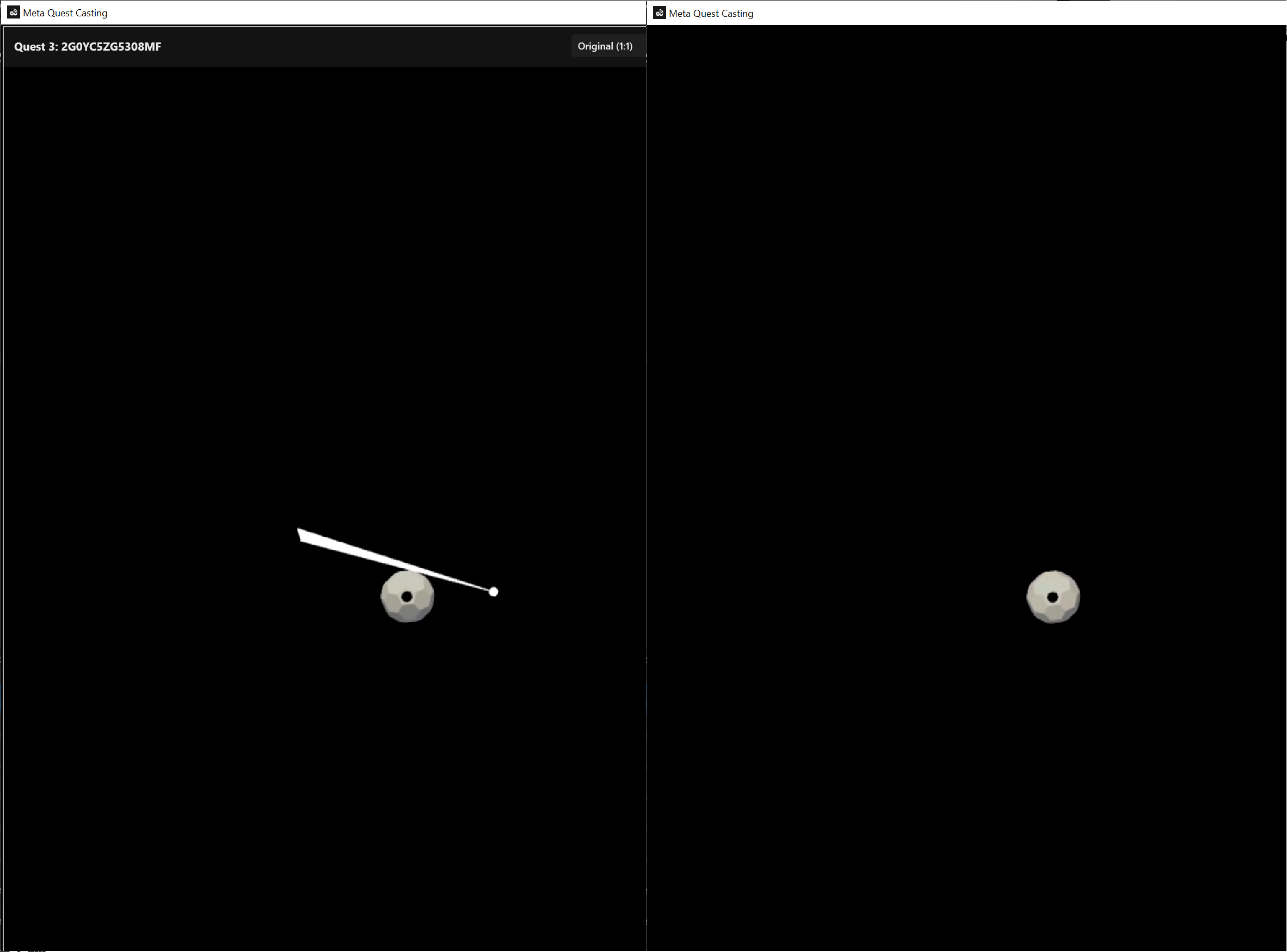
Hi @user-ef050f , the Neon XR Core Package ships with a default Quest 3 mount calibration already, so this process might not necessarily be needed in your case. You may rather want to consider a Gaze Offset Correction. If you feel regardless that you need to run a mount calibration, then you are in the correct scene and it also looks correct.
The idea is to look at the center of the target (the white ball with the black dot). When you are looking at it, hold up your hand and pinch to confirm and move to the next target. Keep going until it is finished. You can find instructions on this here.
It will be best if you disable the gaze ray from the MRTK3 Hand Menu before continuing (as well as any controller rays), since these will influence your gaze patterns.
Does that clear things up or was something specific not working?
I'm simply streaming the data using your
That’s great, however my research requires live processing of the data, that’s why I was using streaming instead of recording and post processing offline. Please let me know when the unity package is updated
Understood. Yes, we will let you know.
Thank you, Rob. Tracking works better after the calibration and offset correction.
You are welcome! Let us know if you have any other questions.
I am sure that this has been asked many times already but I couldn't find a FAQ section. I would like to use the Neon glasses in a Meta Quest 2 to see where someone is looking at in a 360 degree video. Is this something that could be done with the Neon XR mount? On the website (https://docs.pupil-labs.com/neon/neon-xr) it talks about building XR applications but we simply want to do eye-tracking of a 360 video. We are not using Unity or anything like that.
Hi @user-257877 , it is in principle possible to use Neon within the Quest 2, even in the glasses form-factor, although we typically recommend using a dedicated VR mount. Since Neon is modular, you can transfer the eyetracker to different frames to enable different use cases.
While we do not provide a Quest 2 mount, it is possible to build one yourself.
With respect to the 360 video, that is also possible and actually falls under the heading of "XR". No need to use Unity, although then you will want a program to do the mount calibration and convert Neon's gaze data from scene camera coordinates to the VR headset coordinates.
Let us know if you would like more details on any of these points.
Hi, I am going to purchase the inset for the Pico 4 and I have a question:
Do anyone know the answer? Maybe @rob or @user-d407c1?
Thank you
Hi @user-97997c , apologies for the delay. I missed this message. We have not explicitly tested the Pico 4 Ultra Enterprise. We have rather tested the Pico 4 Ultra, where the mount does fit. So long as the Pico 4 Ultra Enterprise has the same shape and the same space in the facebox, then the mount will work in there, too.
Thank you for your prompt response! I did see your instructions on how to 3D print/build your own mount. So, for these custom mounts, the module with the camera will just move to the left or right so that it captures either the left or right eye's view of the video? I saw the photos on your website and it looks like the camera stays in the center between the two lenses which surprised me since I thought the camera either has to move to the left or right eye.
To capture the view of the VR simulation, you can use our neon-vr-recorder tool. It captures the VR feed in real-time and overlays a gaze pointer on it. This allows you to see where they are looking during the experiment, as well as save that for later review.
There are also ways to save the position & pose of the person during the task and then play that back later in your rendering system to see where they were looking (i.e., you can re-project gaze into the scene in a post-hoc step).
To clarify, Neon's scene camera is not used in a VR context. It is blocked and produces a blank video.
Hi @rob , no worries and thanks for the help! The external sizes are the same, I will try it out and let you know
I have consulted with our network admin and he said adding a dedicated wifi router for the Neon is not possible as it will likely interfere with the institution-wide wifi network and vice versa. So we will continue to look into a stable wired connection for sending real-time gaze data into Unity/Unreal. Just sharing this here to let you know that a well-working (and tested) wired connection is still a demand from us and I can imagine other organizations as well. For now, we probably can use the workaround of disabling/enabling network sharing on 2nd network card after each Windows boot until we find a better solution.
Hi @user-ed9dfb , if it helps, the router does not need WiFi capability, nor does it need WiFi enabled to support the wired Ethernet connection. Some users have also used Ethernet switches.
Ah i see, I didn't initially understand that this was your suggestion. We were about to test this setup either way, among some other options
No problem. Using a router to mediate the direct Ethernet connection also helps with automatic device discovery. No need to edit Windows Internet Connection Sharing settings with such a setup.
Thanks, we will try this and I will share how it works out
Hello! Quick question, is it possible to upload own videos to the pupil cloud? We have a VR recording and want to sync them. Then upload them into the cloud to analyse the data.
Hi @user-7daeab , that is not a supported workflow. Typically, Neon XR is not used with Pupil Cloud, unless one wants to use it as a data backup or have the recordings re-processed at 200 Hz.
Pupil Cloud is meant more for real-world recordings, where it is hard to know a priori the 3D layout of the environment and the position of the wearer within it (c.f., Reference Image Mapper).
With VR, you have direct access to ground truth for the 3D structure, position of elements over time, and full control over the whole environment, so you have the best accuracy by continuing to work in the scope of that environment.
If you want to view a synced VR recording with your gaze data, then I recommend looking into our neon-vr-recorder tool.
What some others do is keep a record of the VR camera pose over time and then replay the participant's behaviour in the VR simulation in a post-hoc step.
If you have not saved such information, then you could try syncing by finding a clear distinct event in the VR recording that shows a clear signature in the recorded Neon data and align them.
Hi all, sorry for the basic question but where could I find a guide for how to run a project after I completed the Unity scene done as reported in the online doc about Core Package? I'm stuck at how to deploy or run it (and how to connect the hardware). Thank you so much
Hey everyone! I’m using the ‘I Can See Clearly Now’ Neon glasses with my Quest 3. Does anyone know if there’s a guide or tutorial on how to capture the eye-tracking data while using the Quest 3?
Hi @user-af95e6 , the process is the same, as documented here. Note that you might potentially have less accuracy when wearing Neon that way in the Quest 3, instead of with the dedicated mount. Depending on your use case, you may need to consider doing a mount calibration each time the headset is put on.
Hi @user-a9fbdb , feel free to ask questions.
When you say "completed the Unity scene", do you mean you tested the MRTK3 Template examples?
With respect to connecting the hardware, may I ask which VR headset you have?
I have VR Meta Quest 3, can we use the glass with the current application in Quest 3 or we need to run it on unity application ?
Thank you Rob. I'm using Meta Quest 3. I've followed the other guide (https://docs.pupil-labs.com/neon/neon-xr/neon-xr-core-package/) but I think it's a similar set up. It's correct that I'm not using the companion phone (so connecting the USB-C of the pupillometer to the USB-C of the Meta glass)? Thank you
Hi @user-a9fbdb , you still need to connect Neon to the Companion phone, not to the USB-C port of the Meta Quest 3.
Once that is connected, we can proceed to a more thorough discussion of how to use it with Unity.
Unity Scene deploy for Meta Quest 3
In a setup such as the one described in your "Turn your VR Headset into a Research Lab" video, where we do not control the closed-source application, would it be possible to hack the Reference Image Mapper to create a heatmap of the pilot's dashboard? I am considering running a study on XPlane
Hi @user-ef050f , Neon XR does not record the scene camera video and uploading third-party videos to Pupil Cloud is not supported. For this case, you may want to look into our neon-vr-recorder tool. Otherwise, I will check with the team if there is an alternative solution for your case.
Hi Rob, I actually thought about using the Neon VR Recorder. Please let me know if it's possible to generate heatmaps mapping its video to AOIs