
Hi guys
Has anyone had any problems callibrating the pupil _
Namely I have an htc vive addon and I can 't seem to make it work
I have set the cameras as in documentation (both htc and pupil) and when I try to callibrate it, the dot in the middle does not move 😄
I have problems with calibration, but it's not the same kind. Do you have an error in your Unity terminal?
Sorry, forgot to tag @user-e91538 Do you have an error in your Unity terminal?
I have a problem to configure the pupil capture to follow the pupil correctly. I played with all parameters, but I didn't manage to get a correct tracking. I try with different people (so it's not my morphology). Does anyone has a good tracking of the pupil? If so, could you tell me the value of the config parameters in pupil and post a video of the result on the eye. Thx
@user-e91538 How can I access the C# code of the Unity plugin? Can't find it on the github anywhere.
Or can anyone tell me what's the internal type of msgpack object received from pupil?
Does anybody know how the calibration is done in 3D mode? Is there any documents introcudes how the calibration process is done? Thank you very much.
@tylnesh#6064 the standard package you receive is a dictionary with string as key and object as value. the value can then be e.g. of type float, string, vector and more based on the subtopic (i.e. the key).
I think a good example to look at for this is
https://github.com/pupil-labs/hmd-eyes/blob/master/unity_pupil_plugin_vr/Assets/pupil_plugin/Scripts/PupilDemo.cs
The method CustomReceiveData(string topic, Dictionary<string,object> dictionary, byte[] thirdFrame = null) is called from Connection.cs, line 151, after receiving a new message through NetMQ in which the second frame corresponds to the MessagePack object
@user-e91538 thx, I've found it out two days ago and were able to go on from there. Thanks for your help.
@Peiteng#5385 we currently have this PDF (included in the Unity plugin GitHub repo), of which an updated version will soon be added to the Pupil online docs https://github.com/pupil-labs/hmd-eyes/blob/master/GettingStarted/Unity%20Pupil%20Plugin%20-%20Getting%20Started.pdf There is a section called "Running a Calibration", which should serve as a starting point. You mention 3D calibration, specifically. did you have any problems with it compared to running a 2D calibration? or did you want to dive right in to 3D?
@user-e91538 Thank you very much. I am very curious about how the 3d gaze vector is mapped to the scene in VR and how to compensate the slippage
Do you know where could I read the details about this?
Thank you very much.
@user-e91538 For insights about mapping and slippage compensation, you would have to look at what Pupil itself is doing. The Unity plugin is directly using the gaze positions it reads from the stream.
@user-e91538 Thank you very much.
@user-e91538 Hi, I can't see the gaze visualizations after calibration on hololens. The Pupil Capture display this exception: "too many values to unpack". Here is the whole log.
Hey, is it possible to somehow record the Unity Scene with the Recorder when using Vive mount, similar to the front camera capture option? Would really like to do this, but couldn't find info about it.
@helpstertee#3691 just so we don’t misunderstand each other: you are looking for an alternative way to record the Unity scene other than the one that is already there? because we have something called Recorder as part of the Unity plugin. but I think you are addressing the recording option included in Pupil Capture, am I correct?
@user-70cd0f I will have to consult with @papr on this
@user-70cd0f Thank you very much for the report. I will have a look at it
@user-e91538 The original question in the 👁 core channel was: helpstertee: Hey, is it possible to somehow record the Unity Scene with the Recorder when using Vive mount, similar to the front camera capture option? Would really like to do this, but couldn't find info about it. helpstertee: (Need to analyze focus patterns in the scene)
@user-e91538 @user-70cd0f I was able to find the issue. This is a regression of a recent change in gaze topic formats. I will submit a fix into master
@user-70cd0f I fixed the issue and pushed it to master. The fix will be included in the next release
@user-e91538 True. I tried the Pupil Capture application.
So the recorder inside the plugin will do something similar with ingame footage? I can capture scene render output and superimpose gazes later on?
@user-1ad73e okay, let’s talk about recording in Unity, then. we actually have two options by now: a standard screen recording that captures the view as seen in Unity Editors Game tab and a heatmap, which captures a spherical video of the current scene. the latter of which has options to visualize the gaze
with standard recording, you get a gaze visualization, too, but only one the user will also see. Heatmap can capture gaze without the user being distracted
Great, it’s heatmap then. Will check that out. Another question: do we need to calibrate everytime we start the scene?
unfortunately, you have to run it every time. but with the recent versions, at least the calibration time has been reduced. what would be possible (if the headset stays on the users head) is to load-in scenes after a successful calibration
Okay! Thanks for the help!
@papr Thanks! I'll try it later.
@papr I downloaded the newest master project and ran it on hololens, but there was the same error on pupil capture. The pupil capture console showed "too many values to unpack".
@user-70cd0f What did you download exactly? The hmd-eyes source code, the Pupil source code, or the Pupil bundle application that can be executed via the exe file?
@user-70cd0f In case that you downloaded the bundled application: v1.5 does not include the fix yet. But v1.6 will. Please use v1.4 until then: https://github.com/pupil-labs/pupil/releases/tag/v1.4
Hi, there. I am wondering if any of you here having experience working with infants or toddlers with this eye tracker? Thanks.
@papr I'm sorrry that I download the hmd-eyes source code instead of pupil source code. I've tried the pupil v1.4 release and it works fine now. Thanks for your patient explaination!
so i've been trying to integrate zmq for a week now in an Unreal Engine plugin and I have abandoned that idea. No I'
m trying to steer away from zmq and modify the pupil service app to get the gaze date somehow else
e.g. UDP
Could somebody point me towards where the data is transmited in the pupil Project
@user-e91538 maybe just a little more context for the others from our conversation, yesterday: the reason you want to go with the UDP solution for Unreal Engine is that you could not find a working solution for ZMQ communication in C++ and the focus of your project is the actual use of Pupil and not developing a new solution for UE. as for "where to look", you mentioned the "Connection.cs" file of our HoloLens Unity project (in a DM) but I think a better start is "UDPCommunication.cs" https://github.com/pupil-labs/hmd-eyes/blob/master/unity_pupil_plugin_hololens/Assets/pupil_plugin/Scripts/Networking/UDPCommunication.cs Starting in line 192, the method "InterpreteUDPData(byte[] data)" reads the data being sent over the UDP connection
Hi, first of all great work! Is there any way to use the HTC Vives front camera as world camera for pupil-labs capture?
I have updated all the related libraries and programs to the latest but pupil capture, service, and player at the 1.14 version due to a crash issue. However, calibration often is not really accurate. It few times works, and often doesn't. Is there any proper ways to calibrate eyes? Please help. Running out of time..
@user-d84237 I wrote you a DM, so we can try to solve your problem in detail
++
++
+++++++
sorry
Hi
I have a quick question about the pupil lab products!
Could You please help me ?
I want to compare this device to tobii vr eyetracking
And also compare it to FOVE!
?
Hi all! I'm having issues with running the default Unity calibration and my HTC Vive. The confidence is well below the minimum of 0.6. I see both eye fine in the Pupil Capture screen, but one of both eyes keep loosing tracking when looking either up or down. The eyes are both in the center of the video capture screen when looking forward. Is there anything I can adjust or change to get the 3D calibration to work better?
Hi guys what is the easieast way to calibrate pupil using the htc vive ?
Is it mandatory to calibrate it using Unity ?
Hey!
I'm using pupil capture 1.6 and the latest versin of HMD eyes. After finishing the pupil plugin calibration in Unity I see that the user settings in the puil capture settings folder are changed for both eyes. When restarting the eye processes, capture says 'No user calibration found' and loads the dummy calibration. Is there a way to use the calibration done in unity in another session?
i'm having some trouble with the format of the data send from pupil capture/service
as a sanity check : when subscribing to a zmq socket does pupil send data encoded as utf 8?
Hey guys, working on the diy pupil hardware.
Is there alternatives to the exposed black film (can't find any local); I purchased the $25 recommended alternative in the Google " list of materials" - unfortunately it was a glass nir filter that was too large.
Tried using polarizing filters (salvaged from 3d real-d glass) and I'm having trouble with getting the lens to focus and display a clear image.
I'm assuming if I try the exposed black film, it should fix problem with focusing a clear eye image; but I'm having trouble finding the material
Ps. I have the ir leds soldered. The frames set up. And can record and play back the video recordings. Just having trouble with focusing a crisp image and light filtering
The ir leds work for certain: double checked with my cell phone camera and you can see the violet light glowing
Also tried manually adjusting the physical distance of the eye camera mount, the software focus, and the lens finger adjustment
Oh, also tried floppy disk magnetic film as a filter as well... No luck
Hi @user-c71581 if you are making a pupil diy headset I would suggest posting in the 👁 core channel
For a DIY setup you can use exposed film negatives
Hey guys, I have tried recording with the pupil labs unity plugin and I am working with HTC vive. I have two problems. First, pressing the "Record" button after calibration does not start recording, second, if I start recording during calibration, the unity video recording stops after calibration and does not record or output data from my main scene. Has anybody had this problem?
[email removed] , the second scenario you are describing results from the cameras being switched: the Pupil Manager gameobject/prefab brings its own camera, which is used during the calibration process. If you start the recording at this stage, it is attached to the calibration camera and deactivated when the calibration finishes.
This brings us to the first issue:
Is this happening with one of the demo scenes or a custom one?
I suspect that the variable PupilSettings.Instance.currentCamera is not set to the active camera, so that the recording is attached incorrectly.
In case of standard gaze visualization, currentCamera is set to Camera.main (PupilGazeTracker.StartVisualizingGaze(), line 183)
@user-e91538 unfortunately, we currently do not support this. I hope the reduced calibration time in the recent release helps with at least improving this part of the process
Hello, I am trying to get the blink scene to work, but the pupil service freezes every time I start the scene. (Pupil service v1.16.11), what can I do?
@PasserVR#6816 do you also get this problem with Pupil Capture? we will try to reproduce the freeze on our end
No. With Capture no problem.
@user-d754f8 thanks, this will help narrow it down
@PasserVR#6816 we identified the issue and will fix it in the next release. until then, you will have to rely on Pupil Capture or a previous version of Service
Thanks. That will do for now.
Hey guys, we're trying to access the diameter_3d value through the Unity HMD project. The best candidate we found was PupilData._3D.Circle.Radius, but when you go through the source code, it is hard coded to return 0.0 . Is this an error? or is the function obsolete? help 😃
@user-a23640 it is the latter. I would recommend having a look at the Pupil demo scene and the related script. It implements subscribing to “pupil.” in 2D which delivers values such as diameter. if you adapt it for 3D mode, you can find values for “diameter_3d” in the dictionary that is being received
Ahhh nice 😃 Thank you very much
Just notice that in the git Read.me file the link for Download and start hmd-eyes demo app
is expired
Hi, I'm trying HMD calibration using Python script. I notice there are two parameters sent to the Pupil Service. One is "set_detection_mapping_mode" with value being "2d" or "3d", the other is "start_plugin" with value being "HMD_Calibration" or "HMD_Calibration_3D". If I select "HMD_Calibration", can I set detection mapping mode to "3d", or it has to be "2d"?
Is there example Python script to use "HMD_Calibration_3D"?
Hi, I have Pupil add-on for Hololens, but image from one camera is turned upside down. Is it normal, or I`m doing something wrong?
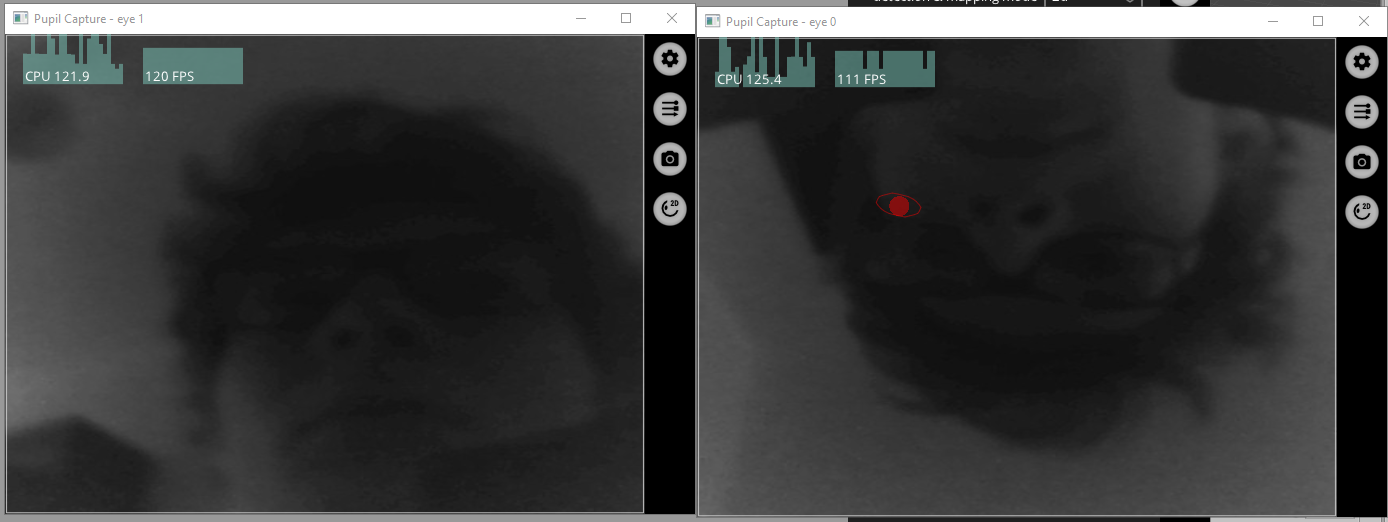
@user-e91538 this is by design. You can flip this from the General menu in the eye0 window if you want. But the inversion of this camera is compensated for during calibration process.
Oh, thanks 😃 So I shouldn`t change this?
You can leave it as it is, yes.
You can flip the image display in software if you want in the Eye0 window General menu - but it is not required
I understand, thank you very mych for quick answer
you're welcome 😄